








Chaikin Oscillator Indicator for Stock Trading
Article
A technical implementation guide of Chaikin Oscillator using LightningChart JS Trader for developing Fintech applications.
Ahmad Omid
Data Science Developer


Introduction to Chaikin Oscillator Indicator
The Chaikin Oscillator is a powerful technical analysis tool used in stock trading to identify trends and potential reversals by analyzing the relationship between price movement and volume.
It is specifically designed to calculate the Moving Average Convergence-Divergence (MACD) based on the Accumulation-Distribution (A/D) line rather than price alone. This unique approach helps traders assess buying and selling pressure, providing an insight into the market’s underlying strength or weakness.
Traders use the Chaikin Oscillator Indicator to spot potential entry and exit points by analyzing whether momentum is building or declining in a particular stock. By using the oscillator to confirm market trends and detect reversals, traders can make more informed trading decisions, helping them to capitalize on market movements before they become widely evident.
Chaikin Oscillator Indicator in Trading
In the stock market, the Chaikin Oscillator serves as a strategic tool for understanding price trends and gauging whether a security is experiencing accumulation (buying) or distribution (selling) pressure.
When the oscillator value moves upward, it often indicates strong accumulation, which may precede a rise in stock prices. Conversely, when the oscillator trends downward, it can signal distribution, potentially foreshadowing a decline in prices.
Because the Chaikin Oscillator Indicator is based on volume rather than just price, it provides insights beyond the price trend itself. It can highlight whether there is genuine market interest or weakening sentiment behind price movements. Therefore, traders find it especially useful for validating breakout or breakdown signals, as it can reveal whether these moves are supported by meaningful buying or selling volumes.
How Does the Chaikin Oscillator Indicator Work?
The Chaikin Oscillator works by analyzing the balance of accumulation (buying pressure) and distribution (selling pressure) within a specific timeframe. It achieves this by applying the Moving Average Convergence-Divergence (MACD) method to the Accumulation-Distribution (A/D) line rather than directly using price. This section will cover the formula in depth, the interpretation of its output, and the key components that drive its functionality.
Formula
The Chaikin Oscillator formula calculates the difference between the 3-day and 10-day Exponential Moving Averages (EMAs) of the Accumulation-Distribution (A/D) line. This approach highlights shifts in market sentiment by showing short-term accumulation versus longer-term trends. The formula is as follows:
Chaikin Oscillator = EMA(A/D,3) – EMA(A/D,10)
Step 1: Calculate the Accumulation-Distribution (A/D) Line
The A/D line measures the cumulative flow of money into or out of a stock over time. Unlike price-focused indicators, the A/D line focuses on volume combined with price movement, reflecting the degree of buying or selling pressure.
- Determine the Money Flow Multiplier (MFM) for each period:

- Calculate the Money Flow Volume (MFV) by multiplying the MFM with the volume for the period:
MFV = MFM x Volume
- Compute the A/D line by cumulative addition of the MFV: Start with an initial value (often zero) for the A/D line and add each period’s MFV to the previous A/D value:
A/D (Current) = A/D (Previous) + MFV
Step 2: Calculate the Exponential Moving Averages (EMA) of A/D Line
The 3-day EMA of the A/D line represents short-term accumulation and distribution trends. It is a faster-moving measure and responds quickly to recent data changes. While the 10-day EMA of the A/D line smooths out price movements over a longer period, capturing a broader trend in accumulation and distribution.
The Chaikin Oscillator takes the difference between these two EMAs. When the 3-day EMA is greater than the 10-day EMA, the oscillator value is positive, indicating accumulation. When the 3-day EMA is below the 10-day EMA, the value turns negative, indicating distribution.
To calculate the 3-day EMA and 10-day EMA of the A/D line, follow these steps for each respective EMA:
EMA = (Current A/D x K) + (Previous EMA x (1 – K))
where:
- Current A/D is the current A/D line value.
- K is the smoothing factor, calculated as:
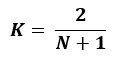
- N is the EMA period (for example, 3 for a 3-day EMA and 10 for a 10-day EMA).
Step-by-Step EMA Calculation:
- Calculate the Smoothing Factor (K) for each period. For the 3-day EMA:
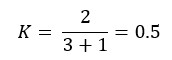
For the 10-day EMA:
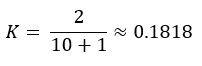
- Compute the Initial EMA:
- For the first EMA value, use a simple average of the A/D line values over the first N periods.
- For example, for the 3-day EMA, take the average of the first 3 A/D values. For the 10-day EMA, take the average of the first 10 A/D values.
- Calculate the EMA for each subsequent period using the formula above, applying the calculated smoothing factor and the previous EMA value.
Step 3: Calculate the Chaikin Oscillator Value
Once you have both the 3-day EMA and the 10-day EMA for each period:
Chaikin Oscillator = EMA3day – EMA10day
This difference between the two EMAs represents the Chaikin Oscillator value for that period, indicating shifts in accumulation and distribution in the market.
Interpretation & Key Components of the Chaikin Oscillator
Understanding how to interpret the Chaikin Oscillator is essential for effective trading. Here’s a deeper look at what its values and movements mean:
- Positive Oscillator Values:
- When the Chaikin Oscillator crosses above zero, it suggests that the 3-day EMA of the A/D line has risen above the 10-day EMA, indicating a shift toward buying pressure. This generally implies that the stock is in an accumulation phase, potentially pointing to bullish conditions.
- If the oscillator continues to move higher, it can signal strong accumulation, suggesting a possible upward trend.
- Negative Oscillator Values:
- When the oscillator dips below zero, the 3-day EMA is lower than the 10-day EMA, signaling an increase in selling pressure or distribution. This typically reflects a bearish sentiment.
- Persistent negative values or a downward-trending oscillator often suggest sustained distribution, potentially foreshadowing a downward price movement.
- Divergence as a Signal for Reversals:
- Bullish Divergence: Occurs when the stock’s price is falling, but the Chaikin Oscillator is rising. This indicates a potential reversal from a downtrend to an uptrend, as buying pressure (accumulation) increases despite declining prices.
- Bearish Divergence: Happens when the stock price rises, but the Chaikin Oscillator trends downward. This signals potential weakness in the uptrend and may indicate an impending reversal.
Key Components of the Chaikin Oscillator Indicator
The Chaikin Oscillator relies on several core elements to interpret market momentum and trading volume effectively:
- Accumulation-Distribution (A/D) Line:
- The A/D line is a cumulative measure that plays a foundational role in Chaikin Oscillator calculations. It incorporates both price position within the daily range and trading volume, providing a nuanced view of buying and selling pressures.
- Since the A/D line is sensitive to volume, it offers insights beyond price alone, helping traders confirm trends by assessing whether price changes are backed by significant volume.
- Exponential Moving Averages (EMAs):
- Using EMAs rather than simple moving averages gives the Chaikin Oscillator a sensitivity that is more responsive to recent price and volume data, enhancing its ability to detect changes in market sentiment.
- The difference between the shorter-term (3-day) and longer-term (10-day) EMAs of the A/D line is the crux of the Chaikin Oscillator. This differential allows the indicator to act as a momentum gauge, tracking whether buying or selling pressure is accelerating or decelerating.
- Money Flow Multiplier and Volume Weighted Price Analysis:
- The A/D line’s calculation involves a Money Flow Multiplier which measures the relative position of the close price within the trading range. This multiplier is then applied to the volume for the day, weighting it according to buying or selling sentiment.
- The volume-weighted price analysis component of the A/D line is particularly useful in confirming price movements. For instance, a price increase accompanied by high volume suggests stronger buying interest, whereas a decline with high volume reflects stronger selling interest.
Through these components, the Chaikin Oscillator provides a nuanced view of the market, capturing both price direction and volume to identify trends and potential reversals with greater precision. By analyzing the interplay between the short-term and long-term accumulation and distribution trends, the oscillator offers a robust way to monitor momentum shifts in trading.
How to Create the Technical Indicator Using LC JS Trader
Step 1: Get LightningChart JS Trader
To begin, you’ll need access to LightningChart JS Trader. This library provides the tools necessary to create advanced technical indicators, including the Chaikin Oscillator Indicator. Visit the LightningChart JS Trader page to download the required components and review the documentation.
Step 2: Review the Interactive Example
LightningChart JS Trader includes interactive examples that demonstrate how to create custom technical indicators. Start by reviewing the documentation, focusing on how to integrate the Chaikin Oscillator Indicator into your chart setup. The interactive examples will guide you through the process of setting up the Chaikin Oscillator Indicator, from importing the necessary modules to modify the chart settings.
Step 3: Code Explanation
In this step, we will break down the code that creates the chart with the Chaikin Oscillator Indicator, as shown in the image, using LightningChart JS Trader. The code demonstrates how to initialize a trading chart, apply the Chaikin Oscillator Indicator, and customize its appearance.

Here’s a detailed breakdown of each section:
A. Importing the Required Libraries:
   const lcjsTrader = require('@arction/lcjs-trader')
   const lcjs = require('@arction/lcjs')
const { Themes } = lcjs- lcjsTrader: This library provides access to the LightningChart JS Trader functionalities, allowing you to create advanced financial charts.
- lcjs: The main LightningChart JS library, used for general charting functionality.
- Themes: A property within lcjs that provides access to pre-built themes. In this case, we are using the darkGold theme to style the chart.
B. Initializing the Trading Chart:
   lcjsTrader.trader(TRADER_LICENSE).then(async (trader) => {
    // Create a trading chart.
const tradingChart = trader.tradingChart({ loadFromStorage: false, colorTheme: Themes.darkGold })trader(TRADER_LICENSE): Initializes the LightningChart JS Trader with the provided license key (TRADER_LICENSE). This is required to access the charting functionalities for financial data.
Note you can request a LightningChart JS Trader trial license, which is free.
tradingChart(): This function creates a trading chart with certain options.loadFromStorage: false: This disables the loading of previously stored chart data from local storage, ensuring a fresh chart setup.colorTheme: Themes.darkGold: This applies the darkGold theme to the chart, which influences the background color, gridlines, and other visual elements.
C. Adding and Customizing the Indicator
// Add a Chaikin Oscillator indicator
    const co = tradingChart.indicators().addChaikinOscillator()
    co.setPeriodCounts(3, 10)
    co.setLineColor('#FFB514')
co.setLineWidth(3)addChaikinOscillator(): Adds Chaikin Oscillator to the chart. Chaikin Oscillator calculates Moving Average Convergence-Divergence (MACD) based on Accumulation-Distribution (A/D) line. It is used to detect trends and reversals.
co.setPeriodCounts(3, 10): The number of fast and slow time periods used to calculate the indicator. The fast period count used to calculate the indicator is 3; while the slow period count used in the chart is 10.
co.setLineColor('#FFB514): Changes the Chaikin Oscillator line’s color to a shade of orange. This distinct color improves visibility on the chart.
co.setLineWidth(3): Sets the thickness of the Chaikin Oscillator line to 3 pixels. This thicker line enhances the visual prominence of the Chaikin Oscillator on the chart.
D. Loading Data from a CSV File
    // Reading data from a file.
    await fetch(`${document.head.baseURI}examples/assets/0000/Alphabet Inc (GOOGL).csv`).then((res) => res.text()).then((text) => {
        tradingChart.readCsvString(text, 'Alphabet Inc (GOOGL)')
})fetch(): This function retrieves a CSV file containing historical data for Alphabet Inc. (GOOGL). The CSV file includes pricing information for the company’s stock, which is plotted on the chart.readCsvString(): This function reads the CSV data and interprets it as pricing data for Alphabet Inc. The second argument (‘Alphabet Inc (GOOGL)’) sets the label for the chart, as seen at the top of the chart image.
E. Setting the Currency for the Chart
    tradingChart.setCurrency('USD')
})setCurrency('USD'): This sets the currency of the chart to USD, ensuring that the pricing data is interpreted and displayed in US dollars.
Advantages and Limitations of the Indicator
Advantages
One of the main advantages of the Chaikin Oscillator is its unique approach to combining price with volume data. Most technical indicators rely solely on price movement, but the Chaikin Oscillator incorporates volume to give a more nuanced view of market sentiment.
This focus on volume allows traders to gauge whether a trend is backed by genuine buying or selling interest, making it especially useful for confirming the strength of price movements. For example, if a stock’s price is rising on low volume, it may be a weaker trend compared to one supported by high volume. The Chaikin Oscillator captures these differences, helping traders make more informed decisions.
Another strength of the Chaikin Oscillator is its ability to detect potential trend reversals. By identifying divergences—when price and oscillator values move in opposite directions—traders can spot early signals of a possible shift in the market.
If the price of a stock is falling, but the oscillator starts moving upward, it may suggest that selling pressure is fading and a reversal could be imminent. This ability to signal potential turning points is valuable for traders looking to enter or exit trades at the right moment.
The Chaikin Oscillator is also flexible across different timeframes, which makes it suitable for a wide range of traders. Short-term traders might use it to assess quick changes in momentum, while long-term investors might track it over days or weeks to validate broader trends. This adaptability makes it a versatile tool that can support various trading strategies, whether you’re day trading or holding positions longer.
Limitations
Despite its strengths, the Chaikin Oscillator also has some limitations that traders should be aware of. Like many technical indicators, it’s a lagging indicator, meaning that it relies on historical data and may react to market changes with a delay.
This delay can sometimes cause traders to miss optimal entry or exit points, especially in fast-moving markets. For instance, by the time the oscillator signals a reversal, the price may have already started moving in that direction, making it harder to capitalize on the shift.
The Chaikin Oscillator can also be prone to false signals, especially in highly volatile markets. When prices fluctuate rapidly, the oscillator may give mixed or unreliable readings, making it harder to interpret.
This can lead traders to act on signals that don’t result in significant price movement, which may cause frustration or losses. Therefore, traders often combine the Chaikin Oscillator with other indicators to reduce the chance of false signals and gain a more comprehensive view of market trends.
Lastly, the indicator may be less effective in low-volume environments. Since the Chaikin Oscillator relies on volume as a core component, it may struggle to provide accurate readings in cases where there isn’t enough trading activity to generate meaningful volume data. In such situations, the oscillator may misinterpret low trading volume as a sign of weakness, even if the price is moving in a particular direction due to other factors.
Conclusion
The Chaikin Oscillator Indicator is a highly effective tool for traders who want to go beyond simple price movements by analyzing the volume-based trends in a stock. By incorporating the Accumulation-Distribution line and applying a MACD-style approach, the Chaikin Oscillator helps traders identify accumulation or distribution patterns that can signal potential trend reversals or confirm existing trends.
Its ability to provide insights based on both price and volume makes it a robust addition to a trader’s toolkit, enhancing their ability to make informed entry and exit decisions.
Using LightningChart JS Trader is especially valuable when working with the Chaikin Oscillator or any other advanced technical indicators. The LightningChart JS Trader offers high-speed charting and interactive examples, allowing traders to visualize complex data in real-time.
With its precision and responsiveness, LightningChart JS Trader makes it easy to observe subtle changes in the Chaikin Oscillator and other indicators, which can be critical for timely decision-making. Whether you’re analyzing price trends or monitoring accumulation-distribution patterns, LightningChart JS Trader ensures that traders can leverage the Chaikin Oscillator and other tools to their fullest potential.
Continue learning with LightningChart
Andrews’ Pitchfork in Technical Analysis
Andrews' Pitchfork is one of the most respected technical analysis tools used by traders to identify potential support and resistance levels, trend direction, and future price paths. Developed by Dr. Alan H. Andrews, the indicator is based on the principle that prices...

React Charting Performance
Here's a scenario that plays out across development teams every few months. Someone builds a React dashboard, picks Recharts or Victory because they're popular, the devs love them, and the first demo looks great. Then the dataset gets bigger. Or the data starts...

Javascript Charting Library comparison 2026
Every year someone publishes a listicle of JavaScript charting libraries. They screenshot a demo, note the GitHub stars, paste in the npm install command, and call it a day. Then you follow their recommendation, get six months into your project, and discover that your...



If you have any questions, feel free to contact us!



©LightningChart Ltd 2026. All rights reserved.