








Chaikin Money Flow Indicator for Stock Trading
Article
A technical implementation guide of Chaikin Money Flow indicator using LightningChart JS Trader for developing Fintech applications.
Ahmad Omid
Data Science Developer


Introduction to Chaikin Money Flow Indicator
The Chaikin Money Flow Indicator (CMF) is a volume-weighted metric based on the Accumulation-Distribution (A/D) line, developed by Marc Chaikin to gauge buying and selling pressure in a stock. This technical indicator assesses whether a stock is experiencing accumulation (buying interest) or distribution (selling pressure) over a specified period.
By calculating a volume-weighted average of the A/D line, the CMF offers insights into the balance between buying and selling forces, providing traders with a deeper understanding of the stock’s underlying trend strength.
The CMF is commonly used to confirm trends, detect potential reversals, and assess the strength of price movements. When combined with other indicators, it becomes a valuable tool for traders seeking to make informed decisions based on the volume-driven flow of money in and out of securities.
Chaikin Money Flow Indicator in Trading
The Chaikin Money Flow Indicator affects stock trading by highlighting the relationship between trading volume and price action. Here’s how it influences stock price interpretations:
- Trend Confirmation: The CMF helps confirm trends by displaying either positive or negative values. When the CMF is above zero, it suggests buying pressure and potentially signals a bullish trend. Conversely, CMF values below zero indicate selling pressure and may suggest a bearish outlook.
- Divergence and Reversal Signals: Traders often use Chaikin Money Flow divergence indicators to identify possible reversals. For instance, if the price reaches a new high but the CMF does not follow, it indicates weakening buying pressure. This divergence suggests that the trend could reverse, allowing traders to prepare for possible shifts in price direction.
- Identifying Accumulation and Distribution: By observing whether the CMF is positive or negative over a set period, traders can assess whether a stock is in a phase of accumulation or distribution. Positive CMF values indicate that demand is driving the stock price, while negative values suggest supply is pushing it downward.
Formula
The Chaikin Money Flow Indicator calculation involves three key steps, using the A/D line as a foundation to create a volume-weighted average that reflects market sentiment:
Step 1: Calculate the Money Flow Multiplier (MFM)
The MFM assesses where the stock price closes in relation to its daily high and low. The formula is as follows:

- A positive MFM value indicates that the price closed in the upper range, suggesting buying pressure.
- A negative MFM value suggests selling pressure, as the price closes in the lower part of its range.
Step 2: Calculate the Money Flow Volume (MFV)
The MFV multiplies the MFM by the daily trading volume to weigh price action against volume:
Money Flow Volume = Money Flow Multiplier x Volume
This calculation shows whether the money flow on a given day leans towards accumulation (positive MFV) or distribution (negative MFV).
Step 3: Aggregate and Calculate the Chaikin Money Flow (CMF)
The CMF calculation sums the MFV over a specific period (commonly 21 days) and divides it by the total volume over the same period:
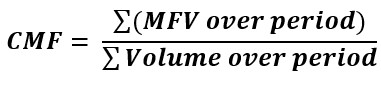
This process results in a volume-weighted average that reflects whether buying or selling pressure dominates over the period analyzed.
General Interpretations:
The CMF oscillates between positive and negative values:
- Above Zero: Positive CMF values suggest buying pressure, implying that accumulation is occurring and that the stock price might continue to rise.
- Below Zero: Negative CMF values indicate selling pressure, suggesting that distribution is in play and that the stock price might decline.
Key Components
- Money Flow Multiplier (MFM): This multiplier determines the stock’s relative position within its range, providing a measure of daily accumulation or distribution.
- Money Flow Volume (MFV): By multiplying the MFM with volume, the MFV quantifies the magnitude of accumulation or distribution.
- Volume: Volume is essential in this calculation, as it amplifies the impact of price movements and provides a clearer sense of market sentiment.
How to Create the Technical Indicator Using LC JS Trader
Step 1: Get LightningChart JS Trader
To begin, you’ll need access to LightningChart JS Trader. This library provides the tools necessary to create advanced technical indicators, including the Chaikin Money Flow Indicator. Visit the LightningChart JS Trader page to download the required components and review the documentation.
Step 2: Review the Interactive Example
LightningChart JS Trader includes interactive examples that demonstrate how to create custom technical indicators. Start by reviewing the documentation, focusing on how to integrate the Chaikin Money Flow Indicator into your chart setup. The interactive examples will guide you through the process of setting up the CMF Indicator, from importing the necessary modules to modify the chart settings.
Step 3: Code Explanation
In this step, we will break down the code that creates the chart with the Chaikin Money Flow Indicator, as shown in the image, using LightningChart JS Trader. The code demonstrates how to initialize a trading chart, apply the CMF Indicator, and customize its appearance.

Here’s a detailed breakdown of each section:
A. Importing the Required Libraries:
   const lcjsTrader = require('@arction/lcjs-trader')
   const lcjs = require('@arction/lcjs')
const { Themes } = lcjs- lcjsTrader: This library provides access to the LightningChart JS Trader functionalities, allowing you to create advanced financial charts.
- lcjs: The main LightningChart JS library, used for general charting functionality.
- Themes: A property within lcjs that provides access to pre-built themes. In this case, we are using the darkGold theme to style the chart.
B. Initializing the Trading Chart:
   lcjsTrader.trader(TRADER_LICENSE).then(async (trader) => {
    // Create a trading chart.
const tradingChart = trader.tradingChart({ loadFromStorage: false, colorTheme: Themes.darkGold })trader(TRADER_LICENSE): Initializes the LightningChart JS Trader with the provided license key (TRADER_LICENSE). This is required to access the charting functionalities for financial data.
Note you can request a LightningChart JS Trader trial license, which is free.
tradingChart(): This function creates a trading chart with certain options.loadFromStorage: false: This disables the loading of previously stored chart data from local storage, ensuring a fresh chart setup.colorTheme: Themes.darkGold: This applies the darkGold theme to the chart, which influences the background color, gridlines, and other visual elements.
C. Adding and Customizing the Indicator
// Add a Chaikin Money Flow indicator
    const cmf = tradingChart.indicators().addChaikinMoneyFlow()
    cmf.setPeriodCount(21)
    cmf.setLineColor('#FF4F14')
cmf.setLineWidth(3)addChaikinMoneyFlow(): It calculates a Volume-weighted average based on Accumulation-Distribution (A/D) line.cmf.setPeriodCount(21): The number of time periods used to calculate the indicator.cmf.setLineColor('#FF4F14): Changes the CMF line’s color to an orange. This distinct color improves visibility on the chart.cmf.setLineWidth(3): Sets the thickness of the CMF line to 3 pixels. This thicker line enhances the visual prominence of the CMF on the chart.
D. Loading Data from a CSV File
    // Reading data from a file.
    await fetch(`${document.head.baseURI}examples/assets/0000/Alphabet Inc (GOOGL).csv`).then((res) => res.text()).then((text) => {
        tradingChart.readCsvString(text, 'Alphabet Inc (GOOGL)')
})fetch(): This function retrieves a CSV file containing historical data for Alphabet Inc. (GOOGL). The CSV file includes pricing information for the company’s stock, which is plotted on the chart.readCsvString(): This function reads the CSV data and interprets it as pricing data for Alphabet Inc. The second argument (‘Alphabet Inc (GOOGL)’) sets the label for the chart, as seen at the top of the chart image.
E. Setting the Currency for the Chart
    tradingChart.setCurrency('USD')
})setCurrency('USD'): This sets the currency of the chart to USD, ensuring that the pricing data is interpreted and displayed in US dollars.
Advantages and Limitations of the Indicator
The Chaikin Money Flow Indicator offers several benefits that make it a useful tool for many traders. One of its main advantages is its ability to confirm trends. When the indicator is positive, it suggests strong buying pressure, which can be a good sign of a bullish trend.
If it’s negative, it typically means that sellers are in control, pointing to a bearish trend. This ability to align with market sentiment is especially helpful for traders who want additional confidence in their trading decisions.
Another powerful feature of the Chaikin Money Flow Indicator is its ability to reveal divergences between price movement and money flow. When there’s a mismatch—like when the stock price is reaching new highs, but the indicator doesn’t show a corresponding increase—it can signal that a trend may be losing strength.
This kind of insight can help traders anticipate potential trend reversals before they happen, allowing them to adjust their positions proactively.
The CMF also adds a unique layer by incorporating volume data, which many other indicators overlook. By factoring in volume, the CMF doesn’t just follow price; it measures the strength behind price movements.
This makes it more insightful, as it captures whether trading activity is genuinely supporting the price direction, offering a clearer picture of market sentiment.
However, the Chaikin Money Flow Indicator does have some limitations that traders should keep in mind. One drawback is its tendency to produce unreliable signals in stocks with low trading volumes.
Since the indicator relies heavily on volume data, it may not be as effective when volume is sparse, which can distort readings and potentially mislead traders.
Another limitation is that the CMF can be a lagging indicator, meaning it might not always respond quickly to sudden market changes. In fast-moving or volatile markets, this delay can affect its usefulness, as traders may miss out on timely entry or exit points.
Additionally, in highly volatile markets, the CMF can sometimes produce rapid, conflicting signals known as “whipsaws.” These frequent, abrupt changes in the indicator’s direction can lead to confusion, particularly if the CMF is used alone without support from other indicators.
In short, while the Chaikin Money Flow Indicator can be a valuable tool for confirming trends and detecting possible reversals, it’s most effective when paired with other indicators. Being aware of both its strengths and limitations helps traders apply it thoughtfully within a broader trading strategy.
Conclusion
The Chaikin Money Flow Indicator is a valuable tool for traders who want a deeper look into the dynamics of buying and selling pressure in stocks. By calculating a volume-weighted average based on the Accumulation-Distribution (A/D) line, the CMF offers insights beyond simple price movements, highlighting when buying or selling pressure might lead to trend continuation or reversal.
This makes it a great addition to any trader’s toolkit, especially when confirming trends or identifying potential shifts in stock direction. In addition, using LightningChart JS Trader enhances the experience of analyzing the CMF and other indicators.
LightningChart JS Trader provides a smooth, high-performance visualization experience, allowing traders to interactively explore the nuances of volume and price relationships. Its robust charting capabilities make it easier to apply technical analysis, supporting clearer insights and faster decision-making in trading.
Key Takeaways:
- The Chaikin Money Flow Indicator helps traders assess whether buying or selling pressure dominates by looking at volume and price.
- By confirming trends and identifying divergences, it supports timely trading decisions.
- While useful, the CMF is best combined with other indicators and analysis techniques for a well-rounded strategy.
- With LightningChart JS Trader, visualizing the CMF and other indicators becomes more intuitive, empowering traders to make informed choices based on comprehensive data.
Continue learning with LightningChart
Andrews’ Pitchfork in Technical Analysis
Andrews' Pitchfork is one of the most respected technical analysis tools used by traders to identify potential support and resistance levels, trend direction, and future price paths. Developed by Dr. Alan H. Andrews, the indicator is based on the principle that prices...
React Charting Performance
Here's a scenario that plays out across development teams every few months. Someone builds a React dashboard, picks Recharts or Victory because they're popular, the devs love them, and the first demo looks great. Then the dataset gets bigger. Or the data starts...

Javascript Charting Library comparison 2026
Every year someone publishes a listicle of JavaScript charting libraries. They screenshot a demo, note the GitHub stars, paste in the npm install command, and call it a day. Then you follow their recommendation, get six months into your project, and discover that your...



If you have any questions, feel free to contact us!



©LightningChart Ltd 2026. All rights reserved.