








Average True Range Indicator for Building Trading Applications with LightningChart JS Trader
Article
Assisted by AI
Learn how to integrate the average true range indicator in your financial and trading applications using LightningChart JS Trader.
Ahmad Omid
Data Science Developer

Introduction
The Average True Range (ATR) is a core tool in the arsenal of traders who need to quantify market volatility. Originally introduced by J. Welles Wilder Jr. in his 1978 book New Concepts in Technical Trading Systems, the ATR was designed to capture the level of price volatility, regardless of direction. It’s not a trend-following indicator; instead, it’s a volatility gauge, perfect for understanding when a market is heating up or calming down.
What sets the Average True Range apart from many other indicators is its flexibility. It doesn’t try to predict price direction but instead tells traders how much price typically moves. This makes it invaluable for setting stop-loss levels, identifying breakout points, and refining position sizing.
LightningChart JS Trader offers direct support for Average True Range (ATR), not just as a chart overlay, but as a trigger mechanism for chart types like Renko, Kagi, and Point-and-Figure. These charts don’t move forward with time, they only generate a new box, line, or figure when price moves by a certain amount.
ATR plays a crucial role here: the current ATR value can dynamically define that threshold. If price moves more than the latest ATR value, a new element is drawn. This integration makes ATR more than just a visualization tool, it becomes the engine driving how and when these charts update.
The LC JS Trader demonstrates this behavior out of the box, giving developers a hands-on, visual way to learn, tweak, and apply ATR in advanced use cases.
Key features of the Average True Range:
- Measures volatility, not price direction.
- Works on any time frame, daily, hourly, or minute charts.
- Can be integrated with various chart types, including Renko, Kagi, and Point-and-Figure.
- Included as a built-in feature in LightningChart JS Trader, making technical implementation straightforward.
Formula
The Average True Range is based on the concept of the True Range (TR). The True Range is defined as the greatest of the following:
- Current high – current low
- Absolute value of current high – previous close
- Absolute value of current low – previous close
Once the True Range is established, the Average True Range is simply the n-period exponential moving average (EMA) or simple moving average (SMA) of those values.

Where:
- n is the number of periods (commonly 14)
- TR is the True Range for the current period
Interpretation:
A rising Average True Range (ATR) signals increasing volatility, while a falling ATR points to a quieter market. However, a high ATR doesn’t indicate bullish or bearish sentiment, it simply reflects stronger price movement, regardless of direction.
In general, ATR rises when recent price bars show wider ranges (i.e., larger price swings per period), and it falls when those ranges narrow. But how much is “rising” or “falling”? It’s relative to the asset and its historical volatility. For example:
- If a stock’s ATR typically ranges between 1.0 and 1.5, and it suddenly spikes to 2.2, that’s a clear sign of increased volatility.
- Conversely, if ATR slowly drops from 1.4 to 0.9 over several sessions, it may signal a consolidating market.
Here’s how traders use this in practice:
- Trend trading: A rising ATR (e.g., from 1.2 → 1.8) may confirm a breakout is supported by strong volatility, increasing confidence in the trend’s momentum.
- Range trading: A falling ATR (e.g., from 1.5 → 0.7) suggests tighter price movement, often seen in sideways or range-bound markets.
Bottom line: ATR doesn’t predict direction, but it tells you how intense the market is moving. That alone can shape better entries, exits, and stop-loss placement.
Calculation Example
Let’s take a simplified 5-day example with the following True Ranges:
- Day 1: 1.2
- Day 2: 1.5
- Day 3: 1.3
- Day 4: 1.4
- Day 5: 1.6
Using a 5-day simple average:

This value (1.4) indicates the average range (in price units) the asset moved over the last 5 periods.
How to Create the Technical Indicator Using LC JS Trader
Step 1: Get LightningChart JS Trader
To begin, you’ll need access to LightningChart JS Trader. . This specialized library contains all the necessary components for developing advanced technical indicators, including the Average True Range (ATR) indicator. Visit the LightningChart JS Trader page to download the required components and review the documentation.
Step 2: Review the Interactive Example
LightningChart JS Trader includes interactive examples that demonstrate how to create custom technical indicators. These examples do more than just explain; they show you what works in practice. Start with the documentation, focusing on how to add the ATR indicator to your chart. The interactive examples take you through each step of the process, from importing the right modules to adjusting your chart settings for the best display.
Step 3: Code Explanation
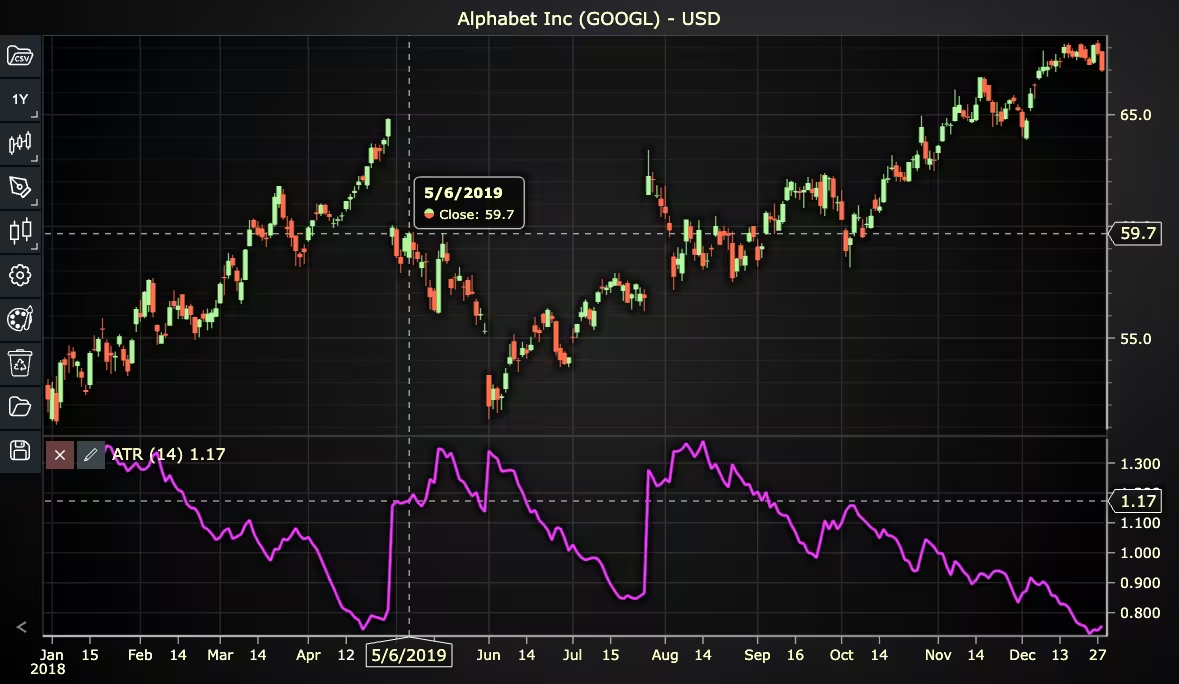
In this step, we’ll examine the code that creates the chart with the ATR indicator, as shown in the image, using LightningChart JS Trader. The code reveals how to properly initialize a trading chart, apply the indicator, and customize its visual properties to enhance your technical analysis. Understanding these code components helps you see how the different parts work together to produce an effective analysis tool. This knowledge allows you to adapt the implementation for your specific trading requirements.
Here’s a detailed breakdown of each section:
A. Importing the Required Libraries:
const lcjsTrader = require('@lightningchart/lcjs-trader')
const lcjs = require('@lightningchart/lcjs')- lcjsTrader: This library provides access to the LightningChart JS Trader functionalities, allowing you to create advanced financial charts.
- lcjs: The main LightningChart JS library, used for general charting functionality.
B. Initializing the Trading Chart:
   lcjsTrader.trader(TRADER_LICENSE).then(async (trader) => {
     // Create a trading chart. Optionally, various chart settings can be provided.
const tradingChart = trader.tradingChart({ loadFromStorage: false })trader(TRADER_LICENSE): Initializes the LightningChart JS Trader with the provided license key (TRADER_LICENSE). This is required to access the charting functionalities for financial data.
Note you can request a LightningChart JS Trader trial license, which is free.
tradingChart(): This function creates a trading chart with certain options.loadFromStorage: false: This disables the loading of previously stored chart data from local storage, ensuring a fresh chart setup.
C. Adding and Customizing the Indicator
   // Add an Average True Range indicator
    const atr = tradingChart.indicators().addAverageTrueRange()
    atr.setPeriodCount(14)
    atr.setLineColor('#EF14FF')
atr.setLineWidth(3)addAverageTrueRange(): ATR measures market volatility by calculating the average of true ranges over a given time range (period count).
setPeriodCount(14): Sets the number of time periods (n) used to calculate the indicator.
setLineColor('#EF14FF'): Sets the color of the VHF line to pink.
atr.setLineWidth(3): Sets the lines width of the indicator to 3 pixels.
D. Loading Data from a CSV File
    // Reading data from a file.
    await fetch(`${document.head.baseURI}examples/assets/0000/Alphabet Inc (GOOGL).csv`).then((res) => res.text()).then((text) => {
        tradingChart.readCsvString(text, 'Alphabet Inc (GOOGL)')
})fetch(): This function retrieves a CSV file containing historical data for Alphabet Inc. (GOOGL). The CSV file includes pricing information for the company’s stock, which is plotted on the chart.readCsvString(): This function reads the CSV data and interprets it as pricing data for Alphabet Inc. The second argument (‘Alphabet Inc (GOOGL)’) sets the label for the chart, as seen at the top of the chart image.
E. Setting the Currency for the Chart
    tradingChart.setCurrency('USD')
})setCurrency('USD'): This sets the currency of the chart to USD, ensuring that the pricing data is interpreted and displayed in US dollars.
Advantages and Limitations of the Indicator
The Average True Range (ATR) stands out for its ability to measure market volatility without being influenced by price direction. One of its main advantages is versatility, it works across all timeframes and market types, making it useful for day traders, swing traders, and long-term investors alike. ATR is particularly valuable for setting dynamic stop-loss levels that adjust to current market conditions, helping traders avoid premature exits during volatile periods.
It also integrates seamlessly with non-time-based chart types like Renko, Kagi, and Point-and-Figure, where ATR can define the threshold for drawing new boxes or lines based on price movement rather than time. This feature is directly supported in LightningChart JS Trader, allowing for smart, adaptive chart behavior.
However, ATR isn’t without limitations. Since it’s based on moving averages, it lags behind price action and can’t provide predictive signals about trend direction. Additionally, in markets with low volume or erratic price jumps, ATR may produce misleading spikes that don’t reflect true market behavior. Despite these limitations, ATR remains a powerful tool for interpreting volatility and adjusting strategy accordingly.
Conclusion
The Average True Range is a standout among volatility indicators, not because it predicts market direction, but because it enhances situational awareness. Traders use it to size positions, place stops, and filter out false breakouts. It becomes especially powerful when paired with non-time-based charts like Renko or Kagi, where it determines when new price structures are drawn.
Thanks to environments like LightningChart JS Trader, implementing the Average True Range formula becomes less about coding complexity and more about strategic application. If you’re working with dynamic markets or specialized chart types, average true indicator is not optional; it’s essential.
Continue learning with LightningChart
Ionic Capacitor
Learn how to use Ionic Capacitor for data visualization and build a mobile charting application with Angular & LightningChart JS
Create a JavaScript Pie Chart with NodeJS, TypeScript & LightningChart
Written by a human | Updated on April 10th, 2025JavaScript Pie Chart with NodeJS & TypeScript Today, we are going to do a short tutorial on how to generate a pie chart using Node JS, TypeScript, and LigningCharts JS. To see how to get LightningChart JS for...
Real-time data visualization with WebSockets
Written by a human | Updated on April 10th, 2025WebSockets Data Visualization in Real-Time These days it is ever increasingly common that people require web solutions for their applications and services. Data visualization is not an exception to this, as...



If you have any questions, feel free to contact us!



©LightningChart Ltd 2026. All rights reserved.