





Average Directional Index for Fintech App Development with LightningChart JS Trader
Article
Assisted by AI
Learn how the Average Directional Index measures trend strength, confirms signals, and improves trading strategies with ADX and DI indicators.
Ahmad Omid
Data Science Developer

Introduction
The Average Directional Index (ADX) is a widely used technical analysis indicator designed to measure the strength of a market trend, regardless of its direction. Available on nearly every trading platform, ADX helps traders determine whether a market is trending strongly or moving sideways. This distinction is critical for identifying high-probability trading opportunities and avoiding low-momentum conditions.
Developed by J. Welles Wilder, who also created the Relative Strength Index (RSI), the Average Directional Index is accompanied by two complementary indicators: the +DI (Positive Directional Indicator), which measures upward movement, and the -DI (Negative Directional Indicator), which tracks downward pressure. Together, these components provide a comprehensive view of market momentum and trend dynamics.
For developers building trading applications, the Average Directional Index is particularly valuable for enabling users to identify strong trends, confirm signals from other indicators, and filter out choppy market environments. In LightningChart JS Trader, the ADX and its companion DI lines can be implemented efficiently through interactive examples and straightforward functions such as showDiLines().
Why ADX Matters in Financial Markets
What makes the ADX special is that it doesn’t try to tell you if prices are going up or down; it focuses only on how strongly they are moving. This makes it incredibly useful for building trading algorithms, automating decision rules, or creating risk models. Many experienced traders know that the strongest trends often deliver the best profits, and the ADX helps identify exactly those periods.
Market Timing with ADX
If you’re creating an app to help users time their entries and exits, adding the ADX gives them a real edge. It helps filter out those frustrating sideways markets where other indicators constantly trigger false signals. When you see the ADX line climbing, it tells you the trend (whatever direction it’s in) is gaining strength; that’s often the perfect time to join the move or hold onto existing positions.
Formula
The Average Directional Index is calculated using the following steps:
1. Calculating the True Range (TR):

2. Determining +DM and -DM (positive and negative directional movements):

3. Applying Wilder’s Smoothing to the TR, +DM, and -DM values over a chosen period

Then:

4. Computing +DI:

5. Computing -DI:

6. Calculating the Directional Movement Index:

7. Smoothing the DX values over the same period to get the ADX:

Then:

This whole calculation gives you the ADX line that shows you how powerful a trend is (no matter which way it’s going), while the +DI and -DI lines help you figure out which direction the market is actually moving. Environments like LightningChart JS Trader do all these complex calculations behind the scenes in their ADX indicator, and they make it easy to show or hide those direction lines with their showDiLines() feature.
How to Interpret ADX Values
- Rising ADX: This tells you the trend is getting stronger. If you’re using strategies that follow trends, this is exactly what you want to see before jumping in.
- Falling ADX: The trend is running out of steam. Many experienced traders take this as a signal to lock in some profits or reduce their position size.
- Below 20: The market’s probably just chopping around without much direction. This is when trend-following strategies tend to lose money – it might be better to sit on the sidelines or use range-trading approaches.
- Between 20 and 40: Now we’re talking, the trend has real momentum behind it. Most traders I know consider 25 to 30 as their personal threshold for confirming a legitimate trend worth trading.
- Above 40: You’ve got a seriously strong trend on your hands. These don’t come along every day, but when they do, momentum strategies really shine. These are the trends that can deliver those account-changing moves if you stay with them.
Calculation Example:
The following example demonstrates how to calculate the Average Directional Index (ADX) step by step using Wilder’s smoothing method. To keep the process clear and easy to follow, the calculation is illustrated with a simplified dataset. Although the standard setting for ADX is 14 periods—which is widely used by traders—this example focuses on a few key periods to clearly explain the methodology.
At first glance, the ADX calculation can appear complex due to its multiple components and sequential steps. However, when broken down and applied to actual numerical values, the process becomes much more straightforward. The mathematics involved is not inherently difficult; rather, it consists of a structured sequence of calculations that build upon one another. While most modern trading platforms perform these computations automatically, understanding the underlying mechanics provides deeper insight into how the indicator measures trend strength and market momentum.
Sample Price Data (first 3 periods):
| Period | High | Low | Close |
|---|---|---|---|
| Day 1 | 48 | 46 | 47 |
| Day 2 | 49 | 45 | 48 |
| Day 3 | 51 | 44 | 46 |
We’ll compute the values from Day 2 onward, since Day 1 has no “previous” period.
Step 1: True Range (TR):
For Day 2:
TR = max (4, 2, 2) = 4 |
For Day 3:
TR = max (7, 3, 4) = 7 |
Step 2: +DM and -DM:
Day 2:
So: +DM = 1, -DM = 0 |
Day 3:
So: +DM = 2, -DM = 0 |
Step 3: Wilder’s Smoothing (Start at Day 15):
Assuming we’ve collected 14 days of TR, +DM, -DM, and the smoothed values at Day 15 are:
- Smoothed TR = 80
- Smoothed +DM = 40
- Smoothed -DM = 20
Step 4: Computing +DI:

Step 5: Computing -DI:

Step 6: Calculating the Directional Movement Index:

Step 7: ADX (Smoothed DX):
Assuming we have 14 DX values: First ADX = average of the first 14 DX values.

Final Interpretation:
• +DI (50) is higher than -DI (25) → This tells us we’re in an uptrend.
• ADX ≈ 30.95 → We’ve got a moderately strong trend happening.
This breakdown shows how the Average Directional Index works together with the +DI/-DI lines to give you the complete picture – both how powerful the trend is and which way it’s moving. That combination is exactly what makes it so valuable when building trading tools that actually help people make better decisions.
I’ve found that understanding both pieces of information together gives traders a much clearer signal than just looking at price alone. While price might be making higher highs, the ADX tells you if there’s real momentum behind those moves or if they’re likely to fizzle out.
How to Create the Technical Indicator Using LC JS Trader
Step 1: Get LightningChart JS Trader
To begin, you’ll need access to LightningChart JS Trader. This specialized library contains all the necessary components for developing advanced technical indicators, including the Average Directional Index Indicator. Visit the LightningChart JS Trader page to download the required components and review the documentation.
Step 2: Review the Interactive Example
LightningChart JS Trader includes interactive examples that demonstrate how to create custom technical indicators. These examples do more than just explain; they show you what works in practice.
Start with the documentation, focusing on how to add the ADX Indicator to your chart. The interactive examples take you through each step of the process, from importing the right modules to adjusting your chart settings for the best display.
Step 3: Code Explanation
In this step, we’ll examine the code that creates the chart with the ADX Indicator, as shown in the image, using LightningChart JS Trader. The code reveals how to properly initialize a trading chart, apply the indicator, and customize its visual properties to enhance your technical analysis. Understanding these code components helps you see how the different parts work together to produce an effective analysis tool. This knowledge allows you to adapt the implementation for your specific trading requirements.
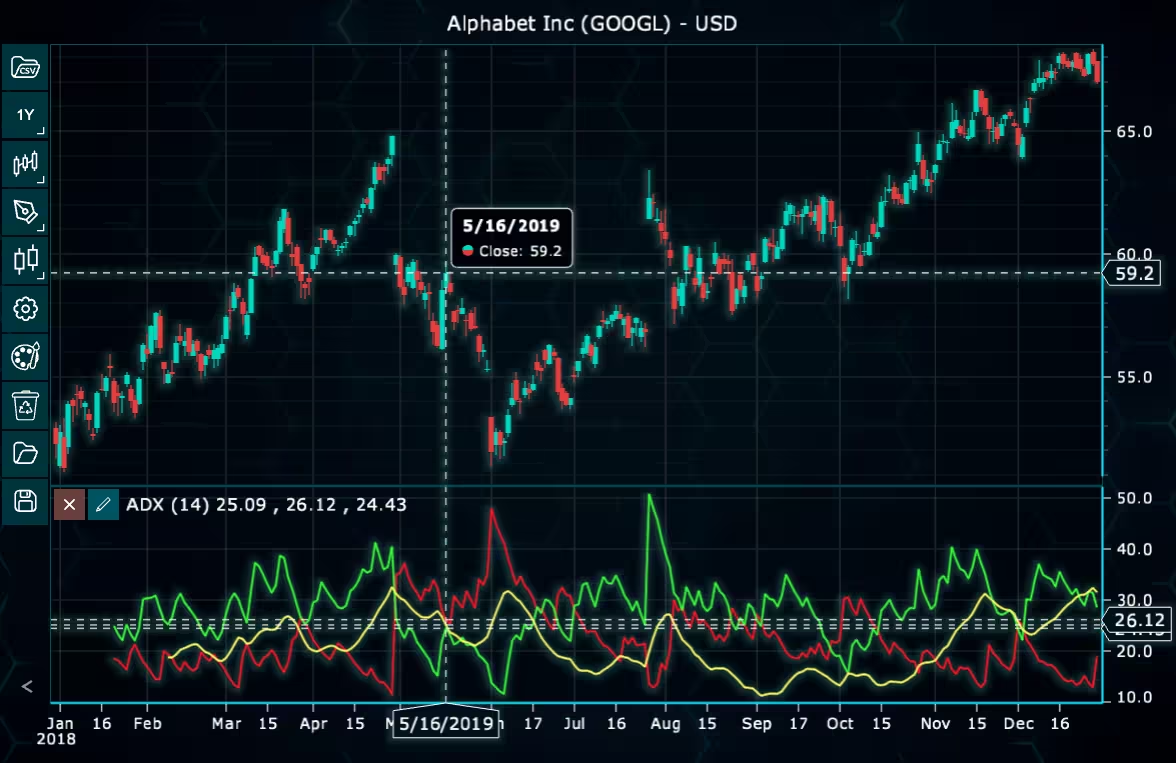
Here’s a detailed breakdown of each section:
A. Importing the Required Libraries:
const lcjsTrader = require('@lightningchart/lcjs-trader')
const lcjs = require('@lightningchart/lcjs')
const { Themes } = lcjs- lcjsTrader: This library provides access to the LightningChart JS Trader functionalities, allowing you to create advanced financial charts.
- lcjs: The main LightningChart JS library, used for general charting functionality.
- Themes: A property within LCJS that provides access to pre-built themes. In this case, we are using the darkGold theme to style the chart.
B. Initializing the Trading Chart:
lcjsTrader.trader(TRADER_LICENSE).then(async (trader) => {
  // Create a trading chart.
  const tradingChart = trader.tradingChart({ loadFromStorage: false, colorTheme: Themes.darkGold })
trader(TRADER_LICENSE): Initializes the LightningChart JS Trader with the provided license key (TRADER_LICENSE). This is required to access the charting functionalities for financial data.
Note you can request a LightningChart JS Trader trial license, which is free.
tradingChart(): This function creates a trading chart with certain options.loadFromStorage: false: This disables the loading of previously stored chart data from local storage, ensuring a fresh chart setup.colorTheme:Themes.darkGoldThis applies the darkGold theme to the chart, which influences the background color, gridlines, and other visual elements.
C. Adding and Customizing the Indicator
// Add an Average Directional Index Indicator
const adx = tradingChart.indicators().addAverageDirectionalIndex()
adx.setPeriodCount(14)
adx.showDiLines(true)
adx.setLineColor('#FCFF66')
adx.setLineWidth(2)
addAverageDirectionalIndex(): ADX measures the overall strength of a trend by calculating the average of expanding price range values. Directional Movement Indicators (-DI and +DI) can be shown together with the ADX line.adx.setPeriodCount(14): Sets the number of time periods (n) used to calculate the indicator.adx.showDiLines(true): Control whether -DI and +DI lines should be displayed.adx.setLineColor('#FCFF66'): Sets the line color of the ADX line to yellow.adx.setLineWidth(2): Sets the line width of the indicator to 2 pixels.
D. Loading Data from a CSV File
    // Reading data from a file.
    await fetch(`${document.head.baseURI}examples/assets/0000/Alphabet Inc (GOOGL).csv`).then((res) => res.text()).then((text) => {
        tradingChart.readCsvString(text, 'Alphabet Inc (GOOGL)')
})fetch(): This function retrieves a CSV file containing historical data for Alphabet Inc. (GOOGL). The CSV file includes pricing information for the company’s stock, which is plotted on the chart.readCsvString(): This function reads the CSV data and interprets it as pricing data for Alphabet Inc. The second argument (‘Alphabet Inc (GOOGL)’) sets the label for the chart, as seen at the top of the chart image.
E. Setting the Currency for the Chart
    tradingChart.setCurrency('USD')
})setCurrency('USD'): This sets the currency of the chart to USD, ensuring that the pricing data is interpreted and displayed in US dollars.
Advantages and Limitations of the Indicator
The Average Directional Index (ADX) is a fantastic tool for spotting strong market trends in trading apps. What I love about it is how objective it is, giving you actual numbers instead of subjective patterns. You get three indicators in one: the ADX showing trend strength, plus the +DI and -DI lines showing direction. This makes building trading tools much more effective.
The ADX works on everything: stocks, forex, crypto, and any timeframe you need. In LightningChart JS Trader, it’s even better with features like “showDiLines()” that let users customize their view.
It’s not perfect, though. It lags behind price movements, so you might enter trades later than ideal. The ADX alone only shows strength, not direction, so you need those DI lines too. And in sideways markets, it doesn’t help much.
Despite these limitations, the ADX remains a trusted staple in trading systems. When combined with other indicators, it’s an essential part of any serious trading toolkit.
Conclusion
The Average Directional Index is a real gem for technical analysis, especially when you’re building fintech apps for market timing, automated trading systems, or risk management tools. What makes it so useful is how it measures trend strength, while the +DI and -DI lines give you the complete picture about market direction.
If you’re developing with LightningChart JS Trader, adding the ADX is surprisingly easy thanks to handy features, such as showDiLines() which enables users to toggle between different views of the trend data. By incorporating the Average Directional Index into your trading platforms, you’re giving users a much clearer lens to see through market noise and make smarter decisions when markets get complicated.
I’ve found that traders who understand how to use the ADX properly tend to avoid many of the common pitfalls that come with choppy, directionless markets, exactly the kind of edge that makes a fintech application valuable to its users.
Continue learning with LightningChart

Visualizing 10 Million Data Points in the Browser (2026): The Technical Deep-Dive
Ten Million Data Points in the Browser: How WebGL Makes Mass Datasets Interactive Ten million data points. That number used to mean a database problem, not a front-end problem. Now research teams want to explore it interactively in a browser. Trading desks want...
Elliott Wave Theory in Trading
Financial markets often appear chaotic, but many traders believe that price movements follow recurring patterns driven by human psychology. One of the most influential approaches based on this idea is the Elliott Wave Theory. Developed nearly a century ago, it remains one of the most widely studied methods of technical analysis.
The Head and Shoulders Pattern in Technical Analysis
The Head and Shoulders Pattern in Technical Analysis The Head and Shoulders Pattern in Technical Analysis The Head and Shoulders pattern is one of the most recognized and widely used chart patterns in technical analysis. It is considered a reliable reversal pattern...





If you have any questions, feel free to contact us!
©LightningChart Ltd 2026. All rights reserved.