








LightningChart JS TraderStandard Deviation in Statistics
ArticleHow to Use Standard Deviation in Statistics for Financial & Trading Analysis
Written by a human | Updated on April 24th, 2025
Standard Deviation in Statistics for Financial Analysis
In financial and trading analysis, understanding how to measure risk and volatility is essential for informed decision-making. One of the most widely used tools for quantifying these aspects is standard deviation in statistics. While commonly used in diverse fields, standard deviation plays a crucial role in assessing price movements, market trends, and overall portfolio risk in the financial world. This article delves into the fundamental concepts of standard deviation, its calculation, and its practical applications in financial and trading analysis, especially using tools like LightningChart JS Trader.
Standard Deviation: An Overview
Before diving into the intricacies of standard deviation in statistics, it’s essential to understand the broader statistical framework it operates within. Standard deviation (SD) measures the extent of variability or dispersion of a set of data points from the mean. In simpler terms, it helps to identify how spread out or clustered a dataset is around its central value, known as the mean.
Mean, Variance, and Standard Deviation
To fully grasp the concept of standard deviation, one must also understand related terms like mean and variance, which lay the groundwork for the equation and interpretation of standard deviation in statistics.
- Mean: The mean is the average value of a dataset. It is calculated by summing all the data points and dividing by the total number of data points.
- Variance: Variance measures how far the data points are spread out from the mean. It is calculated as the average of the squared differences between each data point and the mean. Variance provides insight into the data’s overall dispersion but can be difficult to interpret due to the squaring process.
- Standard Deviation: Standard deviation is the square root of the variance, which brings the measure back to the original scale of the data, making it easier to interpret.
Example of Calculating the Mean and Variance: For a dataset: {2, 4, 4, 4, 5, 5, 7, 9}, the steps for calculating mean and variance are as follows:
Mean (µ) = (2 + 4 + 4 + 4 + 5 + 5 + 7 + 9) ÷ 8 = 5
Variance (σ²) = [(2-5)² + (4-5)² + (4-5)² + (4-5)² + (5-5)² + (5-5)² + (7-5)² + (9-5)²] ÷ 8 = 4
Here, the variance is 4, meaning the data points vary from the mean by approximately 4 units squared. The standard deviation (√4 = 2) indicates that, on average, data points deviate from the mean by about 2 units.
What is the purpose of Standard Deviation in Statistics?
Standard deviation in statistics refers to a measurement that quantifies the amount of variation or dispersion in a dataset. A low standard deviation indicates that data points are clustered closely around the mean, while a high standard deviation suggests that data points are spread out over a wide range of values. What does standard deviation mean in statistics? Essentially, it reflects how consistent or volatile a set of data is.
The equation for Standard Deviation in Statistics
The equation for standard deviation in statistics is as follows:
- For a population:

- For a sample:
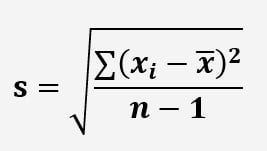
Where:
- σ = population standard deviation
- s = sample standard deviation
- = each data point
- μ or = mean of the dataset
- N or ? = number of data points
Population vs. Sample Standard Deviation
- Population Standard Deviation: When calculating the standard deviation for an entire dataset (population), use the above formula without adjusting for the sample size.
- Sample Standard Deviation: For a smaller subset (sample) of a larger dataset, adjust the formula by dividing by ?-1, a technique called Bessel’s correction, to avoid bias.
Square of the Standard Deviation in Statistics
The square of the standard deviation is the variance, which is crucial in interpreting the data’s dispersion. While variance provides a more direct measure of variability, its units are squared, making standard deviation a more practical metric for interpretation in the same units as the data itself.
How is Standard Deviation used for descriptive statistics?
Descriptive statistics summarize and organize data in an easily understandable manner. In this context, standard deviation provides insight into the variability of a dataset, which is vital for evaluating the performance of a financial asset.
- A low standard deviation in a stock price indicates that prices are stable and consistent.
- A high standard deviation suggests that the price fluctuates significantly, indicating volatility.
The interpretation of mean and standard deviation in descriptive statistics plays a key role in decision-making. For instance, investors often assess the mean and standard deviation of stock returns to gauge potential risk and reward.
Calculation Example: Let’s assume we are analyzing the daily closing prices of a particular stock over 7 days. The prices (in dollars) are as follows:
Day 1 to 7: 50, 52, 53, 55, 56, 58, 60
Step 1: Calculate the Mean (Average) Price:
The mean price is calculated by summing all the prices and dividing by the number of days:

Step 2: Calculate the Variance:
The variance measures how much each data point (stock price) deviates from the mean. To calculate variance, we follow these steps:
- Subtract the mean from each price.
- Square the result.
- Sum all the squared differences.
- Divide by the number of data points (for population variance) or ?-1 (for sample variance).
For our stock prices:

Now, sum all the squared differences:
Sum of Squared Differences = 23.62 + 8.18 + 3.46 + 0.02 + 1.30 + 9.86 + 26.42 = 72.86
For population variance, divide by the number of data points (7):
Step 3: Calculate the Standard Deviation:
The standard deviation is the square root of the variance:
Descriptive Statistics Interpretation:
- The mean stock price is $54.86, meaning that over the 7 days, this is the average price of the stock.
- The variance, 10.41, tells us that the data points (stock prices) are, on average, about 10.41 units squared away from the mean. This number alone is not easy to interpret because it is in squared units (dollars squared, in this case).
- The standard deviation is $3.23, on average, the stock price deviates by about $3.23 from the mean price of $54.86, which implies moderate variability in stock prices over the week. If the standard deviation were lower, say $1 or $2, it would suggest the stock price remained relatively stable over the period. Conversely, a higher standard deviation, such as $6 or $7, would indicate more volatile price movements.
- Financial analysts use this variability to gauge risk. A low standard deviation suggests the stock is stable and not subject to large price swings, while a high standard deviation suggests more risk and volatility.
The Role of LightningChart JS Trader in Financial Analysis

Financial analysis involves examining historical data to forecast future trends, make informed decisions, and assess risk. In this domain, applications like LightningChart JS Trader serve a critical role by providing real-time, high-performance data visualization tools that help traders and analysts better interpret complex datasets. It enables traders to track market trends, calculate volatility using indicators like standard deviation, and visualize price movements.
The platform’s ability to handle large datasets and real-time updates makes it essential for fast decision-making in dynamic markets. Additionally, its customization options allow users to create tailored charts and apply statistical indicators, enhancing both the precision of analysis and risk management. This tool helps streamline financial analysis and supports more informed, data-driven trading strategies.
How to Create the Standard Deviation Indicator Using LightningChart JS Trader
Step 1: Get LightningChart JS Trader
To begin, you’ll need access to LightningChart JS Trader. This library provides the tools necessary to create advanced technical indicators, including Standard Deviation. Visit the LightningChart JS Trader page to download the required components and documentation.
Step 2: Review the Interactive Example
LightningChart JS Trader includes interactive examples that demonstrate how to create custom technical indicators. Start by reviewing the documentation, focusing on how to integrate Standard Deviation into your chart setup. The interactive examples will guide you through the process of setting up Standard Deviation, from importing the necessary modules to modifying the chart settings.
Step 3: Code Explanation
In this step, we will break down the code that creates the chart with the Standard Deviation indicator, as shown in the image, using LightningChart JS Trader. The code demonstrates how to initialize a trading chart, apply the Standard Deviation (SD) indicator, and customize its appearance.

Here’s a detailed breakdown of each section:
A. Importing the Required Libraries:
const lcjsTrader = require('@arction/lcjs-trader')
const lcjs = require('@arction/lcjs')
const { Themes } = lcjs- lcjsTrader: This library provides access to the LightningChart JS Trader functionalities, allowing you to create advanced financial charts.
- lcjs: The main LightningChart JS library, used for general charting functionality.
- Themes: A property within lcjs that provides access to pre-built themes. In this case, we are using the
darkGoldtheme to style the chart.
B. Initializing the Trading Chart:
lcjsTrader.trader(TRADER_LICENSE).then(async (trader) => {
    // Create a trading chart.
const tradingChart = trader.tradingChart({ loadFromStorage: false, colorTheme: Themes.darkGold })- trader(TRADER_LICENSE): Initializes the LightningChart JS Trader with the provided license key (TRADER_LICENSE). This is required to access the charting functionalities for financial data. Note you can request a LightningChart JS Trader trial license, which is free.
tradingChart(): This function creates a trading chart with certain options. In this example:loadFromStorage: false: This disables the loading of previously stored chart data from local storage, ensuring a fresh chart setup.colorTheme: Themes.darkGold: This applies the darkGold theme to the chart, which influences the background color, grid lines, and other visual elements.
C. Adding and Customizing the Standard Deviation Indicator
// Add a Standard Deviation indicator with time period count of 20.
    const sd20 = tradingChart.indicators().addStandardDeviation()
    sd20.setPeriodCount(20)
    sd20.setLineColor('#FFFFFF') //White
    sd20.setLineWidth(3)
    sd20.setOffset(2)
const sd20 = tradingChart.indicators().addStandardDeviation(): Adds the SD, initially without specifying the period, allowing for further customization.setPeriodCount(20): Sets the period for the SD to 20, calculating the average price over the last 20 data points.setLineColor('#FFFFFF'): Sets the line color of the SD to white, making it visually distinct on the chart.setLineWidth(3): Increases the line thickness of the SD to 3 pixels, making the line more prominent on the chart.setOffset(2): Moves the indicator from its calculated position forward or backward. It is often used for visualization purposes or to adjust the timing of signals.
D. Loading Data from a CSV File
    // Reading data from a file.
    await fetch(`${document.head.baseURI}examples/assets/0000/Alphabet Inc (GOOGL).csv`).then((res) => res.text()).then((text) => {
        tradingChart.readCsvString(text, 'Alphabet Inc (GOOGL)')
})fetch(): This function retrieves a CSV file containing historical data for Alphabet Inc. (GOOGL). The CSV file includes pricing information for the company’s stock, which is plotted on the chart.readCsvString(): This function reads the CSV data and interprets it as pricing data for Alphabet Inc. The second argument (‘Alphabet Inc (GOOGL)’) sets the label for the chart, as seen at the top of the chart image.
E. Setting the Currency for the Chart
tradingChart.setCurrency('USD')
})setCurrency('USD'): This sets the currency of the chart to USD, ensuring that the pricing data is interpreted and displayed in US dollars.
In summary, once the code is executed, the chart is created, and the Standard Deviation indicator is applied separately as a second chart to show the standard deviation of the price data in the specified time period for Alphabet Inc. (GOOGL).
Advantages and Limitations of Standard Deviation in Statistics for Financial Analysis
Advantages:
- Risk Measurement: Standard deviation offers a clear measure of asset volatility, helping traders and investors assess risk.
- Comparative Analysis: It allows for the comparison of the volatility of different financial instruments.
- Market Insights: Standard deviation helps forecast price movements and volatility, which is crucial for making informed trading decisions.
Disadvantages:
- Assumes Normal Distribution: Standard deviation works best when data is normally distributed, which may not always be the case in financial markets.
- Past Data Dependency: Standard deviation is based on historical data, which may not always predict future trends.
- Does Not Distinguish Between Upside and Downside Volatility: Standard deviation treats all deviations from the mean equally, whereas investors might be more concerned with downside risk.
Conclusion
In financial and trading analysis, standard deviation in statistics is an indispensable tool for measuring volatility and risk. Understanding its calculation and interpretation is essential for both novice and experienced traders. Tools like LightningChart JS Trader make it easier to visualize and analyze financial data, helping traders leverage standard deviation for more informed decision-making.
Key Takeaways:
- Standard deviation helps in assessing the variability and volatility of financial assets.
- Its use in tools like LightningChart JS Trader enhances real-time decision-making for traders.
- Despite its advantages, it’s essential to recognize the limitations of standard deviation when applied to financial markets.
By mastering the concepts of mean, variance, and standard deviation, financial professionals can use statistical tools more effectively to make data-driven decisions.

Ahmad Omid
Data Science Developer


Continue learning with LightningChart
Horizontal Bar Chart of Russia-Ukraine War Weaponry Data
Written by a human | Updated on April 10th, 2025 JavaScript Horizontal Bar Chart In this article, we aim to respectfully create a JavaScript horizontal bar chart that simulates the weaponry usage on recent war conflicts. While the data have been taken from Kaggle and...
Create a vibration charts application with 2D & 3D spectrograms
Written by a human | Updated on April 10th, 2025JS Spectrogram ApplicationHello, in this article we will create a JS dashboard with 2D and 3D spectrogram charts. The purpose of creating this project is to explain how to create a vibration analysis application that...
Ionic app development
Written by a human | Updated on April 10th, 2025Beginning Ionic App Development with Capacitor, Angular & LightningChart JS [This is the second part of the article "Data Visualization with Ionic Capacitor, Angular & JS Charts (Part 1)"] In the previous...



If you have any questions, feel free to contact us!



©LightningChart Ltd 2026. All rights reserved.