








LightningChart PythonCreating a Water Quality Monitoring Application in Python
TutorialWater quality monitoring app of Ireland's coastal areas
Written by a human | Updated on April 24th, 2025
Water Quality Monitoring Python Application
This project uses LightningChart Python to visualize real-time water quality data from coastal locations in Ireland. Monitoring water quality is crucial for assessing the health of water bodies and ensuring that they are safe for ecosystems and human use. This article demonstrates how to monitor water quality effectively, focusing on key parameters like pH, dissolved oxygen, and temperature, which are critical for water monitoring efforts.
Why is monitoring water quality important?
Continuous monitoring helps detect pollutants and environmental stressors early, enabling timely interventions to preserve aquatic ecosystems and maintain water safety.
LightningChart Python

LightningChart Python is a high-performance library designed to handle large datasets efficiently. It was the core visualization tool used in this project, chosen for its ability to render data quickly and support real-time monitoring. LightningChart Python offers various chart types, including area, spline, bar, scatter, and radar charts, all of which were used to visualize water quality parameters over time.
Setting Up Python Environment
To set up the Python environment for this project, you need to install Python and the necessary libraries. This includes installing LightningChart Python and Pandas. For the original project, refer to GitHub.
- Install Python: Download and install the latest version of Python from the official website.
- Install Libraries: Use
pipto install the required libraries:
pip install lightningchart pandas3. Set up your development environment by creating a new project directory and installing the required libraries. Ensure that LightningChart Python is properly licensed.
Overview of libraries used
- LightningChart Python: For creating high-performance charts. (documentation)
- Pandas: Essential for data manipulation and analysis. (documentation)
Working with Jupyter Notebooks in Visual Studio Code
If you’re using Visual Studio Code (VSCode) as your development environment, you can run Jupyter notebooks directly within it, which offers a seamless experience.
Installing VSCode and Python Extension
- Install Visual Studio Code: If you haven’t installed it, download it from the official website.
- Install the Python Extension :
- Open VSCode.
- Go to the Extensions view by clicking the Extensions icon in the Activity Bar on the side of the window.
- Search for the “Python” extension by Microsoft and install it.
Installing Jupyter Extension
- In the Extensions view, search for “Jupyter” and install the extension by Microsoft.
- This extension allows you to run Jupyter notebooks
.ipynbfiles directly within VSCode.
Loading and Processing Data
The dataset includes 11 key water quality monitoring parameters collected from Cork Harbour, Moy Killala, and 15 other coastal locations in Ireland. The original dataset, provided by the source, contained over 1.2 million rows, which were reduced to 29,159 rows by the data provider before it was used in this project. Preprocessing on our end involved checking missing values and ensuring data consistency.
Here’s an overview of the key parameters from the dataset and their importance in water quality monitoring:
- Alkalinity-total (as CaCO3): Measures water’s ability to neutralize acids, maintaining stable pH.
- Ammonia-Total (as N): Toxic at high levels, requiring careful monitoring to protect aquatic life.
- BOD – 5 days (Total): Measures the oxygen organisms need to decompose organic matter, indicating pollution levels.
- Chloride: Assesses water salinity and potential contamination from road salts or industrial discharge.
- Conductivity @25°C: Evaluates the ability of water to conduct electricity, indicating salinity.
- Dissolved Oxygen: Critical for aquatic life. Low levels suggest poor water quality.
- ortho-Phosphate (as P): Excess can lead to eutrophication, often measured to monitor nutrient levels.
- pH: Indicates the acidity or alkalinity of water, affecting biological processes.
- Temperature: Influences chemical reactions and the metabolic rate of aquatic life.
- Total Hardness (as CaCO3): Reflects calcium and magnesium levels, which are important for aquatic organisms.
- True Colour: Measures water color after filtering, often used to assess clarity and potential pollution.
Data Loading and Preprocessing
The code below shows how the data was loaded and basic information was extracted:
import pandas as pd

# Load the dataset
ireland_dataset_path = 'dataset/Water Quality Monitoring Dataset_ Ireland.csv'
ireland_water_data = pd.read_csv(ireland_dataset_path)

# Display basic information about the dataset and check for missing values
ireland_water_data_info = ireland_water_data.info()
ireland_null_values_summary = ireland_water_data.isnull().sum()

# Output basic info and missing values
print(ireland_water_data_info)
print(ireland_null_values_summary)
Next, we cleaned and preprocessed the data. The code below extracts and cleans waterbody names:
# Extracting unique waterbodies
unique_waterbodies = ireland_water_data['WaterbodyName'].unique()
print(unique_waterbodies)

# Clean waterbody names for readability
import re

def clean_waterbody_name(name):
    # Replace underscores with spaces and keep numbers that follow important identifiers
    cleaned_name = re.sub(r'_+', ' ', name)  # Replace underscores with spaces
    cleaned_name = re.sub(r'(?<![a-zA-Z])(\d+)', r'\1', cleaned_name)  # Retain numbers if attached to names
    cleaned_name = cleaned_name.title()  # Capitalize for readability
    return cleaned_name.strip()

cleaned_names = [clean_waterbody_name(name) for name in unique_waterbodies]
print("Cleaned names:", cleaned_names)
Visualizing Data with LightningChart Python
Using LightningChart Python, we created multiple interactive charts to display trends and changes in water quality monitoring over time. These charts were essential for monitoring parameters such as temperature, dissolved oxygen, and biological oxygen demand (BOD).
Area Chart – Average pH Over Years
The area chart displays the fluctuations in pH levels over the years. pH is a critical measure for water quality monitoring, as it affects the biological and chemical processes within the water.
# Group by Years and calculate the average pH value for each year
grouped_data = ireland_water_data.groupby('Years')['pH'].mean().reset_index()

# Extract x_values (Years) and y_values (average pH)
# Convert years to UNIX time for proper display on the x-axis
x_values = [
    time.mktime(datetime.datetime(year, 1, 1).timetuple()) * 1000 for year in grouped_data['Years']
]
y_values = grouped_data['pH'].tolist()

# Create the chart
chart = lc.ChartXY(
    theme=lc.Themes.Light,
    title='Average pH Over Years'
)

# Configure the x-axis for proper time display
x_axis = chart.get_default_x_axis()
x_axis.set_title("Year")
x_axis.set_tick_strategy('DateTime')

# Add an area series
series = chart.add_area_series(data_pattern="ProgressiveX")

# Append the data to the area series
series.add(x_values, y_values)

# Open the chart
chart.open()
The pH levels remained mostly stable over time, with occasional dips indicating potential increases in acidity during specific years.
Spline Chart (Line Chart) – Physical Parameters Over Years
The spline chart highlights how physical parameters such as temperature and total hardness have evolved over time. Physical parameters play a significant role in determining the suitability of water for various uses.
# Define the physical parameters to be visualized
parameters = ['Dissolved Oxygen', 'Temperature', 'pH', 'Conductivity @25°C']

# Group by Years and calculate the mean for the selected physical parameters
grouped_data = ireland_water_data.groupby('Years')[parameters].mean().reset_index()

# Convert years to UNIX time for proper display on the x-axis
x_values = [
    time.mktime(datetime.datetime(year, 1, 1).timetuple()) * 1000 for year in grouped_data['Years']
]

# Create the chart
chart = lc.ChartXY(
    theme=lc.Themes.Light,
    title='Mean Physical Parameters Over Years'
)

# Configure the x-axis to display dates
x_axis = chart.get_default_x_axis()
x_axis.set_title("Years")
x_axis.set_tick_strategy('DateTime')

# Add spline series for each parameter
for parameter in parameters:
    y_values = grouped_data[parameter].tolist()
    series = chart.add_spline_series(data_pattern="ProgressiveX").append_samples(
        x_values=x_values,
        y_values=y_values
    )
    series.set_name(parameter)  # Set the series name for identification
    series.set_line_thickness(2)

legend = chart.add_legend()
legend.add(chart)  # Attach all elements within the chart to the legend

# Open the chart
chart.open()
Temperature shows slight variations, possibly reflecting seasonal changes. Total hardness remains steady, suggesting that mineral content in the water is stable.
Spline Chart – Chemical Parameters Over Years
This chart highlights key chemical parameters such as chloride and dissolved oxygen levels. Note that two parameters have been scaled up by a factor of 100 to make their values more comparable to others in the chart. This scaling allows for a better visual comparison between parameters that naturally have smaller values.
# Define the chemical parameters to be visualized
parameters = ['Chloride', 'Ammonia-Total (as N)', 'BOD - 5 days (Total)',
              'Alkalinity-total (as CaCO3)', 'ortho-Phosphate (as P) - unspecified',
              'Total Hardness (as CaCO3)']

# Group by Years and calculate the mean for the selected chemical parameters
grouped_data = ireland_water_data.groupby('Years')[parameters].mean().reset_index()

# Apply a scaling factor to the ammonia and phosphate values
scaling_factor = 100
grouped_data['Ammonia-Total (as N)'] = grouped_data['Ammonia-Total (as N)'] * scaling_factor
grouped_data['ortho-Phosphate (as P) - unspecified'] = grouped_data['ortho-Phosphate (as P) - unspecified'] * scaling_factor

# Convert years to UNIX time for proper display on the x-axis
x_values = [
    time.mktime(datetime.datetime(year, 1, 1).timetuple()) * 1000 for year in grouped_data['Years']
]

# Create the chart
chart = lc.ChartXY(
    theme=lc.Themes.Light,
    title='Mean Chemical Parameters Over Years'
)

# Configure the x-axis to display dates
x_axis = chart.get_default_x_axis()
x_axis.set_title("Years")
x_axis.set_tick_strategy('DateTime')

# Add spline series for each parameter
for parameter in parameters:
    y_values = grouped_data[parameter].tolist()
    series = chart.add_spline_series(data_pattern="ProgressiveX").append_samples(
        x_values=x_values,
        y_values=y_values
    )
        # Indicate scaling for ammonia and phosphate
    if parameter == 'Ammonia-Total (as N)':
        series.set_name(f'{parameter} (scaled x{scaling_factor})')
    elif parameter == 'ortho-Phosphate (as P) - unspecified':
        series.set_name(f'{parameter} (scaled x{scaling_factor})')
    else:
        series.set_name(parameter)
    series.set_line_thickness(2)

legend = chart.add_legend()
legend.add(chart)  # Attach all elements within the chart to the legend

# Open the chart
chart.open()
Chloride levels remain stable, while occasional dips in dissolved oxygen levels may indicate potential periods of lower water quality, possibly due to pollution.
Scatter Chart – True Colour Trends
True colour is an indicator of water clarity, which is influenced by dissolved and particulate matter. This scatter chart visualizes the trends in true colour across different years and water bodies.
# Find the waterbodies with the highest and lowest True Colour values
max_true_color_row = ireland_water_data.loc[ireland_water_data['True Colour'].idxmax()]
min_true_color_row = ireland_water_data.loc[ireland_water_data['True Colour'].idxmin()]

# Get the waterbody names
max_true_color_waterbody = max_true_color_row['CleanedWaterbodyName']
min_true_color_waterbody = min_true_color_row['CleanedWaterbodyName']

# Filter data for these specific waterbodies
high_true_color_data = ireland_water_data[ireland_water_data['CleanedWaterbodyName'] == max_true_color_waterbody]
low_true_color_data = ireland_water_data[ireland_water_data['CleanedWaterbodyName'] == min_true_color_waterbody]

# Convert years to UNIX time for proper display on the x-axis
high_x_values = [
    time.mktime(datetime.datetime(year, 1, 1).timetuple()) * 1000 for year in high_true_color_data['Years']
]
low_x_values = [
    time.mktime(datetime.datetime(year, 1, 1).timetuple()) * 1000 for year in low_true_color_data['Years']
]

# Create the chart
chart = lc.ChartXY(
    theme=lc.Themes.Light,
    title='True Colour Trends for Waterbodies with Highest and Lowest Values'
)

# Configure the x-axis to display dates
x_axis = chart.get_default_x_axis()
x_axis.set_title("Years")
x_axis.set_tick_strategy('DateTime')

# Add point series for the waterbody with the highest True Colour
high_series = chart.add_point_series().append_samples(
    x_values=high_x_values,
    y_values=high_true_color_data['True Colour'].tolist()
)
high_series.set_name(f'Highest True Colour: {max_true_color_waterbody}')

# Add point series for the waterbody with the lowest True Colour
low_series = chart.add_point_series().append_samples(
    x_values=low_x_values,
    y_values=low_true_color_data['True Colour'].tolist()
)
low_series.set_name(f'Lowest True Colour: {min_true_color_waterbody}')

# Set point sizes
high_series.set_point_size(5)
low_series.set_point_size(5)

legend = chart.add_legend()
legend.add(chart)  # Attach all elements within the chart to the legend
legend.set_position(x=98.5, y=70)  # Set the position of the legend

# Open the chart
chart.open()
Sharp increases in true color values indicate potential pollution or increases in organic material affecting water clarity during certain years.
Bar Chart – Mean BOD (Biological Oxygen Demand)
BOD is an indicator of how much oxygen is needed to break down organic matter in water. This vertical bar chart displays the BOD levels across different water bodies, highlighting those with high organic pollution which are important parameters in water quality monitoring.
# Group data by CleanedWaterbodyName and calculate the mean of BOD - 5 days (Total)
parameter = ['BOD - 5 days (Total)']
grouped_by_waterbody = ireland_water_data.groupby('CleanedWaterbodyName')[parameter].mean().reset_index()

# Prepare data for the bar chart using CleanedWaterbodyName and BOD values
# 'category' is the waterbody name, and 'value' is the mean BOD for that waterbody
data = []
for i, row in grouped_by_waterbody.iterrows():
    data.append({'category': row['CleanedWaterbodyName'], 'value': row['BOD - 5 days (Total)']})

# Create a vertical bar chart to visualize mean BOD by waterbody
chart = lc.BarChart(
    vertical=True,
    theme=lc.Themes.Light,
    title='Mean BOD - 5 days (Total) by Waterbody'
)

# Sort bars in descending order and rotate waterbody labels for better visibility
chart.set_sorting('descending')
chart.set_label_rotation(90)
chart.set_value_label_display_mode('hidden')  # Hide value labels for a cleaner look

# Assign the prepared data to the chart
chart.set_data(data)

# Set gradient color ranges based on BOD values
chart.set_palette_colors(
    steps=[
        {'value': 0, 'color': lc.Color(0, 0, 255)},   # Blue for low BOD
        {'value': 1.5, 'color': lc.Color(0, 255, 0)},  # Green for moderate BOD
        {'value': 2.5, 'color': lc.Color(255, 255, 0)},  # Yellow for higher BOD
        {'value': 3.5, 'color': lc.Color(255, 165, 0)},  # Orange for concerning levels
        {'value': 5, 'color': lc.Color(255, 0, 0)}   # Red for high BOD (poor water quality)
    ],
    percentage_values=False  # Use absolute BOD values for the color gradient
)

# Open the chart
chart.open()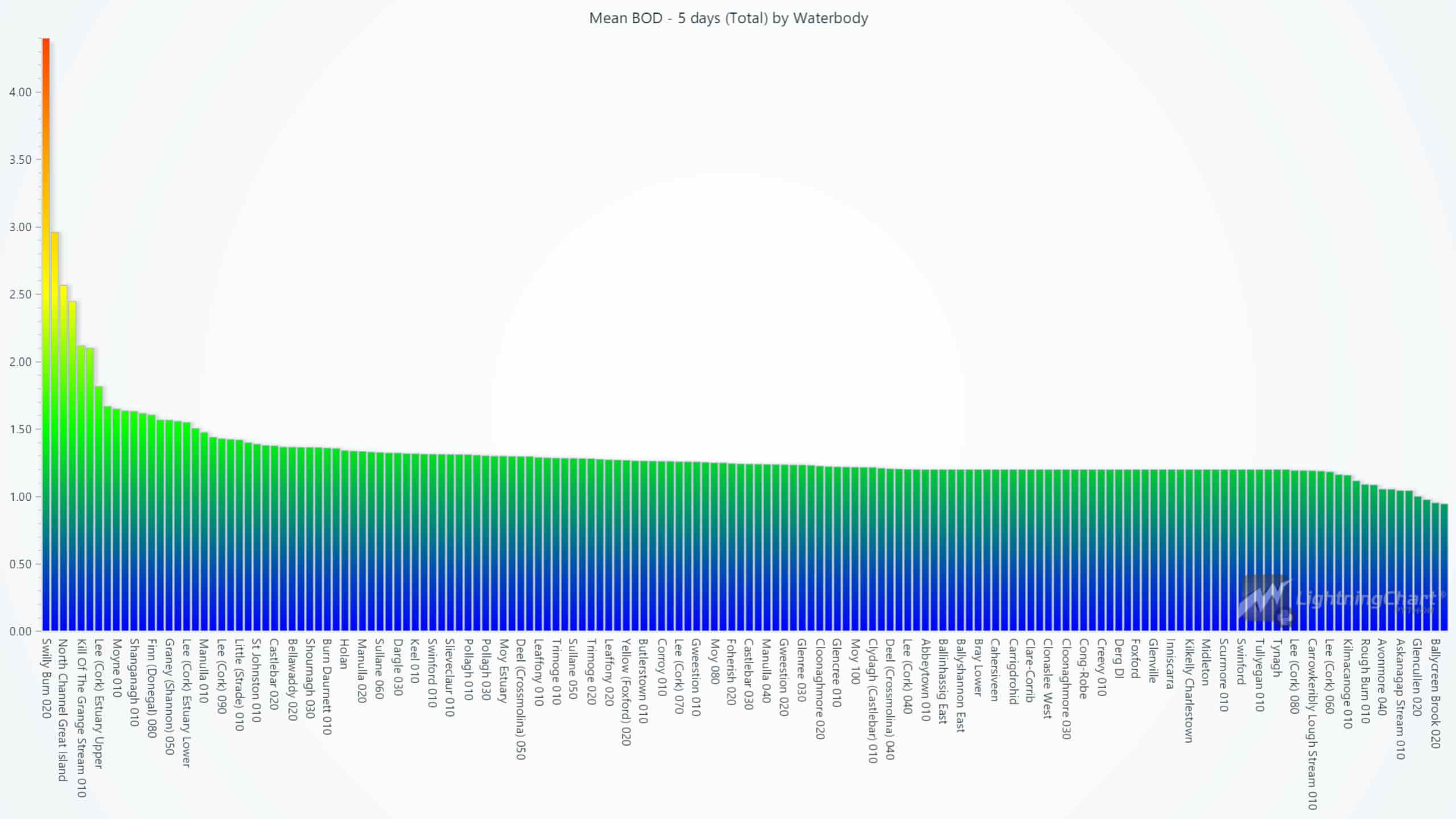
Some waterbodies show higher BOD levels, suggesting higher organic pollution, which may stress aquatic life.
Bar Chart – Average Values Across All Parameters
This horizontal bar chart gives an overview of the average values for each water quality monitoring parameter. It provides a clear understanding of which parameters were most prominent across the dataset.
# List of parameters to analyze
# These are the water quality parameters for which we want to calculate and visualize the average values
parameters = ['Alkalinity-total (as CaCO3)', 'Ammonia-Total (as N)', 'BOD - 5 days (Total)', 'Chloride',
              'Conductivity @25°C', 'Dissolved Oxygen', 'ortho-Phosphate (as P) - unspecified', 'pH',
              'Temperature', 'Total Hardness (as CaCO3)', 'True Colour']

# List to store the average values for each parameter
average_values = []

# Iterate through each parameter and calculate the average value
for parameter in parameters:
    average_value = ireland_water_data[parameter].mean()
    # Append the calculated average as a dictionary with 'category' as the parameter name and 'value' as the mean
    average_values.append({
        'category': parameter,
        'value': average_value
    })

# Prepare the data for the bar chart
# 'category' is the parameter name, and 'value' is the corresponding average value
data = [{'category': item['category'], 'value': item['value']} for item in average_values]

# Create a horizontal bar chart to visualize the average values across all parameters
chart = lc.BarChart(
    vertical=False,
    theme=lc.Themes.Light,
    title='Average Values Across All Parameters'
)

# Disable sorting to keep the parameters in the order they were listed in the 'parameters' list
chart.set_sorting('disabled')

# Assign the prepared data to the chart
chart.set_data(data)

# Open the chart
chart.open()
The chart highlights high conductivity and chloride levels, which may point to salinity concerns. Ammonia and ortho-Phosphate show up as 0 due to their very low average values, which round down to zero in the visualization, while other parameters like pH and dissolved oxygen remain within acceptable ranges.
Spider Chart – Water Quality Parameters Comparison Over Years
The spider chart offers a comparative view of different water quality monitoring parameters, allowing for a quick comparison of their relative levels across the years.
# Define the time periods you want to compare
time_periods = [2007, 2011, 2015, 2019, 2023]

# Create a spider chart with a circular web and light theme to visualize parameter comparison across years
chart = lc.SpiderChart(
    theme=lc.Themes.Light,
    title='Water Quality Parameters Comparison Over Years'
)
chart.set_web_mode('circle')  # Set the web shape to circular

# Define the water quality parameters to be plotted on the spider chart
parameters = ['Dissolved Oxygen', 'Temperature', 'pH', 'Conductivity @25°C', 'Chloride', 'Total Hardness (as CaCO3)', 'True Colour']

# Function to calculate the average values for the water quality parameters in a specific year
# This function filters the data by the year and returns the average for each parameter
def get_average_values_for_year(year):
    data_for_year = ireland_water_data[ireland_water_data['Years'] == year]
    return [data_for_year[param].mean() for param in parameters]

# Add a data series to the chart for each time period
# For each year, calculate the average parameter values and plot them as a series on the spider chart
for year in time_periods:
    avg_values = get_average_values_for_year(year)  # Get the average values for the specified year
    points = [{'axis': param, 'value': value} for param, value in zip(parameters, avg_values)]  # Prepare data points
    chart.add_series().add_points(points).set_name(f'{year}')  # Add the series to the chart with the corresponding year label

# Open the chart
chart.open()
Dashboard – Overview of the Water Quality Monitoring Parameters Over Years
The following dashboard provides a consolidated view of water quality parameters, displaying trends across physical, chemical, and eutrophication-related indicators. Additionally, it highlights the highest values for each parameter, offering insights into the extreme measurements observed over the years. The code for this dashboard can be found in the water quality monitoring project’s notebook file.

Additional Visualizations
Beyond the charts showcased in this article, the water quality monitoring project’s Jupyter Notebook (>ireland_WQI.ipynb) contains additional visualizations that offer more insights into the water quality dataset. Users with access to the licensed version of LightningChart Python can explore these additional charts.
Conclusion
By leveraging LightningChart Python, this water quality monitoring project shows how we can efficiently monitor key parameters that determine the water quality in regions, e.g. Ireland, this includes water quality trends. This kind of water quality monitoring applications are critical for maintaining safe and healthy water bodies.

Roy Liu
Data Science Python Developer


Continue learning with LightningChart

Geospatial data visualization with Google Maps & LightningChart
Written by a human | Updated on April 10th, 2025Geospatial Data Visualization This article showcases and describes a particular use case of LightningChart JS for geospatial data visualization. LightningChart JS is a JavaScript charting tool designed for...
![[Tutorial] How to embed interactive charts in PowerPoint presentations](https://lightningchart.com/wp-content/uploads/2022/12/Interactive-Charts-in-PowerPoint-feature-image.jpg)
[Tutorial] How to embed interactive charts in PowerPoint presentations
Written by a human | Updated on April 9th, 2025Embed interactive charts in PowerPoint presentations Embedding charts within PowerPoint presentations has always been possible but perhaps one of the most ignored possibilities is actually embedding web applications...

Motorsports Analytics
Updated on April 10th, 2025 | Written by human Motorsports Analytics Large companies in the motorsports industry are collecting huge volumes of real-time data coming from different sources on and off the pitch during racing competitions. These data are both...



If you have any questions, feel free to contact us!



©LightningChart Ltd 2026. All rights reserved.