








Python Urban Heat Analysis of the Impact of Newly Constructed Areas
Tutorial
Assisted by AI
Explore Python urban heat analysis with LightningChart Python to visualize and understand heat patterns in urban environments effectively.
Fateme Ajam
Data Science Python Developer


Introduction
Urban heat islands (UHIs) are a phenomenon where urbanized areas experience significantly higher temperatures than their rural surroundings. This effect is caused by dense human activity, industrial structures, and lack of vegetation. Urban heat impacts not only the environment but also public health, energy consumption, and biodiversity.
The rise of newly constructed areas exacerbates the UHI effect, amplifying localized warming trends. To better understand these impacts, we utilize data visualization tools to analyze how newly constructed zones in King County, WA, influence temperature distributions.
About the Dataset
The dataset used in this analysis is derived from Landsat 8 Collection 2 Surface Temperature imagery, accessed via Google Earth Engine (GEE). It provides high-resolution geospatial data for analyzing land surface temperatures (LST) over King County, Washington, across two distinct time periods: 2013-2014 and 2023-2024.
LightningChart Python
LightningChart Python is a high-performance data visualization library specifically designed for creating complex, interactive, and visually appealing graphs in Python.
It is widely recognized for its speed, scalability, and ability to handle large datasets efficiently, making it ideal for projects involving real-time and high-density data visualization.

In this project, LightningChart Python was used to visualize land surface temperature (LST) data, demonstrating the following capabilities:
- Split Maps: Displayed temperature differences side-by-side for easy comparison.
- Heatmaps: Highlighted temperature intensities across King County.
- Histograms: Provided statistical comparisons of temperature distributions across two time periods.
With LightningChart Python, complex geospatial data was rendered with impressive performance, enabling efficient and accurate visualizations of urban heat impacts. It proved to be a superior choice for analyzing and presenting large-scale environmental data.
Setting Up Python Environment
For this analysis, we used LightningChart Python, a high-performance data visualization library ideal for large-scale geospatial datasets. Additional libraries like Pandas, NumPy, and Geemap were included for data handling and integration with Google Earth Engine (GEE).
// Code for Importing Libraries
import lightningchart as lc
import pandas as pd
import numpy as np
import geemap
import ee
Before proceeding, ensure Earth Engine is authenticated and initialized:
ee.Authenticate()
ee.Initialize(project='ee-simon0618123')
Data Loading and Preprocessing
The dataset used includes land surface temperature (LST) data retrieved from the Landsat 8 Collection 2 Surface Temperature for King County. Preprocessing involves:
- Defining a Region of Interest (ROI).
- Applying cloud masking for higher data accuracy.
- Converting LST values from Kelvin to Celsius.
Key preprocessing snippet:
# Define the bounding box for King County, WA
roi = ee.Geometry.Rectangle([-122.583, 47.096, -121.100, 47.957])
LST is converted using:
# Convert thermal data from Kelvin to Celsius (multiply by scale factor, then adjust)
  lst_celsius = landsat_thermal.multiply(0.00341802).add(149).subtract(273.15)
Visualizing Data with LightningChart Python
LightningChart provides an advanced platform for visualizing intricate datasets effectively. Here, we delve into various visualizations to uncover trends and patterns in waste production and management across industries and activities.
Split-Map LST Comparison
We compare land surface temperatures from 2023-2024 and 2013-2014 using a split-map layout for intuitive side-by-side analysis.
Map = geemap.Map(center=[47.6206, -122.3505], zoom=10)
left_layer = geemap.ee_tile_layer(lst_celsius_1, lst_vis_params, f"LST 2023-2024")
right_layer = geemap.ee_tile_layer(lst_celsius_2, lst_vis_params, f"LST 2013-2014")
Map.split_map(left_layer, right_layer)
Map
Insights: in this urban heat analysis, we can observe the newly constructed areas that exhibit higher temperatures due to reduced vegetation and increased surface heat retention.
Urban Heat Analysis Bar Chart: Comparison of Land Surface Temperature (LST) Histograms for 2024-08-27 and 2014-08-23
This chart compares the land surface temperature (LST) distributions for two time periods over King County, Washington. The bar chart illustrates the frequency of temperature values for 2024-08-27 (orange), 2014-08-23 (blue), and their intersection (purple), highlighting overlapping temperature ranges.
The visualization provides insights into temperature trends, revealing an increase in higher temperature frequencies in 2024 compared to 2014, potentially indicating urban heat effects. This comparison effectively showcases temperature variations and consistent temperature ranges across the two periods, offering a valuable perspective on climate dynamics in the region.
# Define ROI and preprocess thermal radiance data for two periods
roi = ee.Geometry.Rectangle([-122.583, 47.096, -121.100, 47.957])
thermal_radiance_array_1 = np.array(
    lst_celsius_1.reduceRegion(ee.Reducer.toList(), roi, 100, maxPixels=1e13).get('ST_B10').getInfo()
)
thermal_radiance_array_2 = np.array(
    lst_celsius_2.reduceRegion(ee.Reducer.toList(), roi, 100, maxPixels=1e13).get('ST_B10').getInfo()
)

# Generate histograms for both periods
bins = 50
bins_combined = np.linspace(min(thermal_radiance_array_1.min(), thermal_radiance_array_2.min()),
                            max(thermal_radiance_array_1.max(), thermal_radiance_array_2.max()), bins + 1)
hist_1_aligned, _ = np.histogram(thermal_radiance_array_1, bins=bins_combined)
hist_2_aligned, _ = np.histogram(thermal_radiance_array_2, bins=bins_combined)
intersection = np.minimum(hist_1_aligned, hist_2_aligned)

# Prepare bar chart data
prepare_bar_data = lambda hist, bins: [
    {"category": f"{int(bins[i])}", "value": int(count)}
    for i, count in enumerate(hist)
]
bar_data_1 = prepare_bar_data(hist_1_aligned, bins_combined)
bar_data_2 = prepare_bar_data(hist_2_aligned, bins_combined)
intersection_data = prepare_bar_data(intersection, bins_combined)

dashboard = lc.Dashboard(columns=1, rows=1, theme=lc.Themes.Light)

chart_1 = dashboard.BarChart(column_index=0, row_index=0)
chart_1.set_data(bar_data_1).set_bars_color(lc.Color('orange'))
chart_1.set_title(f'LST Histogram: {image_date_1}')

chart_2 = dashboard.BarChart(column_index=0, row_index=0)
chart_2.set_data(bar_data_2).set_bars_color(lc.Color('blue'))
chart_2.set_title(f'LST Histogram: {image_date_2}')

chart_3 = dashboard.BarChart(column_index=0, row_index=0)
chart_3.set_data(intersection_data).set_bars_color(lc.Color('purple'))
chart_3.set_title('Intersection of LST Histograms')

dashboard.open()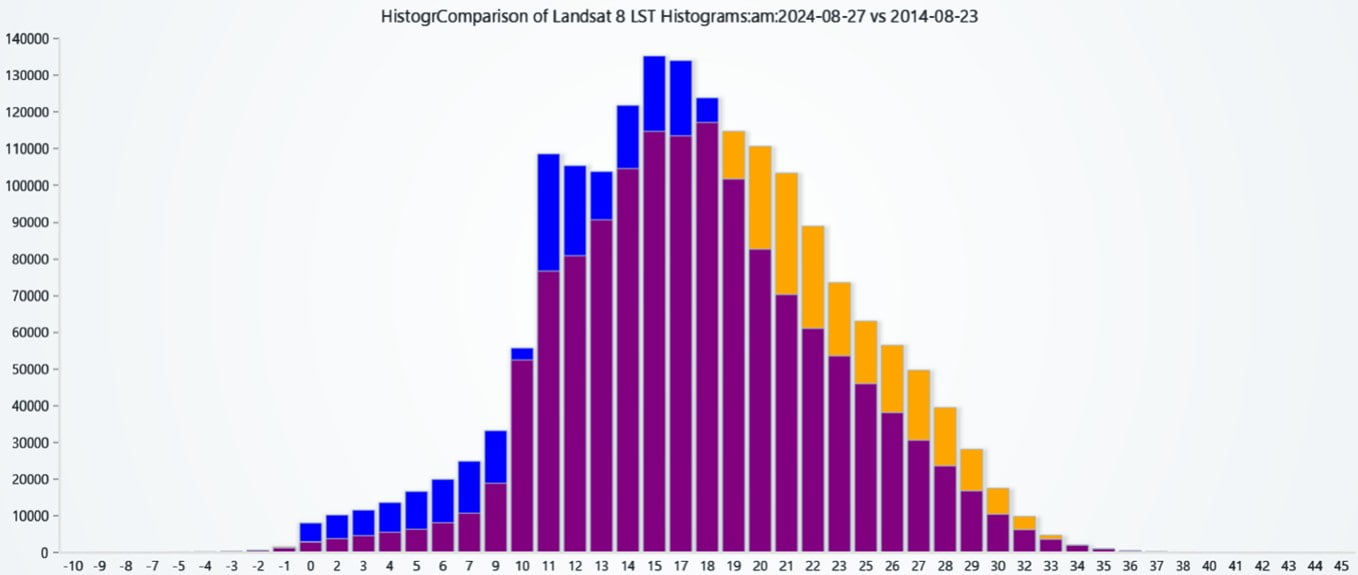
Individual Histograms for Detailed Analysis
To complement the earlier comparative histogram, separate histograms were plotted for the two time periods: 2024-08-27 and 2014-08-23. These individual visualizations allow for a deeper examination of the distribution of land surface temperature (LST) data for each period.
thermal_radiance_array_1 = np.array(thermal_radiance_data_1)
bins = 50
hist_1, bin_edges_1 = np.histogram(thermal_radiance_array_1, bins=bins)
bar_data_1 = [{"category": f"{int(bin_edges_1[i])}", "value": int(count)} for i, count in enumerate(hist_1)]
chart = lc.BarChart(vertical=True, theme=lc.Themes.Light, title='Landsat 8 LST Histogram: 2024-08-27')
chart.set_data(bar_data_1).set_bars_color(lc.Color('orange')).set_sorting('disabled')
chart.value_axis.set_title('Frequency')
chart.category_axis.set_title('Temperature (°C)')
chart.open()
thermal_radiance_array_2 = np.array(thermal_radiance_data_2)
bins = 50
hist, bin_edges = np.histogram(thermal_radiance_array_2, bins=bins)
bar_data = [{"category": f"{int(bin_edges[i])}", "value": int(count)} for i, count in enumerate(hist)]
chart = lc.BarChart(vertical=True, theme=lc.Themes.Light, title='Landsat 8 LST Histogram: 2014-08-23')
chart.set_data(bar_data).set_bars_color(lc.Color('orange')).set_sorting('disabled')
chart.value_axis.set_title('Frequency')
chart.category_axis.set_title('Temperature (°C)')
chart.open()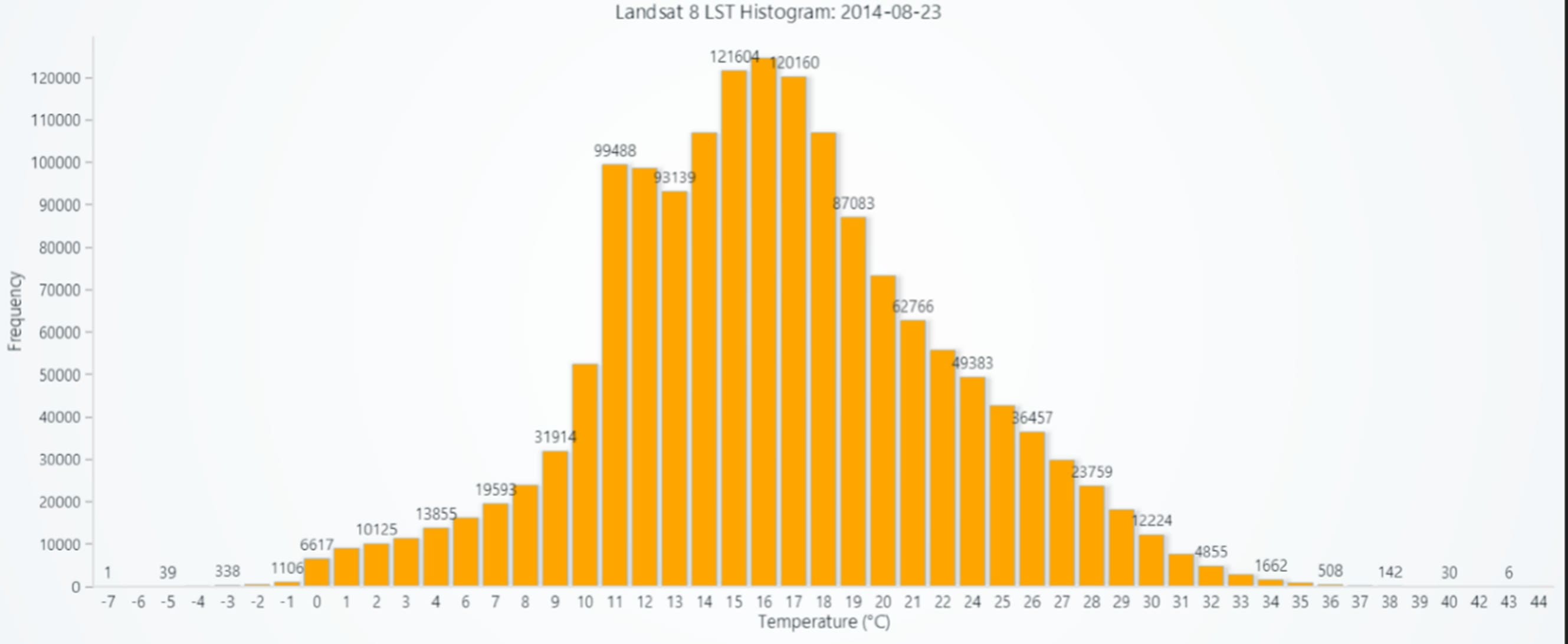
Insights
- These histograms highlight subtle changes in LST distributions between the two time periods, offering a clearer perspective on how urban development might have influenced temperature patterns.
- By isolating the datasets, we can identify specific trends or anomalies unique to each period.
Heatmap: Comparative LST Visualizations Across Time Periods
This Heatmap visualization compares the land surface temperature (LST) data across two distinct time periods: 2023-2024 and 2013-2014. The side-by-side layout provides an intuitive comparison, showcasing temperature intensity variations within the selected region.
A color gradient ranging from blue (cooler temperatures) to red (warmer temperatures) highlights the changes in thermal patterns over time. This visual representation aids in identifying trends and spatial differences in LST between the two timeframes.
import numpy as np
import lightningchart as lc
from PIL import Image
import urllib

def download_image(image, region, dimensions=(512, 512)):
    url = image.getThumbURL({
        'region': region,
        'min': lst_vis_params['min'],
        'max': lst_vis_params['max'],
        'palette': lst_vis_params['palette'],
        'dimensions': dimensions
    })
    with urllib.request.urlopen(url) as file:
        img = Image.open(file).rotate(270, expand=True)
        return np.array(img)

image_array_1 = download_image(lst_celsius_1, roi)
image_array_2 = download_image(lst_celsius_2, roi)

dash = lc.Dashboard(columns=2, rows=1, theme=lc.Themes.Light)

for idx, (image_array, title) in enumerate([(image_array_1, f'LST 2023-2024 ({image_date_1})'),
                                            (image_array_2, f'LST 2013-2014 ({image_date_2})')]):
    chart = dash.ChartXY(column_index=idx, row_index=0, title=title)
    grid_size_x, grid_size_y = image_array.shape[:2]
    heatmap = chart.add_heatmap_grid_series(columns=grid_size_x, rows=grid_size_y)
    heatmap.set_start(0, 0).set_end(grid_size_x, grid_size_y).set_step(1, 1)
    heatmap.invalidate_intensity_values(image_array[:, :, 0].astype(float).tolist())
    heatmap.set_palette_coloring(
        steps=[
            {"value": 0, "color": lc.Color(0, 0, 255)},
            {"value": 0.25, "color": lc.Color(0, 255, 255)},
            {"value": 0.5, "color": lc.Color(0, 255, 0)},
            {"value": 0.75, "color": lc.Color(255, 255, 0)},
            {"value": 1, "color": lc.Color(255, 0, 0)}
        ],
        interpolate=True,
        percentage_values=True,
    )
    chart.get_default_y_axis().set_title("Longitude")
    chart.get_default_x_axis().set_title("Latitude")

dash.open()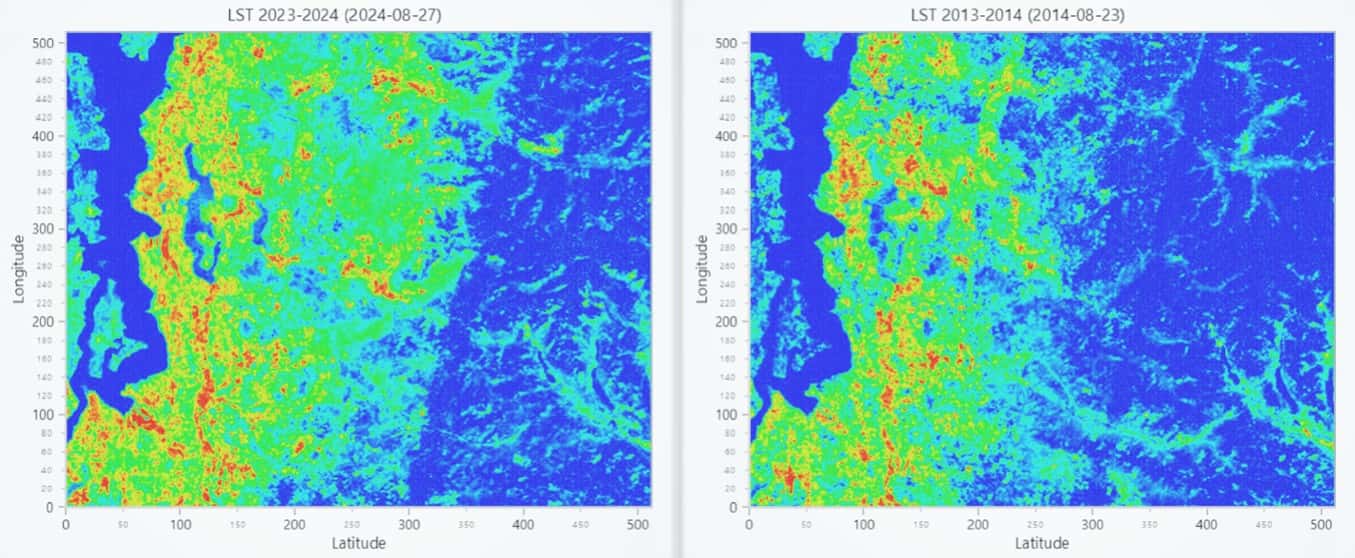
Visualizing Decadal Changes in Land Surface Temperature Across King County and Lynnwood
The ten images generated from the above heatmap-based code represent Land Surface Temperature (LST) data for five distinct regions in King County and Lynnwood across two time periods (2013-2014 and 2023-2024). Each pair of heatmaps visually compares the temperature distribution over time to assess changes potentially caused by urban development or environmental variations. The regions include:
- West Seattle: Depicting temperature changes in the West Seattle area.
- Light Rail North Extension: Showcasing LST variations around the northern extension of the light rail project.
- Bellevue: Highlighting urban heat impacts in Bellevue’s city area.
- Issaquah: Representing shifts in LST for the Issaquah region.
- Lynnwood: Comparing LST differences in the Lynnwood area over a decade.
For each region, the left chart shows recent LST data (2023-2024), while the right chart visualizes historical data (2013-2014). By juxtaposing these heatmaps, the impact of urban growth and climate-related changes on the surface temperature is made clear, with red areas indicating hotspots and blue areas representing cooler zones.
import numpy as np
import lightningchart as lc
from lightningchart import Themes
from PIL import Image
import urllib
import ee

# Authenticate Earth Engine API
try:
    ee.Initialize()
except:
    ee.Authenticate()
    ee.Initialize()

# Define ROIs and parameters
rois = {
    'West_Seattle': ee.Geometry.Rectangle([-122.430, 47.520, -122.370, 47.590]),
    'Lynnwood': ee.Geometry.Rectangle([-122.320, 47.810, -122.250, 47.860])
}
lst_vis_params = {'min': -20, 'max': 50, 'palette': ['blue', 'cyan', 'green', 'yellow', 'red']}

# Function to process Landsat 8 data
def process_landsat_data(start_date, end_date, roi):
    collection = ee.ImageCollection('LANDSAT/LC08/C02/T1_L2').filterBounds(roi).filterDate(start_date, end_date)
    thermal_image = collection.select('ST_B10').median().multiply(0.00341802).add(149).subtract(273.15)
    image_date = ee.Date(collection.sort('system:time_start', False).first().get('system:time_start')).format('YYYY-MM-dd').getInfo()
    return thermal_image, image_date

# Function to download images
def download_image(image, region):
    url = image.getThumbURL({'region': region, 'min': lst_vis_params['min'], 'max': lst_vis_params['max'], 'palette': lst_vis_params['palette'], 'dimensions': (512, 512)})
    with urllib.request.urlopen(url) as file:
        return np.array(Image.open(file).rotate(270, expand=True))

# Function to create a dashboard
def create_dashboard(location, image1, date1, image2, date2, roi):
    arr1, arr2 = download_image(image1, roi), download_image(image2, roi)
    dashboard = lc.Dashboard(rows=1, columns=2, theme=Themes.Light)

    for idx, (image_array, date, title) in enumerate([(arr1, date1, "2023-2024"), (arr2, date2, "2013-2014")]):
        chart = dashboard.ChartXY(row_index=0, column_index=idx, title=f"LST {title} ({date})")
        heatmap = chart.add_heatmap_grid_series(columns=image_array.shape[0], rows=image_array.shape[1])
        heatmap.set_start(x=0, y=0).set_end(x=image_array.shape[0], y=image_array.shape[1])
        heatmap.invalidate_intensity_values(image_array.astype(float).tolist())
        heatmap.set_palette_coloring(
            steps=[{"value": 0, "color": lc.Color(0, 0, 255)}, {"value": 1, "color": lc.Color(255, 0, 0)}],
            interpolate=True,
            percentage_values=True,
        )
        chart.get_default_x_axis().set_title("Longitude")
        chart.get_default_y_axis().set_title("Latitude")

    dashboard.open()

# Process data and generate dashboards for each ROI
for location, roi in rois.items():
    lst_1, date_1 = process_landsat_data('2023-01-01', '2024-08-31', roi)
    lst_2, date_2 = process_landsat_data('2013-01-01', '2014-08-31', roi)
    create_dashboard(location, lst_1, date_1, lst_2, date_2, roi)


Conclusion
The use of LightningChart for visualizing complex datasets, such as Land Surface Temperature (LST), provides a powerful tool for rapid and precise analysis. With features like interactive data visualization, diverse color palettes, and multi-panel dashboards, it delivers a user-friendly experience for professional-grade visualizations.
In this project, the surface temperature changes over the periods 2023-2024 and 2013-2014 were analyzed for specific regions (e.g., West Seattle and Lynnwood).
The generated visualizations revealed:
- Temperature changes over a decade were clearly visible across different regions.
- The detailed color palette helped to easily identify warm and cool spots.
- The side-by-side display of two time periods enabled direct comparison of environmental conditions.
This project demonstrated that LightningChart can transform complex satellite data into clear, precise, and professional insights. Its comparative and interactive tools make it an ideal choice for environmental and climate analyses. Such methods can significantly contribute to identifying climate changes, managing natural resources, and informing environmental policies.
Continue learning with LightningChart
Best OxyPlot Alternative in 2026: GPU Rendering, 3D Charts, Commercial Support
OxyPlot has been a reliable reference point in the .NET scientific and engineering charting space for over a decade. MIT-licensed, platform-neutral in its rendering model (which is how it achieves coverage across WPF, WinForms, Xamarin, Avalonia, and MAUI from a...
7 Best Plotly.js Alternatives in 2026: Faster, Lighter, No Context Limits
Plotly.js holds a unique position in the JavaScript charting ecosystem. Data scientists already know it from Python, when Plotly.py generates a chart in a Jupyter notebook, it's Plotly.js rendering it in the browser. That continuity between languages is genuinely...

7 Best Highcharts Alternatives in 2026: Faster, Cheaper, and More Capable
Highcharts has been a reliable workhorse for enterprise JavaScript charts since 2009. Solid documentation, broad chart type coverage, WCAG accessibility that's genuinely best-in-class. A lot of teams have built a lot of dashboards on it over the years. But teams also...



If you have any questions, feel free to contact us!



©LightningChart Ltd 2026. All rights reserved.