








Visualizing Telecom Churn Analytics with LightningChart Python
Tutorial
Assisted by AI
Explore effective strategies for visualizing telecom churn analytics using LightningChart Python to improve customer retention and insights.
Vindya Nukulasooriya
Data Science Developer

Introduction
This project presents a comprehensive data visualization study on telecom churn analytics of customer data, using the high-performance LightningChart Python library. The analysis is based on the publicly available Iranian Churn Dataset from the UCI Machine Learning Repository. The dataset includes detailed customer-level metrics ranging from call activity and subscription duration to complaint behaviour and tariff plans.
The purpose of this project is to transform complex, multidimensional churn-related data into insightful visualizations. By leveraging LightningChart Python’s advanced rendering engine and interactive features, we aim to uncover patterns behind customer attrition and service usage behaviours. These visualizations are crucial for telecom providers aiming to minimize churn, enhance customer segmentation, and improve service strategies.
Project Overview
To develop a curated set of up to 10 interactive chart examples using LightningChart Python, focusing on the key behavioural and demographic features of customers and their relation to churn.
Objectives
- To explore and visualize churn behaviour based on customer metrics using LightningChart Python.
- To identify correlations between features like call failures, subscription length, tariff plan, and churn.
- To analyze patterns and segmentations based on usage frequency, age group, and complaint behaviour.
- To demonstrate how LightningChart Python can be applied in customer analytics and churn mitigation.
Deliverables
- Up to 10 professional-level visualizations created exclusively with LightningChart Python, focusing on key behavioural and demographic factors influencing telecom churn.
- Accompanying Python code and chart-specific explanations for each visualization.
- Analytical summaries that examine churn patterns across variables such as age groups, usage behaviour, complaints, and tariff plans.
- A conclusion reflecting on the effectiveness of LightningChart Python in uncovering insights from customer churn data and supporting decision-making in telecom analytics.
Tools Used
Python 3.13.5, LightningChart Python, Jupyter Notebook, AI Assistance
About the Dataset
The dataset contains detailed records of customer behaviour and demographics from an Iranian telecom company. It includes 3,150 customer entries with variables related to service usage, payment behaviour, complaints, and personal demographics. Each record is labelled with a churn indicator, identifying whether the customer has left the service.
This dataset enables a rich analysis of churn factors, such as call failures, subscription length, charge amounts, frequency of use, SMS activity, and distinct called numbers, in relation to variables like age group, tariff plan, and complaint history.
LightningChart Python
LightningChart Python is a high-performance data visualization library designed for ultra-fast rendering, real-time interactivity, and precision-driven output. Supporting both 2D and 3D graphics, it is especially effective for behavioural, categorical, and time-series datasets, where high responsiveness and visual clarity are essential for uncovering patterns, correlations, and actionable insights.

Setting Up Python Environment
Before running the project, install Python and the other required libraries using:
%pip install numpy pandas lightningchartOverview of Libraries Used:
- Pandas: for data handling and time-based grouping
- Numpy: for numerical operations
- LightningChart: for high-performance visualization
Setting Up Your Development Environment:
- Set up a virtual environment:
- Use Visual Studio Code (VSCode) for a streamlined development experience.
Loading and Preprocessing Data
To create this China Water Pollution Monitoring Application, we will fetch the China water pollution data using the following function:
Downloaded the dataset from https://archive.ics.uci.edu/dataset/563/iranian+churn+datasetTo preprocess the dataset, we will import the pandas library:
# Import necessary libraries (load pandas library to preprocess dataset)
import pandas as pd
Visualizing Data with LightningChart Python
This telecom churn analytics study examines customer behavior and service patterns to identify drivers of churn. Key questions include:
- How does Call Failure vary across Tariff Plans and Age Groups?
- Is there a link between Subscription Length and Charge Amount or Seconds of Use?
- How are Complaints distributed across Tariff Plans and Usage Frequency?
- What is the relationship between Distinct Called Numbers, SMS Frequency, and Subscription Length or Age Group?
Insights from these questions will help improve retention strategies and optimize telecom services.
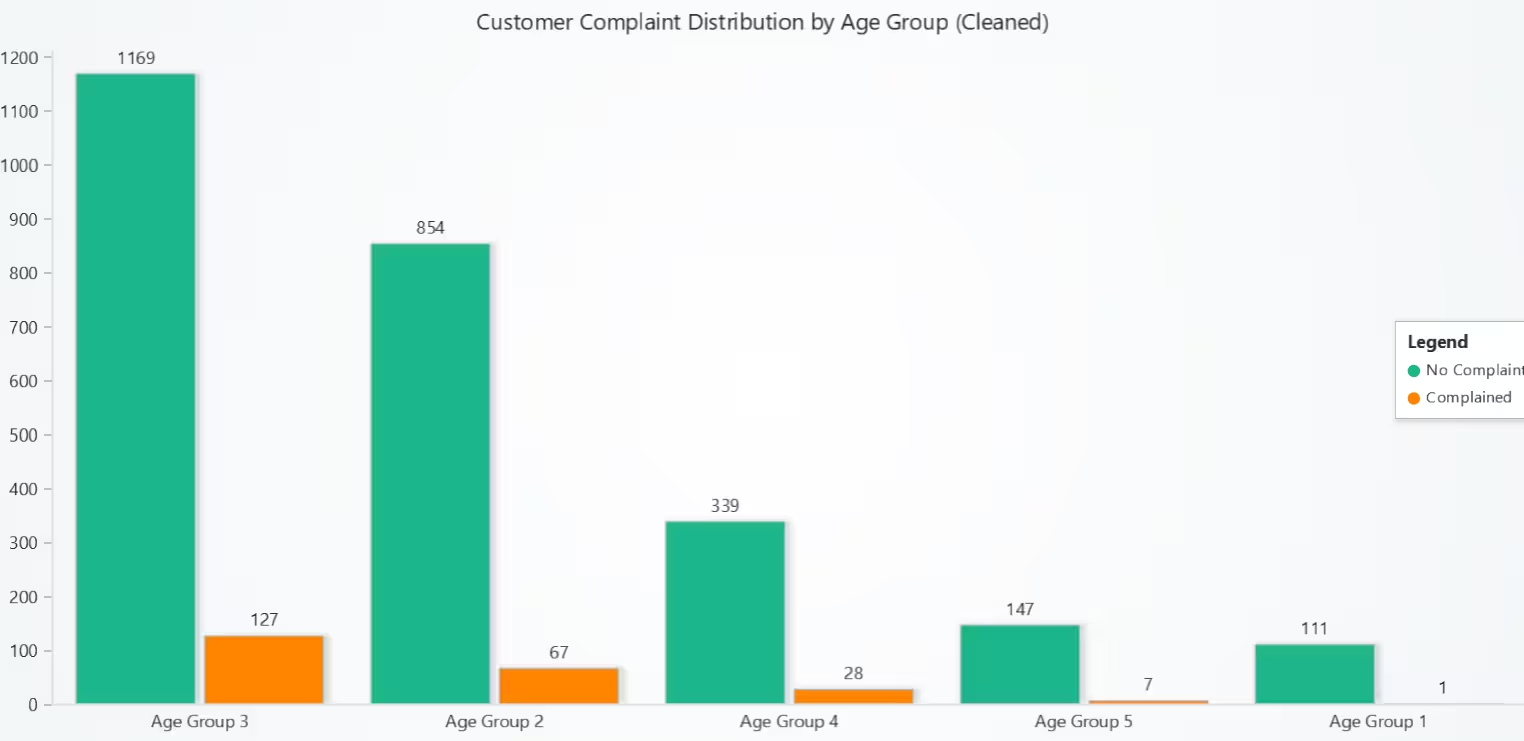
Customer Complaint Distribution by Age Group – Grouped Bar Chart
Age Group 3 shows the highest complaints, while Groups 1 and 5 have very few. Most complaints come from Groups 2 to 4, indicating they may be more critical or affected by service issues.
# Chart 1 – Grouped Bar Chart: Customer Complaint Distribution by Age Group (Cleaned)
# Developed with AI assistance to demonstrate LightningChart Python

import pandas as pd
import lightningchart as lc

# Load LightningChart license
with open("D:/HAMK/Internship/MyProjects/lc_license.txt", "r") as f:
    license_key = f.read().strip()

lc.set_license(license_key)

# Load dataset
df = ccd

# Clean duplicates
ccd = df.copy()
ccd.drop_duplicates(inplace=True)

# Group by Age Group and Complains
ccd_distribution = ccd.groupby(['Age Group', 'Complains']).size().unstack(fill_value=0)

# Rename columns for clarity
ccd_distribution.columns = ['No Complaint', 'Complained']

# Convert data for chart
age_groups = [f'Age Group {i}' for i in sorted(ccd_distribution.index)]
no_complaint = ccd_distribution['No Complaint'].tolist()
complained = ccd_distribution['Complained'].tolist()

# Create the grouped bar chart
chart = lc.BarChart(
    vertical=True,
    theme=lc.Themes.Light,
    title='Customer Complaint Distribution by Age Group (Cleaned)'
)

# Set grouped data
chart.set_data_grouped(
    age_groups,
    [
        {'subCategory': 'No Complaint', 'values': no_complaint},
        {'subCategory': 'Complained', 'values': complained},
    ]
)

# Show chart with legend
chart.add_legend().add(chart)

chart.open()
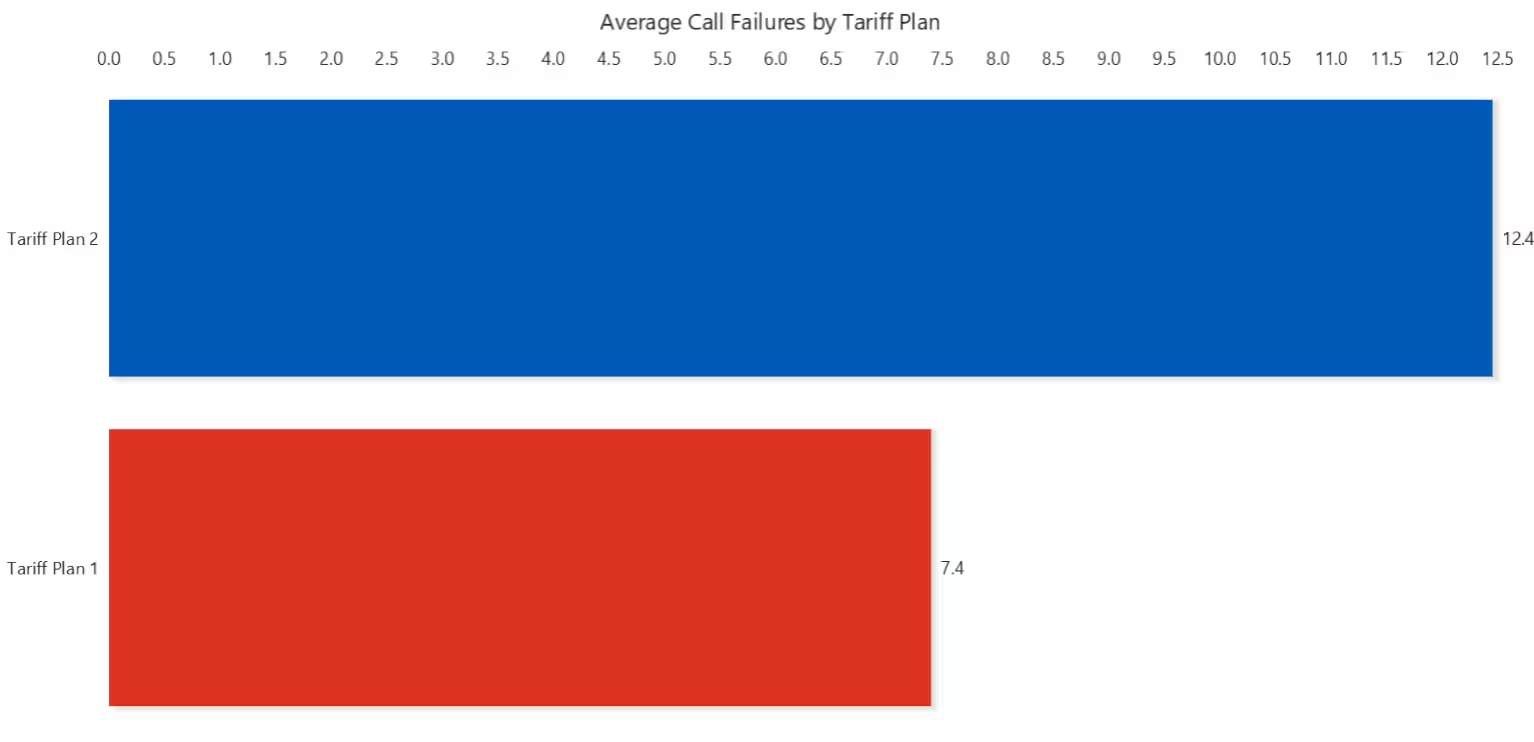
Average Call Failures by Tariff Plan – Horizontal Bar Chart
This chart shows that users under certain tariff plans experience more frequent call failures. These performance gaps may affect user satisfaction and churn.
# Chart 2 – Horizontal Bar Chart: Avg. Call Failures by Tariff Plan
# Developed with AI assistance to demonstrate LightningChart Python

import pandas as pd
import lightningchart as lc

# Load LightningChart license
with open("D:/HAMK/Internship/MyProjects/lc_license.txt", "r") as f:
    license_key = f.read().strip()

lc.set_license(license_key)

# Use already loaded dataset
df = ccd.copy()
df.drop_duplicates(inplace=True)

# Compute average call failures per tariff plan
call_failure_by_plan = df.groupby('Tariff Plan')['Call  Failure'].mean().round(2)

# Prepare chart data
tariff_labels = [f'Tariff Plan {int(plan)}' for plan in call_failure_by_plan.index]
avg_failures = call_failure_by_plan.tolist()

# Create horizontal bar chart
chart = lc.BarChart(
    vertical=False,
    theme=lc.Themes.White,
    title='Average Call Failures by Tariff Plan'
)

# Set data correctly
chart.set_data([
    {'category': label, 'value': value}
    for label, value in zip(tariff_labels, avg_failures)
])

# Show chart
chart.open()
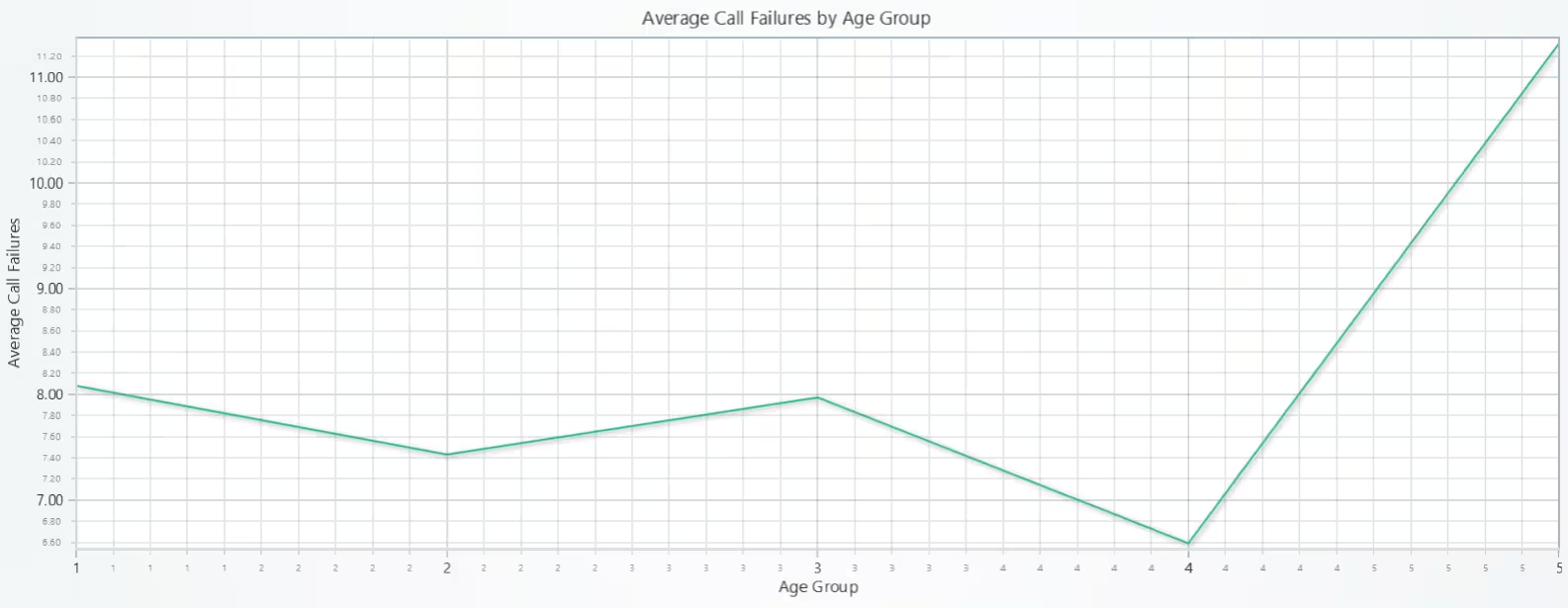
Average Call Failures by Age Group – Line Chart
The chart reveals a trend where older users (Age Group 5) encounter more call failures, possibly due to higher call volumes or weaker service coverage in this demographic.
# Chart 3 – Line Chart: Avg. Call Failures by Age Group
# Developed with AI assistance using LightningChart Python

import pandas as pd
import lightningchart as lc

# Load LightningChart license
with open("D:/HAMK/Internship/MyProjects/lc_license.txt", "r") as f:
    license_key = f.read().strip()

lc.set_license(license_key)

# Use already loaded and cleaned dataset
df = ccd.copy()
df.drop_duplicates(inplace=True)

# Compute average call failures per age group
call_failure_by_age = df.groupby('Age Group')['Call  Failure'].mean().round(2)

# Prepare X and Y values
x_values = sorted(call_failure_by_age.index.tolist())     # [1, 2, 3, 4, 5]
y_values = call_failure_by_age.tolist()                   # [8.08, 7.43, 7.97, 6.59, 11.32]

# Create chart
chart = lc.ChartXY(
    theme=lc.Themes.Light,
    title='Average Call Failures by Age Group'
)

# Add line series with data
series = chart.add_line_series().append_samples(
    x_values=x_values,
    y_values=y_values
)

# Add axis labels
chart.get_default_x_axis().set_title("Age Group")
chart.get_default_y_axis().set_title("Average Call Failures")

# Format X-axis to remove decimals
chart.get_default_x_axis().set_decimal_precision(0)

# Open chart
chart.open()
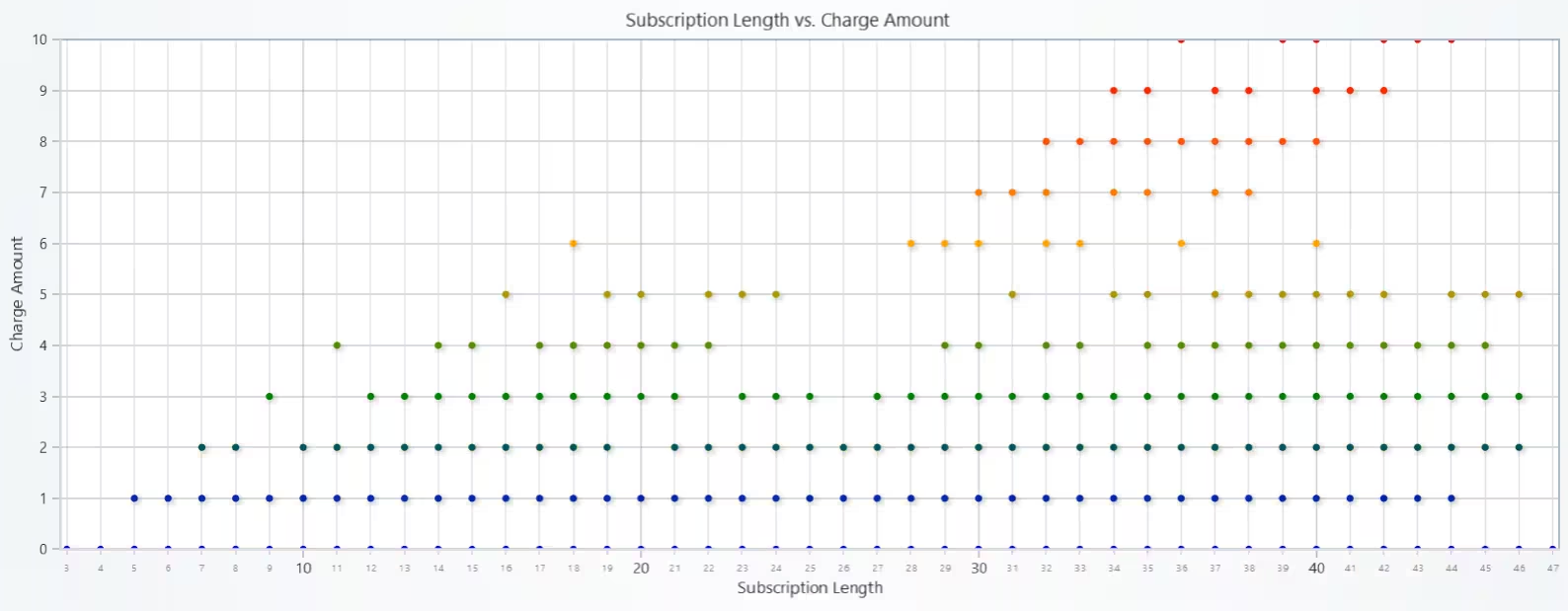
Subscription Length vs. Charge Amount – Scatter Plot
There appears to be a moderate positive correlation between subscription length and charge amount. Longer-term customers generally accumulate higher charges, though variability exists due to usage patterns.
# Chart 4 – Scatter Plot: Subscription Length vs. Charge Amount
# Developed with AI assistance using LightningChart Python

import pandas as pd
import lightningchart as lc

# Load LightningChart license
with open("D:/HAMK/Internship/MyProjects/lc_license.txt", "r") as f:
    license_key = f.read().strip()

lc.set_license(license_key)

# Use cleaned dataset
df = ccd.copy()
df.drop_duplicates(inplace=True)

# Clean column names
df.columns = df.columns.str.strip()

df.columns = df.columns.str.replace(r'\s+', ' ', regex=True).str.strip()

# Extract X and Y data
x_data = df['Subscription Length'].tolist()  # X-axis
y_data = df['Charge Amount'].tolist()        # Y-axis

# Create chart
chart = lc.ChartXY(
    title='Subscription Length vs. Charge Amount',
    theme=lc.Themes.Light
)

# Add scatter series
point_series = chart.add_point_series()

# Optional: color by y (charge amount) range
point_series.set_palette_point_coloring(
    steps=[
        {'value': min(y_data), 'color': lc.Color('blue')},
        {'value': max(y_data) * 0.3, 'color': lc.Color('green')},
        {'value': max(y_data) * 0.6, 'color': lc.Color('orange')},
        {'value': max(y_data), 'color': lc.Color('red')}
    ],
    look_up_property='y',
    percentage_values=False
)

# Add data points
point_series.add(x=x_data, y=y_data)

# Format X and Y axes
x_axis = chart.get_default_x_axis()
x_axis.set_title("Subscription Length")
x_axis.set_decimal_precision(0)

y_axis = chart.get_default_y_axis()
y_axis.set_title("Charge Amount")
y_axis.set_decimal_precision(0)

# Show chart
chart.open()
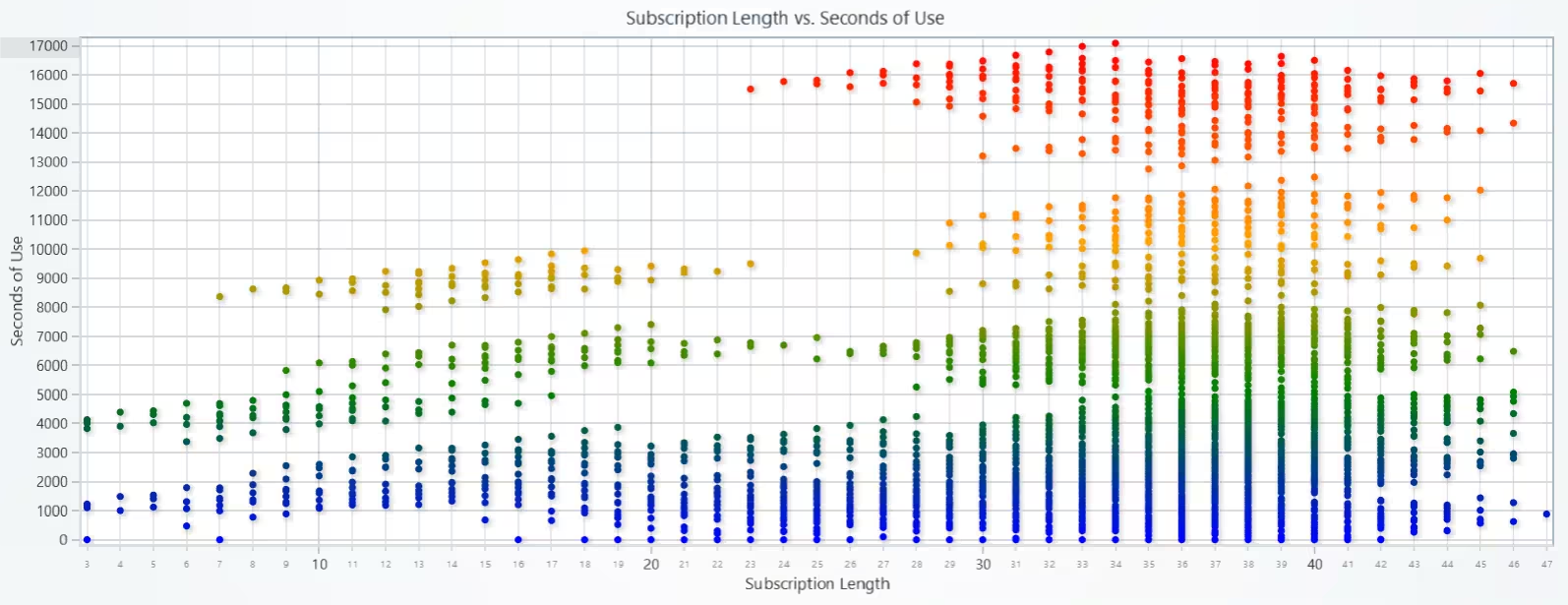
Subscription Length vs. Seconds of Use – Scatter Plot
There’s a slight positive trend, suggesting users with longer subscriptions tend to have higher total usage in seconds. However, considerable variability implies usage habits differ even among long-term users.
# Chart 5 – Scatter Plot: Subscription Length vs. Seconds of Use
# Developed with AI assistance using LightningChart Python

import pandas as pd
import lightningchart as lc

# Load LightningChart license
with open("D:/HAMK/Internship/MyProjects/lc_license.txt", "r") as f:
    license_key = f.read().strip()

lc.set_license(license_key)

# Use cleaned dataset
df = ccd.copy()
df.drop_duplicates(inplace=True)

# Clean column names
df.columns = df.columns.str.replace(r'\s+', ' ', regex=True).str.strip()

# Extract X and Y data
x_data = df['Subscription Length'].tolist()   # X-axis
y_data = df['Seconds of Use'].tolist()        # Y-axis

# Create chart
chart = lc.ChartXY(
    title='Subscription Length vs. Seconds of Use',
    theme=lc.Themes.Light
)

# Add scatter series
point_series = chart.add_point_series()

# Optional: color by seconds of use (Y-value)
point_series.set_palette_point_coloring(
    steps=[
        {'value': min(y_data), 'color': lc.Color('blue')},
        {'value': max(y_data) * 0.3, 'color': lc.Color('green')},
        {'value': max(y_data) * 0.6, 'color': lc.Color('orange')},
        {'value': max(y_data), 'color': lc.Color('red')}
    ],
    look_up_property='y',
    percentage_values=False
)

# Add data points
point_series.add(x=x_data, y=y_data)

# Format X and Y axes
x_axis = chart.get_default_x_axis()
x_axis.set_title("Subscription Length")
x_axis.set_decimal_precision(0)

y_axis = chart.get_default_y_axis()
y_axis.set_title("Seconds of Use")
y_axis.set_decimal_precision(0)

# Show chart
chart.open()
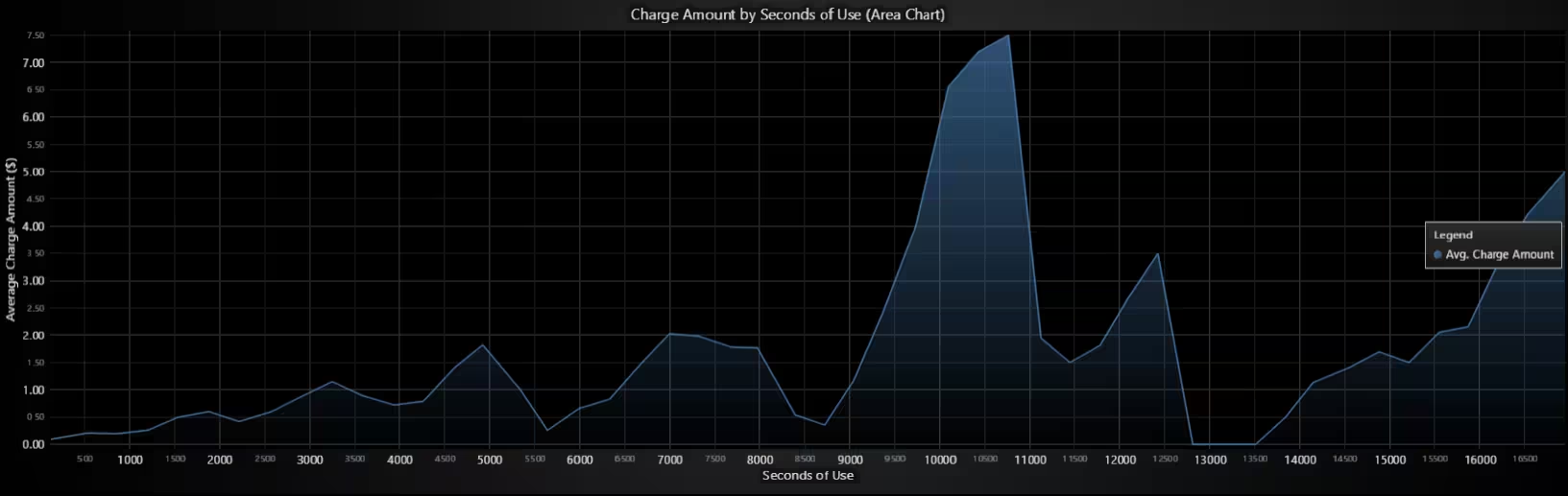
Charge Amount by Seconds of Use (Binned) – Area Chart
This chart highlights a positive relationship between call duration and billing, confirming expected behavior that longer usage leads to higher charges. Binning helps reduce noise and reveals the overall pattern.
# Chart 6 – Area Chart: Charge Amount by Seconds of Use (Binned)
# Developed with AI assistance using LightningChart Python

import pandas as pd
import numpy as np
import lightningchart as lc

# Load LightningChart license
with open("D:/HAMK/Internship/MyProjects/lc_license.txt", "r") as f:
    license_key = f.read().strip()

lc.set_license(license_key)

# Use cleaned dataset
df = ccd.copy()
df.drop_duplicates(inplace=True)
df.columns = df.columns.str.replace(r'\s+', ' ', regex=True).str.strip()

# Binning Seconds of Use
df['Seconds Bin'] = pd.cut(df['Seconds of Use'], bins=50)
grouped = df.groupby('Seconds Bin').agg({
    'Seconds of Use': 'mean',
    'Charge Amount': 'mean'  # Can use 'sum' instead if needed
}).dropna()

# Prepare x and y data
x_data = grouped['Seconds of Use'].values.tolist()
y_data = grouped['Charge Amount'].values.tolist()

# Create chart
chart = lc.ChartXY(
    title='Charge Amount by Seconds of Use (Area Chart)',
    theme=lc.Themes.Black
)

# Add Area Series
area_series = chart.add_area_series()
area_series.set_name('Avg. Charge Amount')
area_series.add(x_data, y_data)

# Label axes
chart.get_default_x_axis().set_title("Seconds of Use")
chart.get_default_y_axis().set_title("Average Charge Amount ($)")

# Add legend
chart.add_legend(data=area_series)

# Show chart
chart.open()
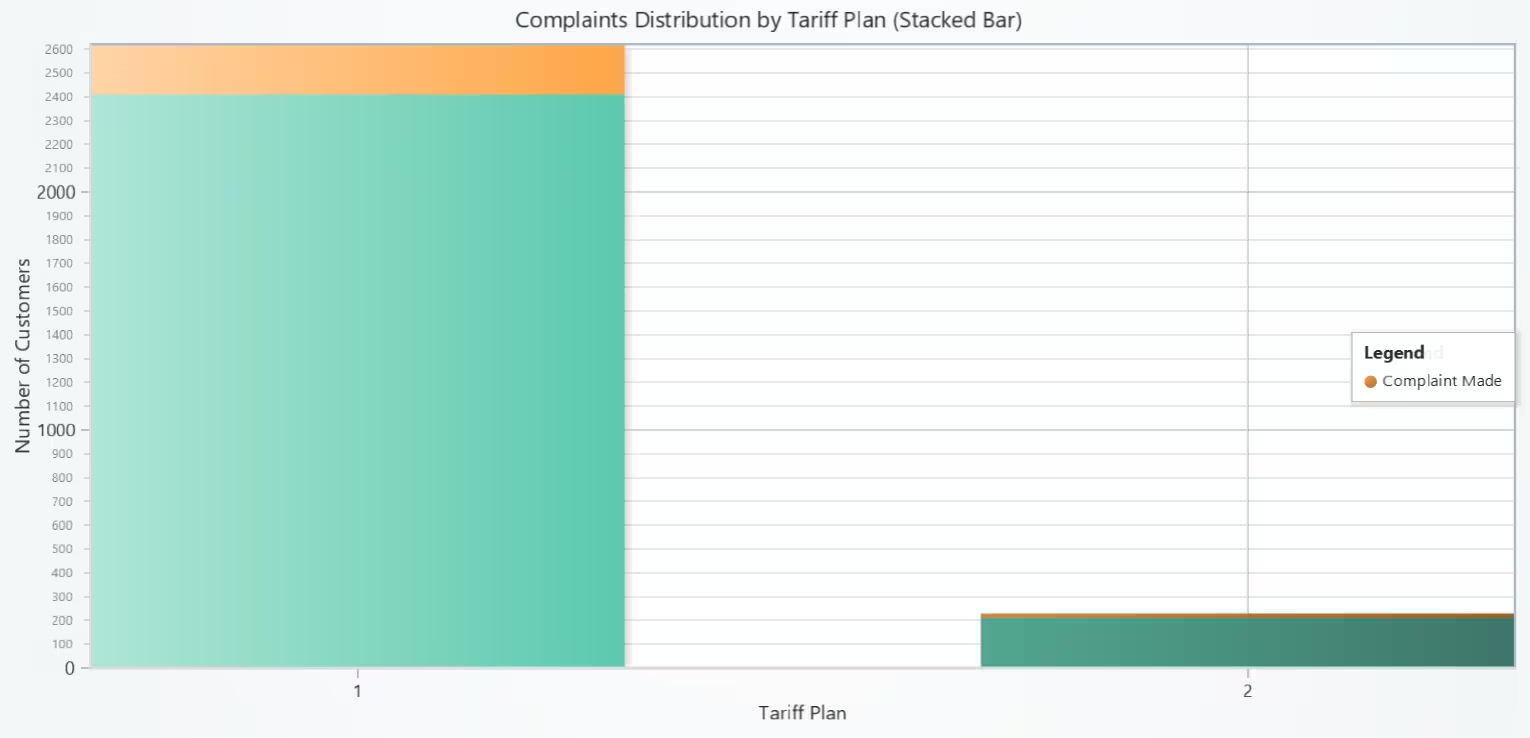
Complaints Distribution by Tariff Plan – Stacked Bar Chart
This visualization reveals how complaints vary by tariff plan, helping identify which plans are associated with higher customer dissatisfaction.
# Chart 7 – Stacked Bar Chart: Complaints Distribution by Tariff Plan
# Developed with AI assistance using LightningChart Python

import lightningchart as lc
import pandas as pd

# Load license
with open("D:/HAMK/Internship/MyProjects/lc_license.txt", "r") as f:
    license_key = f.read().strip()

lc.set_license(license_key)

# === Cleaned dataset ===
df = ccd.copy()
df.drop_duplicates(inplace=True)
df.columns = df.columns.str.replace(r'\s+', ' ', regex=True).str.strip()

# === Group data: Complaints by Tariff Plan ===
grouped = df.groupby(['Tariff Plan', 'Complains']).size().unstack(fill_value=0).sort_index()

# Extract x-axis category labels and data
x_labels = grouped.index.astype(str).tolist()               # Tariff Plans as strings
x_values = list(range(len(x_labels)))                       # x = 0, 1, 2, ...
complaint_0 = grouped.get(0, pd.Series([0]*len(x_labels))).tolist()  # No Complaint
complaint_1 = grouped.get(1, pd.Series([0]*len(x_labels))).tolist()  # Complaint Made

# === Create ChartXY ===
chart = lc.ChartXY(
    title='Complaints Distribution by Tariff Plan (Stacked Bar)',
    theme=lc.Themes.Light
)

# === Add "No Complaint" bars (bottom layer) ===
series_no = chart.add_rectangle_series()
series_no.set_name("No Complaint")
for x, y in zip(x_values, complaint_0):
    series_no.add(x - 0.3, 0, x + 0.3, y)

# === Add "Complaint Made" bars (top layer, stacked) ===
series_yes = chart.add_rectangle_series()
series_yes.set_name("Complaint Made")
for x, y0, y1 in zip(x_values, complaint_0, complaint_1):
    series_yes.add(x - 0.3, y0, x + 0.3, y0 + y1)

# === Configure custom tick labels on X-axis ===
x_axis = chart.get_default_x_axis()
x_axis.set_title("Tariff Plan")
x_axis.set_tick_strategy('Empty')  # Disable automatic ticks

for i, label in enumerate(x_labels):
    tick = x_axis.add_custom_tick()
    tick.set_value(i)       # Position on axis (numeric index)
    tick.set_text(label)    # Display label (e.g., "1", "2", "3")

# === Y-axis title ===
chart.get_default_y_axis().set_title("Number of Customers")

# === Add legend ===
chart.add_legend(data=series_no)
chart.add_legend(data=series_yes)

# === Show chart ===
chart.open()
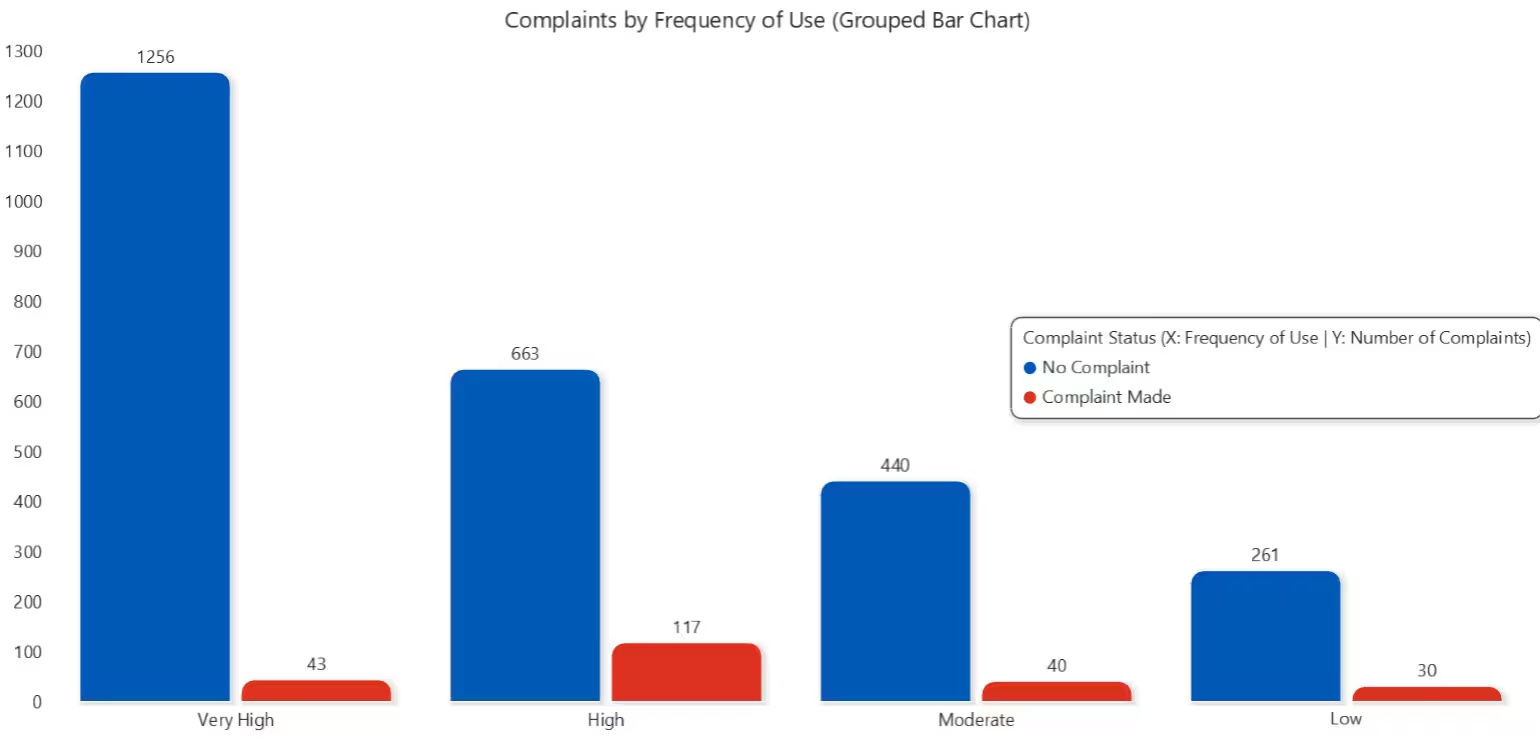
Complaints by Frequency of Use (Grouped Bar Chart)
The chart displays X-axis: Frequency of use (Low → Very High), Y-axis: Number of customers, and Bars: Each group contains two bars (Left = No Complaint and Right = Complaint Made).
# Chart 8 – Complaints by Frequency of Use (Grouped Bar Chart)
# Developed with AI assistance using LightningChart Python

import lightningchart as lc
import pandas as pd

# Load license
with open("D:/HAMK/Internship/MyProjects/lc_license.txt", "r") as f:
    license_key = f.read().strip()

lc.set_license(license_key)

# === Clean dataset ===
df = ccd.copy()
df.drop_duplicates(inplace=True)
df.columns = df.columns.str.replace(r'\s+', ' ', regex=True).str.strip()

# === Bin Frequency of Use ===
def bin_frequency(value):
    if value <= 10:
        return 'Low'
    elif value <= 30:
        return 'Moderate'
    elif value <= 60:
        return 'High'
    else:
        return 'Very High'

df['FreqBin'] = df['Frequency of use'].apply(bin_frequency)

# === Group data: FreqBin × Complains ===
grouped = df.groupby(['FreqBin', 'Complains']).size().unstack(fill_value=0)
grouped = grouped.reindex(['Low', 'Moderate', 'High', 'Very High'])

# === Prepare data for BarChart ===
x_labels = grouped.index.tolist()  # ['Low', 'Moderate', ...]
no_complaints = grouped.get(0, pd.Series([0] * len(x_labels))).tolist()
yes_complaints = grouped.get(1, pd.Series([0] * len(x_labels))).tolist()

# === Create BarChart ===
chart = lc.BarChart(
    vertical=True,
    theme=lc.Themes.White,
    title='Complaints by Frequency of Use (Grouped Bar Chart)'
)

chart.set_data_grouped(
    x_labels,
    [
        {'subCategory': 'No Complaint', 'values': no_complaints},
        {'subCategory': 'Complaint Made', 'values': yes_complaints},
    ]
)

# === Add legend properly ===
legend = chart.add_legend(title="Complaint Status\n(X: Frequency of Use | Y: Number of Complaints)")
legend.add(chart)

# === Show chart ===
chart.open()
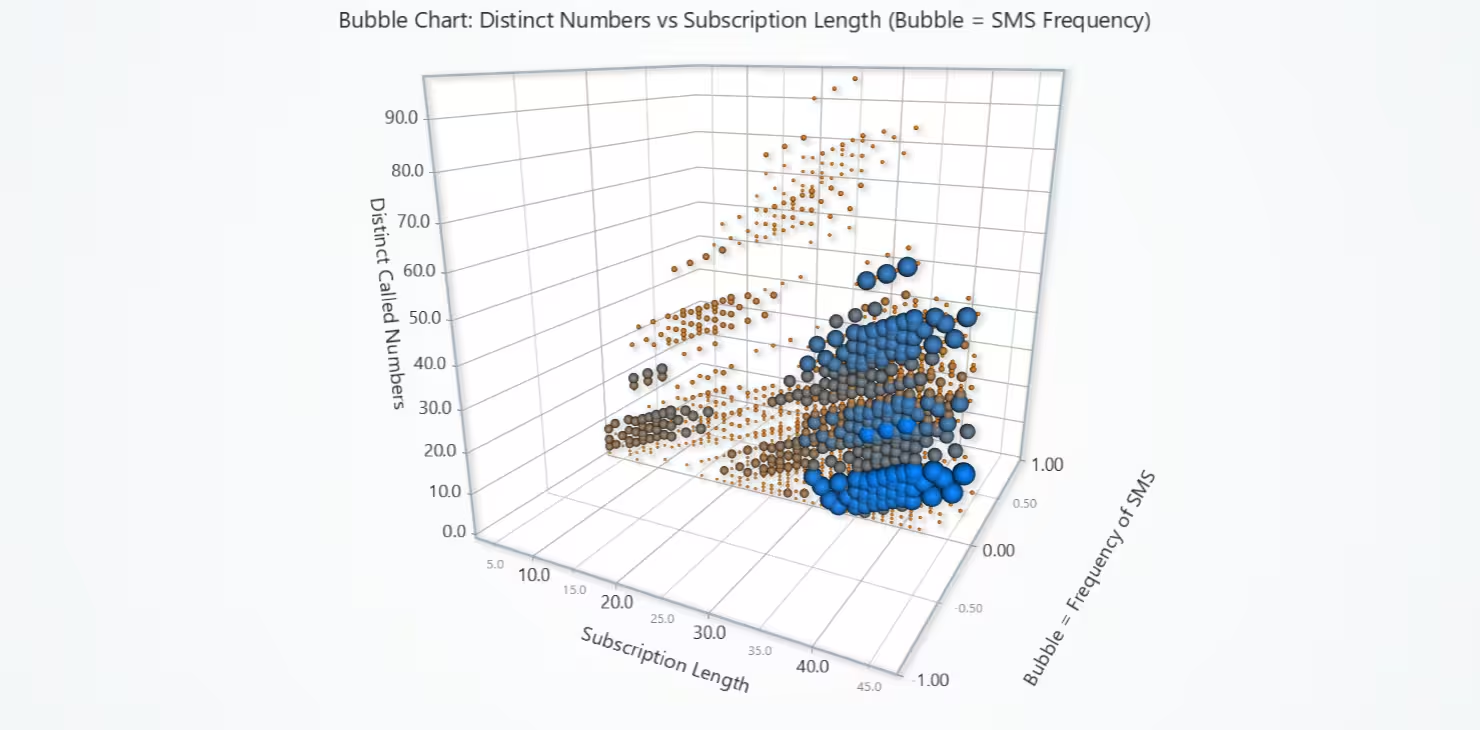
Distinct Numbers vs Subscription Length– 3D Bubble Chart
This visualization shows how user behavior (calling and texting patterns) changes with longer service usage. It reveals usage intensity and communication diversity over time.
# Chart 9 – Distinct Numbers vs Subscription Length (Bubble Chart)
# Developed with AI assistance using LightningChart Python

import lightningchart as lc
import pandas as pd

# Load license
with open("D:/HAMK/Internship/MyProjects/lc_license.txt", "r") as f:
    license_key = f.read().strip()

lc.set_license(license_key)

# === Cleaned dataset ===
df = ccd.copy()
df.drop_duplicates(inplace=True)
df.columns = df.columns.str.replace(r'\s+', ' ', regex=True).str.strip()

# === Select relevant data and normalize bubble sizes ===
df = df[['Subscription Length', 'Distinct Called Numbers', 'Frequency of SMS']].dropna()

# Normalize size values for bubble rendering
min_size, max_size = 4, 30
min_sms = df['Frequency of SMS'].min()
max_sms = df['Frequency of SMS'].max()

def normalize_size(sms):
    return min_size + (sms - min_sms) / (max_sms - min_sms) * (max_size - min_size)

df['Size'] = df['Frequency of SMS'].apply(normalize_size)

# === Create 3D Bubble Chart ===
chart = lc.Chart3D(
    theme=lc.Themes.Light,
    title='Bubble Chart: Distinct Numbers vs Subscription Length (Bubble = SMS Frequency)'
)

# Add 3D point series
series = chart.add_point_series(
    render_2d=False,
    individual_lookup_values_enabled=True,
    individual_point_color_enabled=True,
    individual_point_size_axis_enabled=True,
    individual_point_size_enabled=True,
)

series.set_point_shape('sphere')

# Optional: Color bubbles by SMS frequency (value)
series.set_palette_point_colors(
    steps=[
        {'value': 0.0, 'color': lc.Color(255, 128, 0)},
        {'value': 1.0, 'color': lc.Color(0, 128, 255)},
    ],
    look_up_property='value',
    interpolate=True,
    percentage_values=True
)

# Prepare data for 3D points
data = []
for _, row in df.iterrows():
    data.append({
        'x': row['Subscription Length'],
        'y': row['Distinct Called Numbers'],
        'z': 0,  # keep flat on Z-axis (optional, or use Frequency of SMS)
        'size': row['Size'],
        'value': (row['Frequency of SMS'] - min_sms) / (max_sms - min_sms)  # for color
    })

series.add(data)

chart.get_default_x_axis().set_title("Subscription Length")
chart.get_default_y_axis().set_title("Distinct Called Numbers")
chart.get_default_z_axis().set_title("Bubble = Frequency of SMS")


# Show chart
chart.open()
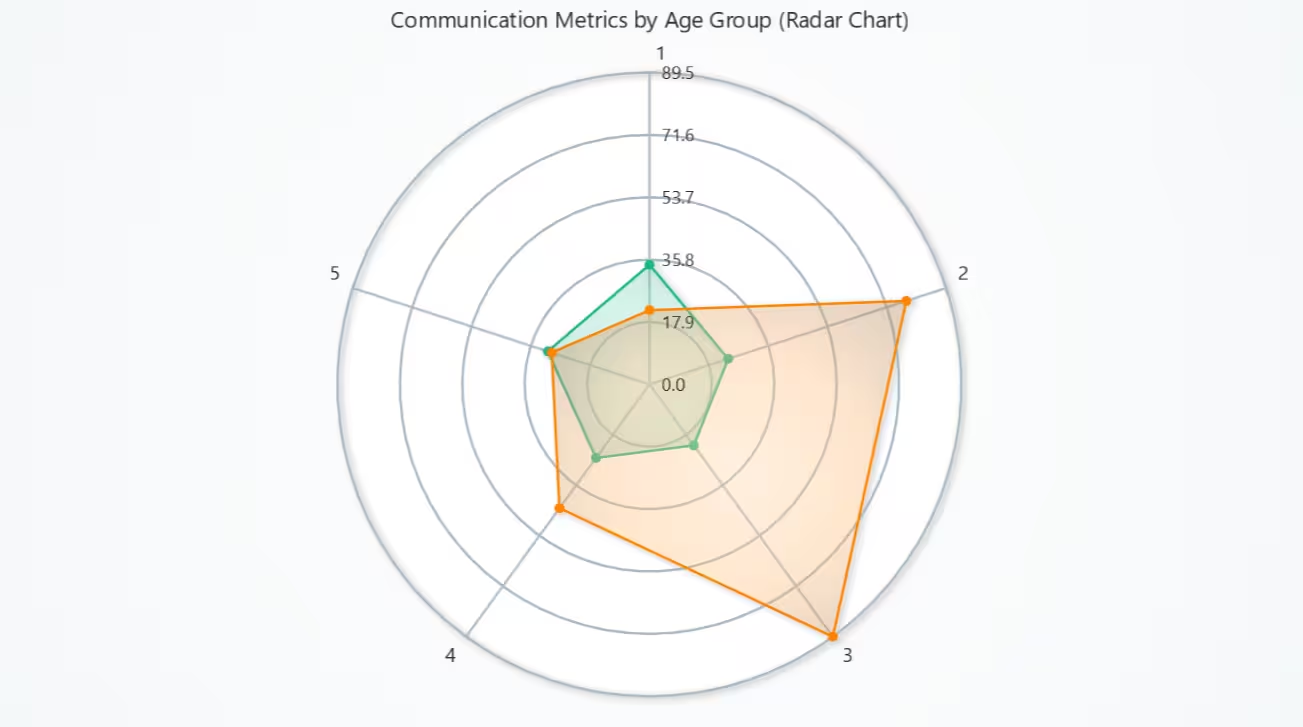
Communication Metrics by Age Group – Radar Chart
The chart reveals communication preferences by age. Younger or middle age groups may favour SMS more, while others rely on calling distinct numbers.
# Chart 10 – Communication Metrics by Age Group (Radar Chart)
# Developed with AI assistance using LightningChart Python

import lightningchart as lc
import pandas as pd

# Load license
with open("D:/HAMK/Internship/MyProjects/lc_license.txt", "r") as f:
    license_key = f.read().strip()
lc.set_license(license_key)

# === Cleaned dataset ===
df = ccd.copy()
df.drop_duplicates(inplace=True)
df.columns = df.columns.str.replace(r'\s+', ' ', regex=True).str.strip()

# === Prepare average communication metrics by Age Group ===
df = df[['Age Group', 'Distinct Called Numbers', 'Frequency of SMS']].dropna()

# Group by Age Group
grouped = df.groupby('Age Group')[['Distinct Called Numbers', 'Frequency of SMS']].mean().round(2)
age_groups = grouped.index.astype(str).tolist()
distinct_avg = grouped['Distinct Called Numbers'].tolist()
sms_avg = grouped['Frequency of SMS'].tolist()

# === Create Radar (Spider) Chart ===
chart = lc.SpiderChart(
    title="Communication Metrics by Age Group (Radar Chart)",
    theme=lc.Themes.Light
)

chart.set_web_mode("circle")     # Circular web layout
chart.set_web_count(5)           # Number of internal rings

# Add axes for each Age Group
for label in age_groups:
    chart.add_axis(label)

# Series 1 – Distinct Called Numbers
series_1 = chart.add_series()
series_1.set_name("Distinct Called Numbers")
series_1.add_points([
    {'axis': age_groups[i], 'value': val} for i, val in enumerate(distinct_avg)
])

# Series 2 – Frequency of SMS
series_2 = chart.add_series()
series_2.set_name("Frequency of SMS")
series_2.add_points([
    {'axis': age_groups[i], 'value': val} for i, val in enumerate(sms_avg)
])

# Open chart
chart.open()
Conclusion
This telecom churn analytics project aimed to visualize and analyze telecom customer behavior, service usage, and churn patterns using the LightningChart Python library. A total of 10 diverse chart types were developed to explore relationships between customer complaints, tariff plans, usage intensity, and communication behavior.
The dataset, sourced from a telecom churn study, was cleaned and transformed using pandas. Visualizations such as grouped bar charts, scatter plots, area charts, 3D bubble plots, and radar charts were constructed to reveal how customer behavior varies across age groups, subscription lengths, call failure rates, and SMS/voice usage.
Each chart was selected to answer specific analytical questions related to customer dissatisfaction, engagement patterns, and behavioural segmentation. The result is a visual dashboard that can help telecom companies identify churn-prone segments, optimize services, and strategize retention efforts.
Continue learning with LightningChart
React Charting Performance
Here's a scenario that plays out across development teams every few months. Someone builds a React dashboard, picks Recharts or Victory because they're popular, the devs love them, and the first demo looks great. Then the dataset gets bigger. Or the data starts...
Javascript Charting Library comparison 2026
Every year someone publishes a listicle of JavaScript charting libraries. They screenshot a demo, note the GitHub stars, paste in the npm install command, and call it a day. Then you follow their recommendation, get six months into your project, and discover that your...

Visualizing 10 Million Data Points in the Browser (2026): The Technical Deep-Dive
Ten Million Data Points in the Browser: How WebGL Makes Mass Datasets Interactive Ten million data points. That number used to mean a database problem, not a front-end problem. Now research teams want to explore it interactively in a browser. Trading desks want...



If you have any questions, feel free to contact us!
©LightningChart Ltd 2025. All rights reserved.