





Ship Fuel Consumption Analysis & CO2 Emissions with LightningChart Python
Tutorial
Assisted by AI
Explore ship fuel consumption analysis and its impact on CO2 emissions to understand how to optimize maritime operations for a greener future.
Fateme Ajam
Data Science Python Developer


Introduction
The maritime industry plays a crucial role in global trade, with ships being the backbone of international transportation. However, as the industry continues to grow, environmental sustainability has become an increasing concern.
In particular, fuel consumption and its impact on CO2 emissions have drawn attention from stakeholders aiming to reduce the industry’s carbon footprint. Efficient fuel use not only helps in minimizing environmental damage but also in optimizing operational costs, a key factor for the financial viability of shipping companies.
This study explores the relationship between fuel consumption, CO2 emissions, and distance traveled by different types of ships, utilizing data collected from various maritime operations. The analysis covers four types of ships: Oil Service Boats, Fishing Trawlers, Surfer Boats, and Tanker Ships.
By comparing key metrics such as fuel consumption and CO2 emissions, this research aims to provide insights into how various operational factors affect the environmental and economic performance of ships.
Through visual representations, including scatter plots, bubble charts, and line graphs, this study aims to highlight the trends, disparities, and opportunities for reducing fuel consumption and emissions across different ship types.
The ultimate goal is to present data-driven insights that can inform policy-making, operational strategies, and technological improvements in the maritime industry, contributing to the broader efforts of achieving a more sustainable and efficient shipping industry.
About the Dataset
This dataset provides a detailed overview of fuel consumption and CO2 emissions for various ship types operating in Nigerian waterways. It includes data on ship types, routes, engine efficiency, fuel consumption, Month and emissions, making it suitable for environmental impact studies, maritime operations optimization.
LightningChart Python
LightningChart Python is a powerful and fast data visualization library designed for creating interactive and high-performance charts. It allows users to easily create a wide variety of charts, including line, scatter, bubble, and heatmap charts, with full customization options for colors, shapes, and data series.
Its interactive features, such as tooltips, zooming, and real-time updates, make it an excellent choice for visualizing complex datasets. With its intuitive API and performance optimization, LightningChart enables users to quickly generate clear, dynamic visualizations for both small and large datasets.

Setting Up Python Environment
First, you need to install Python: Download and install the latest version of Python from the official Python website. Second, you need to import Pandas and LightningChart:
import pandas as pd
import lightningchart as lc
import time
import numpy as np
Visualizing Data with LightningChart Python
LightningChart offers a powerful way to visualize complex datasets in real-time. Below, we’ll create several visualizations to explore temperature and rainfall trends in Bangladesh over the years:
Analysis of Ship Performance Metrics
This dashboard highlights key patterns in ship performance metrics, showing a strong positive correlation between fuel consumption and CO2 emissions, indicating that higher fuel usage directly increases emissions.
The engine efficiency varies notably across ship types, with some maintaining higher efficiency despite similar fuel consumption.
The distribution charts reveal that most ships operate within a moderate range of fuel consumption and emissions, with fewer extreme outliers. The engine efficiency distribution also suggests that ships tend to cluster around specific efficiency levels, likely reflecting standard practices or design features.
These insights can support strategies to improve fuel efficiency and reduce emissions across different ship categories.
selected_columns = ['fuel_consumption', 'CO2_emissions', 'engine_efficiency']
ship_types = data["ship_type"].unique()

dashboard = lc.Dashboard(columns=len(selected_columns), rows=len(selected_columns), theme=lc.Themes.Dark)

colors = {ship_type: lc.Color(r, g, b, 150) for ship_type, (r, g, b) in zip(ship_types, [(255, 0, 0), (0, 255, 0), (0, 0, 255), (255, 165, 0)])}
global_legend = dashboard.add_legend()
added_series_names = set()

def create_scatter_chart(x_values, y_values, xlabel, ylabel, column_index, row_index, ship_types_column):
    chart = dashboard.ChartXY(column_index=column_index, row_index=row_index)
    for ship_type in ship_types:
        scatter_series = chart.add_point_series().add(x_values[ship_types_column == ship_type], y_values[ship_types_column == ship_type]).set_point_color(colors[ship_type]).set_point_size(5).set_name(ship_type)
        if ship_type not in added_series_names:
            global_legend.add(scatter_series)
            added_series_names.add(ship_type)

def add_area_chart(feature_data, feature_name, ship_types_column, column_index, row_index):
    chart = dashboard.ChartXY(column_index=column_index, row_index=row_index)
    for ship_type in ship_types:
        hist, bins = np.histogram(feature_data[ship_types_column == ship_type], bins=30)
        chart.add_area_series().append_samples(x_values=bins[:-1].tolist(), y_values=hist.tolist()).set_fill_color(colors[ship_type]).set_name(ship_type)

for i, x_column in enumerate(selected_columns):
    for j, y_column in enumerate(selected_columns):
        if i == j:
            add_area_chart(data[x_column], x_column, data["ship_type"], i, j)
        else:
            create_scatter_chart(data[x_column], data[y_column], x_column, y_column, i, j, data["ship_type"])

dashboard.open()
Radar Chart: Ship Type Performance Analysis Across Key Metrics
The radar chart shows distinct performance profiles for each ship type. For example, oil service boats may have higher fuel consumption and emissions but demonstrate better efficiency compared to fishing trawlers or tanker ships.
Meanwhile, some ship types like surfer boats may balance efficiency with lower emissions and moderate distance coverage. The normalization reveals that no ship type excels in all categories, indicating trade-offs between efficiency, distance, and environmental impact.
df = pd.read_csv("ship_fuel_efficiency.csv")
chart = lc.SpiderChart(theme=lc.Themes.TurquoiseHexagon, title="Ship Type Performance Radar Chart")
chart.set_web_mode("circle").set_web_count(5)

metrics = ['Distance', 'Fuel Consumption', 'CO2 Emissions', 'Engine Efficiency']
for metric in metrics:
    chart.add_axis(metric)

data_normalized = df.groupby('ship_type').mean().reset_index()
for i, row in data_normalized.iterrows():
    values = row[['distance', 'fuel_consumption', 'CO2_emissions', 'engine_efficiency']].values.tolist()
    chart.add_series().set_name(row['ship_type']).add_points([{'axis': metrics[j], 'value': values[j]} for j in range(len(metrics))])

chart.add_legend().add(chart)
chart.open()
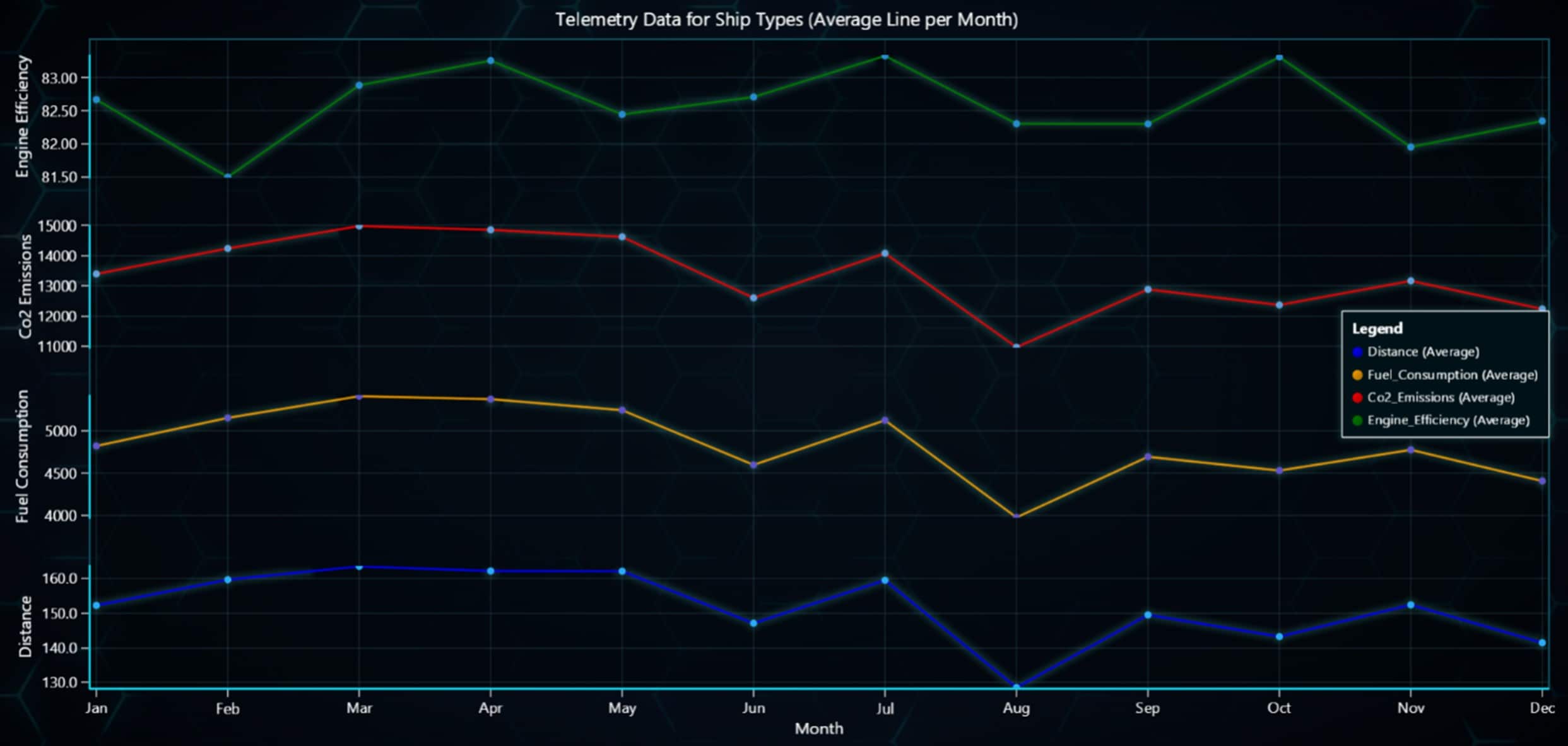
The line chart shows that all metrics, including distance, fuel consumption, and CO2 emissions, follow a relatively similar trend throughout the months, with slight peaks and drops.
However, the green line representing engine efficiency follows a different pattern, showing more noticeable stability and less fluctuation compared to the other metrics. This suggests that while operational factors affect consumption and emissions similarly, engine efficiency remains more consistent over time.
Line Chart: Monthly Telemetry Data for Ship Types
The line chart shows that all metrics, including distance, fuel consumption, and CO2 emissions, follow a relatively similar trend throughout the months, with slight peaks and drops.
However, the green line representing engine efficiency follows a different pattern, showing more noticeable stability and less fluctuation compared to the other metrics. This suggests that while operational factors affect consumption and emissions similarly, engine efficiency remains more consistent over time.
df = pd.read_csv("9.fuel/ship_fuel_efficiency.csv")
df['month'] = pd.to_datetime(df['month'], format='%B').dt.strftime('%b')
df.dropna(subset=['distance', 'fuel_consumption', 'CO2_emissions', 'engine_efficiency'], inplace=True)
df['month_index'] = df['month'].map({month: i + 1 for i, month in enumerate(['Jan', 'Feb', 'Mar', 'Apr', 'May', 'Jun', 'Jul', 'Aug', 'Sep', 'Oct', 'Nov', 'Dec'])})

chart = lc.ChartXY(theme=lc.Themes.TurquoiseHexagon, title='Telemetry Data for Ship Types (Average Line per Month)')
chart.get_default_y_axis().dispose()

for column in ['distance', 'fuel_consumption', 'CO2_emissions', 'engine_efficiency']:
    y_axis = chart.add_y_axis()
    series = chart.add_line_series(y_axis=y_axis, data_pattern='ProgressiveX')
    monthly_avg = df.groupby('month_index')[column].mean().reset_index()
    series.add(monthly_avg['month_index'], monthly_avg[column])

chart.open()
Bar Chart: Monthly Comparison of Ship Performance Metrics by Type
This bar chart dashboard compares the monthly distribution of fuel consumption, CO2 emissions, distance traveled, and engine efficiency across different ship types.
The charts show that tanker ships generally dominate fuel consumption and CO2 emissions, reflecting their large size and operational demands.
In contrast, other ship types, such as surfer boats and fishing trawlers, exhibit lower values for these metrics. The distance chart highlights the varying usage patterns for each ship type, while the engine efficiency chart shows relatively stable performance across months, with minor fluctuations among ship types.
df = pd.read_csv("ship_fuel_efficiency.csv").dropna(subset=["month"])

df["month"] = pd.Categorical(df["month"], categories=["January", "February", "March", "April", "May", "June",
                                                       "July", "August", "September", "October", "November", "December"], ordered=True)

dashboard = lc.Dashboard(columns=2, rows=2, theme=lc.Themes.TurquoiseHexagon)

for i, variable in enumerate(['fuel_consumption', 'CO2_emissions', 'distance', 'engine_efficiency']):
    pivot_data = df.groupby(["month", "ship_type"])[variable].sum().unstack(fill_value=0).sort_index()
    months = pivot_data.index.tolist()
    values = [{'subCategory': ship_type, 'values': pivot_data[ship_type].tolist()} for ship_type in pivot_data.columns]

    chart = dashboard.BarChart(column_index=i % 2, row_index=i // 2, vertical=True)
    chart.set_title(f'{variable.replace("_", " ").title()} by Ship Type for Each Month')
    chart.set_data_grouped(months, values).set_sorting('disabled')
    chart.set_label_rotation(45).set_value_label_display_mode("insideBar")
    chart.add_legend().add(chart)

dashboard.open()
Box Plot: Impact of Weather Conditions on Ship Performance Metrics
This box plot compares ship performance metrics—fuel consumption, CO2 emissions, and engine efficiency—across different weather conditions: calm, moderate, and stormy. The spread of the data highlights how metrics are influenced by varying weather.
For instance, stormy conditions exhibit greater variability and outliers, particularly in CO2 emissions and fuel consumption, indicating higher stress on the ships.
In contrast, calmer conditions show more consistent performance with narrower interquartile ranges, especially for engine efficiency. This visualization provides valuable insights into the operational resilience of ships under different environmental conditions.
ship_data = pd.read_csv("ship_fuel_efficiency.csv")
categories = {'Fuel Consumption': 'fuel_consumption', 'CO2 Emissions': 'CO2_emissions', 'Engine Efficiency': 'engine_efficiency'}
weather_conditions = ['Calm', 'Moderate', 'Stormy']

chart = lc.ChartXY(theme=lc.Themes.TurquoiseHexagon, title='Box Plot: Weather Conditions vs Ship Metrics')
series = chart.add_box_series()

for label, column_name in categories.items():
    for condition in weather_conditions:
        data = ship_data[ship_data['weather_conditions'] == condition][column_name].dropna().tolist()
        if data:
            series.add()

chart.add_point_series(sizes=True)
chart.add_legend(title='Weather Conditions')
chart.get_default_x_axis().add_custom_tick()
chart.open()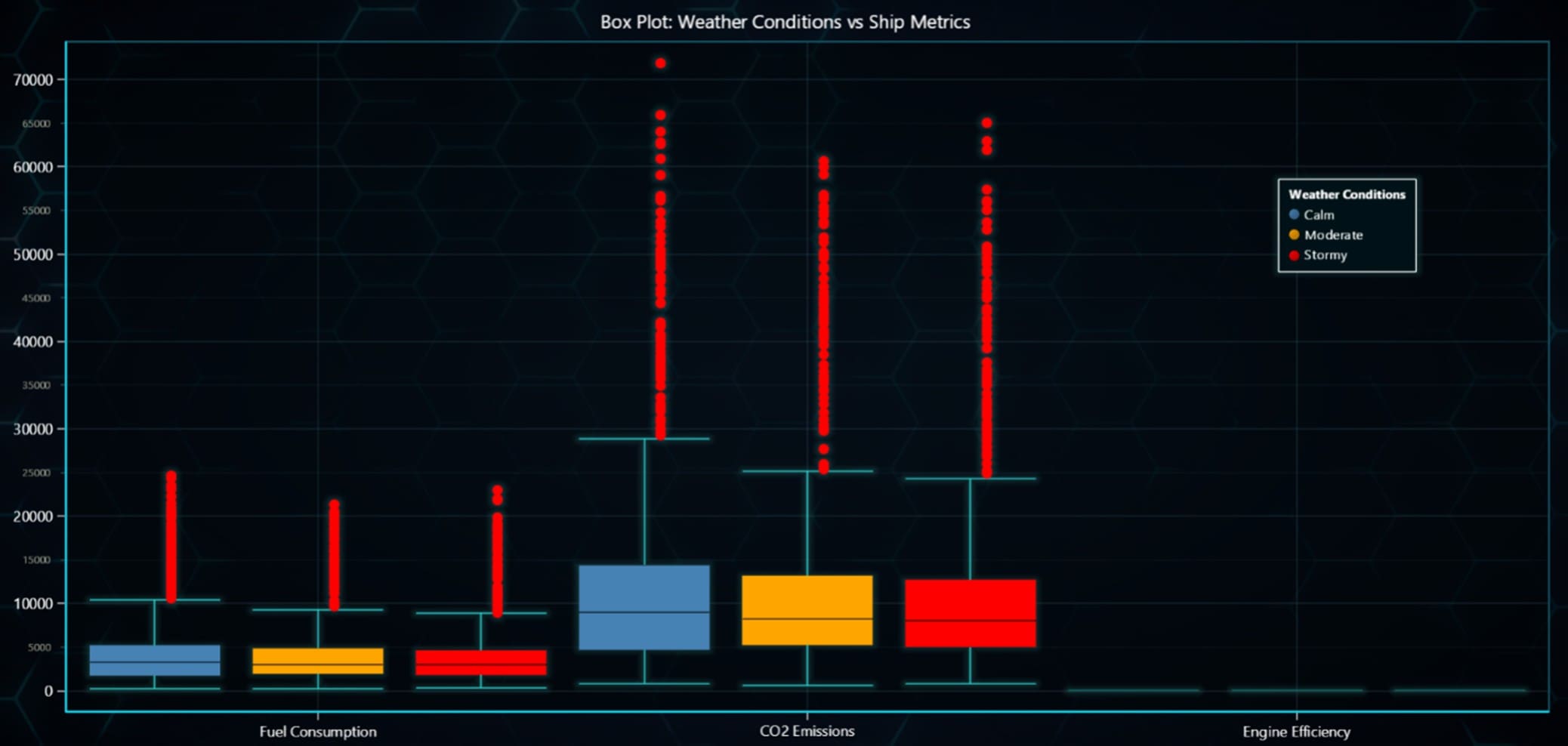
Heatmap: Monthly Fuel Consumption by Shipping Routes
This heatmap visualizes fuel consumption intensity across different shipping routes and months. The red regions indicate high fuel consumption, while blue areas represent lower consumption levels.
Patterns reveal that certain routes consistently exhibit higher fuel usage during specific months, potentially due to seasonal demand or operational factors. This visualization aids in identifying peak fuel consumption periods and routes requiring optimization.
route_month_data = ship_data.pivot_table(values=['fuel_consumption'], index='route_id', columns='month', aggfunc='sum', fill_value=0)
month_order = ['January', 'February', 'March', 'April', 'May', 'June', 'July', 'August', 'September', 'October', 'November', 'December']
fuel_consumption_data = route_month_data[[f'fuel_consumption_{month}' for month in month_order]].values

chart = lc.ChartXY(title='Fuel Consumption Heatmap by Route and Month', theme=lc.Themes.Dark)
heatmap_series = chart.add_heatmap_grid_series(columns=len(month_order), rows=min(len(route_month_data), 15))
heatmap_series.set_intensity_interpolation(True).invalidate_intensity_values(fuel_consumption_data[:15].tolist())
heatmap_series.set_palette_coloring([{"value": np.min(fuel_consumption_data), "color": lc.Color(0, 0, 255)}, {"value": np.max(fuel_consumption_data), "color": lc.Color(255, 0, 0)}])

x_axis = chart.get_default_x_axis()
for i, month in enumerate(month_order):
    x_axis.add_custom_tick().set_value(i).set_text(month)

y_axis = chart.get_default_y_axis()
for i, route in enumerate(route_month_data.index[:15]):
    y_axis.add_custom_tick().set_value(i).set_text(route)

chart.add_legend(data=heatmap_series).set_title('Fuel Consumption Intensity')
chart.open()
Scatter Plot: Fuel Consumption vs Distance by Ship Type
This scatter plot visualizes the relationship between fuel consumption and distance traveled for different ship types. Each ship type is represented by a distinct color, and the chart shows how fuel consumption increases as the distance covered by the ships grows.
The red color (representing tanker ships) shows the highest fuel consumption, particularly for longer distances, while other ship types such as surfer boats (green) and fishing trawlers (orange) demonstrate different fuel consumption patterns across various distances.
df = pd.read_csv("ship_fuel_efficiency.csv")
df_filtered = df[['distance', 'fuel_consumption', 'ship_type']]

color_palette = {
    'Oil Service Boat': lc.Color('steelblue'),
    'Fishing Trawler': lc.Color('orange'),
    'Surfer Boat': lc.Color('lightgreen'),
    'Tanker Ship': lc.Color('tomato'),
}

chart = lc.ChartXY(title="Fuel Consumption vs Distance by Ship Type", theme=lc.Themes.Dark)
chart.get_default_x_axis().set_title("Distance (km)")
chart.get_default_y_axis().set_title("Fuel Consumption (liters)")

for ship_type in df_filtered['ship_type'].unique():
    data_subset = df_filtered[df_filtered['ship_type'] == ship_type]
    point_series = chart.add_point_series()
    point_series.set_name(ship_type)
    point_series.set_point_color(color_palette[ship_type])
    point_series.add(x=data_subset['distance'].values, y=data_subset['fuel_consumption'].values)

chart.add_legend().add(chart)
chart.open()
CO2 Emissions Bubble Chart for Different Ship Types – Ship fuel consumption analysis
This ship fuel consumption analysis dashboard contains bubble charts for different ship types, showing the relationship between CO2 emissions, fuel consumption, and distance traveled. The size of each bubble represents the level of CO2 emissions, with larger bubbles indicating higher emissions.
The color intensity shifts from green (low emissions) to red (high emissions), providing a clear visual representation of fuel consumption and environmental impact across various distances for each ship type. This visual tool can help identify the efficiency of different ship types concerning their emissions and fuel consumption patterns.
dashboard = lc.Dashboard(columns=2, rows=(len(ship_types) + 1) // 2, theme=lc.Themes.Dark)

for i, ship_type in enumerate(ship_types):
    df_filtered = dataset[dataset['ship_type'] == ship_type]

    chart = dashboard.ChartXY(column_index=i % 2, row_index=i // 2, title=f'CO2 Emissions Bubble Chart for {ship_type}')

    series = chart.add_point_series(sizes=True, lookup_values=True)
    x_values = df_filtered['distance'].values
    y_values = df_filtered['fuel_consumption'].values
    sizes = (df_filtered['CO2_emissions'].values / df_filtered['CO2_emissions'].max()) * 100
    lookup_values = df_filtered['CO2_emissions'].values

    series.append_samples(x_values=x_values, y_values=y_values, sizes=sizes, lookup_values=lookup_values)
    series.set_individual_point_color_enabled(True)
    series.set_palette_point_coloring(steps=[{'value': lookup_values.min(), '	color':lc.Color(50, 200, 50, 128)},
    {'value': lookup_values.max(), 'color': lc.Color(255, 0, 0, 128)}],
                                      look_up_property='value')

    chart.get_default_x_axis().set_title("Distance (km)")
    chart.get_default_y_axis().set_title("Fuel Consumption (liters)")

dashboard.open()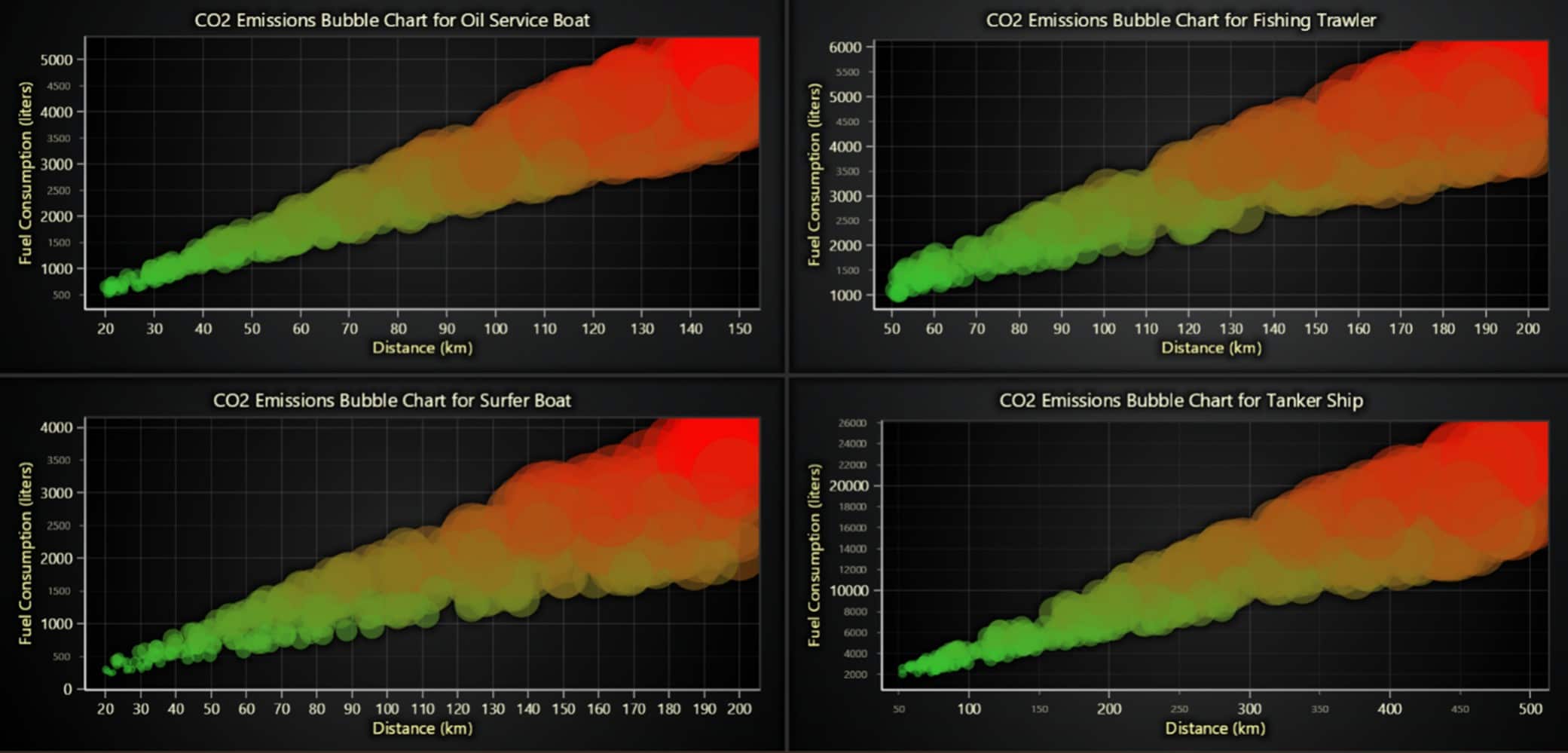
Comparison of Fuel Consumption and CO2 Emissions Across Different Ship Types
The provided chart compares key metrics—fuel consumption and CO2 emissions—across different types of ships (Oil Service Boat, Fishing Trawler, Surfer Boat, and Tanker Ship). The chart plots the relationship between distance traveled and both fuel consumption and CO2 emissions.
The data shows clear differences in how each ship type behaves in terms of fuel consumption and CO2 emissions. As the distance increases, there is a noticeable increase in fuel consumption and CO2 emissions for all ship types.
Tanker ships, for instance, exhibit a much higher rate of fuel consumption and CO2 emissions compared to other ship types, particularly as the distance grows.
chart = lc.ChartXY(
    theme=lc.Themes.Black,
    title="Comparison of Metrics for Different Ship Types"
)

# Define metrics
metrics = ['fuel_consumption', 'CO2_emissions']

# Set point shapes and colors for ship types
shapes = ['circle', 'triangle', 'square', 'diamond', 'cross']
colors = [(70, 130, 180), (255, 99, 71), (34, 139, 34), (255, 165, 0), (128, 0, 128)]

# Add legend
legend = chart.add_legend()

# Plot data
for i, ship_type in enumerate(df['ship_type'].unique()):
    for j, metric in enumerate(metrics):
        df_filtered = df[df['ship_type'] == ship_type].sort_values(by='distance')
        series = chart.add_point_line_series()
        series.set_name(f"{metric.title()} ({ship_type})")
        series.set_point_shape(shapes[i % len(shapes)])
        series.set_line_color(lc.Color(*colors[j % len(colors)]))
        series.add(x=df_filtered['distance'], y=df_filtered[metric])
        legend.add(series)

# Set axis titles
chart.get_default_x_axis().set_title("Distance (km)")
chart.get_default_y_axis().set_title("Values (scaled)")

# Show chart
chart.open()
Conclusion
Using LightningChart Python in this ship fuel consumption analysisand CO2 emissions helped provide a clear and easy-to-understand analysis of how different types of ships perform environmentally.
The tool made it possible to create interactive charts that showed key metrics like fuel usage, emissions, and distance traveled. From bubble charts to scatter plots, each chart gave important insights into the environmental impact of different ships.
LightningChart worked well even with large datasets and allowed for real-time updates, making it a powerful tool for this analysis. The ability to combine various types of charts, such as line, bubble, and scatter charts, into one dashboard helped present the data in a clear and engaging way. This experience showed that LightningChart is not only great for making beautiful charts but also a strong tool for explaining complex data.
In summary, LightningChart Python was a valuable tool for turning ship data into meaningful insights, making it a great choice for creating advanced visualizations in environmental studies and sustainability analysis in the maritime industry.
Continue learning with LightningChart
![[Tutorial] How to embed interactive charts in PowerPoint presentations](https://lightningchart.com/wp-content/uploads/2022/12/Interactive-Charts-in-PowerPoint-feature-image.jpg)
[Tutorial] How to embed interactive charts in PowerPoint presentations
Written by a human | Updated on April 9th, 2025Embed interactive charts in PowerPoint presentations Embedding charts within PowerPoint presentations has always been possible but perhaps one of the most ignored possibilities is actually embedding web applications...
Motorsports Analytics
Updated on April 10th, 2025 | Written by human Motorsports Analytics Large companies in the motorsports industry are collecting huge volumes of real-time data coming from different sources on and off the pitch during racing competitions. These data are both...
High-Performance Charting Controls for Fintech App Development
Written by a human | Updated on April 10th, 2025Charting Controls for Fintech Apps Money makes the world go round and as such, tracking and controlling financial transactions and information are some of the most important activities to do for any...





If you have any questions, feel free to contact us!
©LightningChart Ltd 2026. All rights reserved.