





LightningChart PythonPredictive Maintenance Python Application for Industrial Machines Analytics
TutorialCreate a predictive maintenance Python application with LightningChart Python
Written by a human | Updated on April 23rd, 2025
Predictive Maintenance Python Application
Predictive maintenance is a proactive approach to maintaining industrial machines by predicting when maintenance should be performed. This technique leverages data analysis and machine learning to forecast equipment failures, allowing for maintenance to be scheduled at the most opportune times, thus reducing downtime and improving efficiency.
Predictive maintenance analysis in Python involves using Python’s powerful libraries to analyze data and create models that predict when machines are likely to fail. (Machine Learning for Predictive Maintenance: Reinventing Asset Upkeep — ITRex, n.d.)
A predictive maintenance application leverages historical data, real-time data, and advanced analytics to provide actionable insights and alerts regarding the health of industrial machines. The application aims to demonstrate how Python can be effectively used for predictive maintenance, providing insights and alerts about the health of industrial machines. (What Is Predictive Maintenance?, 2024)
LightningChart Python

LightningChart is a high-performance charting library designed for creating advanced data visualizations in Python. It offers a wide range of features and chart types, making it ideal for creating complex dashboards and data analysis tools. Key features include high rendering performance, a variety of chart types (e.g., line charts, heatmaps, bar charts), and extensive customization options. (LightningChart Python API Reference, n.d.)
Features and Chart Types to be used in the Project
In this project, we will use several chart types offered by LightningChart, including:
- XY and Line Charts for displaying time series data
- Heatmaps for visualizing temperature distributions
- Bar Charts for comparing temperature metrics across different periods
- Area Charts for density estimation of temperature distributions
Performance Characteristics
LightningChart is a high-performance charting library designed for creating advanced data visualizations in Python. It offers a wide range of features and chart types, making it ideal for building complex dashboards and data analysis tools. LightningChart’s key features include high rendering performance, a variety of chart types (such as line charts, heatmaps, and bar charts), and extensive customization options.
Setting Up Python Environment
Installing Python and necessary libraries
To get started with predictive maintenance analysis using Python, you need to have Python installed on your system. Additionally, you’ll need to install the necessary libraries, including NumPy, Pandas, LightningChart, and various machine learning libraries like Scikit-learn.
pip install lightningchart==0.7.0
pip install numpy pandas changefinder scikit-learn
Overview of libraries used
- NumPy: Used for numerical operations and handling arrays.
- Pandas: Provides data structures and data analysis tools.
- LightningChart: For creating high-performance data visualizations.
- ChangeFinder: For change detection in time series data.
- Scikit-learn: For implementing machine learning models.
Setting up your development environment
1. Set up your development environment by creating a virtual environment and installing the necessary libraries. This ensures that your project dependencies are isolated and manageable.
python -m venv env
source env/bin/activate
pip install -r requirements.txt
2. Using Visual Studio Code (VSCode)
Visual Studio Code (VSCode) is a popular code editor offering rich features to enhance your development workflow.
Loading and Processing Data
How to load the data files
The data file used in this project is machine_temperature_system_failure.csv, which contains temperature sensor data of an internal component of a large industrial machine. Load the data using Pandas (Industrial Machine Anomaly Detection, n.d.):
import pandas as pd
file_path = 'path/to/machine_temperature_system_failure.csv'
data = pd.read_csv(file_path)
Handling and processing the data
Preprocess the data by converting the timestamp to a DateTime object, extracting relevant features like year, month, day, hour, and minute, and normalizing the temperature values if necessary.
data['timestamp'] = pd.to_datetime(data['timestamp'])
data['year'] = data['timestamp'].dt.year
data['month'] = data['timestamp'].dt.month
data['day'] = data['timestamp'].dt.day
data['hour'] = data['timestamp'].dt.hour
data['minute'] = data['timestamp'].dt.minute
Visualizing Data with LightningChart
LightningChart provides a user-friendly API for creating complex visualizations. You can add multiple charts to a dashboard and customize them extensively to suit your analysis needs.
Heatmaps
Create various charts to visualize the data:
- Heatmap: Replaces the Year/Month Count diagram to visualize temperature distributions over time. Heatmaps allow for a comprehensive overview of the machine’s performance by displaying data over a continuous time frame, aiding in long-term analysis and planning.
Refer to the GitHub documentation to access the Python code for creating the heatmap diagram.

Heatmap diagram for a predictive maintenance Python application
Line Charts
To understand the distribution of given anomaly points and temperature mean over time and also to display detected anomaly points using different models. Line charts with anomaly points marked highlight exactly when anomalies occur, helping correlate these events with operational logs or external factors. Continuous monitoring of temperature trends helps in identifying gradual changes that might indicate wear and tear, allowing for predictive maintenance before failures occur.
Refer to the GitHub documentation to access the Python code for creating the line chart.

TimeSeries Analysis Diagrams
Here the multiple charts provide a side-by-side comparison of various anomaly detection models, helping identify the most effective model for a given dataset. Highlighting anomalies directly on the temperature trend allows for quick identification of unusual patterns, aiding in timely maintenance actions.
These visualizations help in evaluating the performance of different models, making it easier to choose the most suitable one for predictive maintenance tasks. Refer to the GitHub documentation for creating the following diagram.

All anomaly-detection models diagrams
Bar Charts
To compare mean, max, and min temperatures across different periods. They provide a clear statistical summary of the dataset, such as mean, maximum, and minimum temperatures, facilitating a quick understanding of data distribution. Visualizing counts and temperature statistics by month helps in identifying specific periods with higher or lower activity, which could correlate with operational changes or issues.
Refer to the GitHub documentation to access the Python code for creating the line chart.

Python bar chart diagrams
Area Charts
Area charts effectively show the distribution and density of temperature data over time, helping identify trends and patterns that might indicate potential issues. By breaking down data by year and month, these charts allow for detailed temporal analysis, making it easier to spot seasonal or cyclical trends. Comparing distributions over different time periods can highlight changes in the machine’s operating conditions, aiding in proactive maintenance scheduling.
Refer to the GitHub documentation to access the Python code for creating the line chart.
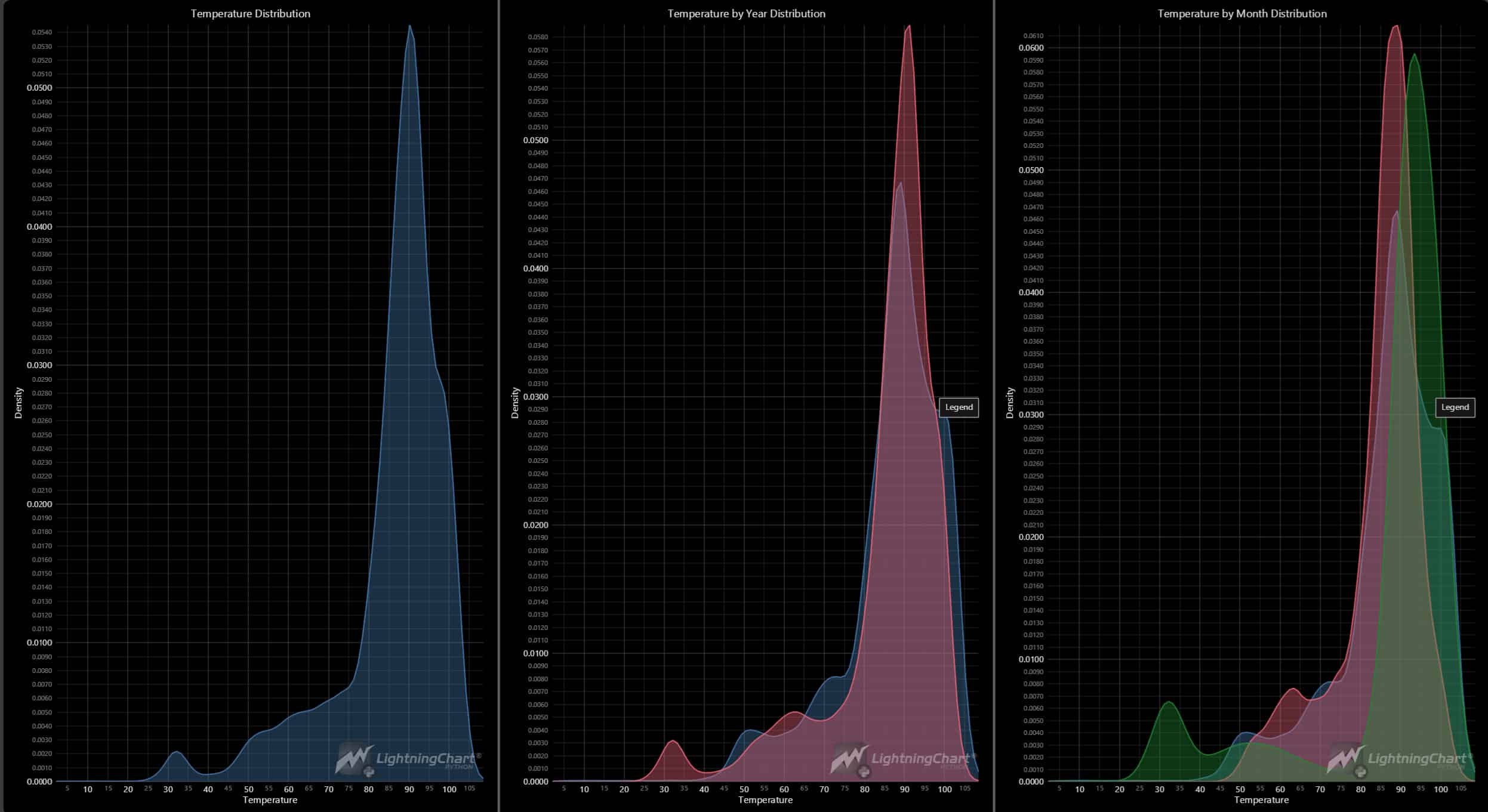
Python area chart diagrams
Creating Dashboard
The following dashboard demonstrates the diagrams selected for creating the final application. Refer to the GitHub documentation for accessing the code.

Predictive maintenance Python application – dashboard with selected diagrams
Conclusion
In this project, we demonstrated how to build a predictive maintenance application using Python and LightningChart. By leveraging these tools, organizations can transform raw sensor data into actionable insights, ensuring efficient and reliable machine operations. The comprehensive visualizations not only aid in anomaly detection but also facilitate informed decision-making, ultimately contributing to improved operational efficiency and cost savings. As technology continues to advance, the methodologies and tools discussed here will remain integral to the ongoing evolution of predictive maintenance practices.
Benefits of Using LightningChart Python for Visualizing Data
LightningChart offers high-performance, customizable visualizations that are crucial for handling large datasets and real-time data. Its ability to create complex, interactive dashboards makes it an excellent choice for predictive maintenance applications in the industry. This is crucial for industrial applications where sensor data is continuously collected over long periods. The LightningChart’s ability to handle data in real-time allows for immediate visualization and analysis, facilitating timely maintenance decisions and actions.
LightningChart offers a wide range of chart types that enable users to select the most appropriate visualization for their specific analysis needs. ach chart type provides unique insights. For example, heatmaps reveal patterns over time, while bar charts summarize statistical information. This diversity ensures that all aspects of the data can be thoroughly explored.
LightningChart diagrams are more interactive and enable users to visualize intuitively. Users can zoom in on specific periods or data points and pan across the dataset, making it easier to investigate anomalies and trends in detail. Interactive elements such as tooltips and hover effects enhance the user experience by providing additional information without cluttering the visualizations.
Integrating LightningChart with Python allows users to leverage Python’s powerful data processing and analysis capabilities. This combination enhances the overall effectiveness of the maintenance analysis process. Python’s simplicity and extensive library support, combined with LightningChart’s advanced visualization features, make it easy for analysts to develop and deploy predictive maintenance analysis.

Soroush Sohrabian
Software Developer


Continue learning with LightningChart
What Is LiDAR Data Visualization?
LiDAR Data Visualization The LiDAR method conveys another yet complex level of data visualization as it is widely used in demanding industries that require plotting, e.g., topographic or cartography 3D data. But the use of LiDAR goes further as it is also used...
Android
Written by a human | Updated on April 9th, 2025Android Charts Here's a new article I'm really excited about...this time, we will create an android charts data visualization application. For this application, we will work with Android Studio and LightningChart JS...

Create a JavaScript Scatter Plot
Written by a human | Updated on April 9th, 2025LightningChart JS This is a quick technical look into some interesting features of LightningChart JS XY charts and how to create an embedded scatter chat and add custom interactions to it using LightningChart JS....





If you have any questions, feel free to contact us!
©LightningChart Ltd 2026. All rights reserved.