





LightningChart PythonA Python Analysis of The Share of The Population Access to Electricity
TutorialImplementation of the analysis with LightningChart Python
Written by a human | Updated on April 24th, 2025
Population Access to Electricity Analysis
Access to electricity is a key factor in socio-economic development. The dataset on “share of the population with access to electricity” provides an insightful overview of the electrification progress made by various countries from 1990 to 2021. This data is crucial for understanding the global trends in energy access and identifying regions that are lagging behind.
Electricity access plays a pivotal role in driving economic growth, enhancing education, and improving healthcare. Studies have shown that countries with higher electrification rates tend to experience faster economic development and better living standards (Stern et al., 2019). The impact of electricity on economic output has been widely documented in research, with evidence showing that access to reliable electricity fosters industrialization and urbanization (Burke, 2018; Stern, 2019). Furthermore, energy infrastructure improvements have led to sustained economic gains in many parts of the world (Sovacool, 2013).
Despite global progress, some countries still face significant challenges in providing electricity to their populations. Regions such as Sub-Saharan Africa and South Asia continue to report low electrification rates. Countries like Afghanistan, Liberia, and Chad have some of the lowest access rates to electricity, often hampered by poor infrastructure and unstable energy policies (Burke & Stephens, 2018; Sovacool, 2010). In fact, it is estimated that nearly 800 million people still live without electricity worldwide, most of them concentrated in rural areas of low-income countries (Sovacool et al., 2018).

The importance of electricity access cannot be overstated. Without it, countries struggle to meet the needs of their growing populations and improve their economic prospects. Studies like those of Stern (2019) and Burke (2018) highlight the transformative effects that electrification can have on economies, particularly in reducing poverty and supporting sustainable development. The relationship between electricity access and economic prosperity has been consistently demonstrated across a variety of regions and development stages (Sovacool et al., 2013; Sovacool, 2010).
In light of these findings, it is clear that improving access to electricity is a fundamental goal for policymakers around the world. Efforts to expand electrification have already yielded significant progress, but much remains to be done to ensure universal access. The analysis presented here will provide insights into the current state of electricity access globally, offering visualizations of the trends and highlighting areas where further improvements are needed.
LightningChart Python

LightningChart Python is a high-performance data visualization library designed for handling large datasets and real-time data-driven applications. It supports a wide range of customizable charts, making it perfect for analyzing electricity access data across countries and regions. The library’s ability to manage large datasets while maintaining real-time performance makes it an excellent choice for this analysis.
About Dataset & Charts
The dataset contains information on the percentage of the population with access to electricity for various countries from 1990 to 2021. It tracks global electrification trends, highlighting disparities in access between regions and showing progress over time for individual nations. The data offers valuable insights into which areas still face challenges in providing reliable electricity and where significant improvements have been made.
Key Data Points in Electricity Access Analysis
Electricity access analysis focuses on several key variables, including:
- Access percentage: This metric represents the percentage of the population with access to electricity over time.
- Country progress: It highlights how different countries have improved (or stagnated) in providing electricity to their citizens.
Chart Types to be used in the Project
In this project, we leverage several of LightningChart Python’s chart types to visualize the trends and disparities in electricity access:
- Line Charts: Line charts are used to track electricity access trends over time across countries. These charts reveal the progress made by countries like India and Brazil while identifying those that still face challenges.
- Polar Charts: Polar charts are ideal for comparing electricity access across multiple countries in a circular layout. In this project, they help visualize access data for countries like Nigeria and Zambia, offering a distinct visual perspective on global disparities.
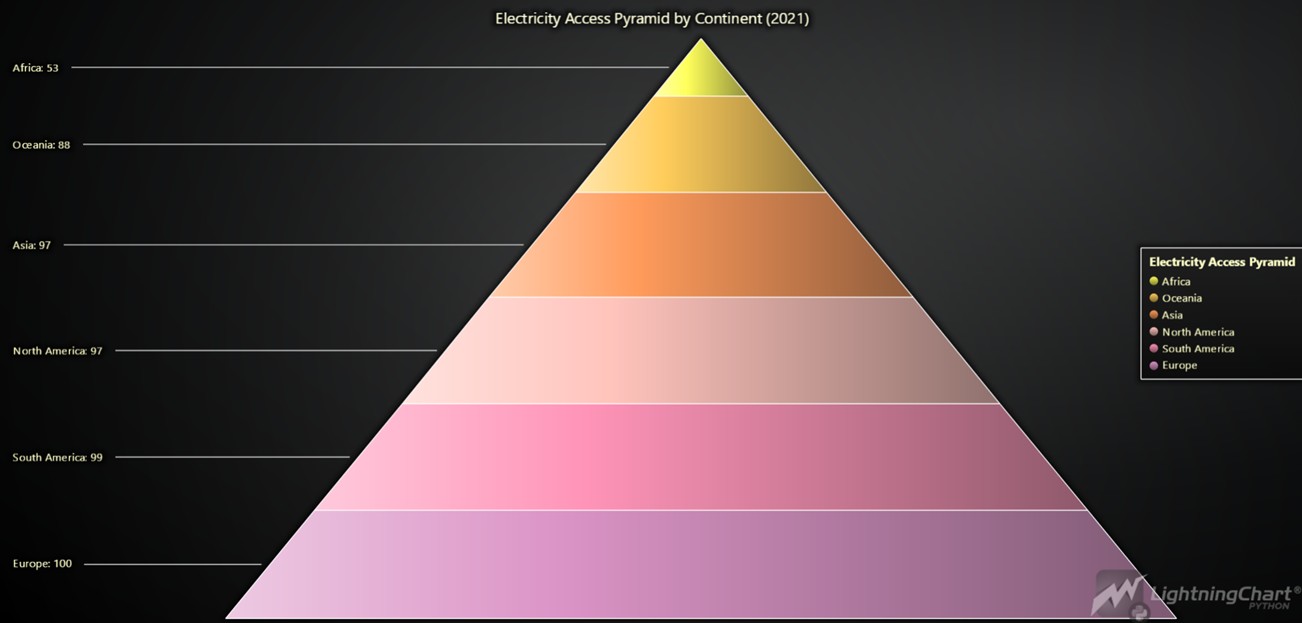
- Pyramid Charts: Pyramid charts provide a clear breakdown of electricity access by continent, helping us identify which regions have made the most progress and which still lag behind. For instance, Africa shows significant room for improvement compared to Europe.
- Tree Map Charts: Treemaps allow for an in-depth view of electricity access at the country level within each continent. By representing each country as a colored rectangle, these charts illustrate varying levels of access, with colors ranging from red (low access) to green (high access), making it easy to see how countries compare within their respective regions.
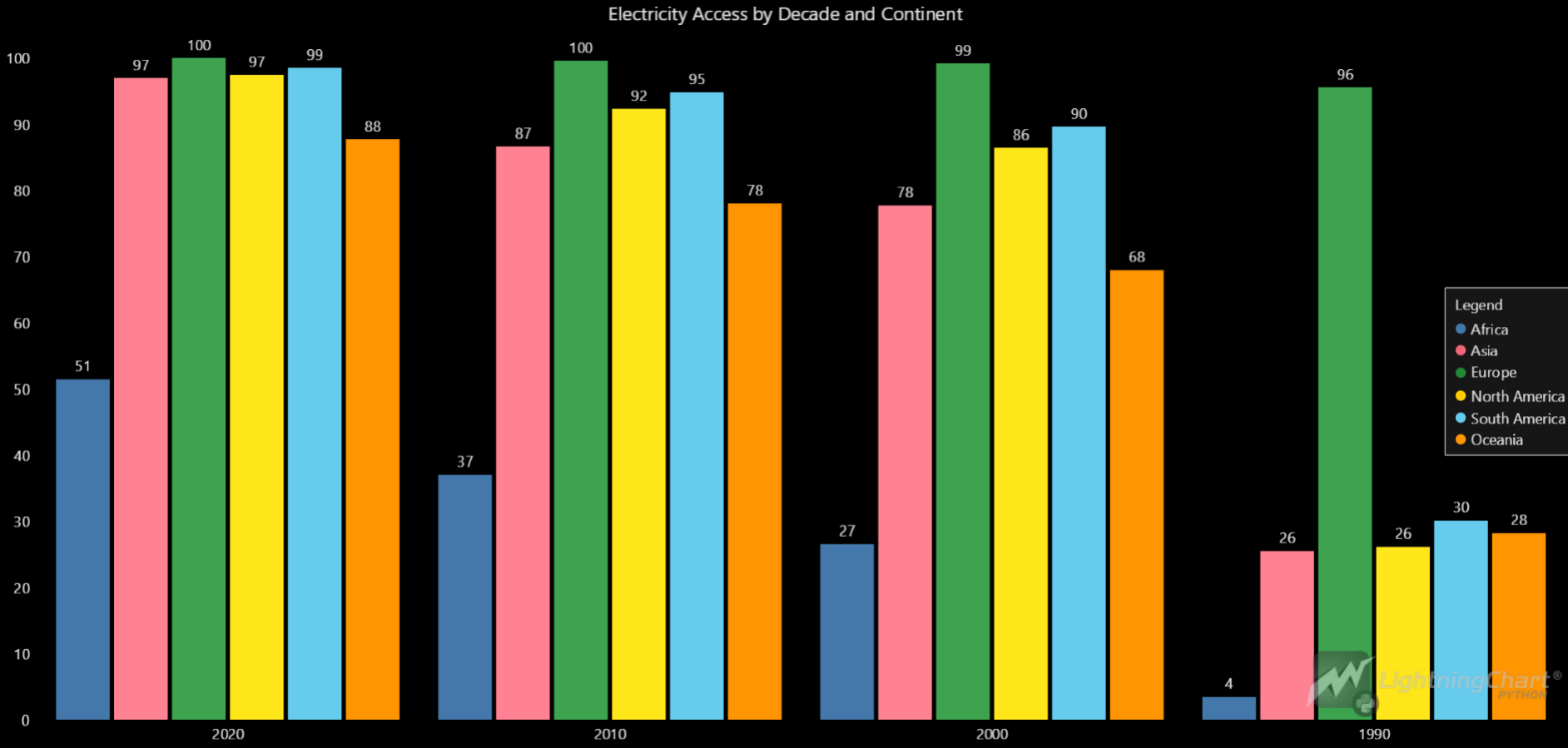
- Grouped Bar Charts: These charts effectively illustrate electricity access across different continents over the decades. They allow for easy comparison of access levels from 1990 to 2020, revealing trends and progress made by various regions in providing electricity to their populations.
- Map Charts: LightningChart Python’s map charts allow us to display geographical data on electricity access. By plotting access percentages on a global map, users can easily observe regional disparities and trends over time.
- Gauge Charts: Gauge charts are used to visualize the global average electricity access percentage, offering an at-a-glance understanding of how close the world is to achieving universal electricity access.
Optimizing Data Visualization Performance

In this population access to electricity analysis project, the ability to efficiently visualize extensive datasets in real time was paramount. Given the large scope of the electricity access dataset, which covers multiple decades and hundreds of countries, maintaining high performance during analysis was critical. LightningChart Python was selected for its robust performance and capacity to manage such complexity seamlessly.
Several key factors contributed to its effectiveness:
- Seamless Large Dataset Handling: LightningChart Python excels at rendering large datasets without sacrificing speed or quality. This ensures that data involving millions of points, such as country-level electricity access statistics, is processed and visualized smoothly.
- Interactive and Real-Time Capabilities: The tool allows users to interact with visualizations dynamically, enabling real-time exploration of data trends. Whether zooming into specific years or regions or updating the charts with new data, LightningChart maintains a high level of responsiveness.
- Optimized Resource Utilization: Despite the scale of the data, LightningChart efficiently manages system resources, allowing complex visualizations to run without lags or delays. This was crucial for maintaining a smooth user experience throughout the analysis.
Setting Up Python Environment
To begin working on this population access to electricity analysis project, it’s necessary to install the required libraries, including Pandas and LightningChart Python. You can do this by following the steps below:
First, you need to install Python: Download and install the latest version of Python from the official Python website. Second, you need to Install Pandas and LightningChart Python using the pip package manager to install the necessary libraries by running these commands:
pip install lightningchart
pip install pandas numpy
To analyze and visualize the population access to electricity data, we’ll use a combination of libraries such as:
- Pandas: For data manipulation and analysis.
- NumPy: For numerical operations.
- LightningChart: A high-performance charting library for data visualization.
- Time and Random: For simulating real-time data updates and generating random values.
Loading and Processing Data
This Python code shows how to import the libraries.
import pandas as pd
import lightningchart as lc
import time
import numpy as np
Now, we load the dataset and clean it. In our case, the dataset is a CSV file containing data on population access to electricity across different countries.
# Load the dataset
data = pd.read_csv('share-of-the-population-with-access-to-electricity.csv')

# Clean the dataset (dropping unnecessary columns)
data_cleaned = data.drop(columns=['Code'])

# Filter the data to include relevant years and countries
filtered_data = data_cleaned[(data_cleaned['Year'] >= 1990) & (data_cleaned['Year'] <= 2021)]
Line Chart: Electricity Access Trends with Future Predictions
This chart visualizes the historical data on population access to electricity, showcasing trends for countries like Afghanistan, Argentina, and India. It offers a clear comparison of how different nations have progressed in providing access to electricity over time. Additionally, using linear regression, this chart includes projected future trends for each country with dashed lines, giving insights into potential growth in electricity access for the next 10 years.
# Create a dynamic line chart showing electricity access over time with future predictions
chart = lc.ChartXY(title='Electricity Access: Past Trends and Future Predictions')

# Initialize series for each country and their corresponding predictions
line_series = {}
prediction_series = {}

for country in countries:
    # Line series for actual historical data
    line_series[country] = chart.add_line_series().set_name(f'{country} (Actual)')
    line_series[country].set_line_thickness(2)  # Enhancing visibility
    # Add country to the chart's legend
    legend.add(line_series[country])

    # Prediction series with dashed lines
    prediction_series[country] = chart.add_line_series().set_name(f'{country} (Projected)')
    prediction_series[country].set_line_thickness(2).set_dashed('Dashed').set_line_color(lc.Color(255, 0, 0))

# Customize chart axes
chart.get_default_x_axis().set_title('Year').set_interval(start=int(pivot_data.index.min()), end=int(pivot_data.index.max() + 10))
chart.get_default_y_axis().set_title('Electricity Access (%)').set_interval(0, 100)

# Render the chart
chart.open(live=True)
Polar Chart: Real-Time Electricity Access Comparison
This PolarChart provides a visually engaging representation of population access to electricity across 15 selected countries, including Guinea-Bissau, Rwanda, and Afghanistan. The chart continuously updates year by year, simulating smooth transitions to display changes in electricity access rates over time. Each country is represented with unique, randomly generated colors, and the chart includes a detailed legend for easier interpretation.
# Initialize PolarChart for visualizing electricity access for selected countries
chart = lc.PolarChart(title="Electricity Access in Polar Chart")

# Generate random colors for each country and create line series
for country in selected_countries:
    color = get_random_color()  # Assign a unique random color to each country
    line_series = chart.add_point_line_series().set_name(country).set_stroke(thickness=2, color=color)

# Adding legend for country names and appearance customization
legend = lc.ui.legend.Legend(chart, title="Country Legend")
for country in selected_countries:
    legend.add(country_series[country])

# Function to simulate real-time updates of data year by year
def update_data():
    for year in range(min_year, max_year):
 # Process data for each country and year
# Simulate continuous transitions with slight delay for smoother visualization
        time.sleep(0.001)

# Start real-time data simulation
update_data()
Pyramid Chart: Visualizing Electricity Access by Continent
This Pyramid Chart provides a clear, hierarchical view of population access to electricity across continents for the year 2021. By calculating the average electricity access for each continent, the chart illustrates the disparities between regions such as Africa, Europe, and Asia. Each continent is represented as a slice in the pyramid, with the height corresponding to the average percentage of population with access to electricity.
# Calculate continent averages and create a PyramidChart for 2021
continent_averages = calculate_continent_average()

# Prepare data for visualization
sorted_data = sorted([{"name": continent, "value": round(average, 2)} for continent, average in continent_averages.items()], key=lambda x: x["value"])

# Create PyramidChart with sorted data
chart = lc.PyramidChart(
    slice_mode='height',
    theme=lc.Themes.Dark,
    title='Electricity Access Pyramid by Continent (2021)'
)

# Add slices to the PyramidChart
chart.add_slices(sorted_data)

# Add a legend for better understanding
chart.add_legend().set_title('Electricity Access Pyramid')

# Display the chart
chart.open()
This chart highlights how population access to electricity varies significantly by continent, offering a snapshot of where progress has been made and where further improvements are needed. The visual layout makes it easy to compare regions at a glance.
Tree Map: Individual Country Comparisons
The Tree Map offers a closer look at individual countries in 2021 and their population access to electricity. It shows how each country compares within its continent, using colors from red (low access) to green (high access). This visualization gives a clearer picture of what’s happening within each continent at a specific point.

# Prepare TreeMap data structure for country comparisons
treemap_data = create_treemap_data()

# Create TreeMapChart
chart = lc.TreeMapChart(theme=lc.Themes.Dark, title="Electricity Access by Continent (2021)")
chart.set_data(treemap_data)
Grouped Bar Chart: Decadal Access by Continent
To analyze population access to electricity over the decades, this grouped bar chart illustrates how each continent has progressed from 1990 to 2020. It reveals increases across most regions, providing a better sense of long-term trends in access to electricity.
# Set data for Grouped Bar Chart (decades as main categories)
grouped_data = prepare_grouped_data()
chart = lc.BarChart(vertical=True, theme=lc.Themes.TurquoiseHexagon, title='Electricity Access by Decade and Continent')
chart.set_data_grouped(['1990', '2000', '2010', '2020'], grouped_data)
Interactive Population Access to Electricity Dashboard
This interactive dashboard uses LightningChart to visualize global electricity access trends between 1990 and 2021. The dashboard features three main visualizations: a Map Chart showing country-level access, a Line Chart illustrating continent-wide averages, and a Gauge Chart to track global average electricity access. These charts are updated year by year, providing real-time insights into how electricity access has evolved globally and regionally.
- Map Chart: The map highlights the percentage of population with access to electricity for each country. The chart is color-coded, with blue representing no access and green indicating full access.
- Line Chart: This chart tracks electricity access over time for each continent, showing the average percentage of population with access to electricity across Africa, Asia, Europe, North America, South America, and Oceania.
- Gauge Chart: The gauge provides a quick visual of the global average electricity access for each year, with the colors ranging from red (low access) to green (high access).
The code ensures that the dashboard updates dynamically, with a smooth transition between years, making it ideal for real-time analysis.
# Update dashboard with global, continental, and country data
def update_dashboard():
    for year in pivot_data.index:
        print(f"Updating data for year: {year}")
        data = prepare_data_for_year(year)

        # Update map, line, and gauge charts
This population access to electricity dashboard offers an intuitive way to explore electricity access trends, from global to regional levels. The combination of map, line, and gauge charts provides a holistic view of the electricity access landscape.
Conclusion
Using LightningChart to visualize population access to electricity data was an enriching experience. The flexibility of the library allowed us to create dynamic, real-time visualizations that are both aesthetically pleasing and highly informative. From the line chart showcasing trends over time to the polar and pyramid charts that offer unique perspectives on data, LightningChart proved to be a powerful tool for complex datasets.
Each chart variant provided different insights, making it easier to understand how electricity access varies across countries and continents. The performance of LightningChart, especially when handling large datasets and continuous updates, was impressive, ensuring a smooth and engaging user experience. Overall, LightningChart Python is an excellent choice for anyone looking to create advanced visualizations for real-world data analysis.

Fateme Ajam
Data Science Python Developer


Continue learning with LightningChart
Data Visualization Components for React Applications
Written by a human | Updated on April 9th, 2025React Data Visualization Components React is one of the most popular front-end development frameworks on the web in the year 2022. It is a free and open-source front-end JS library that is used to build interactive...
What Is LiDAR Data Visualization?
LiDAR Data Visualization The LiDAR method conveys another yet complex level of data visualization as it is widely used in demanding industries that require plotting, e.g., topographic or cartography 3D data. But the use of LiDAR goes further as it is also used...
Android
Written by a human | Updated on April 9th, 2025Android Charts Here's a new article I'm really excited about...this time, we will create an android charts data visualization application. For this application, we will work with Android Studio and LightningChart JS...





If you have any questions, feel free to contact us!
©LightningChart Ltd 2026. All rights reserved.