








Lake Pollution Analysis with LightningChart Python
Tutorial
Assisted by AI
Learn to visualize data effectively with LightningChart Python for your lake pollution analysis project in Python.
Vindya Nukulasooriya
Data Science Developer

Introduction
This project presents an analysis of water potability using a curated dataset of water quality monitoring records and the high-performance LightningChart Python library. The dataset provides measurements of key parameters such as pH, Dissolved Oxygen (DO), Biochemical Oxygen Demand (BOD), Conductivity, and Total Coliform counts, which together determine whether water samples meet potable (safe-to-drink) standards.
The primary objectives of this project are to:
- Characterize how the distribution of pH differs between potable and non-potable water.
- Assess how Conductivity ranges separate potable from non-potable samples, using cumulative distribution functions.
- Explore the relationship between Solids (BOD proxy) and Conductivity, with potability highlighted.
- Reveal geographic sampling variation through state-level counts (Top 5 vs Bottom 5 states).
- Summarize correlations between parameters such as DO, BOD, Coliform counts, and Conductivity.
To achieve these objectives, LightningChart Python was selected for its:
- High performance on dense datasets with smooth interactivity.
- Versatile 2D chart types suited for statistical and categorical comparisons.
- Interactive, presentation-ready visuals (zoom, tooltips, legends, axis labelling, themes).
By transforming raw water quality measurements into clear visualizations, the project highlights how key parameters and geographic patterns contribute to water safety, supporting monitoring, analysis, and decision-making.
Project Overview
Build 5 interactive LightningChart Python visuals to uncover how water quality parameters distinguish potable from non-potable water and reveal sampling biases across states.
Objectives
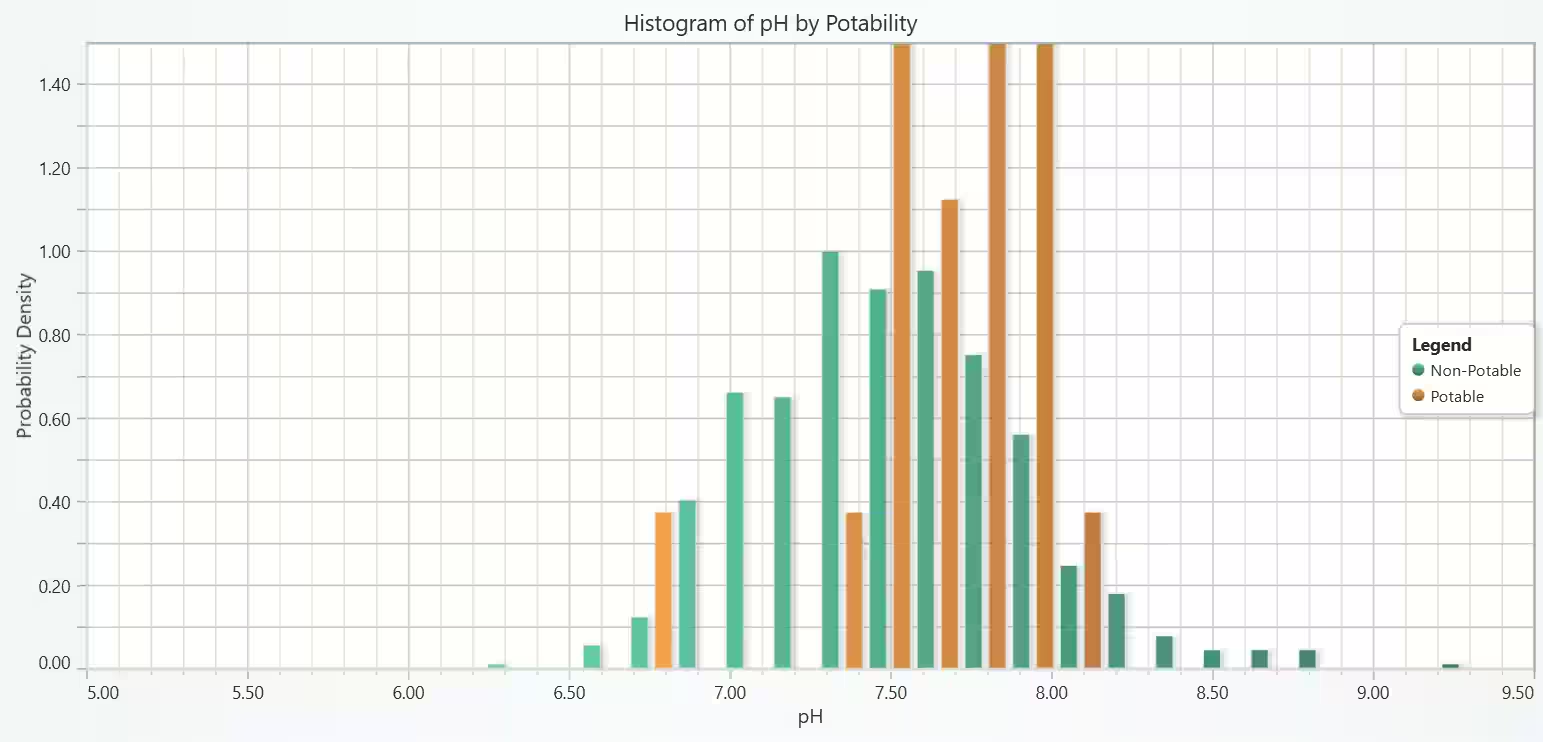
- Measure pH distributions for potable vs. non-potable water using histograms.
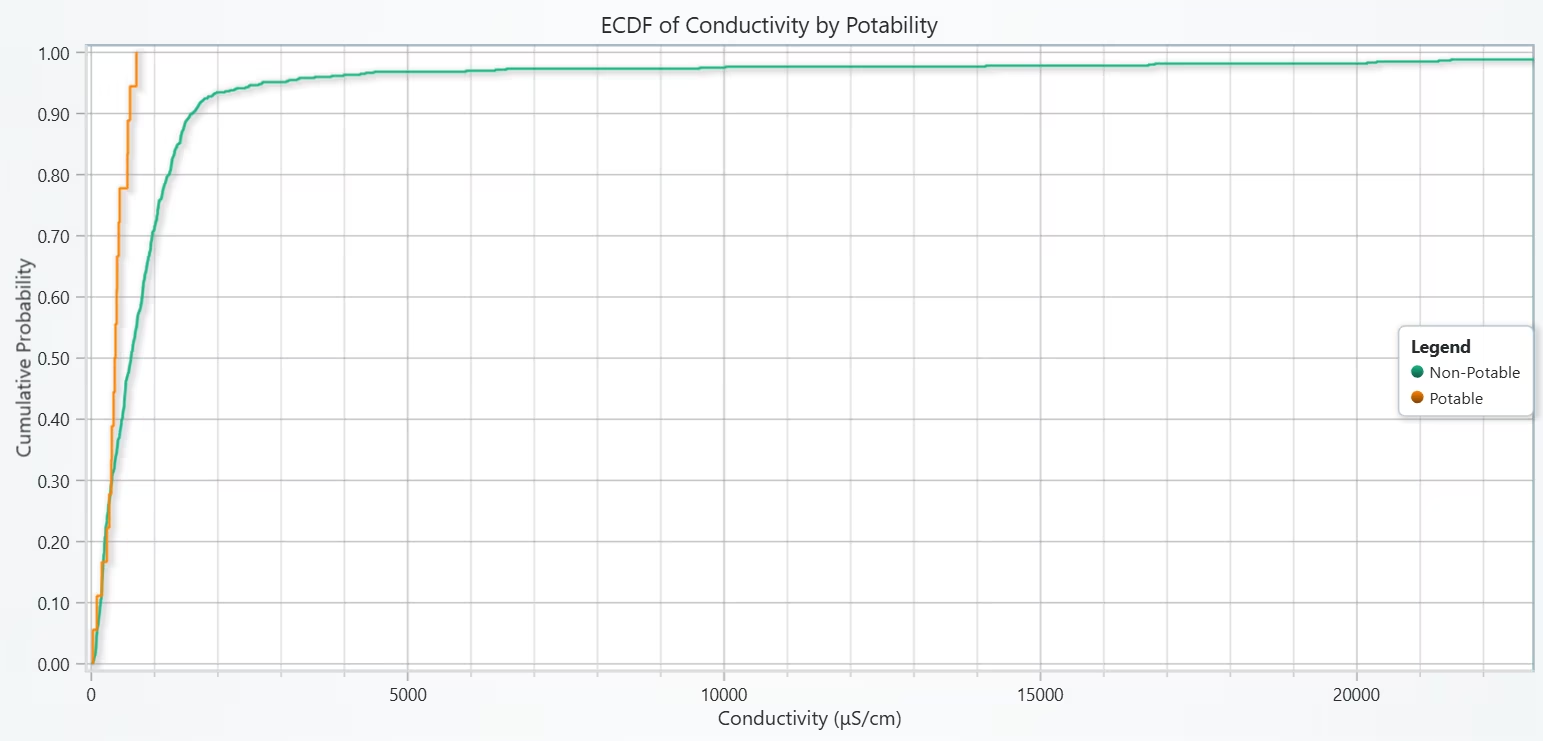
- Compare groups using ECDFs of Conductivity to reveal separation ranges.
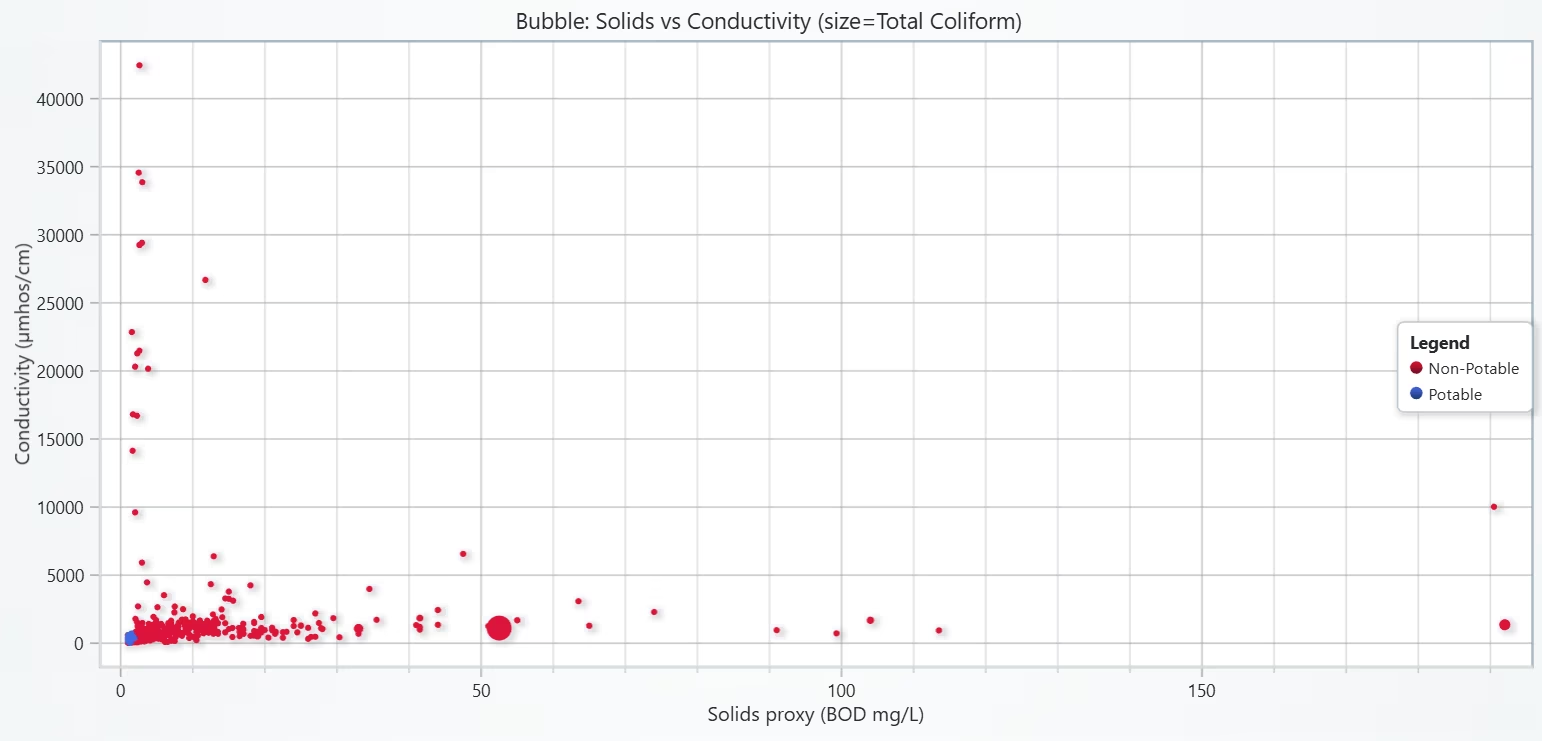
- Examine multivariate relationships with a Bubble Chart of Solids vs. Conductivity, coloured by potability.
- Summarize Top 5 and Bottom 5 states by sample counts with clear bar charts.
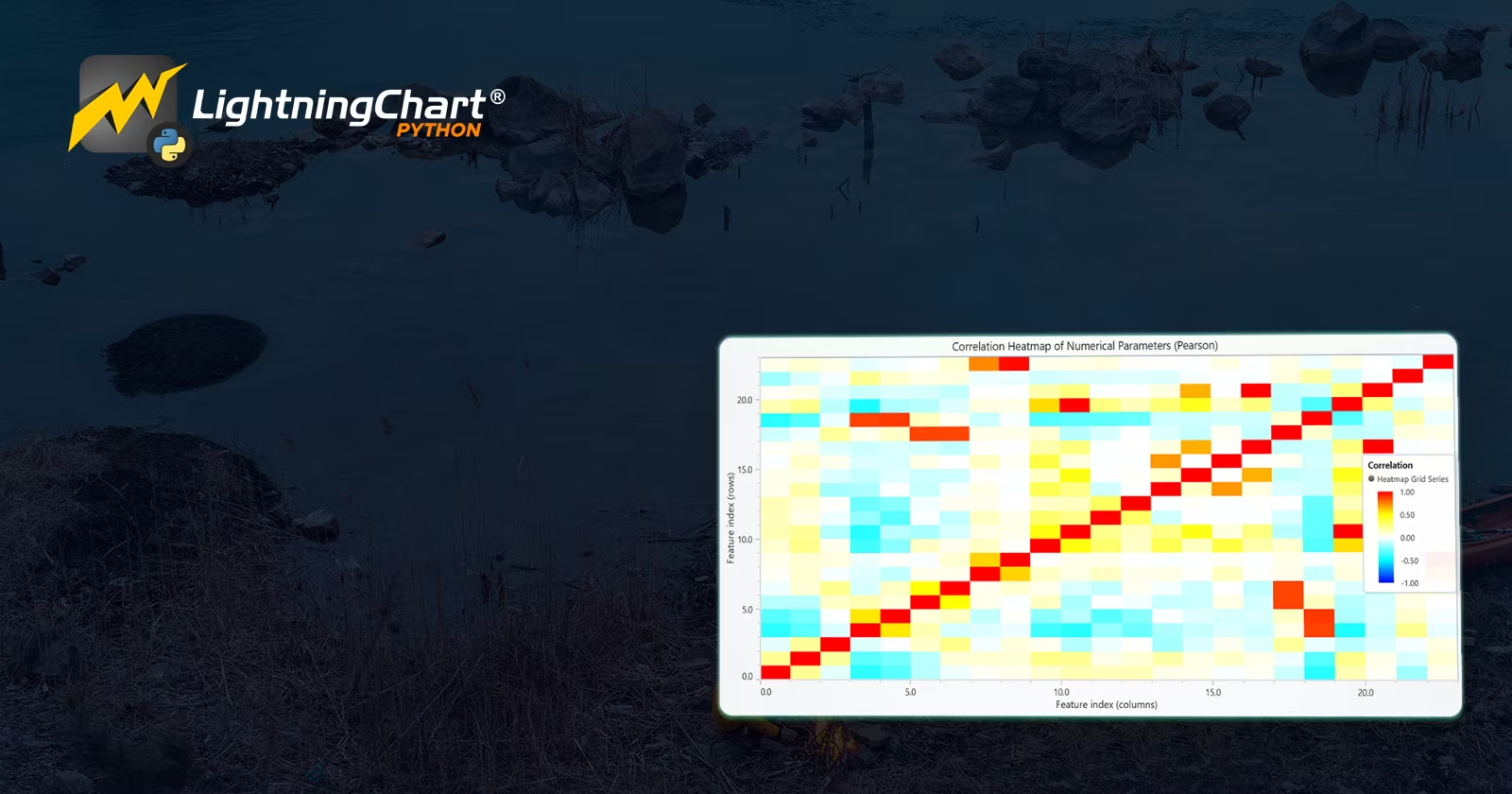
- Analyze inter-parameter associations with a correlation heatmap.
Deliverables
- Five LightningChart Python visuals: Histogram, ECDF, Bubble Chart, Bar Charts, Heatmap.
- Documented Python code for each visualization (preprocessing, parameters, axis/legend setup).
- Interpretive summaries highlighting parameter differences, correlations, and sampling coverage.
- A conclusion summarizing findings and demonstrating the value of LightningChart for scientific visualization.
Tools Used
Python 3.13.5, LightningChart Python, Jupyter Notebook, AI Assistance
About the Dataset
For this project, I have used the water quality dataset available in Kaggle, and the file used was Water_pond_tanks_2021.csv.
LightningChart Python
LightningChart Python is a professional-grade data visualization library renowned for its ultra-fast rendering and analytical precision. Its ability to handle large-scale, granular datasets and produce multidimensional, interactive visualizations makes it highly effective for data analysis.

Setting Up Python Environment
Before running the project, install Python and the other required libraries using:
%pip install numpy pandas lightningchartSetting Up Your Development Environment:
- Set up a virtual environment:
- Use Visual Studio Code (VSCode) for a streamlined development experience.
Loading and Preprocessing Data
Fetch and preprocess the data using the following function:
# Import necessary libraries (load pandas library to preprocess dataset)
import pandas as pd
Visualizing Data with LightningChart Python
This confirms that pH is a critical discriminator of potability. Although many non-potable samples also fall in the safe range, deviations beyond limits almost always result in non-potability.
# Chart 1 - Histogram of pH Distribution by Potability
# Developed with AI assistance to demonstrate LightningChart Python

import lightningchart as lc
import numpy as np
import pandas as pd

# License (adjust path)
try:
    with open("D:/HAMK/Internship/MyProjects/lc_license.txt") as f:
        lc.set_license(f.read().strip())
except Exception:

    pass

# Data loading
CSV_PATH = None
if 'wbqid' not in globals():
    if CSV_PATH is None:
        raise RuntimeError("Set CSV_PATH to your dataset file, or define a DataFrame named 'wbqid' before running.")
    wbqid = pd.read_csv(CSV_PATH)

# Helpers to locate/midpoint columns when needed
def find_col(df, partials):
    pats = [p.lower() for p in (partials if isinstance(partials, (list, tuple)) else [partials])]
    for c in df.columns:
        cl = c.lower()
        if all(p in cl for p in pats):
            return c
    return None

def mid_from(df, a, b):
    a = pd.to_numeric(df[a], errors='coerce') if a else None
    b = pd.to_numeric(df[b], errors='coerce') if b else None
    if a is not None and b is not None:
        return (a + b) / 2
    if a is not None:
        return a
    if b is not None:
        return b
    return pd.Series(np.nan, index=df.index)

# Ensure required columns exist (derive when missing)
if ('ph' not in wbqid.columns) or ('Potability' not in wbqid.columns):
    wbqid['ph'] = mid_from(
        wbqid,
        find_col(wbqid, ['ph', '(min']),
        find_col(wbqid, ['ph', '(max'])
    )
    wbqid['DO'] = mid_from(
        wbqid,
        find_col(wbqid, ['dissolved oxygen', '(min']),
        find_col(wbqid, ['dissolved oxygen', '(max'])
    )
    wbqid['BOD'] = mid_from(
        wbqid,
        find_col(wbqid, ['bod', '(min']),
        find_col(wbqid, ['bod', '(max'])
    )
    wbqid['TC'] = mid_from(
        wbqid,
        find_col(wbqid, ['total coliform', '(min']),
        find_col(wbqid, ['total coliform', '(max'])
    )

    # Simple potable rule (WHO-like bands)
    wbqid['Potability'] = (
        wbqid['ph'].between(6.5, 8.5, inclusive='both') &
        (wbqid['DO'] >= 6) &
        (wbqid['BOD'] <= 2) &
        (wbqid['TC'] <= 50)
    ).astype(int)

# Build arrays by class
ph0 = wbqid.loc[wbqid['Potability'] == 0, 'ph'].dropna().to_numpy()
ph1 = wbqid.loc[wbqid['Potability'] == 1, 'ph'].dropna().to_numpy()

# Histogram spec
bins = 30
# 1) Shared edges from ALL data
ph_all = np.concatenate([ph0, ph1]) if len(ph0) and len(ph1) else (ph0 if len(ph0) else ph1)
edges = np.linspace(ph_all.min(), ph_all.max(), bins + 1)

c0, _ = np.histogram(ph0, bins=edges, density=True)
c1, _ = np.histogram(ph1, bins=edges, density=True)
w = edges[1] - edges[0]

# Chart
chart = lc.ChartXY(theme=lc.Themes.Light, title="Histogram of pH by Potability",html_text_rendering=True)
chart.get_default_x_axis().set_title("pH")
chart.get_default_y_axis().set_title("Probability Density")

r0 = chart.add_rectangle_series().set_name("Non-Potable")
r1 = chart.add_rectangle_series().set_name("Potable")

# 3) Two bars per bin (neatly fill bin halves)
pad = 0.08 * w
for i in range(len(c0)):
    left, right = edges[i], edges[i + 1]
    mid = (left + right) / 2
    # Non-Potable on left half
    r0.add(left + pad, 0, mid - pad, c0[i])
    # Potable on right half
    r1.add(mid + pad, 0, right - pad, c1[i])

# 4) Optional: axis bounds (adjust to your data)
try:
    chart.get_default_x_axis().set_interval(5.0, 9.5)
except Exception:
    pass

chart.add_legend(data=chart)
chart.open()
ECDF of Conductivity by Potability
High conductivity, often linked to excess dissolved salts/ions, correlates strongly with non-potability. Potable samples are more stable and stay within tighter conductivity limits.
# Chart 2 - ECDF(Empirical Cumulative Distribution Function) of Conductivity by Potability
# Developed with AI assistance to demonstrate LightningChart Python

import lightningchart as lc
import numpy as np
import pandas as pd

# License
try:
    with open("D:/HAMK/Internship/MyProjects/lc_license.txt") as f:
        lc.set_license(f.read().strip())
except Exception:
    pass

# Data loading
CSV_PATH = None  # eg: r"D:\path\to\water_quality.csv"
if 'wbqid' not in globals():
    if CSV_PATH is None:
        raise RuntimeError("Set CSV_PATH to your dataset file or define 'wbqid' before running.")
    wbqid = pd.read_csv(CSV_PATH)

# Helpers
def find_col(df, partials):
    pats = [p.lower() for p in (partials if isinstance(partials, (list, tuple)) else [partials])]
    for c in df.columns:
        cl = c.lower()
        if all(p in cl for p in pats):
            return c
    return None

def mid_from(df, a, b):
    a = pd.to_numeric(df[a], errors='coerce') if a else None
    b = pd.to_numeric(df[b], errors='coerce') if b else None
    if a is not None and b is not None:
        return (a + b) / 2
    if a is not None:
        return a
    if b is not None:
        return b
    return pd.Series(np.nan, index=df.index)

def ecdf_steps(arr: np.ndarray):
    """Right-continuous step ECDF coordinates for a 1D array (NaNs ignored)."""
    a = np.sort(arr[~np.isnan(arr)])
    n = a.size
    if n == 0:
        return np.array([0.0, 0.0]), np.array([0.0, 1.0])
    # Repeat each x to form horizontal steps
    x = np.repeat(a, 2)
    # y: 0, 1/n, 1/n, 2/n, 2/n, ... , 1
    y_levels = np.arange(1, n + 1) / n
    y = np.empty(2 * n)
    y[0] = 0.0
    y[1::2] = y_levels
    y[2::2] = y_levels[:-1]
    return x, y

# Ensure required columns
if 'Conductivity' not in wbqid.columns:
    wbqid['Conductivity'] = mid_from(
        wbqid,
        find_col(wbqid, ['conductivity', '(min']),
        find_col(wbqid, ['conductivity', '(max'])
    )

if ('ph' not in wbqid.columns) or ('Potability' not in wbqid.columns):
    wbqid['ph'] = mid_from(
        wbqid,
        find_col(wbqid, ['ph', '(min']),
        find_col(wbqid, ['ph', '(max'])
    )
    wbqid['DO'] = mid_from(
        wbqid,
        find_col(wbqid, ['dissolved oxygen', '(min']),
        find_col(wbqid, ['dissolved oxygen', '(max'])
    )
    wbqid['BOD'] = mid_from(
        wbqid,
        find_col(wbqid, ['bod', '(min']),
        find_col(wbqid, ['bod', '(max'])
    )
    wbqid['TC'] = mid_from(
        wbqid,
        find_col(wbqid, ['total coliform', '(min']),
        find_col(wbqid, ['total coliform', '(max'])
    )
    wbqid['Potability'] = (
        wbqid['ph'].between(6.5, 8.5, inclusive='both') &
        (wbqid['DO'] >= 6) & (wbqid['BOD'] <= 2) & (wbqid['TC'] <= 50)
    ).astype(int)

# Build ECDFs
cond_np = wbqid.loc[wbqid['Potability'] == 0, 'Conductivity'].astype(float).to_numpy()
cond_p  = wbqid.loc[wbqid['Potability'] == 1, 'Conductivity'].astype(float).to_numpy()

x_np, y_np = ecdf_steps(cond_np)
x_p,  y_p  = ecdf_steps(cond_p)

# Chart
chart = lc.ChartXY(theme=lc.Themes.Light, title="ECDF of Conductivity by Potability", html_text_rendering=True)
chart.get_default_x_axis().set_title("Conductivity (μS/cm)")  # μS/cm is the SI unit for conductivity
chart.get_default_y_axis().set_title("Cumulative Probability")

s_np = chart.add_line_series().set_name("Non-Potable")
s_p  = chart.add_line_series().set_name("Potable")
s_np.add(x_np.tolist(), y_np.tolist())
s_p.add(x_p.tolist(), y_p.tolist())

# clamp x-axis to reduce extreme outlier stretch (eg: 1st–99th percentile)
try:
    q1 = np.nanpercentile(np.concatenate([cond_np, cond_p]), 1)
    q99 = np.nanpercentile(np.concatenate([cond_np, cond_p]), 99)
    if np.isfinite(q1) and np.isfinite(q99) and q99 > q1:
        chart.get_default_x_axis().set_interval(float(q1), float(q99))
except Exception:
    pass

chart.add_legend(data=chart)
chart.open()
Bubble Chart of Solids vs. Conductivity, coloured by Potability
There’s a positive relationship: higher solids generally coincide with higher conductivity. Safe water consistently falls in the low-solids, low-conductivity zone, reinforcing both as indicators of water quality.
# Chart 3 - Bubble Chart of Solids vs. Conductivity, colored by Potability (Bubble size = Total Coliform)
# Developed with AI assistance to demonstrate LightningChart Python

import lightningchart as lc
import numpy as np
import pandas as pd

with open("D:/HAMK/Internship/MyProjects/lc_license.txt") as f: lc.set_license(f.read().strip())

# Build required columns (midpoints)
def get_mid(df, key):
    def find(p):
        P=[x.lower() for x in (p if isinstance(p,(list,tuple)) else [p])]
        for c in df.columns:
            if all(t in c.lower() for t in P): return c
        return None
    a=find([key,'(min']); b=find([key,'(max'])
    A=pd.to_numeric(df[a],errors='coerce') if a else None
    B=pd.to_numeric(df[b],errors='coerce') if b else None
    return (A+B)/2 if (A is not None and B is not None) else (A if A is not None else (B if B is not None else pd.Series(np.nan,index=df.index)))

wbqid['BOD_mid'] = get_mid(wbqid,'bod')
wbqid['Cond']    = get_mid(wbqid,'conductivity')
wbqid['TC_mid']  = get_mid(wbqid,'total coliform')

# Use BOD as Solids proxy
df = wbqid[['BOD_mid','Cond','TC_mid','Potability']].dropna()

# size scaling (avoid giant bubbles)
tc = df['TC_mid'].to_numpy()
size = 5 + 15 * (tc - np.nanmin(tc)) / max(1e-9, (np.nanmax(tc) - np.nanmin(tc)))

chart = lc.ChartXY(theme=lc.Themes.Light, title="Bubble: Solids vs Conductivity (size=Total Coliform)",html_text_rendering=True)
chart.get_default_x_axis().set_title("Solids proxy (BOD mg/L)")
chart.get_default_y_axis().set_title("Conductivity (µmhos/cm)")

# two series with sizes
non = df['Potability']==0
ser0 = chart.add_point_series(sizes=True).set_name("Non-Potable")
ser0.set_point_color(lc.Color('crimson'))
ser0.append_samples(x_values=df.loc[non,'BOD_mid'], y_values=df.loc[non,'Cond'], sizes=size[non])

ser1 = chart.add_point_series(sizes=True).set_name("Potable")
ser1.set_point_color(lc.Color('royalblue'))
ser1.append_samples(x_values=df.loc[~non,'BOD_mid'], y_values=df.loc[~non,'Cond'], sizes=size[~non])

chart.add_legend(data=chart)
chart.open()
Bar Charts of Potability Distribution (Top & Bottom 5 States)
Both frequency and intensity of introductions ramp up over time. The distinct size/color mapping clarifies when and how strongly surges occur (and by which grouping if present).


# Chart 4 - Bar Charts of Potability Distribution (Top & Bottom 5 States)
# Developed with AI assistance to demonstrate LightningChart Python

import lightningchart as lc

# License
with open("D:/HAMK/Internship/MyProjects/lc_license.txt", "r") as f:
    lc.set_license(f.read().strip())

# Aggregate: count rows per State
state_counts = wbqid['State Name'].value_counts()

# Top 5 states (highest sample counts)
top5 = state_counts.head(5)
data_top5 = [{'category': state, 'value': int(count)} for state, count in top5.items()]

chart_top5 = lc.BarChart(
    vertical=True,
    theme=lc.Themes.Light,
    title='Top 5 States by Water Sample Counts\n(X-axis: State | Y-axis: Number of Samples)',html_text_rendering=True
)
chart_top5.set_sorting('disabled')
chart_top5.set_data(data_top5)
chart_top5.open()

# Bottom 5 states (lowest sample counts)
bottom5 = state_counts.tail(5)
data_bottom5 = [{'category': state, 'value': int(count)} for state, count in bottom5.items()]

chart_bottom5 = lc.BarChart(
    vertical=True,
    theme=lc.Themes.Light,
    title='Bottom 5 States by Water Sample Counts\n(X-axis: State | Y-axis: Number of Samples)'
)
chart_bottom5.set_sorting('disabled')
chart_bottom5.set_data(data_bottom5)
chart_bottom5.open()
Correlation Heatmap of All Numerical Parameters
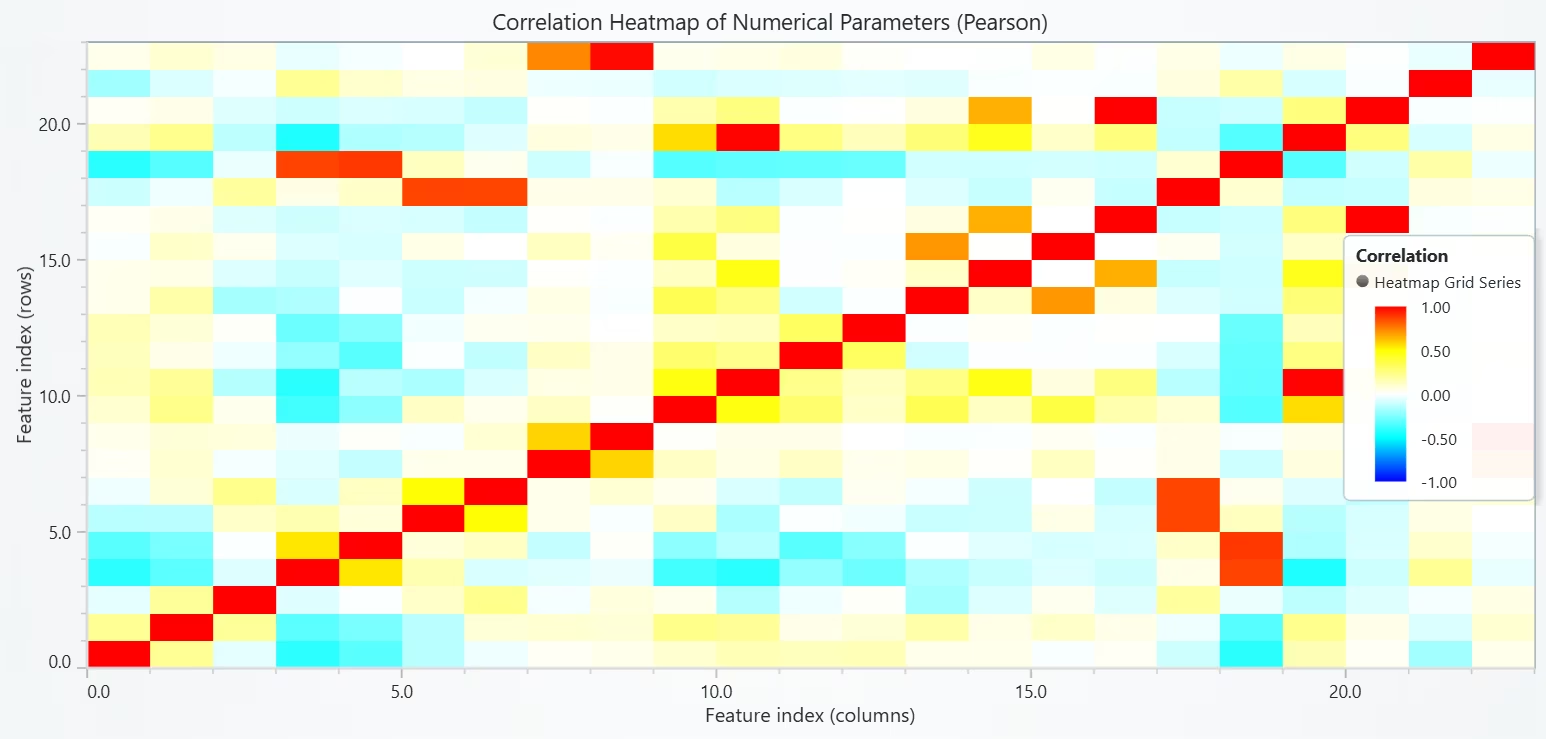
The heatmap highlights key parameter interactions driving potability. The inverse DO–BOD relationship reflects oxygen consumption during organic pollution. High conductivity also tends to accompany microbial contamination, reinforcing its diagnostic role.
# Chart 5 - Correlation Heatmap of Numerical Parameters
# Developed with AI assistance to demonstrate LightningChart Python

import lightningchart as lc
import numpy as np
import pandas as pd

# License
with open("D:/HAMK/Internship/MyProjects/lc_license.txt", "r") as f:
    lc.set_license(f.read().strip())

# 1) Ensure consolidated numeric features exist (if missing)
def find_col(df, partials):
    pats = [p.lower() for p in (partials if isinstance(partials, (list, tuple)) else [partials])]
    for c in df.columns:
        cl = c.lower()
        if all(p in cl for p in pats):
            return c
    return None

def mid_from(df, a_name, b_name):
    a = pd.to_numeric(df[a_name], errors='coerce') if a_name else None
    b = pd.to_numeric(df[b_name], errors='coerce') if b_name else None
    if a is not None and b is not None:  return (a + b) / 2
    if a is not None:                    return a
    if b is not None:                    return b
    return pd.Series(np.nan, index=df.index)

# Create consolidated columns if they don't exist
if 'ph' not in wbqid.columns:
    ph_min = find_col(wbqid, ['ph', '(min']); ph_max = find_col(wbqid, ['ph', '(max'])
    wbqid['ph'] = mid_from(wbqid, ph_min, ph_max)

if 'DO' not in wbqid.columns:
    do_min = find_col(wbqid, ['dissolved oxygen', '(min']); do_max = find_col(wbqid, ['dissolved oxygen', '(max'])
    wbqid['DO'] = mid_from(wbqid, do_min, do_max)

if 'BOD' not in wbqid.columns:
    bod_min = find_col(wbqid, ['bod', '(min']); bod_max = find_col(wbqid, ['bod', '(max'])
    wbqid['BOD'] = mid_from(wbqid, bod_min, bod_max)

if 'TC' not in wbqid.columns:
    tc_min = find_col(wbqid, ['total coliform', '(min']); tc_max = find_col(wbqid, ['total coliform', '(max'])
    wbqid['TC'] = mid_from(wbqid, tc_min, tc_max)

if 'Conductivity' not in wbqid.columns:
    c_min = find_col(wbqid, ['conductivity', '(min']); c_max = find_col(wbqid, ['conductivity', '(max'])
    wbqid['Conductivity'] = mid_from(wbqid, c_min, c_max)

# 2) Collect ALL numerical columns safely
# Coerce object columns that look numeric into numeric
df_num = wbqid.copy()
for col in df_num.columns:
    if df_num[col].dtype == 'object':
        try_series = pd.to_numeric(df_num[col], errors='coerce')
        # If we gain at least some numeric values, keep the coerced series
        if try_series.notna().sum() > 0:
            df_num[col] = try_series

# Keep numeric columns only (float/int)
df_num = df_num.select_dtypes(include=['number'])

# Optional: drop columns that are almost entirely NaN
keep_cols = [c for c in df_num.columns if df_num[c].notna().sum() >= max(5, int(0.2 * len(df_num)))]
df_num = df_num[keep_cols]

if df_num.shape[1] < 2:
    raise RuntimeError("Not enough numeric columns to compute a correlation matrix.")

# Pearson correlation in [-1, 1], NaNs → 0
corr = df_num.corr(method='pearson').fillna(0.0)

labels = corr.columns.tolist()
M = corr.values.astype(float)
N = len(labels)

# 3) Build Heatmap Grid (LightningChart)
chart = lc.ChartXY(
    title='Correlation Heatmap of Numerical Parameters (Pearson)',html_text_rendering=True,
    theme=lc.Themes.Light
)

# Create heatmap grid series
heatmap = chart.add_heatmap_grid_series(columns=N, rows=N)
heatmap.set_start(x=0, y=0)
heatmap.set_end(x=N, y=N)
heatmap.set_step(x=1, y=1)
heatmap.set_intensity_interpolation(False)   # discrete blocks look cleaner for correlation
heatmap.hide_wireframe()

# Load intensity values (matrix is indexed [row, col])
# Heatmap expects a rows x cols 2D list
heatmap.invalidate_intensity_values(M.tolist())

# Diverging color palette: blue (neg) → white (0) → red (pos)
palette = [
    {"value": -1.0, "color": ('blue')},
    {"value": -0.5, "color": ('cyan')},
    {"value":  0.0, "color": ('white')},
    {"value":  0.5, "color": ('yellow')},
    {"value":  1.0, "color": ('red')},
]
heatmap.set_palette_coloring(
    steps=palette,
    look_up_property='value',
    interpolate=True
)

# Axis titles (indices map printed below)
chart.get_default_x_axis().set_title('Feature index (columns)')
chart.get_default_y_axis().set_title('Feature index (rows)')

# Legend for color meaning
chart.add_legend(data=heatmap).set_title('Correlation')

# Open chart
chart.open()

# Print label order so you can map indices ↔ feature names in your notebook/report
print("Heatmap order (top→bottom rows and left→right cols):")
for i, name in enumerate(labels):
    print(f"{i}: {name}")

# Also print the numeric correlation table (rounded) for documentation
print("\nCorrelation table:")
print(pd.DataFrame(M, index=labels, columns=labels).round(2))
Conclusion
The analysis revealed that most water samples in the dataset are non-potable, with only a very small percentage meeting safety threshold. Parameters such as pH, Dissolved Oxygen (DO), BOD, and Conductivity play a central role in determining potability.
Strong correlations were found, such as the inverse relationship between DO and BOD, and the tendency for higher conductivity and solids to indicate unsafe water. Overall, the results confirm that multiple parameters must be evaluated together for reliable water quality assessment.
Continue learning with LightningChart

Best Apache ECharts Alternative in 2026: When Canvas Hits Its Ceiling
Apache ECharts is an excellent charting library that's the honest starting point, and it's worth saying clearly. Free under the Apache 2.0 license, actively maintained by one of the most active open-source communities in data visualization, with 60,000+ GitHub stars...

Best D3.js Alternatives in 2026: Less Code, More Performance, Same Power
D3.js is the most starred data visualization library in existence 109,000+ GitHub stars and for justifiable reasons. It provides the building blocks to construct any visualization imaginable: data binding, SVG path generation, scale functions, geographic projections,...

Best ApexCharts Alternatives in 2026: Scale Beyond SVG, Add Real 3D
ApexCharts earned its position through a set of genuine strengths executed consistently well: MIT license, the best default visual aesthetics among free JavaScript chart libraries, official and actively maintained React, Vue, and Angular component wrappers, clean...



If you have any questions, feel free to contact us!
©LightningChart Ltd 2025. All rights reserved.