








Conducting a Hospital Readmission Prediction Data Visualization Analysis With LightningChart Python
Tutorial
Assisted by AI
Explore how LightningChart Python enhances data visualization in hospital readmission prediction analysis for better healthcare outcomes.
Vindya Nukulasooriya
Data Science Developer

Introduction
This project presents a comprehensive hospital readmission prediction analysis of risk factors using the Hospital Readmissions 30k Dataset, powered by the LightningChart Python library. The dataset, originally sourced from Kaggle, contains clinical, demographic, and hospital-related data for 30,000 patient records, with the goal of identifying patterns and factors influencing 30-day readmission rates.
The primary objectives of this project is to:
- Explore relationships between patient demographics, health conditions, and 30-day readmission status.
- Identify critical predictors such as diabetes, hypertension, BMI, medication count, and cholesterol levels.
- Visualize how these factors interact with hospital discharge destinations and patient comorbidity profiles.
- Transform raw hospital data into clear, interactive visualizations that support healthcare operations, readmission prevention programs, and policy making.
To achieve this, we leveraged the LightningChart Python library, chosen for its:
- High-performance rendering for large datasets.
- Advanced 2D and 3D visualization capabilities tailored for medical and operational analytics.
- Ability to produce publication-ready, interactive dashboards and specialized healthcare-focused visualizations.
By converting statistical patterns into visual insights, this project uncovers hidden trends in hospital readmission risks, helping administrators, clinicians, and policymakers develop targeted intervention strategies.
Project Overview
Objectives
- Assess readmission trends by age, gender, and health status.
- Examine the combined effect of comorbidities such as diabetes and hypertension on readmission rates.
- Explore correlations between vital signs, lab values, and hospital discharge patterns.
- Showcase LightningChart Python’s ability to deliver scientific-grade visualizations for operational healthcare data.
Deliverables
A comprehensive report including:
- Ten high-performance visualizations created exclusively with LightningChart Python.
- Well-documented Python code for each chart, with preprocessing steps explained.
- Interpretive summaries highlighting trends, risk factors, and operational insights.
- A conclusion discussing how LightningChart Python enhances healthcare data analysis and decision-making.
Tools Used
Python 3.13.5, LightningChart Python, Jupyter Notebook, AI Assistance
About the Dataset
The Hospital Readmissions 30k Dataset contains anonymized patient-level data, detailing demographics, comorbidities, vitals, lab results, hospital discharge details, and readmission status. It is well-suited for demographic profiling, comorbidity analysis, and operational trend detection in hospital performance studies.
Each record includes
- Demographics: Age, Gender
- Health Metrics: BMI, Cholesterol, Blood Pressure, Medication Count
- Conditions: Diabetes, Hypertension
- Hospital Details: Discharge Destination
- Target Variable: Readmitted within 30 days (Yes/No)
LightningChart Python
LightningChart Python is a professional-grade data visualization library with ultra-fast rendering and scientific precision. Its ability to handle large datasets and multidimensional charts makes it an ideal tool for exploring hospital performance data.

Setting Up Python Environment
Before running the project, install Python and the other required libraries using:
%pip install numpy pandas lightningchartSetting Up Your Development Environment:
- Set up a virtual environment:
- Use Visual Studio Code (VSCode) for a streamlined development experience.
Loading and Preprocessing Data
To create this China Water Pollution Monitoring Application, we will fetch the China water pollution data using the following function:
Downloaded the dataset from https://www.kaggle.com/datasets/siddharth0935/hospital-readmission-predictionsynthetic-datasetTo preprocess the dataset, we will import the pandas library:
# Import necessary libraries (load pandas library to preprocess dataset)
import pandas as pd
Visualizing Data with LightningChart Python
Age Distribution by Readmission Status – Histogram
This chart reveals that older patients (65+) are more likely to be readmitted within 30 days compared to younger ones. This age-related trend aligns with general healthcare risk patterns, where older individuals face higher complications and hospital returns. The age distribution for non-readmitted patients is relatively broader but slightly more balanced.


# Chart 1 – Age Distribution by Readmission Status (Histogram)
# Developed with AI Assistance to demonstrate LightningChart Python

import lightningchart as lc
import pandas as pd
import numpy as np

# Load your license
with open("D:/HAMK/Internship/MyProjects/lc_license.txt", "r") as f:
    lc.set_license(f.read().strip())

# Load dataset
df = pd.read_csv("hospital_readmissions_30k.csv")

# Separate ages by readmission status
ages_yes = df[df['readmitted_30_days'] == 'Yes']['age']
ages_no = df[df['readmitted_30_days'] == 'No']['age']

# Define bin edges
bins = np.arange(0, 101, 5)

# Histogram counts
counts_yes, edges = np.histogram(ages_yes, bins=bins)
counts_no, _ = np.histogram(ages_no, bins=bins)

# Format bin labels
bin_labels = [f"{edges[i]}–{edges[i+1]}" for i in range(len(edges)-1)]

# Build bar data for readmitted and not readmitted
bar_data_yes = [
    {"category": bin_labels[i], "value": int(counts_yes[i])}
    for i in range(len(counts_yes))
]

bar_data_no = [
    {"category": bin_labels[i], "value": int(counts_no[i])}
    for i in range(len(counts_no))
]

# Create two BarCharts for comparison
chart_yes = lc.BarChart(
    vertical=True,
    title="Age Histogram - Readmitted\nX: Age Groups (5-year bins), Y: Patient Count",
    theme=lc.Themes.White
)
chart_yes.set_data(bar_data_yes)
chart_yes.set_sorting('disabled')
chart_yes.set_bars_color('orange')
chart_yes.open()

chart_no = lc.BarChart(
    vertical=True,
    title="Age Histogram - Not Readmitted\nX: Age Groups (5-year bins), Y: Patient Count",
    theme=lc.Themes.White
)
chart_no.set_data(bar_data_no)
chart_no.set_sorting('disabled')
chart_no.set_bars_color('green')
chart_no.open()
Readmission Rate by Discharge Destination – Bar Chart
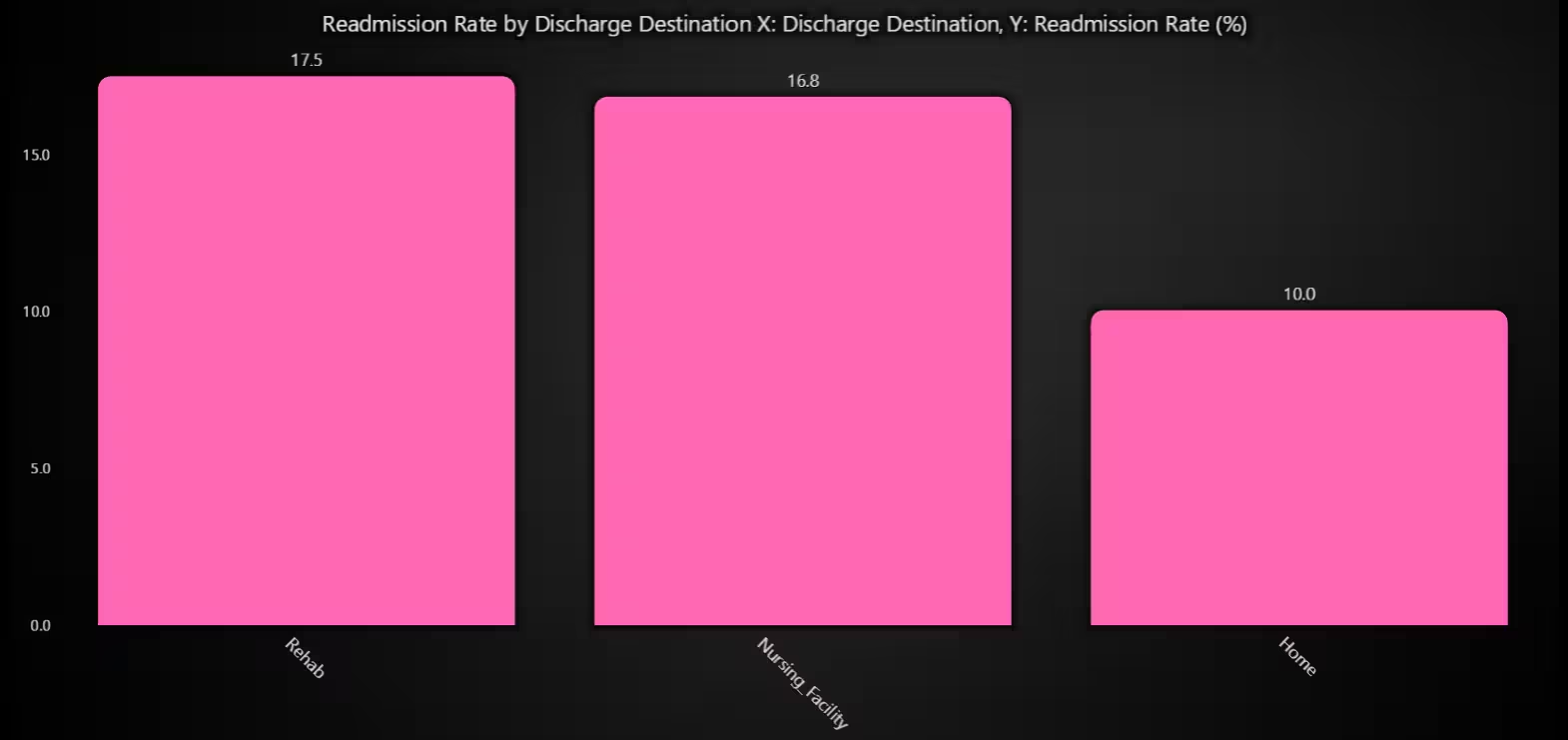
This chart clearly reveals which discharge destinations are more prone to 30-day readmissions. Facilities or pathways with high readmission percentages may require post-discharge monitoring programs.
# Chart 2 – Readmission Rate by Discharge Destination (Bar Chart (Catagorical Rates))
# Developed with AI Assistance to demonstrate LightningChart Python

import lightningchart as lc
import pandas as pd

# Load your license
with open("D:/HAMK/Internship/MyProjects/lc_license.txt", "r") as f:
    lc.set_license(f.read().strip())

# Load dataset
df = pd.read_csv("hospital_readmissions_30k.csv")

# Compute readmission rates by discharge destination
group = df.groupby('discharge_destination')['readmitted_30_days'].value_counts(normalize=True).unstack()
rates = group.get('Yes', pd.Series(0))

# Prepare chart data
destinations = rates.index.tolist()
bar_data = [
    {"category": dest, "value": float(rates[dest] * 100)}  # percentage
    for dest in destinations
]

# Create bar chart with axis labels in title
chart = lc.BarChart(
    vertical=True,
    theme=lc.Themes.Black,
    title="Readmission Rate by Discharge Destination\nX: Discharge Destination, Y: Readmission Rate (%)"
)
chart.set_data(bar_data)
chart.set_sorting('descending')
chart.set_bars_color('#FF69B4')

# Customize appearance
chart.set_category_axis_labels(size=12, weight='bold')
chart.set_label_rotation(45)  # rotate long labels
chart.set_value_axis_labels(major_size=12)
chart.set_label_fitting(True)

# Show chart
chart.open()
Blood Pressure vs. Cholesterol – Scatter Plot
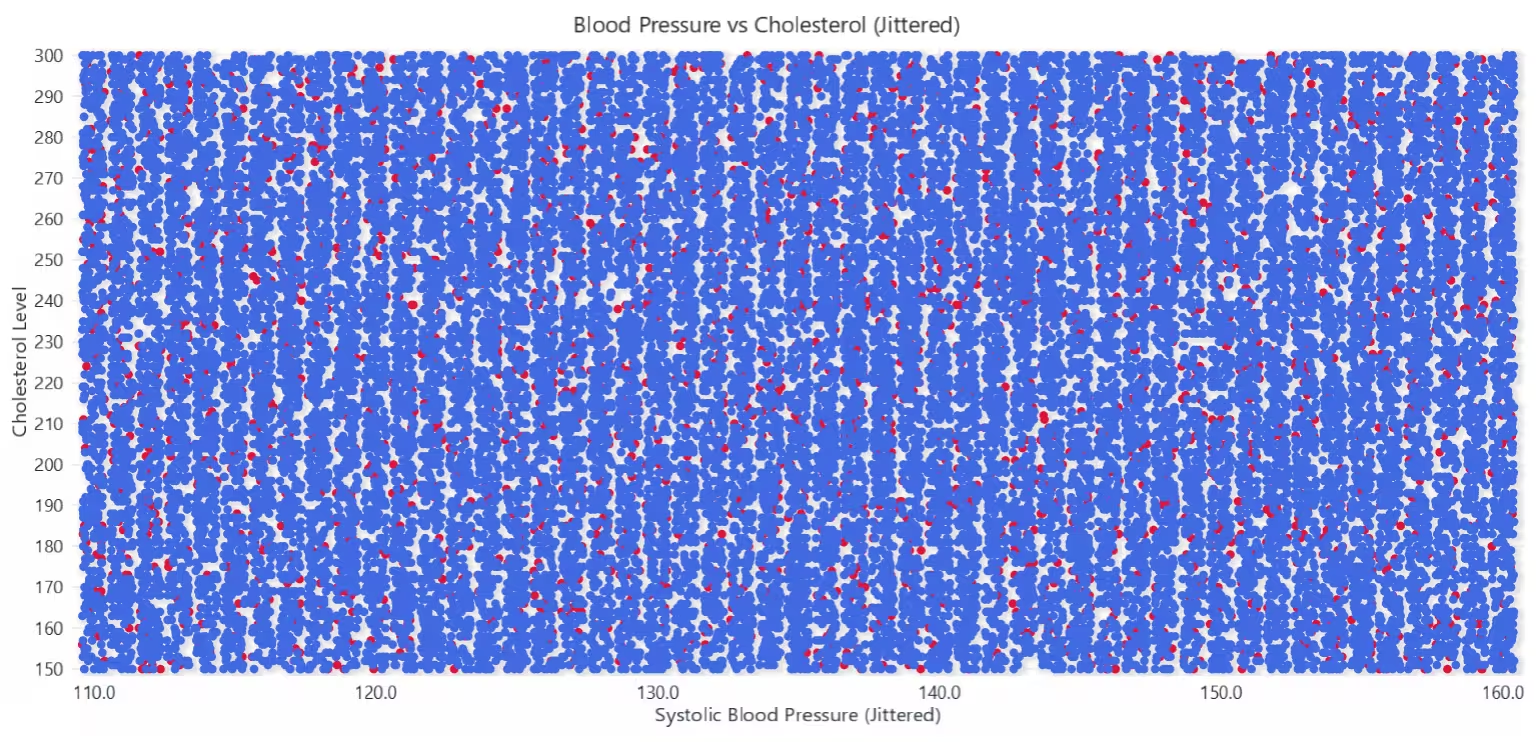
Each sector represents a month, and each ring represents a year (1998–2017). Color intensity reflects the number of fire incidents (logically interpolated from red = low to blue = high). The heatmap quickly shows which months consistently see higher fire activity, and whether these peaks are repetitive or shifting over time.
# Chart 3 – Blood Pressure vs. Cholesterol (Scatter Plot)
# Developed with AI Assistance to demonstrate LightningChart Python

import lightningchart as lc
import pandas as pd
import numpy as np

# Load your license
with open("D:/HAMK/Internship/MyProjects/lc_license.txt", "r") as f:
    lc.set_license(f.read().strip())

# Load and prepare data
df = pd.read_csv("hospital_readmissions_30k.csv")
df[['systolic', 'diastolic']] = df['blood_pressure'].str.split('/', expand=True).astype(int)

# Split data by readmission
readmitted_yes = df[df['readmitted_30_days'] == 'Yes']
readmitted_no = df[df['readmitted_30_days'] == 'No']

# Jittering function
def jitter(array, magnitude=0.4):
    return array + np.random.uniform(-magnitude, magnitude, size=len(array))

# Prepare jittered data
x_yes = jitter(readmitted_yes['systolic'].to_numpy())
y_yes = readmitted_yes['cholesterol'].to_numpy()

x_no = jitter(readmitted_no['systolic'].to_numpy())
y_no = readmitted_no['cholesterol'].to_numpy()

# Create chart
chart = lc.ChartXY(title="Blood Pressure vs Cholesterol (Jittered)", theme=lc.Themes.White)

# Add series for Readmitted = Yes
series_yes = chart.add_point_series()
series_yes.add(x=x_yes.tolist(), y=y_yes.tolist())
series_yes.set_point_color('crimson')
series_yes.set_name("Readmitted = Yes")

# Add series for Readmitted = No
series_no = chart.add_point_series()
series_no.add(x=x_no.tolist(), y=y_no.tolist())
series_no.set_point_color('royalblue')
series_no.set_name("Readmitted = No")

# Axis labels
chart.get_default_x_axis().set_title("Systolic Blood Pressure (Jittered)")
chart.get_default_y_axis().set_title("Cholesterol Level")

# Show chart
chart.open()
Impact of Diabetes & Hypertension on Readmission – Grouped Bar Chart
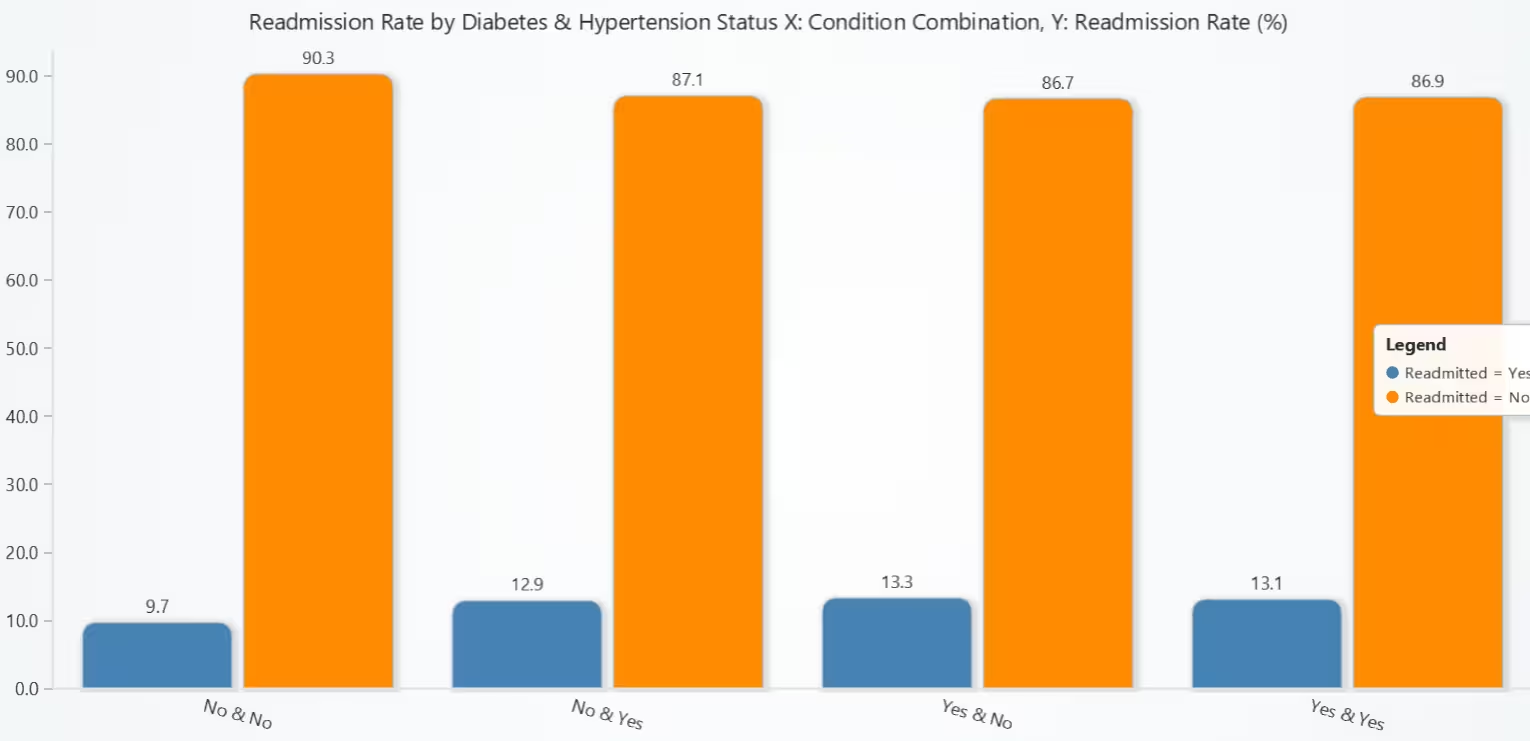
This grouped bar chart reveals a clear relationship between chronic conditions and hospital readmission. As either condition is introduced, the readmission rate increases. The highest rate appears when both diabetes and hypertension coexist, suggesting a compounding effect. This supports the idea that managing comorbidities may help reduce readmission risks.
# Chart 4 – Impact of Diabetes & Hypertension on Readmission (Grouped Bar Chart)
# Developed with AI Assistance to demonstrate LightningChart Python

import lightningchart as lc
import pandas as pd

# Load your license
with open("D:/HAMK/Internship/MyProjects/lc_license.txt", "r") as f:
    lc.set_license(f.read().strip())

# Load dataset
df = pd.read_csv("hospital_readmissions_30k.csv")

# Create condition combo column
df['condition_combo'] = df['diabetes'] + " & " + df['hypertension']

# Calculate % readmitted / not-readmitted per condition combo
group = df.groupby('condition_combo')['readmitted_30_days'].value_counts(normalize=True).unstack().fillna(0)
group *= 100  # convert to percentages
group = group.round(1)

# Prepare data for grouped bar chart
group_labels = group.index.tolist()
yes_values = group['Yes'].tolist()
no_values = group['No'].tolist()

chart = lc.BarChart(
    vertical=True,
    theme=lc.Themes.Light,
    title="Readmission Rate by Diabetes & Hypertension Status\nX: Condition Combination, Y: Readmission Rate (%)"
)

chart.set_data_grouped(
    group_labels,
    [
        {'subCategory': 'Readmitted = Yes', 'values': yes_values, 'color': 'steelblue'},
        {'subCategory': 'Readmitted = No', 'values': no_values, 'color': 'darkorange'},
    ]
)

chart.set_sorting('disabled')
chart.set_category_axis_labels(size=12, weight='bold')
chart.set_label_rotation(15)

chart.add_legend().add(chart)
chart.open()
Distribution of Medication Count by Readmission Status – Box Plot
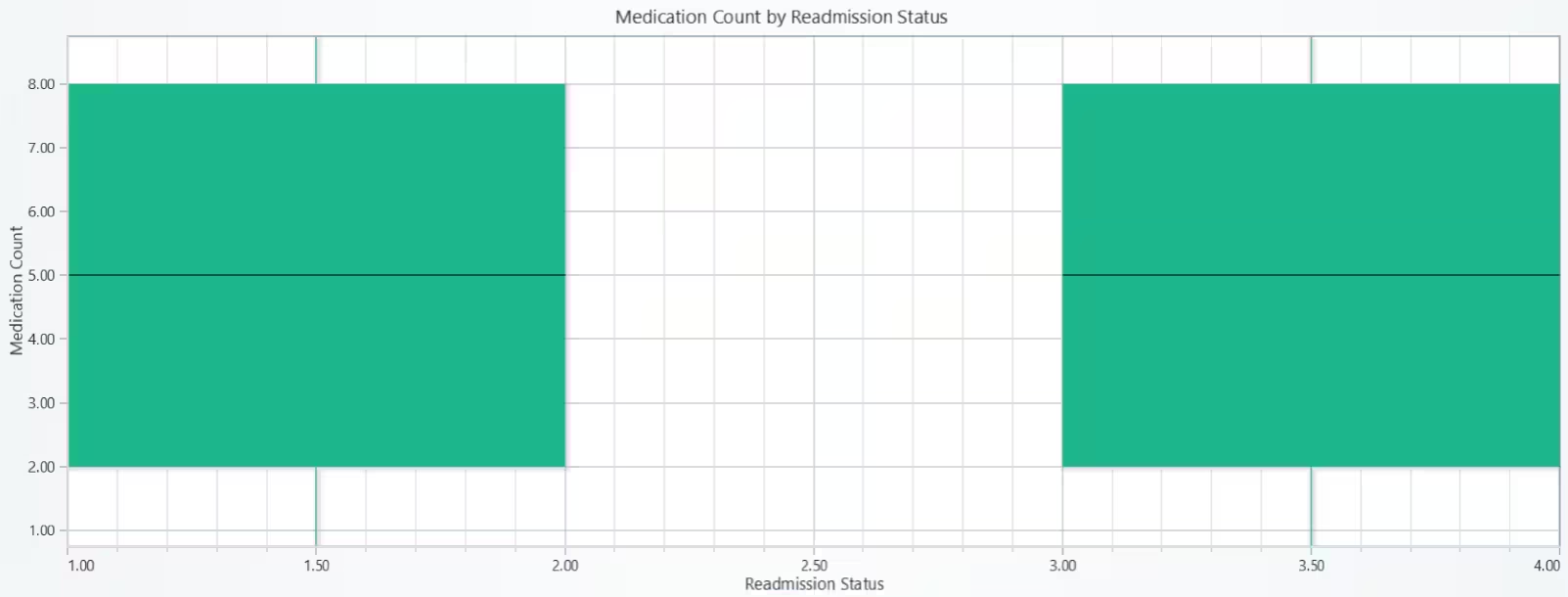
This box plot demonstrates that medication count alone does not appear to be a differentiating factor for readmission. Both readmitted and non-readmitted groups have virtually identical distributions, suggesting that the quantity of medications prescribed may not directly affect 30-day readmission likelihood.
# Chart 5 – Distribution of Medication Count by Readmission Status (Box Plot)
# Developed with AI Assistance to demonstrate LightningChart Python

import lightningchart as lc
import pandas as pd
import numpy as np

# Load your license
with open("D:/HAMK/Internship/MyProjects/lc_license.txt", "r") as f:
    lc.set_license(f.read().strip())

# Load dataset
df = pd.read_csv("hospital_readmissions_30k.csv")

# Define data groups
box_data = {
    'Readmitted = Yes': df[df['readmitted_30_days'] == 'Yes']['medication_count'].tolist(),
    'Readmitted = No': df[df['readmitted_30_days'] == 'No']['medication_count'].tolist()
}

# Set up chart
chart = lc.ChartXY(theme=lc.Themes.Light, title='Medication Count by Readmission Status')
chart.get_default_x_axis().set_title("Readmission Status")
chart.get_default_y_axis().set_title("Medication Count")

# Prepare data
dataset = []
x_outliers = []
y_outliers = []

x_ticks = []
x_labels = []

for i, (label, values) in enumerate(box_data.items()):
    start = (i * 2) + 1
    end = start + 1
    center = start + 0.5

    q1 = float(np.percentile(values, 25))
    q3 = float(np.percentile(values, 75))
    median = float(np.median(values))
    iqr = q3 - q1
    lower_bound = q1 - 1.5 * iqr
    upper_bound = q3 + 1.5 * iqr

    non_outliers = [v for v in values if lower_bound <= v <= upper_bound]
    lower_extreme = float(min(non_outliers)) if non_outliers else q1
    upper_extreme = float(max(non_outliers)) if non_outliers else q3
    outliers = [v for v in values if v < lower_bound or v > upper_bound]

    print(f"\n--- Stats for {label} ---")
    print(f"Q1: {q1}")
    print(f"Q3: {q3}")
    print(f"Median: {median}")
    print(f"IQR: {iqr}")
    print(f"Lower Extreme: {lower_extreme}")
    print(f"Upper Extreme: {upper_extreme}")
    print(f"Outliers: {outliers[:5]} ... ({len(outliers)} total)")

    dataset.append({
        'start': start,
        'end': end,
        'lowerQuartile': q1,
        'upperQuartile': q3,
        'median': median,
        'lowerExtreme': lower_extreme,
        'upperExtreme': upper_extreme,
    })

    for outlier in outliers:
        x_outliers.append(center)
        y_outliers.append(outlier)

    x_ticks.append(center)
    x_labels.append(label)

# Add box series
box_series = chart.add_box_series()
box_series.add_multiple(dataset)

# Add outliers
if x_outliers:
    outlier_series = chart.add_point_series(sizes=True)
    outlier_series.set_point_color('crimson')
    outlier_series.append_samples(
        x_values=x_outliers,
        y_values=y_outliers,
        sizes=[8] * len(y_outliers),
    )

# Show chart
chart.open()
Readmission Distribution by Gender and Discharge Destination – Treemap Chart
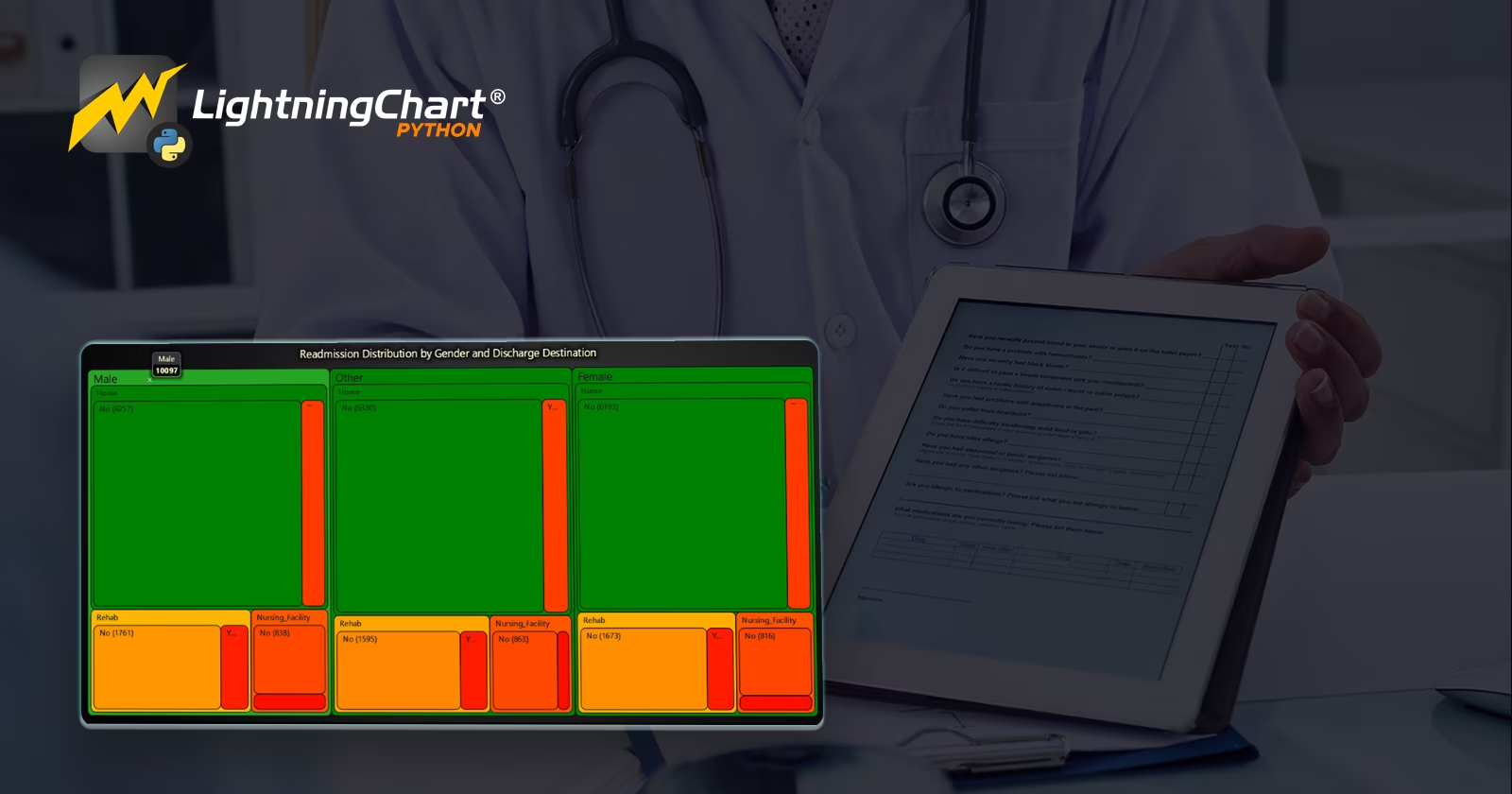
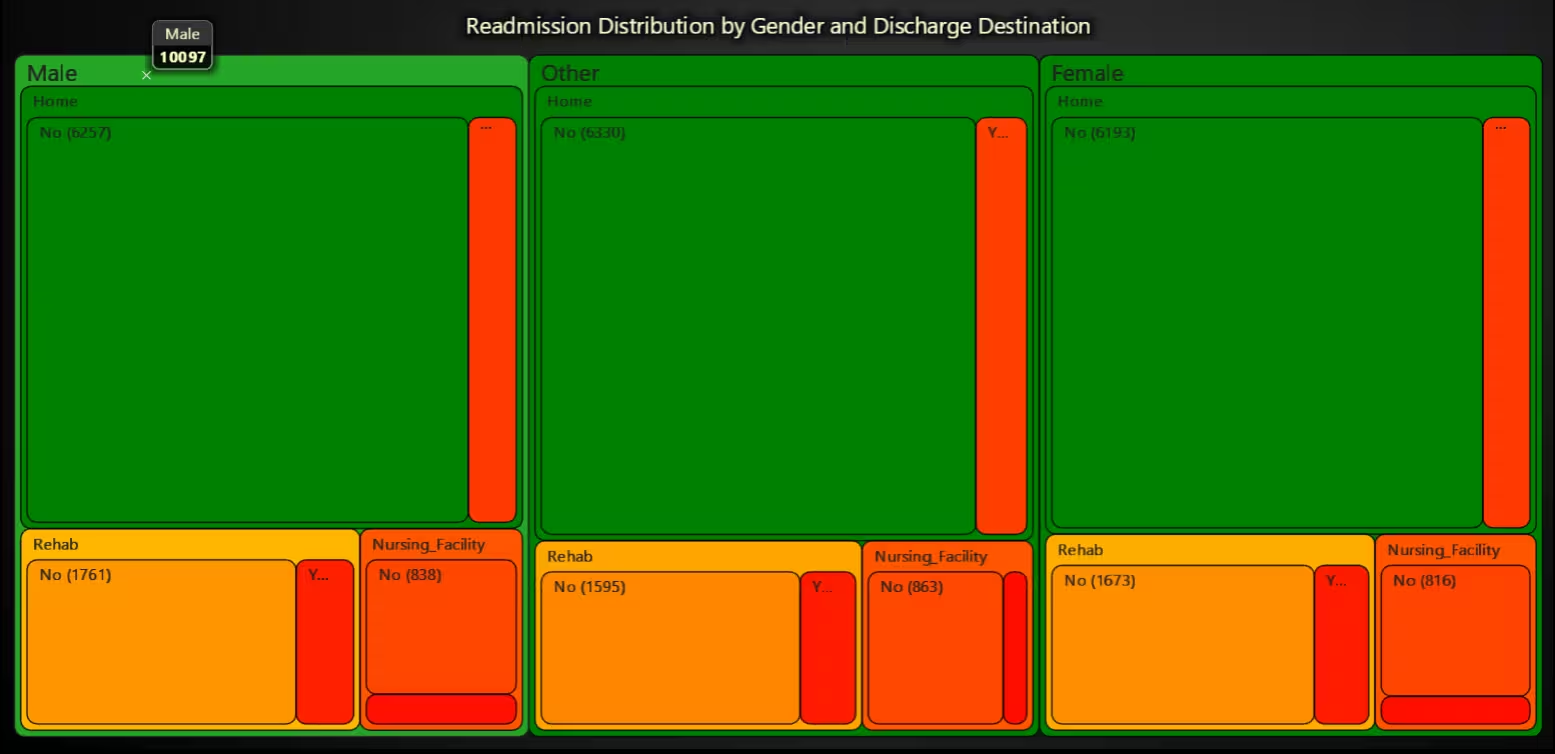
This treemap reveals that gender and discharge destinations together influence readmission trends. Female patients show larger readmission proportions in specific destinations, signalling potential areas for improved discharge planning.
# Chart 6 – Readmission Distribution by Gender and Discharge Destination (Treemap Chart)
# Developed with AI Assistance to demonstrate LightningChart Python

import lightningchart as lc
import pandas as pd

# Load license
with open("D:/HAMK/Internship/MyProjects/lc_license.txt", "r") as f:
    lc.set_license(f.read().strip())

# Load the dataset
df = pd.read_csv("hospital_readmissions_30k.csv")

# Group and prepare TreeMap structure
grouped = df.groupby(['gender', 'discharge_destination', 'readmitted_30_days']).size().reset_index(name='count')

tree_data = []
for gender in grouped['gender'].unique():
    gender_group = grouped[grouped['gender'] == gender]
    gender_node = {'name': gender, 'children': []}

    for dest in gender_group['discharge_destination'].unique():
        dest_group = gender_group[gender_group['discharge_destination'] == dest]
        dest_node = {'name': dest, 'children': []}

        for _, row in dest_group.iterrows():
            dest_node['children'].append({
                'name': f"{row['readmitted_30_days']} ({int(row['count'])})",
                'value': int(row['count'])
            })

        gender_node['children'].append(dest_node)

    tree_data.append(gender_node)

# Create TreeMap chart
chart = lc.TreeMapChart(
    theme=lc.Themes.Dark,
    title="Readmission Distribution by Gender and Discharge Destination"
)

# Set color palette
chart.set_node_coloring(
    steps=[
        {'value': 0, 'color': ('red')},
        {'value': 3000, 'color': ('yellow')},
        {'value': 6000, 'color': ('green')},
    ]
)

# Apply data
chart.set_data(tree_data)
chart.open()
Discharge Flow Towards Readmission Risk – Funnel Chart
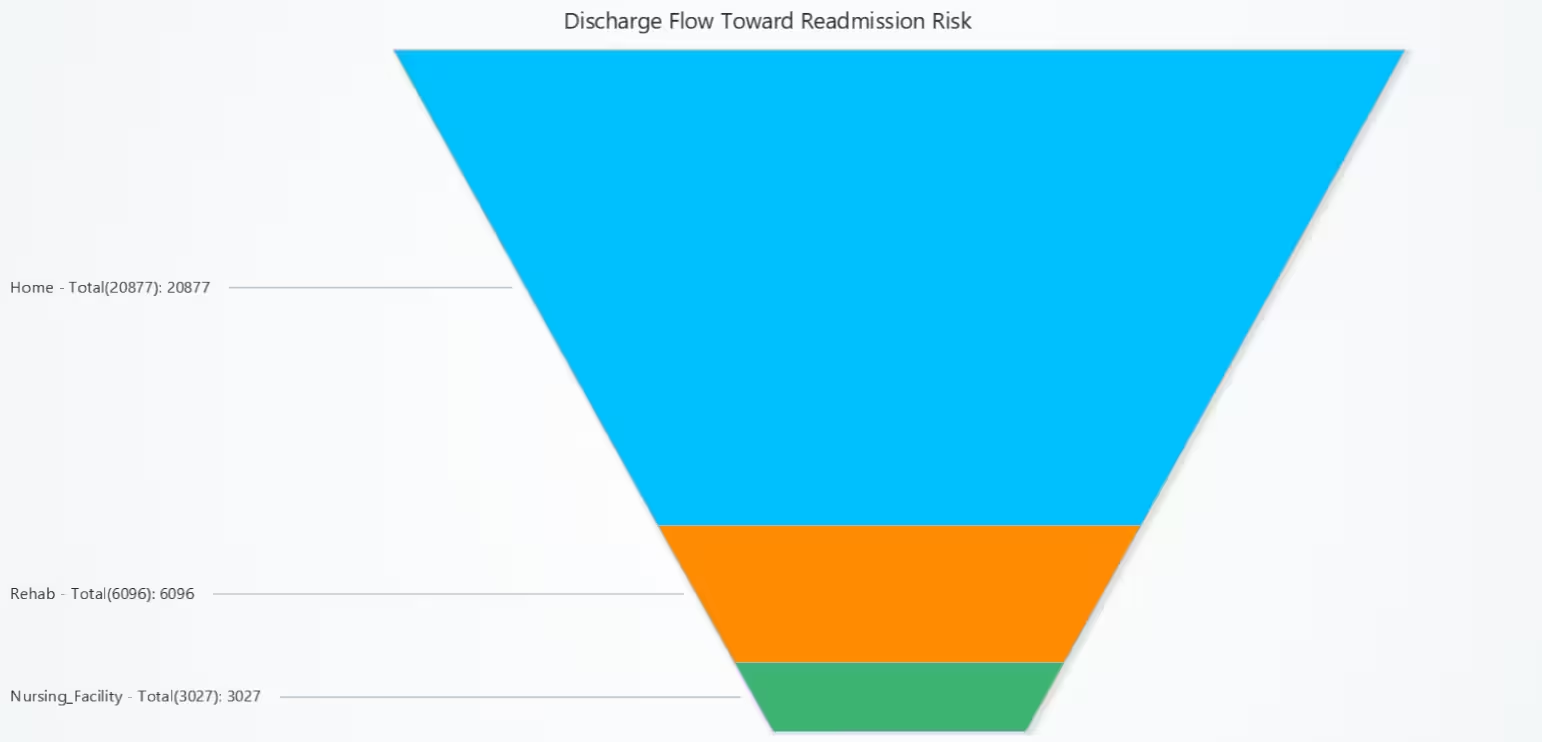
This funnel highlights the key exit points from hospitals that warrant strategic follow-up. Destinations like “Home” or “Skilled Nursing Facility” are dominant discharge paths potentially associated with higher readmission counts.
# Chart 7 – Discharge Flow Towards Readmission Risk (Funnel Chart)
# Developed with AI Assistance to demonstrate LightningChart Python

import lightningchart as lc
import pandas as pd

# Load license
with open("D:/HAMK/Internship/MyProjects/lc_license.txt", "r") as f:
    lc.set_license(f.read().strip())

# Load dataset
df = pd.read_csv("hospital_readmissions_30k.csv")

# Group by discharge_destination and readmission status
funnel_df = df.groupby(['discharge_destination', 'readmitted_30_days']).size().reset_index(name='count')

# Pivot to get total per destination
pivot_df = funnel_df.pivot(index='discharge_destination', columns='readmitted_30_days', values='count').fillna(0)
pivot_df['Total'] = pivot_df.sum(axis=1)

# Sort and extract top 3 discharge destinations
funnel_data = pivot_df.sort_values(by='Total', ascending=False).head(3)

# Build data for chart
slices = []
for idx, row in funnel_data.iterrows():
    slices.append({
        'name': f"{idx} - Total({int(row['Total'])})",
        'value': int(row['Total'])
    })

# Create Funnel Chart
chart = lc.FunnelChart(
    slice_mode='height',
    theme=lc.Themes.Light,
    title='Discharge Flow Toward Readmission Risk'
)
chart.add_slices(slices)
chart.set_slice_colors([
    'deepskyblue',
    'darkorange',
    'mediumseagreen'
])

chart.open()
Patient Risk Patterns by Readmission – Parallel Coordinate Chart
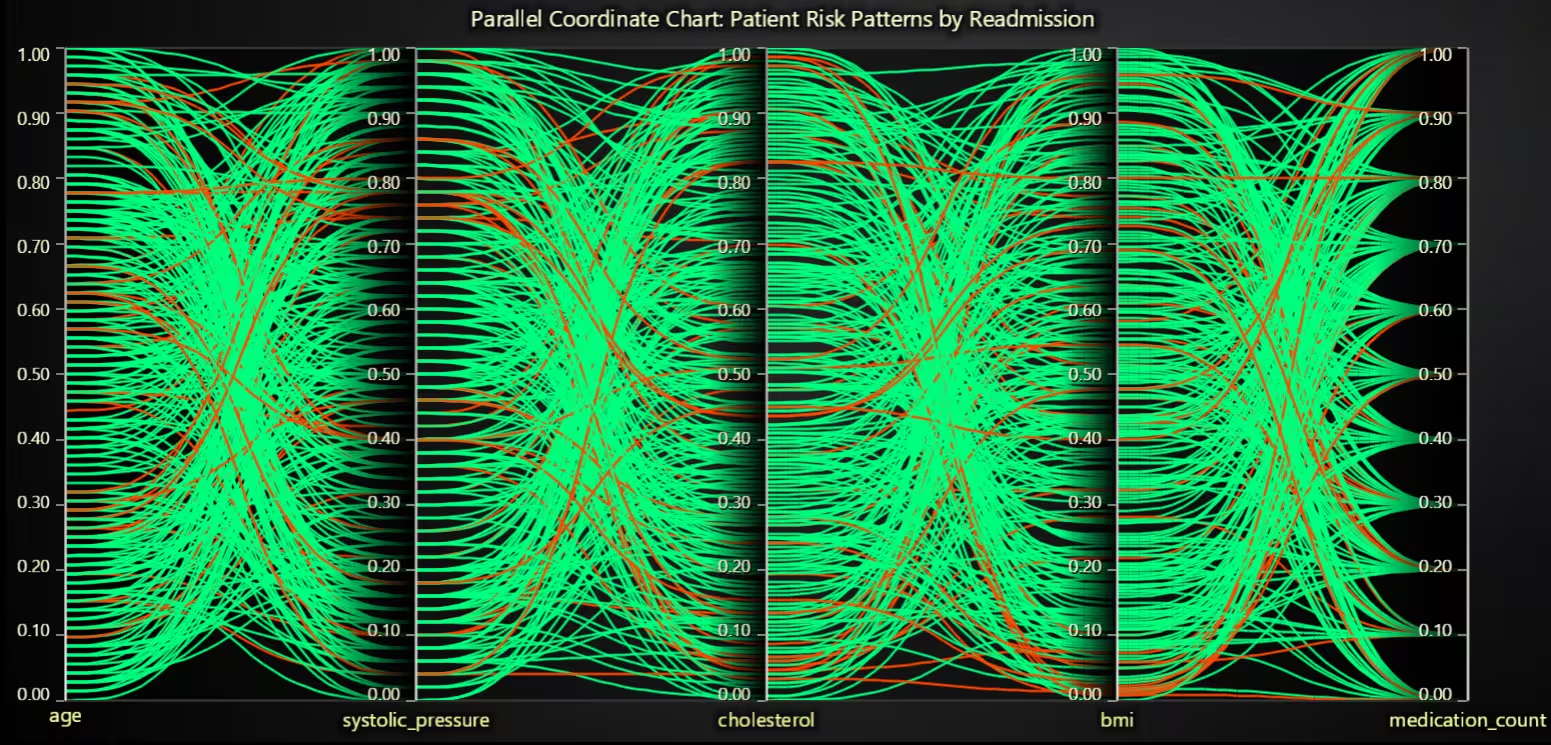
By normalizing and plotting health metrics side-by-side, this chart gives a holistic view of patient risk signatures. It allows detecting overlapping or diverging characteristics between readmitted and non-readmitted individuals.
# Chart 8 – Patient Risk Patterns by Readmission (Parallel Coordinate Chart)
# Developed with AI Assistance to demonstrate LightningChart Python

import lightningchart as lc
import pandas as pd
import numpy as np

# Load your license
with open("D:/HAMK/Internship/MyProjects/lc_license.txt", "r") as f:
    lc.set_license(f.read().strip())

# Load the dataset
df = pd.read_csv("hospital_readmissions_30k.csv")

# Extract systolic blood pressure (first number before '/')
df['systolic_bp'] = df['blood_pressure'].str.extract(r'(\d+)/\d+')[0]
df['systolic_bp'] = pd.to_numeric(df['systolic_bp'], errors='coerce')

# Drop rows with missing or invalid values
required = ['age', 'systolic_bp', 'cholesterol', 'bmi', 'medication_count', 'readmitted_30_days']
df_clean = df.dropna(subset=required)

# Sample max 300 rows for clarity
df_sample = df_clean.sample(n=min(300, len(df_clean)), random_state=42)

# Normalize selected numerical columns
def normalize(series):
    return (series - series.min()) / (series.max() - series.min())

df_sample['age'] = normalize(df_sample['age'])
df_sample['systolic_pressure'] = normalize(df_sample['systolic_bp'])
df_sample['cholesterol'] = normalize(df_sample['cholesterol'])
df_sample['bmi'] = normalize(df_sample['bmi'])
df_sample['medication_count'] = normalize(df_sample['medication_count'])

# Setup chart
chart = lc.ParallelCoordinateChart(
    theme=lc.Themes.Dark,
    title="Parallel Coordinate Chart: Patient Risk Patterns by Readmission"
)

# Define axes with renamed blood pressure
chart.set_axes(['age', 'systolic_pressure', 'cholesterol', 'bmi', 'medication_count'])

# Add patient data
for _, row in df_sample.iterrows():
    data = {
        'age': float(row['age']),
        'systolic_pressure': float(row['systolic_pressure']),
        'cholesterol': float(row['cholesterol']),
        'bmi': float(row['bmi']),
        'medication_count': float(row['medication_count'])
    }
    series = chart.add_series()
    series.set_data(data)

    # Color lines by readmission status
    if row['readmitted_30_days'] == 'Yes':
        series.set_color('orangered')
    else:
        series.set_color('springgreen')

# Show chart
chart.open()
30-Day Readmission Rate – Gauge Chart
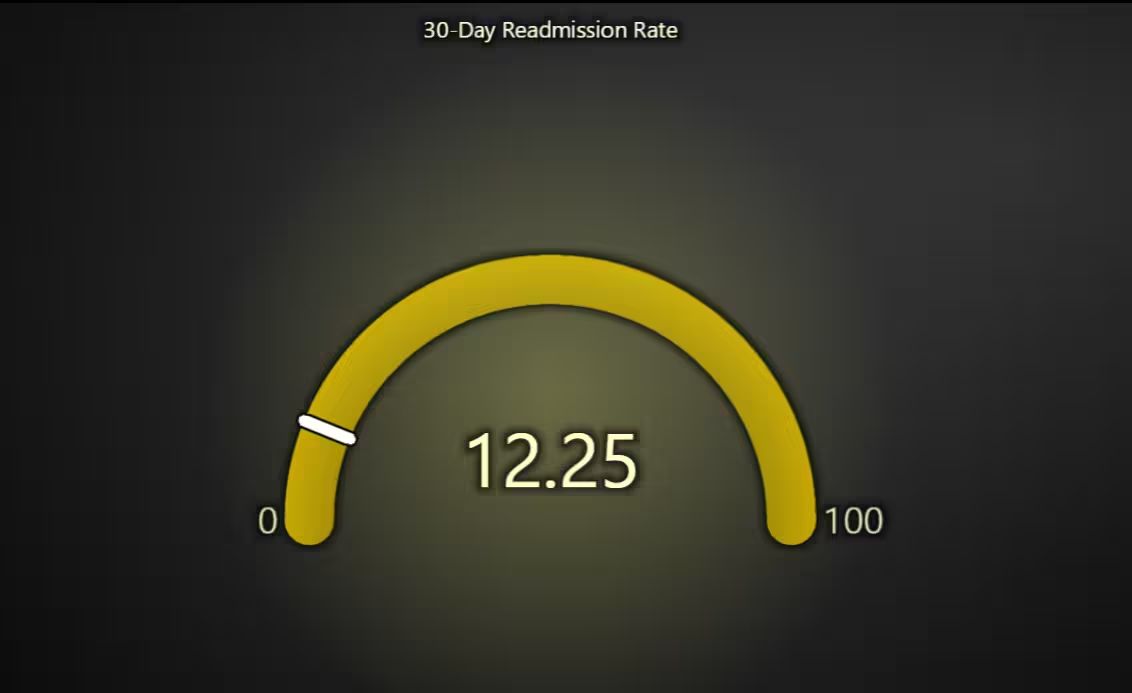
This KPI-style chart conveys the hospital’s overall readmission burden (12.25%) clearly and quickly. The coloured band helps interpret urgency or normalcy, aiding strategic benchmarking.
# Chart 9 – 30-Day Readmission Rate (Gauge Chart)
# Developed with AI Assistance to demonstrate LightningChart Python

import lightningchart as lc

# Load your license
with open("D:/HAMK/Internship/MyProjects/lc_license.txt", "r") as f:
    lc.set_license(f.read().strip())

# Readmission percentage from analysis
readmission_rate = 12.25

# Create the gauge chart
chart = lc.GaugeChart(
    theme=lc.Themes.Dark,
    title='30-Day Readmission Rate'
)

# Set angle (semicircle style)
chart.set_angle_interval(start=180, end=0)

# Set the numeric range
chart.set_interval(start=0, end=100)

# Set the actual readmission percentage as the value
chart.set_value(readmission_rate)

# Change color based on threshold
if readmission_rate < 10:
    chart.set_bar_color('limegreen')
elif readmission_rate < 20:
    chart.set_bar_color('gold')
else:
    chart.set_bar_color('crimson')

# Open the chart
chart.open()
Average Health Metrics by Readmission Status – Radar Chart
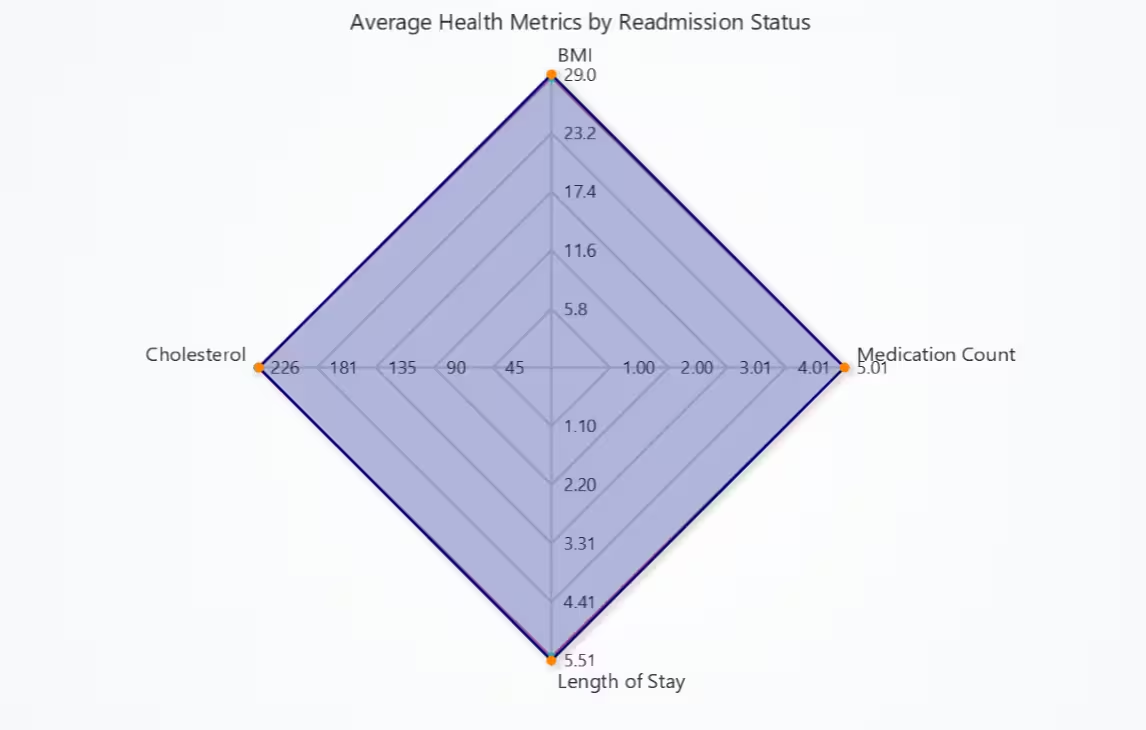
This radar plot shows that readmitted patients tend to have worse average health profiles. It underscores the combined effect of multiple risk factors that could be targeted for intervention.
# Chart 10 – Average Health Metrics by Readmission Status (Radar (Spider) Chart)
# Developed with AI Assistance to demonstrate LightningChart Python

import lightningchart as lc
import pandas as pd

# Load your LightningChart license
with open("D:/HAMK/Internship/MyProjects/lc_license.txt", "r") as f:
    lc.set_license(f.read().strip())

# Load dataset
df = pd.read_csv("hospital_readmissions_30k.csv")

# Define metrics
metrics = ['bmi', 'medication_count', 'length_of_stay', 'cholesterol']
axes = ['BMI', 'Medication Count', 'Length of Stay', 'Cholesterol']

# Drop rows with missing values
df = df.dropna(subset=metrics)

# Compute group means
group_means = df.groupby('readmitted_30_days')[metrics].mean().round(2)

# Prepare values
values_yes = group_means.loc['Yes'].tolist()
values_no = group_means.loc['No'].tolist()

# Create Radar Chart
chart = lc.SpiderChart(
    title="Average Health Metrics by Readmission Status",
    theme=lc.Themes.Light
)
chart.set_web_mode("polygon")
chart.set_web_count(5)

# Add axes
for axis in axes:
    chart.add_axis(axis)

# Colors
color_yes = (255, 99, 132, 100)     # Soft Red
color_no = (54, 162, 235, 100)      # Soft Blue

# Add Readmitted Series
series_yes = chart.add_series()
series_yes.set_name("Readmitted")
series_yes.set_line_color('crimson')
series_yes.set_fill_color(color_yes)
series_yes.add_points([{'axis': axes[i], 'value': values_yes[i]} for i in range(len(axes))])

# Add Not Readmitted Series
series_no = chart.add_series()
series_no.set_name("Not Readmitted")
series_no.set_line_color('navy')
series_no.set_fill_color(color_no)
series_no.add_points([{'axis': axes[i], 'value': values_no[i]} for i in range(len(axes))])

# Show chart
chart.open()
Total Fires per Year – Bar Chart
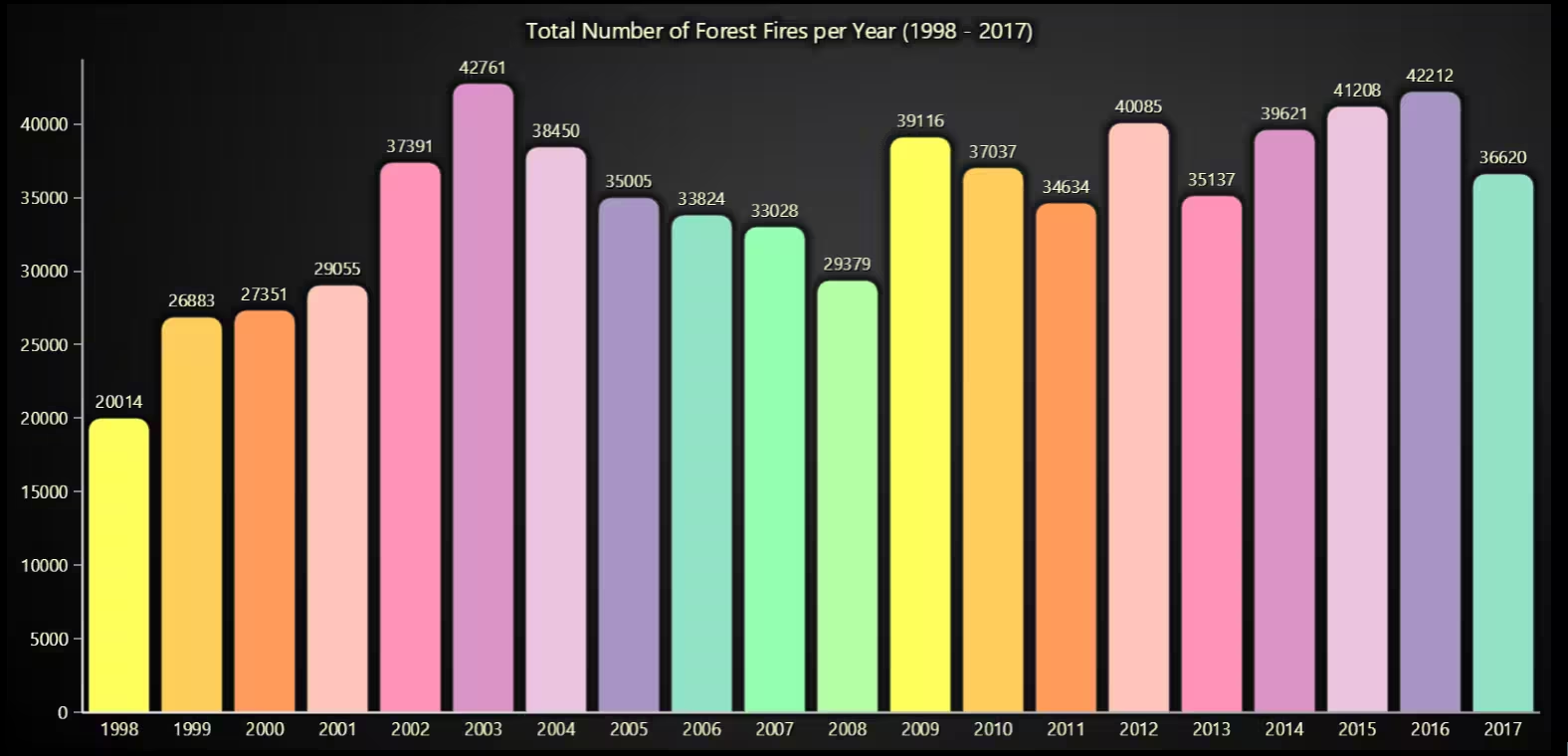
The chart presents the total number of forest fires per year from 1998 to 2017. It clearly highlights spikes in fire activity such as in 2004, 2007, and 2010, as well as notably calmer years like 2000 and 2012.
# Bonus Chart 2 – Total Fires per Year (Vertical Bar Chart)
# Developed with AI assistance using LightningChart Python

import pandas as pd
import lightningchart as lc

# Load LightningChart license
with open("D:/HAMK/Internship/MyProjects/lc_license.txt", "r") as f:
    lc.set_license(f.read().strip())

# Load and clean dataset
df = pd.read_csv("Forest Fires Brazil Data.csv", encoding='ISO-8859-1')
df.columns = df.columns.str.strip()
df.drop_duplicates(inplace=True)

# Group total fires per year
fires_per_year = df.groupby('year')['number'].sum()

# Convert to LightningChart format
bar_data = [{'category': str(year), 'value': count} for year, count in fires_per_year.items()]

# Create vertical bar chart
chart = lc.BarChart(
    vertical=True,
    theme=lc.Themes.Dark,
    title='Total Number of Forest Fires per Year (1998 - 2017)'
)
chart.set_sorting('disabled')
chart.set_data(bar_data)

chart.open()
Conclusion
This project focused on visualizing and analysing hospital readmission risk factors using the Hospital Readmissions 30k Dataset with the LightningChart Python library. A total of 10 high-performance, interactive visualizations were developed to examine patterns related to patient demographics (age, gender), health metrics (BMI, cholesterol, blood pressure, medication count), comorbid conditions (diabetes, hypertension), and hospital discharge outcomes.
The dataset was pre-processed using pandas to handle missing values, derive new variables (eg: combined condition categories, systolic blood pressure extraction), and calculate readmission rates across multiple groupings. The charts included bar charts, treemaps, funnel charts, parallel coordinate plots, box plots, radar charts, gauge charts, and other visual formats, each chosen to highlight distinct relationships between patient factors and 30-day readmission risk.
The results provide actionable insights for hospital administrators, clinicians, and policymakers, such as identifying high-risk discharge destinations, profiling readmission-prone patient types, and understanding how combinations of chronic conditions affect re-hospitalization likelihood.
Continue learning with LightningChart

Create a JavaScript Pie Chart with NodeJS, TypeScript & LightningChart
Written by a human | Updated on April 10th, 2025JavaScript Pie Chart with NodeJS & TypeScript Today, we are going to do a short tutorial on how to generate a pie chart using Node JS, TypeScript, and LigningCharts JS. To see how to get LightningChart JS for...

Real-time data visualization with WebSockets
Written by a human | Updated on April 10th, 2025WebSockets Data Visualization in Real-Time These days it is ever increasingly common that people require web solutions for their applications and services. Data visualization is not an exception to this, as...

Why Performance Matters in Data Visualization?
Written by a human | Updated on April 10th, 2025Performance in Data VisualizationI was doing a Google search a couple of days ago and particularly, I wanted to know what are the options for developers who need to visualize large amounts of data points within...



If you have any questions, feel free to contact us!
©LightningChart Ltd 2025. All rights reserved.