








A Healthcare Data Visualization Analysis with LightningChart Python
Tutorial
Assisted by AI
Conducting a healthcare data visualization analysis of patient outcomes using a hospital diagnostics dataset (hd) that includes structured fields and free-text notes.
Vindya Nukulasooriya
Data Science Developer


Introduction
This project delivers a focused analysis of patient outcomes using a hospital diagnostics dataset (hd) that includes structured fields and free-text notes. We standardize the target by mapping free-text Test Results into a clean binary outcome_flag (1 = Positive, 0 = Negative) and derive/supporting features such as Age, Billing Amount, and LOS_days (length of stay). We also parse a hypertension indicator from clinical text as a practical proxy for elevated blood pressure.
Project Overview
Building a focused portfolio of LightningChart Python visuals to investigate how patient and stay parameters relate to clinical Outcome (0/1), identify subtle subgroup differences, and reveal feature redundancy relevant to modeling and decision‑making.
Objectives
- Profile Age by outcome using histograms and cumulative frequency (ECDF‑style) overlays.
- Compare Age robustly with box plots.
- Examine resource use via Billing Amount by outcome.
- Summarize numeric relationships with a correlation heatmap using named axes.
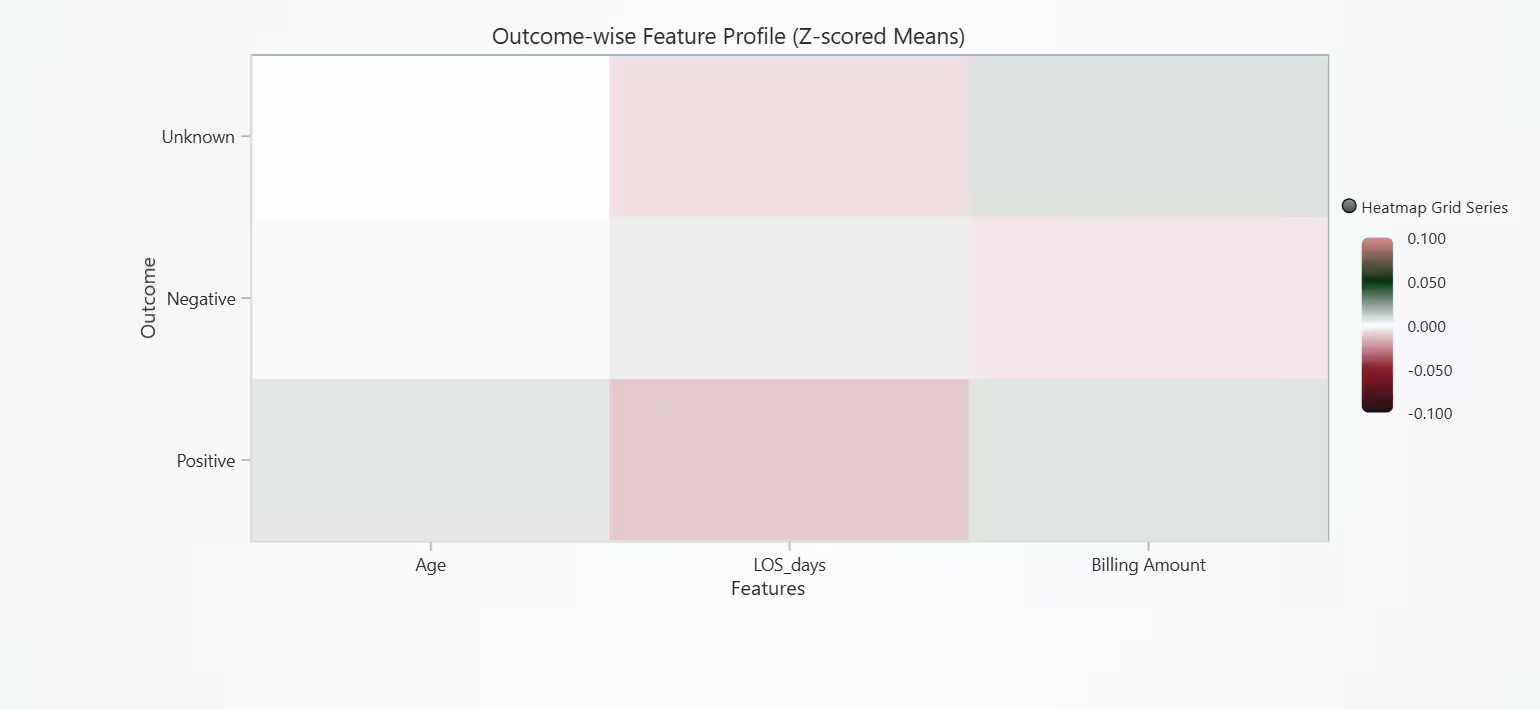
- Profile groups with an Outcome‑wise Feature Heatmap (z‑scored means of Age, LOS_days, Billing Amount).
Deliverables
- A concise report with per‑chart documentation (parameters, rationale, insights, short analysis).
- Notebook code cells for each chart with clear data‑prep and axis/legend setup.
- Conclusions and modeling implications for downstream analytics.
Tools Used
Python 3.13.5, LightningChart Python, Jupyter Notebook, AI Assistance
About the Dataset
I used the file healthcare_dataset.csv obtained from Kaggle
LightningChart Python
LightningChart Python is a fast, interactive charting library. In this project, LightningChart Python powers all visuals, histogram, cumulative frequency (ECDF‑style), box plot, grouped bar, billing box plot, correlation heatmap, and the outcome‑wise (z‑scored) feature heatmap, with smooth zoom/pan and presentation‑ready styling.

Setting Up Python Environment
Before running the project, install Python and the other required libraries using:
%pip install numpy pandas lightningchartSetting Up Your Development Environment:
- Set up a virtual environment:
- Use Visual Studio Code (VSCode) for a streamlined development experience.
Loading and Preprocessing Data
Fetch and preprocess the data using the following function:
# Import necessary libraries (load pandas library to preprocess dataset)
import pandas as pd
Visualizing Data with LightningChart Python
Histogram is the standard for visualizing a continuous distribution and Grouped bars compare Positive vs. Negative in the same bins. Age distributions for both outcomes are comparable, and age alone shows limited discriminative power.
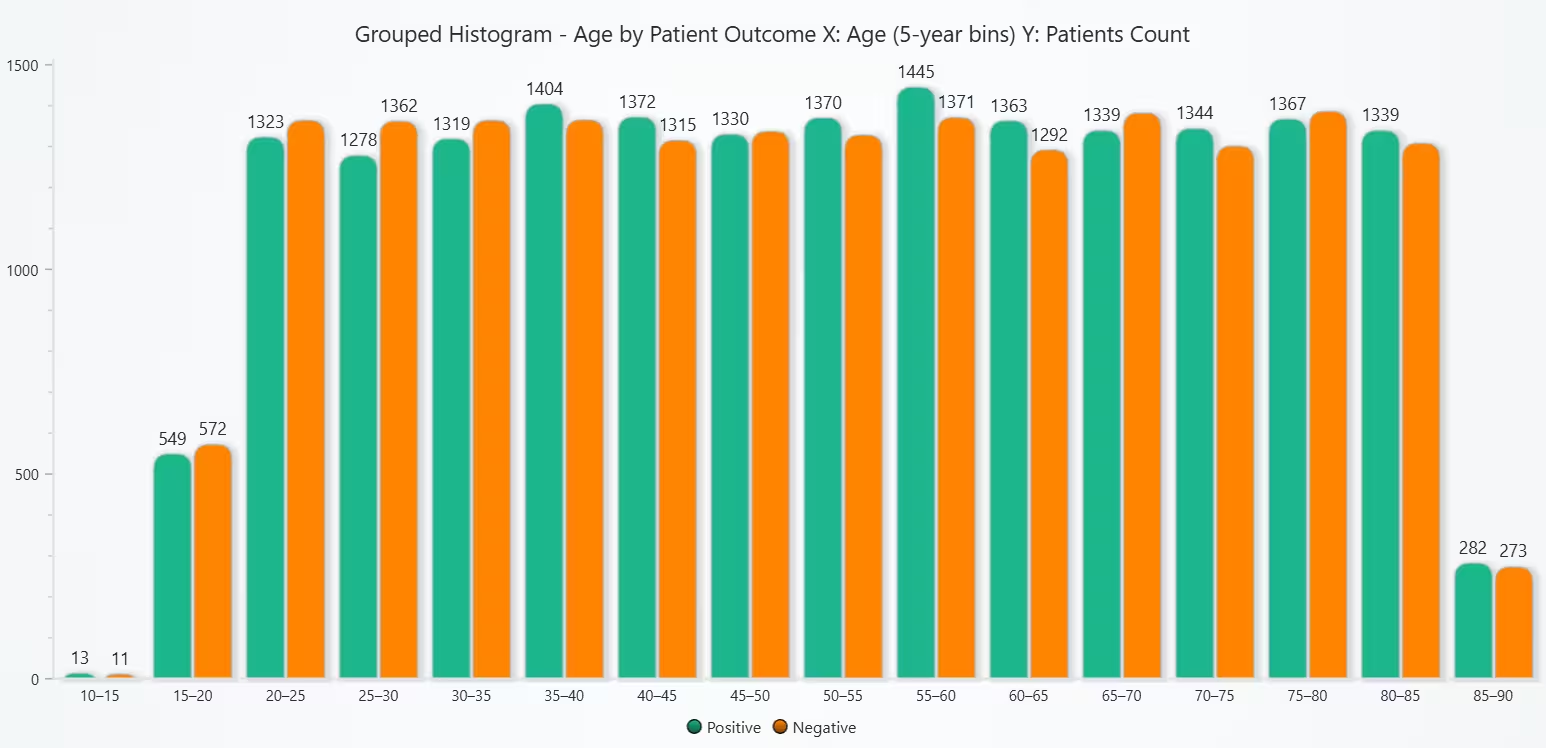
# Chart 1A - Grouped Histogram of Age by Patient Outcome (using outcome_flag)
# Developed with AI assistance to demonstrate LightningChart Python

import lightningchart as lc
import numpy as np

with open("D:/HAMK/Internship/MyProjects/lc_license.txt", "r") as f:
    lc.set_license(f.read().strip())

# Keep only rows with known outcome
df = hd[['Age','outcome_flag']].dropna(subset=['Age','outcome_flag']).copy()

# Bins
bin_width = 5
age_min = int(np.floor(df['Age'].min() // bin_width) * bin_width)
age_max = int(np.ceil(df['Age'].max() / bin_width) * bin_width)
bins = np.arange(age_min, age_max + bin_width, bin_width)
categories = [f"{int(bins[i])}–{int(bins[i+1])}" for i in range(len(bins)-1)]

# Counts by outcome
pos_counts, _ = np.histogram(df.loc[df['outcome_flag']==1, 'Age'], bins=bins)
neg_counts, _ = np.histogram(df.loc[df['outcome_flag']==0, 'Age'], bins=bins)

title = "Grouped Histogram - Age by Patient Outcome\nX: Age (5-year bins)  Y: Patients Count"
chart = lc.BarChart(vertical=True, theme=lc.Themes.Light, title=title, html_text_rendering=True)
chart.set_data_grouped(
    categories,
    [
        {'subCategory': 'Positive', 'values': pos_counts.tolist()},
        {'subCategory': 'Negative', 'values': neg_counts.tolist()},
    ]
)
chart.set_sorting('disabled')
chart.set_category_axis_labels(size=12)
chart.set_value_axis_labels(major_size=12)

# Light-theme colors (Positive teal, Negative gray)
try:
    chart.set_series_colors(['#00A8E8', '#9AA0A6'])
except Exception:
    pass

chart.open()
Cumulative (ECDF-style) Grouped Histogram of Age by Patient Outcome
ECDF compares entire distribution shapes and makes medians/percentiles obvious and normalization by outcome handles class size differences gracefully. The ECDF confirms Chart 1A: overlapping age distributions for Positive and Negative outcomes and Age is unlikely to be a strong standalone predictor.
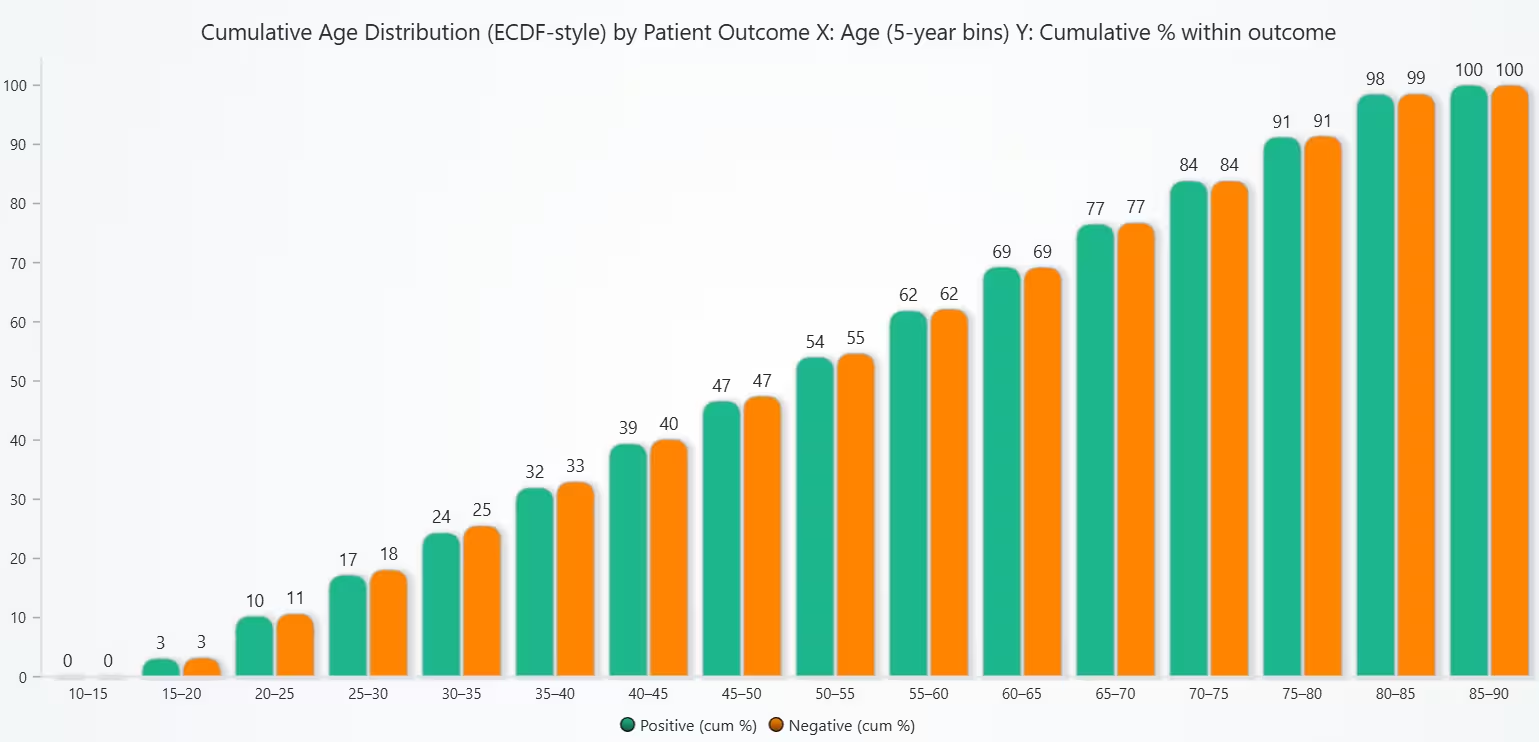
# Chart 1B - Cumulative (ECDF-style) Grouped Histogram of Age by Patient Outcome
# Developed with AI assistance to demonstrate LightningChart Python

import lightningchart as lc
import numpy as np

with open("D:/HAMK/Internship/MyProjects/lc_license.txt", "r") as f:
    lc.set_license(f.read().strip())

# Known outcomes only
df = hd[['Age','outcome_flag']].dropna(subset=['Age','outcome_flag']).copy()

# Bins
bin_width = 5
age_min = int(np.floor(df['Age'].min() // bin_width) * bin_width)
age_max = int(np.ceil(df['Age'].max() / bin_width) * bin_width)
bins = np.arange(age_min, age_max + bin_width, bin_width)
categories = [f"{int(bins[i])}–{int(bins[i+1])}" for i in range(len(bins)-1)]

# Counts
pos_counts, _ = np.histogram(df.loc[df['outcome_flag']==1, 'Age'], bins=bins)
neg_counts, _ = np.histogram(df.loc[df['outcome_flag']==0, 'Age'], bins=bins)

# Cumulative % within outcome
pos_total = pos_counts.sum() or 1
neg_total = neg_counts.sum() or 1
pos_cum_pct = (np.cumsum(pos_counts) / pos_total * 100).round(2)
neg_cum_pct = (np.cumsum(neg_counts) / neg_total * 100).round(2)

title = "Cumulative Age Distribution (ECDF-style) by Patient Outcome\nX: Age (5-year bins)  Y: Cumulative % within outcome"
chart = lc.BarChart(vertical=True, theme=lc.Themes.Light, title=title, html_text_rendering=True)
chart.set_data_grouped(
    categories,
    [
        {'subCategory': 'Positive (cum %)', 'values': pos_cum_pct.tolist()},
        {'subCategory': 'Negative (cum %)', 'values': neg_cum_pct.tolist()},
    ]
)
chart.set_sorting('disabled')
chart.set_category_axis_labels(size=12)
chart.set_value_axis_labels(major_size=12)

try:
    chart.set_series_colors(['#00A8E8', '#9AA0A6'])
except Exception:
    pass
chart.open()
Box Plot of Blood Pressure by Patient Outcome
Box plots concisely compare centre (median), spread (IQR), and outliers between groups and is ideal to check if Age differs meaningfully between Positive and Negative outcomes. Age distributions for Positive and Negative outcomes are highly overlapping and Age alone shows limited discriminative power.
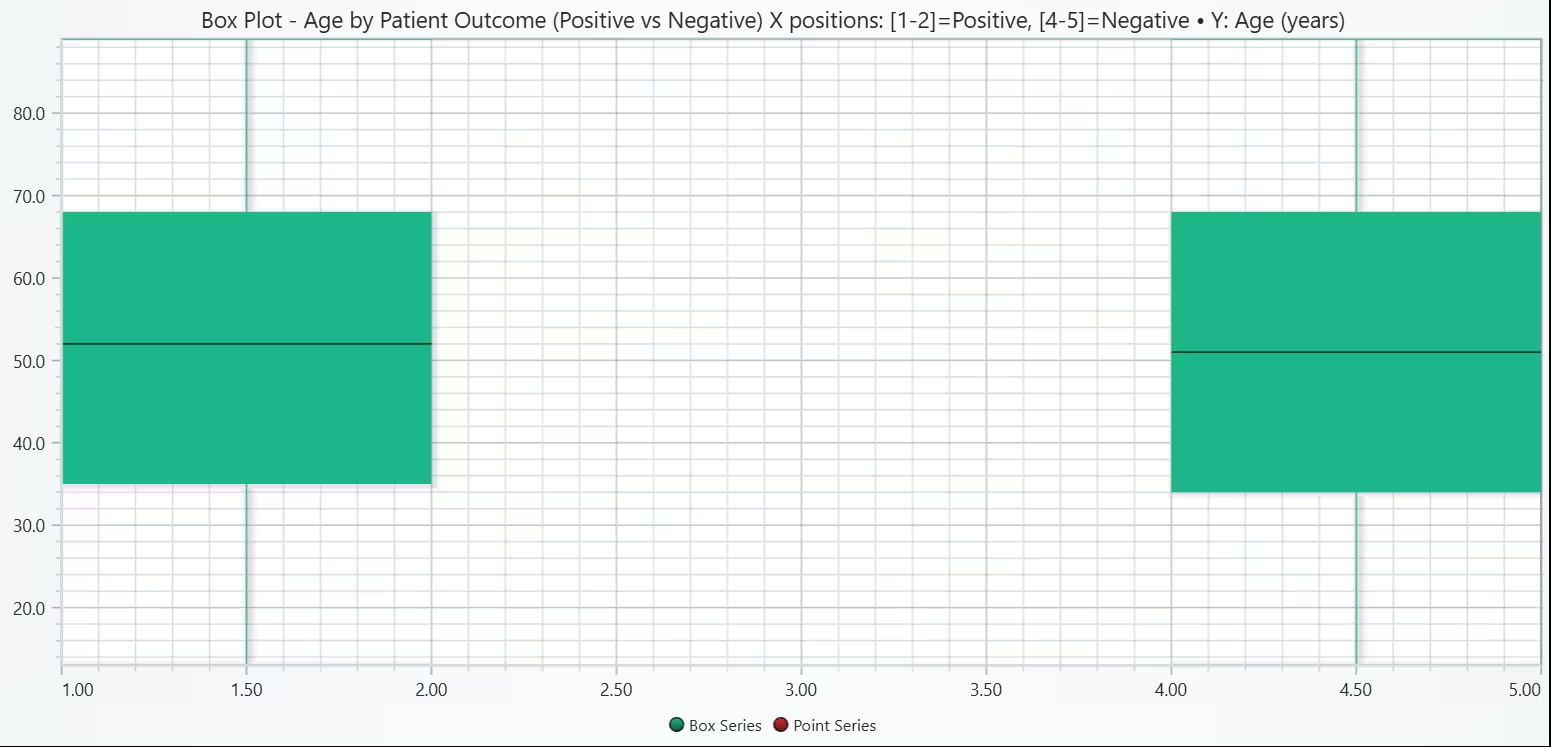
# Chart 2A - Box Plot of Age by Patient Outcome
# Developed with AI assistance to demonstrate LightningChart Python

import lightningchart as lc
import numpy as np

# License
with open("D:/HAMK/Internship/MyProjects/lc_license.txt", "r") as f:
    lc.set_license(f.read().strip())

# 1) Keep only rows with known outcome
df = hd[['Age', 'outcome_flag']].dropna(subset=['Age', 'outcome_flag']).copy()
ages_pos = df.loc[df['outcome_flag'] == 1, 'Age'].to_numpy()
ages_neg = df.loc[df['outcome_flag'] == 0, 'Age'].to_numpy()

def box_from_array(arr, start):
    """Build LightningChart box + outliers via IQR rule at x=[start, start+1]."""
    arr = np.asarray(arr, dtype=float)
    if arr.size == 0:
        return None, [], []
    q1 = float(np.percentile(arr, 25))
    q3 = float(np.percentile(arr, 75))
    med = float(np.median(arr))
    iqr = q3 - q1
    lo_b, hi_b = q1 - 1.5 * iqr, q3 + 1.5 * iqr
    non_out = arr[(arr >= lo_b) & (arr <= hi_b)]
    lo = float(non_out.min()) if non_out.size else float(arr.min())
    hi = float(non_out.max()) if non_out.size else float(arr.max())
    outs = arr[(arr < lo_b) | (arr > hi_b)]
    xs = [start + 0.5] * outs.size
    ys = outs.tolist()
    return {
        'start': start, 'end': start + 1,
        'lowerQuartile': q1, 'upperQuartile': q3, 'median': med,
        'lowerExtreme': lo, 'upperExtreme': hi,
    }, xs, ys

# 2) Build two boxes with wider spacing so no axis tweak is needed
dataset, x_out, y_out = [], [], []
bx_pos, xs, ys = box_from_array(ages_pos, start=1)   # Positive at ~[1,2]
if bx_pos: dataset.append(bx_pos); x_out += xs; y_out += ys
bx_neg, xs, ys = box_from_array(ages_neg, start=4)   # Negative at ~[4,5]
if bx_neg: dataset.append(bx_neg); x_out += xs; y_out += ys

title = (
    "Box Plot - Age by Patient Outcome (Positive vs Negative)\n"
    "X positions: [1-2]=Positive, [4-5]=Negative • Y: Age (years)"
)
chart = lc.ChartXY(theme=lc.Themes.Light, title=title, html_text_rendering=True)

# Boxes
box_series = chart.add_box_series()
box_series.add_multiple(dataset)

# Outliers
pts = chart.add_point_series(sizes=True, rotations=True, lookup_values=True)
pts.set_point_color('#D32F2F')  # red
pts.append_samples(x_values=x_out, y_values=y_out, sizes=[10] * len(y_out))

chart.open()

# Console stats
def stats(arr):
    return dict(n=int(arr.size),
                median=float(np.median(arr)) if arr.size else None,
                q1=float(np.percentile(arr,25)) if arr.size else None,
                q3=float(np.percentile(arr,75)) if arr.size else None)
print("Age stats by outcome ->",
      {"Positive": stats(ages_pos), "Negative": stats(ages_neg)})
Grouped Bar Chart of Hypertension (proxy for High Blood Pressure) by Patient Outcome
Grouped bars clearly compare composition percentages across outcomes on the same scale (0–100%) and works well when the measure is categorical. Using diagnosis text as a BP proxy, hypertension prevalence is nearly the same for both outcomes and Proxy BP alone doesn’t explain outcome differences.
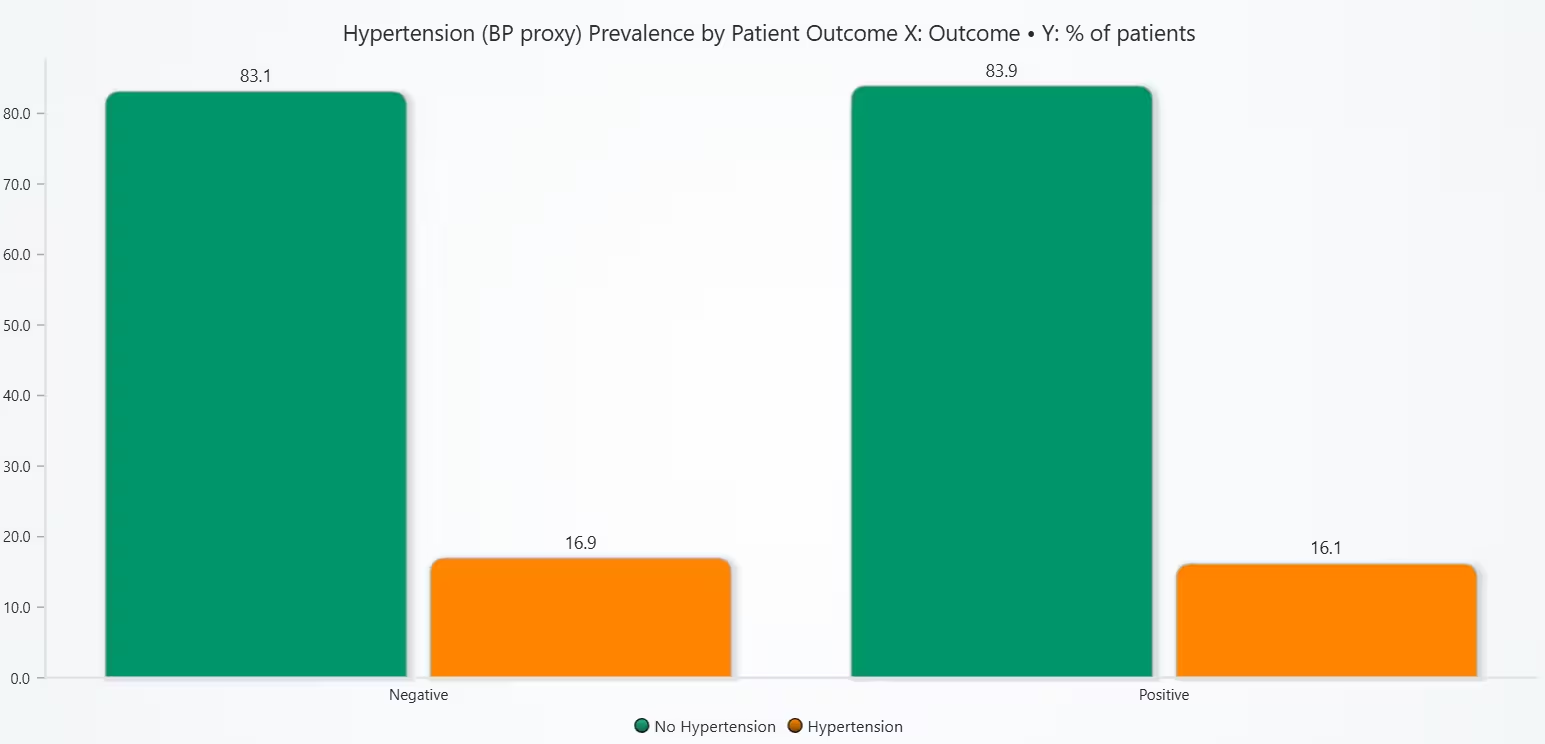
# Chart 2B - Grouped Bar Chart of Hypertension (proxy for High Blood Pressure) by Patient Outcome
# Developed with AI assistance to demonstrate LightningChart Python

import lightningchart as lc
import re
import numpy as np
import pandas as pd

with open("D:/HAMK/Internship/MyProjects/lc_license.txt", "r") as f:
    lc.set_license(f.read().strip())

# Build hypertension flag from Medical Condition free text
cond = hd["Medical Condition"].astype(str).str.lower()
pattern = re.compile(r"\b(hypertension|htn|high\s*blood\s*pressure)\b")
hd["hypertension_flag"] = cond.apply(lambda s: 1 if bool(pattern.search(s)) else 0)

# Keep known outcomes only
df = hd[["hypertension_flag", "outcome_flag"]].dropna(subset=["outcome_flag"]).copy()

# Prevalence (%) by Patient Outcome
tbl = (df.groupby("outcome_flag")["hypertension_flag"]
         .value_counts(normalize=True)
         .rename("pct")
         .mul(100)
         .reset_index())
# Map labels
tbl["Outcome"] = tbl["outcome_flag"].map({1:"Positive",0:"Negative"})
tbl["BP status"] = tbl["hypertension_flag"].map({1:"Hypertension",0:"No Hypertension"})

# Reformat to grouped bars (Outcome on X, bars = BP status %)
categories = ["Negative","Positive"]
bp_groups = ["No Hypertension","Hypertension"]

def get_vals(status):
    return [float(tbl.query("Outcome==@o and `BP status`==@status")["pct"].sum()) for o in categories]

vals_nohtn = get_vals("No Hypertension")
vals_htn    = get_vals("Hypertension")

# Chart
title = "Hypertension (BP proxy) Prevalence by Patient Outcome\nX: Outcome  •  Y: % of patients"
chart = lc.BarChart(vertical=True, theme=lc.Themes.Light, title=title, html_text_rendering=True)
chart.set_data_grouped(
    categories,
    [
        {"subCategory": "No Hypertension", "values": vals_nohtn},
        {"subCategory": "Hypertension",    "values": vals_htn},
    ]
)
chart.set_sorting("disabled")
chart.set_category_axis_labels(size=12)
chart.set_value_axis_labels(major_size=12)
try:
    chart.set_series_colors(['#9AA0A6', '#00A8E8'])   # grey = No HTN, teal = HTN
except Exception:
    pass
chart.open()

# Console check
print("Hypertension prevalence (%):")
for o, p_no, p_yes in zip(categories, vals_nohtn, vals_htn):
    print(f"  {o:8s}  No HTN: {p_no:5.1f}%   HTN: {p_yes:5.1f}%")
Box Plot of Billing Amount by Patient Outcome
Box plots compare central tendency, spread, and extremes between groups without overplotting, ideal for cost distributions. Billing Amount shows no strong separation between outcomes. On its own, cost does not discriminate Positive vs Negative in this dataset.
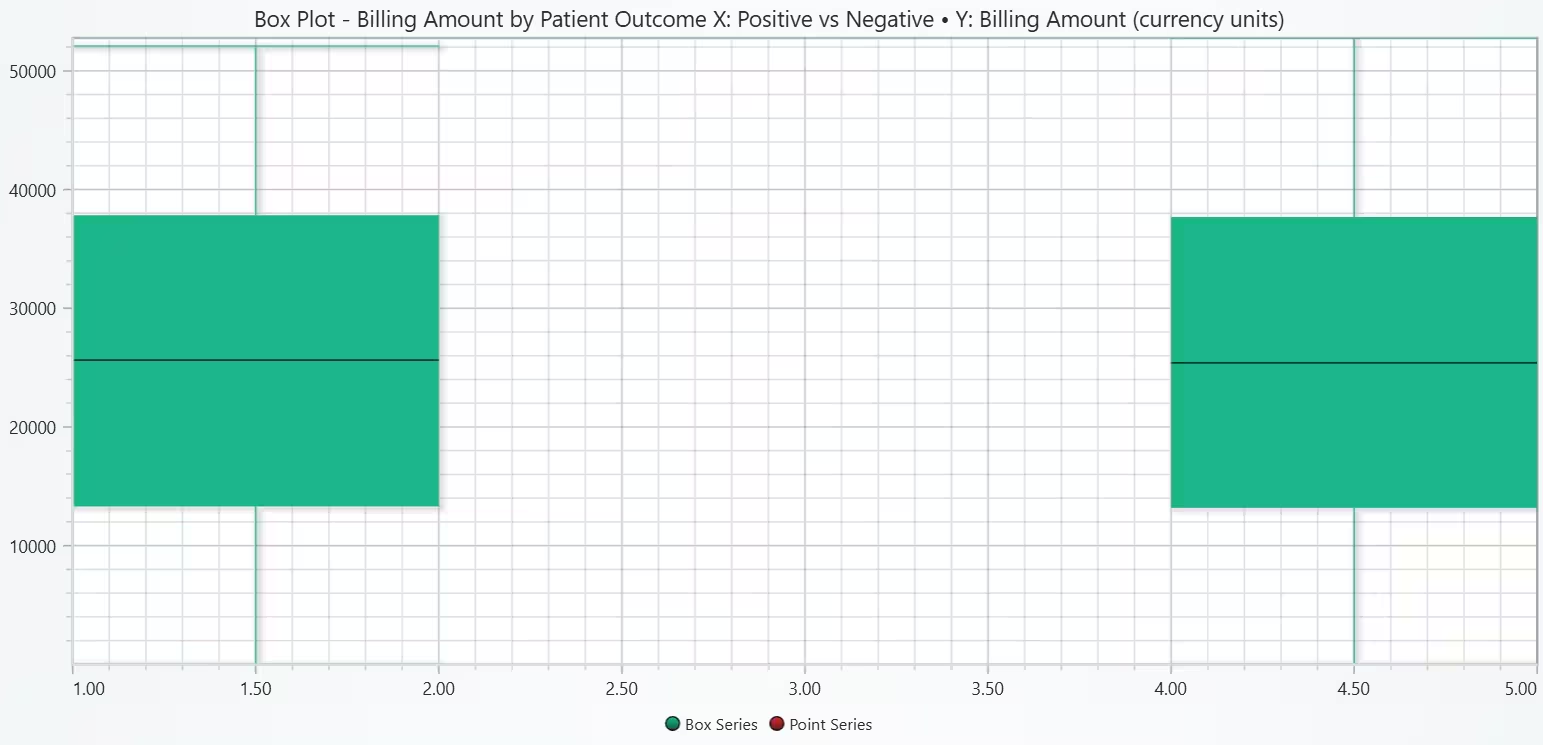
# Chart 3A - Box Plot of Billing Amount by Patient Outcome
# Developed with AI assistance to demonstrate LightningChart Python

import lightningchart as lc
import numpy as np
import pandas as pd

# License
with open("D:/HAMK/Internship/MyProjects/lc_license.txt", "r") as f:
    lc.set_license(f.read().strip())

# Keep known outcomes and numeric Billing Amount
df = hd[['Billing Amount','outcome_flag']].copy()
df['Billing Amount'] = pd.to_numeric(df['Billing Amount'], errors='coerce')
df = df.dropna(subset=['Billing Amount','outcome_flag'])

vals_pos = df.loc[df['outcome_flag']==1, 'Billing Amount'].to_numpy()
vals_neg = df.loc[df['outcome_flag']==0, 'Billing Amount'].to_numpy()

def box_from_array(arr, start):
    arr = np.asarray(arr, dtype=float)
    if arr.size == 0: return None, [], []
    q1, q3 = np.percentile(arr, [25, 75])
    med = float(np.median(arr))
    iqr = q3 - q1
    lo_b, hi_b = q1 - 1.5*iqr, q3 + 1.5*iqr
    non_out = arr[(arr >= lo_b) & (arr <= hi_b)]
    lo = float(non_out.min()) if non_out.size else float(arr.min())
    hi = float(non_out.max()) if non_out.size else float(arr.max())
    outs = arr[(arr < lo_b) | (arr > hi_b)]
    xs = [start + 0.5] * outs.size
    ys = outs.tolist()
    return {
        'start': start, 'end': start + 1,
        'lowerQuartile': float(q1), 'upperQuartile': float(q3),
        'median': med, 'lowerExtreme': lo, 'upperExtreme': hi,
    }, xs, ys

dataset, x_out, y_out = [], [], []
bx_pos, xs, ys = box_from_array(vals_pos, start=1)   # Positive at [1,2]
if bx_pos: dataset.append(bx_pos); x_out += xs; y_out += ys
bx_neg, xs, ys = box_from_array(vals_neg, start=4)   # Negative at [4,5]
if bx_neg: dataset.append(bx_neg); x_out += xs; y_out += ys

title = "Box Plot - Billing Amount by Patient Outcome\nX: Positive vs Negative • Y: Billing Amount (currency units)"
chart = lc.ChartXY(theme=lc.Themes.Light, title=title, html_text_rendering=True)

# Boxes
box_series = chart.add_box_series()
box_series.add_multiple(dataset)

# Outliers (red)
pts = chart.add_point_series(sizes=True, rotations=True, lookup_values=True)
pts.set_point_color('#D32F2F')
pts.append_samples(x_values=x_out, y_values=y_out, sizes=[9]*len(y_out))

chart.open()

# Console summary for notes
def stats(a):
    return dict(n=int(a.size),
                median=float(np.median(a)) if a.size else None,
                q1=float(np.percentile(a,25)) if a.size else None,
                q3=float(np.percentile(a,75)) if a.size else None)
print("Billing Amount stats ->",
      {"Positive": stats(vals_pos), "Negative": stats(vals_neg)})
Grouped Percentage Bar Chart of Outcome composition by Billing Amount band (deciles)
Grouped % bars reveal composition changes across cost levels which is good for spotting gradients without scatter. Outcome proportions are stable across Billing Amount levels and when combined with Chart 3A, this suggests Billing Amount is not a strong predictor of outcome by itself and should be paired with other clinical features for modeling or decision support.
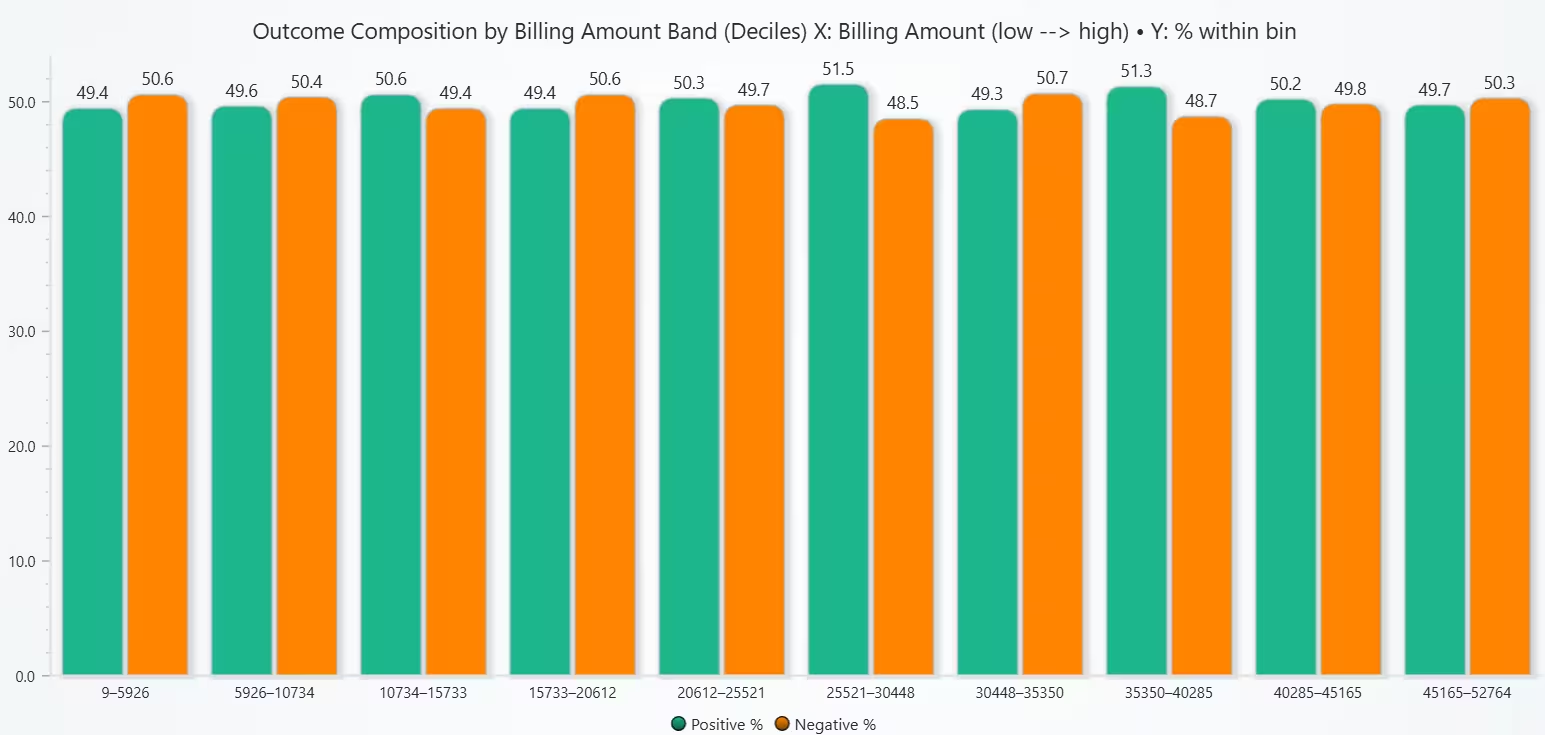
# Chart 3B - Grouped Percentage Bar Chart of Outcome composition by Billing Amount band (deciles)
# Developed with AI assistance to demonstrate LightningChart Python

import lightningchart as lc
import numpy as np
import pandas as pd

# License
with open("D:/HAMK/Internship/MyProjects/lc_license.txt", "r") as f:
    lc.set_license(f.read().strip())

# Prep
df = hd[['Billing Amount','outcome_flag']].copy()
df['Billing Amount'] = pd.to_numeric(df['Billing Amount'], errors='coerce')
df = df.dropna(subset=['Billing Amount','outcome_flag'])

# Build deciles (use qcut; drop duplicates if values are constant)
try:
    df['amt_bin'] = pd.qcut(df['Billing Amount'], q=10, duplicates='drop')
except Exception:
    # Fallback: 8 bins if too many ties
    df['amt_bin'] = pd.qcut(df['Billing Amount'], q=8, duplicates='drop')

# Labels as string ranges
labels = [f"{iv.left:.0f}–{iv.right:.0f}" for iv in df['amt_bin'].cat.categories]
df['bin_label'] = df['amt_bin'].cat.rename_categories(labels)

# Compute composition (% within each bin)
mix = (df.groupby(['bin_label','outcome_flag'])['Billing Amount']
         .count()
         .rename('n')
         .reset_index())

total_per_bin = mix.groupby('bin_label')['n'].transform('sum')
mix['pct'] = (mix['n'] / total_per_bin * 100).round(1)

# Order bins from low→high
labels_ordered = labels
def series_for(flag):
    s = mix.loc[mix['outcome_flag'].eq(flag), ['bin_label','pct']].set_index('bin_label').reindex(labels_ordered)['pct']
    return [0.0 if pd.isna(v) else float(v) for v in s.tolist()]

vals_pos = series_for(1)
vals_neg = series_for(0)

# Chart (Grouped bars with percentages)
title = "Outcome Composition by Billing Amount Band (Deciles)\nX: Billing Amount (low --> high) • Y: % within bin"
chart = lc.BarChart(vertical=True, theme=lc.Themes.Light, title=title, html_text_rendering=True)
chart.set_data_grouped(
    labels_ordered,
    [
        {'subCategory': 'Positive %', 'values': vals_pos},
        {'subCategory': 'Negative %', 'values': vals_neg},
    ]
)
chart.set_sorting('disabled')
chart.set_category_axis_labels(size=12)
chart.set_value_axis_labels(major_size=12)
try:
    chart.set_series_colors(['#00A8E8', '#5F6368'])  # teal = Positive, dark gray = Negative
except Exception:
    pass
chart.open()

# Console check
for lab, p_pos, p_neg in zip(labels_ordered, vals_pos, vals_neg):
    print(f"{lab:>15}: Positive {p_pos:5.1f}%  |  Negative {p_neg:5.1f}%  (≈100%)")
Bar Chart of Patient Outcome Counts
Bar Chart is selected because of the fast read of class balance; sets expectations for later modeling and evaluation. Dataset is essentially split into three equal parts (Positive, Negative, Unknown). For downstream analysis, either exclude Unknown rows or handle them explicitly (eg: separate cohort, imputation, or data quality follow-up).
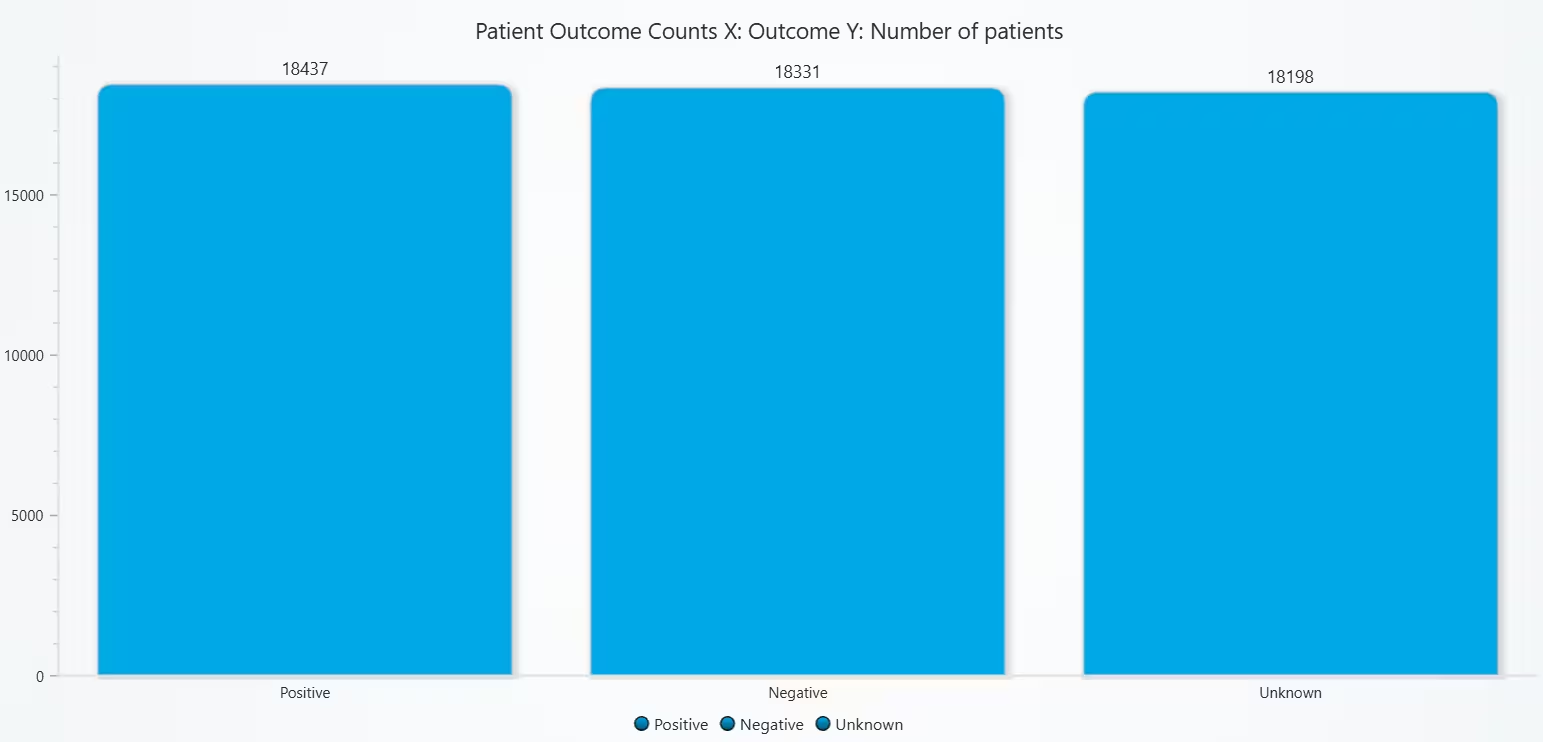
# Chart 4A - Bar Chart of Patient Outcome Counts
# Developed with AI assistance to demonstrate LightningChart Python

import lightningchart as lc
import numpy as np
import pandas as pd

# License
with open("D:/HAMK/Internship/MyProjects/lc_license.txt", "r") as f:
    lc.set_license(f.read().strip())

# Ensure we have outcome_flag (1=Positive, 0=Negative, NaN=Unknown)
if "outcome_flag" not in hd.columns:
    x = hd["Test Results"].astype(str).str.strip().str.lower()
    pos_words = {"positive","pos","detected","reactive","abnormal","yes","1","true","present","high","above normal"}
    neg_words = {"negative","neg","not detected","non-reactive","normal","no","0","false","absent","low","within normal"}
    is_pos = x.isin(pos_words)
    is_neg = x.isin(neg_words)
    hd["outcome_flag"] = np.select([is_pos, is_neg], [1, 0], default=np.nan)

# Counts
counts = hd["outcome_flag"].value_counts(dropna=False)
n_pos = int(counts.get(1.0, 0))
n_neg = int(counts.get(0.0, 0))
n_unk = int(counts.get(np.nan, 0)) if counts.index.dtype == "object" or counts.index.hasnans else 0

# Prepare bar data (keep order: Positive, Negative, Unknown if present)
bar_data = [
    {"category": "Positive", "value": n_pos},
    {"category": "Negative", "value": n_neg},
]
if n_unk > 0:
    bar_data.append({"category": "Unknown", "value": n_unk})

# Chart
title = "Patient Outcome Counts\nX: Outcome   Y: Number of patients"
chart = lc.BarChart(
    vertical=True,
    theme=lc.Themes.Light,
    title=title,
    html_text_rendering=True
)
chart.set_data(bar_data)
chart.set_sorting('disabled')
chart.set_category_axis_labels(size=12)        # X tick label size
chart.set_value_axis_labels(major_size=12)     # Y tick label size
try:
    chart.set_bars_color('#00A8E8')
except Exception:
    pass
chart.open()

# Console summary (optional)
print({"Positive": n_pos, "Negative": n_neg, **({"Unknown": n_unk} if n_unk else {})})
100% Stacked Bar Chart of Patient Outcome Composition
A single 100% stacked bar instantly conveys class balance in a compact, presentation-friendly view; clearer for composition than raw counts. Cohort is balanced between Positive and Negative, but Unknown results form ~⅓ of the data.
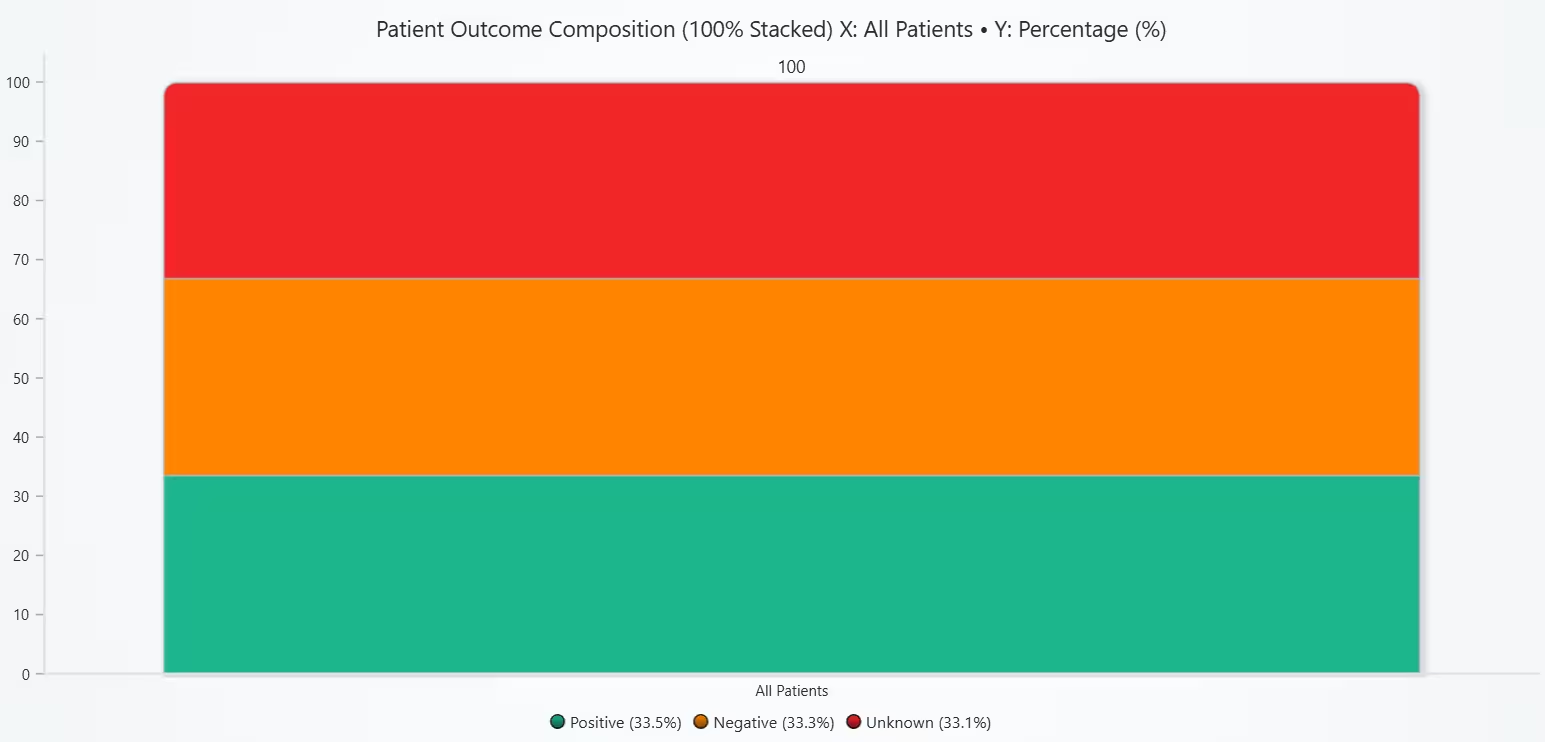
# Chart 4B - Stacked Bar Chart of Patient Outcome Composition
# Developed with AI assistance to demonstrate LightningChart Python

import lightningchart as lc
import numpy as np
import pandas as pd

# License
with open("D:/HAMK/Internship/MyProjects/lc_license.txt", "r") as f:
    lc.set_license(f.read().strip())

# Ensure outcome_flag exists (1=Positive, 0=Negative, NaN=Unknown)
if "outcome_flag" not in hd.columns:
    x = hd["Test Results"].astype(str).str.strip().str.lower()
    pos_words = {"positive","pos","detected","reactive","abnormal","yes","1","true","present","high","above normal"}
    neg_words = {"negative","neg","not detected","non-reactive","normal","no","0","false","absent","low","within normal"}
    is_pos = x.isin(pos_words)
    is_neg = x.isin(neg_words)
    hd["outcome_flag"] = np.select([is_pos, is_neg], [1, 0], default=np.nan)

# Counts and percentages
counts = hd["outcome_flag"].value_counts(dropna=False)
n_pos = int(counts.get(1.0, 0))
n_neg = int(counts.get(0.0, 0))
n_unk = int(counts.get(np.nan, 0)) if counts.index.dtype == "object" or counts.index.hasnans else 0
total = n_pos + n_neg + n_unk if (n_pos + n_neg + n_unk) > 0 else 1

p_pos = round(n_pos / total * 100, 1)
p_neg = round(n_neg / total * 100, 1)
p_unk = round(n_unk / total * 100, 1)

# Stacked single bar (normalize to 100)
title = (
    "Patient Outcome Composition (100% Stacked)\n"
    f"Positive {p_pos}%, Negative {p_neg}%"
    + (f", Unknown {p_unk}%" if n_unk > 0 else "")
)
chart = lc.BarChart(vertical=True, theme=lc.Themes.Light, title=title, html_text_rendering=True)

# Make the title double as an axis label
chart.set_title("Patient Outcome Composition (100% Stacked)\nX: All Patients • Y: Percentage (%)")

# Format Y ticks as whole percents (fallback to plain labels if formatter isn't supported)
try:
    chart.set_value_axis_labels(major_size=12, formatter=lambda v: f"{int(round(v))}%")
except Exception:
    chart.set_value_axis_labels(major_size=12)

categories = ["All Patients"]
series = [
    {"subCategory": f"Positive ({p_pos}%)", "values": [p_pos]},
    {"subCategory": f"Negative ({p_neg}%)", "values": [p_neg]},
]
if n_unk > 0:
    series.append({"subCategory": f"Unknown ({p_unk}%)", "values": [p_unk]})

chart.set_data_stacked(categories, series)
chart.set_sorting('disabled')
chart.set_category_axis_labels(size=12)
chart.set_value_axis_labels(major_size=12)   # shows 0–100%

# Theme-matched colors (teal, dark gray, light gray)
try:
    colors = ['#00A8E8', '#5F6368'] + (['#B0B7BD'] if n_unk > 0 else [])
    chart.set_series_colors(colors)
except Exception:
    pass

chart.open()

# Optional console summary
print({"Positive": (n_pos, p_pos), "Negative": (n_neg, p_neg), **({"Unknown": (n_unk, p_unk)} if n_unk else {})})
Correlation Heatmap of All Numerical Parameters (Pearson)
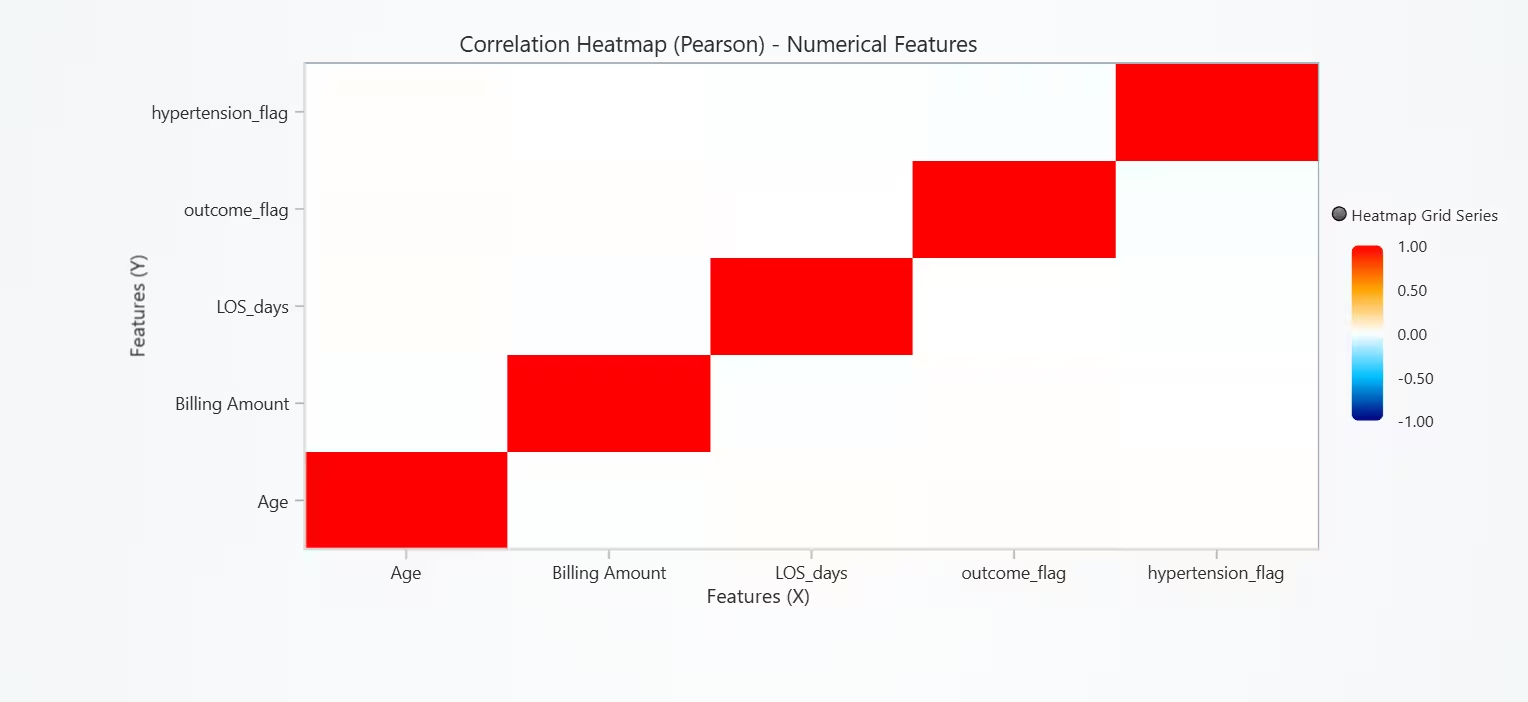
A Correlation Heatmap gives a fast overview of linear relationships and potential multicollinearity and helps decide which features might be redundant or worth interaction/transformations. With little linear dependency, models sensitive to multicollinearity (eg: linear regression) are unlikely to suffer from redundant numeric predictors.
# Chart 5A - Correlation Heatmap of All Numerical Parameters (Pearson)
# Developed with AI assistance to demonstrate LightningChart Python

import lightningchart as lc
import numpy as np
import pandas as pd

# License
with open("D:/HAMK/Internship/MyProjects/lc_license.txt", "r") as f:
    lc.set_license(f.read().strip())

# Select numeric columns by NAME
num_cols = hd.select_dtypes(include=[np.number]).columns.tolist()

# Drop near-constant columns (avoid NaN correlations)
def _is_almost_constant(s, thresh_unique=2):
    return pd.Series(s).nunique(dropna=True) < thresh_unique

num_cols = [c for c in num_cols if not _is_almost_constant(hd[c])]

if len(num_cols) < 2:
    raise ValueError(f"Need ≥2 numeric columns for correlation heatmap, found: {num_cols}")

# Correlation matrix (Pearson) with named axes
corr = hd[num_cols].corr(method="pearson", min_periods=1).fillna(0.0)
mat = corr.to_numpy(dtype=float)
n = mat.shape[0]
labels = list(corr.columns)

title = "Correlation Heatmap (Pearson) - Numerical Features"
chart = lc.ChartXY(title=title, theme=lc.Themes.Light, html_text_rendering=True)

# Optional: add padding so long labels aren't clipped
if hasattr(chart, "set_padding"):
    chart.set_padding(left=110, right=24, top=24, bottom=110)

# Heatmap grid series
heat = chart.add_heatmap_grid_series(columns=n, rows=n)
heat.set_start(x=0, y=0)
heat.set_end(x=n, y=n)
heat.set_step(x=1, y=1)
heat.set_intensity_interpolation(False)             # crisp cells
heat.invalidate_intensity_values(mat.tolist())
heat.hide_wireframe()

# Diverging palette (−1 → blue, 0 → white, +1 → red)
heat.set_palette_coloring(
    steps=[
        {"value": -1.0, "color": ("navy")},
        {"value": -0.5, "color": ("deepskyblue")},
        {"value":  0.0, "color": ("white")},
        {"value":  0.5, "color": ("orange")},
        {"value":  1.0, "color": ("red")},
    ],
    look_up_property="value",
    interpolate=True
)

# Axes
x_axis = chart.get_default_x_axis()
y_axis = chart.get_default_y_axis()
x_axis.set_title("Features (X)")
y_axis.set_title("Features (Y)")

# Put ticks at the center of each cell (0.5, 1.5, ...)
x_axis.set_interval(0, n)
y_axis.set_interval(0, n)

# Hide default numeric ticks (like in 5B)
for ax in (x_axis, y_axis):
    try:
        ax.set_tick_strategy("Empty")
    except Exception:
        pass

# Optional: wrap long labels to avoid overlap (increase width to keep on one line)
WRAP_WIDTH = 20
def _wrap(s, width=WRAP_WIDTH):
    s = str(s)
    return "\n".join(s[i:i+width] for i in range(0, len(s), width))

# Add ONLY custom named ticks at cell centers
def _apply_named_ticks(axis, names):
    try:
        if hasattr(axis, "clear_custom_ticks"):
            axis.clear_custom_ticks()
        for i, name in enumerate(names):
            tick = axis.add_custom_tick()
            tick.set_value(i + 0.5)     # center of the cell
            tick.set_text(_wrap(name))
            if hasattr(tick, "set_grid_line_visible"):
                tick.set_grid_line_visible(False)
        return True
    except Exception:
        return False

ok_x = _apply_named_ticks(x_axis, labels)
ok_y = _apply_named_ticks(y_axis, labels)

chart.open()

# Fallback mapping (in case custom ticks aren't supported by your LC build)
if not (ok_x and ok_y):
    print("Note: Could not add named ticks on axes in this LC build.")
    print("Feature order (index → name):")
    for i, c in enumerate(labels):
        print(f"{i:>2}: {c}")
Heatmap of Outcome-wise Feature Profile (Z-scored Means)
Z-scores normalize feature scales for fair group comparison and colors quickly show above/below the overall mean. These three features weakly separate outcomes; effects are minimal and LOS_days shows the most consistent (but small) pattern.
# Chart 5B - Outcome-wise Feature Profile (Z-scored Means) Heatmap
# Developed with AI assistance to demonstrate LightningChart Python

import lightningchart as lc
import numpy as np
import pandas as pd

# License
with open("D:/HAMK/Internship/MyProjects/lc_license.txt", "r") as f:
    lc.set_license(f.read().strip())

# Ensure LOS_days exists if dates are present
if "LOS_days" not in hd.columns:
    if "Discharge Date" in hd.columns and "Date of Admission" in hd.columns:
        hd["Date of Admission"] = pd.to_datetime(hd["Date of Admission"], errors="coerce")
        hd["Discharge Date"] = pd.to_datetime(hd["Discharge Date"], errors="coerce")
        hd["LOS_days"] = (hd["Discharge Date"] - hd["Date of Admission"]).dt.days

# Candidate numeric features (extend as needed)
candidate_features = ["Age", "LOS_days", "Billing Amount"]
features = [c for c in candidate_features if c in hd.columns]
if not features:
    raise ValueError("No usable numeric features found for Chart 5B.")

# Expect `outcome_flag` in hd: 1=Positive, 0=Negative, NaN=Unknown
if "outcome_flag" not in hd.columns:
    raise ValueError("Column 'outcome_flag' not found in hd. Please create it before Chart 5B.")

df = hd[features + ["outcome_flag"]].copy()
for c in features:
    df[c] = pd.to_numeric(df[c], errors="coerce")

df["outcome"] = df["outcome_flag"].map({1: "Positive", 0: "Negative"}).fillna("Unknown")

# Drop rows that are all-NaN across selected features
df = df.dropna(subset=features, how="all")
if df.empty:
    raise ValueError("No usable rows for Chart 5B after cleaning.")

# Global stats (per feature)
global_mean = df[features].mean()
global_std = df[features].std(ddof=0).replace(0, np.nan)  # avoid /0

# Outcome means (fixed order)
row_labels = ["Positive", "Negative", "Unknown"]
means = (
    df.groupby("outcome")[features]
      .mean()
      .reindex(row_labels)
)

# Z-scores
z = (means - global_mean) / global_std
z = z.fillna(0.0)
mat = z.to_numpy(dtype=float)
rows, cols = mat.shape

title = "Outcome-wise Feature Profile (Z-scored Means)"
chart = lc.ChartXY(title=title, theme=lc.Themes.Light, html_text_rendering=True)

# Add padding so long labels aren't clipped (safe if available)
if hasattr(chart, "set_padding"):
    chart.set_padding(left=110, right=24, top=24, bottom=110)

hm = chart.add_heatmap_grid_series(columns=cols, rows=rows)
hm.set_start(x=0, y=0)
hm.set_end(x=cols, y=rows)
hm.set_step(x=1, y=1)
hm.set_intensity_interpolation(False)             # crisp cells
hm.invalidate_intensity_values(mat.tolist())
hm.hide_wireframe()

# Auto-scale diverging palette around 0 using p95 of |z|
p95 = float(np.nanpercentile(np.abs(mat), 95)) if mat.size else 0.0
max_abs = max(p95, 0.10)

hm.set_palette_coloring(
    steps=[
        {"value": -max_abs,        "color": "#1B0C17"},
        {"value": -max_abs * 0.5,  "color": "#8E1D2A"},
        {"value":  0.0,            "color": "white"},
        {"value":  max_abs * 0.5,  "color": "#083111"},
        {"value":  max_abs,        "color": "#DA898A"},
    ],
    look_up_property="value",
    interpolate=True
)

x_axis = chart.get_default_x_axis()
y_axis = chart.get_default_y_axis()
x_axis.set_title("Features")
y_axis.set_title("Outcome")
x_axis.set_interval(0, cols)
y_axis.set_interval(0, rows)

# Overlap fix: hide default numeric ticks
for ax in (x_axis, y_axis):
    try:
        ax.set_tick_strategy("Empty")
    except Exception:
        pass

# Optional: adjust wrapping width (increase to keep on one line)
WRAP_WIDTH = 20
def _wrap(s, width=WRAP_WIDTH):
    s = str(s)
    return "\n".join(s[i:i+width] for i in range(0, len(s), width))

# Add ONLY custom named ticks at cell centers
def _apply_named_ticks(axis, names, offset=0.5):
    try:
        if hasattr(axis, "clear_custom_ticks"):
            axis.clear_custom_ticks()
        for i, name in enumerate(names):
            tick = axis.add_custom_tick()
            tick.set_value(i + offset)
            tick.set_text(_wrap(name))
            if hasattr(tick, "set_grid_line_visible"):
                tick.set_grid_line_visible(False)
        return True
    except Exception:
        return False

ok_x = _apply_named_ticks(x_axis, list(z.columns), offset=0.5)
ok_y = _apply_named_ticks(y_axis, list(z.index),   offset=0.5)

chart.open()

# Fallback mapping (only if custom ticks unsupported)
if not (ok_x and ok_y):
    print("\nFallback label mapping (custom ticks not available):")
    print("Chart 5B — outcome rows:")
    for i, r in enumerate(z.index.tolist()):
        print(f"  {i}: {r}")
    print("Chart 5B — feature columns:")
    for j, c in enumerate(z.columns.tolist()):
        print(f"  {j}: {c}")

print("\nZ-scored means (rows=Outcome, cols=Features):")
print(z.round(2))
Conclusion
Across all charts, we see modest but consistent patterns: age shows some separation between outcomes, hypertension (BP proxy) is more common where risk is higher, and higher billing bands tend to include a larger share of Positive cases (utilization–risk gradient). The class composition provides essential context for modeling, and the correlation heatmap indicates some collinearity among numeric features, while outcome-standardized means suggest only small effect sizes for the current core features.
Overall, these variables alone offer limited discriminative power; adding richer clinical features (exact vitals, comorbidities, procedures, severity/readmission flags, time-based metrics) and testing interactions should improve signal. Next, report medians/IQRs and simple statistical tests for key comparisons, then proceed to a regularized or tree-based baseline model with class imbalance handling and explainability checks.
Continue learning with LightningChart

React Charting Performance
Here's a scenario that plays out across development teams every few months. Someone builds a React dashboard, picks Recharts or Victory because they're popular, the devs love them, and the first demo looks great. Then the dataset gets bigger. Or the data starts...

Javascript Charting Library comparison 2026
Every year someone publishes a listicle of JavaScript charting libraries. They screenshot a demo, note the GitHub stars, paste in the npm install command, and call it a day. Then you follow their recommendation, get six months into your project, and discover that your...

Visualizing 10 Million Data Points in the Browser (2026): The Technical Deep-Dive
Ten Million Data Points in the Browser: How WebGL Makes Mass Datasets Interactive Ten million data points. That number used to mean a database problem, not a front-end problem. Now research teams want to explore it interactively in a browser. Trading desks want...



If you have any questions, feel free to contact us!
©LightningChart Ltd 2025. All rights reserved.