





Bangladesh Temperature Analysis on Rainfall & Weather Data
Tutorial
Written by a Human
Explore our comprehensive Bangladesh temperature analysis, examining rainfall and weather data to understand climate patterns and trends.
Fateme Ajam
Data Science Python Developer

Introduction
Understanding weather patterns is crucial for studying environmental changes, agricultural planning, and climate trends. This article focuses on the analysis of historical weather data, highlighting the relationship between temperature and rainfall over the years.
By using various visualizations, including line charts, heatmaps, and scatter plots, key patterns and seasonal distributions are revealed, offering insights into the temporal and seasonal dynamics of weather conditions.
The dataset used in this study spans several decades, providing a comprehensive view of annual, monthly, and seasonal temperature and rainfall variations. Through detailed analysis and interactive charts, we aim to uncover trends, identify anomalies, and explore the relationships between different weather indicators.
This exploration not only enhances our understanding of historical climate behavior but also serves as a reference for future climate-related studies and decision-making.
This article presents a step-by-step interpretation of the visualizations, starting from general trends to in-depth seasonal insights, to provide a holistic perspective of climate variability.
About the Dataset
The dataset, obtained from the Harvard Dataverse, contains historical climate data specifically focused on Bangladesh. It records monthly temperatures and rainfall over an extended period, allowing for detailed analysis of seasonal and annual climate trends in the region.
This dataset provides essential insights into temperature fluctuations and rainfall patterns, supporting research on environmental changes, agricultural impacts, and disaster preparedness. The data’s comprehensive nature enables an in-depth understanding of weather patterns crucial for sustainable development planning.
LightningChart Python
LightningChart Python is a high-performance library for creating interactive and real-time visualizations. It effectively visualizes climate data trends, such as temperature and rainfall, using various chart types like line charts, scatter plots, pie charts, and heatmaps.
The ability to apply custom colors, live updates, and synchronized dashboards helps represent seasonal variations and yearly comparisons clearly, making complex data more understandable.

In this project, we leverage several of LightningChart Python’s chart types to visualize the trends and disparities in temperature and rainfall:
- Line Charts: Used for visualizing yearly trends in temperature and rainfall across months to observe fluctuations over time.
- Heatmaps: Applied to show temperature and rainfall intensity distributed over time, making it easier to identify seasonal and long-term patterns.
- Scatter Plots: Utilized to display the correlation between temperature and rainfall, helping to detect any relationships between these variables.
- Pie Charts: Used for illustrating the proportion of rainfall across different seasons to provide an overview of seasonal contributions.
- Polar Charts: Employed to visualize monthly distribution of temperature and rainfall in a circular format, highlighting seasonal symmetry.
- Bar Charts: Used for comparing yearly average rainfall or temperature for specific months to show variations across different years.
Setting Up Python Environment
First, you need to install Python: Download and install the latest version of Python from the official Python website. Second, you need to import Pandas and LightningChart:
import pandas as pd
import lightningchart as lc
import time
import numpy as np
Visualizing Data with LightningChart Python
LightningChart offers a powerful way to visualize complex datasets in real-time. Below, we’ll create several visualizations to explore temperature and rainfall trends in Bangladesh over the years:
Line Chart: Yearly Temperature and Rainfall Trends
This chart shows temperature and rainfall changes over the months for different years. Each line represents a different year, highlighting how temperature rises in the middle of the year (summer) and falls at the start and end (winter).
The rainfall line follows a similar seasonal trend, with peaks during monsoon months. This visualization provides an overview of the seasonal cycles and yearly variations in climate patterns.
years = data['Year'].unique().tolist()

# Initialize dashboard
dashboard = lc.Dashboard(columns=1, rows=2, theme=lc.Themes.Black)

# Temperature Chart
temp_chart = dashboard.ChartXY(column_index=0, row_index=0, title='Temperature Comparison')
for year in years:
    year_data = data[data['Year'] == year].sort_values(by='Month')
    if not year_data.empty:
        temp_chart.add_line_series().append_samples(
            x_values=year_data['Month'].tolist(),
            y_values=year_data['tem'].tolist(),
        )
temp_chart.get_default_x_axis().set_title('Month')
temp_chart.get_default_y_axis().set_title('Temperature (°C)')

# Rainfall Chart
rain_chart = dashboard.ChartXY(column_index=0, row_index=1, title='Rainfall Comparison')
for year in years:
    year_data = data[data['Year'] == year].sort_values(by='Month')
    if not year_data.empty:
        rain_chart.add_line_series().append_samples(
            x_values=year_data['Month'].tolist(),
            y_values=year_data['rain'].tolist(),
        )
rain_chart.get_default_x_axis().set_title('Month')
rain_chart.get_default_y_axis().set_title('Rainfall (mm)')

# Open the dashboard
dashboard.open()
Comparison Chart: Temperature and Rainfall (1912 vs. 2022)
These area range charts compare the monthly temperature and rainfall for the years 1912 and 2022.
- In the temperature chart, the green area represents months when 2022 was hotter than 1912, while the red area shows months when 1912 was warmer. Temperatures in 1912 were generally lower from January to April, while 2022 had significantly higher temperatures from May to August. The temperature differences decreased toward the end of the year.
- In the rainfall chart, the green area shows months when rainfall was higher in 2022, and the red area shows when 1912 had more rainfall. Rainfall in 2022 increased notably from May onward, peaking mid-year before declining. In contrast, 1912 had more rainfall early in the year, which steadily decreased and remained low in the latter half.
data_1912 = data[data['Year'] == 1912].sort_values(by='Month')
data_2022 = data[data['Year'] == 2022].sort_values(by='Month')

if data_1912.empty or data_2022.empty:
    raise ValueError("Data for the selected years is missing.")

# Prepare data for both temperature and rainfall comparison
temp_data = [{'position': i, 'low': temp_1912, 'high': temp_2022} for i, (temp_1912, temp_2022) in enumerate(zip(data_1912['tem'], data_2022['tem']))]
rain_data = [{'position': i, 'low': rain_1912, 'high': rain_2022} for i, (rain_1912, rain_2022) in enumerate(zip(data_1912['rain'], data_2022['rain']))]

# Initialize dashboard
dashboard = lc.Dashboard(columns=1, rows=2, theme=lc.Themes.Light)

# Temperature chart
temp_chart = dashboard.ChartXY(column_index=0, row_index=0, title='Temperature Comparison: 1912 vs 2022')
temp_chart.add_area_range_series().add_dict_data(temp_data)
temp_chart.get_default_x_axis().set_tick_strategy('Empty')
temp_chart.get_default_y_axis().set_title('Temperature (°C)')
temp_chart.add_legend().add(temp_chart.add_point_series().set_name('2022 Higher').set_point_color(lc.Color(0, 255, 0)))
temp_chart.add_legend().add(temp_chart.add_point_series().set_name('1912 Higher').set_point_color(lc.Color(255, 0, 0)))

# Rainfall chart
rain_chart = dashboard.ChartXY(column_index=0, row_index=1, title='Rainfall Comparison: 1912 vs 2022')
rain_chart.add_area_range_series().add_dict_data(rain_data)
rain_chart.get_default_x_axis().set_tick_strategy('Empty')
rain_chart.get_default_y_axis().set_title('Rainfall (mm)')
rain_chart.add_legend().add(rain_chart.add_point_series().set_name('2022 Higher').set_point_color(lc.Color(0, 255, 0)))
rain_chart.add_legend().add(rain_chart.add_point_series().set_name('1912 Higher').set_point_color(lc.Color(255, 0, 0)))

# Open the dashboard
dashboard.open()
Pie Chart and Scatter Plot Dashboard
This dashboard combines a pie chart and a scatter plot to provide insights into seasonal rainfall distribution and the relationship between temperature and rainfall.
Pie Chart (Seasonal Rainfall Distribution):
The pie chart shows the percentage of total rainfall for each season (Winter, Spring, Summer, and Fall). Summer typically receives the highest rainfall due to the monsoon, while winter has the least rainfall. This makes it easy to understand how much each season contributes to the annual rainfall.
Scatter Plot (Temperature vs. Rainfall):
The scatter plot shows the relationship between temperature and rainfall. Each point represents an observation, with temperature on the X-axis and rainfall on the Y-axis. The chart reveals patterns, such as higher rainfall at moderate temperatures and lower rainfall during cooler months, making it useful for spotting trends and correlations.
seasonal_rainfall_data = [{'name': f"{row['Season']} ({row['percentage']:.1f}%)", 'value': row['percentage']} for _, row in seasonal_rainfall.iterrows()]

# Initialize dashboard
dashboard = lc.Dashboard(rows=1, columns=2, theme=lc.Themes.TurquoiseHexagon)

# Scatter chart
scatter_chart = dashboard.ChartXY(column_index=0, row_index=0, title='Temperature vs Rainfall')
scatter_series = scatter_chart.add_point_series()
scatter_series.append_samples(x_values=data['tem'].tolist(), y_values=data['rain'].tolist())

# Pie chart
pie_chart = dashboard.PieChart(column_index=1, row_index=0)
pie_chart.add_slices(seasonal_rainfall_data)
pie_chart.add_legend(data=pie_chart)

# Open dashboard
dashboard.open()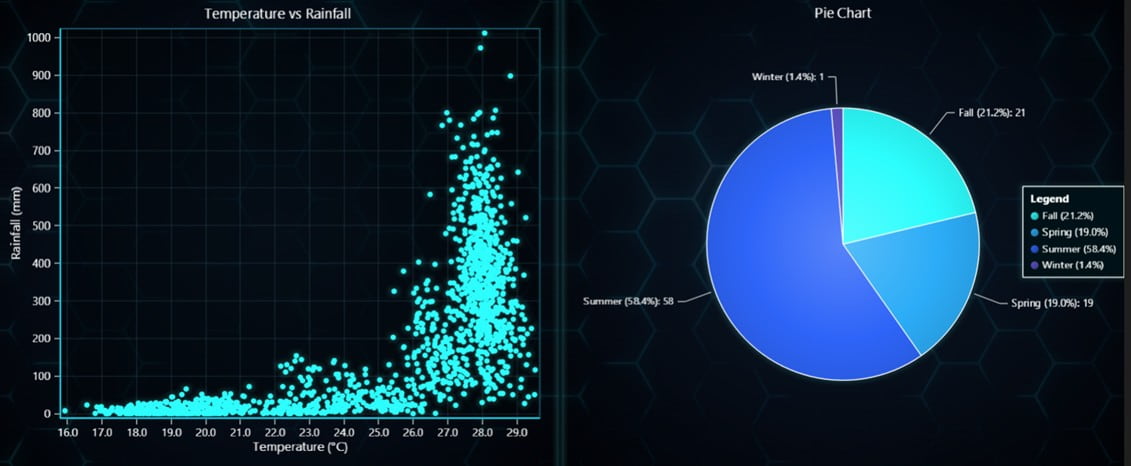
Heatmaps: Temperature and Rainfall Intensity Over Time
The heatmaps visualize temperature and rainfall intensity across years and months.
- The temperature heatmap uses colors from white (cold) to dark red (hot) to show temperature levels.
- The rainfall heatmap uses blue shades to indicate different rainfall intensities, from light blue (low rainfall) to dark blue (heavy rainfall).
These visualizations allow for an at-a-glance understanding of seasonal patterns and yearly anomalies, such as heatwaves or unusually wet monsoon seasons.
chart = lc.ChartXY(title='Rainfall Heatmap', theme=lc.Themes.Light)
heatmap_series = chart.add_heatmap_grid_series(columns=len(rainfall_pivot.columns), rows=len(rainfall_pivot.index))
heatmap_series.invalidate_intensity_values(rainfall_pivot.to_numpy(dtype=float).T.tolist())

# Set custom colors
heatmap_series.set_palette_coloring(steps=[
    {"value": np.nanmin(rainfall_pivot), "color": lc.Color('white')},
    {"value": np.nanmedian(rainfall_pivot), "color": lc.Color('blue')},
    {"value": np.nanmax(rainfall_pivot), "color": lc.Color('navy')}
], look_up_property='value', interpolate=True)

# Set axes and show chart
chart.get_default_x_axis().set_title('Month').set_tick_strategy('Empty')
chart.get_default_y_axis().set_title('Year').set_tick_strategy('Empty')
chart.add_legend(data=heatmap_series).set_title('Rainfall (mm)')
chart.open()
chart = lc.ChartXY(title='Temperature Heatmap (Year vs. Month)', theme=lc.Themes.Light)
heatmap_series = chart.add_heatmap_grid_series(columns=len(temperature_pivot.columns), rows=len(temperature_pivot.index))

# Set intensity values and color palette
heatmap_series.invalidate_intensity_values(temperature_data.T.tolist())
heatmap_series.set_palette_coloring(steps=[
    {"value": np.nanmin(temperature_data), "color": lc.Color('white')},
    {"value": np.nanpercentile(temperature_data, 25), "color": lc.Color('lightcoral')},
    {"value": np.nanmedian(temperature_data), "color": lc.Color('red')},
    {"value": np.nanpercentile(temperature_data, 75), "color": lc.Color('darkred')},
    {"value": np.nanmax(temperature_data), "color": lc.Color('maroon')}
], look_up_property='value', interpolate=True)

# Customize axis titles and ticks
chart.get_default_x_axis().set_title('Month').set_tick_strategy('Empty')
chart.get_default_y_axis().set_title('Year').set_tick_strategy('Empty')

for month in temperature_pivot.columns:
    chart.get_default_x_axis().add_custom_tick().set_value(month).set_text(str(month))

for year in temperature_pivot.index[::3]:  # Show every 3rd year
    chart.get_default_y_axis().add_custom_tick().set_value(year).set_text(str(year))

# Add legend and open the chart
chart.add_legend(data=heatmap_series).set_title('Temperature (°C)')
chart.open()
Comparison Chart with Critical Points
The comparison chart reveals significant fluctuations in both rainfall and temperature across the years. Years with extreme droughts or heatwaves are clearly distinguishable by the steep peaks and troughs. The critical points marked in the chart show that abrupt shifts in rainfall often coincide with noticeable temperature changes, suggesting a close connection between these climate variables.
annual_data = data.groupby('Year').agg({'rain': 'sum', 'tem':'mean'}).diff().dropna()

# Create chart
chart = lc.ChartXY(theme=lc.Themes.Light, title='Yearly Rainfall and Temperature Anomalies')
y_axis_right = chart.add_y_axis(opposite=True).set_title("Temperature Change (°C)")

# Add line series for rainfall and temperature changes
chart.add_line_series().append_samples(x_values=annual_data.index, y_values=annual_data['rain'])
chart.add_line_series(y_axis=y_axis_right).append_samples(x_values=annual_data.index, y_values=annual_data['tem'])

# Add points for max/min changes
for col, color, shape in [('rain', lc.Color(0, 128, 255), 'triangle'), ('tem', lc.Color(255, 165, 0), 'circle')]:
    chart.add_point_series().set_point_color(color).set_point_shape(shape).set_point_size(10).append_samples(
        x_values=annual_data.nlargest(1, col).index.tolist(),
        y_values=annual_data.nlargest(1, col)[col].tolist()
    )

# Set axis titles and open chart
chart.get_default_x_axis().set_title('Year')
chart.get_default_y_axis().set_title('Rainfall Difference (mm)')
chart.add_legend(x=25, y=80).add(chart.get_series(0)).add(chart.get_series(1))

chart.open()
Combined Bar and Line Chart: Average Monthly Rainfall and Temperature
This chart confirms the monsoon’s impact on the annual climate, with rainfall peaking in the middle of the year and tapering off in the later months. The line chart shows that despite increased rainfall, temperatures remain high during the monsoon period, indicating humid, tropical conditions.
The pattern of low rainfall and cooler temperatures during winter further emphasizes the region’s distinct wet and dry seasons.
# Group data and calculate monthly average
monthly_avg = data.groupby('Month')[['tem', 'rain']].mean()

# Create dashboard with bar and line charts
dashboard = lc.Dashboard(columns=1, rows=1, theme=lc.Themes.Light)

# Bar chart for rainfall
bar_chart = dashboard.BarChart(column_index=0, row_index=0)
rain_data = [{'category': str(month), 'value': rainfall} for month, rainfall in zip(monthly_avg.index, monthly_avg['rain'])]
bar_chart.set_data(rain_data).set_title('Average Monthly Rainfall and Temperature')
bar_chart.category_axis.set_title('Month')

# Line chart for temperature
line_chart = dashboard.ChartXY(column_index=0, row_index=0)
line_series = line_chart.add_line_series().append_samples(x_values=list(range(1, 13)), y_values=monthly_avg['tem'].tolist())
line_chart.get_default_x_axis().set_title('Month').set_tick_strategy('Empty').set_interval(0.5, 12.5)
for idx in range(1, 13):
    line_chart.get_default_x_axis().add_custom_tick().set_value(idx).set_text(str(idx))
line_chart.get_default_y_axis().set_title('Temperature (°C)')

# Open the dashboard
dashboard.open()
Bubble Chart: Temperature and Rainfall Across Time
This chart highlights the strong seasonality of rainfall and temperature in the region. The monsoon months consistently show larger bubbles, indicating higher rainfall, while the cooler months have smaller bubbles, showing minimal precipitation.
The color variations demonstrate how warmer months align with higher rainfall, reinforcing the region’s typical climate pattern of hot, rainy summers and dry, cooler winters.
x_values, y_values = data['Month'], data['Year']
sizes = [(rain / max(data['rain'])) * 50 for rain in data['rain']]
lookup_values = data['tem']

# Create and configure chart
chart = lc.ChartXY(theme=lc.Themes.Light, title='Bubble Chart: Temperature and Rainfall')
series = chart.add_point_series(sizes=True, lookup_values=True)
series.append_samples(x_values, y_values, sizes, lookup_values)

# Set color palette
series.set_palette_point_coloring(steps=[
    {'value': min(lookup_values), 'color': lc.Color(0, 0, 255)},
    {'value': np.median(lookup_values), 'color': lc.Color(255, 165, 0)},
    {'value': max(lookup_values), 'color': lc.Color(255, 0, 0)}
], look_up_property='value')

# Customize axes and open chart
chart.get_default_x_axis().set_title('Month').set_tick_strategy('Empty')
chart.get_default_y_axis().set_title('Year').set_tick_strategy('Empty')

for month in range(1, 13): chart.get_default_x_axis().add_custom_tick().set_value(month).set_text(str(month))
for year in range(min(y_values), max(y_values) + 1, 5): chart.get_default_y_axis().add_custom_tick().set_value(year).set_text(str(year))

chart.open()
Bar Chart: Yearly Rainfall by Month (Real-Time Streaming)
This animated bar chart updates every 3 seconds to display rainfall trends over the years for each month. The chart starts from January and progresses to December, showing how rainfall levels have changed for each month across different years. This dynamic visualization makes it easy to identify trends
chart = lc.BarChart(title="Yearly Rainfall Trends", theme=lc.Themes.Dark)
chart.set_animation_values(True)
chart.set_data([{"category": str(year), "value": 0} for year in sorted(data['Year'].unique())])

# Function to get and stream monthly rainfall data
def stream_data_rain():
    for month in range(1, 13):
        month_data = data[data['Month'] == month].groupby('Year').mean().reset_index()
        chart.set_data([{"category": str(year), "value": rain} for year, rain in zip(month_data['Year'], month_data['rain'])])
        chart.set_title(f"Yearly Rainfall Trends for {['Jan', 'Feb', 'Mar', 'Apr', 'May', 'Jun', 'Jul', 'Aug', 'Sep', 'Oct', 'Nov', 'Dec'][month-1]}")
        time.sleep(3)

# Start streaming data in a separate thread
Thread(target=stream_data_rain).start()

# Open chart
chart.open(live=True)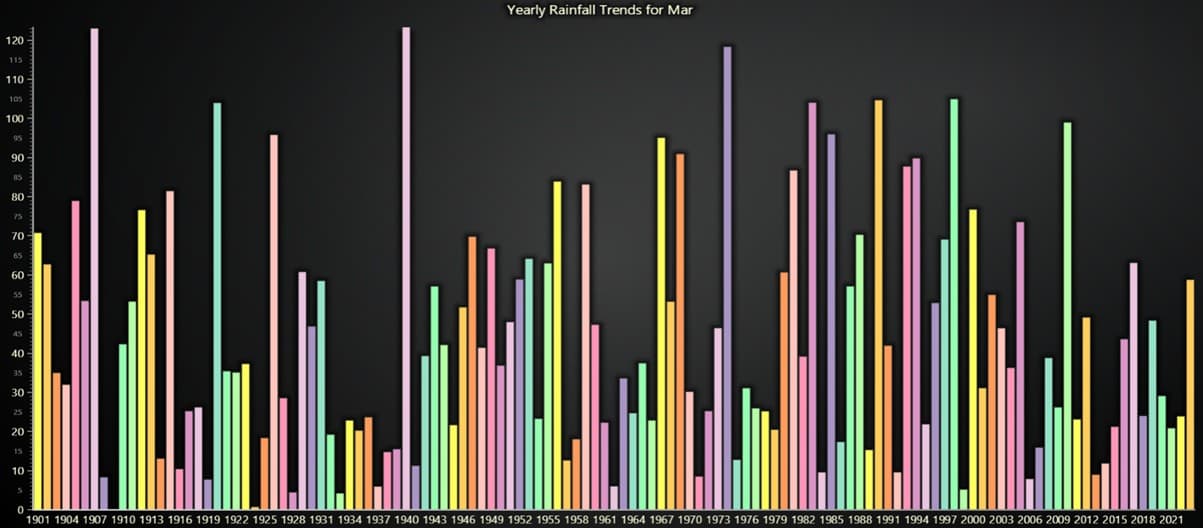
Conclusion
Using LightningChart Python to visualize climate data provided a seamless and insightful exploration of historical temperature and rainfall patterns. The library’s robust capabilities allowed for the creation of highly interactive and real-time visualizations that enhanced data interpretation.
From detailed comparisons of century-old records to vibrant heatmaps and dynamic bubble charts, each visualization contributed valuable perspectives to understanding seasonal trends and yearly anomalies.
The precision and performance of LightningChart, particularly when handling large datasets and updating animations in real time, were exceptional. The ability to seamlessly combine line, bar, polar, and scatter charts within a unified dashboard created a visually engaging and coherent narrative.
This experience demonstrated that LightningChart is not only a tool for beautiful visuals but also a powerful platform for delivering complex climate insights with clarity and speed.
In summary, LightningChart Python proved to be a valuable asset in transforming climate data into meaningful and engaging stories, making it a top choice for advanced visualizations in climate research and beyond.
Continue learning with LightningChart

Create a JavaScript Scatter Plot
Written by a human | Updated on April 9th, 2025LightningChart JS This is a quick technical look into some interesting features of LightningChart JS XY charts and how to create an embedded scatter chat and add custom interactions to it using LightningChart JS....
HTML
Written by a human | Updated on April 9th, 2025HTML Charts with JavaScript HTML charts are standard and suitable for all-level developers with a simple implementation. The issue with basic HTML 5 charts is their limited functionalities and performance...

Volumetric Data Visualization
This article provides an overview of Volume Data, and the techniques which can be used to visualize it.



If you have any questions, feel free to contact us!
©LightningChart Ltd 2025. All rights reserved.