








Data Analysis of Injuries in Sports using LightningChart Python
Tutorial
Written by a Human
Explore our data analysis of injuries in sports using LightningChart Python to uncover trends and insights for better player safety.
Adam Kessa
Data Science Python Developer


Introduction to injuries in sports data analysis
Sports injuries represent one of the most common and challenging obstacles professional athletes encounter during training and competition. This underscores the importance of sports injury data analysis, which plays a critical role in predicting and preventing such setbacks and safeguarding athletes’ performance and careers.
About the Data source
To address the growing concern regarding player safety and injury prevention, a synthetic dataset from Kaggle designed specifically for injury prediction will be analysed.
What kind of data will be analysed?
Critical attributes such as athlete demographics, training intensities, recovery times, and previous injury histories. The goal is to establish correlations between these features and the likelihood of future injuries to accurately simulate real-world scenarios.
LightningChart Python
LightningChart is a high-performance charting library designed for visualizing static as well as real-time data in Python applications. It offers powerful tools for creating real-time visualizations, enabling users to interact with complex datasets seamlessly.
We will use the LC Python library, taking full advantage of its advanced and highly customizable graphing options to make sense of the dataset at hand.

Setting Up Python Environment
To start, let’s set up our environment:
- Download and install the latest version of Python from the official website.
- Install the following libraries using the following commands:
pip install lightningchart==0.9.3
pip install lightningchart pandas numpy
Overview of Libraries Used
- Numpy: A library for numerical computations in Python, providing support for arrays, matrices, and a wide range of mathematical functions.
- Pandas: A library for data manipulation and analysis, offering data structures like DataFrames for managing structured data easily.
- LightningChart: A high-performance charting library for rendering complex visualizations, particularly useful for real-time and large-data applications.
Loading and Processing Data
After downloading the .csv datafile from Kaggle into our project directory. Loading it is straightforward:
import pandas as pd

data_file = "injury_data.csv"
df = pd.read_csv(data_file)
This code snippet filters player data into two groups, no_injuries and past_injuries, based on whether they have had previous injuries. It then calculates histograms of player ages for both groups, using 10 age bins to facilitate comparison.
#splitting data
no_injuries = df[df["Previous_Injuries"] == 0]["Player_Age"]
past_injuries = df[df["Previous_Injuries"] == 1]["Player_Age"]
#Getting Barchart data ready
bins = 10
counts_no_injuries, bin_edges = np.histogram(no_injuries, bins=bins)
counts_past_injuries, _ = np.histogram(past_injuries, bins=bin_edges)
Similarly, this code snippet filters player data into two groups, Unlikely_injury and likely_injury. It then calculates histograms of player ages for both groups, using 10 age bins.
unlikely_injury = df[df["Likelihood_of_Injury"] == 0]["Player_Age"]
likely_injury = df[df["Likelihood_of_Injury"] == 1]["Player_Age"]

#Getting 2nd Barchart data ready

bins= 10
counts_unlikely_injury, bin_edges = np.histogram(unlikely_injury, bins=bins)
counts_likely_injury, _ = np.histogram(likely_injury, bins=bin_edges)
This code snippet calculates box plot data (quartiles, extremes) and identifies outliers for each category, in preparation for visualization.
 # Prepare box plot data
 dataset = []
 x_values_outlier = []
 y_values_outlier = []

 for i, category in enumerate(categories):
     column_data = category_data[category]

     start = i + 0.75
     end = start + 0.5
     lowerQuartile = float(np.percentile(column_data, 25))
     upperQuartile = float(np.percentile(column_data, 75))
     median = float(np.median(column_data))
     lowerExtreme = float(np.min(column_data))
     upperExtreme = float(np.max(column_data))

     dic = {'start': start, 'end': end, 'lowerQuartile': lowerQuartile, 'upperQuartile': upperQuartile,
            'median': median, 'lowerExtreme': lowerExtreme, 'upperExtreme': upperExtreme,  }
     dataset.append(dic)
     # Calculate IQR and identify outliers
     iqr = upperQuartile - lowerQuartile
     lower_bound = lowerQuartile - 1.5 * iqr
     upper_bound = upperQuartile + 1.5 * iqr
     outliers = [y for y in column_data if y < lower_bound or y > upper_bound]

     for outlier in outliers:
         x_values_outlier.append(start + 0.5)
         y_values_outlier.append(outlier)

 # Calculating the total number of athletes for each category
 athlete_counts = {category: len(data) for category, data in category_data.items()}

 # Adding text boxes for each category
 for category, count in athlete_counts.items():
     x_coordinate = int(category)  # Convert category to an integer
     y_coordinate = 1.05  # Fixed y-coordinate for all text boxes

     # Adding a text box to the chart
     text_box = chart.add_textbox(
         text=f"n = {count}",
         x=x_coordinate,
         y=y_coordinate,
     )
Visualizing Data with LightningChart Python
LightningChart allows us to create diverse visualizations for effectively analyzing sports data. Let’s explore each chart in this project and interpret the results.
Dashboard visualization featuring Histograms:
Description: This visualization consists of two grouped bar charts analysing the relationship between athlete age, injury history, and injury likelihood.
- The left chart focuses on athletes with and without prior injuries, grouped by age range. Gray bars represent athletes with no previous injuries, while yellow bars represent athletes with a history of injuries. The chart highlights differences in injury prevalence across age groups.
- The right chart outlines the likelihood of injury by age group. Blue bars represent athletes not at risk of injury, while red bars represent those at risk. The chart helps identify age groups most prone to injury risks.
Use Case: Coaches and sports analysts can use this visualization to detect injury trends across different age groups, helping to develop targeted training programs. By identifying age groups with higher injury risks or histories, teams can optimize conditioning and recovery strategies to minimize injuries and improve athlete performance.
Script Summary:
1. #initializing dashboard
dashboard = lc.Dashboard(columns=2, rows=1, theme=lc.Themes.Black)
# initializing BarChart
Barchart1 = dashboard.BarChart(
        column_index=0, row_index=0
)

Barchart1.set_data_grouped(categories, subcategories)
Barchart1.set_sorting('disabled')


Barchart1.set_title("Athletes with past injuries by Age")
Barchart1.add_legend().add(Barchart1)
# initializing BarChart2
Barchart2 = dashboard.BarChart(
        column_index=1, row_index=0
)

Barchart2.set_data_grouped(categories, subcategories)
Barchart2.set_sorting('disabled')
Barchart2.set_title("Athletes Likely to be Injured by Age")

Barchart2.add_legend().add(Barchart2)
dashboard.open()
Box and Whisker plot visualization
Description: This box plot visualization illustrates the relationship between athlete training intensity and recovery time (in days). Each box represents the distribution of training intensity for a specific recovery time range. The “n” values indicate the sample size for each recovery time group.
Use case: Coaches and sports scientists can use this visualization to determine optimal training intensities for athletes based on their required recovery times.
Script Summary:
series = chart.add_box_series()
series.add_multiple(dataset)
# Add outliers to the chart

outlier_series = chart.add_point_series(
    sizes=True,
    rotations=True,
    lookup_values=True
)
outlier_series.set_point_color(lc.Color('red'))
outlier_series.append_samples(
    x_values=x_values_outlier,
    y_values=y_values_outlier,
    sizes=[10] * len(y_values_outlier)
)

chart.open(method='browser')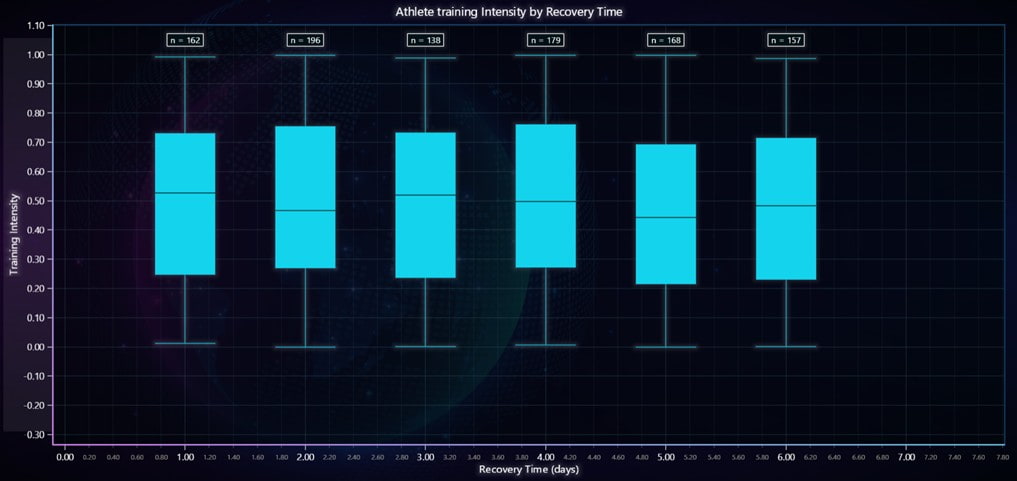
Conclusion
Sports data analysis plays a crucial role in optimizing athlete performance and minimizing injury risks. By using tools like LightningChart Python, complex data can be transformed into intuitive visualizations that uncover valuable insights. This project demonstrates how advanced visualization techniques allow coaches and sports scientists to analyze training intensity, recovery times, and injury patterns effectively.
Continue learning with LightningChart

React Charting Performance
Here's a scenario that plays out across development teams every few months. Someone builds a React dashboard, picks Recharts or Victory because they're popular, the devs love them, and the first demo looks great. Then the dataset gets bigger. Or the data starts...

Javascript Charting Library comparison 2026
Every year someone publishes a listicle of JavaScript charting libraries. They screenshot a demo, note the GitHub stars, paste in the npm install command, and call it a day. Then you follow their recommendation, get six months into your project, and discover that your...

Visualizing 10 Million Data Points in the Browser (2026): The Technical Deep-Dive
Ten Million Data Points in the Browser: How WebGL Makes Mass Datasets Interactive Ten million data points. That number used to mean a database problem, not a front-end problem. Now research teams want to explore it interactively in a browser. Trading desks want...



If you have any questions, feel free to contact us!
©LightningChart Ltd 2025. All rights reserved.