








Alien Species Data Analysis with LightningChart Python
Tutorial
Assisted by AI
Explore how LightningChart Python enhances visualization in alien species data analysis for effective research and insights into biodiversity.
Vindya Nukulasooriya
Data Science Developer

Introduction
This project presents a focused global analysis of first records of established alien (non-native) species using the Our World in Data dataset and the high-performance LightningChart Python library. The dataset provides long-term, year-by-year counts (World totals in this version), which we transform into annual, decadal, and century views to reveal temporal patterns, peaks, and cumulative growth in introductions.
The primary objectives of this project are to:
- Characterize temporal distribution of first records across history (identify quiet periods vs. surge eras).
- Compare eras statistically to see shifts in central tendency, spread, and outliers in annual first records.
- Track cumulative growth and contrast it with annual spikes using a dual-axis line (cumulative vs. annual).
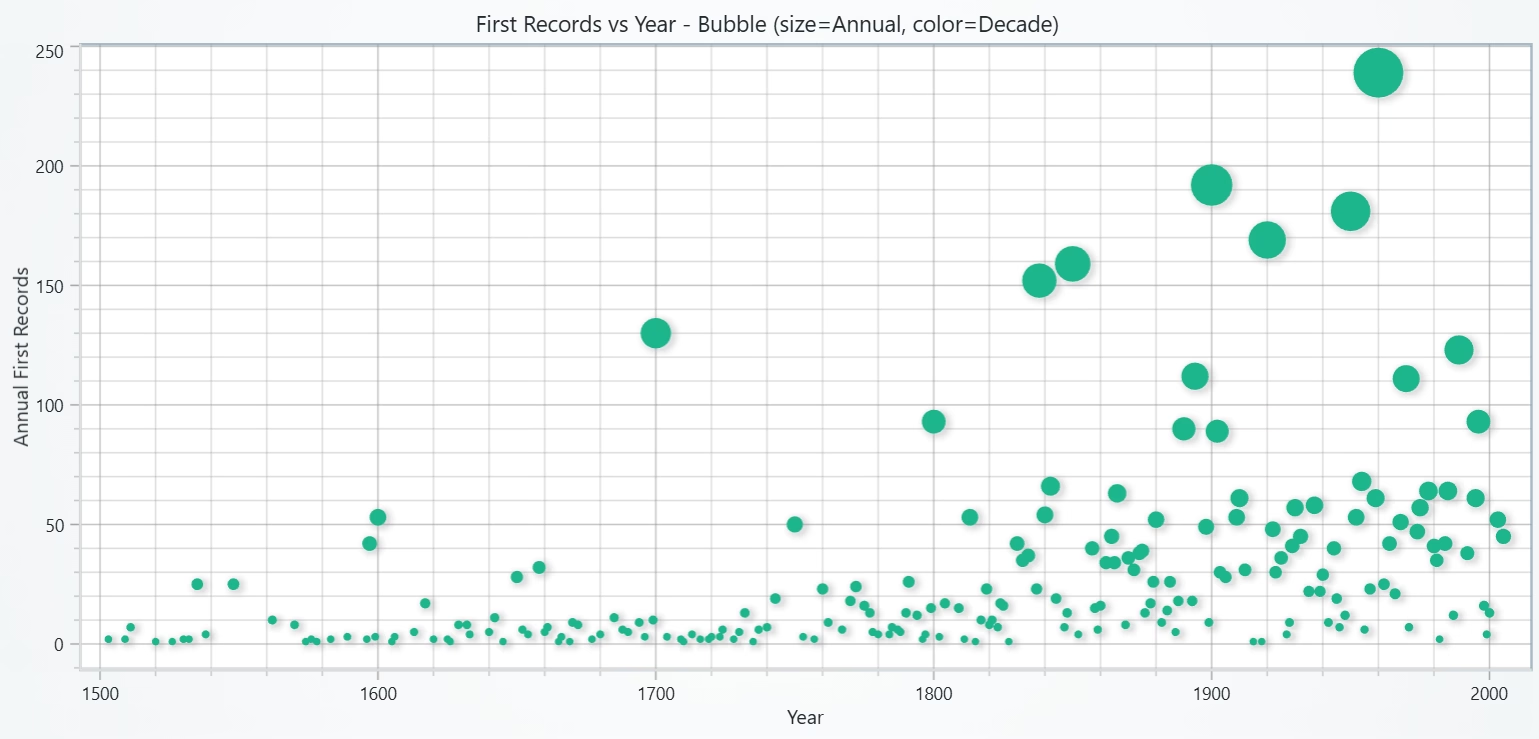
- Reveal multivariate patterns with a bubble chart where size ≠ color (size = annual magnitude; color = decade or taxonomic group, if available).
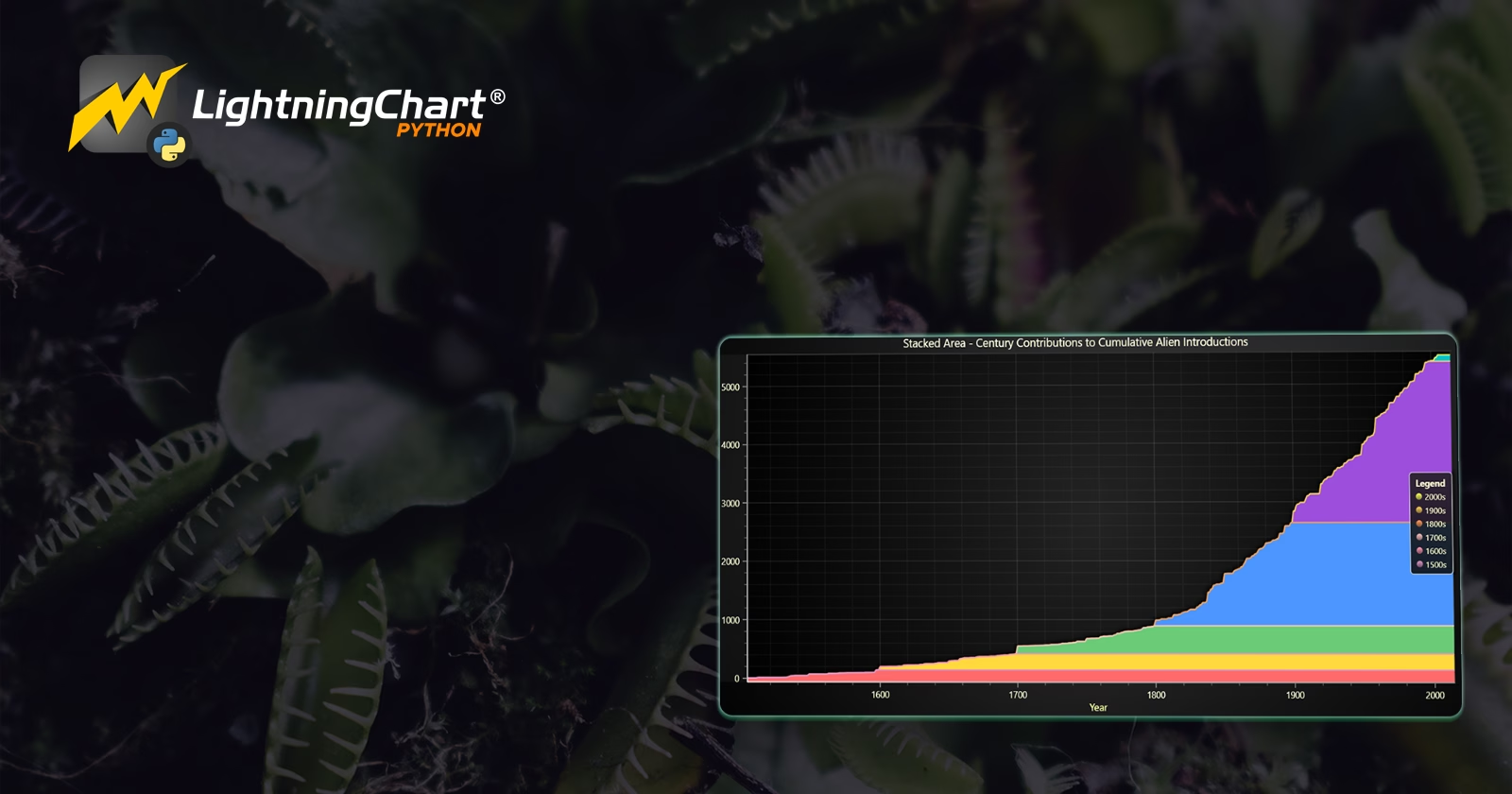
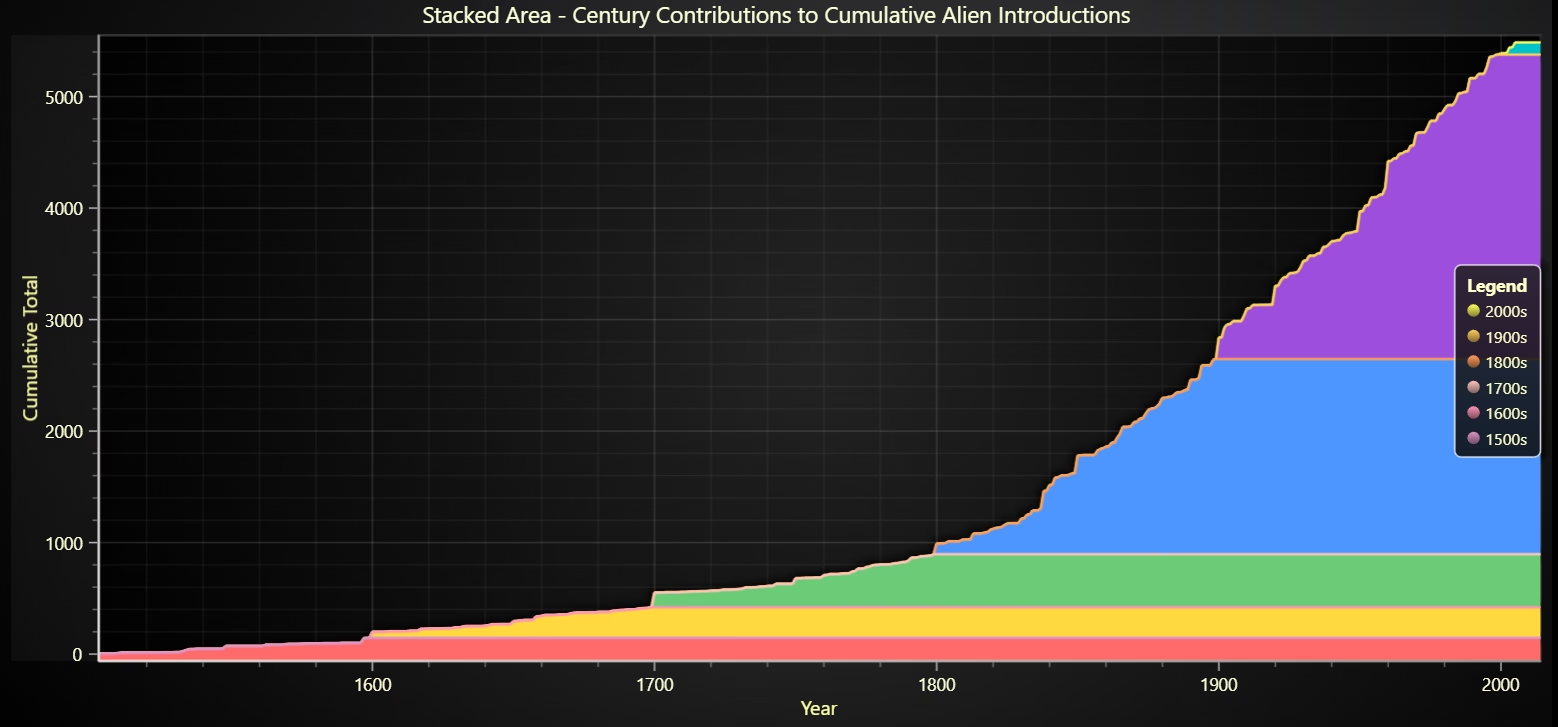
- Highlight peak periods using a stacked area by century to show how different centuries contributed to today’s total.
To achieve these objectives, LightningChart Python was selected for its:
- High performance on long time series (1500→present) with smooth interaction.
- Versatile 2D components that match our questions: BarChart-as-Histogram, BoxSeries, LineSeries with multiple Y-axes, PointSeries with per-point sizes (Bubble), and AreaSeries for stacked views.
- Interactive, presentation-ready visuals with zoom/pan, tooltips, custom axis labelling, and light/dark themes, ideal for clear comparisons and stakeholder reviews.
By converting raw counts into intuitive, interactive visuals, the project makes it easy to see when introductions intensified, how variability changed by era, and which centuries contributed most to the cumulative total, supporting monitoring, research communication, and policy discussion around biological invasions.
Project Overview
Build 5 interactive LightningChart Python visuals to uncover temporal patterns in the first records of established alien (non-native) species, show how activity accelerates over time, and decompose today’s totals by eras/decades/centuries using the Our World in Data dataset.
Objectives
- Measure distributions with a histogram of global first records across years (identify quiet vs. active periods).
- Compare eras with a box plot of annual first records (medians, IQR, outliers).
- Track trends using a dual-axis line: left Y = cumulative total, right Y = annual first records (spikes vs. long-term growth).
- Reveal multivariate patterns with a bubble chart where size = annual magnitude and color = decade (or taxonomic group if available).
- Highlight cumulative contributions with a stacked area by century, showing how each century-built today’s total.
- Ensure reproducible code and publication-ready visuals (clear axes, legends, and theming).
Deliverables
- Five LightningChart Python visuals: Histogram, Box Plot, Dual-Axis Line, Bubble (size≠color), Stacked Area (century layers).
- Documented Python code for each chart (preprocessing, parameters, axis/legend policies) with brief rationale.
- Interpretive summaries highlighting distribution shifts, surge eras, variability, and cumulative contributions.
- A conclusion on how LightningChart supports monitoring, reporting, and communication around biological invasions.
Tools Used
Python 3.13.5, LightningChart Python, Jupyter Notebook, AI Assistance
About the Dataset
Our World in Data, the file used was global-first-records-of-established-alien-species.csv
LightningChart Python
LightningChart Python is a professional-grade data visualization library renowned for its ultra-fast rendering and analytical precision. Its ability to handle large-scale, granular datasets and produce multidimensional, interactive visualizations makes it highly effective for data analysis.

Setting Up Python Environment
Before running the project, install Python and the other required libraries using:
%pip install numpy pandas lightningchartSetting Up Your Development Environment:
- Set up a virtual environment:
- Use Visual Studio Code (VSCode) for a streamlined development experience.
Loading and Preprocessing Data
Fetch and preprocess the data using the following function:
# Import necessary libraries (load pandas library to preprocess dataset)
import pandas as pd
Visualizing Data with LightningChart Python
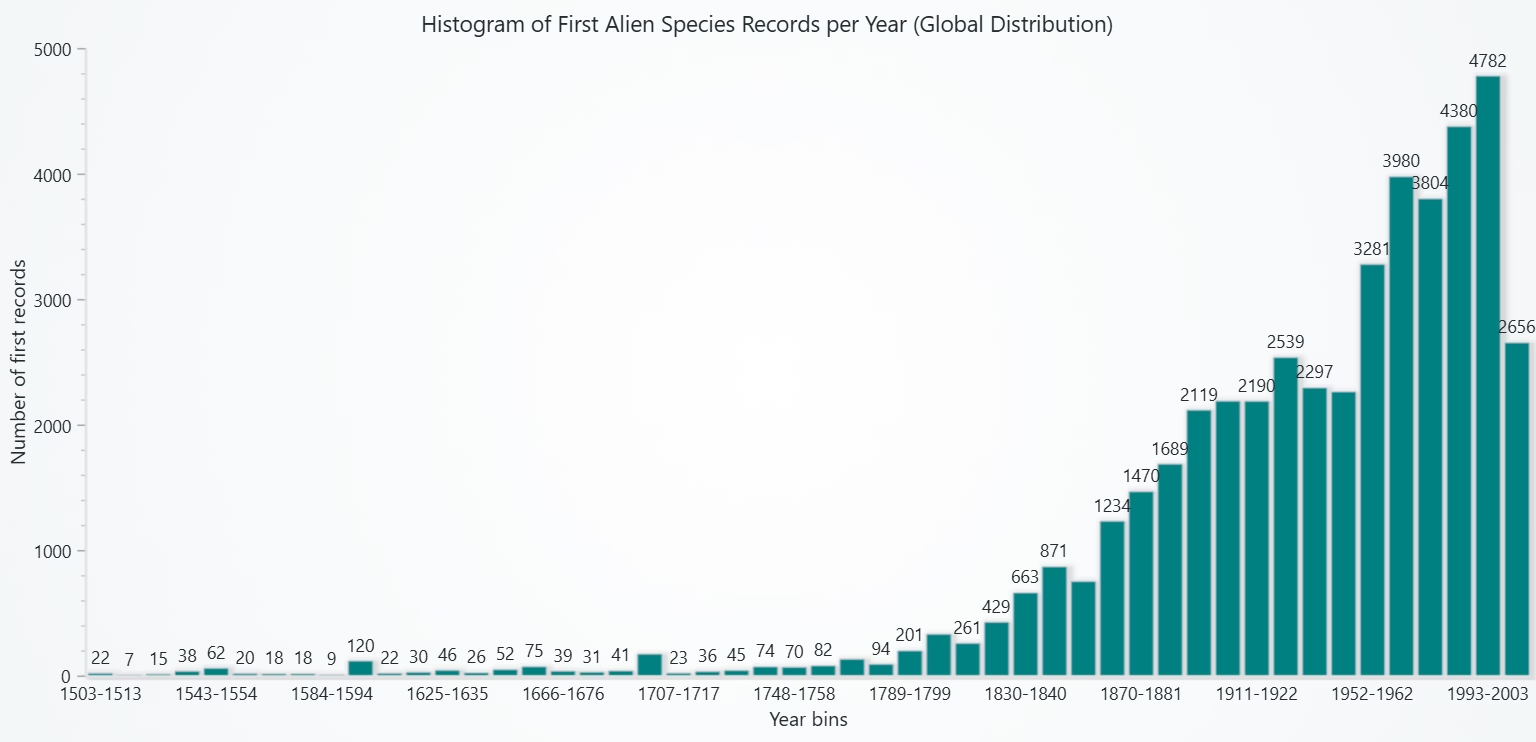
This histogram clearly demonstrates that alien species first-records were relatively rare for centuries but increased dramatically in the modern period, reflecting intensified trade, travel, and ecological globalization.
# Chart 1 - Histogram of Number of First Alien Species Records per Year (Global Distribution)
# Developed with AI assistance to demonstrate LightningChart Python

import lightningchart as lc
import pandas as pd
import numpy as np

# License
with open("D:/HAMK/Internship/MyProjects/lc_license.txt", "r") as f:
    license_key = f.read().strip()
lc.set_license(license_key)

# Load dataset
df = pd.read_csv("global-first-records-of-established-alien-species.csv")

# Clean and rename
df = df.rename(columns={
    "Entity": "Country",
    "Code": "Code",
    "Year": "Year",
    df.columns[-1]: "FirstRecords"
})
df["Year"] = pd.to_numeric(df["Year"], errors="coerce")
df["FirstRecords"] = pd.to_numeric(df["FirstRecords"], errors="coerce")

# Aggregate global first records per year
yearly = df.groupby("Year", as_index=False)["FirstRecords"].sum()

# Create histogram bins (eg: 50-year bins for clarity, adjust as needed)
counts, bin_edges = np.histogram(yearly["Year"].repeat(yearly["FirstRecords"]), bins=50)

# Prepare histogram bar data
bar_data = [
    {"category": f"{int(bin_edges[i])}-{int(bin_edges[i+1])}", "value": int(count)}
    for i, count in enumerate(counts)
]

# Create LightningChart BarChart (as Histogram)
chart = lc.BarChart(
    vertical=True,
    theme=lc.Themes.Light,
    title="Histogram of First Alien Species Records per Year (Global Distribution)", html_text_rendering=True
)

# Set histogram data
chart.set_data(bar_data)

# Disable sorting to preserve order of bins
chart.set_sorting('disabled')

# Color bars
chart.set_bars_color('teal')

# Axis titles
chart.category_axis.set_title("Year bins")
chart.value_axis.set_title("Number of first records")

chart.open()
Box Plot of Annual First Records by Era
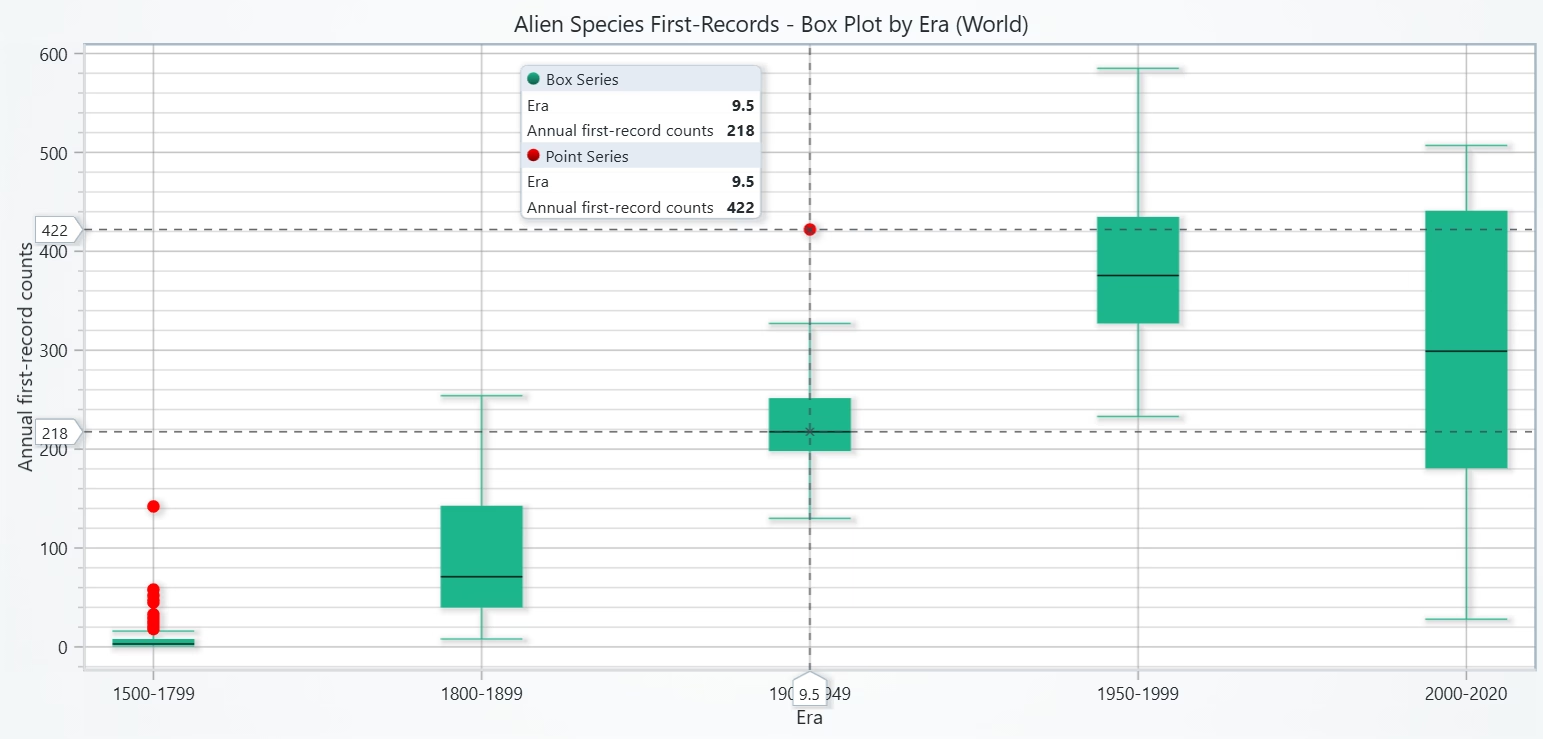
This chart highlights how the central tendency of annual introductions rose dramatically over time. The wider boxes and outliers in recent eras show both greater consistency of high introductions and occasional extreme events.
# Chart 2 - Box Plot of Annual First Records by Era
# Developed with AI assistance to demonstrate LightningChart Python

import lightningchart as lc
import pandas as pd
import numpy as np

# License
with open("D:/HAMK/Internship/MyProjects/lc_license.txt", "r") as f:
    lc.set_license(f.read().strip())

# Load & normalize
CSV_PATH = "global-first-records-of-established-alien-species.csv"
df = pd.read_csv(CSV_PATH)

# OWID value column is the last one → rename to 'FirstRecords'
df = df.rename(columns={
    "Entity": "Entity",
    "Code": "Code",
    "Year": "Year",
    df.columns[-1]: "FirstRecords"
})

df["Year"] = pd.to_numeric(df["Year"], errors="coerce")
df["FirstRecords"] = pd.to_numeric(df["FirstRecords"], errors="coerce")
df = df.dropna(subset=["Year", "FirstRecords"]).sort_values(["Entity", "Year"])

world = df[df["Entity"] == "World"].copy()
if world.empty:
    raise ValueError("World series not found in the CSV. Download the 'World' series or the full entities CSV.")

# Define eras
eras = [
    ("1500-1799", 1500, 1799),
    ("1800-1899", 1800, 1899),
    ("1900-1949", 1900, 1949),
    ("1950-1999", 1950, 1999),
    ("2000-2020", 2000, 2020),
]

# Build BoxSeries payload-
dataset = []
x_out, y_out = [], []
labels = []

spacing = 4  # ← increase spacing between categories (2 → 4)

for i, (label, a, b) in enumerate(eras):
    vals = world.loc[(world["Year"] >= a) & (world["Year"] <= b), "FirstRecords"] \
                .astype(float).to_numpy()
    if vals.size < 5:
        continue

    # Quartiles & median
    q1, q3 = np.percentile(vals, 25), np.percentile(vals, 75)
    med = float(np.median(vals))
    iqr = q3 - q1
    if iqr == 0:  # keep the box visible if constant
        q1 -= 1e-6
        q3 += 1e-6
        iqr = q3 - q1

    # Whiskers via IQR rule
    lb, ub = q1 - 1.5 * iqr, q3 + 1.5 * iqr
    non = vals[(vals >= lb) & (vals <= ub)]
    lo = float(non.min() if non.size else vals.min())
    hi = float(non.max() if non.size else vals.max())

    # X-band for this category with wider spacing
    start = (i * spacing) + 1
    end = start + 1

    dataset.append({
        "start": start,
        "end": end,
        "lowerQuartile": float(q1),
        "upperQuartile": float(q3),
        "median": med,
        "lowerExtreme": lo,
        "upperExtreme": hi,
    })

    # Outliers
    outs = vals[(vals < lb) | (vals > ub)]
    if outs.size:
        x_out.extend([start + 0.5] * len(outs))
        y_out.extend(outs.tolist())

    # Save concise tick label (no "(n=…)" to avoid overlap)
    labels.append((label, (i * spacing) + 1.5, vals.size))

# Plot with LightningChart
chart = lc.ChartXY(
    theme=lc.Themes.Light,
    title="Alien Species First-Records - Box Plot by Era (World)", html_text_rendering=True
)

# Box series
series = chart.add_box_series()
series.add_multiple(dataset)

# Outlier points
ol = chart.add_point_series(sizes=True, rotations=True, lookup_values=True)
ol.set_point_color("red")
if y_out:
    ol.append_samples(x_values=x_out, y_values=y_out, sizes=[10] * len(y_out))

# Axes + custom ticks
try:
    ax_x = chart.get_default_x_axis(); ax_y = chart.get_default_y_axis()
except AttributeError:
    ax_x = chart.get_default_axis_x(); ax_y = chart.get_default_axis_y()

ax_y.set_title("Annual first-record counts")

# 1) Hide default numeric tick labels on X so only custom labels remain
try:
    ax_x.set_tick_strategy('Empty')   # <- key line to remove default numeric ticks
except Exception:
    pass

ax_x.set_title("Era")

# 2) Add concise custom era ticks (no sample size in the label)
for label, mid, n in labels:
    try:
        # Option A: single-line label
        ax_x.add_custom_tick().set_value(mid).set_text(label)

        # Option B (optional): two-line label to save width
        # ax_x.add_custom_tick().set_value(mid).set_text(label.replace("–", "–\n"))
    except Exception:
        pass

chart.open()
Multi-Axis Line (Cumulative vs Annual) Number of Alien Species Introductions Over Time
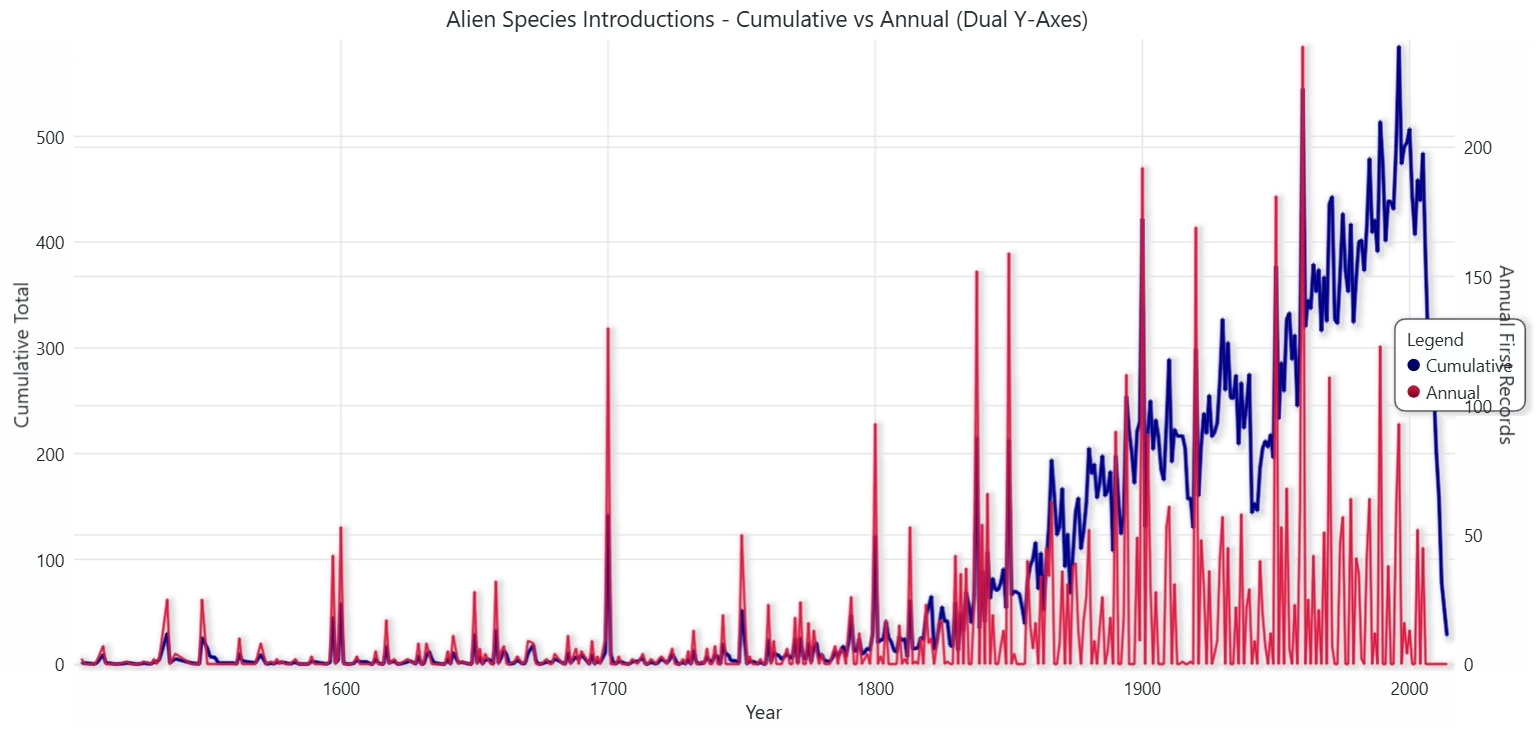
Introductions display nonlinear growth: a slow start followed by rapid accumulation and frequent spike years in modern times.
# Chart 3 - Multi-Axis Line (Cumulative vs Annual) Number of Alien Species Introductions Over Time
# Developed with AI assistance to demonstrate LightningChart Python

import lightningchart as lc
import pandas as pd

# License
with open("D:/HAMK/Internship/MyProjects/lc_license.txt", "r") as f:
    lc.set_license(f.read().strip())

CSV_PATH = "global-first-records-of-established-alien-species.csv"

# Load & prep (World totals)
raw = pd.read_csv(CSV_PATH)
df = (raw[raw["Entity"].str.strip().str.lower() == "world"]
      .rename(columns={"all": "Value"})
      .loc[:, ["Year", "Value"]].sort_values("Year"))
df["Year"] = pd.to_numeric(df["Year"], errors="coerce")
df["Value"] = pd.to_numeric(df["Value"], errors="coerce")
df = df.dropna()

# Annual increments from cumulative 'Value'
df["Annual"] = df["Value"].diff().fillna(df["Value"]).clip(lower=0)
df = df[df["Annual"] >= 0]  # keep sane

# Chart
chart = lc.ChartXY(
    theme=lc.Themes.White,
    title="Alien Species Introductions - Cumulative vs Annual (Dual Y-Axes)",
    html_text_rendering=True
)

axis_x   = chart.get_default_x_axis(); axis_x.set_title("Year")
axis_left  = chart.get_default_y_axis(); axis_left.set_title("Cumulative Total")
axis_right = chart.add_y_axis(opposite=True); axis_right.set_title("Annual First Records")

# Series
s_cum = chart.add_line_series(y_axis=axis_left)
s_cum.set_name("Cumulative").set_line_color("darkblue").set_line_thickness(3)
s_cum.add(x=df["Year"].tolist(), y=df["Value"].tolist())

s_ann = chart.add_line_series(y_axis=axis_right)
s_ann.set_name("Annual").set_line_color("crimson").set_line_thickness(2)
s_ann.add(x=df["Year"].tolist(), y=df["Annual"].tolist())

chart.add_legend(data=chart)
chart.open()
Bubble Chart of First records vs. Year
Both frequency and intensity of introductions ramp up over time. The distinct size/color mapping clarifies when and how strongly surges occur (and by which grouping if present).
# Chart 4 - Bubble Chart of First Records vs. Year
# Developed with AI assistance to demonstrate LightningChart Python

import lightningchart as lc
import pandas as pd
import numpy as np

# Config
CSV_PATH = "global-first-records-of-established-alien-species.csv"
MIN_YEAR = 1500

# License
with open("D:/HAMK/Internship/MyProjects/lc_license.txt", "r") as f:
    lc.set_license(f.read().strip())

# Load & prepare data
raw = pd.read_csv(CSV_PATH)

# Normalize core columns
cols = {c.lower(): c for c in raw.columns}
entity_col = cols.get("entity") or "Entity"
year_col   = cols.get("year")   or "Year"
value_col  = cols.get("all")    or [c for c in raw.columns if c not in [entity_col, year_col, "Code"]][-1]

df = raw.rename(columns={entity_col: "Entity", year_col: "Year", value_col: "Value"})
df["Year"] = pd.to_numeric(df["Year"], errors="coerce")
df["Value"] = pd.to_numeric(df["Value"], errors="coerce")
df = df.dropna(subset=["Year", "Value"]).sort_values("Year")

# Keep World series (your file is World-only)
df = df[df["Entity"].str.strip().str.lower() == "world"].copy()

# Annual first records from cumulative 'Value'
df["Annual"] = df["Value"].diff().fillna(df["Value"]).clip(lower=0)
df = df[(df["Year"] >= MIN_YEAR) & (df["Annual"] > 0)]

if df.empty:
    raise ValueError("No annual values to plot. Check CSV or MIN_YEAR filter.")

# Color mapping (Decade or Group)
possible_group_cols = [c for c in raw.columns
                       if c.lower() in ("taxonomic group", "taxonomic_group", "group", "taxa", "taxon")]
if possible_group_cols:
    group_col = possible_group_cols[0]
    # Align by index if group exists; otherwise fill "Unknown"
    color_key = raw.loc[df.index, group_col].fillna("Unknown").astype(str)
    color_title = "Taxonomic group"
else:
    df["Decade"] = (df["Year"].astype(int) // 10) * 10
    color_key = (df["Decade"].astype(int).astype(str) + "s")
    color_title = "Decade"

categories = sorted(color_key.unique().tolist(), key=lambda s: s)
palette = ["#1f77b4","#d62728","#2ca02c","#ff7f0e","#9467bd",
           "#17becf","#8c564b","#e377c2","#7f7f7f","#bcbd22","#aec7e8","#ff9896"]
while len(palette) < len(categories):
    palette += palette
color_map = {cat: palette[i] for i, cat in enumerate(categories)}
point_colors = [color_map[c] for c in color_key]

# Size mapping (Annual → pixels)
annual = df["Annual"].to_numpy(dtype=float)
a_min, a_max = float(np.min(annual)), float(np.max(annual))
min_px, max_px = 6.0, 40.0
if a_max > a_min:
    sizes = (annual - a_min) / (a_max - a_min)
    sizes = sizes * (max_px - min_px) + min_px
else:
    sizes = np.full_like(annual, (min_px + max_px) / 2.0)

print(f"Annual range {a_min:.1f}–{a_max:.1f} ⇒ bubble sizes {sizes.min():.1f}–{sizes.max():.1f}px")

# Chart
chart = lc.ChartXY(
    theme=lc.Themes.Light,
    title=f"First Records vs Year - Bubble (size=Annual, color={color_title})",
    html_text_rendering=True
)

# IMPORTANT: sizes=True enables per-point sizes
ps = chart.add_point_series(sizes=True)
ps.append_samples(
    x_values=df["Year"].tolist(),
    y_values=df["Annual"].tolist(),
    sizes=sizes.tolist(),
    colors=point_colors
)

# Axes
ax_x = chart.get_default_x_axis(); ax_x.set_title("Year")
ax_y = chart.get_default_y_axis(); ax_y.set_title("Annual First Records")

# Console legend for verification
print(f"\n{color_title} → Color mapping:")
for cat in categories[:20]:
    print(f"  {cat}: {color_map[cat]}")
if len(categories) > 20:
    print(f"... ({len(categories)-20} more categories)")

chart.open()
Stacked Area of Century Contributions to Cumulative Total
The cumulative total is century-heavy in modern times: most contributions come from the last two centuries, highlighting the modern acceleration of alien species establishments.
# Chart 5 - Stacked Area of Century Contributions to Cumulative Total
# Developed with AI assistance to demonstrate LightningChart Python

import lightningchart as lc
import pandas as pd
import numpy as np

# License
with open("D:/HAMK/Internship/MyProjects/lc_license.txt", "r") as f:
    lc.set_license(f.read().strip())

CSV_PATH = "global-first-records-of-established-alien-species.csv"
raw = pd.read_csv(CSV_PATH)

# Prep World series
df = (raw[raw["Entity"].str.strip().str.lower() == "world"]
      .rename(columns={"all": "Value"})
      .loc[:, ["Year", "Value"]]
      .sort_values("Year"))
df["Year"] = pd.to_numeric(df["Year"], errors="coerce")
df["Value"] = pd.to_numeric(df["Value"], errors="coerce")
df = df.dropna()

# Annual first records
df["Annual"] = df["Value"].diff().fillna(df["Value"]).clip(lower=0)

# Pivot annual by Century → wide table (rows = Year, cols = Century)
df["Century"] = (df["Year"].astype(int) // 100) * 100  # e.g., 1500, 1600, ...
wide = (df.pivot_table(index="Year", columns="Century", values="Annual", aggfunc="sum")
          .fillna(0).sort_index())

# Cumulative over time per century (component layers)
comp = wide.cumsum()  # cumulative timeline per century component

# Build stacked (each series is sum of all components up to that layer)
centuries = sorted(comp.columns.tolist())
stacked = comp.copy()
for i, c in enumerate(centuries):
    if i == 0:
        stacked[c] = comp[c]
    else:
        stacked[c] = comp[centuries[:i+1]].sum(axis=1)

# Chart
chart = lc.ChartXY(
    theme=lc.Themes.Dark,
    title="Stacked Area - Century Contributions to Cumulative Alien Introductions",
    html_text_rendering=True
)
axis_x = chart.get_default_x_axis(); axis_x.set_title("Year")
axis_y = chart.get_default_y_axis(); axis_y.set_title("Cumulative Total")

palette = [
    "#FF6B6B",  # 1500s - coral red
    "#FFD93D",  # 1600s - gold yellow
    "#6BCB77",  # 1700s - green
    "#4D96FF",  # 1800s - vivid blue
    "#9D4EDD",  # 1900s - purple
    "#00C2CB",  # 2000s - teal
]
while len(palette) < len(centuries):
    palette += palette

x_vals = stacked.index.to_list()

for i_rev, c in enumerate(reversed(centuries)):
    color = palette[len(centuries) - 1 - i_rev]
    ser = chart.add_area_series()
    ser.set_name(f"{int(c)}s")
    # slight transparency so overlaps are clear
    try:
        ser.set_fill_color(color).set_fill_opacity(0.85)
    except Exception:
        ser.set_fill_color(color)
    ser.add(x_vals, stacked[c].to_list())

chart.add_legend(data=chart)
chart.open()
Conclusion
In this tutorial, we conducted an alien species data analysis using LightningChart Python using the Our World in Data (World totals) dataset. We also built five LightningChart Python visuals: Histogram, Box Plot (by era), Dual-Axis Line (cumulative vs annual), Bubble (size≠color), and Stacked Area (century layers).
Together, the charts show that introductions were rare before 1800, then accelerated rapidly after 1950, with more variability and spikes in recent decades.
The analysis highlights temporal peaks, steep cumulative growth, and (where available) uneven taxonomic contributions. Although this file is World-only, findings align with the view that global connectivity underpins the surge in alien species records.
Continue learning with LightningChart

Choosing the right XY line series
LightningChart .NET features 10 different line series. Read more about their characteristics and functionalities and choose the best for your app.

JavaScript Refreshing Spectrum Chart
Written by a human | Updated on April 10th, 2025JavaScript Refreshing Spectrum Chart Hello again, this time I bring a quick but helpful tutorial on how to create a JavaScript refreshing spectrum chart. A spectrum chart is commonly used in reading and plotting...
Horizontal Bar Chart of Russia-Ukraine War Weaponry Data
Written by a human | Updated on April 10th, 2025 JavaScript Horizontal Bar Chart In this article, we aim to respectfully create a JavaScript horizontal bar chart that simulates the weaponry usage on recent war conflicts. While the data have been taken from Kaggle and...



If you have any questions, feel free to contact us!
©LightningChart Ltd 2025. All rights reserved.