








Stock Market Data Visualization Python Analysis with LightningChart Python Trader
Tutorial
Written by a Human
Create a Stock Market Data Visualization Python analysis using LightningChart. Learn technical analysis, advanced charting, and trading strategies.
Mikael Virtanen
Data Science Python Developer

Introduction
This article demonstrates how to perform basic stock analysis on the LightningChart Python trader. Charts will be used to examine how different variables, such as close and open prices, might correlate with volume, and the range between the first two.
Dataset
The data for this article was acquired from a Kaggle dataset by Boris Marjanovic. The dataset contains data for both stocks and ETFs; this analysis will focus on stocks. The data is first downloaded as is and then imported to the trader. Data import is done using simple Python code and Pandas, a Python library with a focus on data analysis.
Plotted variables
Python trader requires Open, High, Low, Close (O, H, L, C) values to work (as well as a date). Volume value is not required for the trader to work, but is needed for certain indicators. Volume is also needed for this article.
Values for all of the variables are included in the dataset, although the data range varies between tickers. Some of the datasets go all the way back to 1999, but (for example) some only go back to 2005. This is fine for the scope of the analysis, and Python trader makes it easy to choose the data range.
Libraries used
- LightningChart Python trader
- Pandas
pip install pandas
pip install lightningchart_trader
This article demonstrates how to perform basic stock analysis on the LightningChart Python trader. Charts will be used to examine how different variables such as close, and open prices might correlate with volume, and the range between the first two.
LightningChart Python Trader
LightningChart’s Python trader (PT) provides extensive charting solutions with a high degree of customizability through its easy-to-use UI and built-in functionalities. Since the library is built for Python, it’s also possible to use other Python libraries if necessary.
As with all Lightningchart products, Performance has been a high priority when developing the library, even when working with large amounts of data, thus removing possible bottlenecks in this area.
Overview of the UI
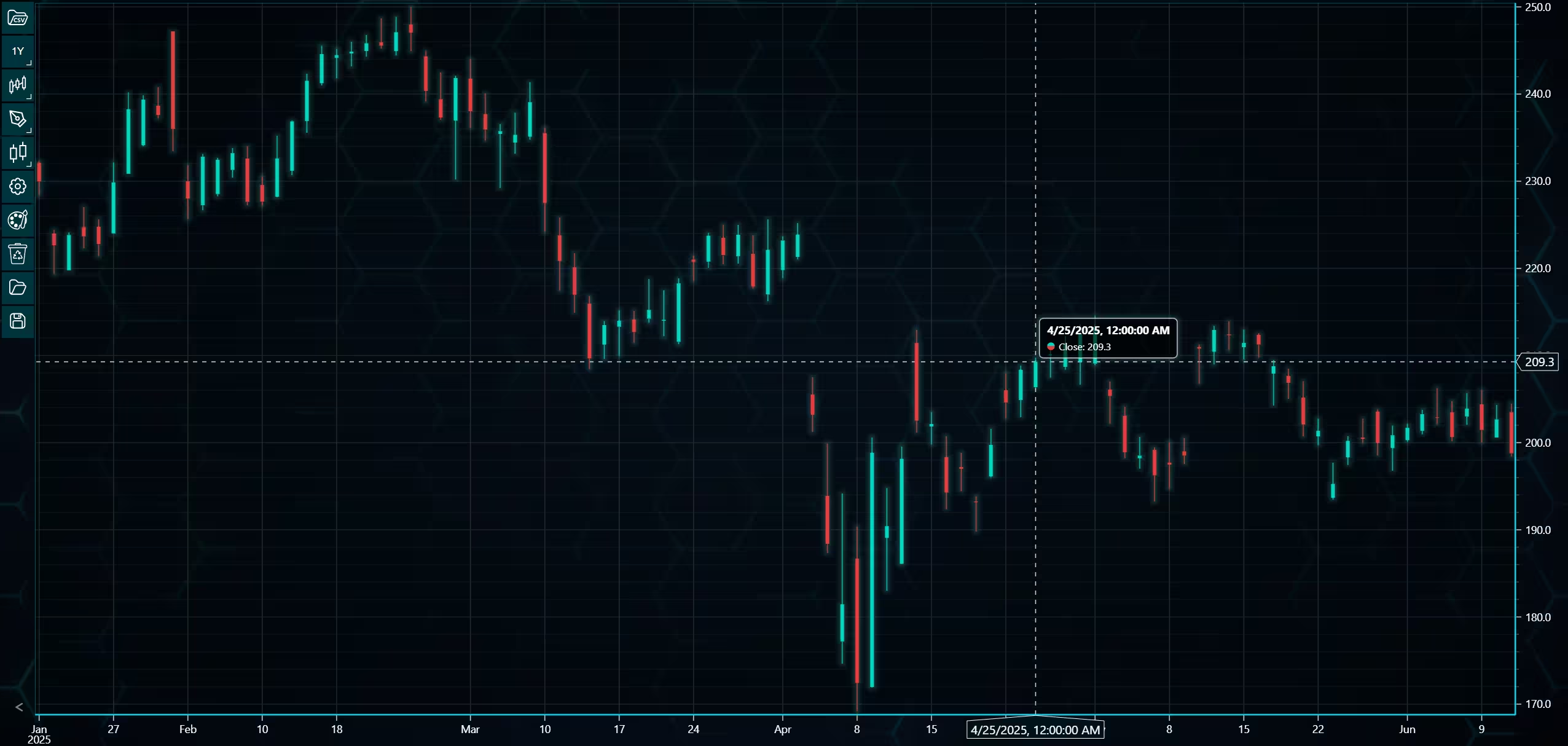
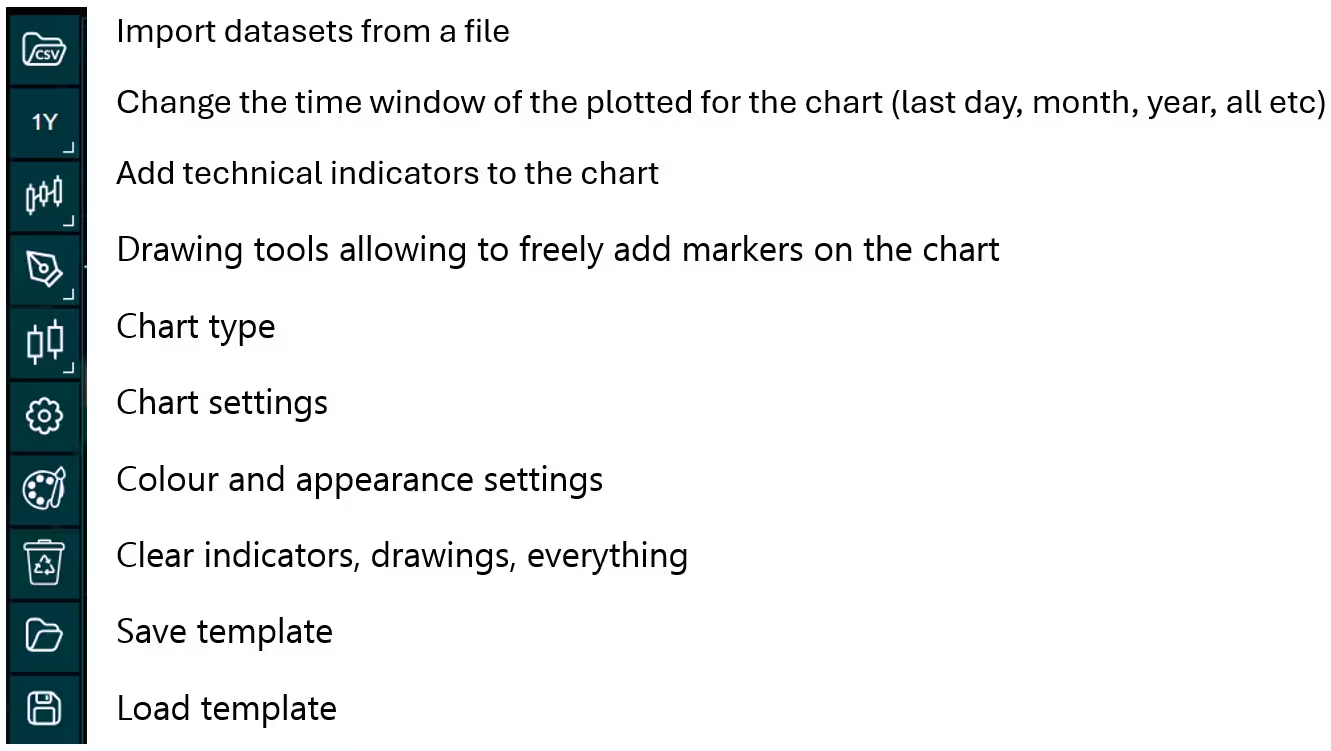
Above is the PT user interface with stock data charted using the default candlestick chart. On the top left are controls used to customize the chart and work with datasets. Here is the explanation for all the UI controls:
Charting features
These are chart types of Python trader provides out of the box.
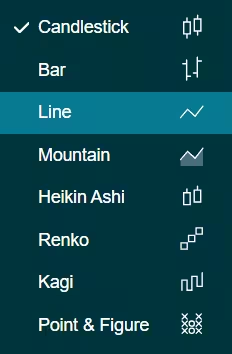
Chart types can be changed with the the UI or with the set_price_chart_type(chart_type) command. Available ones are ‘CandleStick’, ‘Bar’, ‘Line’, ‘Mountain’, ‘HeikinAshi’, ‘Renko’, ‘Kagi’, and ‘PointAndFigure’. For example, a mountain creating a mountain chart using the following methods:
trader.set_price_chart_type('Mountain')
trader.add_data_array(data)
trader.open()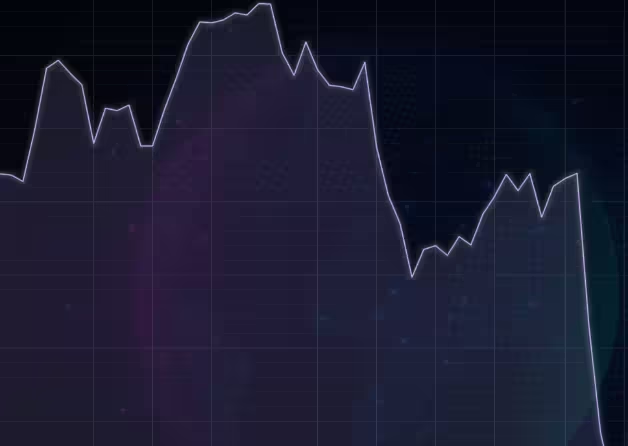
Chart visuals can be customized using the Python trader UI. Below are available settings for chart and indicator colours, background colour/image etc.
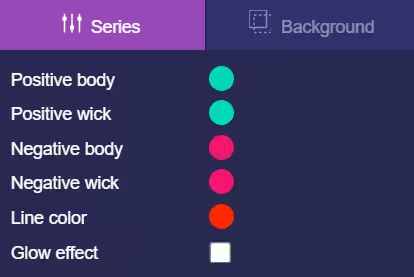
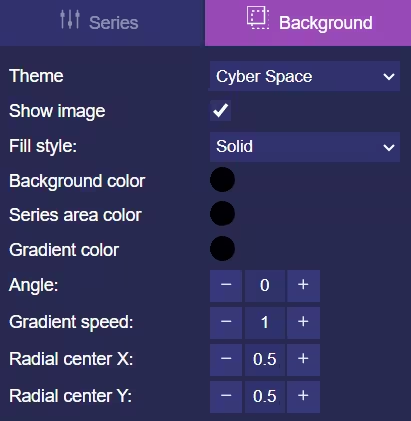
Default chart colours.
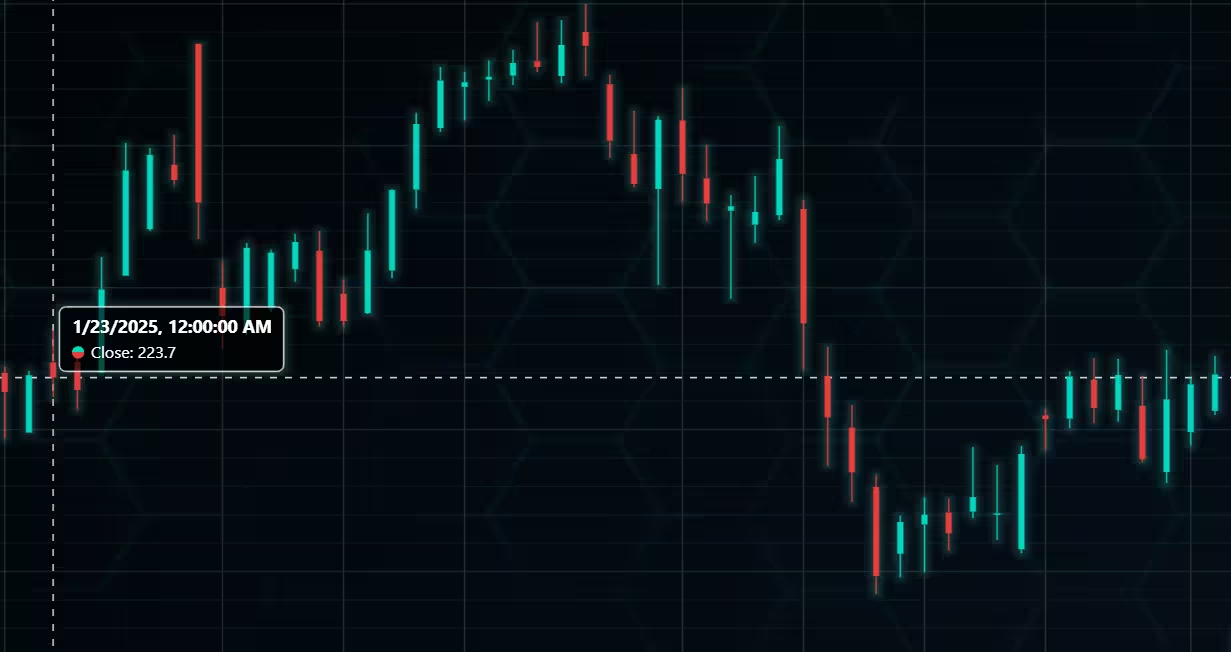
Background and indicator colours changed
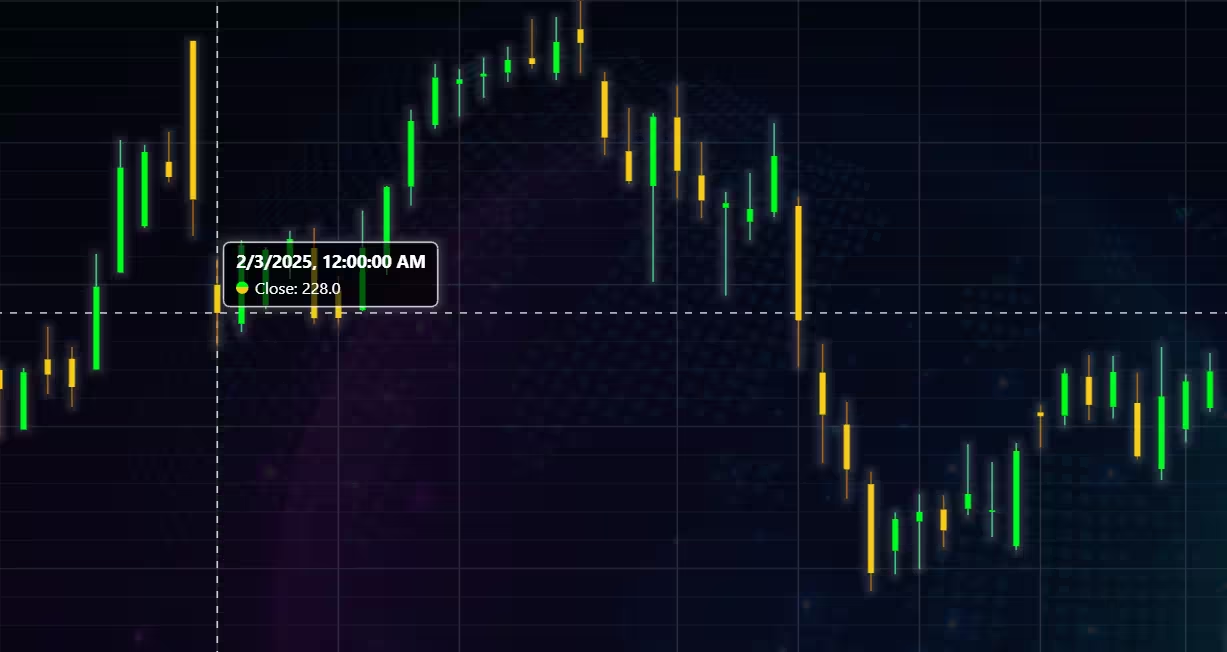
Chart customization
Customisation can also be done with code, using the built-in methods. The code below changes the background image and the chart colours to the ones seen in the right image. But why use code for customisation, since working with UI is easier?
trader.set_color_theme('cyberSpace')
# Changing the indicator colours for the candlesticks
trader.set_positive_body_color('#0fdf0c')
trader.set_positive_wick_color('#33d7a0')
trader.set_negative_body_color("#f3eb16")
trader.set_negative_wick_color('#b85900')
When the customization is applied on code level there’s no need to change any settings or load a template. Meaning you won’t have to make the changes every time when opening a chart. Python trader supports the use of templates for customization, and these files can be loaded in with code.
However, you still need to manually select the file, and in case you want to share the chart the template file would also need to be shared. When the changes are done in code, only it needs to be shared to get the same results.
Technical indicators
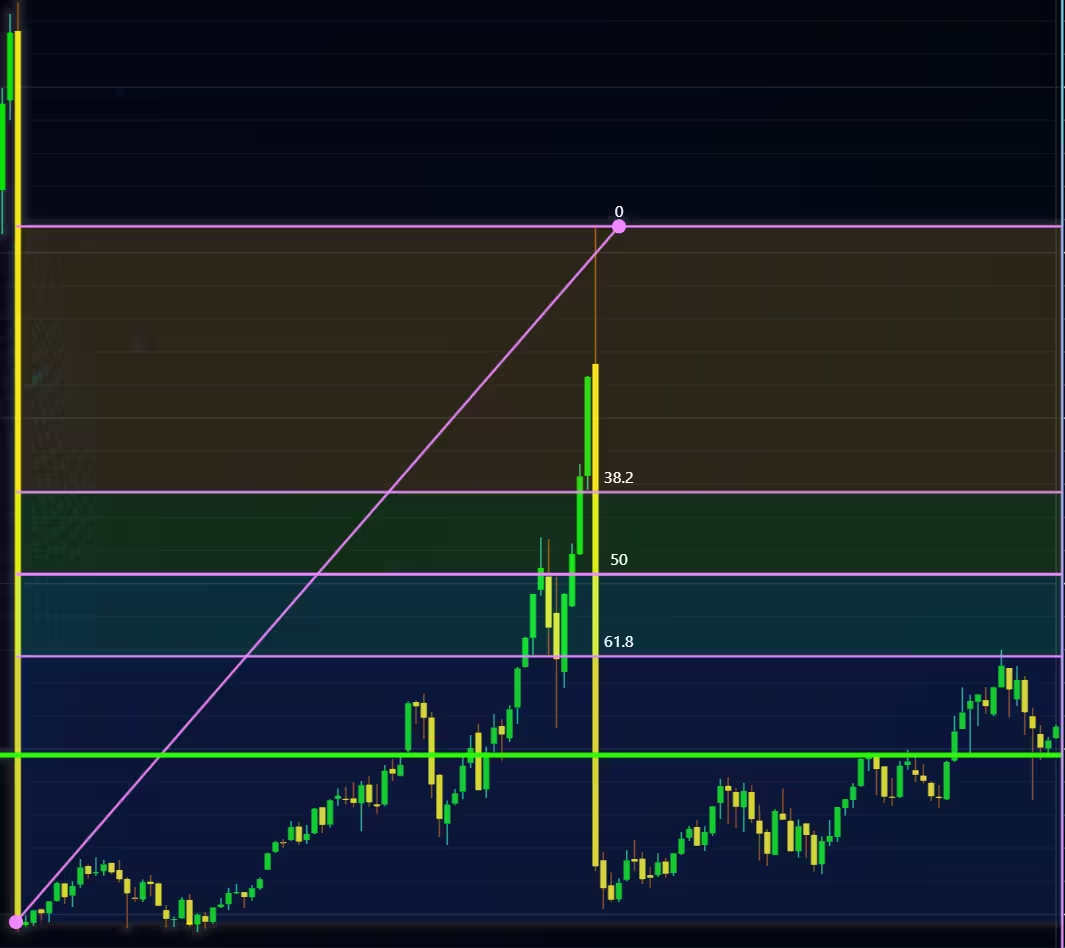
Python trader supports over 100 technical indicators. These include ones such as Relative Strength Index (RSI), Bollinger bands, Moving averages (SMA, EMA etc), Oscillators for money flow and price, Fibonacci retracements, as well as statistical ones like Standard deviation. Technical indicators can be added to a chart easily with the trader UI, their properties (period count, standard dev) can also be changed the same way.
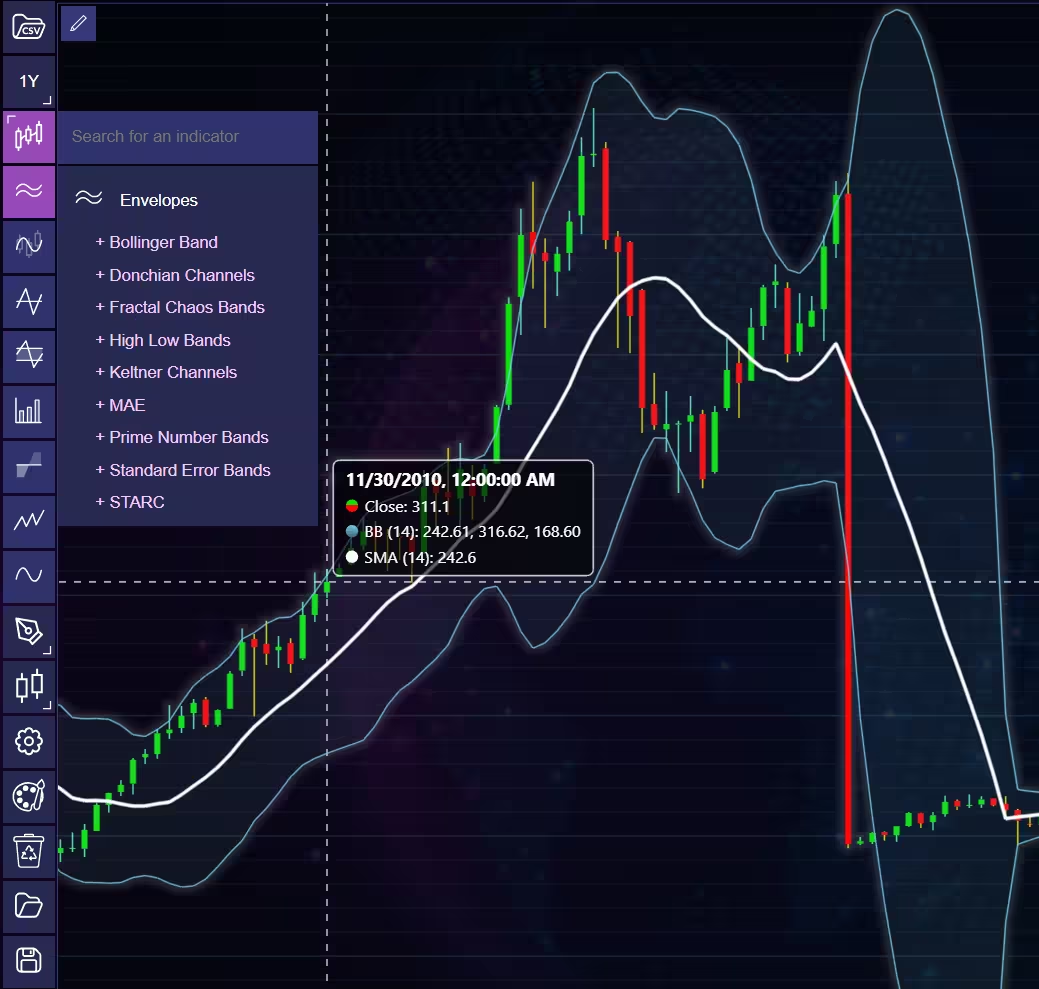
These indicators can also be added and customized via code.
trader.add_simple_moving_average(period_count=14)
trader.add_bollinger_band(period_count=14)
Indicators such as the Fibonacci patterns can be added with the built-in draw tools. Other markers can also be added this way. To see all the indicators, refer to the documentation.
Setting Up Python Environment
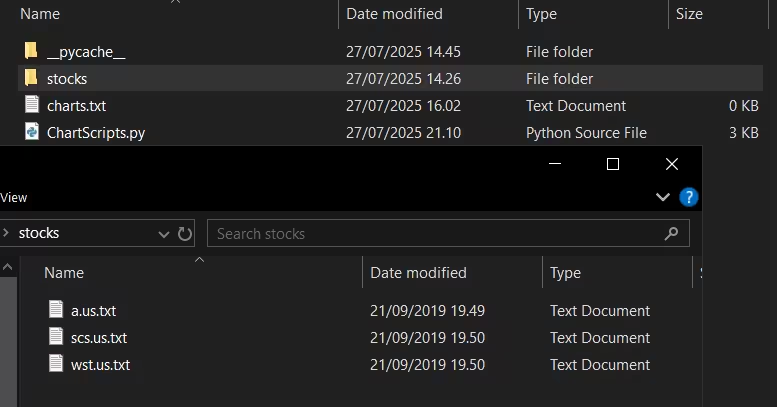
The dataset provides the stock data in .txt files. These files are saved in a folder named “stocks”, and the folder is in the same space as the ChartScript.py file. If this structure varies, the code that retrieves the data (explained in a moment) needs to be modified.
# Library imports, lightningchart_trader and pandas might need to be installed before they can be imported.
from lightningchart_trader import TAChart
import pandas as pd
import time
import os
# Lightning chart license key and Python Trader initialization
license_key = “Lightning chart license key”

# Path to the folder where the documents are located.
filepath = os.listdir('stocks/')
# For some reason a desktop.ini file was detected by python, despite there not being anything additional in the folder.
# This removes it from the filepath list. Not sure why this happens.
filepath.remove('desktop.ini')
print(filepath)
# Method used to import data to the trader. Optionally you can set chart properties here.
for datatxt in filepath:
    # Looping through the individual files, that have the price data.
    # The name 'stocks/' should be replaced with folder name where you've placed the files
    # The filepath might might also have to be changed
    # python trader can work with pandas dataframes, assuming all the relevant variables are present (in this case they are)
    stock_dataframe = pd.read_csv('stocks/'+datatxt)
    # Initialize the trader software with your license key and set the dataframes as the data.
    trader = TAChart(license_key)
    trader.set_data(stock_dataframe)
    # Chart customization. Optional and can also be done in UI, but this way makes it more convenient. Finally open the chart instance
    trader.set_color_theme('cyberSpace')
    trader.set_positive_body_color("#0b6a09")
    trader.set_positive_wick_color("#0aee24")
    trader.set_negative_body_color("#8a0606")
    trader.set_negative_wick_color("#fe0101")
    trader.open()
# Wait for the chart to load properly. Then close the trader instance, this keeps the charts opened and makes testing easier. Optional
time.sleep(3)
trader.close()
Stock Market Data Visualization
The visualization part has works as a test of a very basic trading strategy. Idea is to see how well Price-Volume-Trend (PVT) would work as a buy indicator. Test will be conducted on 3 stocks, and the time frame is limited. Due to these factors this should be taken as a more of a demonstration of the charting software, than as a serious trading idea. The strategy would need be back tested on much larger sample size, but that’s outside the scope of the article.
Agilent technologies
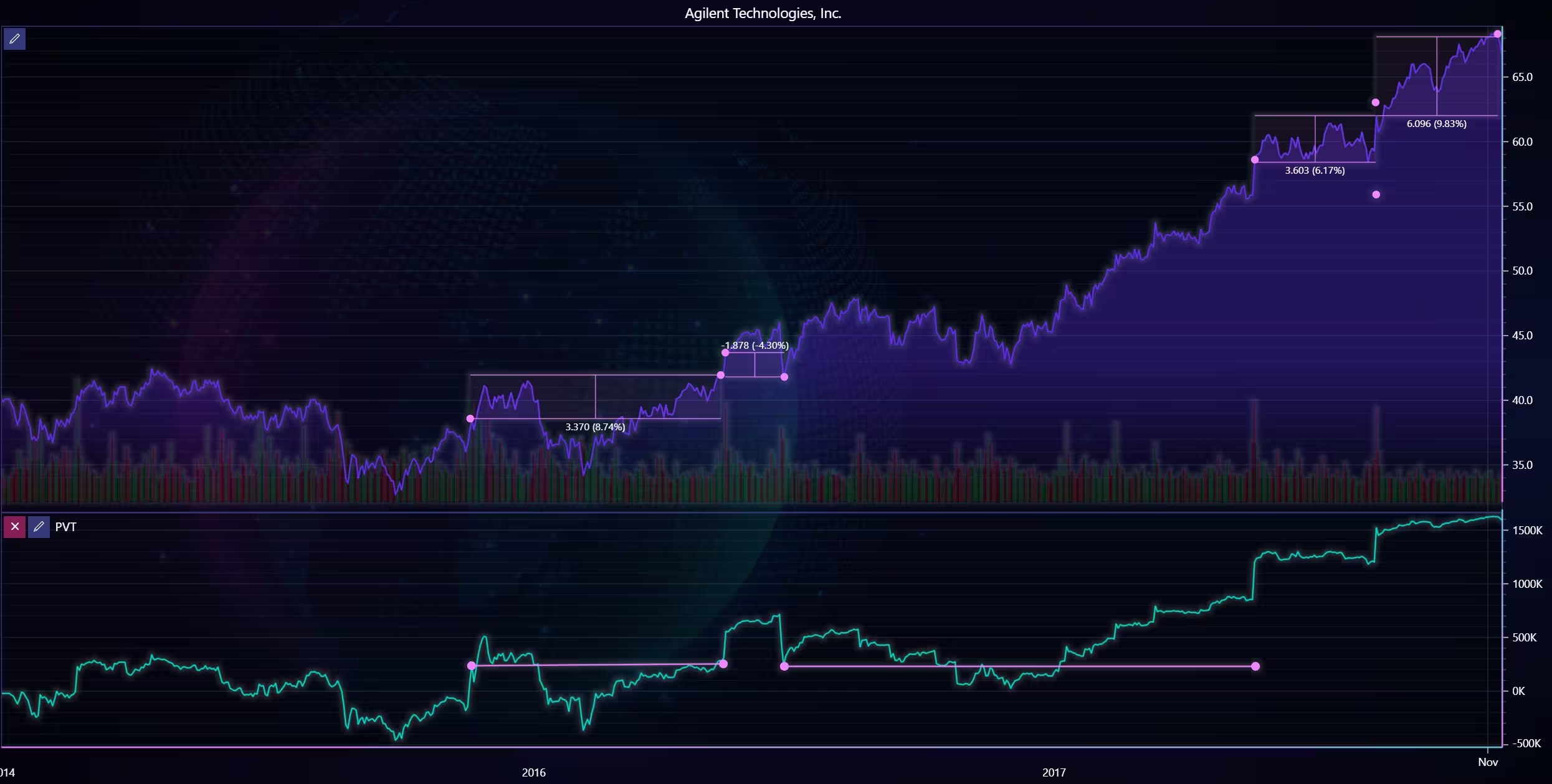
Chart showing the an test to see if Price-Volume-Trend would have been a good indicator to predict stock price. In this (admittedly cherry picked) test, buying when a rapid increase or decrease of PVT happens does net relative profit.
Another interesting note is towards the end, between 3/2017 and 12/20, there are three periods where PVT volatility is relatively low. These are preceded by a sudden spike in PVT. During these periods the stock price has incresed by roughly 26%, in just 8 months.
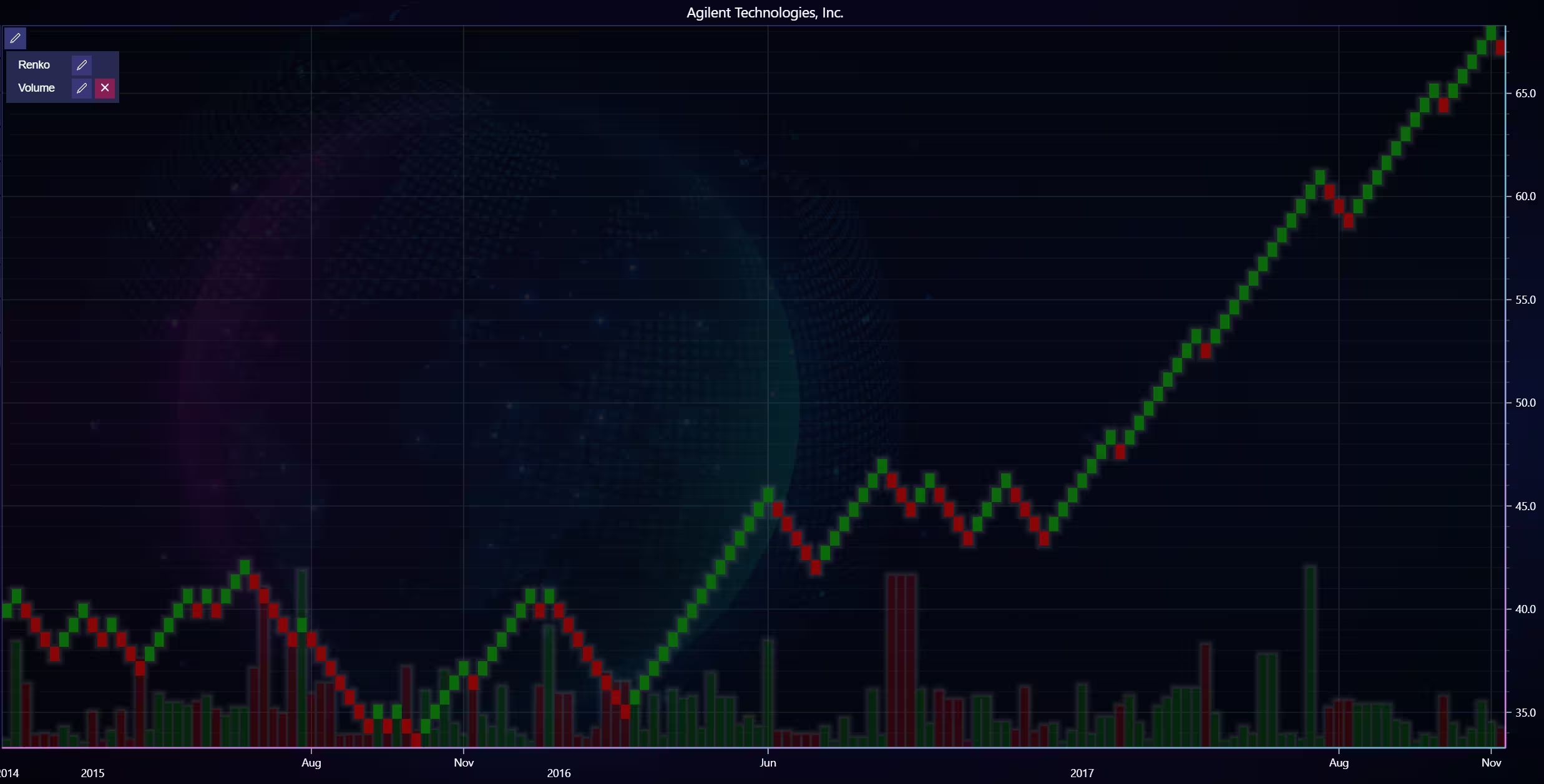
Renko chart of the same stock. As renko charts track trends and reversals by eliminating noise by isolating price movements from time.
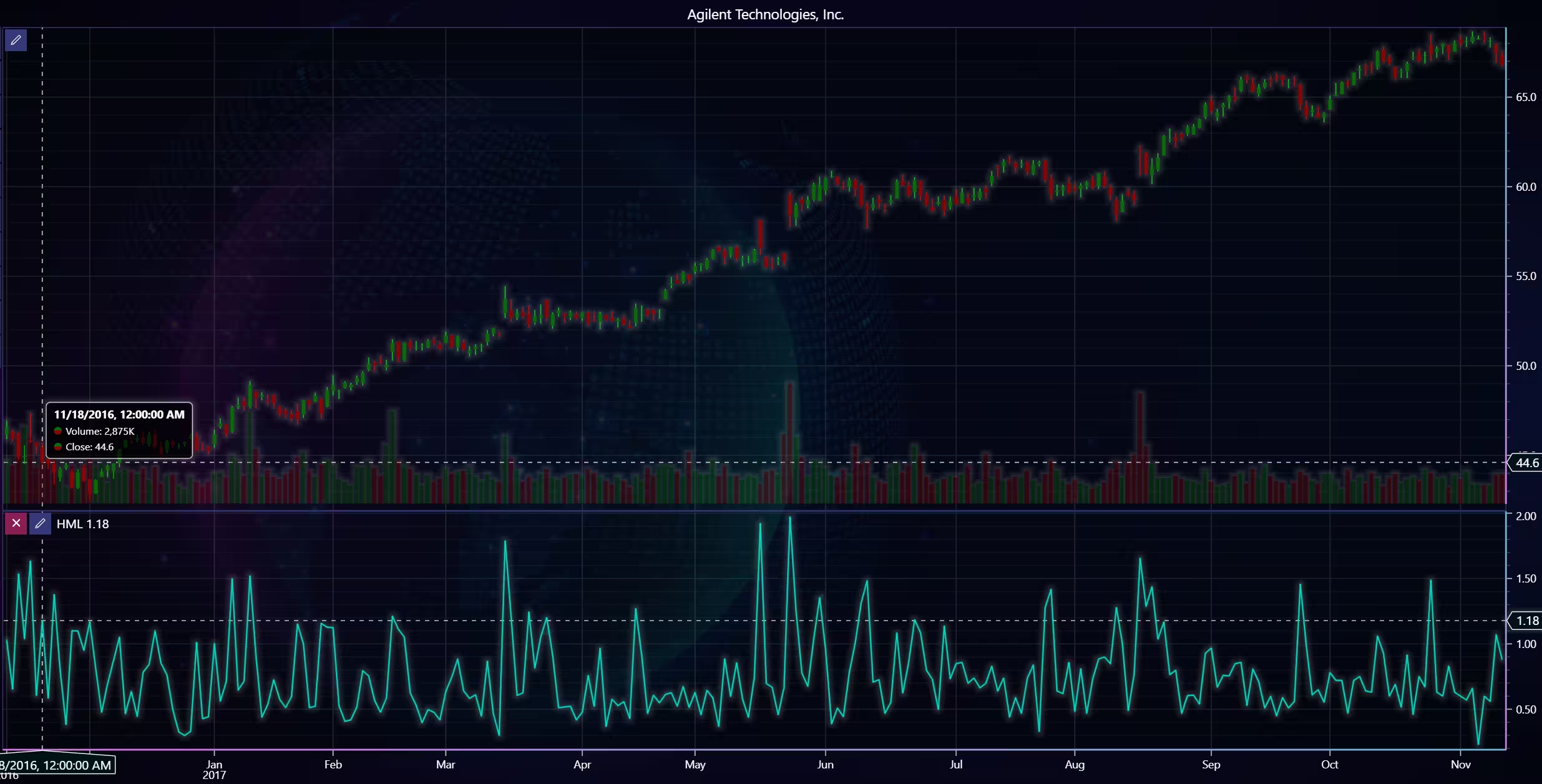
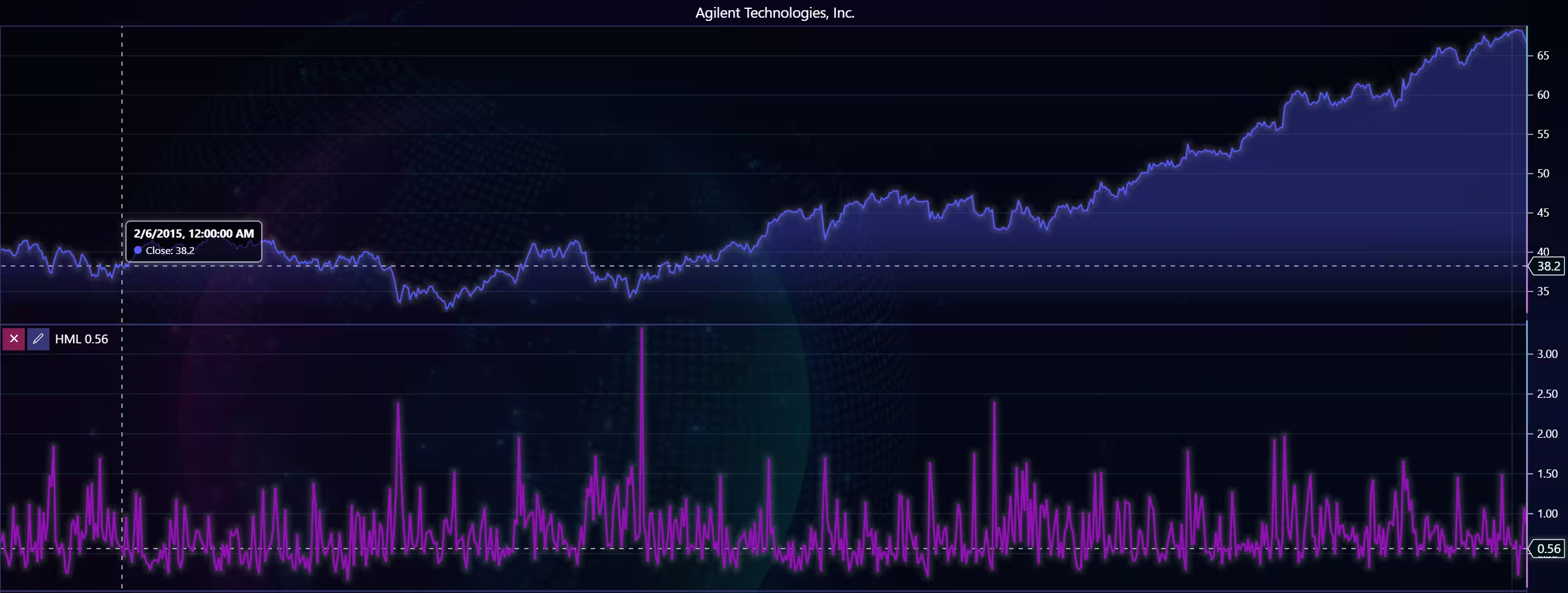
There is an observable correlation between a larger High-minus-low value (difference between day’s highest and lowest price), and larger volume. There are, however, several exceptions to this rule.
Steel Case Inc.
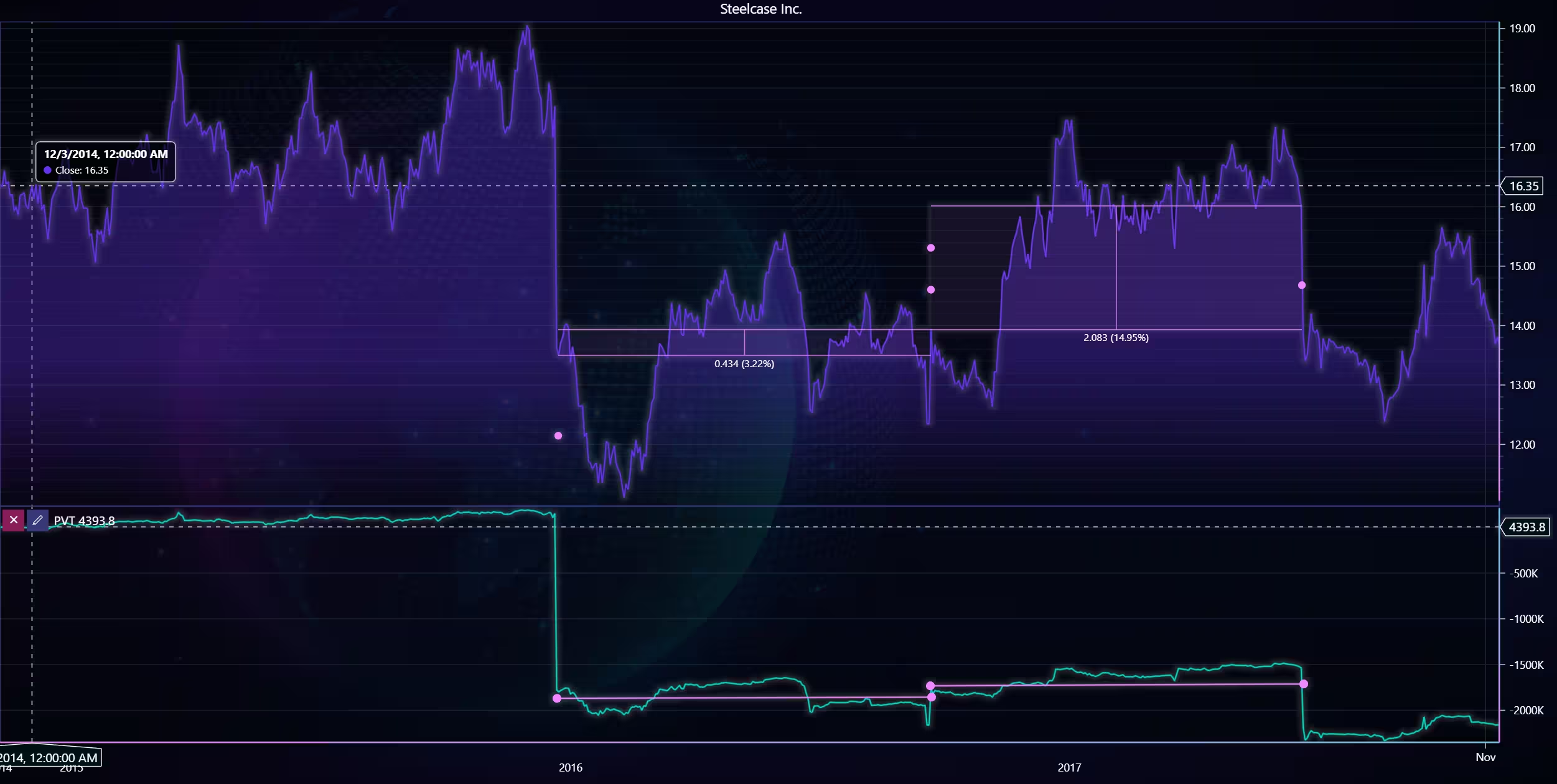
Using the same idea as the previous chart, of buying stock whenever there is a sharp increase or decrease in PVT. However, this wouldn’t lead to nearly as much profit as the previous situation only about 1.67%. A strategy to identify a proper sell would have to be added to further capitalize on gains.
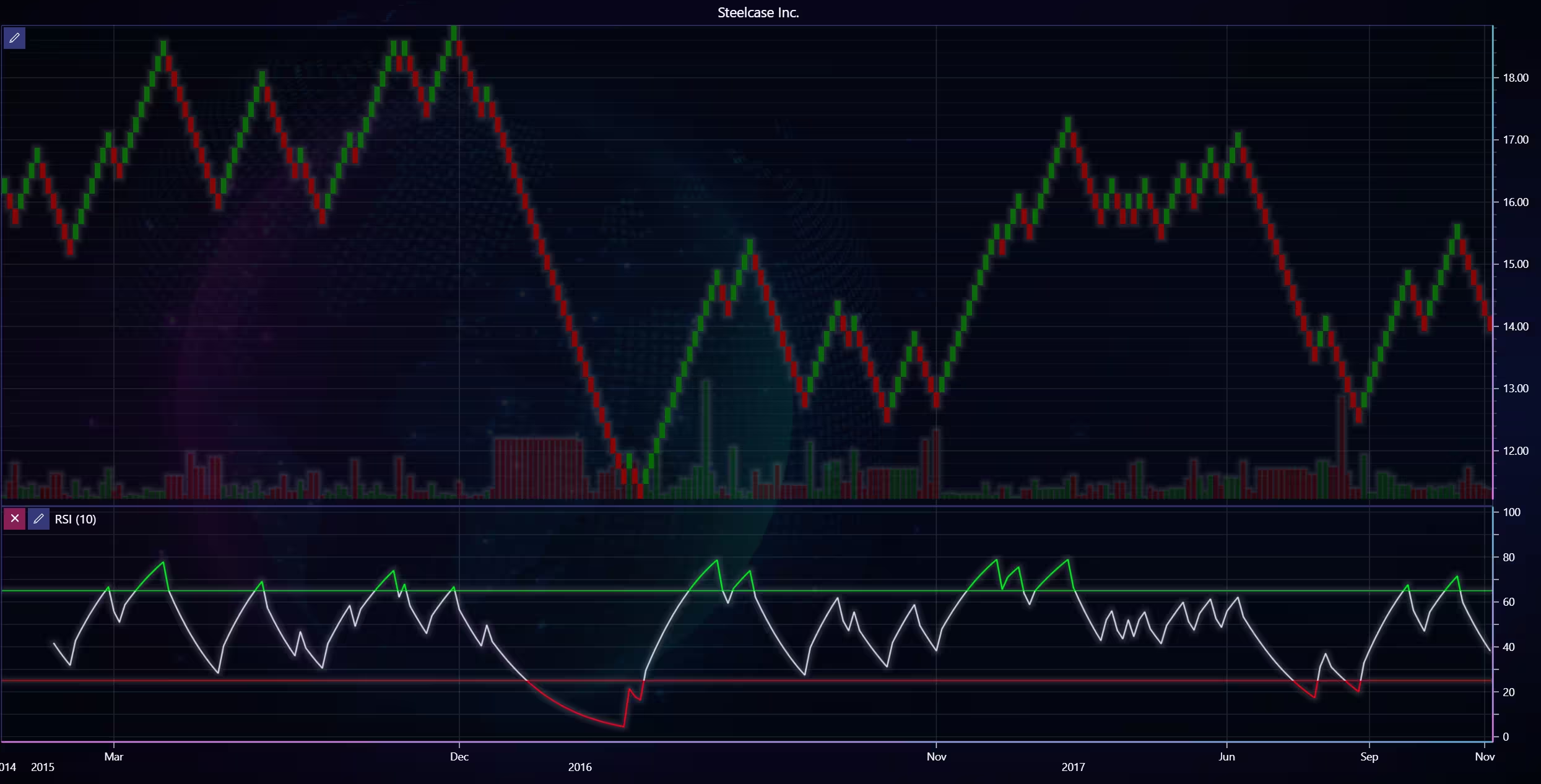
The relative strength index is one indicator that can help identify buy (or sell) opportunities. Combined with a Renko chart to better analyse trends and their reversals, allows the recognition of these moments. More experimentation would be required to find out what settings and values to use.
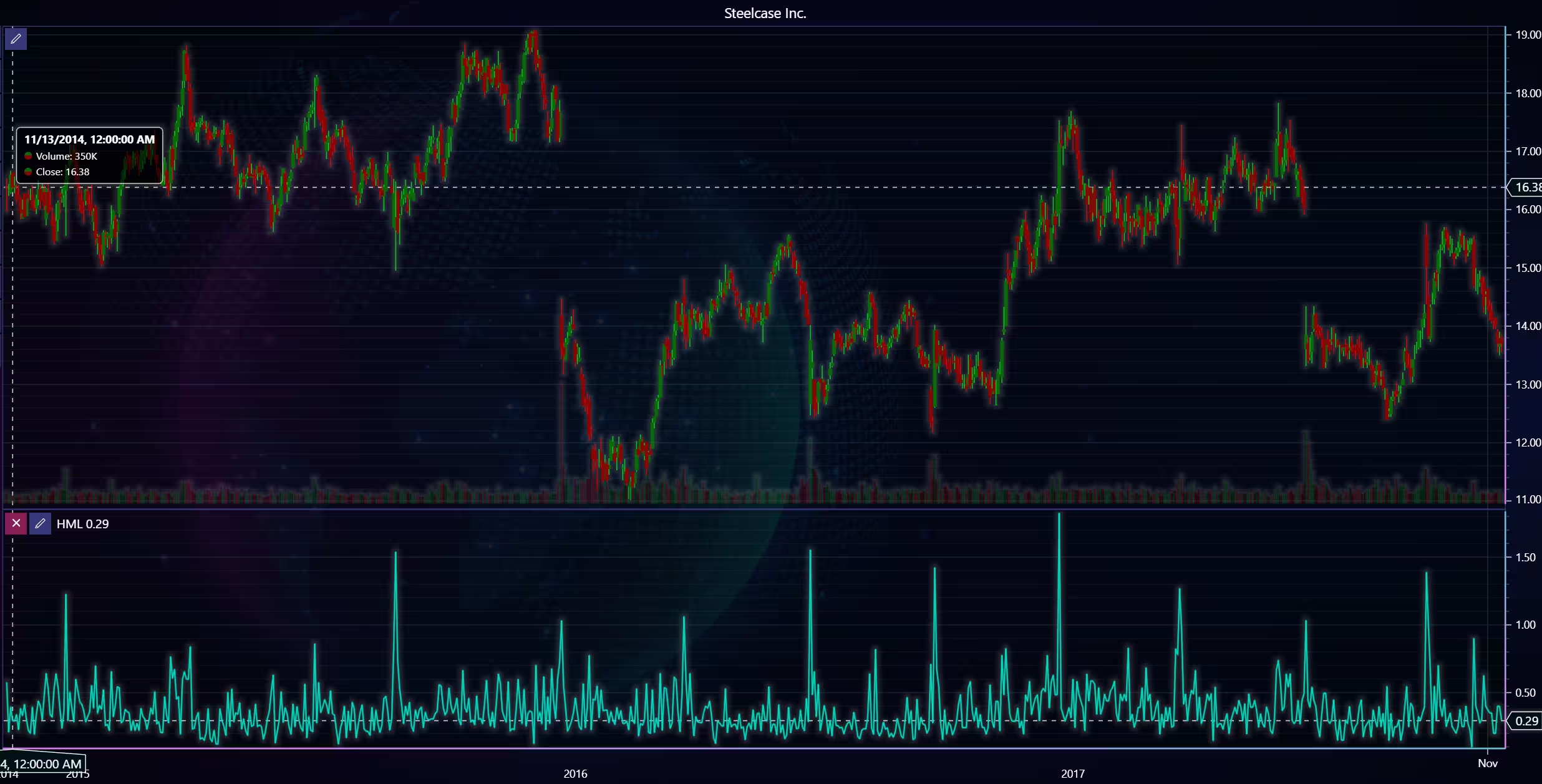
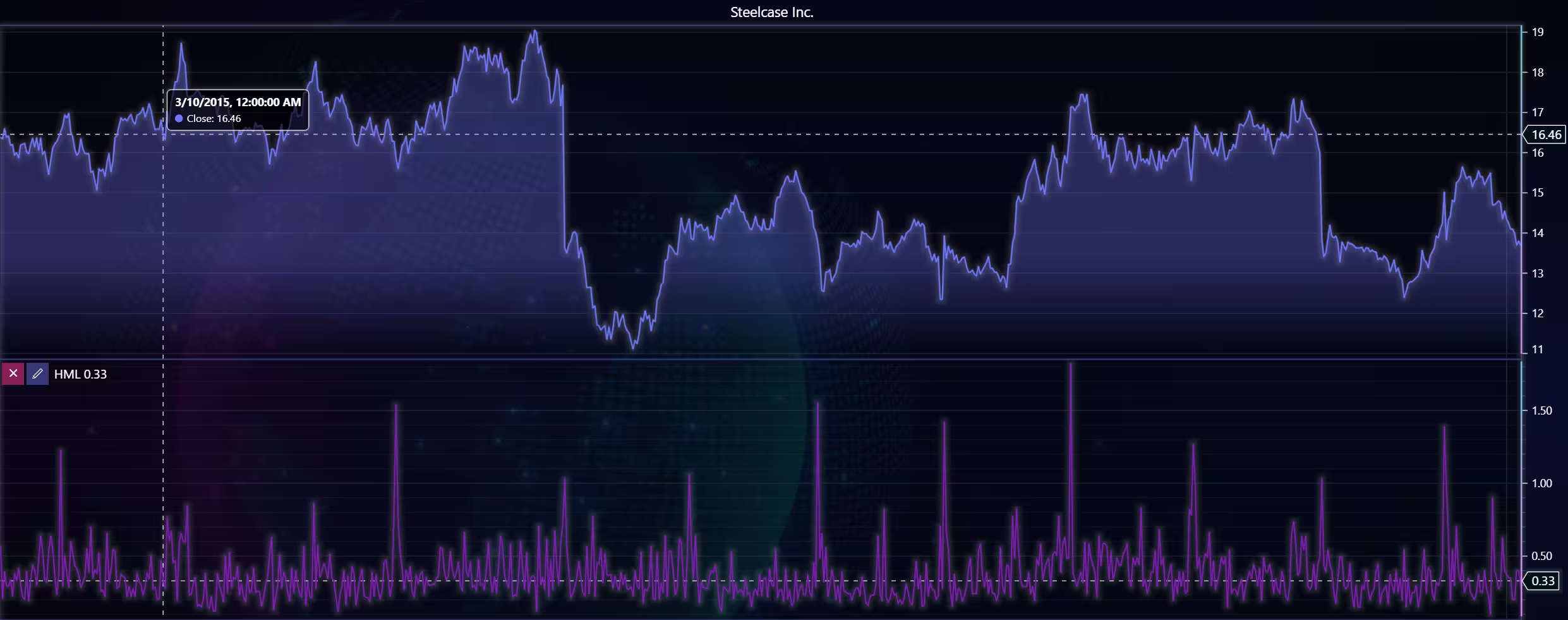
There appears to be less of a correlation between volume and high and low prices than in the previous stock.
West Pharmaceuticals Inc
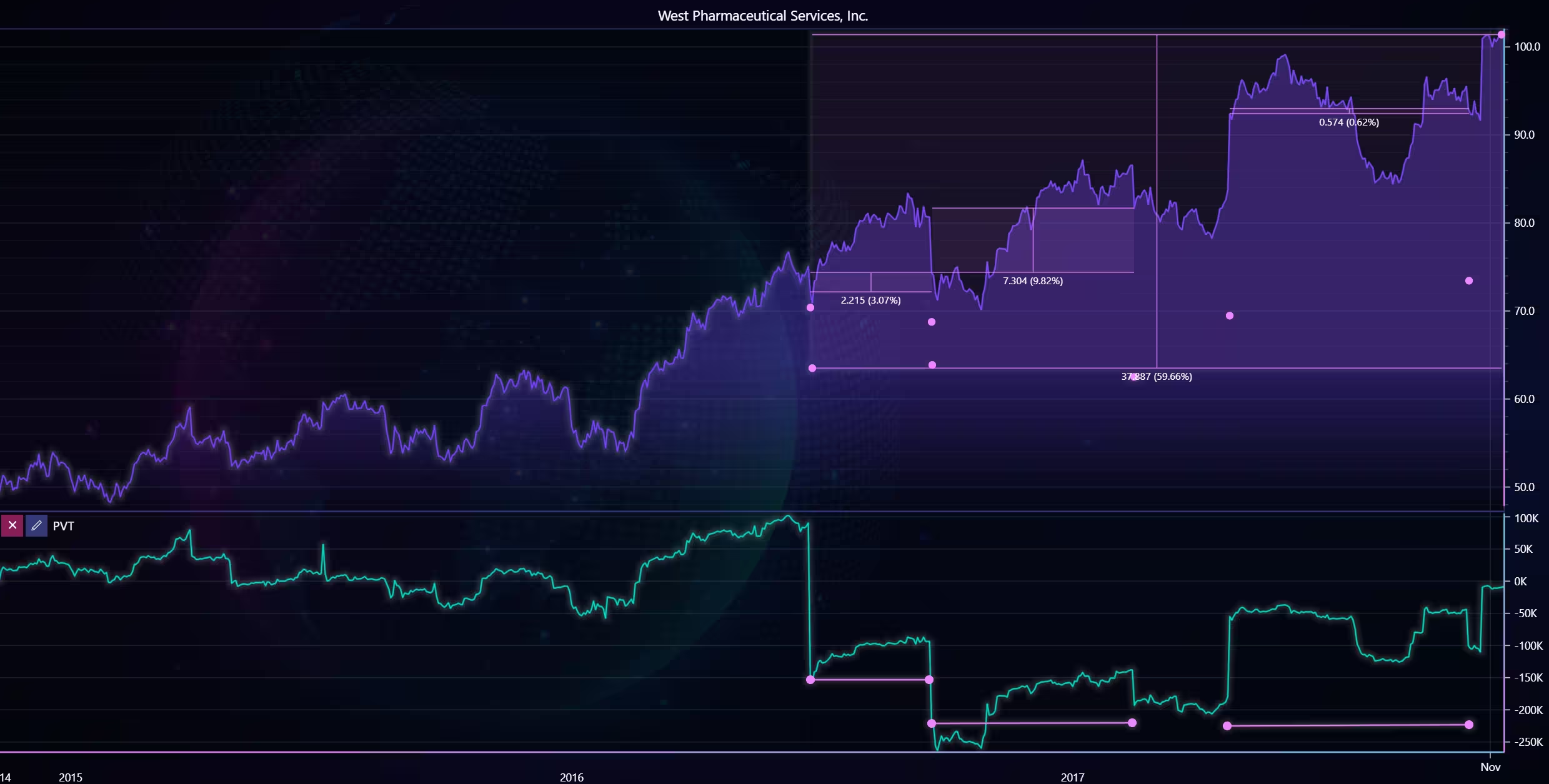
Same strategy in action, this is a more significant return. Around 60% over a 14-month period. Several opportunities to sell the stock if a shorter holding period is desired.
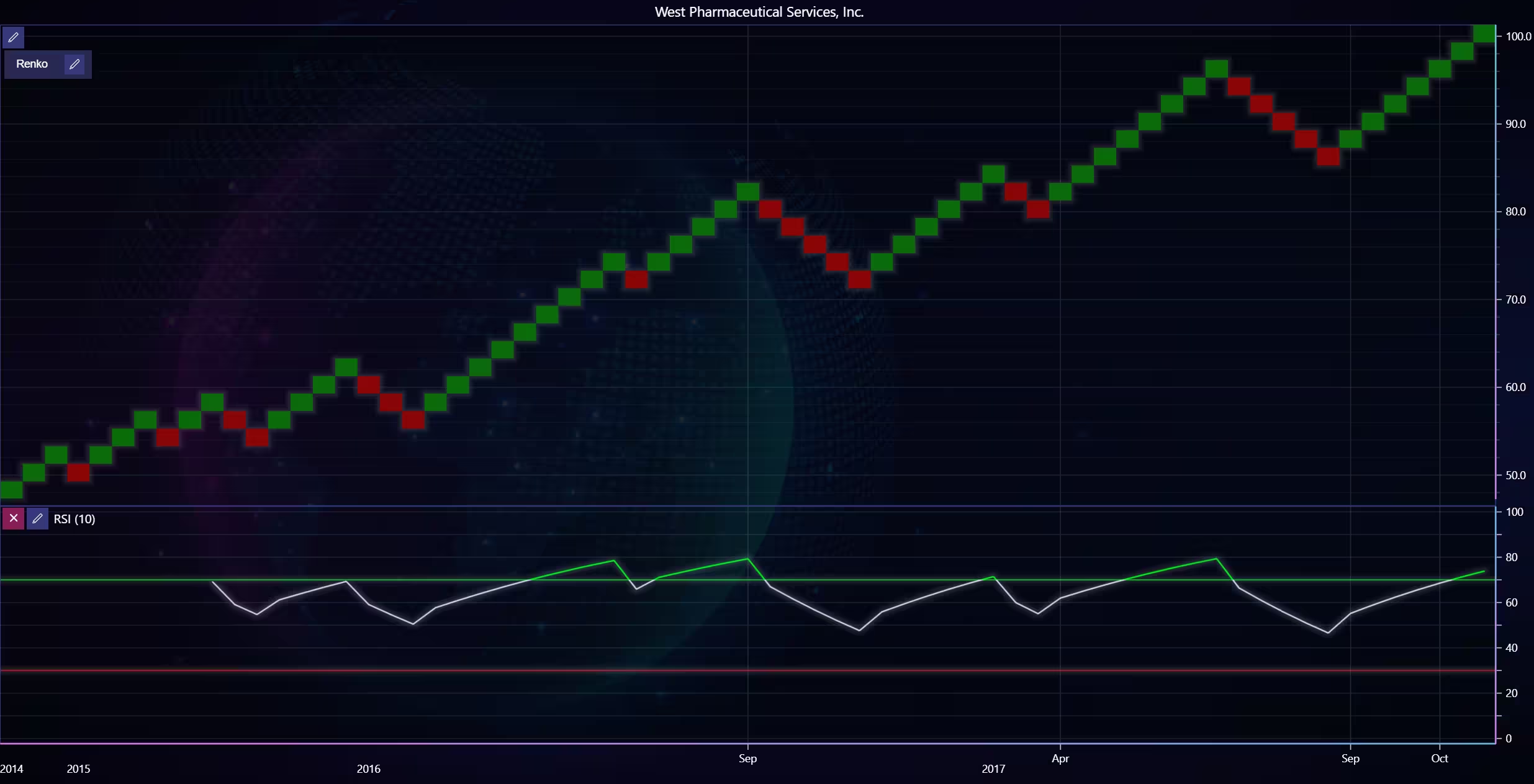
Analysis
How do Close prices and Volume trends vary over time for stocks Agilent Technologies (A), Steelcase Inc. (SCS), and West Pharmaceutical Services (WST)? How do the closing prices of the selected stocks compare to each other over a specific period?
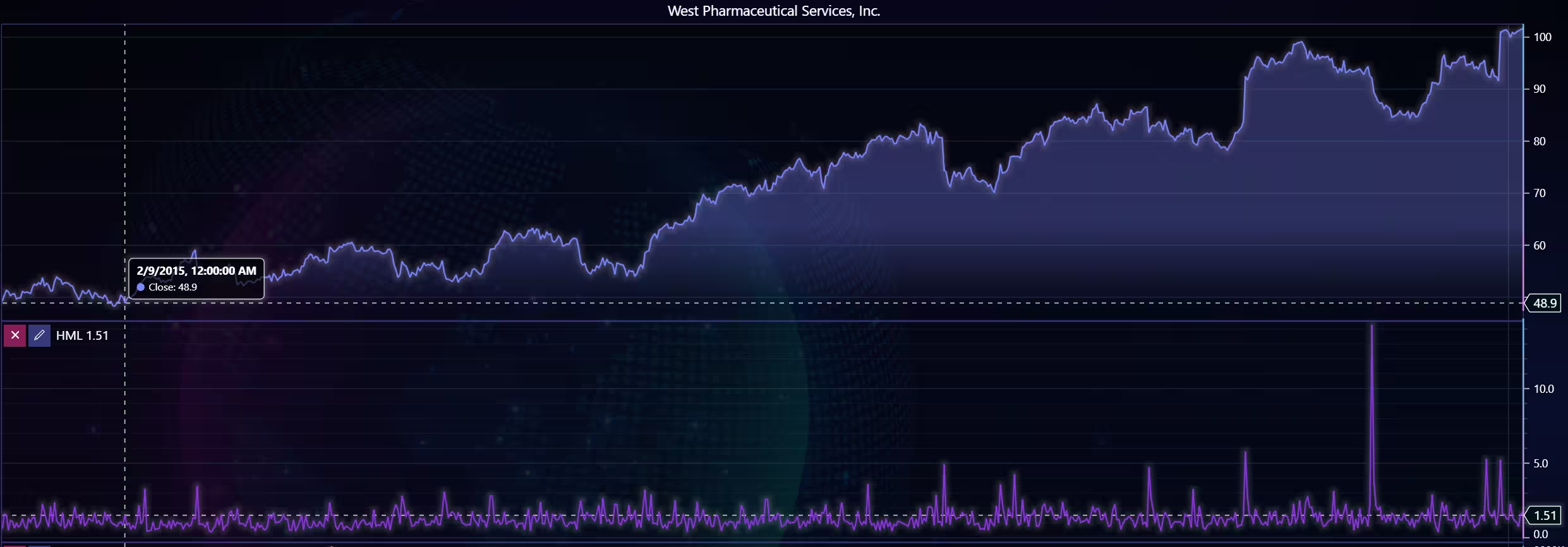
Two of the stocks (A, WST) experience a strong upward trend with mostly low volatility, whilst SCS has a sideways trend with high volatility. As for volume, SCS and WST have more stable volume overall but experience large spikes periodically. A has more variance in volume, and while there are high points, even they come at more consistent intervals.
Is there a correlation between Volume and High or Low prices for specific stocks?
There doesn’t appear to be any strong correlations between volume and high/low prices. Although trade volume is noticeably higher during large, sudden price movements. Correlation between the size of price movements and volume is observable. This correlation is stronger between volume and open/close price difference than between volume and high/low.
What is the daily price range (High – Low) distribution for different stocks or ETFs?
High/low range analysis using the high-minus-low indicator.
Conclusion
During this project, stock data has been imported from a text file to the Python trader, which is then analysed with a mock trading strategy. Technical indicators and different chart types were used to try to verify good buying opportunities. In the end, the conclusion was that the strategy was not very reliable (even when ignoring the low sample size).
Further analysis is then performed to identify if there is a correlation between price points and volume. LightningChart Python Trader was extremely useful both in implementing and customizing charts and indicators. Additionally, the data import process was easy and demonstrated. I also found that the UI made it easier to select the time range compared to other alternatives.
Continue learning with LightningChart
Create a vibration charts application with 2D & 3D spectrograms
Written by a human | Updated on April 10th, 2025JS Spectrogram ApplicationHello, in this article we will create a JS dashboard with 2D and 3D spectrogram charts. The purpose of creating this project is to explain how to create a vibration analysis application that...
Ionic app development
Written by a human | Updated on April 10th, 2025Beginning Ionic App Development with Capacitor, Angular & LightningChart JS [This is the second part of the article "Data Visualization with Ionic Capacitor, Angular & JS Charts (Part 1)"] In the previous...
Ionic Capacitor
Learn how to use Ionic Capacitor for data visualization and build a mobile charting application with Angular & LightningChart JS



If you have any questions, feel free to contact us!
©LightningChart Ltd 2025. All rights reserved.