





LightningChart PythonOil and Gas Data Analysis & Pipeline Monitoring Application
TutorialImplementation of an advanced Oil and Gas Data Analysis Application with LightningChart Python
Written by a human | Updated on April 24th, 2025
Introduction to oil and gas data analysis and pipeline monitoring
In the fast-evolving world of the energy industry, oil and gas data analysis has emerged as a critical factor in shaping the future of energy management and sustainability. By leveraging data analytics, companies can enhance operational efficiency, optimize resource allocation, and make informed decisions to address the unique challenges in oil and gas exploration and production.
Oil and gas analytics serve numerous purposes across the lifecycle of energy production. For instance, predictive maintenance models allow operators to forecast equipment failures, reducing unexpected downtimes and maintenance costs. Furthermore, data analysis in the oil and gas sector provides insights for optimizing operations, reducing environmental impacts, and ensuring safety, especially in managing pipelines—where monitoring plays a crucial role in detecting leaks and preventing spills.
Big Data in the Oil and Gas Industry
The oil and gas industry is inherently data-intensive, with vast amounts of information generated daily across upstream, midstream, and downstream operations. Big data enables companies to analyze patterns in seismic, drilling, and production data, helping streamline processes from exploration to transportation.
In upstream operations, analytics assist in reservoir simulation and well performance monitoring. In midstream and downstream, data analysis aids in tracking transportation logistics, optimizing pipeline flow, and refining processes. Real-time data streaming, combined with historical analysis, enables proactive pipeline monitoring—minimizing operational risks, reducing environmental hazards, and optimizing maintenance schedules.
LightningChart Python

LightningChart Python is a high-performance data visualization library, designed to handle large datasets efficiently and render complex, interactive visualizations. Ideal for oil and gas data analysis, it supports a wide range of charts including line charts, heatmaps, spider charts, and real-time dashboards, allowing users to visualize and interpret data effectively.
Features and Chart Types to be used in the Project
LightningChart Python provides a suite of powerful features that are particularly beneficial for visualizing oil and gas data. Some of the chart types used in our analysis include:
- Point Line Chart: A line chart with points marked on the line, ideal for tracking changes over time, such as monthly trends in pipeline incidents. It shows both the direction and magnitude of change clearly.
- Stacked Bar Chart: A bar chart where categories are stacked on top of each other, allowing for the comparison of parts to the whole. For example, it can show incidents by liquid type or pipeline type, helping to see category distributions within the total incidents.
- Horizontal Bar Chart: Similar to a bar chart but oriented horizontally, useful for comparing categories with longer labels or when the focus is on ranking items, such as causes of pipeline incidents. It helps highlight the top causes of incidents.
- Heatmap: A visual representation of data intensity over geographic or other two-dimensional spaces using color gradients. It’s effective for identifying high-risk zones in pipeline networks by location, with colors indicating incident density.
- Radar Chart: A circular chart that displays multiple variables on axes starting from the same point, ideal for comparing metrics like incident frequency, recovery rates, and costs over time. It provides an overview of multiple metrics in one chart.
- Dual Axis Chart: A chart with two y-axes, often used to compare two related metrics on different scales, such as net loss and total costs. It allows for simultaneous visualization of two datasets, revealing their relationship or trend alignment.
- Bubble Chart: A scatter plot where the size of the points (bubbles) represents an additional variable, such as cost impact. Useful for showing the severity of incidents by month, where larger bubbles indicate higher costs or severity.
- Line Chart: A basic chart for showing trends over time, such as monthly costs for different categories. It helps track how variables change, making it easier to see trends or cycles over a period.
- Stacked Area Chart: An area chart that stacks multiple data series on top of each other, providing a cumulative view of the total and its components. It’s suitable for visualizing total impact over time, such as incident metrics across several years.
- Box Plot: A statistical chart that displays the distribution of data through quartiles, including median and outliers. Useful for identifying seasonal cost variations, it provides insights into data spread and any potential seasonal spikes.
- Gauge Chart: A circular chart that resembles a speedometer, showing a single value within a range. It’s used to display metrics like liquid recovery as a percentage of net loss, providing a quick visual assessment of performance relative to a goal.
These chart types enable analysts to monitor, predict, and mitigate potential pipeline issues effectively, enhancing safety and optimizing resource allocation.
Performance Characteristics
Designed for handling large datasets, LightningChart Python offers smooth performance without compromising on speed or detail. This high-performance rendering makes it suitable for real-time monitoring, where quick response times are essential. LightningChart’s ability to handle complex data structures and high-volume datasets efficiently is a significant advantage for the oil and gas industry.
Setting Up Python Environment
To get started, ensure you have Python installed. If you wish so, you can access the main GitHub repository. Here you can see how to install the following libraries:
- lightningchart: This package provides high-performance charting capabilities.
- numpy: Essential for numerical operations in Python.
- pandas: Used for data manipulation and analysis.
- Scikit-Learn: For predictive modeling and machine learning applications.
Install these libraries using pip:
pip install lightningchart==0.9.0
pip install numpy pandas statsmodels
Set up your development environment
Set up a virtual environment to keep dependencies isolated and manageable.
python3 -m venv venv
source venv/bin/activate  # On Windows use `venv\Scripts\activate`
pip install -r requirements.txt
Using Visual Studio Code (VSCode) for development
Visual Studio Code (VSCode) is a popular code editor that offers a rich set of features to enhance your development workflow.
Loading and Processing Data
To load the dataset containing information on oil pipeline incidents, use Pandas.
data['Accident Date/Time'] = pd.to_datetime(data['Accident Date/Time'])
data.dropna(inplace=True)
Handling and Preprocessing the Data
Transform date columns into datetime objects, handle missing values, and normalize numerical columns if necessary. These preprocessing steps are crucial for efficient data visualization and accurate predictive modeling.
Visualizing Data with LightningChart Python
With LightningChart, visualizing oil and gas data becomes highly interactive and insightful. Let’s explore creating some key visualizations that provide actionable insights into pipeline monitoring.
Monthly Incident Frequency Line Chart:
This line chart highlights the monthly trend of oil pipeline incidents from around 2010 to 2017, showing fluctuations in incident frequency. Peaks and troughs in the line chart suggest possible seasonality or operational changes that impact incident rates. The noticeable spikes and declines across different periods allow companies to identify times of higher risk, possibly linked to external factors such as weather or specific operational phases. Understanding these patterns helps in preparing timely safety measures and planning maintenance activities more effectively.
data['year_month'] = pd.to_datetime(data['Accident Date/Time']).dt.to_period('M')
monthly_incidents = data.groupby('year_month').size().reset_index(name='incident_count')
x_values = (monthly_incidents['year_month'].dt.start_time.astype('int64') // 10**6).tolist()
y_values = monthly_incidents['incident_count'].tolist()

chart = lc.ChartXY(theme=lc.Themes.Dark, title='Monthly Incidents of Oil Pipeline Leaks and Spills')
chart.get_default_x_axis().set_title('Month').set_tick_strategy('DateTime', time_origin=min(x_values) // 1000)
chart.get_default_y_axis().set_title('Number of Incidents')

chart.add_point_line_series(data_pattern='ProgressiveX').set_point_size(8).set_point_shape
('Triangle').set_point_color(lc.Color('orange')).add(x_values, y_values)
chart.open()
Pipeline Incidents by Liquid Type (Stacked Bar Chart):
The stacked bar chart categorizes pipeline incidents by the type of liquid (e.g., crude oil, refined products, CO₂). It shows that incidents related to crude oil are most common. This distribution allows decision-makers to focus safety and maintenance efforts more on pipelines transporting crude oil, as they are more susceptible to incidents. By understanding the distribution of incidents across liquid types, companies can implement targeted safety protocols for high-risk materials, thereby reducing potential hazards.
data['Year'] = pd.to_datetime(data['Accident Date/Time']).dt.year.astype(str)
categories = ['Pipeline Type', 'Liquid Type']

chart = lc.BarChart(vertical=True, theme=lc.Themes.Light, title='Incident Frequency by Category Over the Years')
chart.set_sorting('alphabetical').set_value_label_display_mode('hidden').set_label_rotation(45).add_legend()

for category in categories:
    category_year_data = data.dropna(subset=[category]).groupby(['Year', category]).size().unstack(fill_value=0)
    x_values = category_year_data.index.tolist()
    stacked_data = [{'subCategory': sub, 'values': category_year_data[sub].tolist()} for sub in category_year_data.columns]
    chart.set_data_stacked(x_values, stacked_data).set_title(f'Incident Frequency by {category} Over the Years')
    chart.open()

Pipeline Incidents by Pipeline Type (Stacked Bar Chart):
In this stacked bar chart, incidents are categorized by pipeline type (e.g., aboveground, underground) for each year. The chart reveals that underground and aboveground pipelines have higher incident rates compared to others. This information can guide resource allocation for inspection and maintenance, as these pipeline types may need more frequent monitoring. By focusing on the most vulnerable pipeline types, companies can optimize resource usage and reduce the likelihood of leaks or breaks in the future.
data['Year'] = pd.to_datetime(data['Accident Date/Time']).dt.year.astype(str)
categories = ['Pipeline Type', 'Liquid Type']

chart = lc.BarChart(vertical=True, theme=lc.Themes.Light, title='Incident Frequency by Category Over the Years')
chart.set_sorting('alphabetical').set_value_label_display_mode('hidden').set_label_rotation(45).add_legend()

for category in categories:
    category_year_data = data.dropna(subset=[category]).groupby(['Year', category]).size().unstack(fill_value=0)
    x_values = category_year_data.index.tolist()
    stacked_data = [{'subCategory': sub, 'values': category_year_data[sub].tolist()} for sub in category_year_data.columns]
    chart.set_data_stacked(x_values, stacked_data).set_title(f'Incident Frequency by {category} Over the Years')
    chart.open()
Cause of Pipeline Incidents (Horizontal Bar Chart):
This horizontal bar chart ranks the causes of pipeline incidents, with “Internal” causes being the most frequent. Knowing that internal factors are the primary cause of incidents allows companies to evaluate their internal processes, materials, and pipeline conditions to mitigate these risks. By addressing the most frequent causes, organizations can potentially lower incident rates, reduce costs associated with repairs, and improve pipeline longevity.
data = pd.read_csv('Dataset/database.csv')
cause_counts = data['Cause Subcategory'].value_counts()
chart_data = [{'category': cause, 'value': int(count)} for cause, count in zip(cause_counts.index, cause_counts.values)]

chart = lc.BarChart(vertical=True, theme=lc.Themes.White, title='Cause Subcategory Counts')
chart.set_sorting('disabled').set_label_rotation(90).set_data(chart_data)
chart.open()
Incident Costs by State (Bar Chart):
This bar chart presents the total costs associated with pipeline incidents across different states. It provides insights into geographic areas where incidents lead to higher expenses, highlighting states that may require additional resources for monitoring or incident response. This analysis can inform budgeting decisions, ensuring that states with historically higher incident costs receive adequate attention to prevent similar occurrences in the future.
data = pd.read_csv('Dataset/database.csv')
state_costs = data.groupby('Accident State')['All Costs'].sum().sort_values(ascending=False)
chart_data = [{'category': state, 'value': int(cost)} for state, cost in zip(state_costs.index, state_costs.values)]

chart = lc.BarChart(vertical=True, theme=lc.Themes.White, title='Total Costs by State')
chart.set_sorting('descending').set_label_rotation(90).set_data(chart_data).set_value_label_font_size(10)
chart.open()
Pipeline Spills and Leaks by Location (Heatmap):
The heatmap visualizes the geographic distribution of pipeline spills and leaks, with areas in red indicating high incident concentrations. This map allows companies to pinpoint high-risk locations and prioritize them for additional safety checks or reinforcements. Geographic patterns in incidents may be influenced by factors such as environmental conditions, population density, or regional operational practices, helping companies address issues unique to specific areas.
data = pd.read_csv('Dataset/database.csv')
latitude, longitude = data['Accident Latitude'].dropna(), data['Accident Longitude'].dropna()
incident_density, lon_edges, lat_edges = np.histogram2d(longitude, latitude, bins=[100, 100])

chart = lc.ChartXY(title='Geospatial Analysis of Oil Pipeline Spills and Leaks', theme=lc.Themes.Dark)
heatmap = chart.add_heatmap_grid_series(rows=incident_density.shape[0], columns=incident_density.shape[1])

heatmap.set_start(x=lon_edges.min(), y=lat_edges.min()).set_end(x=lon_edges.max(), y=lat_edges.max())
heatmap.invalidate_intensity_values(incident_density.tolist())

custom_palette = [
    {"value": np.min(incident_density), "color": lc.Color(204, 229, 255)},
    {"value": np.percentile(incident_density, 99), "color": lc.Color(0, 0, 255)},
    {"value": np.percentile(incident_density, 99.25), "color": lc.Color(0, 255, 255)},
    {"value": np.percentile(incident_density, 99.5), "color": lc.Color(0, 255, 0)},
    {"value": np.percentile(incident_density, 99.75), "color": lc.Color(255, 255, 204)},
    {"value": np.max(incident_density), "color": lc.Color(255, 0, 0)}
]
heatmap.set_palette_colors(steps=custom_palette, look_up_property='value', interpolate=True)

chart.get_default_x_axis().set_title('Longitude')
chart.get_default_y_axis().set_title('Latitude')
chart.add_legend(data=heatmap, title="Incident Density")
chart.open()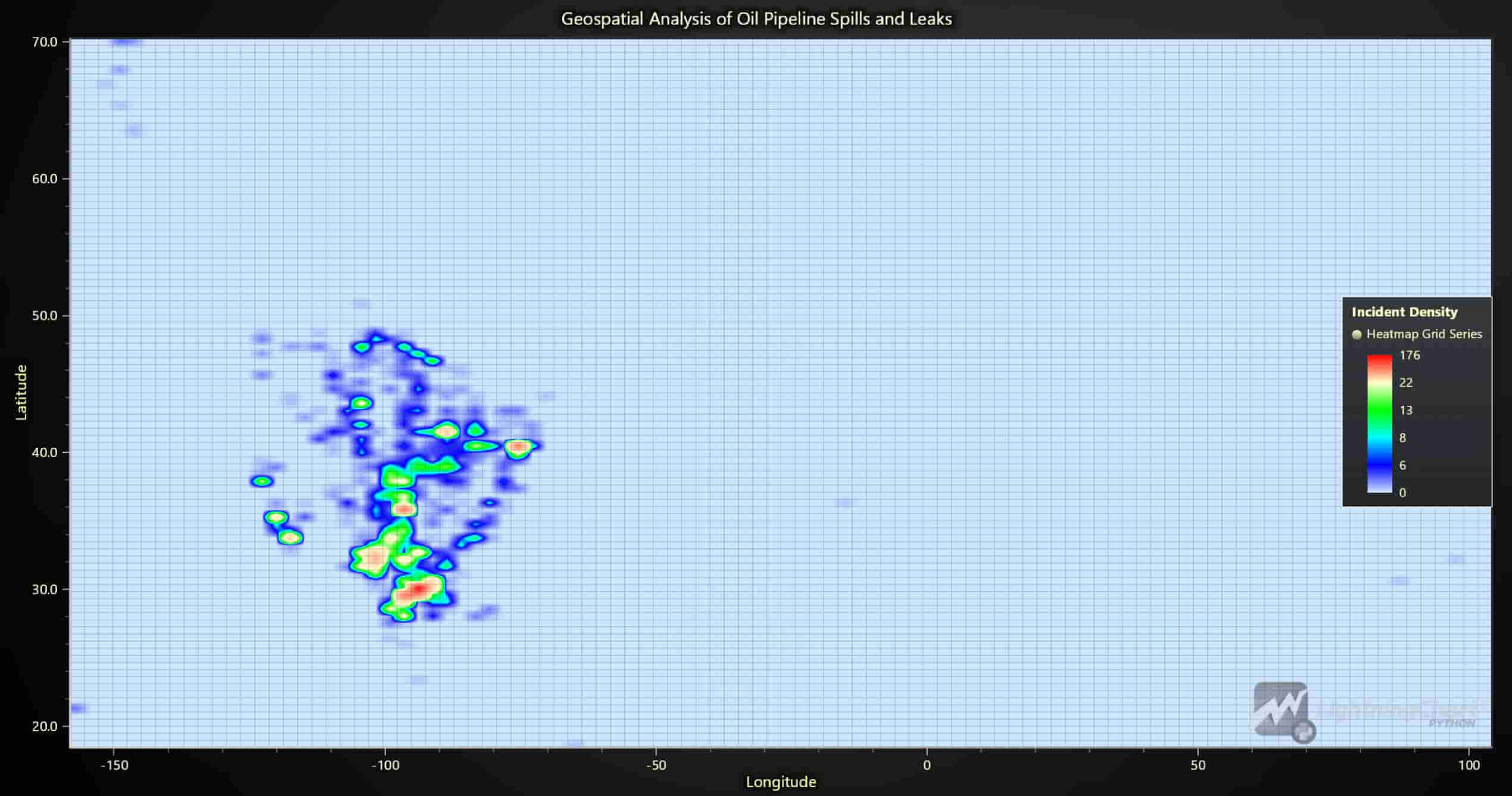
Comparison of Key Metrics by Year (Radar Chart):
This radar chart compares various metrics—incident counts, average liquid recovery, net loss, and total costs—across multiple years from 2010 to 2017. Higher values in the incident metric relative to costs suggest that incidents generally have a low per-incident cost, indicating possible success in containment efforts. However, consistent high incident counts could imply a need for better preventive measures. This comprehensive view helps prioritize metrics for improvement based on yearly variations.
data = pd.read_csv('Dataset/database.csv')
data['Year'] = pd.to_datetime(data['Accident Date/Time']).dt.year

aggregated_data = data.groupby('Year').agg({
    'Accident Year': 'count',
    'Liquid Recovery (Barrels)': 'mean',
    'Net Loss (Barrels)': 'mean',
    'All Costs': 'mean'
}).reset_index()
scaled_data = aggregated_data.copy()
metrics = ['Incidents', 'Average Liquid Recovery', 'Average Net Loss', 'All Costs']

for metric in metrics:
    min_val, max_val = scaled_data[metric].min(), scaled_data[metric].max()
    scaled_data[metric] = (scaled_data[metric] - min_val) / (max_val - min_val) * 10

chart = lc.SpiderChart(theme=lc.Themes.White, title='Pipeline Incident Impact Metrics Over Time')
chart.set_axis_label_font(weight='bold', size=15).set_nib_style(thickness=5, color=lc.Color(0, 0, 0))

for metric in metrics:
    chart.add_axis(metric)

for _, row in scaled_data.iterrows():
    chart.add_series().set_name(f"Year {int(row['Year'])}").add_points(
        [{'axis': metric, 'value': row[metric]} for metric in metrics])

chart.add_legend()
chart.open()
Net Loss vs. Total Costs (Dual Axis Chart):
The dual-axis chart shows the relationship between annual net loss in barrels and the associated costs. It reveals that as net loss increases or decreases, there is a corresponding trend in costs, reflecting a direct relationship between the volume of lost materials and financial impact. This insight allows companies to predict cost implications based on net loss values, aiding in budget planning and incident impact estimation.
data = pd.read_csv('Dataset/database.csv')
data['Accident Date/Time'] = pd.to_datetime(data['Accident Date/Time'])
data['year'] = data['Accident Date/Time'].dt.year

annual_data = data.groupby('year').agg({'Net Loss (Barrels)': 'sum', 'All Costs': 'sum'}).reset_index()

chart = lc.ChartXY(theme=lc.Themes.Dark, title="Annual Net Loss (Barrels) vs Total Costs (USD)")
y_axis_loss, y_axis_costs = chart.get_default_y_axis(), chart.add_y_axis(opposite=True)
y_axis_loss.set_title("Net Loss (Barrels)")
y_axis_costs.set_title("Total Costs (USD)")

series_loss = chart.add_area_series().set_name('Net Loss').set_fill_color(lc.Color(255, 102, 102))
series_costs = chart.add_point_line_series(y_axis=y_axis_costs).set_name('Total Costs').set_point_shape(
    'triangle').set_line_thickness(2).set_line_color(lc.Color(255, 255, 0))

x_values = [int(datetime(year, 1, 1).timestamp()) * 1000 for year in annual_data['year']]
series_loss.add(x=x_values, y=annual_data['Net Loss (Barrels)'].tolist())
series_costs.add(x=x_values, y=annual_data['All Costs'].tolist())

x_axis = chart.get_default_x_axis().set_title('Year').set_tick_strategy('DateTime', utc=True)
y_axis_loss.add_constant_line().set_value(0).set_stroke(2, lc.Color(255, 0, 0))
chart.add_legend().set_margin(120)
chart.open()
Severity of Incidents by Month (Bubble Chart):
The bubble chart illustrates the severity of incidents for each month, with bubble size corresponding to cost impact. Larger bubbles indicate incidents with higher financial consequences, identifying months where incidents are more costly. This visualization helps prioritize specific times of the year for heightened safety measures, allowing companies to allocate emergency resources efficiently during peak incident months.
data = pd.read_csv('Dataset/database.csv')
data['Date'] = pd.to_datetime(data['Accident Date/Time']).dt.to_period('M').dt.to_timestamp()

monthly_data = data.groupby('Date').agg({'All Costs': 'sum', 'Net Loss (Barrels)': 'sum'}).reset_index()
monthly_data['ColorValue'] = np.log1p(monthly_data['All Costs']) / np.log1p(monthly_data['All Costs']).max()
monthly_data['BubbleSize'] = (monthly_data['Net Loss (Barrels)'] / monthly_data['Net Loss (Barrels)'].max()) * 100

chart = lc.ChartXY(theme=lc.Themes.White, title='Monthly Incident Impact and Severity')
series = chart.add_point_series(sizes=True, lookup_values=True)

series.append_samples(
    x_values=monthly_data['Date'].apply(lambda x: int(x.timestamp() * 1000)).tolist(),
    y_values=monthly_data['Net Loss (Barrels)'].tolist(),
    sizes=monthly_data['BubbleSize'].tolist(),
    lookup_values=monthly_data['ColorValue'].tolist())

series.set_individual_point_color_enabled(enabled=True).set_palette_colors(
    steps=[
        {'value': 0.0, 'color': lc.Color(0, 0, 128, 128)},
        {'value': 0.8, 'color': lc.Color(255, 0, 0, 128)},
    ], look_up_property='value', percentage_values=True)

chart.get_default_x_axis().set_title('Date (Monthly)').set_tick_strategy('DateTime', utc=True)
chart.get_default_y_axis().set_title('Net Loss (Barrels)')
chart.add_legend().add(series).set_title('Total Costs')
chart.open()
Monthly Costs by Category (Line Chart):
This line chart visualizes monthly costs categorized by emergency, environmental, and other categories. It helps companies monitor cost trends in each area, enabling data-driven adjustments to budgets and resources as costs fluctuate. Seasonal variations in different cost categories may indicate the need for targeted response measures for specific incident types during particular months.
data = pd.read_csv('Dataset/database.csv')
data['Accident Date/Time'] = pd.to_datetime(data['Accident Date/Time'], format='%m/%d/%Y %H:%M')
data['relative_month'] = ((data['Accident Date/Time'].dt.year - 2010) * 12 + data['Accident Date/Time'].dt.month - 1)

monthly_costs = data.groupby('relative_month').agg({
    'Emergency Response Costs': 'sum',
    'Environmental Remediation Costs': 'sum',
    'Property Damage Costs': 'sum',
    'Lost Commodity Costs': 'sum',
    'Public/Private Property Damage Costs': 'sum',
    'All Costs': 'sum'
}).reset_index()

start_date = datetime(2010, 1, 1)
monthly_costs['timestamp'] = [(start_date + timedelta(days=month * 30)).timestamp() * 1000 for month in monthly_costs['relative_month']]

chart = lc.ChartXY(theme=lc.Themes.White, title="Monthly Sum Costs by Category")
categories = [('Emergency Response Costs', 'yellow', 'Emergency'),
    ('Environmental Remediation Costs', 'green', 'Environment'),
    ('Property Damage Costs', 'blue', 'Property'),
    ('Lost Commodity Costs', 'red', 'Commodity'),
    ('Public/Private Property Damage Costs', 'cyan', 'Public/Private Prop.'),
    ('All Costs', 'black', 'All')]

for category, color, label in categories:
    series = chart.add_line_series(data_pattern='ProgressiveX').set_name(label).set_line_thickness(2)
    series.add(monthly_costs['timestamp'].tolist(), monthly_costs[category].tolist())
    chart.add_legend().add(series)

chart.get_default_x_axis().set_title('Month (DateTime)').set_tick_strategy('DateTime')
chart.get_default_y_axis().set_title('Sum Cost ($Millions)')
chart.open()
Incident Frequency vs. Liquid Recovery (Dual Axis Chart):
The dual-axis chart compares incident frequency against the volume of liquid recovery over time. Ideally, liquid recovery efforts should increase alongside rising incidents, reflecting an effective response strategy. This visualization helps evaluate the efficiency of recovery programs, as well as identify areas for improvement if recovery rates do not align with incident trends.
data = pd.read_csv('Dataset/database.csv')
data['Accident Date/Time'] = pd.to_datetime(data['Accident Date/Time'])
data['year_month'] = data['Accident Date/Time'].dt.to_period('M')

monthly_recovery = data.groupby('year_month')['Liquid Recovery (Barrels)'].sum().reset_index()
monthly_recovery['timestamp'] = [int(datetime(year.year, year.month, 1).timestamp()) * 1000 for year in monthly_recovery['year_month']]
x_values = monthly_recovery['timestamp'].tolist()
y_values_recovery = monthly_recovery['Liquid Recovery (Barrels)'].tolist()

monthly_incidents = data.groupby('year_month').size().reset_index(name='incident_count')
y_values_incidents = monthly_incidents['incident_count'].tolist()

chart = lc.ChartXY(theme=lc.Themes.Dark, title="Incidents Over Time vs Liquid Recovery")
x_axis = chart.get_default_x_axis().set_title("Incident Date").set_tick_strategy('DateTime', utc=True)
y_axis_left = chart.get_default_y_axis().set_title("Number of Incidents")
y_axis_right = chart.add_y_axis(opposite=True).set_title("Liquid Recovery (Barrels)")

incident_series = chart.add_line_series().set_name("Incident Frequency").add(x_values, y_values_incidents).set_line_color(lc.Color(255, 255, 0))
recovery_series = chart.add_area_series(y_axis=y_axis_right).set_name("Liquid Recovery (Barrels)").add(x_values, y_values_recovery)
recovery_series.set_fill_color(lc.Color(0, 128, 255, 128))

legend = chart.add_legend().add(incident_series).add(recovery_series).set_margin(70)
chart.open()
Incident Frequency, Recovery Rate, and Severity Levels (Multi-Dimensional Analysis):
This chart combines incident frequency, recovery rate, and severity levels over time. A declining trend in incident frequency coupled with an increasing recovery rate suggests that safety measures are improving. Meanwhile, the steady severity level indicates consistent control over incident impacts. This multi-dimensional analysis provides a holistic view of safety improvements and areas where incident management could still be enhanced.
data = pd.read_csv('Dataset/database.csv')
data['Accident Date/Time'] = pd.to_datetime(data['Accident Date/Time'])
data['Year'] = data['Accident Date/Time'].dt.year
data['Severity Level'] = pd.cut(data['Unintentional Release (Barrels)'], bins=[0, 50, 200, np.inf], labels=['Minor', 'Moderate', 'Severe'])

incident_counts = data.groupby('Year').size()
avg_recovery_rate = data.groupby('Year')['Liquid Recovery (Barrels)'].mean()
severity_counts = data.groupby(['Year', 'Severity Level']).size().unstack(fill_value=0)
timestamps = [int(datetime(year, 1, 1).timestamp() * 1000) for year in incident_counts.index]
severity_proportions = severity_counts.div(severity_counts.sum(axis=1), axis=0)

chart = lc.ChartXY(theme=lc.Themes.Dark, title="Incident Frequency and Average Recovery Rate Over Time")
incident_series = chart.add_point_line_series().set_name("Incident Frequency").set_line_color(
    lc.Color('yellow')).add(x=timestamps, y=incident_counts.values.tolist())

y_axis_right_1 = chart.add_y_axis(opposite=True).set_title("Average Recovery Rate (Barrels)")
recovery_series = chart.add_point_line_series(y_axis=y_axis_right_1).set_name(
    "Average Recovery Rate").set_line_color(lc.Color(0, 255, 0)).add(x=timestamps, y=avg_recovery_rate.values.tolist())

y_axis_right_2 = chart.add_y_axis(opposite=True).set_title("Proportion of Incidents by Severity")
severity_colors = {'Minor': lc.Color(135, 206, 235, 128), 'Moderate': lc.Color(255, 160, 122, 128), 'Severe': lc.Color(144, 238, 144, 128)}
for level in severity_proportions.columns:
    chart.add_area_series(y_axis=y_axis_right_2).set_name(level).set_fill_color(
        severity_colors[level]).add(x=timestamps, y=severity_proportions[level].values.tolist())

chart.get_default_x_axis().set_title("Year").set_tick_strategy("DateTime")
chart.add_legend().add(incident_series).add(recovery_series).set_margin(140)
chart.open()
Seasonal Trend Analysis of Log-Normalized Incident Costs (Box Plot with Trend Line):
This box plot chart displays log-normalized monthly cost distributions, with a red trend line showing the average monthly trend. It reveals that costs vary seasonally, with certain months exhibiting higher incident costs. This pattern can guide companies in pre-emptive budgeting for months with historically higher costs. Log-normalization enables better visualization of differences, especially for months with extremely high or low values.
data = pd.read_csv('Dataset/database.csv')
data['Accident Date/Time'] = pd.to_datetime(data['Accident Date/Time'])
data['Year'], data['Month'] = data['Accident Date/Time'].dt.year, data['Accident Date/Time'].dt.month

monthly_data = data.groupby(['Year', 'Month']).agg({'All Costs': 'sum'}).reset_index()
monthly_data['Log Normalized Costs'] = np.log1p(monthly_data['All Costs'])
monthly_data['Log Normalized Costs'] = (monthly_data['Log Normalized Costs'] - monthly_data[
    'Log Normalized Costs'].min()) / (monthly_data['Log Normalized Costs'].max() - monthly_data['Log Normalized Costs'].min())

log_normalized_stats = monthly_data.groupby('Month')['Log Normalized Costs'].describe(percentiles=[
    0.25, 0.5, 0.75]).rename(columns={'25%': 'Lower Quartile', '50%': 'Median', '75%': 'Upper Quartile', 'min': 'Lower Extreme', 'max': 'Upper Extreme'})

box_data = [{'start': m - 0.4, 'end': m + 0.4, 'median': s['Median'], 'lowerQuartile': s['Lower Quartile'],
              'upperQuartile': s['Upper Quartile'], 'lowerExtreme': s['Lower Extreme'], 'upperExtreme': s['Upper Extreme']} for m, s in log_normalized_stats.iterrows()]

chart = lc.ChartXY(theme=lc.Themes.Light, title="Seasonal Trend Analysis of Log-Normalized Incident Costs")
chart.add_box_series().set_name("Monthly Log-Normalized Cost Distribution").add_multiple(box_data)

line_series = chart.add_point_line_series().set_name("Average Log-Normalized Monthly Cost Trend").set_line_color(lc.Color(255, 0, 0))
line_series.add(x=np.arange(1, 13).tolist(), y=monthly_data.groupby('Month')['Log Normalized Costs'].mean().tolist())

chart.get_default_x_axis().set_title("Month").set_interval(0.5, 12.5).set_tick_strategy('Empty')
for i, month_name in enumerate(["Jan", "Feb", "Mar", "Apr", "May", "Jun", "Jul", "Aug", "Sep", "Oct", "Nov", "Dec"], start=1):
    chart.get_default_x_axis().add_custom_tick().set_value(i).set_text(month_name)

chart.get_default_y_axis().set_title("Log-Normalized Cost (0 to 1)")
chart.add_legend().add(chart.get_series_by_name("Monthly Log-Normalized Cost Distribution")).add(line_series)
chart.open() 
Comprehensive Incident and Cost Analysis (Multi-Chart Dashboard):
The dashboard combines a stacked area chart, radar chart, heatmap, and gauge chart to offer a complete view of incident metrics. The stacked area chart provides a year-round perspective on key metrics; the radar chart shows inter-metric relationships; the heatmap highlights high-cost areas; and the gauge chart indicates liquid recovery percentages. Together, these charts give a detailed, multifaceted view of pipeline health and incident costs, helping decision-makers monitor, prioritize, and manage resources more effectively.
data = pd.read_csv('Dataset/database.csv')
data['Accident Date/Time'] = pd.to_datetime(data['Accident Date/Time'])
data['Year'] = data['Accident Date/Time'].dt.year
historical_min, historical_max = data[['Unintentional Release (Barrels)', 'Liquid Recovery (Barrels)', 'Net Loss (Barrels)',
                                        'All Costs']].min(), data[['Unintentional Release (Barrels)', 'Liquid Recovery (Barrels)', 'Net Loss (Barrels)', 'All Costs']].max()
encoder = OneHotEncoder(sparse_output=False, handle_unknown='ignore').fit(data[['Pipeline Type', 'Cause Category']])

X = np.hstack((data[['Unintentional Release (Barrels)', 'Liquid Recovery (Barrels)', 'Net Loss (Barrels)']], encoder.transform(data[['Pipeline Type', 'Cause Category']])))
y = data['All Costs']
model = RandomForestRegressor(n_estimators=100, random_state=42, n_jobs=-1).fit(X, y)
scaler = MinMaxScaler((0, 10)).fit(data[['Unintentional Release (Barrels)', 'Liquid Recovery (Barrels)', 'Net Loss (Barrels)', 'All Costs']])

dashboard = lc.Dashboard(theme=lc.Themes.TurquoiseHexagon, rows=2, columns=3)
stacked_area_chart = dashboard.ChartXY(row_index=0, column_index=0, column_span=2, title="Annual Analysis")
series_dict = {m: stacked_area_chart.add_area_series(data_pattern='ProgressiveX').set_name(m) for m in ['Incidents', 'Liquid Recovery', 'Net Loss', 'All Costs']}
recovery_gauge = dashboard.GaugeChart(row_index=1, column_index=2, title='Recovery Rate (%)')
spider_chart = dashboard.SpiderChart(row_index=0, column_index=2, title='Incident Metrics')
heatmap = dashboard.ChartXY(row_index=1, column_index=0, column_span=2).add_heatmap_grid_series(rows=100, columns=100)

def update_dashboard():
    for year in range(2010, 2028):
        if year > 2017:
            synthetic_data = pd.DataFrame({f: np.random.uniform(historical_min[f], historical_max[f], 50) for f in
                                            ['Unintentional Release (Barrels)', 'Liquid Recovery (Barrels)', 'Net Loss (Barrels)']})
            X_future = np.hstack((synthetic_data[['Unintentional Release (Barrels)', 'Liquid Recovery (Barrels)', 'Net Loss (Barrels)']],
                                   encoder.transform([[data[['Pipeline Type', 'Cause Category']].mode().iloc[0].tolist()]] * 50)))
            all_costs_pred = model.predict(X_future).sum()
            incidents, liquid_recovery, net_loss = 300, synthetic_data['Liquid Recovery (Barrels)'].sum(), synthetic_data['Net Loss (Barrels)'].sum()
        else:
            year_data = data[data['Year'] == year]
            incidents, liquid_recovery, net_loss, all_costs_pred = year_data.shape[0], year_data['Liquid Recovery (Barrels)'].sum(),
            year_data['Net Loss (Barrels)'].sum(), year_data['All Costs'].sum()

        values = scaler.transform([[incidents, liquid_recovery, net_loss, all_costs_pred]]).flatten()
        year_timestamp = int(datetime(year, 1, 1).timestamp() * 1000)
        for m, v in zip(series_dict.keys(), values):
            series_dict[m].add([year_timestamp], [v])

        recovery_gauge.set_value((liquid_recovery / (liquid_recovery + net_loss)) * 100 if incidents > 0 else 0)
        heatmap.invalidate_intensity_values(np.histogram2d(synthetic_data['Accident Longitude'], synthetic_data['Accident Latitude'],
                                                           bins=[100, 100], weights=synthetic_data['All Costs']).tolist())

        time.sleep(3)
dashboard.open(live=True)
update_dashboard()
LightningChart Python Benefits
- High-Performance Rendering: LightningChart Python is built to handle large datasets efficiently, making it ideal for real-time data monitoring and analysis. In the oil and gas industry, where data is generated at high volumes from sensors, monitoring equipment, and operational logs, LightningChart’s capability to process and render data without lag ensures smooth, interactive experiences for analysts and decision-makers.
- Rich Selection of Chart Types: With a wide range of chart options, including line charts, heatmaps, radar charts, bubble charts, box plots, and area charts, LightningChart Python enables users to visualize data in diverse ways. This variety allows for customized data presentations tailored to specific analytical needs, from incident frequency tracking to cost impact visualization, giving analysts a versatile toolset to explore insights.
- Real-Time Data Visualization: Real-time monitoring is critical for pipeline incident detection and proactive maintenance. LightningChart’s real-time dashboard capabilities allow for continuous data updates, which is essential in tracking pipeline integrity, liquid recovery efforts, and overall operational health. Real-time alerts and visual feedback enable swift responses to emerging issues, reducing downtime and mitigating risks.
- Scalability and Flexibility: LightningChart is highly scalable and can adapt to different data requirements, from small-scale projects to industry-wide analyses. Whether visualizing data for a single pipeline or analyzing hundreds of miles of infrastructure, LightningChart can handle it efficiently. Its flexibility also allows analysts to add or remove data points, adjust metrics, and switch between chart types seamlessly, supporting both exploratory and deep-dive analysis.
- Customizable Visualizations: Customization options in LightningChart enable precise adjustments to visual elements like colors, legends, labels, and axes. This allows analysts to create intuitive, visually appealing charts that are easy to interpret and tailor-made for the audience’s needs, whether technical teams, safety officers, or executive decision-makers. Additionally, customization enhances storytelling, ensuring each chart conveys its intended message clearly.
- Advanced Data Interactivity: LightningChart provides interactive features such as zooming, panning, tooltips, and data point selection, enhancing the exploration process. This interactivity is invaluable when working with geospatial heatmaps, incident timelines, or multi-dimensional radar charts, as it allows users to engage with the data dynamically, facilitating a deeper understanding of trends, patterns, and anomalies.
- Streamlined Data Integration: LightningChart integrates smoothly with popular Python data libraries like Pandas and NumPy, making it easier to load, process, and visualize data within a cohesive workflow. This streamlined integration is essential for data-driven pipelines, where multiple analyses and visualizations are often performed in sequence, supporting efficient data management and consistent insights.
- Supports Predictive Analysis and Machine Learning: With its compatibility with Python’s machine learning ecosystem, LightningChart can display predictive model results and forecasts alongside historical data. This is especially useful for analyzing trends like pipeline aging effects, incident likelihoods, and cost forecasts, providing valuable information to guide maintenance planning and risk mitigation strategies.(LightningChart® Python Charts for Data Visualization, 2024)
Conclusion
In summary, oil and gas data analysis provides vital insights that improve safety, reduce costs, and optimize operations in pipeline monitoring. Leveraging LightningChart Python, we can create an interactive real-time dashboard, geospatial analyses, and predictive models to track, predict, and respond to incidents. By implementing this data-driven approach, companies gain a comprehensive understanding of pipeline health, enabling proactive management and swift responses to potential issues.
Using LightningChart Python for oil and gas data visualization not only enhances decision-making but also aligns with industry goals to improve environmental responsibility and operational efficiency.

Soroush Sohrabian
Software Developer


Continue learning with LightningChart
Alternative to SciChart 2026: Why Performance Leaders Choose the Industry Standard
The data visualization market in 2026 is highly fragmented, yet in mission-critical sectors, one name consistently emerges when performance limits are pushed to the edge. While SciChart remains a known player, technical facts and market history favor LightningChart as...
Debunking SciChart’s Performance
Learn about SciChart’s misleading benchmark performance metrics that distort how a real high-end chart library performs.

Swing index indicator: formula and implementation with LC JS Trader
Learn the Swing Index indicator formula and implementation with LightningChart JS Trader to detect trend direction and refine trading signals.





If you have any questions, feel free to contact us!
©LightningChart Ltd 2026. All rights reserved.