



LightningChartAroon Technical Indicator
ArticleLearn more about the Aroon Technical Indicator, how to interpret it and how to calculate it.
Written by a human | Updated on April 22nd, 2025
Aroon Technical Indicator
The Aroon technical indicator was developed by Tushar Chande in 1995. The Aroon technical indicator was designed to reveal if a stock is trending and to determine how strong that trend is.
The idea is to measure how much time has elapsed since the highest or the lowest price value within a specified number of time periods. In an uptrend, the new highest price values will occur often whereas in a downtrend, the new lowest values are frequent.
The Aroon technical indicator consists of two lines: Aroon-Up, measuring the uptrend, and Aroon-Down, measuring the downtrend. Both lines are drawn side-by-side in a separate panel to make the interpretation of the indicator easier.
Crossovers of the line are often signals of a new trend. The Aroon values for both lines are shown as percentages and therefore always fluctuate between 0 and 100.
The name Aroon comes from Sanskrit, meaning “Dawn’s Early Light”. It describes the indicator’s purpose of revealing the beginnings of new trends.

Aroon technical indicator has been added to the LightningChart Trader. Aroon-Up is the green line while Aroon-Down is the red line.
Aroon Calculation
The formula to calculate Aroon is as follows:
Aroon-Up = (n – Periods since High within n) / n x 100
Aroon-Down = (n – Periods since Low within n) / n x 100
Where:
- n = Time period count, 25 is the most common value
- Periods since High within n = How many time periods since the highest High value within the specified time period count (n)
- Periods since Low within n = How many time periods since the lowest Low value within the specified time period count (n)
For example, consider the following data set:
Date		High	Low
18-09-2018	190.0	185.0
19-09-2018	188.0	185.2
20-09-2018	190.0	186.4
21-09-2018	188.4	186.2
24-09-2018	189.8	183.6
25-09-2018	188.6	186.8
26-09-2018	190.8	188.8
27-09-2018	193.6	184.0
28-09-2018	194.2	192.8
01-10-2018	198.0	195.4
02-10-2018	198.2	195.8
03-10-2018	204.0	195.6
04-10-2018	202.0	196.4
05-10-2018	199.0	194.6
08-10-2018	195.2	187.4
09-10-2018	198.0	194.2
10-10-2018	198.4	191.6
11-10-2018	193.2	183.0
12-10-2018	198.2	188.6
15-10-2018	192.4	185.4
16-10-2018	189.4	187.8
17-10-2018	194.2	189.4
18-10-2018	196.0	189.4
19-10-2018	192.2	190.0
22-10-2018	197.8	188.2
23-10-2018	195.0	187.6
The highest High is 204 which is 14 days before the newest value. Respectively, the lowest Low is 183 which is 8 days before the newest value. Therefore, with the period count of 25, Aroon values for October 23rd are:
Aroon-Up = (25 - 14) / 25 x 100 = 44
Aroon-Down = (25 - 8) / 25 x 100 = 68
Aroon Technical Indicator Interpretation
In general, when Aroon-Up is above Aroon-Down, the market behavior is bullish, meaning that prices are expected to rise. If Aroon-Down is above Aroon-Up, the market is bearish and the prices are expected to fall.
When either of the lines stays near 100, it means that new high or low values are constantly hit, thus prices are on a steady rise or fall. This is true especially if the other Aroon technical indicator line stays very low (below 30).
When a new trend in price is beginning, the Aroon technical indicator gives several signals. The first two signals are a crossover point and one line moves above 50 while the other moves below 50.
For example, a new uptrend can be spotted when Aroon-Up moves above Aroon-Down and to values over 50, while Aroon-Down falls to values below 50. A third trend signal is when the Aroon line reaches 100, meaning constant rising or falling of the price since every new time period brings a new highest or lowest value.
As a rule, a new uptrend can be considered as a signal to buy while a new downtrend can be a signal to sell.
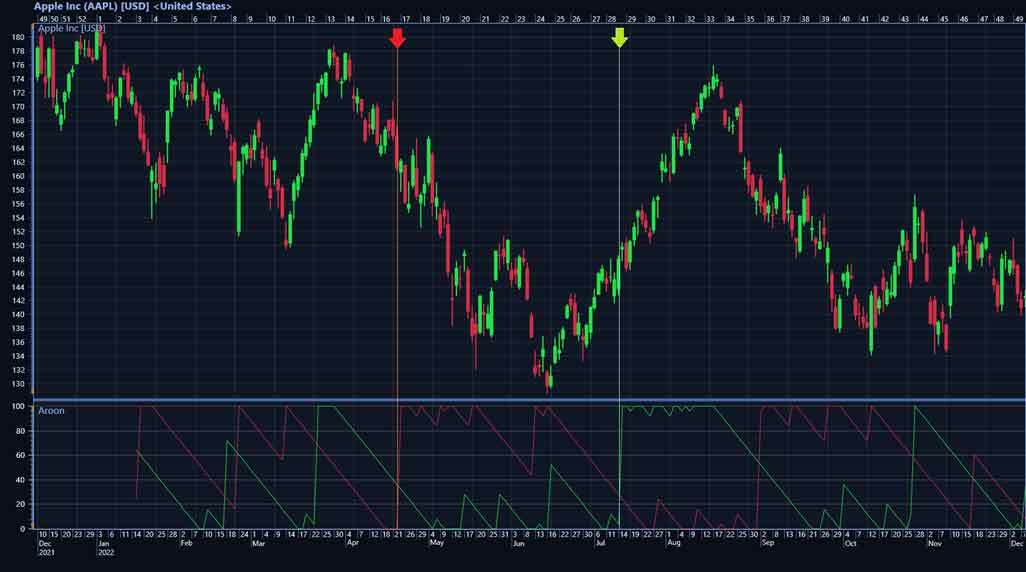
Two trend reversals are marked on the chart. The orange vertical line marks the position where Aroon-Down rises above Aroon-Up, thus signaling the beginning of a downtrend. Respectively, the light blue line marks where Aroon-Up rises above Aroon-Down and an uptrend begins.
The Aroon technical indicator can also signal consolidations meaning that the price moves between a clear pattern of trading levels and does not rise or fall significantly. A consolidation period may have begun when both Aroon lines stay below 50 (new highs or lows are seldom hit) or when the lines move parallel close to each other.

The highlighted area shows the consolidation. Both Aroon-Up and Aroon-Down fall below 50.
LightningChart Trader
The Aroon technical indicator is one of the 100+ technical indicators featured in the newest LightningChart Trader available for both .NET and JavaScript.
The LightningChart Trader is an advanced technical analysis chart library that can be integrated into financial and trading software applications. It features more than 100 technical indicators including indicator types, such as:
- Envelopes
- Moving Averages
- Oscillators
- Statistics
- Trend Indicators
- Volatility
- Market Profile
- Open interested
LightningChart Trader also features technical analysis charts such as CandleStick, Bar, Line, and Mountain charts. Drawing tools like drawLines, Fibonacci, Patterns, and Channels are also available in the LightningChart Trader.
Conclusion
In this article, I reviewed what the Aroon technical indicator is, what it indicates, how to interpret it, and how to use it in the LightningChart Trader.
The idea of the Aroon indicator is driven by the highest and lowest price values within a specific number of periods. This allows to to identify the trends via uptrends and downtrends. These trends can be easily identified, in the LightningChart Trader, with the green and red lines.
I hope this article was useful to you.

Lasse Portin
Senior Developer


Continue learning with LightningChart

Trend Lines in Trading
Trend lines are among the simplest yet most powerful tools in technical analysis. They help traders visualize market direction, identify potential support and resistance levels, and make more informed trading decisions. Despite their simplicity, trend lines remain a...

Best Python Charting Library in 2026
Python's charting ecosystem is large, overlapping, and regularly misunderstood. Most comparison guides stop at Matplotlib, Plotly, and Seaborn. This one goes further: it covers what happens when your datasets grow large, your update rates increase, or your chart types...

Best TradingView Charting Library Alternative
TradingView's charting libraries are the most visible option for fintech developers. Visibility is not the same as capability. This guide is for developers who have hit the wall on candle count limits, watermark restrictions, branding requirements, real-time...



If you have any questions, feel free to contact us!



©LightningChart Ltd 2026. All rights reserved.





