








Percentage Price Oscillator: Chart Implementation with LightningChart JS Trader
Tutorial
Assisted by AI
Learn how to implement the Percentage Price Oscillator charts in your software applications with LightningChart JS Trader for advanced data visualization.
Ahmad Omid
Data Science Developer


Introduction to Percentage Price Oscillator
The Percentage Price Oscillator (PPO) is a popular technical indicator used by traders to analyze trends and momentum in financial markets. By measuring the percentage difference between two Exponentially Weighted Moving Averages (EMA) of varying time periods, it helps traders identify potential buy and sell opportunities. The indicator also includes a signal line and a histogram for additional insights into price movements.
In this blog, we will explore the theory behind the Percentage Price Oscillator, its key components, and how to effectively use it in trading. Additionally, we will demonstrate how to create and visualize the PPO using the LightningChart JS Trader, providing a practical guide to implementation.
How to Use the Percentage Price Oscillator in Trading
The Percentage Price Oscillator is versatile and widely used across different asset classes, including stocks, commodities, and cryptocurrencies. Traders use the PPO to:
- Identify Trend Direction: Positive PPO values indicate an uptrend, while negative values suggest a downtrend.
- Spot Momentum Shifts: When the PPO crosses above or below its signal line, it may signify a change in momentum.
- Recognize Overbought/Oversold Conditions: Divergences between the price and PPO values can indicate overbought or oversold levels.
By combining these features, the Percentage Price Oscillator can serve as a critical tool for informed decision-making.
Formula
At its core, the Percentage Price Oscillator calculates the percentage difference between a short-term EMA and a long-term EMA. The formula is as follows:

Where:
- EMAshort: Exponentially Weighted Moving Average for the short period.
- EMAlong: Exponentially Weighted Moving Average for the long period.
The PPO also features a signal line, which is a moving average of the PPO itself, calculated using the following formula:
SignalLine = EMAsignal(PPO)
Interpretation
- Positive PPO Values: When the PPO is positive, the short-term EMA is higher than the long-term EMA, signaling upward momentum.
- Negative PPO Values: A negative PPO indicates that the short-term EMA is lower than the long-term EMA, suggesting downward momentum.
- Signal Line Crossovers: When the PPO crosses above the signal line, it may be a bullish signal, while crossing below it suggests bearish sentiment.
- Histogram: The histogram provides a visual representation of the divergence or convergence between the PPO and its signal line. Increasing histogram bars suggest strengthening momentum, while decreasing bars indicate weakening momentum.
Key Components
- PPO Line: Represents the core oscillator showing the percentage difference between short- and long-term EMAs.
- Signal Line: Acts as a smoothing factor, helping to filter out short-term fluctuations in the PPO.
- Histogram: Highlights the interaction between the PPO and its signal line, making it easier to identify shifts in momentum.
How to Create the Technical Indicator Using LC JS Trader
Step 1: Get LightningChart JS Trader
To begin, you’ll need access to LightningChart JS Trader. This library provides the tools necessary to create advanced technical indicators, including the Percentage Price Oscillator Indicator. Visit the LightningChart JS Trader page to download the required components and review the documentation.
Step 2: Review the Interactive Example
LightningChart JS Trader includes interactive examples that demonstrate how to create custom technical indicators. Start by reviewing the documentation, focusing on how to integrate the Percentage Price Oscillator Indicator into your chart setup. The interactive examples will guide you through the process of setting up the PPO Indicator, from importing the necessary modules to modify the chart settings.
Step 3: Code Explanation
In this step, we will break down the code that creates the chart with the Percentage Price Oscillator Indicator, as shown in the image, using LightningChart JS Trader. The code demonstrates how to initialize a trading chart, apply the PPO Indicator, and customize its appearance.
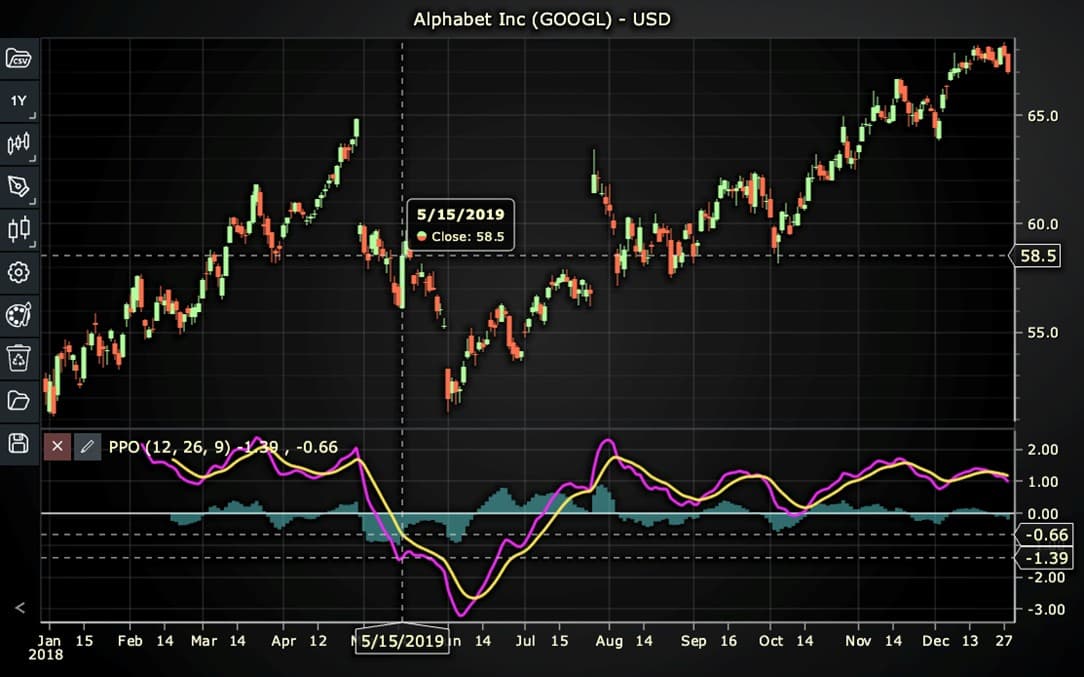
Here’s a detailed breakdown of each section:
A. Importing the Required Libraries:
   const lcjsTrader = require('@arction/lcjs-trader')
   const lcjs = require('@arction/lcjs')
const { Themes } = lcjs- lcjsTrader: This library provides access to the LightningChart JS Trader functionalities, allowing you to create advanced financial charts.
- lcjs: The main LightningChart JS library, used for general charting functionality.
- Themes: A property within lcjs that provides access to pre-built themes. In this case, we are using the darkGold theme to style the chart.
B. Initializing the Trading Chart:
   lcjsTrader.trader(TRADER_LICENSE).then(async (trader) => {
    // Create a trading chart.
const tradingChart = trader.tradingChart({ loadFromStorage: false, colorTheme: Themes.darkGold })trader(TRADER_LICENSE): Initializes the LightningChart JS Trader with the provided license key (TRADER_LICENSE). This is required to access the charting functionalities for financial data.
Note you can request a LightningChart JS Trader trial license, which is free.
tradingChart(): This function creates a trading chart with certain options.loadFromStorage: false: This disables the loading of previously stored chart data from local storage, ensuring a fresh chart setup.colorTheme: Themes.darkGold: This applies the darkGold theme to the chart, which influences the background color, gridlines, and other visual elements.
C. Adding and Customizing the Indicator
    // Add a Percentage Price Oscillator indicator
    const ppo = tradingChart.indicators().addPercentagePriceOscillator()
    ppo.setPeriodCounts(26, 12, 9)
    ppo.setSource(3)
    ppo.setPPOLineColor('#F129F5')
    ppo.setSignalLineColor('#FFE957')
    ppo.setHistogramColor('#66FCFF')
ppo.setLineWidth(3)addPercentagePriceOscillator(): PPO line is the difference between Exponentially weighted Moving Average (EMA) of Short period data, and EMA of Long period data. Signal line is Signal period EMA of PPO. Histogram shows the percentage difference between PPO and Signal.
ppo.setPeriodCounts(26, 12, 9): Sets the number of time periods (n) used to calculate the indicator (longPeriodCount, shortPeriodCount, signalPeriodCount).
**ppo.setSource(3): Sets which values the indicator calculations are based on. In this case, calculations based on Close values.
ppo.setPPOLineColor('#F129F5'): Changes the color of the PPO line to pink.
ppo.setSignalLineColor('#FFE957'): Changes the color of the Signal line to yellow.
ppo.setHistogramColor('#66FCFF'): Changes the Histogram color to Turquoise.
ppo.setLineWidth(3): Sets the line thickness of the indicator to 3 pixels. This makes the line more prominent and easier to observe during analysis.
D. Loading Data from a CSV File
    // Reading data from a file.
    await fetch(`${document.head.baseURI}examples/assets/0000/Alphabet Inc (GOOGL).csv`).then((res) => res.text()).then((text) => {
        tradingChart.readCsvString(text, 'Alphabet Inc (GOOGL)')
})fetch(): This function retrieves a CSV file containing historical data for Alphabet Inc. (GOOGL). The CSV file includes pricing information for the company’s stock, which is plotted on the chart.readCsvString(): This function reads the CSV data and interprets it as pricing data for Alphabet Inc. The second argument (‘Alphabet Inc (GOOGL)’) sets the label for the chart, as seen at the top of the chart image.
E. Setting the Currency for the Chart
    tradingChart.setCurrency('USD')
})setCurrency('USD'): This sets the currency of the chart to USD, ensuring that the pricing data is interpreted and displayed in US dollars.
** Enumeration Source in LC JS Trader:
To select which values the indicator calculations are based on.

Advantages and Limitations of the Indicator
Advantages
- Percentage-Based Insights: Unlike the Moving Average Convergence Divergence (MACD), the PPO expresses differences as percentages, making it more versatile for comparing assets with varying price levels.
- Trend Identification: It effectively highlights trends and potential reversals, enabling traders to time their entries and exits.
- Scalability: The PPO can be applied to various timeframes, from intraday trading to long-term investing.
Limitations
- Lagging Nature: Like all moving average-based indicators, the PPO is reactive and may lag behind price movements, particularly during sudden market reversals.
- False Signals: Signal line crossovers and histogram changes may generate false signals during periods of low volatility.
- Requires Context: The PPO should not be used in isolation; combining it with other indicators or price action analysis is crucial for robust trading strategies.
Conclusion
The Percentage Price Oscillator (PPO) is a powerful tool for analyzing market trends and momentum. Its percentage-based approach makes it particularly valuable for comparing assets of different price scales, distinguishing it from the more widely known MACD.
By understanding its formula, interpretation, and components, traders can leverage the PPO to identify trends, momentum shifts, and overbought/oversold conditions.
Continue learning with LightningChart
Andrews’ Pitchfork in Technical Analysis
Andrews' Pitchfork is one of the most respected technical analysis tools used by traders to identify potential support and resistance levels, trend direction, and future price paths. Developed by Dr. Alan H. Andrews, the indicator is based on the principle that prices...
React Charting Performance
Here's a scenario that plays out across development teams every few months. Someone builds a React dashboard, picks Recharts or Victory because they're popular, the devs love them, and the first demo looks great. Then the dataset gets bigger. Or the data starts...
Javascript Charting Library comparison 2026
Every year someone publishes a listicle of JavaScript charting libraries. They screenshot a demo, note the GitHub stars, paste in the npm install command, and call it a day. Then you follow their recommendation, get six months into your project, and discover that your...



If you have any questions, feel free to contact us!
©LightningChart Ltd 2025. All rights reserved.