





Moving Average Convergence Divergence in Trading
Article
Learn how to implement the Moving Average Convergence Divergence (MACD) indicator in your software projects with LightningChart JS Trader.
Ahmad Omid
Data Science Developer


Introduction to Moving Average Convergence Divergence
The Moving Average Convergence Divergence (MACD) indicator is a powerful and widely used tool in technical analysis. It was developed in the late 1970s by Gerald Appel to identify changes in the strength, direction, momentum, and duration of a trend in a stock’s price.
Over the decades, MACD has earned its place as a go-to indicator for traders and investors across markets due to its ability to combine trend-following and momentum-based strategies.
Importance of Moving Average Convergence Divergence in Trading
The Moving Average Convergence Divergence indicator is significant because it helps traders understand the underlying market dynamics. By analyzing the interaction between different moving averages, MACD offers insights into potential buy and sell opportunities. Its ability to highlight trend reversals, confirm trends, and measure momentum makes it an indispensable tool for decision-making.
For instance, MACD generates signals when moving averages converge (indicating reduced momentum) or diverge (signaling increased momentum). This allows traders to act proactively in volatile markets. Whether you’re trading stocks, cryptocurrencies, or forex, the MACD is versatile and applicable across assets.
Difference Between Basic MACD and Custom Versions
The basic Moving Average Convergence Divergence indicator measures the difference between two Exponential Moving Averages (EMAs) of different periods. It consists of three key components:
- MACD Line: The difference between the short-period EMA and the long-period EMA.
- Signal Line: A smoothed moving average of the MACD Line.
- Histogram: The graphical representation of the difference between the MACD Line and the Signal Line.
However, LightningChart JS Trader introduces a custom MACD version. Unlike the traditional MACD, which strictly uses EMAs for smoothing, this custom MACD allows traders to use different types of moving averages for calculation.
With the methods setPeriodCounts() and setMovingAverageTypes(), traders can customize their MACD settings to suit specific needs or strategies. This flexibility provides an enhanced analytical edge for advanced users.
Formula
The basic MACD formula consists of the following components:
- MACD Line: MACD = EMAshort period – EMAlong period
- Signal Line: Signal = EMAsignalperiod(MACD)
- Histogram: Histogram = MACD – Signal
Interpretation
- MACD Line: Indicates momentum and trend direction. A positive value suggests bullish momentum, while a negative value indicates bearish momentum.
- Signal Line: Smooths the MACD Line to help identify crossovers, which act as buy or sell signals.
- Histogram: Shows the divergence between MACD and Signal, helping traders visualize momentum strength.
Calculation Example
Assume a stock’s daily closing prices over a period. Let’s calculate MACD using a 12-day short EMA, a 26-day long EMA, and a 9-day signal EMA:
- Calculate the 12-day and 26-day EMAs. Example:
- EMA12 = 100.50
- EMA26 = 98.00
- Compute the MACD Line:
- MACD = 100.50 – 98 = 2.50
- Calculate the Signal Line (9-day EMA of MACD). Example: Signal = 2.10
- Compute the Histogram: Histogram=2.50-2.10=0.40
This process forms the basis for creating the MACD indicator, which traders can plot graphically for interpretation.
How to Create the Technical Indicator Using LC JS Trader
Step 1: Get LightningChart JS Trader
To begin, you’ll need access to LightningChart JS Trader. This library provides the tools necessary to create advanced technical indicators, including the Moving Average Convergence Divergence Indicator. Visit the LightningChart JS Trader page to download the required components and review the documentation.
Step 2: Review the Interactive Example
LightningChart JS Trader includes interactive examples that demonstrate how to create custom technical indicators. Start by reviewing the documentation, focusing on how to integrate the Moving Average Convergence Divergence Indicator into your chart setup. The interactive examples will guide you through the process of setting up the MACD Indicator, from importing the necessary modules to modify the chart settings.
Step 3: Code Explanation
In this step, we will break down the code that creates the chart with the Moving Average Convergence Divergence Indicator, as shown in the image, using LightningChart JS Trader. The code demonstrates how to initialize a trading chart, apply the MACD Indicator, and customize its appearance.
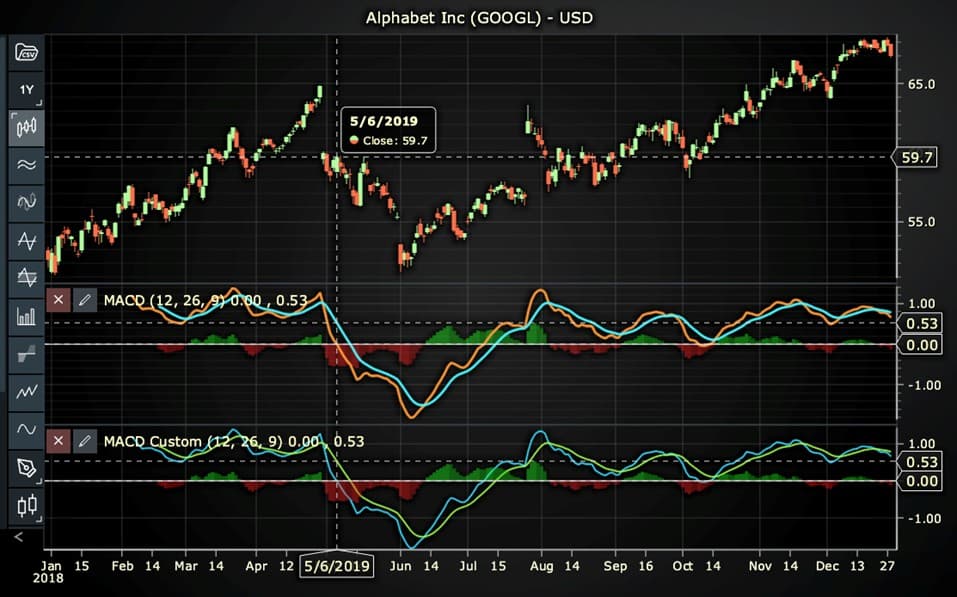
Here’s a detailed breakdown of each section:
A. Importing the Required Libraries:
   const lcjsTrader = require('@arction/lcjs-trader')
   const lcjs = require('@arction/lcjs')
const { Themes } = lcjs- lcjsTrader: This library provides access to the LightningChart JS Trader functionalities, allowing you to create advanced financial charts.
- lcjs: The main LightningChart JS library, used for general charting functionality.
- Themes: A property within lcjs that provides access to pre-built themes. In this case, we are using the darkGold theme to style the chart.
B. Initializing the Trading Chart:
   lcjsTrader.trader(TRADER_LICENSE).then(async (trader) => {
    // Create a trading chart.
const tradingChart = trader.tradingChart({ loadFromStorage: false, colorTheme: Themes.darkGold })trader(TRADER_LICENSE): Initializes the LightningChart JS Trader with the provided license key (TRADER_LICENSE). This is required to access the charting functionalities for financial data.
Note you can request a LightningChart JS Trader trial license, which is free.
tradingChart(): This function creates a trading chart with certain options.loadFromStorage: false: This disables the loading of previously stored chart data from local storage, ensuring a fresh chart setup.colorTheme: Themes.darkGold: This applies the darkGold theme to the chart, which influences the background color, gridlines, and other visual elements.
C. Adding and Customizing the Indicator
- Using basic MACD
    // Add a Moving Average Convergence Divergence indicator
    const macd = tradingChart.indicators().addMovingAverageConvergenceDivergence()
    macd.setPeriodCounts(26, 12, 9)
    macd.setSource(3)
    macd.setMACDLineColor('#FF9633')
    macd.setSignalLineColor('#47F3FF')
macd.setLineWidth(3)addMovingAverageConvergenceDivergence(): MACD is the difference between Exponentially weighted Moving Average (EMA) of Short period data, and EMA of Long period data, that is: EMA(price short period) – EMA(price long period). The Signal line is Signal period EMA of MACD. Histogram shows the difference between MACD and Signal (MACD – Signal).
macd.setPeriodCounts(26, 12, 9): Sets the number of time periods (n) used to calculate the indicator (longPeriodCount, shortPeriodCount, signalPeriodCount).
**macd.setSource(3): Sets which values the indicator calculations are based on. In this case, calculations based on Close values.
macd.setMACDLineColor('#FF9633'): Changes the color of the MACD line to orange.
macd.setSignalLineColor('#47F3FF'): Changes the color of the Signal line to blue.
macd.setLineWidth(3): Sets the line thickness of the indicator to 3 pixels. This makes the line more prominent and easier to observe during analysis.
- Using MACD Custom
        // Add a Moving Average Convergence Divergence Custom indicator
    const macdc = tradingChart.indicators().addMovingAverageConvergence-
                  DivergenceCustom()
    macdc.setPeriodCounts(26, 12, 9)
    macdc.setSource(3)
    macdc.setMovingAverageTypes(0, 0, 0)
    macdc.setMACDLineColor('#FF9633')
    macdc.setSignalLineColor('#47F3FF')
macdc.setLineWidth(3)addMovingAverageConvergenceDivergenceCustom(): Moving Average Convergence Divergence indicator (MACD) shows the difference between two moving averages of different lengths. The custom MACD allows using different moving averages for all smoothings.
setPeriodCounts(26, 12, 9): Sets the number of time periods (n) used to calculate the indicator (longPeriodCount, shortPeriodCount, signalPeriodCount).
**macdc.setSource(3): Sets which values the indicator calculations are based on. In this case, calculations based on Close values.
***macdc.setMovingAverageTypes(0, 0, 0): Sets the moving average types used to calculate MACD and signal lines (shortMovingAverage, longMovingAverage, signalMovingAverage). In this case, 0 represents the Exponential Moving Average (EMA) that could be changed to another moving average types.
setMACDLineColor('#FF9633'): Changes the color of the MACD Custom line to orange.
setSignalLineColor('#47F3FF'): Changes the color of the Signal line to blue.
setLineWidth(3): Sets the line thickness of the indicator to 3 pixels. This makes the line more prominent and easier to observe during analysis.
D. Loading Data from a CSV File
    // Reading data from a file.
    await fetch(`${document.head.baseURI}examples/assets/0000/Alphabet Inc (GOOGL).csv`).then((res) => res.text()).then((text) => {
        tradingChart.readCsvString(text, 'Alphabet Inc (GOOGL)')
})fetch(): This function retrieves a CSV file containing historical data for Alphabet Inc. (GOOGL). The CSV file includes pricing information for the company’s stock, which is plotted on the chart.readCsvString(): This function reads the CSV data and interprets it as pricing data for Alphabet Inc. The second argument (‘Alphabet Inc (GOOGL)’) sets the label for the chart, as seen at the top of the chart image.
E. Setting the Currency for the Chart
    tradingChart.setCurrency('USD')
})setCurrency('USD'): This sets the currency of the chart to USD, ensuring that the pricing data is interpreted and displayed in US dollars.
** Enumeration Source in LC JS Trader:
To select which values the indicator calculations are based on.

*** Enumeration of Moving Average Types in LC JS Trader:
- Exponential Moving Average (EMA): 0
- None: 1 (No moving average applied)
- Simple Moving Average (SMA): 2
- Time Series Moving Average (TSMA): 3
- Triangular Moving Average (TMA): 4
- Variable Moving Average (VMA): 5
- Variable Index Dynamic Average (VIDYA): 6
- Volume Weighted Moving Average (VWMA): 7
- Weighted Moving Average (WMA): 8
Welles Wilder’s Smoothing (WWS): 9
Advantages and Limitations of the Indicator
The Moving Average Convergence Divergence (MACD) indicator offers several advantages that make it a popular choice among traders. One of its primary strengths is its versatility; MACD can be applied across various asset classes and timeframes, making it useful for trading stocks, forex, cryptocurrencies, and more.
Additionally, it combines trend and momentum analysis, enabling traders to identify both the direction and strength of a trend. This dual capability makes MACD a robust tool for generating buy and sell signals. Its ease of use is another advantage, as the indicator is relatively simple to calculate and interpret, making it accessible to both beginners and seasoned traders.
Moreover, platforms like LightningChart JS Trader provide advanced customization options through their custom MACD, allowing users to tailor the types of moving averages used, enhancing the indicator’s flexibility and adaptability.
However, MACD is not without its limitations. As a lagging indicator, it relies on historical price data and may produce delayed signals, particularly during rapid market movements.
This lag can sometimes lead to missed opportunities or late entries and exits. Another drawback is its tendency to generate false signals during sideways or choppy markets, where trends are unclear, potentially leading to losses if trades are executed based on these misleading signals.
Lastly, the choice of EMA periods can be subjective, requiring experience and careful consideration, as the wrong configuration may result in poor performance.
Despite these limitations, when used judiciously and combined with other tools, MACD remains a valuable component of a trader’s technical analysis toolkit.
Conclusion
The Moving Average Convergence Divergence (MACD) indicator is a cornerstone of technical analysis, providing traders with insights into market trends and momentum. Its ability to identify convergence, divergence, and crossovers makes it invaluable for developing trading strategies. While the basic MACD remains a powerful tool, the custom MACD version by LightningChart JS Trader adds a layer of flexibility, allowing traders to tailor moving average types to better suit their needs.
By integrating tools like MACD into a disciplined trading strategy, traders can make informed decisions and navigate markets effectively. Whether you prefer the traditional MACD or the enhanced custom version, understanding the intricacies of this indicator can significantly improve your trading outcomes.
Continue learning with LightningChart
Motorsports Analytics
Updated on April 10th, 2025 | Written by human Motorsports Analytics Large companies in the motorsports industry are collecting huge volumes of real-time data coming from different sources on and off the pitch during racing competitions. These data are both...
High-Performance Charting Controls for Fintech App Development
Written by a human | Updated on April 10th, 2025Charting Controls for Fintech Apps Money makes the world go round and as such, tracking and controlling financial transactions and information are some of the most important activities to do for any...
Data Visualization in Medical & Healthcare Applications
Written by a human | Updated on April 10th, 2025Charting Controls for Medical Healthcare Data Visualization Applications The fact that data and data visualization are everywhere in today's world, makes me wonder how data visualization impacts medical...



If you have any questions, feel free to contact us!
©LightningChart Ltd 2025. All rights reserved.