








A Water Potability Analysis with LightningChart Python
Tutorial
Assisted by AI
Learn to utilize LightningChart in Python for effective water potability analysis, ensuring safe and reliable drinking water evaluations.
Vindya Nukulasooriya
Data Science Developer

Introduction
This project analyzes water potability using the Kaggle “Water Quality & Potability” dataset together with the LightningChart Python library. The cleaned working table (wqpd) contains measurements for pH, Hardness, Solids, Chloramines, Sulfate, Conductivity, Organic Carbon, Trihalomethanes, and Turbidity, plus the target Potability label (0 = non-potable, 1 = potable).
The primary objectives of this project are to:
- High performance and smooth interactivity for dense scatter plots and heatmaps.
- Versatile 2D charting (lines, points, heatmaps) suited to statistical comparisons.
- Presentation-ready visuals with clear axes, legends, zoom/pan, and Light/Dark themes.
By turning the raw measurements into focused visualizations, the project highlights subtle class differences, reveals feature redundancy (for example, the strong link between Solids and Conductivity), and motivates the use of multi-feature, non-linear modeling to assess water safety.
Project Overview
Build 5 LightningChart Python visuals to explore how water-quality parameters relate to Potability (0/1), identify subtle class differences, and reveal feature redundancy that matters for modeling.
Objectives
- Measure pH differences between potable and non-potable using histogram and frequency polygon + CDF.
- Compare Hardness distributions by class using box plot and violin + beeswarm.
- Examine Solids × Conductivity via scatter (class-coloured) and 2D density heatmap.
- Show overall class balance with a bar chart and a waffle chart.
- Summarize feature relationships with a correlation heatmap and parallel coordinates (per-sample, class-coloured).
Tools Used
Python 3.13.5, LightningChart Python, Jupyter Notebook, AI Assistance
About the Dataset
The dataset used was the Water Quality and Potability available from Kaggle. The file that I used was water_potability.csv (cleaned to ‘wqpd’).
LightningChart Python
LightningChart Python is a professional-grade data visualization library renowned for its ultra-fast rendering and analytical precision. Its ability to handle large-scale, granular datasets and produce multidimensional, interactive visualizations makes it highly effective for data analysis.

Setting Up Python Environment
Before running the project, install Python and the other required libraries using:
%pip install numpy pandas lightningchartSetting Up Your Development Environment:
- Set up a virtual environment:
- Use Visual Studio Code (VSCode) for a streamlined development experience.
Loading and Preprocessing Data
Fetch and preprocess the data using the following function:
# Import necessary libraries (load pandas library to preprocess dataset)
import pandas as pd
Visualizing Data with LightningChart Python
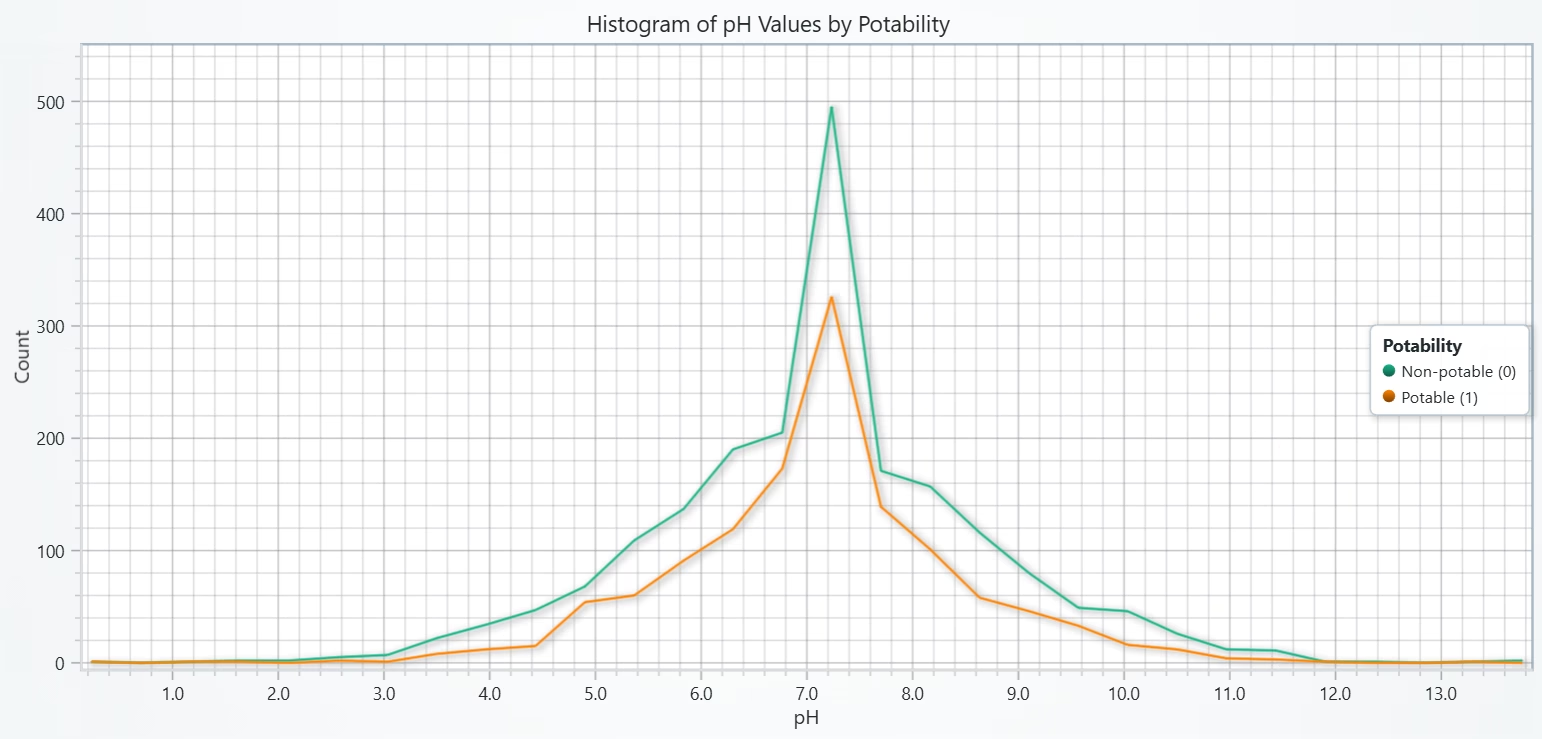
A Histogram is the fastest way to compare distributions between two classes on the same bin edges. Using counts (not density) makes class imbalance plainly visible and keeps the y-axis intuitive.
In the following chart, the pH alone does not cleanly separate potability; any difference is subtle. Treat pH as supporting context, use multivariate modeling for prediction.
# Chart 1A - Histogram of pH Distribution by Potability
# Developed with AI assistance to demonstrate LightningChart Python

import lightningchart as lc
import numpy as np

# License
with open("D:/HAMK/Internship/MyProjects/lc_license.txt", "r") as f:
    lc.set_license(f.read().strip())

# Make a safe local copy with normalized column names
df = wqpd.copy()
df.columns = [str(c).strip().replace(" ", "_").lower() for c in df.columns]

# Safety
assert "ph" in df.columns and "potability" in df.columns, f"Columns found: {df.columns.tolist()}"
df = df.dropna(subset=["ph", "potability"]).copy()
df["potability"] = df["potability"].astype(int)

# Binning
BINS = 30
edges = np.linspace(df["ph"].min(), df["ph"].max(), BINS + 1)
mids = (edges[:-1] + edges[1:]) / 2

# Per-class hist
counts = {}
for cls in (0, 1):
    vals = df.loc[df["potability"] == cls, "ph"].astype(float).values
    hist, _ = np.histogram(vals, bins=edges)
    counts[cls] = hist

# Chart
chart = lc.ChartXY(
    title="Histogram of pH Values by Potability",
    theme=lc.Themes.Light,
    html_text_rendering=True
)

# Axes
x_axis = chart.get_default_x_axis(); x_axis.set_title("pH")
y_axis = chart.get_default_y_axis(); y_axis.set_title("Count")

# Series
s_non = chart.add_line_series(); s_non.set_name("Non-potable (0)")
s_non.add(mids.tolist(), counts[0].astype(float).tolist())

s_pot = chart.add_line_series(); s_pot.set_name("Potable (1)")
s_pot.add(mids.tolist(), counts[1].astype(float).tolist())

# Legend
legend = chart.add_legend()
legend.add(chart)
legend.set_title("Potability")

# Nice Y range
y_max = float(max(counts[0].max(), counts[1].max()))
y_axis.set_interval(0.0, y_max * 1.1 if y_max > 0 else 1.0)

chart.open()
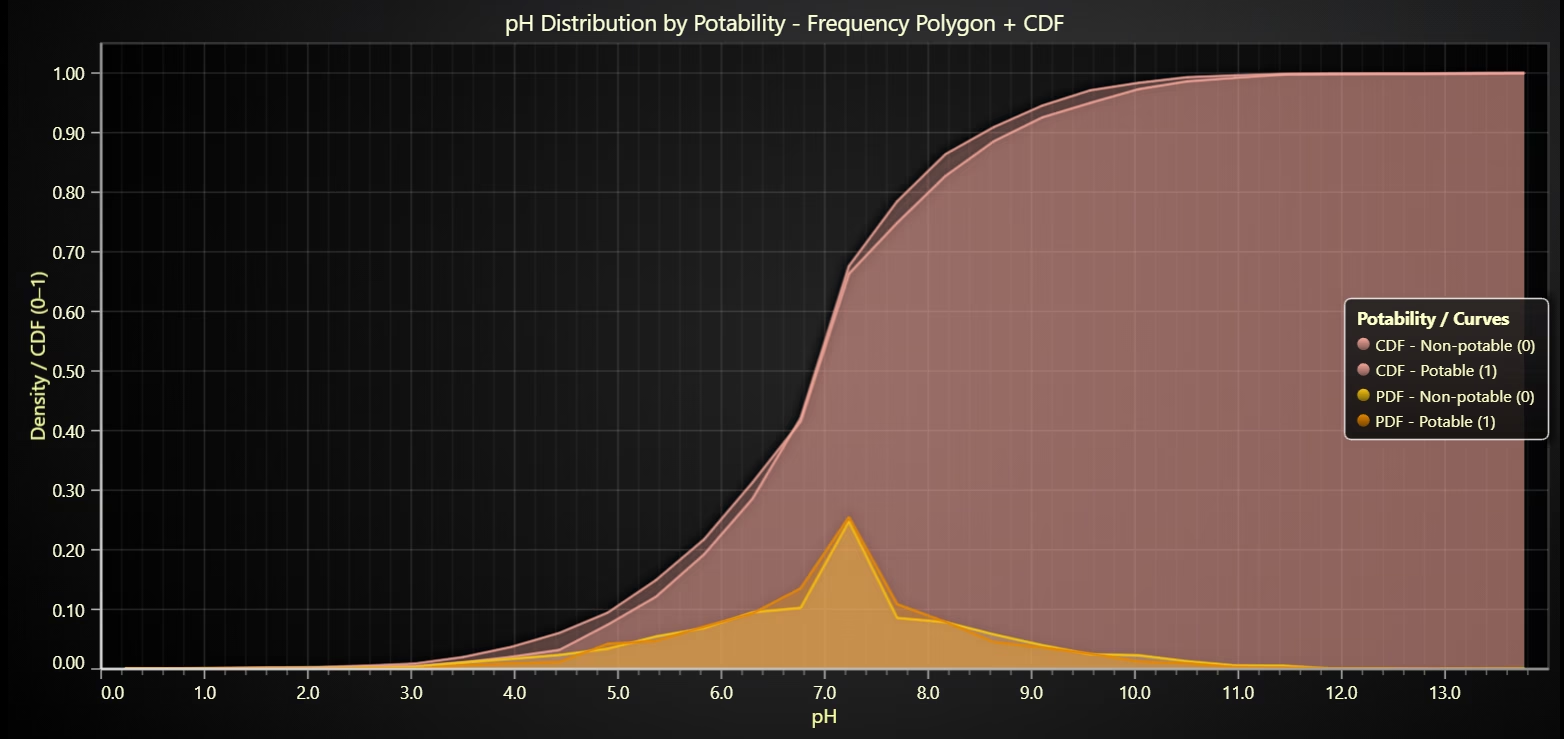
pH – Filled CDF Areas + Filled PDF Areas (by Potability)
pH offers moderate separation (potable closer to neutral), but overlap is large, use pH with other features for robust potability prediction.
# Chart 1B - pH: AreaSeries (filled) for PDF + CDF by Potability
# Developed with AI assistance to demonstrate LightningChart Python

import lightningchart as lc
import numpy as np

# License
with open("D:/HAMK/Internship/MyProjects/lc_license.txt", "r") as f:
    lc.set_license(f.read().strip())

# Data
df = wqpd.copy()
df.columns = [str(c).strip().replace(" ", "_").lower() for c in df.columns]
assert {"ph", "potability"} <= set(df.columns), f"Columns found: {df.columns.tolist()}"

df = df.dropna(subset=["ph", "potability"]).copy()
df["potability"] = df["potability"].astype(int)

# Binning
BINS = 30
edges = np.linspace(df["ph"].min(), df["ph"].max(), BINS + 1)
mids  = (edges[:-1] + edges[1:]) / 2
def class_hist_density_cdf(class_val: int):
    x = df.loc[df["potability"] == class_val, "ph"].astype(float).values
    counts, _ = np.histogram(x, bins=edges)
    total = int(counts.sum())
    density = (counts / total) if total > 0 else counts.astype(float)
    cdf     = (np.cumsum(counts) / total) if total > 0 else np.zeros_like(counts, dtype=float)
    return density.astype(float), cdf.astype(float)

dens0, cdf0 = class_hist_density_cdf(0)   # Non-potable
dens1, cdf1 = class_hist_density_cdf(1)   # Potable

# Chart
chart = lc.ChartXY(
    title="pH Distribution by Potability - Frequency Polygon + CDF",
    theme=lc.Themes.Dark,
    html_text_rendering=True
)
x_axis = chart.get_default_x_axis(); x_axis.set_title("pH")
y_axis = chart.get_default_y_axis(); y_axis.set_title("Density / CDF (0–1)")
x_axis.set_interval(float(edges[0]), float(edges[-1]))
y_axis.set_interval(0.0, 1.05)

# Colors (RGBA with transparency)
# CDF (soft salmon, semi-transparent)
CDF_FILL    = (243, 167, 156, 88)   # lower alpha --> more transparent
CDF_OUTLINE = (243, 167, 156, 220)  # same hue, stronger outline

# PDF (yellow family)
PDF_NON_FILL    = (249, 215, 122, 72)   # non-potable PDF fill (light yellow)
PDF_NON_OUTLINE = (241, 196,  15, 255)  # non-potable PDF outline (bright yellow)
PDF_POT_FILL    = (255, 165, 0, 72)   # potable PDF fill (orange)
PDF_POT_OUTLINE = (230, 135, 0, 255)  # potable PDF outline (darker orange)

# Draw series
legend_items = []

# 1) CDF AREAS FIRST (background)
s_cdf_non = chart.add_area_series(); s_cdf_non.set_name("CDF - Non-potable (0)")
s_cdf_non.set_fill_color(CDF_FILL); s_cdf_non.set_line_color(CDF_OUTLINE)
s_cdf_non.add(mids.tolist(), cdf0.tolist()); legend_items.append(s_cdf_non)

s_cdf_pot = chart.add_area_series(); s_cdf_pot.set_name("CDF - Potable (1)")
s_cdf_pot.set_fill_color(CDF_FILL); s_cdf_pot.set_line_color(CDF_OUTLINE)
s_cdf_pot.add(mids.tolist(), cdf1.tolist()); legend_items.append(s_cdf_pot)

# 2) PDF AREAS SECOND (foreground)
s_pdf_non = chart.add_area_series(); s_pdf_non.set_name("PDF - Non-potable (0)")
s_pdf_non.set_fill_color(PDF_NON_FILL); s_pdf_non.set_line_color(PDF_NON_OUTLINE)
s_pdf_non.add(mids.tolist(), dens0.tolist()); legend_items.append(s_pdf_non)

s_pdf_pot = chart.add_area_series(); s_pdf_pot.set_name("PDF - Potable (1)")
s_pdf_pot.set_fill_color(PDF_POT_FILL); s_pdf_pot.set_line_color(PDF_POT_OUTLINE)
s_pdf_pot.add(mids.tolist(), dens1.tolist()); legend_items.append(s_pdf_pot)

# Legend
legend = chart.add_legend()
for s in legend_items:
    legend.add(s)
legend.set_title("Potability / Curves")

chart.open()
Box Plot of Hardness by Potability
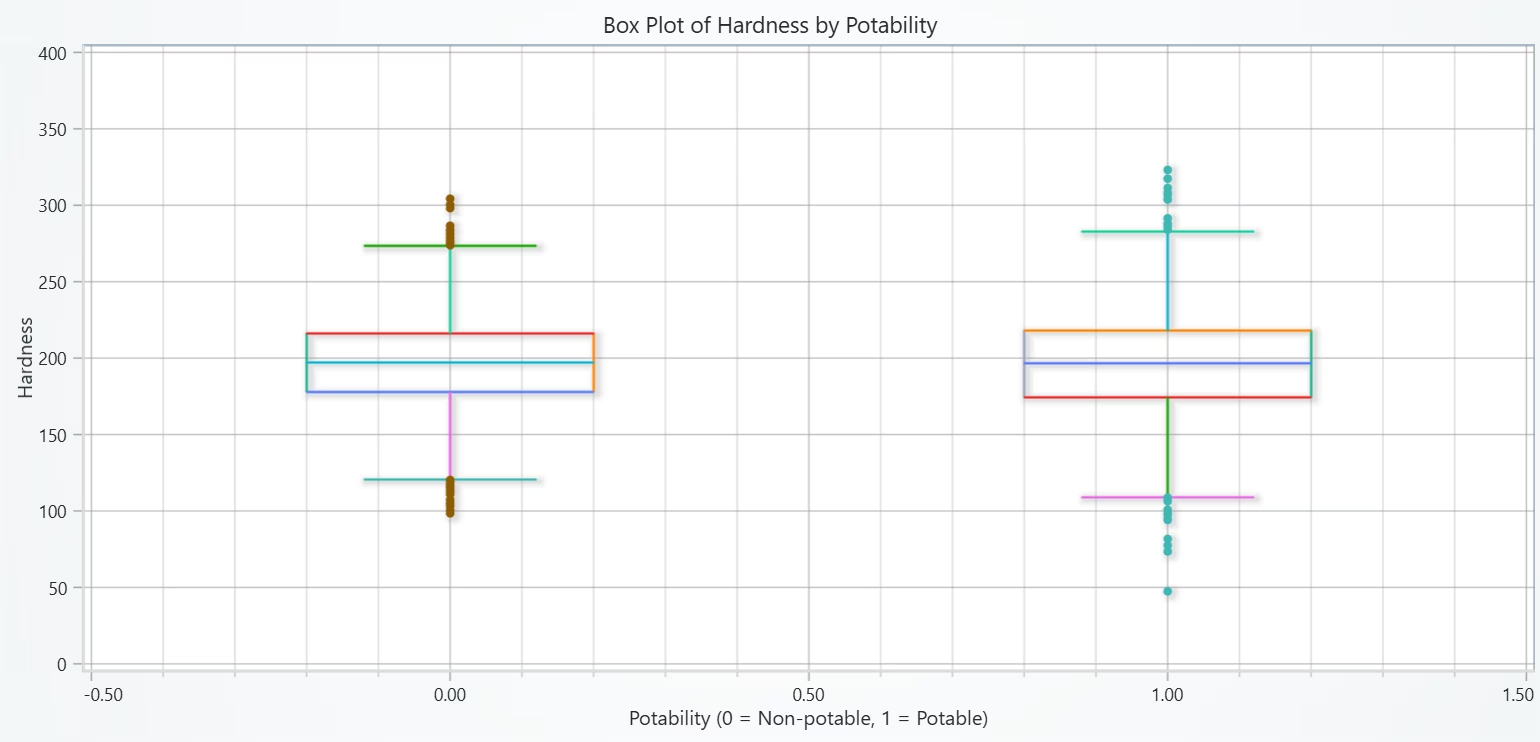
A Box Plot was selected for the fast comparison of centre (median), spread (IQR), and outliers between the two classes.
Visible Insights:
- Medians are very similar for potable (1) and non-potable (0).
- IQRs overlap heavily –> spreads are alike.
- Outliers exist in both classes; no class has consistently higher/lower hardness.
Hardness alone does not separate the classes.
# Chart 2A - Box Plot of Hardness by Potability
# Developed with AI assistance to demonstrate LightningChart Python

import lightningchart as lc
import numpy as np

# License
with open("D:/HAMK/Internship/MyProjects/lc_license.txt", "r") as f:
    lc.set_license(f.read().strip())

# Data
df = wqpd.copy()
df.columns = [str(c).strip().replace(" ", "_").lower() for c in df.columns]
assert "hardness" in df.columns and "potability" in df.columns, f"Columns found: {df.columns.tolist()}"
df = df.dropna(subset=["hardness", "potability"]).copy()
df["potability"] = df["potability"].astype(int)

# Boxplot stats per class
def box_stats(a: np.ndarray):
    a = np.asarray(a, dtype=float)
    q1 = np.percentile(a, 25)
    q2 = np.percentile(a, 50)     # median
    q3 = np.percentile(a, 75)
    iqr = q3 - q1
    lo = np.min(a[a >= q1 - 1.5 * iqr])
    hi = np.max(a[a <= q3 + 1.5 * iqr])
    out = a[(a < lo) | (a > hi)]
    return dict(q1=q1, q2=q2, q3=q3, lo=lo, hi=hi, outliers=out)

stats0 = box_stats(df.loc[df["potability"] == 0, "hardness"].values)
stats1 = box_stats(df.loc[df["potability"] == 1, "hardness"].values)

# X positions and widths
x0, x1 = 0.0, 1.0
box_half_width = 0.20
cap_half_width = 0.12

# Chart
chart = lc.ChartXY(
    title="Box Plot of Hardness by Potability",
    theme=lc.Themes.Light,
    html_text_rendering=True
)

x_axis = chart.get_default_x_axis(); x_axis.set_title("Potability (0 = Non-potable, 1 = Potable)")
y_axis = chart.get_default_y_axis(); y_axis.set_title("Hardness")

def line_seg(x1, y1, x2, y2):
    s = chart.add_line_series()
    s.add([x1, x2], [y1, y2])
    return s

def draw_box(xc, st):
    # Box rectangle (Q1–Q3)
    line_seg(xc - box_half_width, st["q1"], xc - box_half_width, st["q3"])
    line_seg(xc + box_half_width, st["q1"], xc + box_half_width, st["q3"])
    line_seg(xc - box_half_width, st["q3"], xc + box_half_width, st["q3"])
    line_seg(xc - box_half_width, st["q1"], xc + box_half_width, st["q1"])
    # Median
    line_seg(xc - box_half_width, st["q2"], xc + box_half_width, st["q2"])
    # Whiskers
    line_seg(xc, st["q3"], xc, st["hi"])
    line_seg(xc - cap_half_width, st["hi"], xc + cap_half_width, st["hi"])
    line_seg(xc, st["q1"], xc, st["lo"])
    line_seg(xc - cap_half_width, st["lo"], xc + cap_half_width, st["lo"])
    # Outliers
    if st["outliers"].size:
        ps = chart.add_point_series()
        ps.add([xc] * len(st["outliers"]), st["outliers"].tolist())

# Draw both boxes
draw_box(x0, stats0)
draw_box(x1, stats1)

# Frame nicely
x_axis.set_interval(-0.5, 1.5)
y_axis.set_interval(0, 400)   # adjust if hardness values exceed this

chart.open()
Violin + Beeswarm for Hardness by Potability
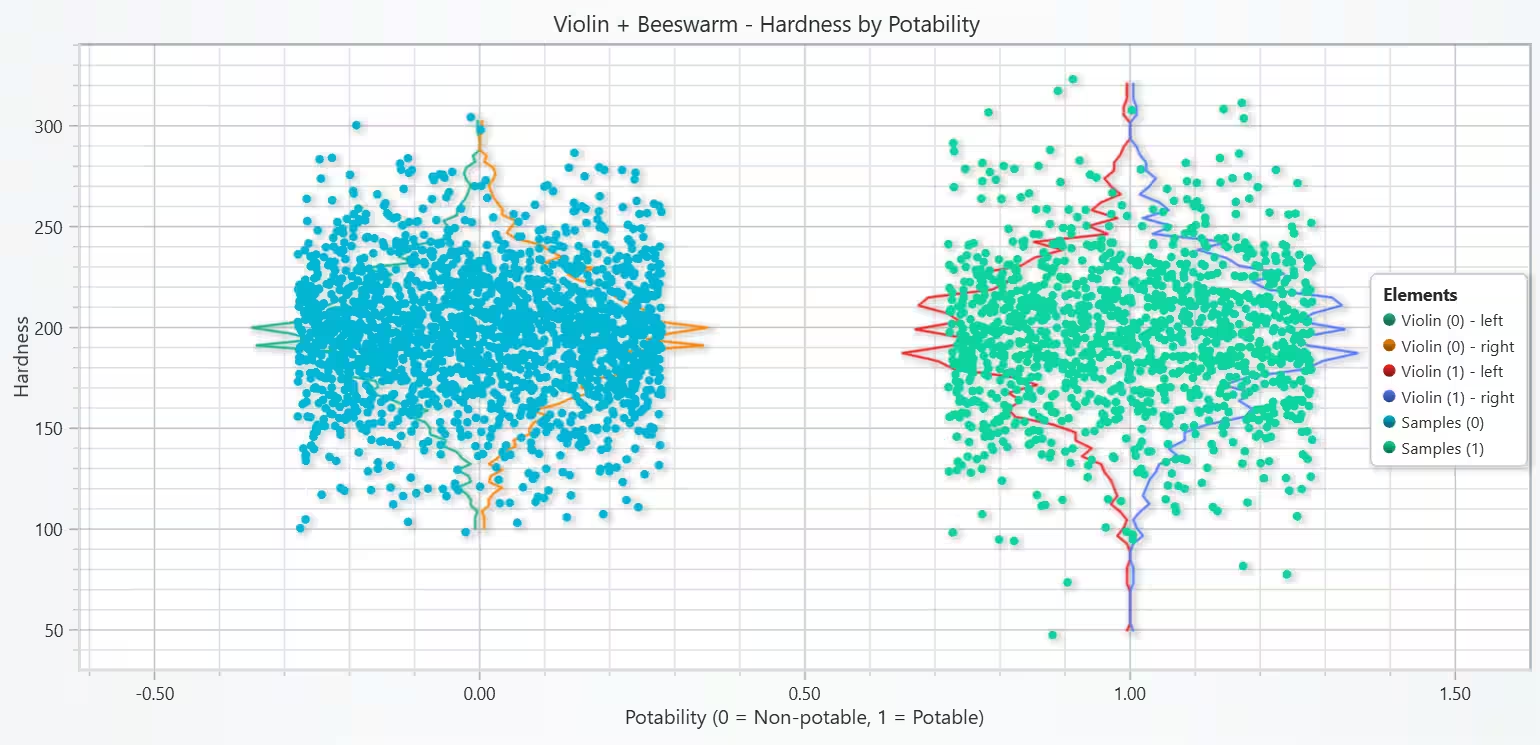
Violin shows the full distribution shape (peaks/tails) per class. Beeswarm reveals the actual observations, highlighting density clusters and outliers. Together, they give both summary and granular. Hardness alone does not separate potable vs. non-potable.
# Chart 2B   - Violin + Beeswarm for Hardness by Potability
# Developed with AI assistance to demonstrate LightningChart Python

import lightningchart as lc
import numpy as np

# License
with open("D:/HAMK/Internship/MyProjects/lc_license.txt", "r") as f:
    lc.set_license(f.read().strip())

# Data
df = wqpd.copy()
df.columns = [str(c).strip().replace(" ", "_").lower() for c in df.columns]
assert "hardness" in df.columns and "potability" in df.columns, f"Columns found: {df.columns.tolist()}"
df = df.dropna(subset=["hardness", "potability"]).copy()
df["potability"] = df["potability"].astype(int)

hard0 = df.loc[df["potability"] == 0, "hardness"].astype(float).values
hard1 = df.loc[df["potability"] == 1, "hardness"].astype(float).values

# Density (histogram-based) --> violin outlines
def density_outline(samples, bins=60):
    # y as hardness; vertical bins; density normalized to 0..1
    hmin, hmax = float(np.min(samples)), float(np.max(samples))
    edges = np.linspace(hmin, hmax, bins + 1)
    centers = 0.5 * (edges[:-1] + edges[1:])
    counts, _ = np.histogram(samples, bins=edges)
    dens = counts.astype(float) / counts.max() if counts.max() > 0 else counts.astype(float)
    return centers, dens

y0, d0 = density_outline(hard0, bins=70)
y1, d1 = density_outline(hard1, bins=70)

# Scale densities to a nice half-width
half_width = 0.35
x0_center, x1_center = 0.0, 1.0
x0_left  = (x0_center - d0 * half_width).tolist()
x0_right = (x0_center + d0 * half_width).tolist()
x1_left  = (x1_center - d1 * half_width).tolist()
x1_right = (x1_center + d1 * half_width).tolist()

# Chart
chart = lc.ChartXY(
    title="Violin + Beeswarm - Hardness by Potability",
    theme=lc.Themes.Light,
    html_text_rendering=True
)

x_axis = chart.get_default_x_axis(); x_axis.set_title("Potability (0 = Non-potable, 1 = Potable)")
y_axis = chart.get_default_y_axis(); y_axis.set_title("Hardness")

# Violin outlines (two line series per group: left & right)
v0_left  = chart.add_line_series(); v0_left.set_name("Violin (0) - left");  v0_left.add(x0_left,  y0.tolist())
v0_right = chart.add_line_series(); v0_right.set_name("Violin (0) - right"); v0_right.add(x0_right, y0.tolist())

v1_left  = chart.add_line_series(); v1_left.set_name("Violin (1) - left");  v1_left.add(x1_left,  y1.tolist())
v1_right = chart.add_line_series(); v1_right.set_name("Violin (1) - right"); v1_right.add(x1_right, y1.tolist())

# Beeswarm (jittered points)
rng = np.random.default_rng(42)
def beeswarm(x_center, vals, jitter=0.28, n_max=None):
    if n_max is not None and len(vals) > n_max:
        vals = rng.choice(vals, size=n_max, replace=False)
    xs = x_center + rng.uniform(-jitter, jitter, size=len(vals))
    ps = chart.add_point_series()
    ps.set_name(f"Samples ({int(x_center)})")
    ps.add(xs.tolist(), vals.tolist())

# Limit plotted points for performance/clarity if large
beeswarm(x0_center, hard0, n_max=2000)
beeswarm(x1_center, hard1, n_max=2000)

# Framing
x_axis.set_interval(-0.6, 1.6)
# Set a safe Y range; tweak if needed
y_min = float(min(hard0.min(), hard1.min()))
y_max = float(max(hard0.max(), hard1.max()))
pad = 0.05 * (y_max - y_min)
y_axis.set_interval(y_min - pad, y_max + pad)

# Legend
legend = chart.add_legend(); legend.add(chart); legend.set_title("Elements")

chart.open()
Scatter Plot of Solids vs Conductivity, coloured by Potability
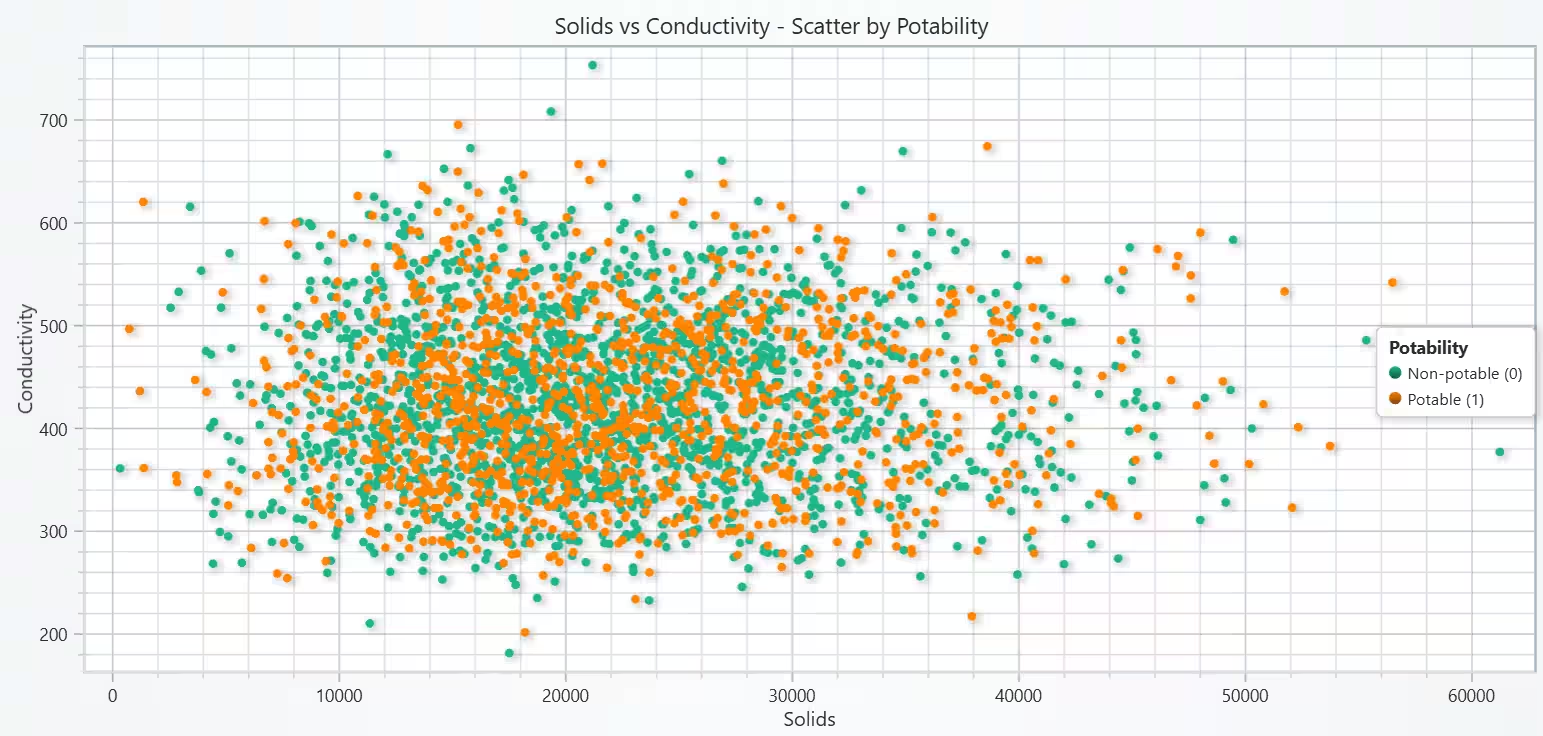
Scatter Plot was selected to check the bivariate relationship between Solids and Conductivity and to see if class colouring reveals separation or clusters. Solids and conductivity carry similar information (correlated pair) & they don’t separate classes on their own.
# Chart 3A - Scatter: Solids vs Conductivity (colored by Potability)
# Developed with AI assistance to demonstrate LightningChart Python

import lightningchart as lc

# License
with open("D:/HAMK/Internship/MyProjects/lc_license.txt", "r") as f:
    lc.set_license(f.read().strip())

# Prep (safe copy + normalized names)
df = wqpd.copy()
df.columns = [str(c).strip().replace(" ", "_").lower() for c in df.columns]

# Safety & filter
required = ["solids", "conductivity", "potability"]
assert all(c in df.columns for c in required), f"Columns found: {df.columns.tolist()}"
df = df.dropna(subset=required).copy()
df["potability"] = df["potability"].astype(int)

# Split by class
df0 = df[df["potability"] == 0]   # Non-potable
df1 = df[df["potability"] == 1]   # Potable

# Chart
chart = lc.ChartXY(
    title="Solids vs Conductivity - Scatter by Potability",
    theme=lc.Themes.Light,           # Light theme recommended for this requested A-chart
    html_text_rendering=True
)

# Axes
x_axis = chart.get_default_x_axis(); x_axis.set_title("Solids")
y_axis = chart.get_default_y_axis(); y_axis.set_title("Conductivity")

# Series (two point series)
s0 = chart.add_point_series(); s0.set_name("Non-potable (0)")
s0.add(df0["solids"].astype(float).tolist(), df0["conductivity"].astype(float).tolist())

s1 = chart.add_point_series(); s1.set_name("Potable (1)")
s1.add(df1["solids"].astype(float).tolist(), df1["conductivity"].astype(float).tolist())

# Legend collecting both series
legend = chart.add_legend()
legend.add(chart)
legend.set_title("Potability")

# Optional: frame the view with small padding
xmin, xmax = float(df["solids"].min()), float(df["solids"].max())
ymin, ymax = float(df["conductivity"].min()), float(df["conductivity"].max())
px, py = 0.02*(xmax-xmin), 0.02*(ymax-ymin)
x_axis.set_interval(xmin - px, xmax + px)
y_axis.set_interval(ymin - py, ymax + py)

chart.open()
2D Density Heatmap: Solids x Conductivity
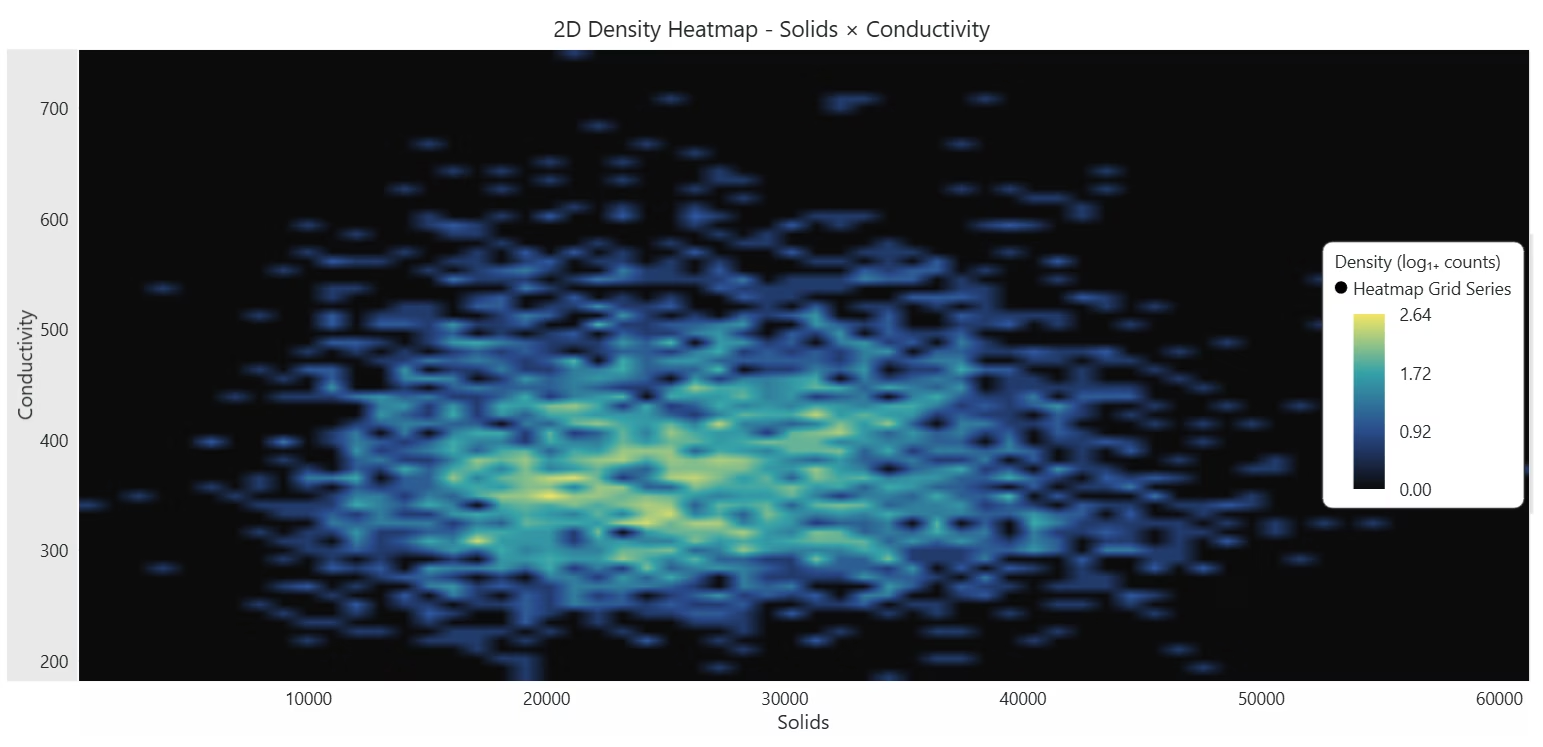
Scatter gets overplotted at high density; a Heatmap shows the joint distribution clearly & highlights where most samples concentrate and the overall relationship shape. These two features (Solids & Conductivity) are strongly correlated.
# Chart 3B - 2D Density Heatmap: Solids × Conductivity
# Developed with AI assistance to demonstrate LightningChart Python

import lightningchart as lc
import numpy as np

# License
with open("D:/HAMK/Internship/MyProjects/lc_license.txt", "r") as f:
    lc.set_license(f.read().strip())

# Data
df = wqpd.copy()
df.columns = [str(c).strip().replace(" ", "_").lower() for c in df.columns]
required = ["solids", "conductivity", "potability"]
assert all(c in df.columns for c in required), f"Columns found: {df.columns.tolist()}"
df = df.dropna(subset=required).copy()

x = df["solids"].astype(float).values
y = df["conductivity"].astype(float).values
if x.size == 0 or y.size == 0:
    raise ValueError("No data available for heatmap (solids/conductivity).")

# 2D histogram to build density grid
BINS_X, BINS_Y = 70, 60  # tune for resolution vs. performance
H, x_edges, y_edges = np.histogram2d(x, y, bins=[BINS_X, BINS_Y])

# Optional: log scaling to emphasize sparse structure
H_show = np.log1p(H)

rows, cols = H_show.shape  # rows correspond to X bins; cols to Y bins

# Chart
chart = lc.ChartXY(
    title="2D Density Heatmap - Solids × Conductivity",
    theme=lc.Themes.White,
    html_text_rendering=True
)

# Heatmap grid series (columns = along X-axis, rows = along Y-axis)
hm = chart.add_heatmap_grid_series(columns=cols, rows=rows)

# Map bin edges to axes — ensure orientation matches the grid shape
x0, x1 = float(x_edges[0]), float(x_edges[-1])
y0, y1 = float(y_edges[0]), float(y_edges[-1])

# Set spatial extents and step size
hm.set_start(x=x0, y=y0)
hm.set_end(x=x1, y=y1)
hm.set_step(x=(x1 - x0) / cols, y=(y1 - y0) / rows)

hm.set_intensity_interpolation(True)
hm.hide_wireframe()

# Feed intensities; transpose so shape matches (rows, cols) if needed
hm.invalidate_intensity_values(H_show.T.tolist())

# Palette: low density → dark, high density → bright
vmin, vmax = float(H_show.min()), float(H_show.max())
palette = [
    {"value": vmin,                   "color": "#0b0b0b"},
    {"value": (vmin + vmax) * 0.35,   "color": "#2a4b8d"},
    {"value": (vmin + vmax) * 0.65,   "color": "#36a2a8"},
    {"value": vmax,                   "color": "#f5e663"},
]
hm.set_palette_coloring(steps=palette, look_up_property="value", interpolate=True)

# Axes & ranges
x_axis = chart.get_default_x_axis(); x_axis.set_title("Solids")
y_axis = chart.get_default_y_axis(); y_axis.set_title("Conductivity")
x_axis.set_interval(x0, x1)
y_axis.set_interval(y0, y1)
# Legend
chart.add_legend(data=hm).set_title("Density (log₁₊ counts)")

chart.open()
Bar Chart of Potability Distribution
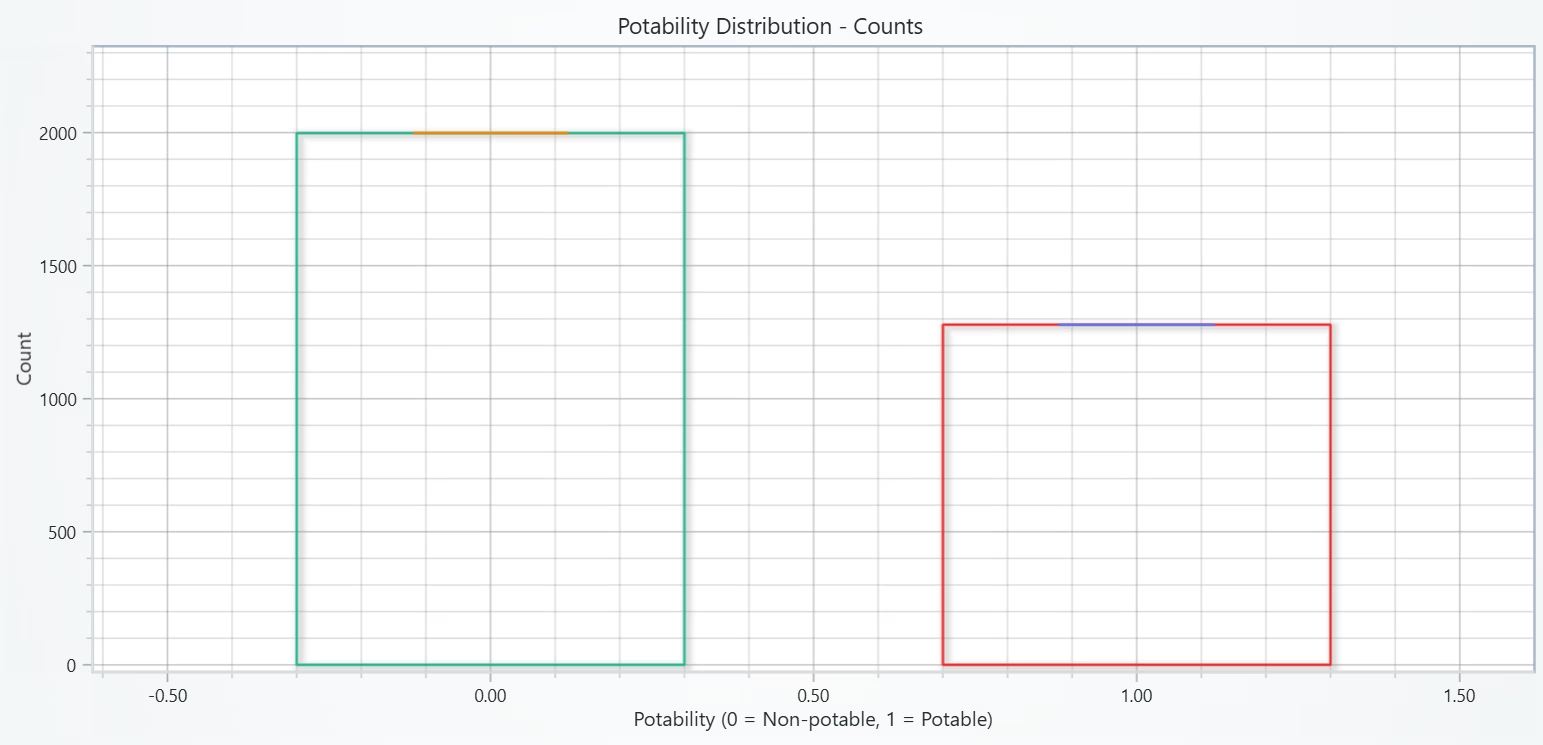
A Bar Chart is the fastest way to show class balance/imbalance before modeling. The classes are uneven (~60% non-potable vs ~40% potable), so a model might lean toward predicting non-potable.
# Chart 4A - Bar Chart of Potability
# Developed with AI assistance to demonstrate LightningChart Python

import lightningchart as lc
import numpy as np

# License
with open("D:/HAMK/Internship/MyProjects/lc_license.txt", "r") as f:
    lc.set_license(f.read().strip())

# Data
df = wqpd.copy()
df.columns = [str(c).strip().replace(" ", "_").lower() for c in df.columns]
assert "potability" in df.columns, f"Columns found: {df.columns.tolist()}"
df = df.dropna(subset=["potability"]).copy()
df["potability"] = df["potability"].astype(int)

count0 = int((df["potability"] == 0).sum())
count1 = int((df["potability"] == 1).sum())

# x positions for the two bars
x0, x1 = 0.0, 1.0
half_width = 0.30

# Chart
chart = lc.ChartXY(
    title="Potability Distribution - Counts",
    theme=lc.Themes.Light,
    html_text_rendering=True
)

x_axis = chart.get_default_x_axis(); x_axis.set_title("Potability (0 = Non-potable, 1 = Potable)")
y_axis = chart.get_default_y_axis(); y_axis.set_title("Count")

def draw_bar(xc, height):
    # Rectangle outline with a line series (left, top, right, bottom)
    s = chart.add_line_series()
    xs = [xc - half_width, xc - half_width, xc + half_width, xc + half_width, xc - half_width]
    ys = [0, height, height, 0, 0]
    s.add(xs, ys)
    # Optional: add a small tick at the top as a visual cap
    cap = chart.add_line_series()
    cap.add([xc - half_width * 0.4, xc + half_width * 0.4], [height, height])

# Draw both bars
draw_bar(x0, count0)
draw_bar(x1, count1)

# Frame nicely
x_axis.set_interval(-0.6, 1.6)
y_max = max(count0, count1)
y_axis.set_interval(0, y_max * 1.15 if y_max > 0 else 1)

# Legend is optional here (only outlines); skipping for a cleaner look
chart.open()
Waffle Chart of Potability Share
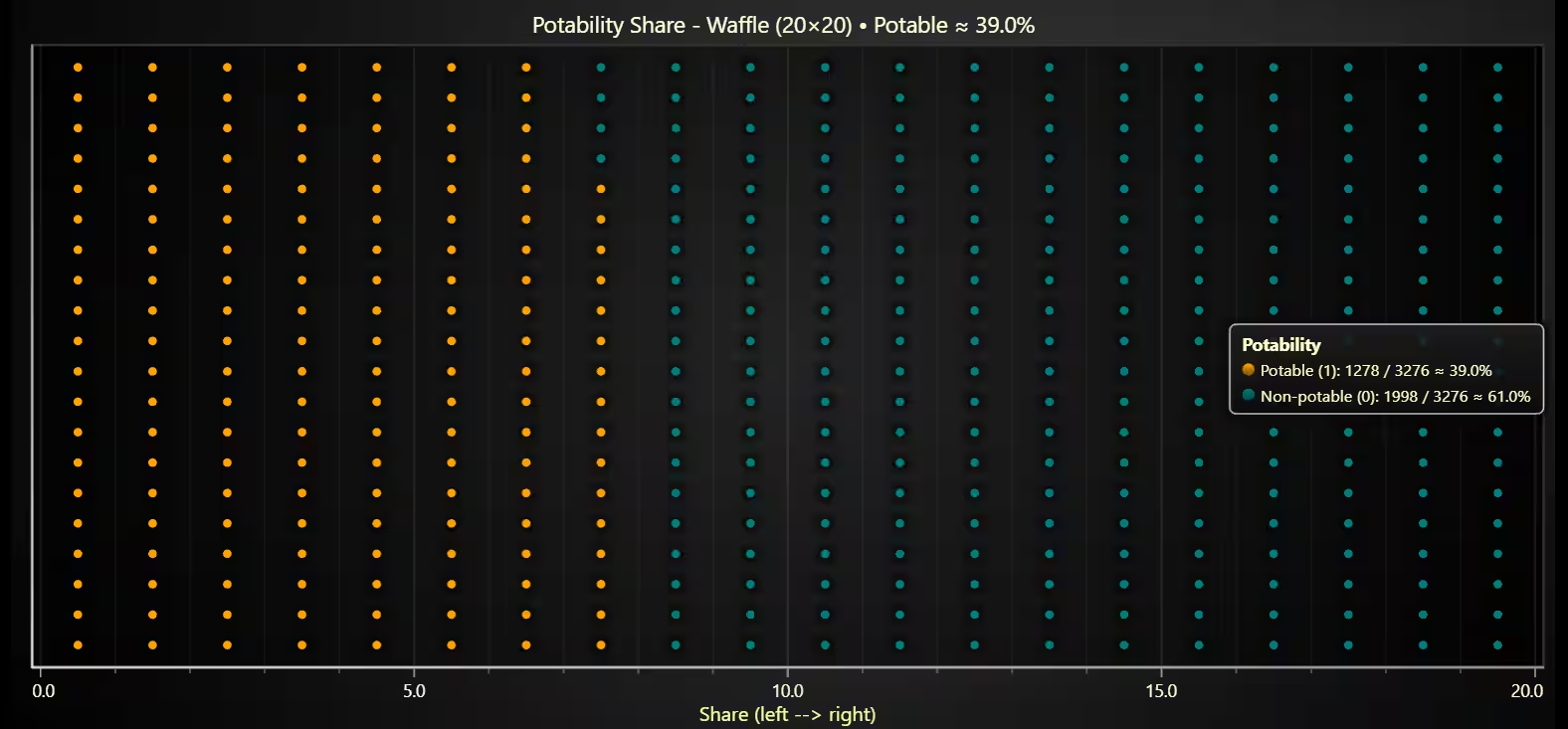
A Waffle Chart is a presentation-friendly way to show a percentage split at a glance, and it complements the bar chart (4A) by emphasizing share, not just counts. The dataset is imbalanced (~40% potable).
# Chart 4B - Waffle Chart of Potability Share (left --> right fill)
# Developed with AI assistance to demonstrate LightningChart Python

import lightningchart as lc
import numpy as np

# License
with open("D:/HAMK/Internship/MyProjects/lc_license.txt", "r") as f:
    lc.set_license(f.read().strip())

# Data
df = wqpd.copy()
df.columns = [str(c).strip().replace(" ", "_").lower() for c in df.columns]
df = df.dropna(subset=["potability"]).copy()
df["potability"] = df["potability"].astype(int)

count0 = int((df["potability"] == 0).sum())   # Non-potable
count1 = int((df["potability"] == 1).sum())   # Potable
total  = count0 + count1 if (count0 + count1) > 0 else 1
share1 = count1 / total
share0 = 1.0 - share1

# Grid layout (cols × rows)
COLS, ROWS = 20, 20                  # 400 cells total
N1 = int(round(share1 * COLS * ROWS))  # number of potable cells

# COLUMN-major fill: left → right, bottom → top
xs, ys, cls = [], [], []
filled = 0
for col in range(COLS):
    for row in range(ROWS):
        xs.append(col + 0.5)     # center of cell
        ys.append(row + 0.5)
        cls.append(1 if filled < N1 else 0)  # first N1 cells are Potable (1)
        filled += 1

xs = np.asarray(xs, dtype=float)
ys = np.asarray(ys, dtype=float)
cls = np.asarray(cls, dtype=int)

# Split by class
x1, y1 = xs[cls == 1], ys[cls == 1]   # Potable (1)
x0, y0 = xs[cls == 0], ys[cls == 0]   # Non-potable (0)

# Chart
chart = lc.ChartXY(
    title=f"Potability Share - Waffle (20×20) • Potable ≈ {share1*100:.1f}%",
    theme=lc.Themes.Dark,
    html_text_rendering=True
)

x_axis = chart.get_default_x_axis(); x_axis.set_title("Share (left --> right)")
y_axis = chart.get_default_y_axis(); y_axis.set_title("")

# Point series with clear colors
s1 = chart.add_point_series(); s1.set_name(f"Potable (1): {count1} / {total} ≈ {share1*100:.1f}%")
s1.set_point_color(lc.Color('orange'))
s1.add(x1.tolist(), y1.tolist())

s0 = chart.add_point_series(); s0.set_name(f"Non-potable (0): {count0} / {total} ≈ {share0*100:.1f}%")
s0.set_point_color(lc.Color('teal'))
s0.add(x0.tolist(), y0.tolist())

# Frame exactly to grid
x_axis.set_interval(0, COLS)
y_axis.set_interval(0, ROWS)

# Keep Y clean (no numeric ticks) so focus stays on the left→right share
y_axis.set_tick_strategy("Empty")

# Legend
legend = chart.add_legend()
legend.add(chart)
legend.set_title("Potability")

chart.open()
Correlation Heatmap of All Numerical Parameters
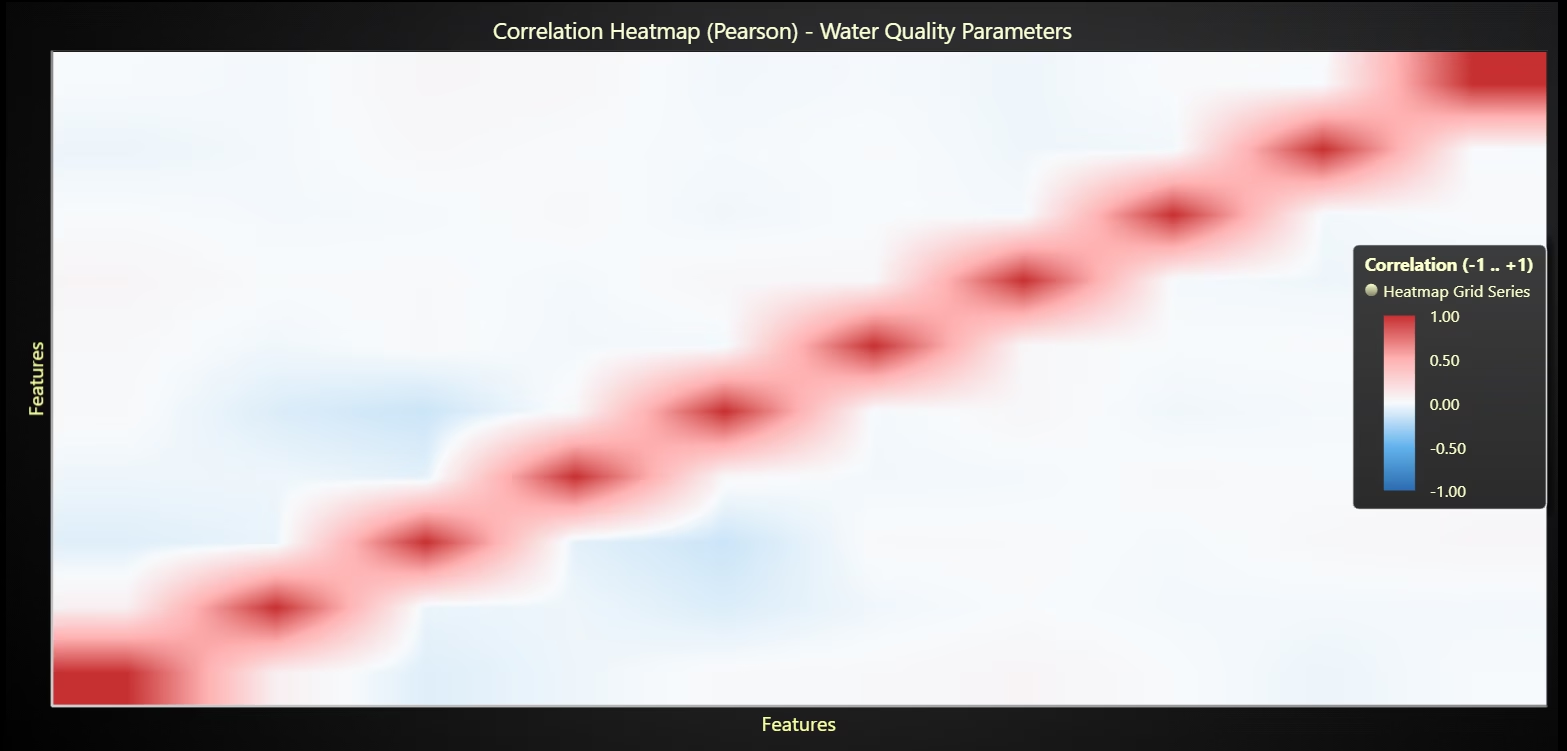
A Correlation Heatmap will give quick, global view of linear relationships and redundancy between features, plus how each relates to potability. Potability has little linear signal per feature, so use multi-feature, likely non-linear models, and regularize/handle correlated pairs (eg: solids-conductivity).
# Chart 5A - Correlation Heatmap of All Numeric Columns
# Developed with AI assistance to demonstrate LightningChart Python

import lightningchart as lc
import numpy as np
# License
with open("D:/HAMK/Internship/MyProjects/lc_license.txt", "r") as f:
    lc.set_license(f.read().strip())

# Data
df = wqpd.copy()
df.columns = [str(c).strip().replace(" ", "_").lower() for c in df.columns]

# Keep only numeric columns
num_cols = df.select_dtypes(include=["number"]).columns.tolist()
if len(num_cols) == 0:
    raise ValueError("No numeric columns found for correlation heatmap.")

# Drop rows with any NA among numeric cols to compute corr reliably
corr_df = df[num_cols].dropna().copy()
C = corr_df.corr(method="pearson").values.astype(float)

n = C.shape[0]

# Chart
chart = lc.ChartXY(
    title="Correlation Heatmap (Pearson) - Water Quality Parameters",
    theme=lc.Themes.Dark,                    # Dark works well for diverging palettes
    html_text_rendering=True
)

# Heatmap grid (n × n)
hm = chart.add_heatmap_grid_series(columns=n, rows=n)

# Place the heatmap in a unit square [0,n]×[0,n]
hm.set_start(x=0, y=0)
hm.set_end(x=n, y=n)
# Feed values (rows × cols)
hm.invalidate_intensity_values(C.tolist())

# Diverging palette: -1 (blue) → 0 (neutral) → +1 (red)
palette = [
    {"value": -1.0, "color": "#2b6cb0"},  # deep blue
    {"value": -0.5, "color": "#63b3ed"},
    {"value":  0.0, "color": "#f7fafc"},  # near white
    {"value":  0.5, "color": "#feb2b2"},
    {"value":  1.0, "color": "#c53030"},  # deep red
]
hm.set_palette_coloring(steps=palette, look_up_property="value", interpolate=True)
hm.set_intensity_interpolation(True)
hm.hide_wireframe()
# Axes
x_axis = chart.get_default_x_axis(); x_axis.set_title("Features")
y_axis = chart.get_default_y_axis(); y_axis.set_title("Features")
x_axis.set_interval(0, n)
y_axis.set_interval(0, n)

# Optional: hide numeric ticks to keep it clean (matrix is square)
# (Labels are long; list them below the chart if you want to print them)
x_axis.set_tick_strategy("Empty")
y_axis.set_tick_strategy("Empty")

# Legend
chart.add_legend(data=hm).set_title("Correlation (-1 .. +1)")

chart.open()

# For reference in the notebook output, print the feature order:
print("Feature order in heatmap:", num_cols)
Parallel Coordinates Chart of All Numerical Parameters, coloured by Potability
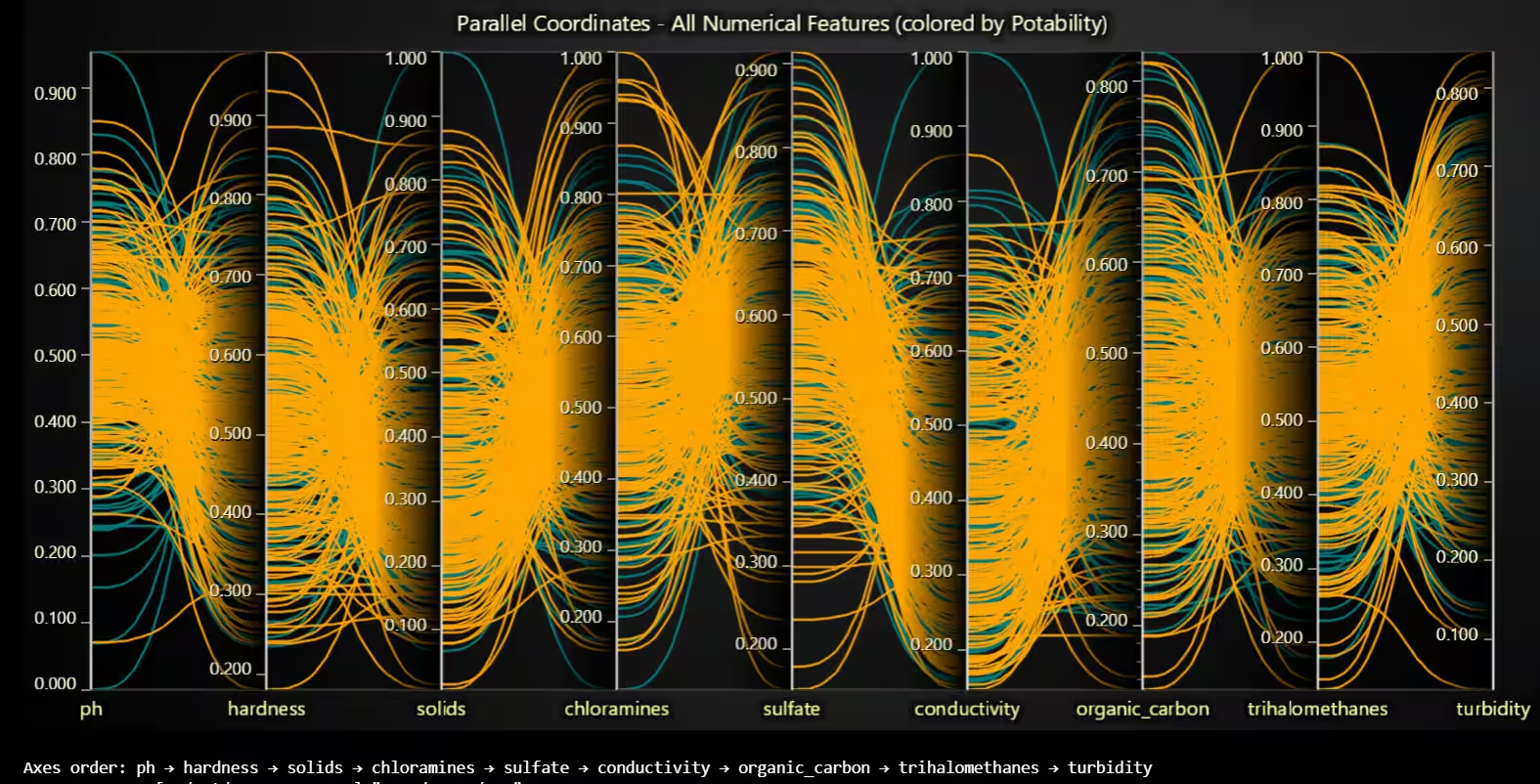
Parallel Coordinates is ideal for multivariate comparison: you can see each sample as a polyline crossing all features (after bringing them to the same scale) and visually compare class patterns across dimensions at once.
Potability isn’t linearly separable by any single feature; expect better results from multi-feature, non-linear models (eg: tree ensembles) with proper scaling, correlation handling (conductivity/solids), and perhaps feature engineering or dimensionality reduction to capture weak, combined signals.
# Chart 5B - Parallel Coordinates - native ParallelCoordinateChart
# Developed with AI assistance to demonstrate LightningChart Python

import lightningchart as lc
import numpy as np
import pandas as pd

# License
with open("D:/HAMK/Internship/MyProjects/lc_license.txt", "r") as f:
    lc.set_license(f.read().strip())

# Data prep
df = wqpd.copy()
df.columns = [str(c).strip().replace(" ", "_").lower() for c in df.columns]

features = [
    "ph","hardness","solids","chloramines","sulfate",
    "conductivity","organic_carbon","trihalomethanes","turbidity"
]
features = [f for f in features if f in df.columns]
required = features + ["potability"]
df = df.dropna(subset=required).copy()
df["potability"] = df["potability"].astype(int)

mins = df[features].min()
maxs = df[features].max()
rng  = (maxs - mins).replace(0, 1.0)
norm = (df[features] - mins) / rng
norm["potability"] = df["potability"]

N_PER_CLASS = 250
rng_np = np.random.default_rng(42)
def pick(index, n):
    if len(index) <= n:
        return index
    return rng_np.choice(index, size=n, replace=False)

idx0 = pick(norm.index[norm["potability"] == 0], N_PER_CLASS)
idx1 = pick(norm.index[norm["potability"] == 1], N_PER_CLASS)
norm0 = norm.loc[idx0].drop(columns="potability")
norm1 = norm.loc[idx1].drop(columns="potability")

# Try native PC first
NativePC = getattr(lc, "ParallelCoordinateChart", None)
used_native = False

if NativePC is not None:
    try:
        chart = NativePC(theme=lc.Themes.Dark,
                         title="Parallel Coordinates - All Numerical Features (colored by Potability)")
        if hasattr(chart, "set_axes") and hasattr(chart, "add_series"):
            chart.set_axes(features)

            col0 = lc.Color("teal")
            col1 = lc.Color("orange")

            for _, row in norm0.iterrows():
                s = chart.add_series()
                s.set_data({k: float(v) for k, v in zip(features, row.values)})
                if hasattr(s, "set_color"): s.set_color(col0)
                elif hasattr(s, "set_line_color"): s.set_line_color(col0)

            for _, row in norm1.iterrows():
                s = chart.add_series()
                s.set_data({k: float(v) for k, v in zip(features, row.values)})
                if hasattr(s, "set_color"): s.set_color(col1)
                elif hasattr(s, "set_line_color"): s.set_line_color(col1)

            chart.open()
            used_native = True
    except Exception:
        used_native = False

if not used_native:
    # Fallback ChartXY with medians & points (Dark)
    xs_base = np.arange(len(features), dtype=float)
    xs0 = (xs_base - 0.02).tolist()
    xs1 = (xs_base + 0.02).tolist()

    chart = lc.ChartXY(
        title="Parallel Coordinates - All Numerical Features (colored by Potability)",
        theme=lc.Themes.Dark,
        html_text_rendering=True
    )
    x_axis = chart.get_default_x_axis(); x_axis.set_title("Features (left → right)")
    y_axis = chart.get_default_y_axis(); y_axis.set_title("Normalized value (0–1)")
    x_axis.set_interval(-0.2, len(features) - 0.8)
    y_axis.set_interval(0.0, 1.0)

    c0 = lc.Color("teal")
    c1 = lc.Color("orange")

    for _, row in norm0.iterrows():
        s = chart.add_line_series(); s.set_line_color(c0); s.add(xs0, row.values.tolist())
    for _, row in norm1.iterrows():
        s = chart.add_line_series(); s.set_line_color(c1); s.add(xs1, row.values.tolist())

    # Medians (lines + points)
    med0 = norm0.median().values.tolist()
    med1 = norm1.median().values.tolist()
    s_med0 = chart.add_line_series(); s_med0.set_name("Median - Non-potable (0)")
    s_med0.set_line_color(c0); s_med0.add(xs0, med0)
    s_med1 = chart.add_line_series(); s_med1.set_name("Median - Potable (1)")
    s_med1.set_line_color(c1); s_med1.add(xs1, med1)

    p0 = chart.add_point_series(); p0.set_name("Median pts - Non-potable (0)"); p0.add(xs0, med0)
    p1 = chart.add_point_series(); p1.set_name("Median pts - Potable (1)");     p1.add(xs1, med1)

    legend = chart.add_legend()
    legend.add(s_med0); legend.add(s_med1)
    legend.set_title("Class medians")

    chart.open()

print("Axes order:", " → ".join(features))
Conclusion
There was no single feature that cleanly separates potable from non-potable water. pH shows a small shift (potable slightly nearer neutral), but overlap is large. Solids <-> Conductivity are strongly correlated (redundant information). Overall, linear correlations with Potability are weak; class split is imbalanced (~60/40).
Some of the benefits of creating a water potability analysis with LightningChart Python are:
- Fast with dense data: Handles thousands of points (scatter, heatmaps, parallel lines) smoothly.
- Clean visuals: Crisp rendering, anti-aliased lines/points, high-DPI friendly.
- Interactive by default: Pan/zoom/hover make exploring ranges (eg: solids × conductivity) easy.
- Flexible chart types: Line/point series, heatmap grids, and custom shapes let you build violins, boxplots, waffles, etc.
- Easy theming: Quick Light/Dark switches to match analysis vs. presentation.
- Good layering: Multiple series + legend control (eg: overlaying PDFs and CDFs) without clutter.
- Precise axis control: Simple interval setting and labelling for consistent framing across charts.
- Scales to multivariate views: Parallel-coordinates and correlation heatmaps stay responsive with subsampling.
- Consistent API: Similar method names across charts lowers cognitive load when iterating.
- Presentation-ready: Produces polished charts suitable for reports and demos with minimal tweaking.
Continue learning with LightningChart

Best DevExpress Charts Alternative in 2026: GPU Performance for Web and Desktop
DevExpress is one of the most comprehensive UI component suites in the .NET and web ecosystem. WinForms, WPF, ASP.NET, Blazor, JavaScript it covers the full Microsoft-aligned development stack with grids, schedulers, form components, reporting, and charting all...

Best Chart.js Alternatives in 2026: When You’ve Outgrown the Basics
Chart.js is the correct answer for a lot of chart projects. MIT license with no commercial restrictions, ~14KB gzipped, documentation that is genuinely among the best in the ecosystem, 65,000+ GitHub stars, and the largest community of any JavaScript chart library by...

Best AnyChart Alternatives in 2026: GPU Performance, Transparent Pricing, Free Trials
AnyChart is a commercially-oriented JavaScript charting library that markets itself on enterprise reliability, used by over 75% of Fortune 500 companies per their own claims, with a broad catalog of 70+ chart types covering Gantt, maps, stock charts, and more. The...



If you have any questions, feel free to contact us!
©LightningChart Ltd 2025. All rights reserved.