





Visualizing Financial Statements | LightningChart Python
Tutorial
Assisted by AI
Step-by-step guide to start visualizing financial statements using LightningChart Python data visualization library.
Vindya Nukulasooriya
Data Science Developer

Introduction
This project presents a comprehensive financial data visualization analysis using the SEC Financial Statement Data Sets, powered by the LightningChart Python library. The dataset, published by the U.S. Securities and Exchange Commission (SEC), contains key accounting indicators such as assets, liabilities, stockholders’ equity, revenues, cost of revenue, gross profit, operating income (loss), net income (loss), cash and cash equivalents, and operating cash flow.
The primary objectives of this project are to:
- Explore the relationships between individual financial statement parameters and overall company performance.
- Identify which factors show the strongest association with profitability, liquidity, and solvency.
- Visualize multivariate interactions to understand the combined effects of balance sheet and income statement variables.
- Transform raw SEC filings into clear, interactive visualizations that can aid investors, analysts, regulators, and corporate decision-makers.
To achieve these objectives, LightningChart Python was selected for its:
- High-performance rendering, capable of efficiently managing millions of financial records across thousands of company filings.
- Extensive 2D and 3D visualization capabilities, well-suited for comparative analysis, correlation studies, and time-series financial profiling.
- Publication-quality interactive charts, enabling both scientific presentation and business intelligence reporting.
By converting raw accounting disclosures into intuitive visual insights, this project reveals critical patterns in corporate financial health, providing evidence-based guidance for evaluating profitability, liquidity, and solvency across U.S. companies.
Project Overview
To develop up to 10 interactive chart examples using LightningChart Python, focusing on uncovering patterns in financial statement parameters, their interrelationships, and their influence on the profitability, liquidity, and solvency of U.S. companies.
Objectives
- Assess how individual accounting indicators (eg, Net Income, Revenues, Assets, Liabilities) vary across companies and time.
- Examine correlations between balance sheet and income statement components, identifying parameters with the strongest relationships.
- Explore multi-parameter financial profiles to determine whether combined variables provide deeper insights into company performance.
- Showcase LightningChart Python’s capability to deliver high-performance, interactive visualizations for large-scale financial datasets.
Deliverables
- Nine high-performance visualizations created exclusively with LightningChart Python.
- Well-documented Python code for each chart, including preprocessing, parameter selection, and reasoning.
- Interpretive summaries highlighting trends, correlations, and patterns in profitability, liquidity, and solvency.
- A conclusion discussing how LightningChart Python enhances financial data analysis and supports corporate performance evaluation.
Tools Used
Python 3.13.5, LightningChart Python, Jupyter Notebook, AI Assistance
About the Dataset
The SEC Financial Statement Data Sets contain structured disclosures from U.S. public companies, including quarterly and annual filings. They provide rich numerical data suitable for analysing accounting metrics, industry patterns, and long-term financial trends. Each record includes
- Balance Sheet Indicators: Assets, Liabilities, Stockholders’ Equity
- Income Statement Indicators: Revenues, Cost of Revenue, Gross Profit, Operating Income, Net Income
- Cash Flow Indicators: Cash and Cash Equivalents, Operating Cash Flow
LightningChart Python
LightningChart Python is a professional-grade data visualization library renowned for its ultra-fast rendering and scientific precision. Its ability to handle large-scale datasets and produce multidimensional, interactive visualizations makes it highly effective for analysing financial statement data.

Setting Up Python Environment
Before running the project, install Python and the other required libraries using:
%pip install numpy pandas lightningchartSetting Up Your Development Environment:
- Set up a virtual environment:
- Use Visual Studio Code (VSCode) for a streamlined development experience.
Loading and Preprocessing Data
To create this China Water Pollution Monitoring Application, we will fetch the China water pollution data using the following function:
Downloaded the dataset from https://www.sec.gov/data-research/sec-markets-data/financial-statement-data-setsTo preprocess the dataset, we will import the pandas library:
# Import necessary libraries (load pandas library to preprocess dataset)
import pandas as pd
Visualizing Data with LightningChart Python
Histogram of NetIncomeLoss Distribution
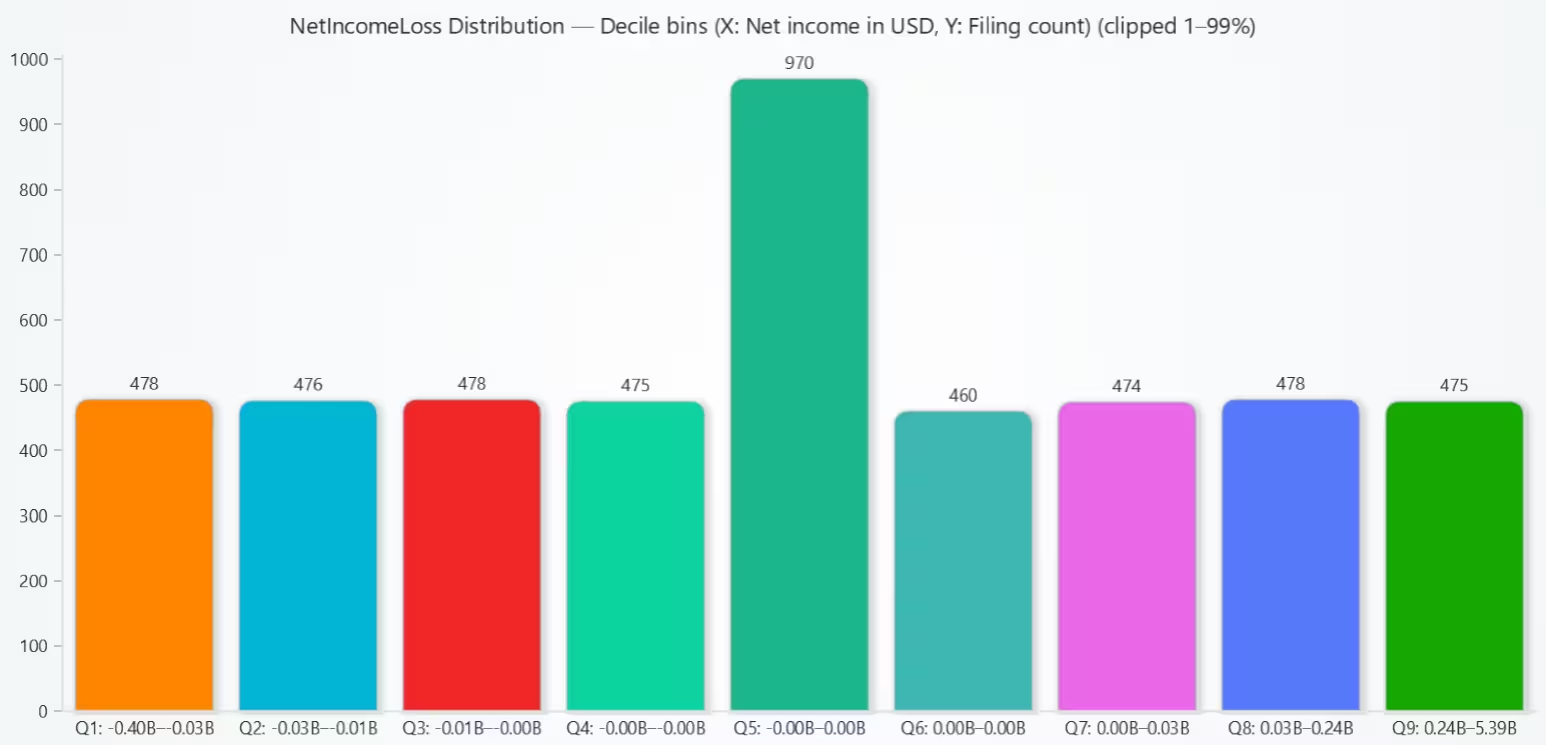
The decile histogram shows that corporate net incomes are highly unevenly distributed: the majority of firms report modest results, while a small fraction accounts for very large profits.
# Chart 1 — Histogram of NetIncomeLoss Distribution (from num_clean.csv)
# Developed with AI Assistance to demonstrate LightningChart Python

import lightningchart as lc
import pandas as pd
import numpy as np

# Load license
with open("D:/HAMK/Internship/MyProjects/lc_license.txt", "r") as f:
    lc.set_license(f.read().strip())

# Load cleaned dataset
num = pd.read_csv("num_clean.csv", low_memory=False)

# Filter to NetIncomeLoss and prep values
net = num[num["tag"].astype(str) == "NetIncomeLoss"].copy()
net["value"] = pd.to_numeric(net["value"], errors="coerce")
values = net["value"].dropna().to_numpy(dtype=float)

if values.size == 0:
    raise ValueError("No NetIncomeLoss values found in num_clean.csv. Check preprocessing or tag filtering.")

# Optional clipping to reduce extreme tails for readability
CLIP = True
if CLIP:
    p_low, p_high = np.nanpercentile(values, [1, 99])
    values = np.clip(values, p_low, p_high)
    clip_note = " (clipped 1–99%)"
else:
    clip_note = ""

# Build 10 quantile (decile) bins
cats = pd.qcut(values, q=10, duplicates="drop")

# Convert to Series before counting
counts = pd.Series(cats).value_counts(sort=False)

# Extract decile edges
intervals = counts.index.to_list()  # pandas.Interval objects

def fmtB(v):
    b = v / 1e9
    if abs(b) >= 100:
        return f"{b:.0f}B"
    elif abs(b) >= 10:
        return f"{b:.1f}B"
    else:
        return f"{b:.2f}B"

bar_data = []
for i, (iv, cnt) in enumerate(zip(intervals, counts.values), start=1):
    left, right = float(iv.left), float(iv.right)
    label = f"Q{i}: {fmtB(left)}–{fmtB(right)}"
    bar_data.append({"category": label, "value": int(cnt)})

# Create BarChart (quantile histogram)
chart = lc.BarChart(
    vertical=True,
    theme=lc.Themes.Light,
    title=f"NetIncomeLoss Distribution — Decile bins (X: Net income in USD, Y: Filing count){clip_note}"
)

chart.set_data(bar_data)
chart.set_sorting('disabled')   # keep Q1..Q10 order
# chart.set_bars_color('cyan')  # optional

chart.open()
Scatter Plot of Revenues vs NetIncomeLoss
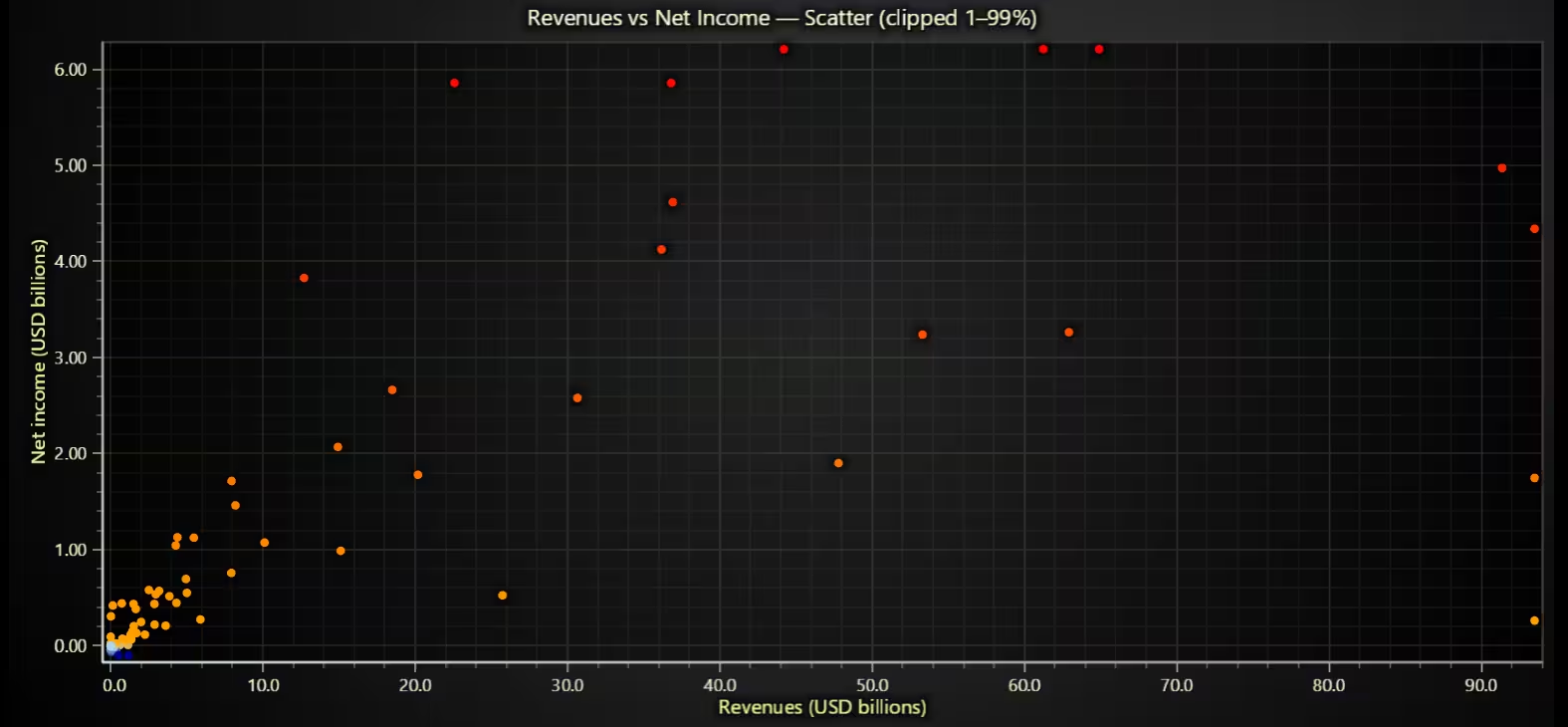
Revenues correlate positively with net income, but profitability varies widely for firms with comparable sales, indicating different cost structures and margins.
# Chart 2 – Scatter Plot of Revenues vs NetIncomeLoss
# Developed with AI Assistance to demonstrate LightningChart Python

import lightningchart as lc
import pandas as pd
import numpy as np

# Load license (adjust path if needed)
with open("D:/HAMK/Internship/MyProjects/lc_license.txt", "r") as f:
    lc.set_license(f.read().strip())

# Load + pivot so each row (adsh) has both metrics
num = pd.read_csv("num_clean.csv", low_memory=False)
keep = num[num["tag"].isin(["Revenues", "NetIncomeLoss"])].copy()
keep["value"] = pd.to_numeric(keep["value"], errors="coerce")
keep = keep.dropna(subset=["value"])

pivot = (
    keep.pivot_table(index="adsh", columns="tag", values="value", aggfunc="max")
         .dropna(subset=["Revenues", "NetIncomeLoss"])
         .reset_index()
)

if pivot.empty:
    raise ValueError("No filings contain both Revenues and NetIncomeLoss in num_clean.csv.")

# Scale to USD billions for readability
pivot["Revenues_B"] = pivot["Revenues"] / 1e9
pivot["NetIncomeLoss_B"] = pivot["NetIncomeLoss"] / 1e9

# Optional clipping to reduce extreme tails (toggle False to see full range)
CLIP = True
x = pivot["Revenues_B"].to_numpy(float)
y = pivot["NetIncomeLoss_B"].to_numpy(float)

if CLIP:
    x1, x99 = np.nanpercentile(x, [1, 99])
    y1, y99 = np.nanpercentile(y, [1, 99])
    x = np.clip(x, x1, x99)
    y = np.clip(y, y1, y99)
    clip_note = " (clipped 1–99%)"
else:
    clip_note = ""

# Build chart
chart = lc.ChartXY(title=f"Revenues vs Net Income — Scatter{clip_note}", theme=lc.Themes.Dark)

# Scatter series
pts = chart.add_point_series()

# Color points by NetIncomeLoss (y)
# Build a dynamic palette spanning min → 0 → upper quantile → max
y_min, y_q75, y_max = float(np.nanmin(y)), float(np.nanpercentile(y, 75)), float(np.nanmax(y))
pts.set_palette_point_coloring(
    steps=[
        {"value": y_min, "color": ("darkblue")}, # deep losses
        {"value": 0.0, "color": ("lightblue")}, # break-even
        {"value": y_q75, "color": ("orange")}, # strong profits
        {"value": y_max, "color": ("red")},
    ],
    look_up_property="y",
    percentage_values=False
)

# Add data
pts.add(x=x, y=y)

# Axis titles
chart.get_default_x_axis().set_title("Revenues (USD billions)")
chart.get_default_y_axis().set_title("Net income (USD billions)")

chart.open()
Bar Chart of Quarterly Operating Cash Flow
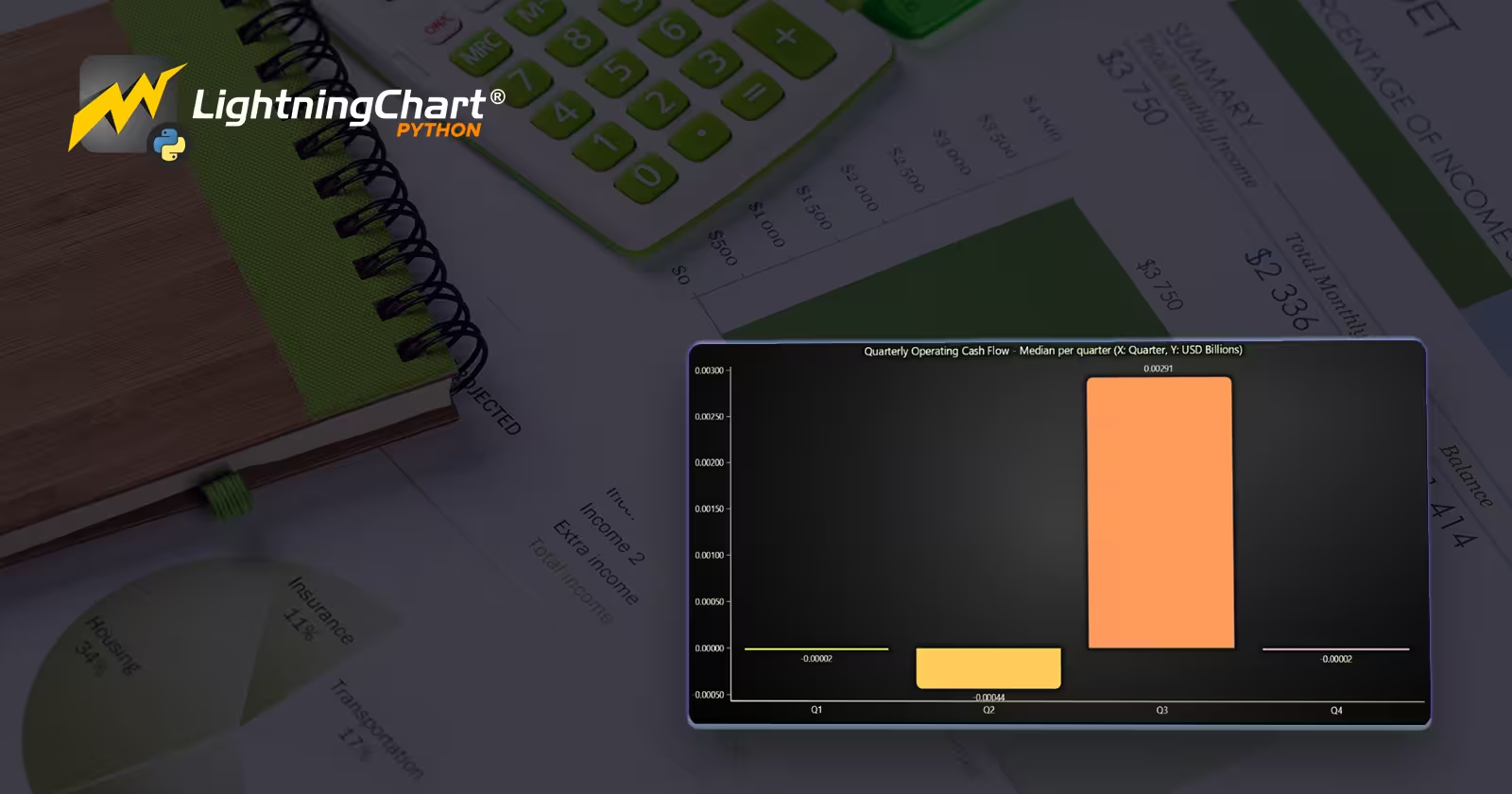
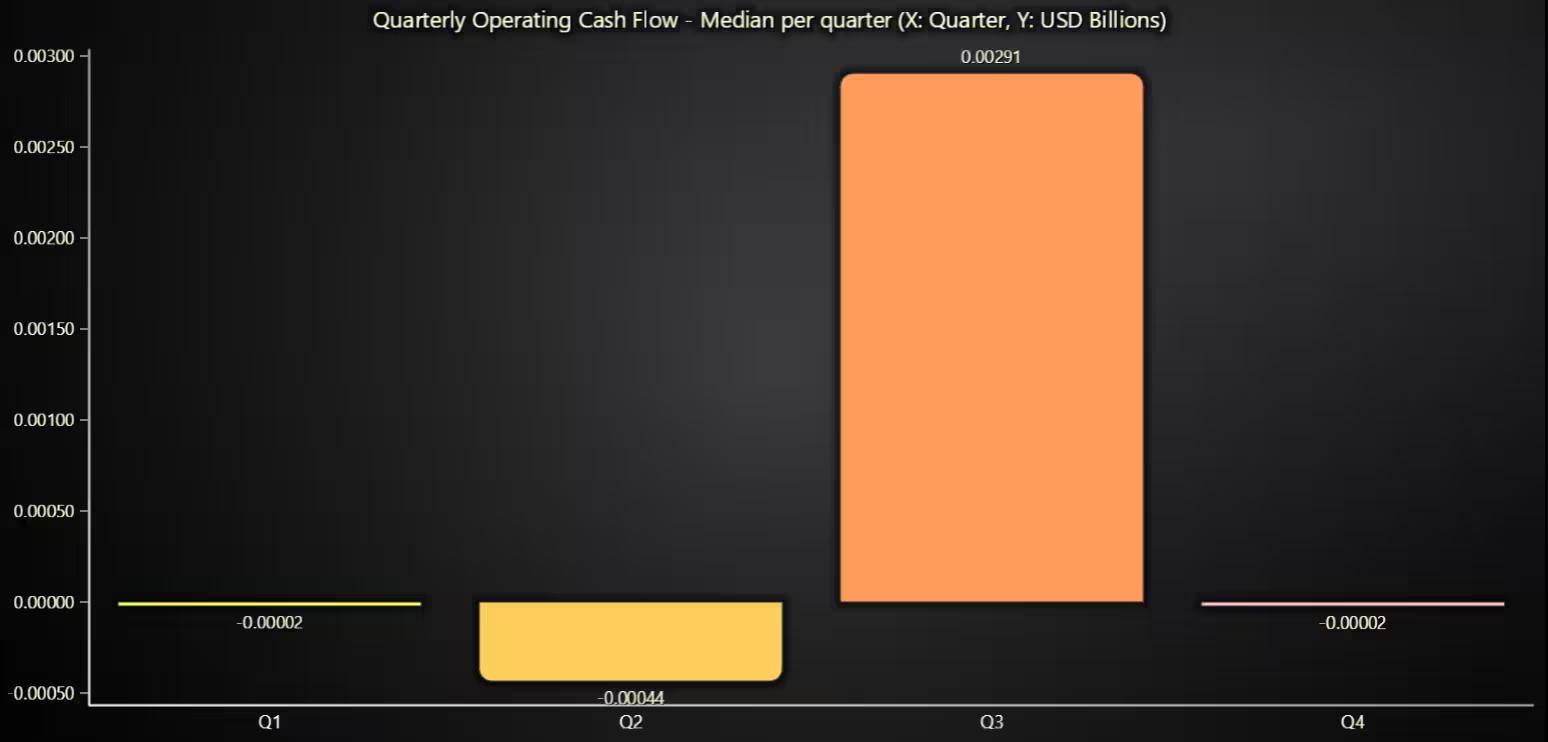
For most companies, operating cash flow is near break-even each quarter, with a small bump in Q3.
# Chart 3 – Bar Chart of Quarterly Operating Cash Flow
# Developed with AI Assistance to demonstrate LightningChart Python

import lightningchart as lc
import pandas as pd
import numpy as np

# Load license
with open("D:/HAMK/Internship/MyProjects/lc_license.txt", "r") as f:
    lc.set_license(f.read().strip())

# Load raw files (need fp from sub)
num = pd.read_csv("num.csv", encoding="ISO-8859-1", low_memory=False)
sub = pd.read_csv("sub.csv", encoding="ISO-8859-1", low_memory=False)

# Filter Operating Cash Flow tag
num["tag"] = num["tag"].astype(str)
ocf = num[num["tag"].str.fullmatch("NetCashProvidedByUsedInOperatingActivities", case=False, na=False)].copy()

ocf["value"] = pd.to_numeric(ocf["value"], errors="coerce")
ocf = ocf.dropna(subset=["value"])

# Keep USD where available
if "uom" in ocf.columns:
    ocf["uom"] = ocf["uom"].astype(str).str.upper()
    ocf = ocf[ocf["uom"].isin({"USD", "USD$", "US DOLLARS", "US$"})]

# Join quarter label from sub (`fp`), or infer from `ddate`
ocf["adsh"] = ocf["adsh"].astype(str).str.strip()
sub["adsh"] = sub["adsh"].astype(str).str.strip()
ocf = ocf.merge(sub[["adsh", "fp"]], on="adsh", how="left")

if "ddate" in ocf.columns:
    ocf["ddate"] = pd.to_datetime(ocf["ddate"].astype(str), errors="coerce", format="%Y%m%d")

def to_quarter(row):
    fp = str(row.get("fp", "")).upper()
    if fp in {"Q1", "Q2", "Q3", "Q4"}:
        return fp
    dt = row.get("ddate")
    if pd.notna(dt):
        return f"Q{int(((dt.month - 1)//3) + 1)}"
    return np.nan

ocf["quarter"] = ocf.apply(to_quarter, axis=1)
ocf = ocf[ocf["quarter"].isin(["Q1", "Q2", "Q3", "Q4"])]

# OPTIONAL: if multiple OCF facts per filing, keep the latest
if "ddate" in ocf.columns:
    ocf = ocf.sort_values(["adsh", "ddate"]).groupby("adsh", as_index=False).tail(1)

# Aggregate: median per quarter (robust), then scale
agg = ocf.groupby("quarter")["value"].median().reindex(["Q1", "Q2", "Q3", "Q4"])
agg_B = (agg / 1e9).fillna(0.0)

# Prepare BarChart data
bar_data = [{"category": q, "value": float(v)} for q, v in agg_B.items()]

# Plot
chart = lc.BarChart(
    vertical=True,
    theme=lc.Themes.Dark,
    title="Quarterly Operating Cash Flow - Median per quarter (X: Quarter, Y: USD Billions)"
)
chart.set_sorting("disabled")   # Q1..Q4 order
chart.set_data(bar_data)
# chart.set_bars_color('#22d3ee')  # optional

chart.open()
Correlation Heatmap of Core Accounting Metrics
Profit metrics move together (operating -> net), and sales scale costs and gross profit, consistent with accounting logic.
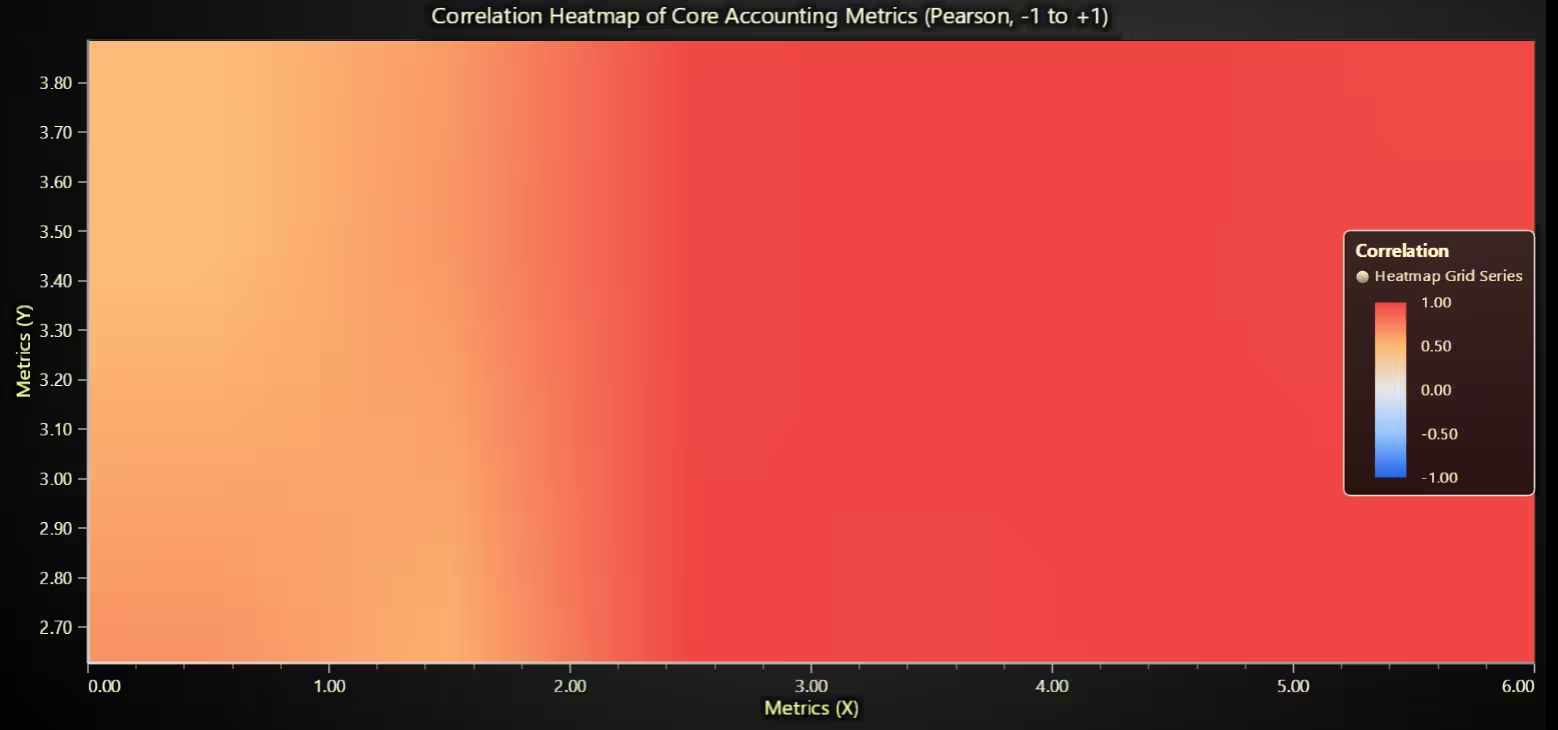
# Chart 4 – Correlation Heatmap of Core Accounting Metrics
# Developed with AI Assistance to demonstrate LightningChart Python

import lightningchart as lc
import pandas as pd
import numpy as np

# License
with open("D:/HAMK/Internship/MyProjects/lc_license.txt", "r") as f:
    lc.set_license(f.read().strip())

# Load + pivot
num = pd.read_csv("num_clean.csv", low_memory=False)

core_tags = [
    "Revenues",
    "CostOfRevenue",
    "GrossProfit",
    "OperatingIncomeLoss",
    "NetIncomeLoss",
    "NetCashProvidedByUsedInOperatingActivities",
]
df = num[num["tag"].isin(core_tags)].copy()
df["value"] = pd.to_numeric(df["value"], errors="coerce")
df = df.dropna(subset=["value"])

# one row per filing (adsh), columns = tags
wide = (
    df.pivot_table(index="adsh", columns="tag", values="value", aggfunc="max")
      .dropna(how="all")
)

# Keep only metrics that actually exist in this quarter
present = [c for c in core_tags if c in wide.columns]
if len(present) < 2:
    raise ValueError("Not enough core metrics available in num_clean.csv to compute correlations.")

# Pearson correlation across filings
corr = wide[present].corr(method="pearson")

# For readability, map long tag to shorter label
display_map = {
    "Revenues": "Revenues",
    "CostOfRevenue": "Cost of Rev.",
    "GrossProfit": "Gross Profit",
    "OperatingIncomeLoss": "Operating Inc./Loss",
    "NetIncomeLoss": "Net Income/Loss",
    "NetCashProvidedByUsedInOperatingActivities": "Operating Cash Flow",
}
labels = [display_map.get(t, t) for t in present]

# Build numeric grid (rows = Y, cols = X)
M = corr.reindex(index=present, columns=present).to_numpy(dtype=float)

# LightningChart heatmap
chart = lc.ChartXY(
    title="Correlation Heatmap of Core Accounting Metrics (Pearson, -1 to +1)",
    theme=lc.Themes.Dark
)

rows, cols = M.shape
heat = chart.add_heatmap_grid_series(columns=cols, rows=rows)
heat.set_start(x=0, y=0)
heat.set_end(x=cols, y=rows)
heat.set_step(x=1, y=1)
heat.set_intensity_interpolation(True)
heat.invalidate_intensity_values(M.tolist())
heat.hide_wireframe()

# Diverging palette: blue (-1) → light (0) → red (+1)
heat.set_palette_coloring(
    steps=[
        {"value": -1.0, "color": ("#2563eb")},   # blue
        {"value": -0.5, "color": ("#93c5fd")},
        {"value":  0.0, "color": ("#e5e7eb")},   # light gray
        {"value":  0.5, "color": ("#fdba74")},
        {"value":  1.0, "color": ("#ef4444")},   # red
    ],
    look_up_property="value",
    interpolate=True
)

# Axis titles (category labels vary by LC build; showing order below)
chart.get_default_x_axis().set_title("Metrics (X)")
chart.get_default_y_axis().set_title("Metrics (Y)")

# Legend
chart.add_legend(data=heat).set_title("Correlation")

# Print label order to console so you can include it in your report
print("Heatmap order (left→right / bottom→top):")
for i, name in enumerate(labels, 1):
    print(f"{i}. {name}")

chart.open()
Line Chart of Revenues Over Time
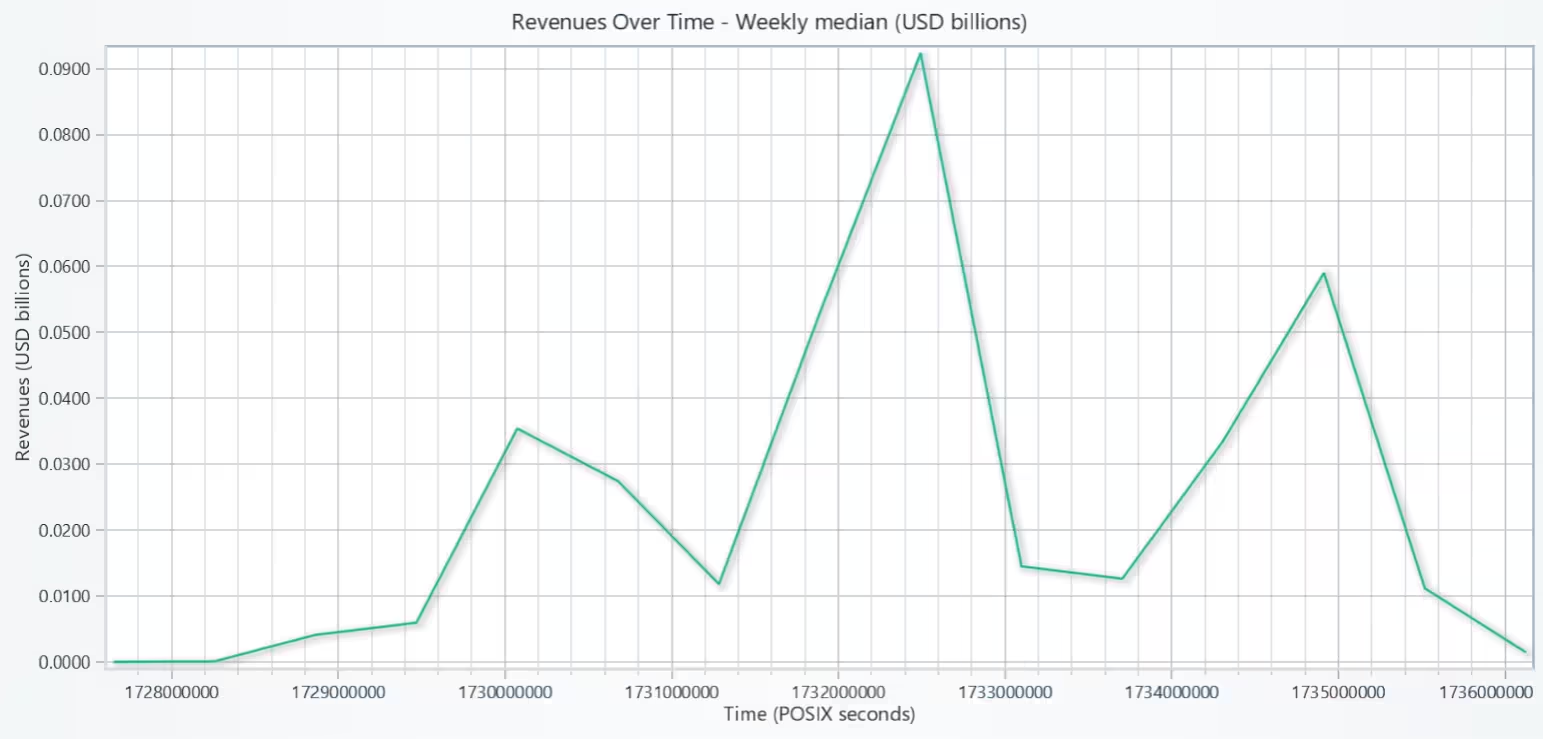
Weekly median revenue barely moves for the typical filer.
# Chart 5 – Line Chart of Revenues Over Time
# Developed with AI Assistance to demonstrate LightningChart Python

import lightningchart as lc
import pandas as pd
import numpy as np

# License (adjust if needed)
with open("D:/HAMK/Internship/MyProjects/lc_license.txt", "r") as f:
    lc.set_license(f.read().strip())

# Load data
num = pd.read_csv("num_clean.csv", low_memory=False)
# Use sub.csv because it reliably includes 'filed'/'accepted' in the raw dump
sub = pd.read_csv("sub.csv", encoding="ISO-8859-1", low_memory=False)

# Revenues per filing
rev_rows = num[num["tag"].astype(str) == "Revenues"].copy()
rev_rows["value"] = pd.to_numeric(rev_rows["value"], errors="coerce")
rev_rows = rev_rows.dropna(subset=["value"])

# Keep one revenue per filing (max if multiple facts)
rev = rev_rows.groupby("adsh", as_index=False)["value"].max()

# Merge possible date columns from sub
sub_dates = sub[["adsh", "filed", "accepted", "period"]].copy()
rev = rev.merge(sub_dates, on="adsh", how="left")

# Also bring in ddate from num as last fallback
rev_ddate = (
    rev_rows[["adsh", "ddate"]]
    .dropna()
    .drop_duplicates(subset=["adsh"], keep="last")
)
rev = rev.merge(rev_ddate, on="adsh", how="left")

# Build a single datetime column with fallbacks
def parse_ymd(s):
    return pd.to_datetime(str(s), errors="coerce", format="%Y%m%d")

rev["filed_dt"]    = parse_ymd(rev["filed"])
rev["accepted_dt"] = pd.to_datetime(rev["accepted"], errors="coerce")  # already timestamp-like
rev["period_dt"]   = parse_ymd(rev["period"])
rev["ddate_dt"]    = pd.to_datetime(rev["ddate"], errors="coerce", format="%Y%m%d")

rev["date"] = rev["filed_dt"]
rev.loc[rev["date"].isna(), "date"] = rev.loc[rev["date"].isna(), "accepted_dt"]
rev.loc[rev["date"].isna(), "date"] = rev.loc[rev["date"].isna(), "period_dt"]
rev.loc[rev["date"].isna(), "date"] = rev.loc[rev["date"].isna(), "ddate_dt"]

# Drop rows with no usable date
rev = rev.dropna(subset=["date"])
if rev.empty:
    raise ValueError("No valid dates found (filed/accepted/period/ddate). Check your sub/num files.")

# Aggregate to weekly median (robust)
weekly = (
    rev.set_index("date")
       .groupby(pd.Grouper(freq="W-MON"))["value"]
       .median()
       .dropna()
)
# Fallback to daily if very sparse
if weekly.size < 3:
    weekly = (
        rev.set_index("date")
           .groupby(pd.Grouper(freq="D"))["value"]
           .median()
           .dropna()
    )

# Build series data (X as POSIX seconds, Y in USD billions)
y_vals = (weekly / 1e9).to_numpy(dtype=float)
x_vals = (weekly.index.astype("int64") // 10**9).to_numpy(dtype=float)

# Plot
chart = lc.ChartXY(theme=lc.Themes.Light, title="Revenues Over Time - Weekly median (USD billions)")
line = chart.add_line_series()
line.append_samples(x_values=x_vals, y_values=y_vals)

# Axes
x_axis = chart.get_default_x_axis()
y_axis = chart.get_default_y_axis()
y_axis.set_title("Revenues (USD billions)")

# Use date ticks if available
try:
    x_axis.set_tick_strategy(lc.AxisTickStrategies.DateTime)
    x_axis.set_title("Filing date")
except Exception:
    x_axis.set_title("Time (POSIX seconds)")

chart.open()
Stacked Bar Chart of Liabilities (Current vs Noncurrent)
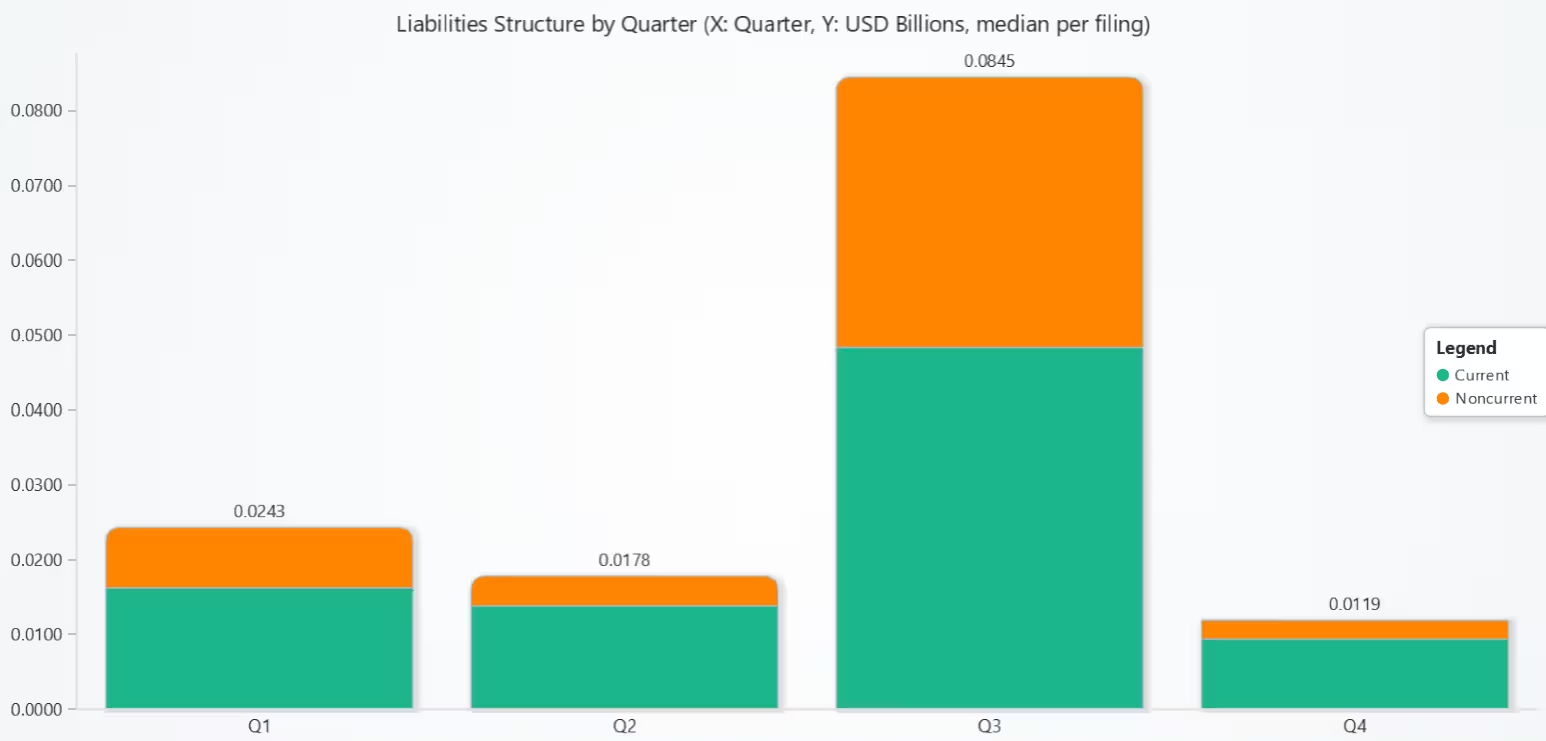
The typical filer carries more short-term (current) debt than long-term.
# Chart 6 – Stacked Bar Chart of Liabilities (Current vs Noncurrent)
# Developed with AI Assistance to demonstrate LightningChart Python

import lightningchart as lc
import pandas as pd
import numpy as np

# Load license
with open("D:/HAMK/Internship/MyProjects/lc_license.txt", "r") as f:
    lc.set_license(f.read().strip())

# Load raw SEC files (need balance-sheet tags + quarter labels)
num = pd.read_csv("num.csv", encoding="ISO-8859-1", low_memory=False)
sub = pd.read_csv("sub.csv", encoding="ISO-8859-1", low_memory=False)

num["tag"] = num["tag"].astype(str)
num["adsh"] = num["adsh"].astype(str).str.strip()
sub["adsh"] = sub["adsh"].astype(str).str.strip()

# Keep only the tags we need
tags = ["Liabilities", "LiabilitiesCurrent", "LiabilitiesNoncurrent"]
df = num[num["tag"].isin(tags)].copy()

# Numeric + USD filter
df["value"] = pd.to_numeric(df["value"], errors="coerce")
df = df.dropna(subset=["value"])
if "uom" in df.columns:
    df["uom"] = df["uom"].astype(str).str.upper()
    df = df[df["uom"].isin({"USD", "USD$", "US DOLLARS", "US$"})]

# If multiple ddates per (adsh, tag), keep the latest
if "ddate" in df.columns:
    df["ddate"] = pd.to_datetime(df["ddate"].astype(str), errors="coerce", format="%Y%m%d")
    df = df.sort_values(["adsh", "tag", "ddate"]).groupby(["adsh", "tag"], as_index=False).tail(1)

# Pivot to one row per filing
wide = df.pivot_table(index="adsh", columns="tag", values="value", aggfunc="max")

# Derive current & noncurrent liabilities per filing
def split_liabilities(row):
    cur  = row.get("LiabilitiesCurrent", np.nan)
    nonc = row.get("LiabilitiesNoncurrent", np.nan)
    total = row.get("Liabilities", np.nan)

    # If both provided, use them.
    if pd.notna(cur) and pd.notna(nonc):
        return cur, nonc
    # If total + one component, infer the other.
    if pd.notna(total) and pd.notna(cur):
        nonc_inf = total - cur
        return cur, (nonc_inf if np.isfinite(nonc_inf) else np.nan)
    if pd.notna(total) and pd.notna(nonc):
        cur_inf = total - nonc
        return (cur_inf if np.isfinite(cur_inf) else np.nan), nonc
    # Otherwise, insufficient info.
    return np.nan, np.nan

cur_vals, nonc_vals = [], []
for _, row in wide.iterrows():
    c, n = split_liabilities(row)
    cur_vals.append(c); nonc_vals.append(n)

wide = wide.assign(Liab_Current=cur_vals, Liab_Noncurrent=nonc_vals)
wide = wide[(wide["Liab_Current"].notna()) | (wide["Liab_Noncurrent"].notna())].reset_index()

# Attach quarter labels (prefer sub.fp; else infer from sub.filed)
sub_small = sub[["adsh", "fp", "filed"]].copy()
wide = pd.merge(wide, sub_small, on="adsh", how="left")

# Parse fallback date to infer quarter if needed
def to_quarter(fp, filed):
    fp = str(fp).upper()
    if fp in {"Q1", "Q2", "Q3", "Q4"}:
        return fp
    dt = pd.to_datetime(str(filed), errors="coerce", format="%Y%m%d")
    if pd.notna(dt):
        return f"Q{int(((dt.month - 1)//3) + 1)}"
    return np.nan

wide["quarter"] = [to_quarter(fp, filed) for fp, filed in zip(wide["fp"], wide["filed"])]
wide = wide[wide["quarter"].isin(["Q1", "Q2", "Q3", "Q4"])]

if wide.empty:
    raise ValueError("No filings with usable Liabilities split and quarter labels.")

# Aggregate to median per quarter (USD billions)
agg = (
    wide.groupby("quarter")[["Liab_Current", "Liab_Noncurrent"]]
        .median()
        .reindex(["Q1","Q2","Q3","Q4"])
        / 1e9
)
agg = agg.fillna(0.0)

categories = agg.index.tolist()  # ["Q1","Q2","Q3","Q4"]
current_vals = agg["Liab_Current"].astype(float).tolist()
noncurrent_vals = agg["Liab_Noncurrent"].astype(float).tolist()

# Plot stacked bars
chart = lc.BarChart(
    vertical=True,
    theme=lc.Themes.Light,
    title="Liabilities Structure by Quarter (X: Quarter, Y: USD Billions, median per filing)"
)

chart.set_sorting("disabled")  # keep Q1..Q4 order
chart.set_data_stacked(
    categories,
    [
        {"subCategory": "Current",    "values": current_vals},
        {"subCategory": "Noncurrent", "values": noncurrent_vals},
    ],
)
chart.add_legend().add(chart)

chart.open()
Box Plot of Gross Profit Margin by Industry
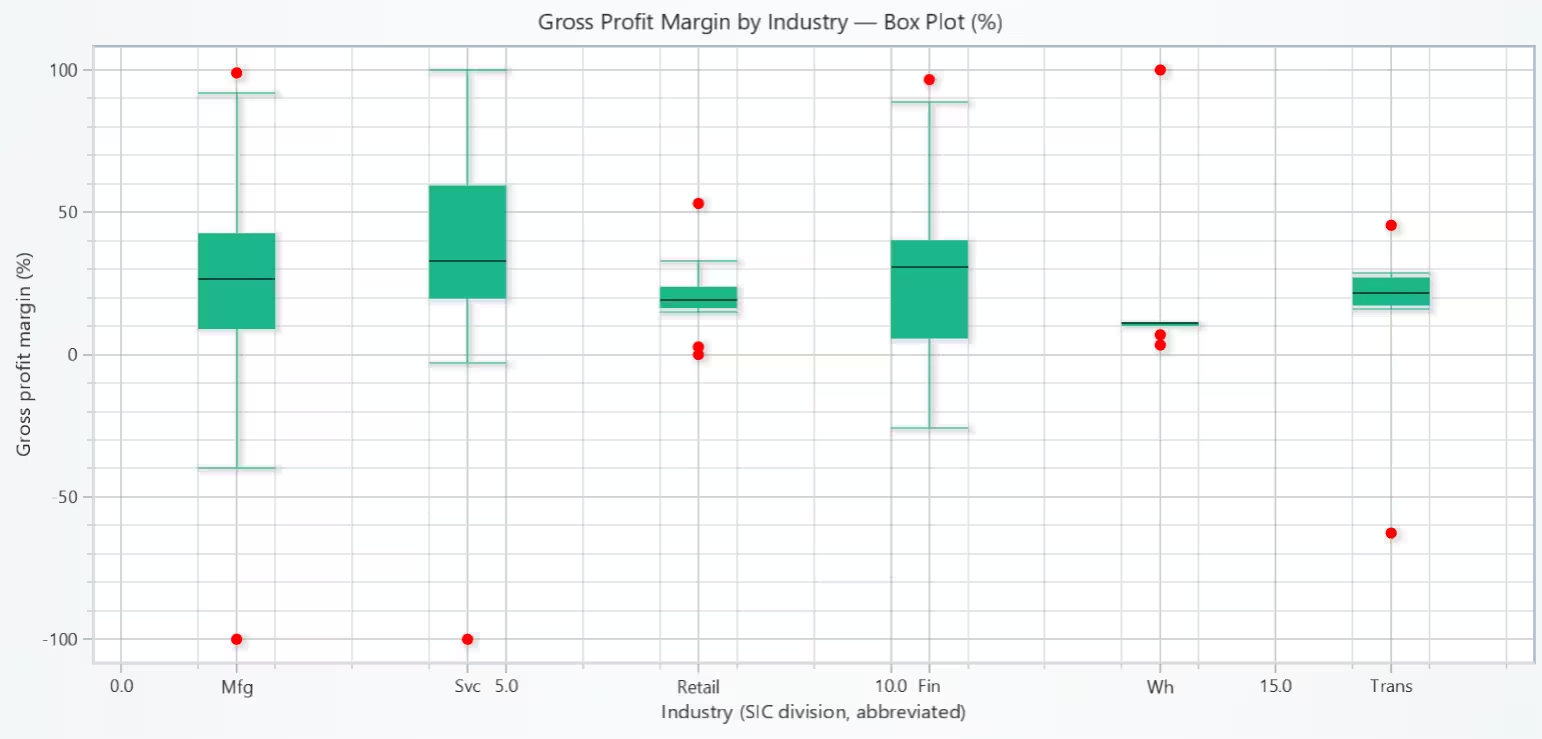
Profitability is industry-driven: asset-light sectors (Services/Finance) tend to earn higher margins, while cost-heavy sectors (Retail/Wholesale) run thin margins.
# Chart 7 – Box Plot of Gross Profit Margin by Industry
# Developed with AI Assistance to demonstrate LightningChart Python

import lightningchart as lc
import pandas as pd
import numpy as np

# Load your license
with open("D:/HAMK/Internship/MyProjects/lc_license.txt", "r") as f:
    lc.set_license(f.read().strip())

# Load data
num = pd.read_csv("num_clean.csv", low_memory=False)
sub = pd.read_csv("sub_clean.csv", low_memory=False)   # needs 'sic'

# Keep Revenues & GrossProfit, one value per filing
df = num[num["tag"].isin(["Revenues", "GrossProfit"])].copy()
df["value"] = pd.to_numeric(df["value"], errors="coerce")
df = df.dropna(subset=["value"])

wide = (
    df.pivot_table(index="adsh", columns="tag", values="value", aggfunc="max")
      .dropna(subset=["Revenues", "GrossProfit"])
      .reset_index()
)

# Merge SIC
sub_small = sub[["adsh", "sic"]].copy()
sub_small["adsh"] = sub_small["adsh"].astype(str).str.strip()
wide["adsh"] = wide["adsh"].astype(str).str.strip()
wide = wide.merge(sub_small, on="adsh", how="left")

# Map SIC → division (compact)
def sic_to_division(s):
    try:
        s = int(s)
    except: return "Other"
    if   100 <= s <=  999:  return "Ag"
    if  1000 <= s <= 1499:  return "Mining"
    if  1500 <= s <= 1799:  return "Const"
    if  2000 <= s <= 3999:  return "Mfg"
    if  4000 <= s <= 4999:  return "Trans"
    if  5000 <= s <= 5199:  return "Wh"
    if  5200 <= s <= 5999:  return "Retail"
    if  6000 <= s <= 6799:  return "Fin"
    if  7000 <= s <= 8999:  return "Svc"
    if  9000 <= s <= 9729:  return "Public"
    return "Other"

wide["industry"] = wide["sic"].apply(sic_to_division)

# Gross Profit Margin (%), clip for readability
rev = wide["Revenues"].replace(0, np.nan)
gpm = (wide["GrossProfit"] / rev) * 100.0
wide["gpm_pct"] = gpm.replace([np.inf, -np.inf], np.nan)
wide = wide.dropna(subset=["gpm_pct"])
wide["gpm_pct"] = wide["gpm_pct"].clip(-100, 100)

# Top 6 industries by count
top_inds = (
    wide.groupby("industry")["gpm_pct"].size()
        .sort_values(ascending=False).head(6).index.tolist()
)
plot_df = wide[wide["industry"].isin(top_inds)].copy()
if plot_df.empty:
    raise ValueError("No gross profit margin data after filtering. Check num_clean.csv contents.")

# Create chart
chart = lc.ChartXY(theme=lc.Themes.Light, title="Gross Profit Margin by Industry — Box Plot (%)")

# Prepare box data with extra spacing + short labels
SPACING = 3  # widen distance between categories to avoid overlap
dataset, x_out, y_out = [], [], []

for i, cat in enumerate(top_inds):
    vals = plot_df.loc[plot_df["industry"] == cat, "gpm_pct"].dropna().to_numpy()
    if vals.size < 2:
        continue

    start = (i * SPACING) + 1
    end = start + 1

    q1 = float(np.percentile(vals, 25))
    q3 = float(np.percentile(vals, 75))
    med = float(np.median(vals))
    iqr = q3 - q1
    lo_b, hi_b = q1 - 1.5 * iqr, q3 + 1.5 * iqr

    inliers = vals[(vals >= lo_b) & (vals <= hi_b)]
    if inliers.size == 0:
        inliers = np.array([q1, q3], dtype=float)

    dataset.append({
        "start": start, "end": end,
        "lowerQuartile": q1, "upperQuartile": q3,
        "median": med,
        "lowerExtreme": float(inliers.min()),
        "upperExtreme": float(inliers.max()),
    })

    outs = vals[(vals < lo_b) | (vals > hi_b)]
    if outs.size:
        x_out += [start + 0.5] * outs.size
        y_out += outs.tolist()

# Add box series
series = chart.add_box_series()
series.add_multiple(dataset)

# Add outliers
out = chart.add_point_series(sizes=True)
out.set_point_color("red")
if y_out:
    out.append_samples(x_values=x_out, y_values=y_out, sizes=[9] * len(y_out))

# Axis titles
x_axis = chart.get_default_x_axis()
y_axis = chart.get_default_y_axis()
x_axis.set_title("Industry (SIC division, abbreviated)")
y_axis.set_title("Gross profit margin (%)")

# Custom ticks with short labels (no overlap)
try:
    # Set the visible range to fit all categories
    x_axis.set_interval(0, (len(top_inds) - 1) * SPACING + 3)
    for i, cat in enumerate(top_inds):
        tick = x_axis.add_custom_tick()
        tick.set_value((i * SPACING) + 1.5)  # centered between start & end
        tick.set_text(cat)                   # already short (e.g., Mfg, Retail)
except Exception:
    # If custom ticks aren't supported, print order to console
    print("Custom ticks not supported; category order:", top_inds)

chart.open()
Scatter Plot of Assets vs StockholdersEquity
Across filings, assets and equity move together, as expected from the balance sheet.
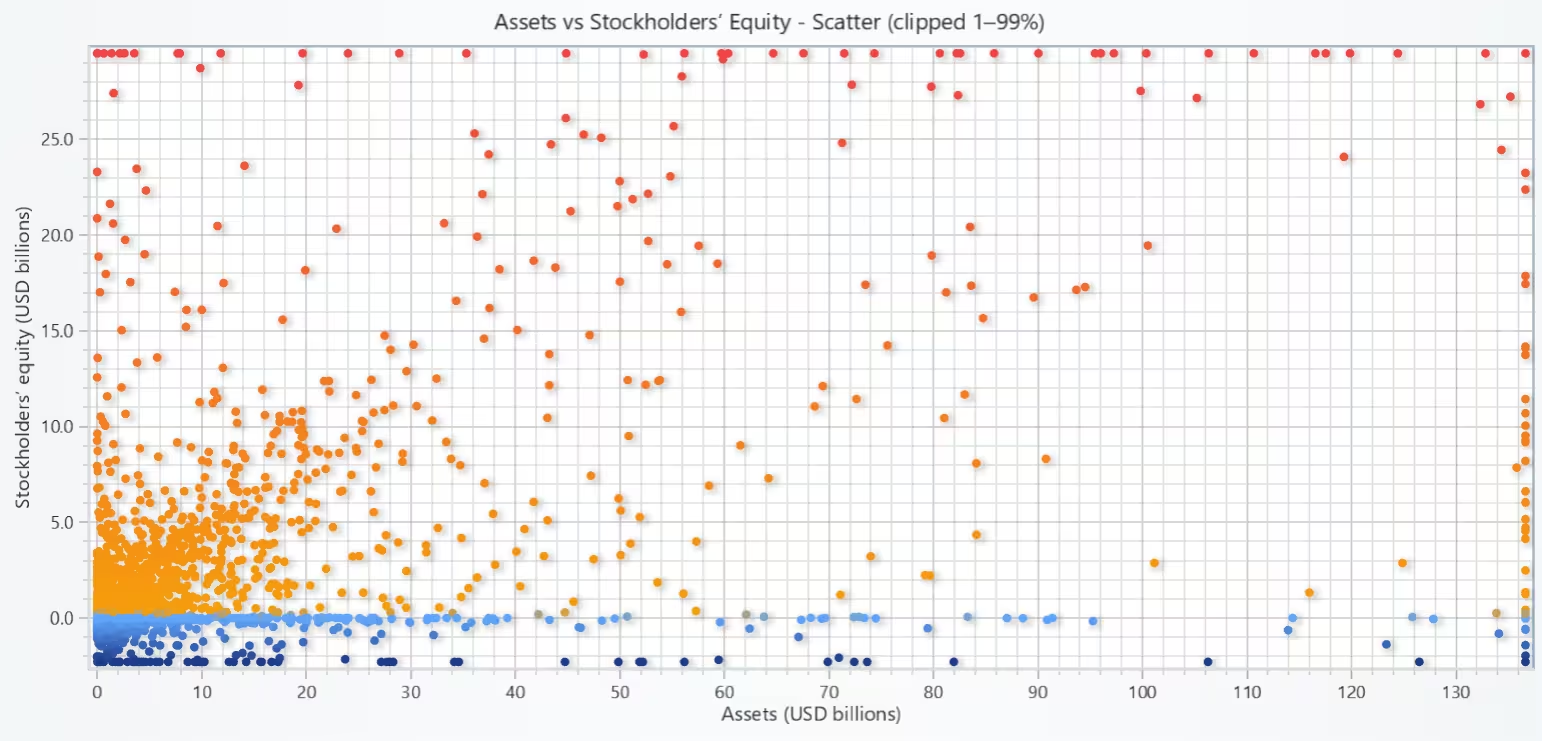
# Chart 8 – Scatter Plot of Assets vs StockholdersEquity
# Developed with AI Assistance to demonstrate LightningChart Python

import lightningchart as lc
import numpy as np
import pandas as pd

# Load license
with open("D:/HAMK/Internship/MyProjects/lc_license.txt", "r") as f:
    lc.set_license(f.read().strip())

# Load numeric (need balance-sheet tags)
num = pd.read_csv("num.csv", encoding="ISO-8859-1", low_memory=False)

num["tag"] = num["tag"].astype(str)
num["adsh"] = num["adsh"].astype(str).str.strip()
num["value"] = pd.to_numeric(num["value"], errors="coerce")
num = num.dropna(subset=["value"])

# Keep only the tags we need
tags = [
    "Assets", "AssetsCurrent", "AssetsNoncurrent",
    "Liabilities",
    "StockholdersEquity",
    "StockholdersEquityIncludingPortionAttributableToNoncontrollingInterest",
]
df = num[num["tag"].isin(tags)].copy()

# If multiple dates per (adsh, tag), keep latest
if "ddate" in df.columns:
    df["ddate"] = pd.to_datetime(df["ddate"].astype(str), errors="coerce", format="%Y%m%d")
    df = df.sort_values(["adsh", "tag", "ddate"]).groupby(["adsh", "tag"], as_index=False).tail(1)

# Pivot to wide per filing
wide = df.pivot_table(index="adsh", columns="tag", values="value", aggfunc="max")

# Compute Assets (proxy) and Equity (choose best available)
def assets_proxy(row):
    if pd.notna(row.get("Assets")):
        return row["Assets"]
    ac, anc = row.get("AssetsCurrent"), row.get("AssetsNoncurrent")
    if pd.notna(ac) and pd.notna(anc):
        return ac + anc
    liab = row.get("Liabilities")
    eq = row.get("StockholdersEquity")
    if pd.isna(eq):
        eq = row.get("StockholdersEquityIncludingPortionAttributableToNoncontrollingInterest")
    if pd.notna(liab) and pd.notna(eq):
        return liab + eq
    return np.nan

def equity_value(row):
    if pd.notna(row.get("StockholdersEquity")):
        return row.get("StockholdersEquity")
    return row.get("StockholdersEquityIncludingPortionAttributableToNoncontrollingInterest")

wide["Assets_val"] = wide.apply(assets_proxy, axis=1)
wide["Equity_val"] = wide.apply(equity_value, axis=1)

data = wide[["Assets_val", "Equity_val"]].dropna()
if data.empty:
    raise ValueError("No filings with both Assets (direct/proxy) and Stockholders' Equity found in num.csv.")

# Scale to USD billions
x = (data["Assets_val"] / 1e9).to_numpy(float)
y = (data["Equity_val"] / 1e9).to_numpy(float)

# Optional clipping to reduce extreme tails
CLIP = True
if CLIP:
    x1, x99 = np.nanpercentile(x, [1, 99])
    y1, y99 = np.nanpercentile(y, [1, 99])
    x = np.clip(x, x1, x99)
    y = np.clip(y, y1, y99)
    clip_note = " (clipped 1–99%)"
else:
    clip_note = ""

# Plot
chart = lc.ChartXY(title=f"Assets vs Stockholders’ Equity - Scatter{clip_note}", theme=lc.Themes.Light)
pts = chart.add_point_series()

# Color by equity magnitude (y) for a bit of depth; safe for all builds
y_min, y_q75, y_max = float(np.nanmin(y)), float(np.nanpercentile(y, 75)), float(np.nanmax(y))
pts.set_palette_point_coloring(
    steps=[
        {"value": y_min, "color": ("#1e3a8a")},  # darker for low equity
        {"value": 0.0,   "color": ("#60a5fa")},  # near zero
        {"value": y_q75, "color": ("#f59e0b")},  # higher equity
        {"value": y_max, "color": ("#ef4444")},  # very high equity
    ],
    look_up_property="y",
    percentage_values=False
)

pts.add(x=x, y=y)

# Axes
chart.get_default_x_axis().set_title("Assets (USD billions)")
chart.get_default_y_axis().set_title("Stockholders’ equity (USD billions)")

chart.open()
Heatmap of Filing Frequency by Year and Form Type
Filing activity is seasonal: 10-Q dominates around quarter deadlines; 10-K clusters around fiscal year-end; 8-K trickles through the period.
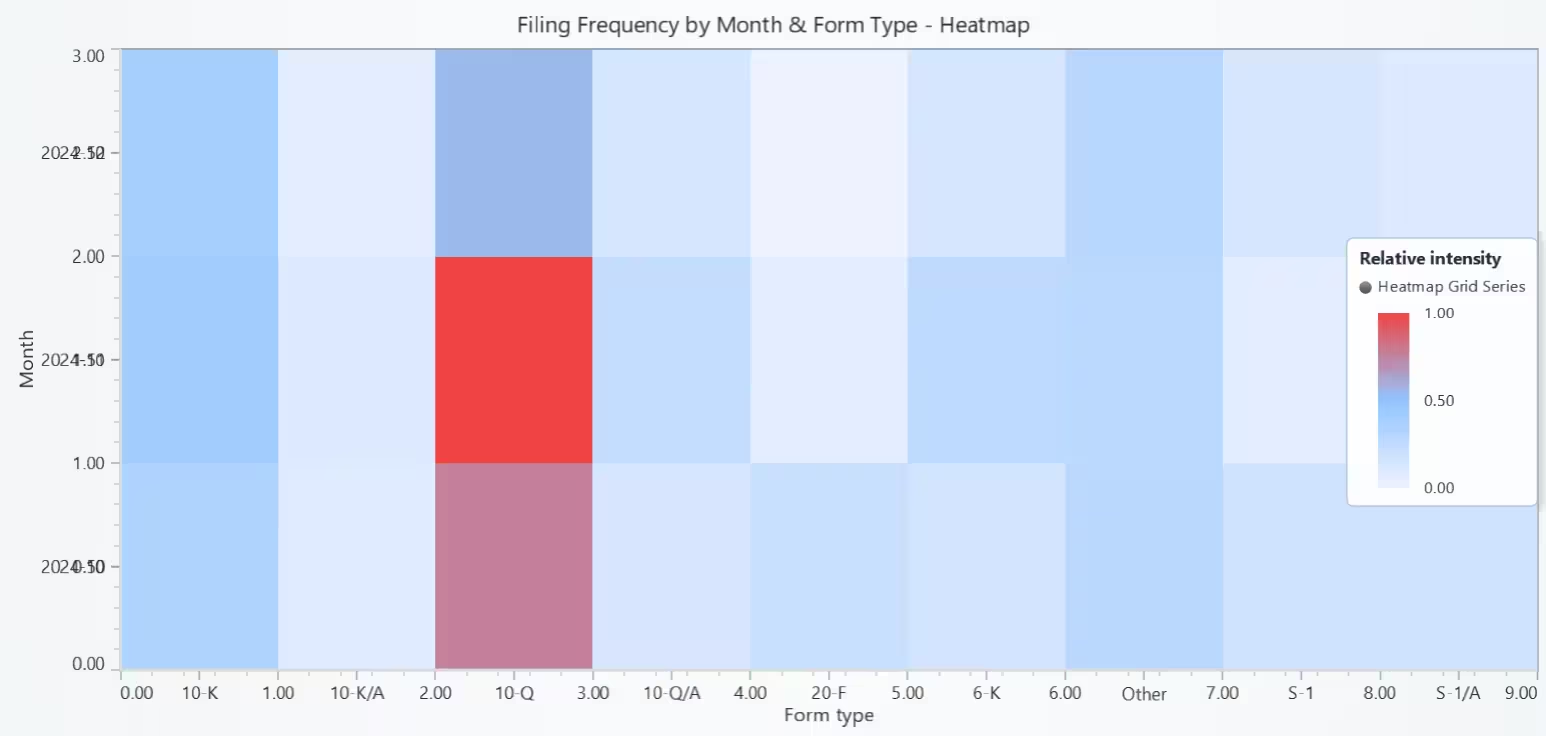
# Chart 9 – Heatmap of Filing Frequency by Year and Form Type
# Developed with AI Assistance to demonstrate LightningChart Python

import lightningchart as lc
import numpy as np
import pandas as pd

# Load license
with open("D:/HAMK/Internship/MyProjects/lc_license.txt", "r") as f:
    lc.set_license(f.read().strip())

# Load submissions (forms + dates)
sub = pd.read_csv("sub.csv", encoding="ISO-8859-1", low_memory=False)
sub["adsh"] = sub["adsh"].astype(str).str.strip()
sub["form"] = sub["form"].astype(str).str.strip()

# Helpers
def get_col(df, name):
    return df[name] if name in df.columns else pd.Series([pd.NA] * len(df), index=df.index)
def parse_ymd_series(series):
    return pd.to_datetime(series.astype(str), errors="coerce", format="%Y%m%d")

# Build a single datetime (filed → accepted → period → fy)
dt = parse_ymd_series(get_col(sub, "filed"))
dt = dt.fillna(pd.to_datetime(get_col(sub, "accepted"), errors="coerce"))
dt = dt.fillna(parse_ymd_series(get_col(sub, "period")))
fy = pd.to_numeric(get_col(sub, "fy"), errors="coerce")
dt = dt.fillna(pd.to_datetime(fy, errors="coerce", format="%Y"))

sub = sub.assign(date=dt).dropna(subset=["date"])

# Prefer YEAR; if only 1 year in the slice, fallback to MONTH (YYYY-MM)
years_n = sub["date"].dt.year.nunique()
if years_n >= 2:
    y_field = "year"
    sub["year"] = sub["date"].dt.year.astype(int)
else:
    y_field = "month"
    sub["month"] = sub["date"].dt.to_period("M").astype(str)

# Keep top 8 forms; rest = "Other"
top_forms = sub["form"].value_counts().head(8).index.tolist()
sub["form_simpl"] = np.where(sub["form"].isin(top_forms), sub["form"], "Other")

# Pivot to Y×Form counts
counts = (
    sub.groupby([y_field, "form_simpl"]).size()
       .unstack(fill_value=0)
       .sort_index()
)

# Remove empty columns (no filings)
counts = counts.loc[:, counts.sum(axis=0) > 0]
if counts.empty:
    raise ValueError("No filing counts available after parsing sub.csv.")

# Intensity matrix (log + normalize to 0..1)
M = counts.to_numpy(dtype=float)
M_log = np.log1p(M)
m_min, m_max = float(M_log.min()), float(M_log.max())
if m_max == m_min:
    # Still flat → center fill to show up with legend, avoids “all green”
    M_norm = np.full_like(M_log, 0.5)
else:
    M_norm = (M_log - m_min) / (m_max - m_min)

# LightningChart heatmap expects a list shaped [columns][rows]
# We have rows=Y, cols=Forms -> transpose
intensity = M_norm.T.tolist()

rows = counts.shape[0]              # number of Y bins
cols = counts.shape[1]              # number of form columns
Y_labels = counts.index.tolist()    # Y axis labels (years or months)
X_labels = counts.columns.tolist()  # X axis labels (form types)

# LightningChart heatmap
chart = lc.ChartXY(
    title=f"Filing Frequency by {y_field.capitalize()} & Form Type - Heatmap",
    theme=lc.Themes.Light
)

heat = chart.add_heatmap_grid_series(columns=cols, rows=rows)
heat.set_start(x=0, y=0)
heat.set_end(x=cols, y=rows)
heat.set_step(x=1, y=1)
heat.set_intensity_interpolation(False)      # crisp cells
heat.invalidate_intensity_values(intensity)  # <- transposed list
heat.hide_wireframe()

# Palette 0→1
heat.set_palette_coloring(
    steps=[
        {"value": 0.00, "color": ("#eef2ff")},   # low
        {"value": 0.50, "color": ("#93c5fd")},   # mid
        {"value": 1.00, "color": ("#ef4444")},   # high
    ],
    look_up_property="value",
    interpolate=True
)

# Axes & labeled ticks (center each cell)
x_axis = chart.get_default_x_axis()
y_axis = chart.get_default_y_axis()
x_axis.set_title("Form type")
y_axis.set_title(y_field.capitalize())

try:
    x_axis.set_interval(0, cols)
    for i, f in enumerate(X_labels):
        t = x_axis.add_custom_tick(); t.set_value(i + 0.5); t.set_text(f)

    y_axis.set_interval(0, rows)
    for j, y in enumerate(Y_labels):
        t = y_axis.add_custom_tick(); t.set_value(j + 0.5); t.set_text(str(y))
except Exception:
    print("Forms (left→right):", X_labels)
    print(f"{y_field.capitalize()} (bottom→top):", Y_labels)

chart.add_legend(data=heat).set_title("Relative intensity")
chart.open()
Conclusion
This project explored the SEC Financial Statement Data Sets using LightningChart Python to start visualizing financial statements’ key measures of profitability, liquidity, and solvency. Nine charts were developed, including histograms, scatter plots, bar charts, heatmaps, and box plots to highlight distribution patterns, cross-metric relationships, industry differences, and regulatory filing trends. Together, these visualizations provided a clearer understanding of how U.S. companies’ financial structures and results vary over time and across sectors.
Continue learning with LightningChart
Why Performance Matters in Data Visualization?
Written by a human | Updated on April 10th, 2025Performance in Data VisualizationI was doing a Google search a couple of days ago and particularly, I wanted to know what are the options for developers who need to visualize large amounts of data points within...

Geospatial data visualization with Google Maps & LightningChart
Written by a human | Updated on April 10th, 2025Geospatial Data Visualization This article showcases and describes a particular use case of LightningChart JS for geospatial data visualization. LightningChart JS is a JavaScript charting tool designed for...
![[Tutorial] How to embed interactive charts in PowerPoint presentations](https://lightningchart.com/wp-content/uploads/2022/12/Interactive-Charts-in-PowerPoint-feature-image.jpg)
[Tutorial] How to embed interactive charts in PowerPoint presentations
Written by a human | Updated on April 9th, 2025Embed interactive charts in PowerPoint presentations Embedding charts within PowerPoint presentations has always been possible but perhaps one of the most ignored possibilities is actually embedding web applications...



If you have any questions, feel free to contact us!
©LightningChart Ltd 2025. All rights reserved.