








Conducting Risk Management Analysis | LightningChart Python
Tutorial
Assisted by AI
Learn how to conduct a data visualization risk management analysis using LightningChart Python library.
Vindya Nukulasooriya
Data Science Developer

Introduction
This project presents a comprehensive financial transaction and risk management visualization analysis using the Financial Transaction and Risk Management Dataset, powered by the LightningChart Python library. The dataset, published on Kaggle, contains bookkeeping-level transaction records, including transaction IDs, dates, account numbers, transaction types (debit, credit, refund), amounts, balances, categories, and associated risk attributes such as risk type and incident severity.
The primary objectives of this project are to:
- Explore the relationships between transaction amounts, balances, and transaction frequency.
- Identify financial patterns such as revenue and expense trends, cash flow fluctuations, and risk-prone categories.
- Visualize multivariate interactions to understand the combined effects of transaction types, amounts, and account behaviours.
- Transform raw transaction logs into clear, interactive visualizations that can aid accountants, financial managers, auditors, and risk analysts.
To achieve these objectives, LightningChart Python was selected for its:
- High-performance rendering, capable of efficiently handling thousands of transaction records across multiple accounts without lag.
- Extensive 2D and 3D visualization capabilities, well-suited for correlation studies, temporal analysis, and account-level profiling.
- Publication-quality interactive charts, enabling both professional reporting and business intelligence use.
By converting granular bookkeeping transactions into intuitive visual insights, this project reveals critical patterns in cash flow management, risk exposure, and transaction behavior, providing evidence-based guidance for improving financial operations and mitigating risks.
Project Overview
Objectives
- Assess how transaction amounts (debits, credits, refunds) vary across time periods and accounts.
- Examine correlations between transaction types, balances, and frequencies, identifying patterns that may indicate risks or inefficiencies.
- Explore multi-parameter profiles to determine whether combinations of transaction variables provide deeper insights into cash flow dynamics.
- Showcase LightningChart Python’s capability to deliver high-performance, interactive visualizations for granular financial datasets.
Deliverables
- Ten high-performance visualizations created exclusively with LightningChart Python.
- Well-documented Python code for each chart, including preprocessing, parameter selection, and reasoning.
- Interpretive summaries highlighting trends, correlations, and patterns in transactions, balances, and risks.
- A conclusion discussing how LightningChart Python enhances financial data analysis and supports bookkeeping and risk management evaluation.
Tools Used
Python 3.13.5, LightningChart Python, Jupyter Notebook, AI Assistance
About the Dataset
The Financial Transaction and Risk Management Dataset contains synthetic yet structured records of company bookkeeping transactions. It includes debit and credit activity, balances, payment methods, categories, and risk attributes, making it well-suited for analysing cash flow management, transaction volume trends, and risk exposure.
Each record includes
- Transaction Details: Transaction ID, Date, Amount, Transaction Type, Description
- Account Information: Account ID, Balance, Category, Payment Method
- Risk Attributes: Risk Type, Incident Severity
LightningChart Python
LightningChart Python is a professional-grade data visualization library renowned for its ultra-fast rendering and analytical precision. Its ability to handle large-scale, granular datasets and produce multidimensional, interactive visualizations makes it highly effective for analysing financial transaction and risk management data.

Setting Up Python Environment
Before running the project, install Python and the other required libraries using:
%pip install numpy pandas lightningchartSetting Up Your Development Environment:
- Set up a virtual environment:
- Use Visual Studio Code (VSCode) for a streamlined development experience.
Loading and Preprocessing Data
To create this China Water Pollution Monitoring Application, we will fetch the China water pollution data using the following function:
Downloaded the dataset from https://www.kaggle.com/datasets/ziya07/financial-transaction-and-risk-management-datasetTo preprocess the dataset, we will import the pandas library:
# Import necessary libraries (load pandas library to preprocess dataset)
import pandas as pd
Visualizing Data with LightningChart Python
Histogram of Transaction Amounts (Debit vs Credit)
This histogram highlights the distribution differences between debit and credit transactions. Debit transactions usually occur more frequently in mid-range values, while credit transactions are often less frequent but can cover a wider or higher amount range.


# Chart 1 – Histogram of Transaction Amounts (Debit vs Credit)
# Developed with AI Assistance to demonstrate LightningChart Python

import lightningchart as lc
import numpy as np
import pandas as pd

# Load license
with open("D:/HAMK/Internship/MyProjects/lc_license.txt", "r") as f:
    lc.set_license(f.read().strip())

# Extract amounts by transaction type (case-insensitive match)
debit_amounts = ftrmd[ftrmd['Transaction_Type'].str.lower() == 'debit']['Amount'].to_numpy()
credit_amounts = ftrmd[ftrmd['Transaction_Type'].str.lower() == 'credit']['Amount'].to_numpy()

# Choose common bins for fair comparison
n_bins = 40
global_min = min(debit_amounts.min() if debit_amounts.size else 0,
                 credit_amounts.min() if credit_amounts.size else 0)
global_max = max(debit_amounts.max() if debit_amounts.size else 1,
                 credit_amounts.max() if credit_amounts.size else 1)

# Avoid identical min/max (flat data)
if global_min == global_max:
    global_max = global_min + 1e-6

bin_edges = np.linspace(global_min, global_max, n_bins + 1)

# Compute histograms with the SAME bin edges
counts_debit, _ = np.histogram(debit_amounts, bins=bin_edges)
counts_credit, _ = np.histogram(credit_amounts, bins=bin_edges)

# Prepare bar data lists in the BarChart format
def build_bar_data(counts, edges):
    return [
        {"category": f"{edges[i]:.2f}–{edges[i+1]:.2f}", "value": int(count)}
        for i, count in enumerate(counts)
    ]

bar_data_debit = build_bar_data(counts_debit, bin_edges)
bar_data_credit = build_bar_data(counts_credit, bin_edges)

# Debit Histogram
chart_debit = lc.BarChart(
    vertical=True,
    theme=lc.Themes.Light,
    title='Histogram of Transaction Amounts (Debit)\nX = Transaction Amount Bins, Y = Frequency'
)
chart_debit.set_data(bar_data_debit)
chart_debit.set_sorting('disabled')     # keep bin order
chart_debit.set_bars_color(('red'))     # color per your style

# Credit Histogram
chart_credit = lc.BarChart(
    vertical=True,
    theme=lc.Themes.Light,
    title='Histogram of Transaction Amounts (Credit)\nX = Transaction Amount Bins, Y = Frequency'
)
chart_credit.set_data(bar_data_credit)
chart_credit.set_sorting('disabled')    # keep bin order
chart_credit.set_bars_color(('blue'))

# Open charts (two windows)
chart_debit.open()
chart_credit.open()
Box Plot of Transaction Amounts by Month
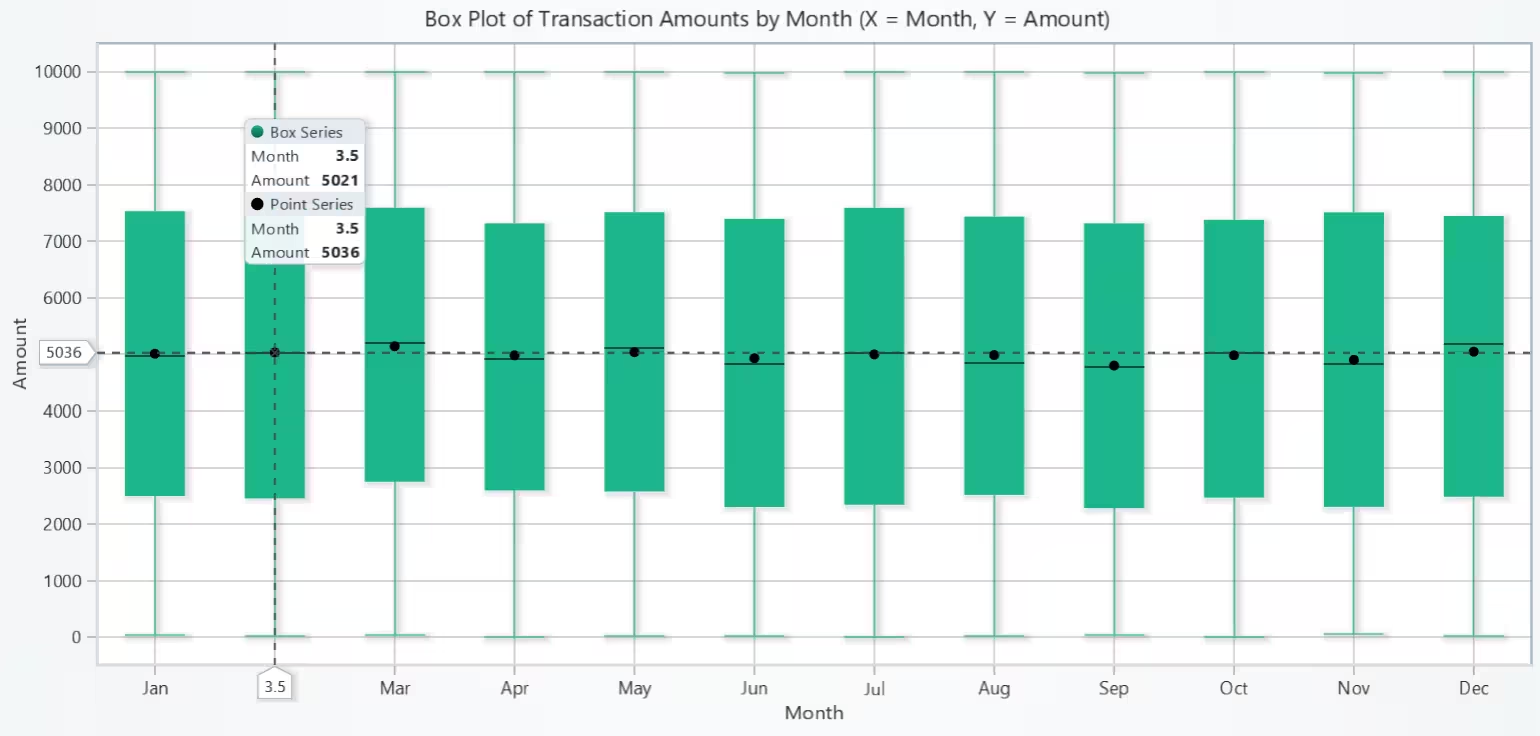
The plot shows which months handle bigger transactions (higher median) and which are more volatile (larger IQR/whiskers). Concentrations of outliers in specific months may point to one-off events or periodic spikes.
# Ensure Date is datetime
ftrmd['Date'] = pd.to_datetime(ftrmd['Date'], errors='coerce')

# Month ordering (Jan..Dec)
ftrmd['MonthNum'] = ftrmd['Date'].dt.month
ftrmd['Month'] = ftrmd['Date'].dt.strftime('%b')
month_order = ['Jan','Feb','Mar','Apr','May','Jun','Jul','Aug','Sep','Oct','Nov','Dec']

# Get amounts per month (keep both types together; box plot is over all transactions)
groups = {m: ftrmd.loc[ftrmd['Month'] == m, 'Amount'].to_numpy()
          for m in month_order}
Scatter Plot of Account Balance vs Transaction Amount
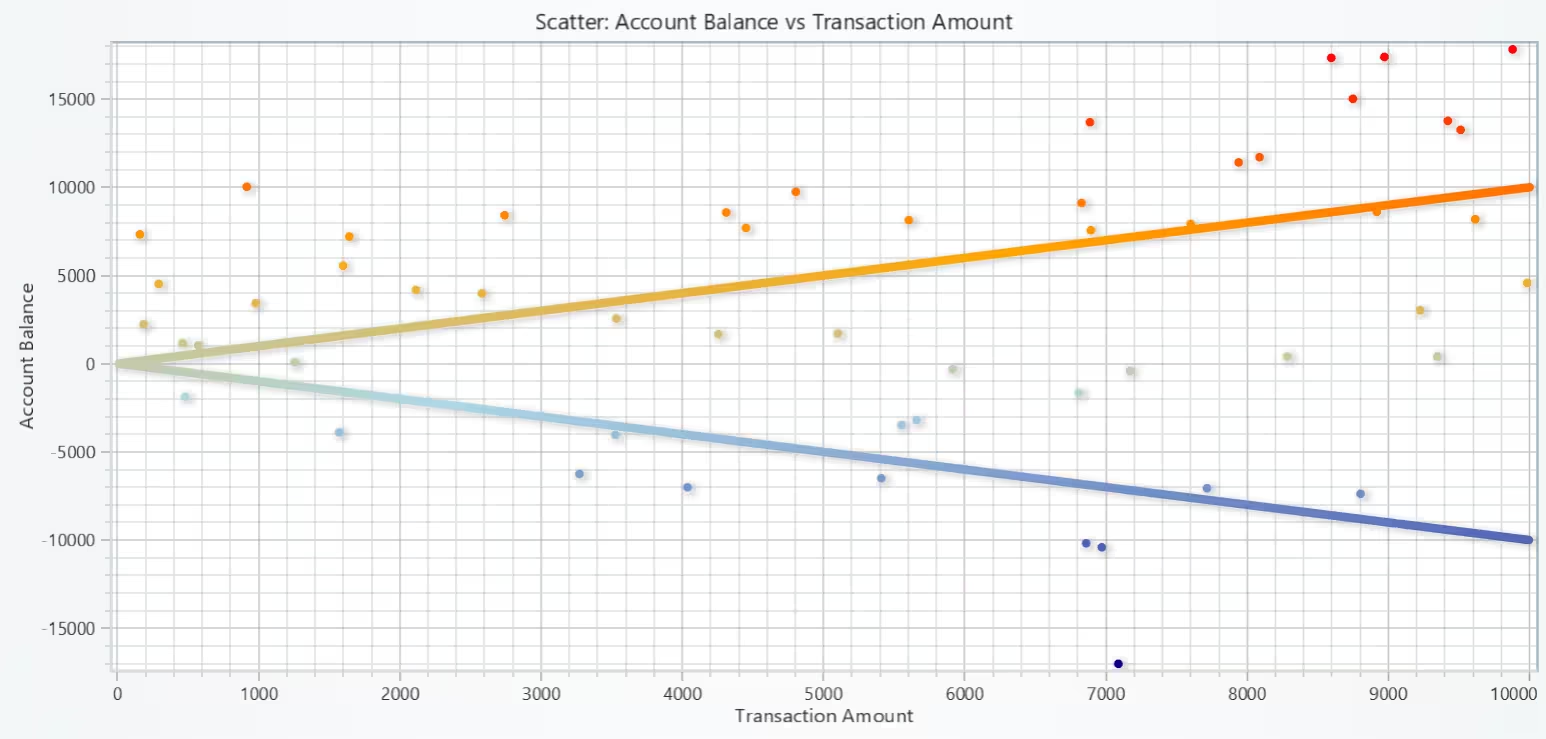
If points spread symmetrically around zero amounts across balances, transaction size isn’t strongly balance-dependent. A tilt (eg: bigger debits at higher balances) suggests behavioural or control effects.
# Chart 3 – Account Balance vs Transaction Amount (Scatter Plot)
# Developed with AI Assistance to demonstrate LightningChart Python

import lightningchart as lc
import numpy as np
import pandas as pd

# License
with open("D:/HAMK/Internship/MyProjects/lc_license.txt", "r") as f:
    lc.set_license(f.read().strip())

# X = Amount (as-is), Y = Balance (synthetic running balance)
x_vals = ftrmd['Amount'].astype(float).to_numpy()
y_vals = ftrmd['Balance'].astype(float).to_numpy()

# Compute palette control points from Y (Balance) distribution
y_min = float(np.nanmin(y_vals))
y_q25 = float(np.nanpercentile(y_vals, 25))
y_q75 = float(np.nanpercentile(y_vals, 75))
y_max = float(np.nanmax(y_vals))

# Chart
chart = lc.ChartXY(title="Scatter: Account Balance vs Transaction Amount",
                   theme=lc.Themes.Light)

# Scatter series
point_series = chart.add_point_series()

# Color by Y (Balance) like the doc sample
point_series.set_palette_point_coloring(
    steps=[
        {'value': y_min, 'color': ('darkblue')},
        {'value': y_q25, 'color': ('lightblue')},
        {'value': y_q75, 'color': ('orange')},
        {'value': y_max, 'color': ('red')},
    ],
    look_up_property='y',
    percentage_values=False
)

# Add points
point_series.add(x=x_vals, y=y_vals)

# Axes
x_axis = chart.get_default_x_axis()
y_axis = chart.get_default_y_axis()
x_axis.set_title("Transaction Amount")
y_axis.set_title("Account Balance")

#  pad view
try:
    pad_x = 0.05 * (x_vals.max() - x_vals.min() if x_vals.size else 1.0)
    pad_y = 0.05 * (y_vals.max() - y_vals.min() if y_vals.size else 1.0)
    x_axis.set_interval(float(x_vals.min()) - pad_x, float(x_vals.max()) + pad_x, False)
    y_axis.set_interval(float(y_vals.min()) - pad_y, float(y_vals.max()) + pad_y, False)
except Exception:
    pass

chart.open()
Bar Chart of Total Monthly Transactions by Type
The bars show when transactions cluster and whether debits or credits dominate in specific months. Clear peaks suggest seasonal cycles (eg: quarter-ends).


# Chart 4 – Total Monthly Transactions by Type (Bar Chart)
# Developed with AI Assistance to demonstrate LightningChart Python

import lightningchart as lc
import pandas as pd

# License
with open("D:/HAMK/Internship/MyProjects/lc_license.txt", "r") as f:
    lc.set_license(f.read().strip())

# Preparation
ftrmd['Date'] = pd.to_datetime(ftrmd['Date'], errors='coerce')
ftrmd['MonthNum'] = ftrmd['Date'].dt.month
month_labels = ['Jan','Feb','Mar','Apr','May','Jun','Jul','Aug','Sep','Oct','Nov','Dec']

def monthly_counts(df: pd.DataFrame, tx_type: str):
    mask = df['Transaction_Type'].str.lower() == tx_type.lower()
    # count by month 1..12, fill missing months with 0
    counts = (
        df.loc[mask]
          .groupby('MonthNum')
          .size()
          .reindex(range(1, 13), fill_value=0)
          .tolist()
    )
    return counts, int(sum(counts))

# Get counts for Debit and Credit
debit_counts, debit_total = monthly_counts(ftrmd, 'debit')
credit_counts, credit_total = monthly_counts(ftrmd, 'credit')

# Build BarChart data payloads
bar_data_debit = [{"category": month_labels[i], "value": int(debit_counts[i])} for i in range(12)]
bar_data_credit = [{"category": month_labels[i], "value": int(credit_counts[i])} for i in range(12)]

# Debit Bar Chart
chart_debit = lc.BarChart(
    vertical=True,
    theme=lc.Themes.Light,
    title=f"Monthly Transactions - Debit (n={debit_total})\n(X = Month, Y = Count)"
)
chart_debit.set_sorting('disabled')   # preserve Jan..Dec order
chart_debit.set_data(bar_data_debit)
chart_debit.set_bars_color(('red'))
chart_debit.open()

# Credit Bar Chart
chart_credit = lc.BarChart(
    vertical=True,
    theme=lc.Themes.Light,
    title=f"Monthly Transactions - Credit (n={credit_total})\n(X = Month, Y = Count)"
)
chart_credit.set_sorting('disabled')
chart_credit.set_data(bar_data_credit)
chart_credit.set_bars_color(('blue'))
chart_credit.open()
Correlation Heatmap of Amount, Balance & Transaction Frequency
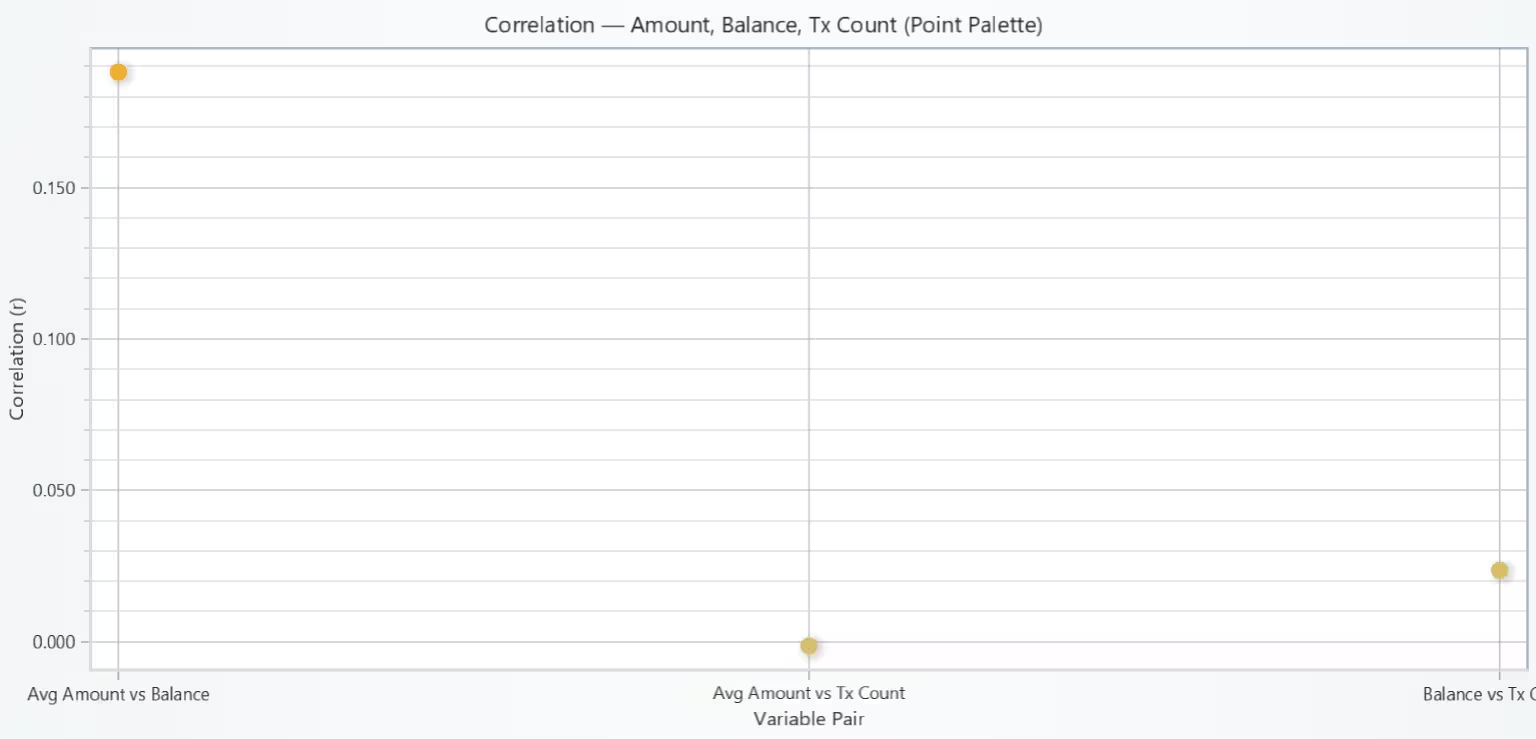
This chart tells whether accounts with larger average transactions also sit on higher balances, and whether more active accounts (tx_count) correlate with balance or amount size. If correlations are weak (~0), the variables act largely independently; if strong (+/–), there’s a consistent relationship worth drilling into.
# Chart 5 – Amount, Balance, and Transaction Frequency (Correlation Heatmap)
# Developed with AI Assistance to demonstrate LightningChart Python

import lightningchart as lc
import pandas as pd
import numpy as np

# License
with open("D:/HAMK/Internship/MyProjects/lc_license.txt", "r") as f:
    lc.set_license(f.read().strip())

# Per-account metrics
acc_metrics = (
    ftrmd.sort_values(['Account_Number', 'Date'])
         .groupby('Account_Number')
         .agg(
             avg_amount=('Amount', 'mean'),
             end_balance=('Balance', 'last'),
             tx_count=('Transaction_ID', 'count')
         )
)

# Compute Pearson correlations
corr = acc_metrics[['avg_amount', 'end_balance', 'tx_count']].corr()

pairs = [
    ("Avg Amount vs Balance",   float(corr.loc['avg_amount', 'end_balance'])),
    ("Avg Amount vs Tx Count",  float(corr.loc['avg_amount', 'tx_count'])),
    ("Balance vs Tx Count",     float(corr.loc['end_balance','tx_count'])),
]

# Drop NaNs just in case
labels, y_vals = zip(*[(lab, val) for (lab, val) in pairs if np.isfinite(val)])
labels = list(labels)
y_vals = np.array(y_vals, dtype=float)

# X positions 1..N
x_vals = np.arange(1, len(labels) + 1, dtype=float)

# Chart
chart = lc.ChartXY(title="Correlation — Amount, Balance, Tx Count (Point Palette)",
                   theme=lc.Themes.Light)

# Bigger points + palette by Y
point_series = chart.add_point_series(sizes=True, rotations=False, lookup_values=True)
point_series.set_palette_point_coloring(
    steps=[
        {'value': -1.0, 'color': ('darkblue')},
        {'value': -0.33, 'color': ('lightblue')},
        {'value':  0.33, 'color': ('orange')},
        {'value':  1.0,  'color': ('red')},
    ],
    look_up_property='y',
    percentage_values=False
)
# Add data with explicit sizes so they’re visible
point_series.append_samples(
    x_values=x_vals.tolist(),
    y_values=y_vals.tolist(),
    sizes=[14] * len(y_vals),
)

# Axes
x_axis = chart.get_default_x_axis()
y_axis = chart.get_default_y_axis()
x_axis.set_title("Variable Pair")
y_axis.set_title("Correlation (r)")

# Fixed ranges for correlations
x_axis.set_interval(0.5, len(labels) + 0.5, False)
y_axis.set_interval(-1.05, 1.05, False)

# Custom tick labels — keep references so they persist
x_axis.set_tick_strategy('Empty')
_custom_ticks = []  # keep refs alive
for i, lab in enumerate(labels, start=1):
    t = x_axis.add_custom_tick()
    t.set_value(float(i)).set_text(lab)
    _custom_ticks.append(t)

chart.open()
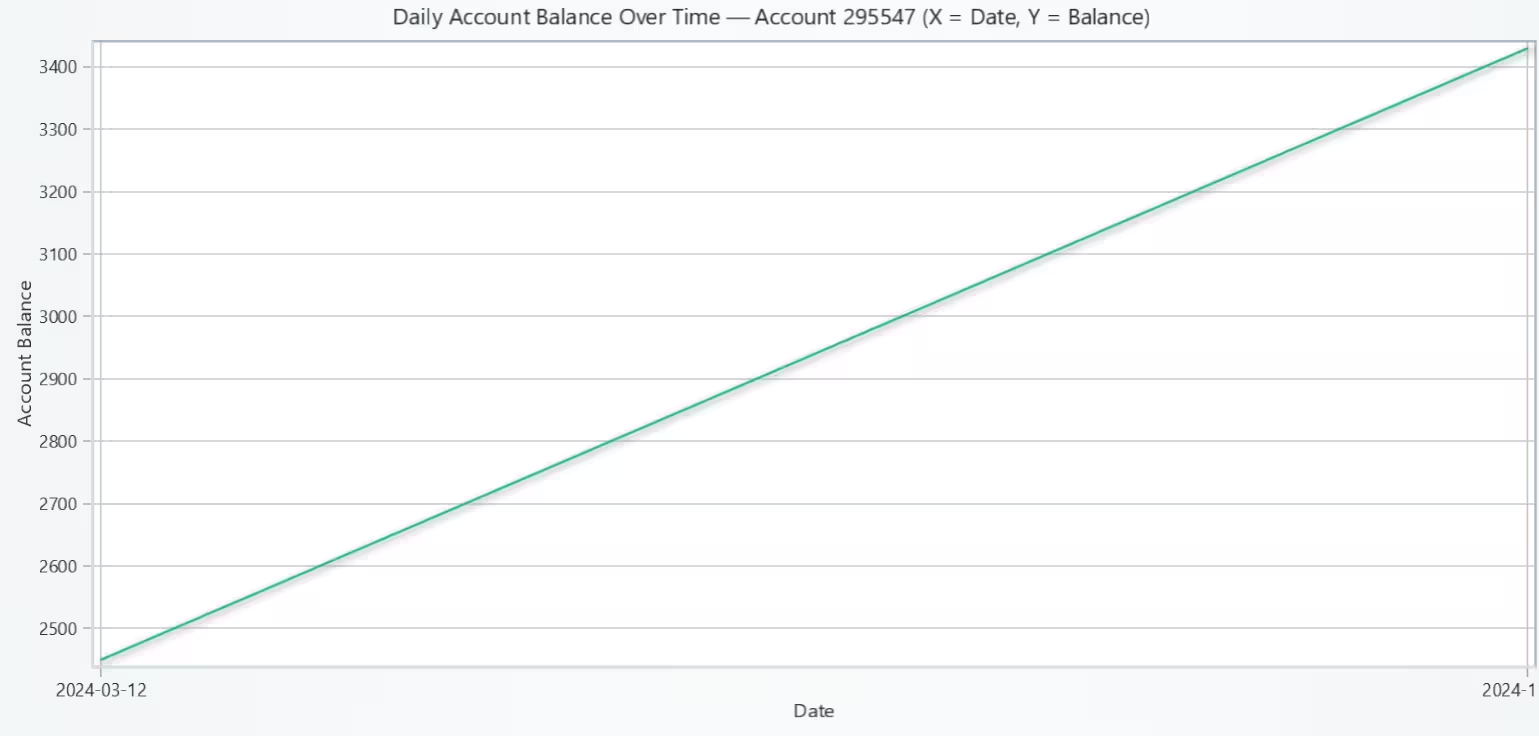
Line Chart of Daily Account Balance Over Time
The curve reveals how the account’s cash position changes over time. Sharp drops mark debit-heavy days; step-ups indicate credits. Long flat segments suggest inactivity; frequent jagged moves imply active transacting.
# Chart 6 – Daily Account Balance Over Time (Line Chart)
# Developed with AI Assistance to demonstrate LightningChart Python

import lightningchart as lc
import pandas as pd
import numpy as np

# License
with open("D:/HAMK/Internship/MyProjects/lc_license.txt", "r") as f:
    lc.set_license(f.read().strip())

# ensure datetime + synthetic balance exist
ftrmd['Date'] = pd.to_datetime(ftrmd['Date'], errors='coerce')
ftrmd = ftrmd.sort_values(['Account_Number', 'Date'])

if 'Signed_Amount' not in ftrmd.columns:
    ftrmd['Signed_Amount'] = ftrmd.apply(
        lambda r: -r['Amount'] if str(r['Transaction_Type']).lower() == 'debit' else r['Amount'], axis=1
    )
if 'Balance' not in ftrmd.columns:
    ftrmd['Balance'] = ftrmd.groupby('Account_Number')['Signed_Amount'].cumsum()

# Choose account to plot (most active by default)
SELECT_ACCOUNT = None  # set to a specific Account_Number (e.g., 123456) to override
if SELECT_ACCOUNT is None:
    SELECT_ACCOUNT = ftrmd['Account_Number'].value_counts().idxmax()

df_acc = ftrmd.loc[ftrmd['Account_Number'] == SELECT_ACCOUNT].copy()

# End-of-day balance series
df_acc['Day'] = df_acc['Date'].dt.normalize()
daily_balance = (
    df_acc.groupby('Day', as_index=False)['Balance']
          .last()                       # end-of-day balance
          .sort_values('Day')
)

# X = day index (0..N-1), Y = balance
x_values = list(range(len(daily_balance)))
y_values = daily_balance['Balance'].astype(float).tolist()

# Chart
chart = lc.ChartXY(
    theme=lc.Themes.Light,
    title=f"Daily Account Balance Over Time — Account {SELECT_ACCOUNT}\n(X = Date, Y = Balance)"
)

# Line series
chart.add_line_series().append_samples(
    x_values=x_values,
    y_values=y_values
)

# Axes
x_axis = chart.get_default_x_axis()
y_axis = chart.get_default_y_axis()
x_axis.set_title("Date")
y_axis.set_title("Account Balance")

# Show whole series nicely
if len(x_values) > 0:
    x_axis.set_interval(-0.5, len(x_values) - 0.5, False)
    ymin, ymax = float(np.min(y_values)), float(np.max(y_values))
    pad = 0.05 * (ymax - ymin if ymax > ymin else 1.0)
    y_axis.set_interval(ymin - pad, ymax + pad, False)

# Put readable date labels on X (custom ticks)
x_axis.set_tick_strategy('Empty')
_keep_ticks = []
if len(x_values) > 0:
    # pick up to 8 evenly spaced ticks
    tick_pos = np.linspace(0, len(x_values) - 1, num=min(8, len(x_values)), dtype=int)
    for pos in np.unique(tick_pos):
        label = pd.to_datetime(daily_balance['Day'].iloc[pos]).strftime('%Y-%m-%d')
        t = x_axis.add_custom_tick().set_value(float(pos)).set_text(label)
        _keep_ticks.append(t)  # store refs

chart.open()
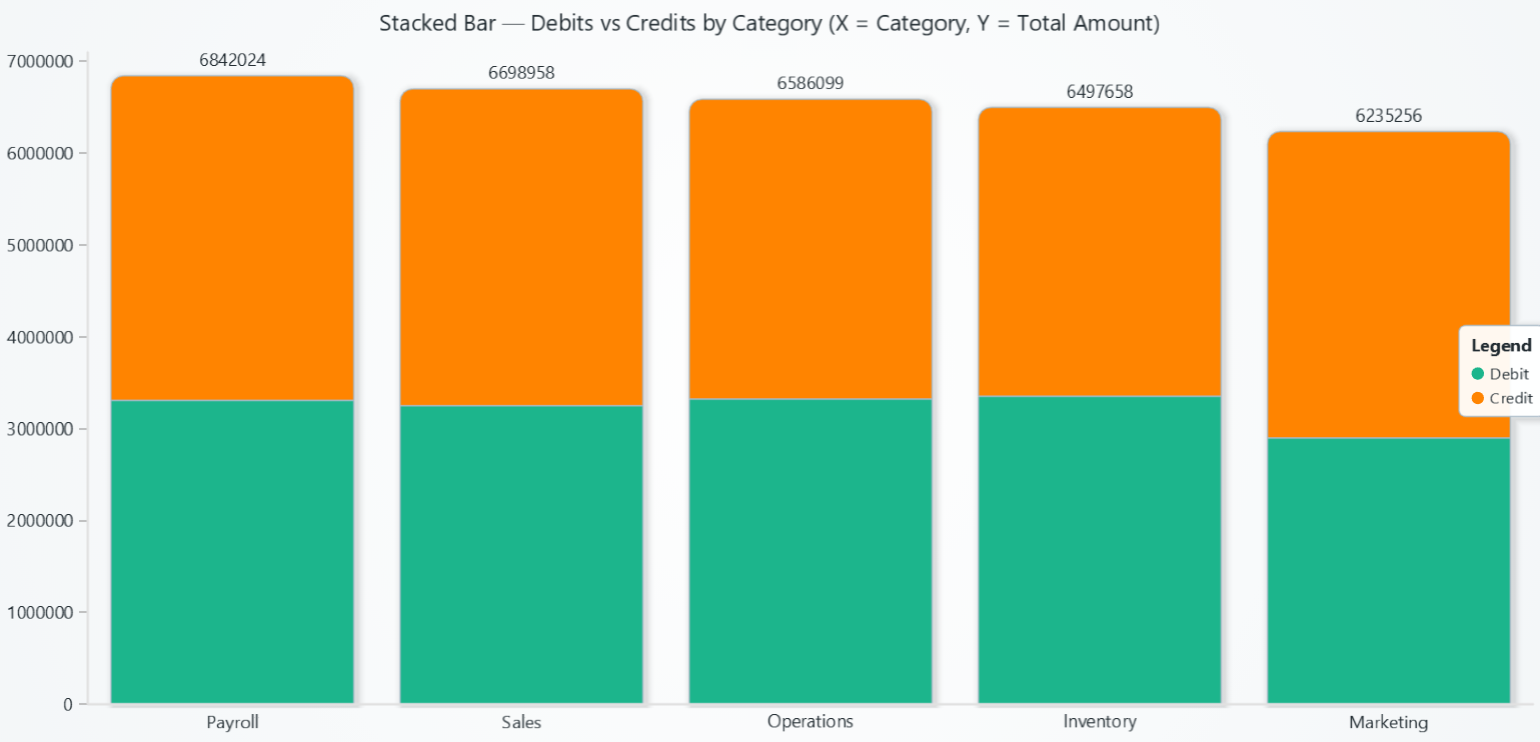
Stacked Bar Chart of Debits vs Credits by Category
The chart highlights where spend vs income concentrates. Categories with large debit portions drive cash outflows; those with strong credit portions drive inflows.
# Chart 7 – Debits vs Credits by Category (Stacked Bar Chart)
# Developed with AI Assistance to demonstrate LightningChart Python

import lightningchart as lc
import pandas as pd

# License
with open("D:/HAMK/Internship/MyProjects/lc_license.txt", "r") as f:
    lc.set_license(f.read().strip())

# Aggregate total AMOUNT by Category & Type
mask = ftrmd['Transaction_Type'].str.lower().isin(['debit', 'credit'])
df = ftrmd.loc[mask, ['Category', 'Transaction_Type', 'Amount']].copy()
df['Transaction_Type'] = df['Transaction_Type'].str.capitalize()  # Debit/Credit

pivot = (
    df.groupby(['Category', 'Transaction_Type'])['Amount']
      .sum()
      .unstack(fill_value=0)
      .reindex(columns=['Debit', 'Credit'], fill_value=0)
)

# Limit to Top-N categories by total for readability
TOP_N = 12
pivot = pivot.assign(_total=pivot.sum(axis=1))\
             .sort_values('_total', ascending=False)\
             .head(TOP_N)\
             .drop(columns=['_total'])

categories = pivot.index.tolist()
debit_values  = pivot['Debit'].astype(float).tolist()
credit_values = pivot['Credit'].astype(float).tolist()

# Stacked Bar Chart (matches LC sample style)
chart = lc.BarChart(
    vertical=True,
    theme=lc.Themes.Light,
    title='Stacked Bar — Debits vs Credits by Category\n(X = Category, Y = Total Amount)'
)

chart.set_sorting('disabled')  # preserve our Top-N order

chart.set_data_stacked(
    categories,
    [
        {'subCategory': 'Debit',  'values': debit_values},
        {'subCategory': 'Credit', 'values': credit_values},
    ],
)

# Legend (per sample)
chart.add_legend().add(chart)

chart.open()
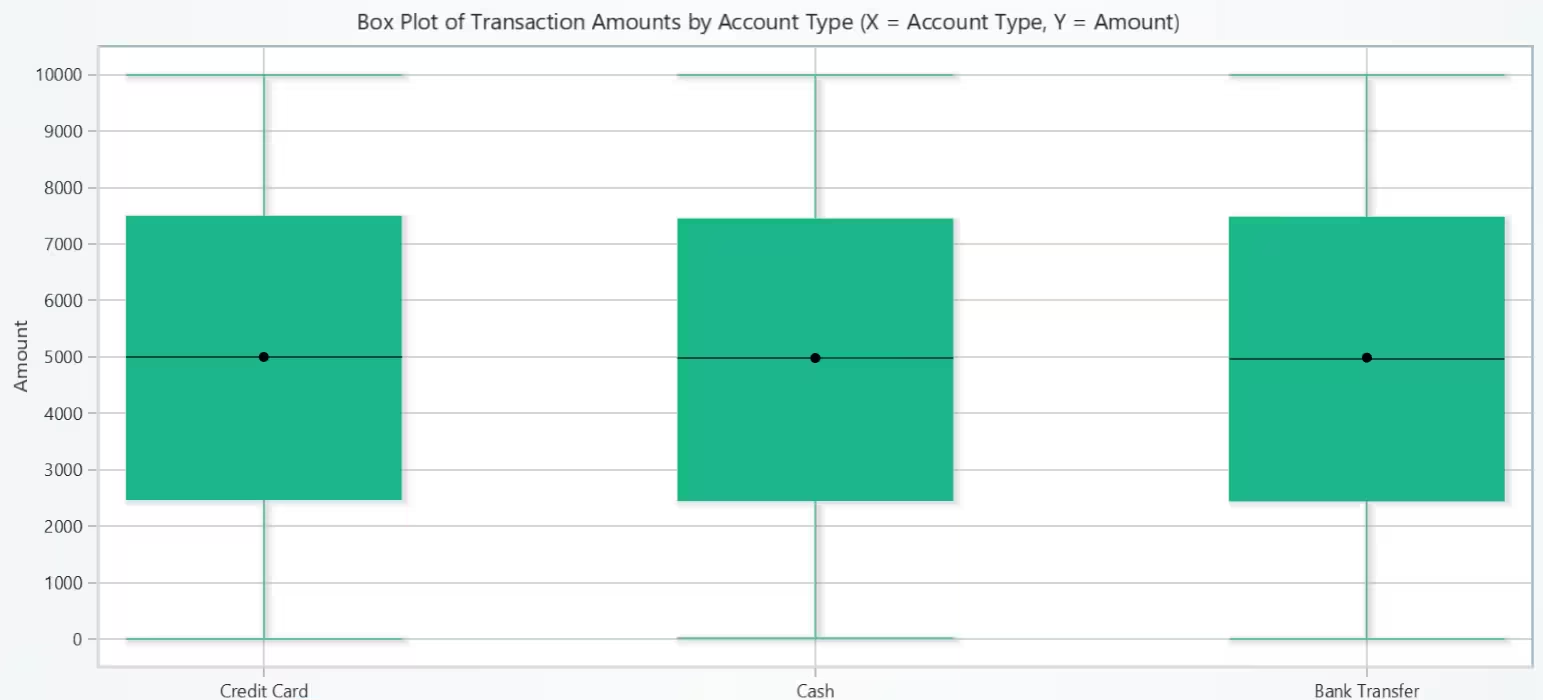
Box Plot of Transaction Amounts by Account Type
Transaction size does not depend strongly on account type in this dataset. Since distributions are alike, investigate differences by transaction_type (debit/credit) or category within each account type to uncover more specific drivers.
# Chart 8 – Transaction Amounts by Account Type (Box Plot)
# Developed with AI Assistance to demonstrate LightningChart Python

import lightningchart as lc
import numpy as np
import pandas as pd

# License
with open("D:/HAMK/Internship/MyProjects/lc_license.txt", "r") as f:
    lc.set_license(f.read().strip())

# Preparation
ftrmd['Amount'] = pd.to_numeric(ftrmd['Amount'], errors='coerce')
ftrmd = ftrmd.dropna(subset=['Amount'])

group_col = 'Account_Type' if 'Account_Type' in ftrmd.columns else 'Payment_Method'

# Limit to Top-N account types by transaction count for readability
TOP_N = 10
categories = (
    ftrmd[group_col]
    .value_counts()
    .head(TOP_N)
    .index
    .tolist()
)

# Build dict: account type -> list of amounts
category_data = {cat: ftrmd.loc[ftrmd[group_col] == cat, 'Amount'].tolist()
                 for cat in categories}

# Chart
chart = lc.ChartXY(theme=lc.Themes.Light,
                   title='Box Plot of Transaction Amounts by Account Type\n(X = Account Type, Y = Amount)')

dataset = []
x_values_outlier, y_values_outlier = [], []
x_means, y_means = [], []

for i, category in enumerate(categories):
    data = category_data[category]
    if not data:
        continue

    start = (i * 2) + 1
    end   = start + 1

    # Quartiles & median
    lowerQuartile = float(np.percentile(data, 25))
    upperQuartile = float(np.percentile(data, 75))
    median        = float(np.median(data))

    # Tukey fences
    iqr = upperQuartile - lowerQuartile
    lower_bound = lowerQuartile - 1.5 * iqr
    upper_bound = upperQuartile + 1.5 * iqr

    # Whiskers = min/max among non-outliers
    non_outliers = [y for y in data if lower_bound <= y <= upper_bound]
    if len(non_outliers) == 0:
        lowerExtreme = lowerQuartile
        upperExtreme = upperQuartile
    else:
        lowerExtreme = float(min(non_outliers))
        upperExtreme = float(max(non_outliers))

    # Box item
    dataset.append({
        'start': start,
        'end': end,
        'lowerQuartile': lowerQuartile,
        'upperQuartile': upperQuartile,
        'median': median,
        'lowerExtreme': lowerExtreme,
        'upperExtreme': upperExtreme,
    })

    # Outliers (red)
    outs = [y for y in data if y < lower_bound or y > upper_bound]
    if outs:
        x_values_outlier += [start + 0.5] * len(outs)
        y_values_outlier += [float(v) for v in outs]

    # Mean marker (black)
    x_means.append(start + 0.5)
    y_means.append(float(np.mean(data)))

# Add box series
series = chart.add_box_series()
series.add_multiple(dataset)

# Add outliers to the chart (red)
if y_values_outlier:
    outlier_series = chart.add_point_series(sizes=True, rotations=True, lookup_values=True)
    outlier_series.set_point_color(('red'))
    outlier_series.append_samples(
        x_values=x_values_outlier,
        y_values=y_values_outlier,
        sizes=[10] * len(y_values_outlier),
    )

# Add mean markers (black)
if y_means:
    mean_series = chart.add_point_series(sizes=True, rotations=True, lookup_values=True)
    mean_series.set_point_color(('black'))
    mean_series.append_samples(
        x_values=x_means,
        y_values=y_means,
        sizes=[8] * len(y_means),
    )

# Axes
x_axis = chart.get_default_x_axis()
y_axis = chart.get_default_y_axis()
x_axis.set_title('Account Type')
y_axis.set_title('Amount')

# Keep all boxes in view
x_axis.set_interval(0, 2 * len(categories) + 1, False)

# Custom category labels centered on each box
x_axis.set_tick_strategy('Empty')
_tick_refs = []
for i, cat in enumerate(categories):
    pos = (i * 2) + 1.5
    t = x_axis.add_custom_tick().set_value(pos).set_text(str(cat))
    _tick_refs.append(t)  # keep references

chart.open()
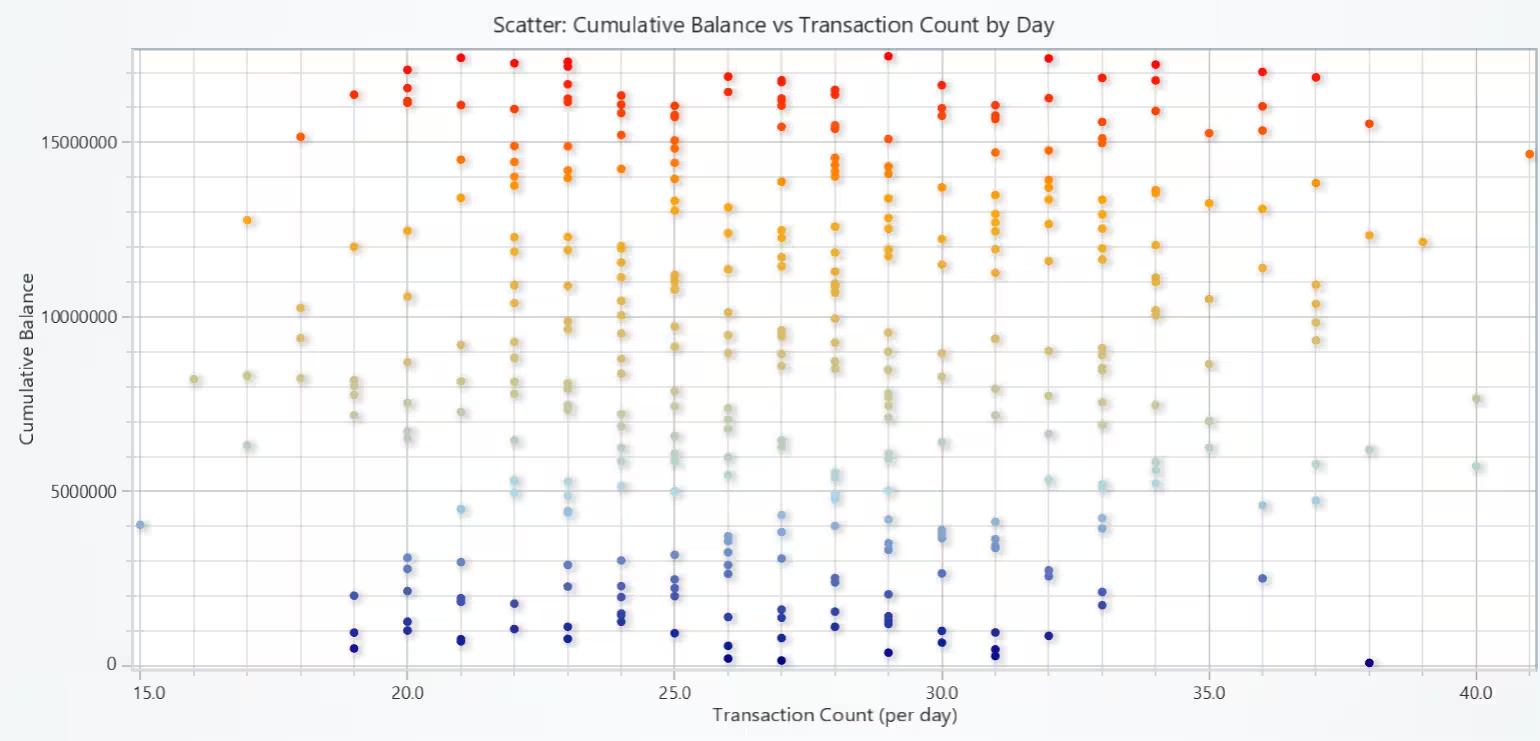
Scatter Plot of Cumulative Balance vs Transaction Count by Day
Daily transaction quantity doesn’t explain the cumulative balance and balance mainly reflects net flows over time.
# Chart 9 – Cumulative Balance vs Transaction Count by Day (Scatter Plot)
# Developed with AI Assistance to demonstrate LightningChart Python

import lightningchart as lc
import pandas as pd
import numpy as np

# License
with open("D:/HAMK/Internship/MyProjects/lc_license.txt", "r") as f:
    lc.set_license(f.read().strip())

# Preparation: daily tx count & company-level cumulative balance
ftrmd['Date'] = pd.to_datetime(ftrmd['Date'], errors='coerce')

# Ensure Signed_Amount exists (Debit negative, Credit/others positive)
if 'Signed_Amount' not in ftrmd.columns:
    ftrmd['Signed_Amount'] = ftrmd.apply(
        lambda r: -r['Amount'] if str(r['Transaction_Type']).lower() == 'debit' else r['Amount'],
        axis=1
    )

# Day-level aggregation
ftrmd['Day'] = ftrmd['Date'].dt.normalize()
daily = (
    ftrmd.groupby('Day')
         .agg(tx_count=('Transaction_ID', 'count'),
              net_flow=('Signed_Amount', 'sum'))
         .sort_index()
         .reset_index()
)

# Company-level cumulative balance over days
daily['cum_balance'] = daily['net_flow'].cumsum()

# X = transactions per day, Y = cumulative balance up to that day
x_vals = daily['tx_count'].astype(float).to_numpy()
y_vals = daily['cum_balance'].astype(float).to_numpy()

# Palette breakpoints from Y distribution (like sample but data-driven)
y_min  = float(np.nanmin(y_vals))
y_q25  = float(np.nanpercentile(y_vals, 25))
y_q75  = float(np.nanpercentile(y_vals, 75))
y_max  = float(np.nanmax(y_vals))

# Chart
chart = lc.ChartXY(title="Scatter: Cumulative Balance vs Transaction Count by Day",
                   theme=lc.Themes.Light)

point_series = chart.add_point_series()
point_series.set_palette_point_coloring(
    steps=[
        {'value': y_min, 'color': ('darkblue')},
        {'value': y_q25, 'color': ('lightblue')},
        {'value': y_q75, 'color': ('orange')},
        {'value': y_max, 'color': ('red')},
    ],
    look_up_property='y',
    percentage_values=False
)

# Add the data
point_series.add(x=x_vals, y=y_vals)

# Axes
x_axis = chart.get_default_x_axis()
y_axis = chart.get_default_y_axis()
x_axis.set_title("Transaction Count (per day)")
y_axis.set_title("Cumulative Balance")

# nice padding
try:
    x_min, x_max = float(np.min(x_vals)), float(np.max(x_vals))
    y_min_v, y_max_v = float(np.min(y_vals)), float(np.max(y_vals))
    x_pad = 0.05 * (x_max - x_min if x_max > x_min else 1.0)
    y_pad = 0.05 * (y_max_v - y_min_v if y_max_v > y_min_v else 1.0)
    x_axis.set_interval(x_min - x_pad, x_max + x_pad, False)
    y_axis.set_interval(y_min_v - y_pad, y_max_v + y_pad, False)
except Exception:
    pass

chart.open()
Heatmap of Transaction Volume by Hour of Day vs Transaction
This pattern almost certainly means the Date field has no time-of-day, so it is always 0.
# Chart 10 – Transaction Volume by Hour of Day vs Transaction Type (Heatmap)
# Developed with AI Assistance to demonstrate LightningChart Python

import lightningchart as lc
import pandas as pd
import numpy as np

# License
with open("D:/HAMK/Internship/MyProjects/lc_license.txt", "r") as f:
    lc.set_license(f.read().strip())

# Preparation
ftrmd['Date'] = pd.to_datetime(ftrmd['Date'], errors='coerce')
ftrmd['Hour'] = ftrmd['Date'].dt.hour

# Normalize type labels
tmp = ftrmd[['Transaction_Type', 'Hour']].copy()
tmp['TxType'] = tmp['Transaction_Type'].astype(str).str.capitalize()

# (Optional) limit to Top-N types for readability
TOP_N = 6
top_types = tmp['TxType'].value_counts().head(TOP_N).index.tolist()

# Pivot to counts: rows = TxType, cols = Hour (0..23)
pivot = (tmp[tmp['TxType'].isin(top_types)]
         .groupby(['TxType', 'Hour'])
         .size()
         .unstack(fill_value=0)
         .reindex(index=top_types, columns=range(24), fill_value=0))

# Heatmap expects (columns, rows) shape per LC sample -> transpose to (24, n_types)
data_matrix = pivot.to_numpy().T.astype(float)        # shape: (24, n_types)
grid_size_x, grid_size_y = data_matrix.shape          # x = hours, y = types

# Handle degenerate palette edge case
vmin = float(np.nanmin(data_matrix)) if data_matrix.size else 0.0
vmax = float(np.nanmax(data_matrix)) if data_matrix.size else 1.0
if vmin == vmax:
    vmax = vmin + 1.0

# Chart
chart = lc.ChartXY(
    title='Heatmap — Transaction Volume by Hour × Type',
    theme=lc.Themes.Light
)

# Heatmap grid series (per LC sample)
heatmap = chart.add_heatmap_grid_series(
    columns=grid_size_x,
    rows=grid_size_y,
)

# Positioning & interpolation
heatmap.set_start(x=0, y=0)
heatmap.set_end(x=grid_size_x, y=grid_size_y)
heatmap.set_step(x=1, y=1)
heatmap.set_intensity_interpolation(True)
heatmap.invalidate_intensity_values(data_matrix.tolist())
heatmap.hide_wireframe()

# Custom palette based on quantiles (low→high volume)
custom_palette = [
    {"value": vmin,                        "color": ('blue')},
    {"value": float(np.nanpercentile(data_matrix, 25)), "color": ('cyan')},
    {"value": float(np.nanmedian(data_matrix)),         "color": ('green')},
    {"value": float(np.nanpercentile(data_matrix, 75)), "color": ('yellow')},
    {"value": vmax,                        "color": ('red')},
]
heatmap.set_palette_coloring(
    steps=custom_palette,
    look_up_property='value',
    interpolate=True
)

# Axes titles
x_axis = chart.get_default_x_axis()
y_axis = chart.get_default_y_axis()
x_axis.set_title('Hour of Day (0–23)')
y_axis.set_title('Transaction Type')

# Show full grid
x_axis.set_interval(0, grid_size_x, False)
y_axis.set_interval(0, grid_size_y, False)

# Custom ticks
# X: label every 2 hours to avoid clutter (use every 1 if you prefer)
x_axis.set_tick_strategy('Empty')
_xticks_refs = []
for h in range(0, 24, 2):
    t = x_axis.add_custom_tick().set_value(h + 0.5).set_text(str(h))
    _xticks_refs.append(t)

# Y: label each transaction type centered on its row
y_axis.set_tick_strategy('Empty')
_yticks_refs = []
for i, tx in enumerate(top_types):
    t = y_axis.add_custom_tick().set_value(i + 0.5).set_text(str(tx))
    _yticks_refs.append(t)

# Legend
chart.add_legend(data=heatmap).set_title('Volume')

chart.open()
Conclusion
This project used the Financial Transaction and Risk Management Dataset with LightningChart Python to visualize granular bookkeeping activity and cash-flow dynamics.
We built 10 interactive charts such as histograms, box plots, scatter plots, bar/stacked bars, a line chart, and heatmaps to examine debit vs. credit distributions, monthly and daily volumes, category mixes, account-type differences, and relationships among amounts, balances, and transaction frequency.
Using pandas, we parsed dates, standardized transaction types, created Signed_Amount (debits negative, credits positive), computed running balances, and produced daily/monthly aggregates and Top-N category views.
Findings show weak aggregate correlations between average amount, balance, and activity; steady balance trends for selected accounts; similar scale and mix across major categories; and little evidence that daily transaction count drives cumulative balance.
These visuals support cash-flow monitoring, expense control, and risk review, and suggest next steps like net cash (credit-debit) by category, percent-stacked mixes, and true timestamp analysis for intraday patterns.
Continue learning with LightningChart

React Charting Performance
Here's a scenario that plays out across development teams every few months. Someone builds a React dashboard, picks Recharts or Victory because they're popular, the devs love them, and the first demo looks great. Then the dataset gets bigger. Or the data starts...

Javascript Charting Library comparison 2026
Every year someone publishes a listicle of JavaScript charting libraries. They screenshot a demo, note the GitHub stars, paste in the npm install command, and call it a day. Then you follow their recommendation, get six months into your project, and discover that your...

Visualizing 10 Million Data Points in the Browser (2026): The Technical Deep-Dive
Ten Million Data Points in the Browser: How WebGL Makes Mass Datasets Interactive Ten million data points. That number used to mean a database problem, not a front-end problem. Now research teams want to explore it interactively in a browser. Trading desks want...



If you have any questions, feel free to contact us!
©LightningChart Ltd 2025. All rights reserved.