








Predicting Water Quality with the LightningChart Python Library
Tutorial
Assisted by AI
Learn how LightningChart Python data visualization library can help in predicting water quality in Python.
Vindya Nukulasooriya
Data Science Developer

Introduction
This project presents a comprehensive water quality and potability analysis using the Water Potability Dataset, powered by the LightningChart Python library. The dataset, sourced from Kaggle, contains multiple physicochemical water quality indicators such as pH, hardness, dissolved solids, chloramines, sulfate, conductivity, organic carbon, trihalomethanes, and turbidity, along with a binary label indicating potability (1 = safe for drinking, 0 = unsafe).
The primary objectives of this project are to:
- Explore the relationships between individual water quality parameters and potability status.
- Identify which factors show the strongest association with potable or non-potable water.
- Visualize multivariate interactions to understand combined effects of parameters on water safety.
- Transform raw environmental measurements into clear, interactive visualizations that can aid public health agencies, water treatment facilities, and environmental policymakers.
To achieve these objectives, LightningChart Python was selected for its:
- High-performance rendering, capable of smoothly managing environmental datasets with multiple numeric variables.
- Extensive 2D and 3D visualization capabilities, well-suited for correlation studies, comparative analysis, and multi-parameter profiling.
- Publication-quality interactive charts, enabling both scientific presentation and operational decision-making.
By converting raw analytical measurements into intuitive visual insights, this project reveals critical patterns in water quality, providing evidence-based guidance for safe water management and potability assessment.
Project Overview
To develop up to 10 interactive chart examples using LightningChart Python, focusing on uncovering patterns in water quality parameters, their interrelationships, and their influence on water potability classification.
Objectives
- Assess how individual water quality indicators (eg: pH, hardness, turbidity) vary between potable and non-potable samples.
- Examine correlations between chemical and physical properties, identifying parameters with the strongest relationships.
- Explore multi-parameter profiles to determine whether combinations of variables can serve as dependable potability indicators.
- Showcase LightningChart Python’s capability to deliver scientific-grade, interactive visualizations for environmental and public health datasets.
Deliverables
- Ten high-performance visualizations created exclusively with LightningChart Python.
- Well-documented Python code for each chart, including preprocessing, parameter selection, and reasoning.
- Interpretive summaries highlighting trends, correlations, and potential predictive indicators of potability.
- A conclusion discussing how LightningChart Python enhances environmental data analysis and supports water safety decision-making.
Tools Used
Python 3.13.5, LightningChart Python, Jupyter Notebook, AI Assistance
About the Dataset
The Water Potability Dataset contains physicochemical measurements from various water sources, labelled as potable or non-potable. It is well-suited for environmental quality assessment, public health monitoring, and predictive modeling of water safety.
Each record includes:
- Physicochemical Indicators: pH, Hardness, Total Dissolved Solids, Chloramines, Sulfate, Conductivity, Organic Carbon, Trihalomethanes, Turbidity
- Target Variable: Potability (1 = Potable, 0 = Non-potable)
LightningChart Python
LightningChart Python is a professional-grade data visualization library renowned for its ultra-fast rendering and scientific precision. Its ability to handle large datasets and produce multidimensional visualizations makes it highly effective for environmental and water quality analysis.

Setting Up Python Environment
Before running the project, install Python and the other required libraries using:
%pip install numpy pandas lightningchartSetting Up Your Development Environment:
- Set up a virtual environment:
- Use Visual Studio Code (VSCode) for a streamlined development experience.
Loading and Preprocessing Data
To create this China Water Pollution Monitoring Application, we will fetch the China water pollution data using the following function:
Downloaded the dataset from https://www.kaggle.com/datasets/uom190346a/water-quality-and-potabilityTo preprocess the dataset, we will import the pandas library:
# Import necessary libraries (load pandas library to preprocess dataset)
import pandas as pd
Visualizing Data with LightningChart Python
pH Distribution by Potability – Histogram
The histogram shows two separate distributions: one for potable water samples and one for non-potable water samples. Both distributions are centered near pH 7.0–7.5, but potable water is more tightly clustered around neutral values.
Non-potable water displays a wider spread, with higher counts in acidic (<6.5) and alkaline (>8.5) ranges. This suggests that while pH alone doesn’t fully determine potability, extreme pH values are more common in non-potable water, potentially contributing to water quality issues.


# Chart 1 – pH Distribution by Potability (Histogram)
# Developed with AI Assistance to demonstrate LightningChart Python

import lightningchart as lc
import pandas as pd
import numpy as np

# Load your license
with open("D:/HAMK/Internship/MyProjects/lc_license.txt", "r") as f:
    lc.set_license(f.read().strip())

# Define bin edges for pH values
bins = np.arange(0, 15, 0.5)

# Separate data by Potability
ph_potable = wqpd[wqpd['Potability'] == 1]['ph']
ph_non_potable = wqpd[wqpd['Potability'] == 0]['ph']

# Histogram counts
counts_potable, edges = np.histogram(ph_potable, bins=bins)
counts_non_potable, _ = np.histogram(ph_non_potable, bins=bins)

# Format bin labels
bin_labels = [f"{edges[i]:.1f}–{edges[i+1]:.1f}" for i in range(len(edges)-1)]

# Prepare data for potable water
bar_data_potable = [
    {"category": bin_labels[i], "value": int(counts_potable[i])}
    for i in range(len(counts_potable))
]

# Prepare data for non-potable water
bar_data_non_potable = [
    {"category": bin_labels[i], "value": int(counts_non_potable[i])}
    for i in range(len(counts_non_potable))
]

# Create chart for potable water
chart_potable = lc.BarChart(
    vertical=True,
    title="pH Distribution - Potable Water\nX: pH Range, Y: Sample Count",
    theme=lc.Themes.White
)
chart_potable.set_data(bar_data_potable)
chart_potable.set_sorting('disabled')
chart_potable.set_bars_color('seagreen')

# Create chart for non-potable water
chart_non_potable = lc.BarChart(
    vertical=True,
    title="pH Distribution - Non-Potable Water\nX: pH Range, Y: Sample Count",
    theme=lc.Themes.White
)
chart_non_potable.set_data(bar_data_non_potable)
chart_non_potable.set_sorting('disabled')
chart_non_potable.set_bars_color('crimson')

# Show charts
chart_potable.open()
chart_non_potable.open()
Hardness by Potability – Box Plot
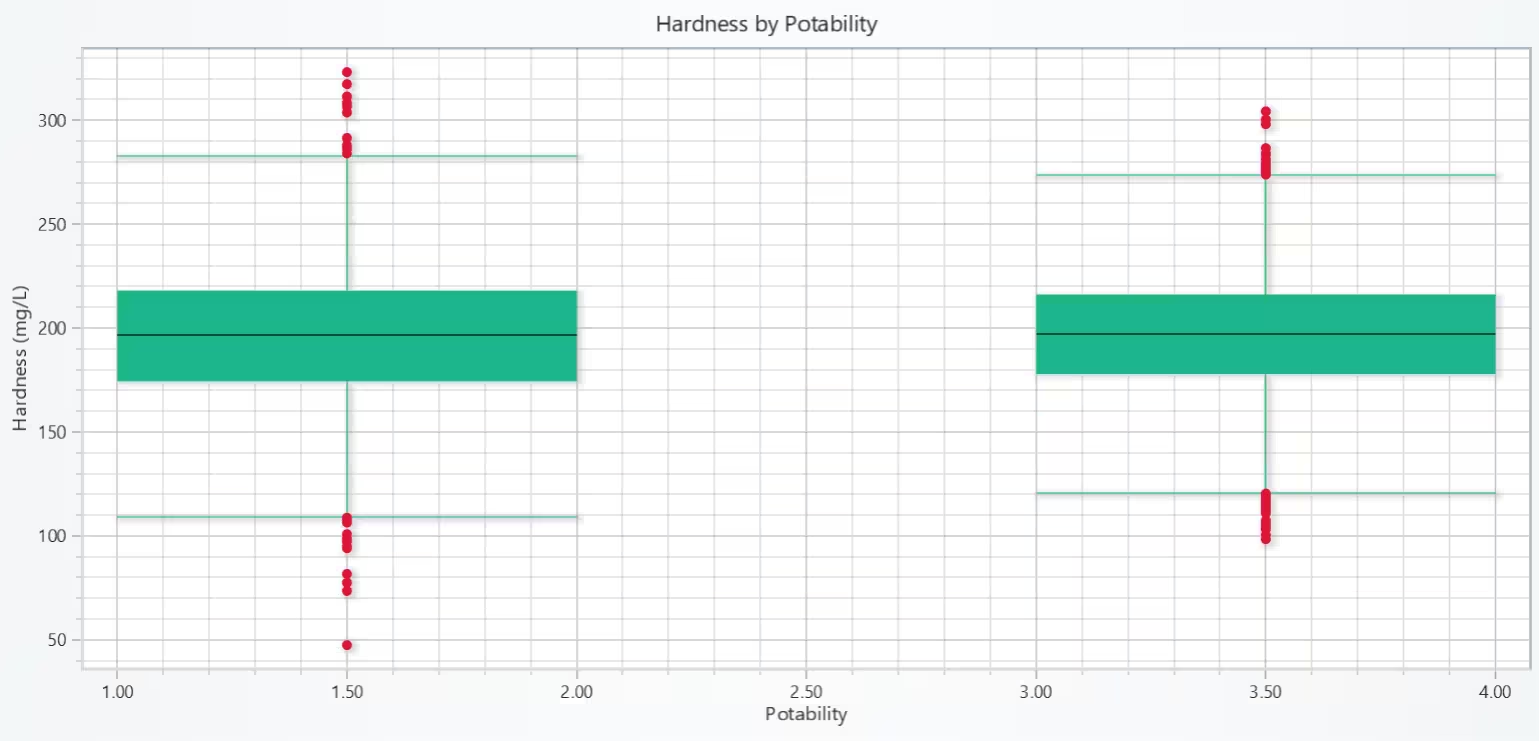
The box plot shows that median Hardness is almost identical for potable and non-potable water (~197 mg/L). Both groups have a similar IQR, indicating most samples fall within a similar hardness range.
Non-potable water exhibits more extreme high outliers (>300 mg/L), which may indicate localized hardness issues. Very low Hardness outliers (<100 mg/L) are present in both groups, but slightly more frequent in non-potable samples.
# Chart 2 – Hardness by Potability (Box Plot)
# Developed with AI Assistance to demonstrate LightningChart Python

import lightningchart as lc
import numpy as np

# Load license
with open("D:/HAMK/Internship/MyProjects/lc_license.txt", "r") as f:
    lc.set_license(f.read().strip())

# Prepare data groups
box_data = {
    'Potable Water': wqpd[wqpd['Potability'] == 1]['Hardness'].tolist(),
    'Non-Potable Water': wqpd[wqpd['Potability'] == 0]['Hardness'].tolist()
}

# Create chart
chart = lc.ChartXY(theme=lc.Themes.Light, title='Hardness by Potability')
chart.get_default_x_axis().set_title("Potability")
chart.get_default_y_axis().set_title("Hardness (mg/L)")

dataset = []
x_outliers = []
y_outliers = []
x_ticks = []
x_labels = []

# Loop through each group
for i, (label, values) in enumerate(box_data.items()):
    start = (i * 2) + 1
    end = start + 1
    center = start + 0.5

    q1 = float(np.percentile(values, 25))
    q3 = float(np.percentile(values, 75))
    median = float(np.median(values))
    iqr = q3 - q1
    lower_bound = q1 - 1.5 * iqr
    upper_bound = q3 + 1.5 * iqr

    non_outliers = [v for v in values if lower_bound <= v <= upper_bound]
    lower_extreme = float(min(non_outliers)) if non_outliers else q1
    upper_extreme = float(max(non_outliers)) if non_outliers else q3
    outliers = [v for v in values if v < lower_bound or v > upper_bound]

    dataset.append({
        'start': start,
        'end': end,
        'lowerQuartile': q1,
        'upperQuartile': q3,
        'median': median,
        'lowerExtreme': lower_extreme,
        'upperExtreme': upper_extreme,
    })

    for outlier in outliers:
        x_outliers.append(center)
        y_outliers.append(outlier)

    x_ticks.append(center)
    x_labels.append(label)

# Add box series
box_series = chart.add_box_series()
box_series.add_multiple(dataset)

# Add outliers
if x_outliers:
    outlier_series = chart.add_point_series(sizes=True)
    outlier_series.set_point_color('crimson')
    outlier_series.append_samples(
        x_values=x_outliers,
        y_values=y_outliers,
        sizes=[8] * len(y_outliers),
    )

# Show chart
chart.open()
Solids vs. Conductivity, coloured by Potability – Scatter Plot
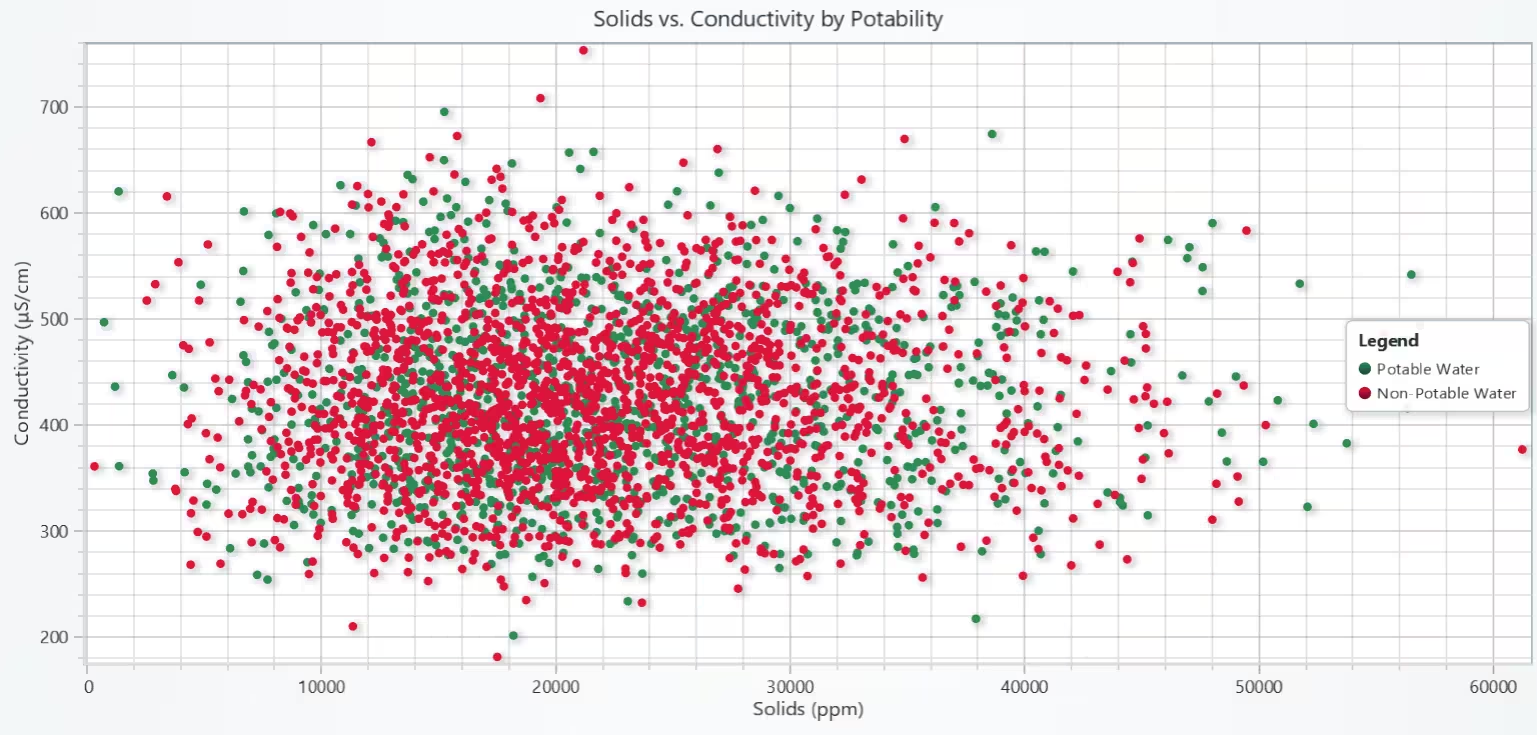
The scatter plot shows a moderate positive relationship between solids concentration and conductivity. Both potable and non-potable water samples follow a similar upward trend, meaning higher solids correspond to higher conductivity.
Non-potable samples show slightly more clustering in the mid-solids range (10,000–30,000 ppm) and scattered high-conductivity points. The heavy overlap suggests that while related, solids and conductivity alone are insufficient for classifying potability.
# Chart 3 – Solids vs. Conductivity, colored by Potability (Scatter Plot)
# Developed with AI Assistance to demonstrate LightningChart Python

import lightningchart as lc

# Load license
with open("D:/HAMK/Internship/MyProjects/lc_license.txt", "r") as f:
    lc.set_license(f.read().strip())

# Split dataset
potable = wqpd[wqpd['Potability'] == 1]
non_potable = wqpd[wqpd['Potability'] == 0]

# Create chart
chart = lc.ChartXY(
    theme=lc.Themes.Light,
    title="Solids vs. Conductivity by Potability"
)

# Add Potable series
series_potable = chart.add_point_series()
series_potable.add(
    x=potable['Solids'].tolist(),
    y=potable['Conductivity'].tolist()
)
series_potable.set_point_color('seagreen')
series_potable.set_name("Potable Water")

# Add Non-Potable series
series_non_potable = chart.add_point_series()
series_non_potable.add(
    x=non_potable['Solids'].tolist(),
    y=non_potable['Conductivity'].tolist()
)
series_non_potable.set_point_color('crimson')
series_non_potable.set_name("Non-Potable Water")

# Axis titles
chart.get_default_x_axis().set_title("Solids (ppm)")
chart.get_default_y_axis().set_title("Conductivity (μS/cm)")

# Add legend
chart.add_legend().add(chart)

# Show chart
chart.open()
Potability Distribution – Bar Chart
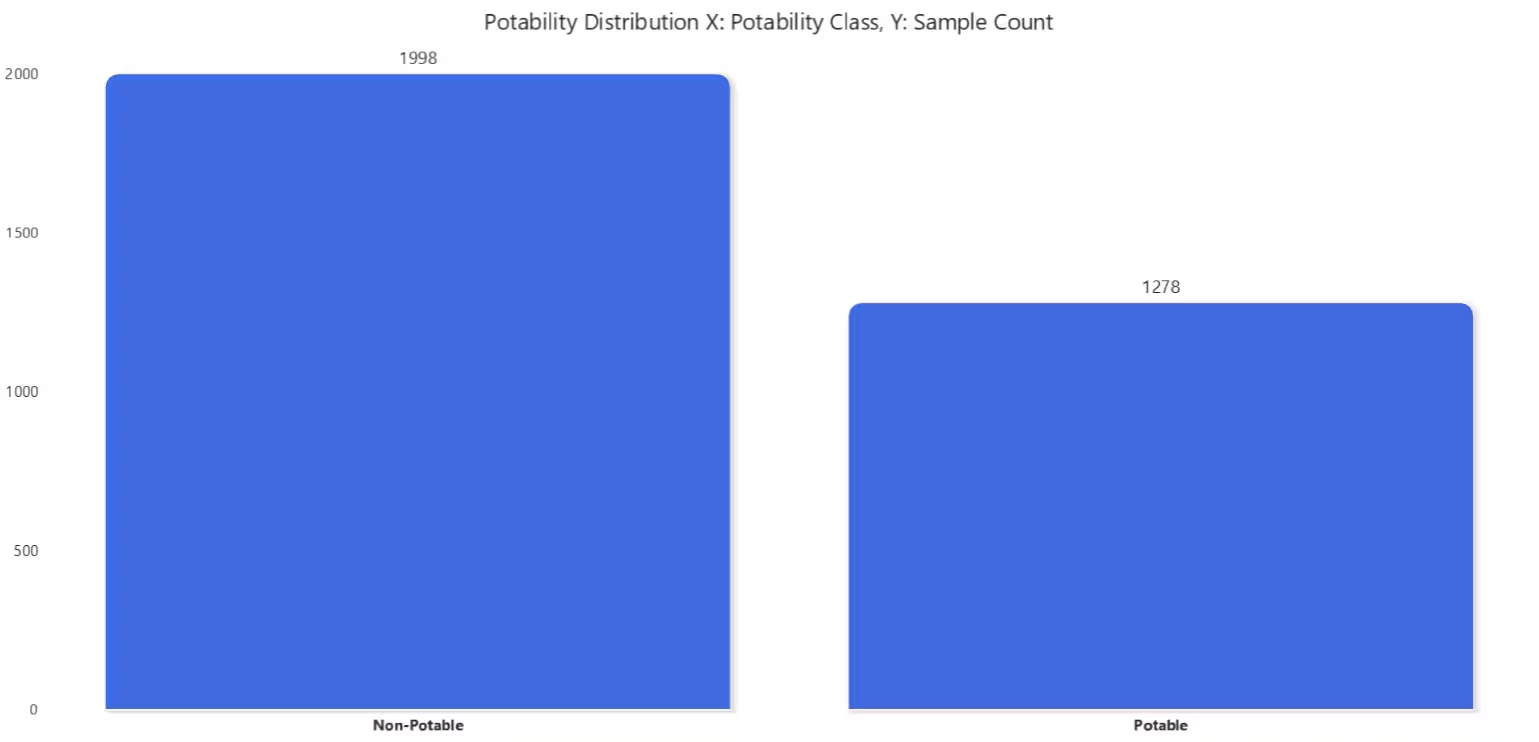
The chart clearly shows that non-potable water samples dominate the dataset, with 720 more samples than potable water. This imbalance could lead to a biased predictive model if not addressed with resampling or class weighting. From a water quality perspective, the higher number of non-potable samples indicates potential systemic issues with water sources in the dataset’s coverage area.
# Chart 4 – Potability Distribution (Bar Chart)
# Developed with AI Assistance to demonstrate LightningChart Python

import lightningchart as lc
import pandas as pd

# Load license
with open("D:/HAMK/Internship/MyProjects/lc_license.txt", "r") as f:
    lc.set_license(f.read().strip())

# Prepare counts
potability_counts = wqpd['Potability'].value_counts().sort_index()
categories = ['Non-Potable', 'Potable']
values = potability_counts.tolist()

# Create bar chart
chart = lc.BarChart(
    vertical=True,
    theme=lc.Themes.White,
    title="Potability Distribution\nX: Potability Class, Y: Sample Count"
)

chart.set_data([
    {"category": categories[i], "value": values[i]}
    for i in range(len(categories))
])

chart.set_sorting('disabled')
chart.set_bars_color('royalblue')

# Customize axes
chart.set_category_axis_labels(size=12, weight='bold')
chart.set_value_axis_labels(major_size=12)

# Show chart
chart.open()
All Numerical Parameters – Correlation Heatmap
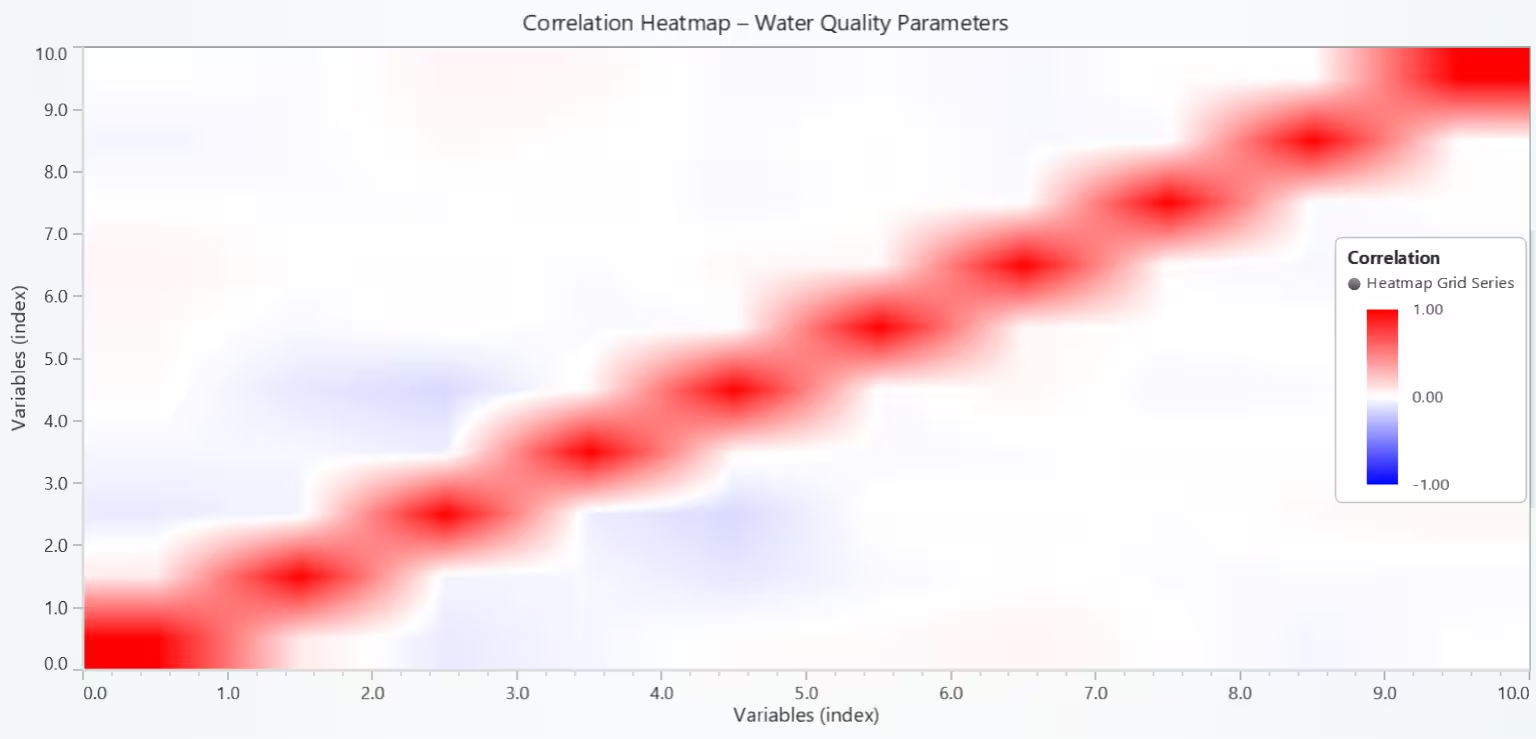
The heatmap indicates that Turbidity has a very low correlation with Potability, suggesting that it alone is not a reliable indicator of drinkability. Other variables, such as pH, Sulfate, and Solids, also show weak correlations with Turbidity, reinforcing its limited predictive value on its own.
Since Turbidity does not strongly relate to most other parameters, it may need to be used in combination with other water quality metrics for potability prediction. This suggests that Turbidity alone cannot provide a clear distinction between potable and non-potable water in this dataset.
# Chart 5 – All Numerical Parameters (Correlation Heatmap)
# Developed with AI Assistance to demonstrate LightningChart Python

import lightningchart as lc
import pandas as pd
import numpy as np

# License
with open("D:/HAMK/Internship/MyProjects/lc_license.txt", "r") as f:
    lc.set_license(f.read().strip())

# Data (expects `wqpd` already prepared; fallback to load if missing)
try:
    wqpd
except NameError:
    wqpd = pd.read_csv("water_potability.csv", encoding="ISO-8859-1")

# Keep only numeric columns for correlation
corr_matrix = wqpd.select_dtypes(include=[np.number]).corr()
variables = corr_matrix.columns.tolist()
values_matrix = corr_matrix.to_numpy().astype(float)

# Chart
chart = lc.ChartXY(
    theme=lc.Themes.Light,
    title="Correlation Heatmap – Water Quality Parameters"
)

heatmap = chart.add_heatmap_grid_series(columns=len(variables), rows=len(variables))
heatmap.set_start(x=0, y=0)
heatmap.set_end(x=len(variables), y=len(variables))
heatmap.set_step(x=1, y=1)

# Interpolation + values
heatmap.set_intensity_interpolation(True)
heatmap.invalidate_intensity_values(values_matrix.tolist())
heatmap.hide_wireframe()

# Palette: blue (-1) → white (0) → red (+1)
custom_palette = [
    {"value": -1.0, "color": ('blue')},
    {"value":  0.0, "color": ('white')},
    {"value":  1.0, "color": ('red')},
]
heatmap.set_palette_coloring(
    steps=custom_palette,
    look_up_property='value',
    interpolate=True,
)

# Axes (Numeric ticks; manual string ticks are not supported in this LC build)
chart.get_default_x_axis().set_title("Variables (index)").set_interval(0, len(variables))
chart.get_default_y_axis().set_title("Variables (index)").set_interval(0, len(variables))

# Optional: print index→name mapping to console for reference
print("\nVariable index mapping (use to read axes):")
for i, v in enumerate(variables):
    print(f"{i} → {v}")

# Color scale legend
chart.add_legend(data=heatmap).set_title('Correlation')

chart.open()
Chloramines vs. Trihalomethanes – Scatter Plot
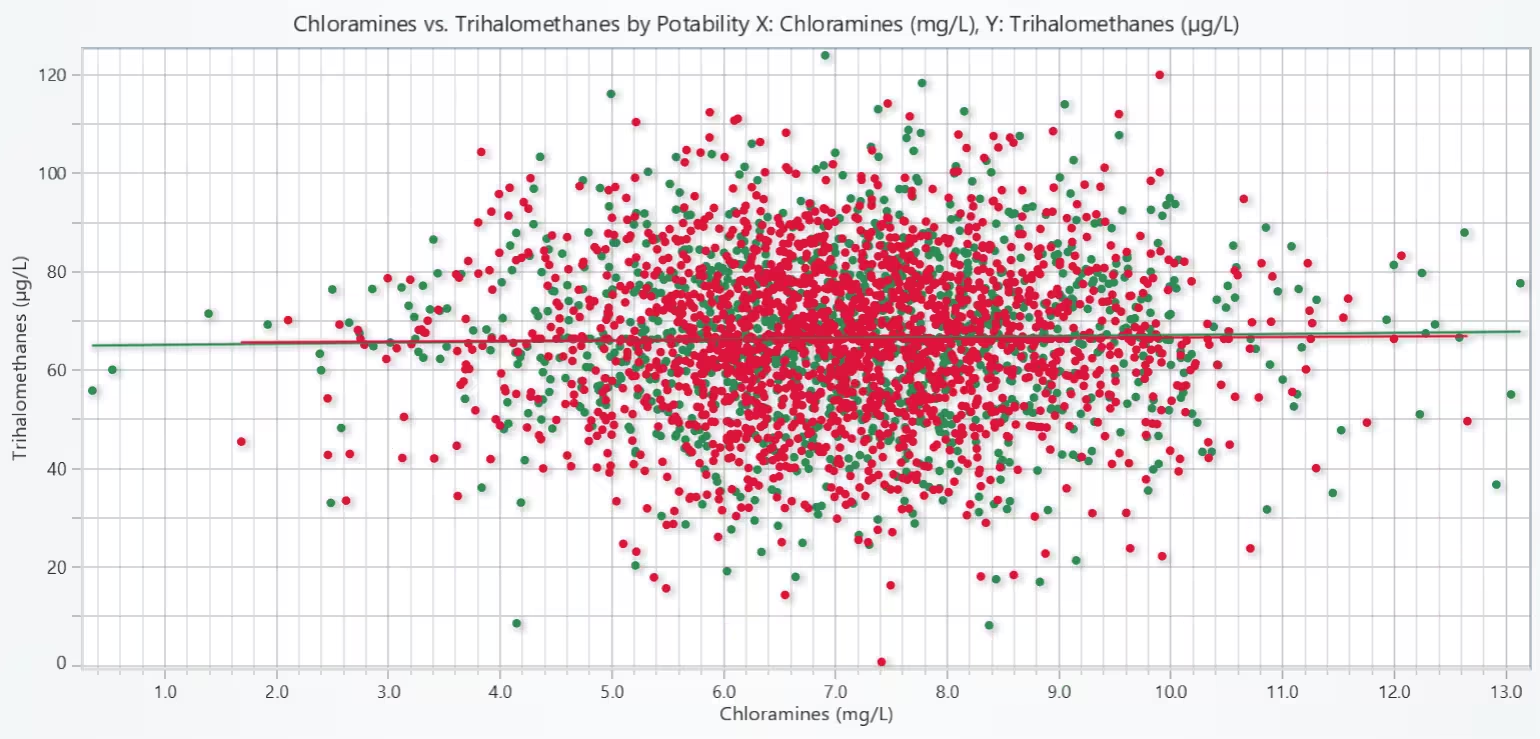
The scatter plot reveals that Chloramines levels do not strongly influence Trihalomethanes concentrations in this dataset, regardless of water potability. The flat regression lines for both potable and non-potable classes confirm the weak linear relationship, suggesting that these two chemical parameters behave largely independently.
# Chart 6 – Chloramines vs. Trihalomethanes (colored by Potability) with per-class trend lines (Scatter plot)
# Developed with AI Assistance to demonstrate LightningChart Python

import lightningchart as lc
import pandas as pd
import numpy as np

# License
with open("D:/HAMK/Internship/MyProjects/lc_license.txt", "r") as f:
    lc.set_license(f.read().strip())

# Data (use already-loaded wqpd if present; otherwise load)
try:
    wqpd
except NameError:
    wqpd = pd.read_csv("water_potability.csv", encoding="ISO-8859-1")

# Ensure required columns exist and are numeric
cols = ["Chloramines", "Trihalomethanes", "Potability"]
for c in cols:
    if c not in wqpd.columns:
        raise ValueError(f"Missing required column: {c}")

wqpd = wqpd.dropna(subset=["Chloramines", "Trihalomethanes", "Potability"]).copy()
wqpd["Chloramines"] = pd.to_numeric(wqpd["Chloramines"], errors="coerce")
wqpd["Trihalomethanes"] = pd.to_numeric(wqpd["Trihalomethanes"], errors="coerce")
wqpd = wqpd.dropna(subset=["Chloramines", "Trihalomethanes"])  # drop rows that failed numeric cast

# Split by Potability
potable = wqpd[wqpd["Potability"] == 1]
non_potable = wqpd[wqpd["Potability"] == 0]

# Chart
chart = lc.ChartXY(
    theme=lc.Themes.Light,
    title="Chloramines vs. Trihalomethanes by Potability\nX: Chloramines (mg/L), Y: Trihalomethanes (µg/L)"
)

# Scatter series: Potable
s_pot = chart.add_point_series()
s_pot.add(
    x=potable["Chloramines"].tolist(),
    y=potable["Trihalomethanes"].tolist()
)
s_pot.set_point_color('seagreen')
s_pot.set_name("Potable (points)")

# Scatter series: Non-Potable
s_non = chart.add_point_series()
s_non.add(
    x=non_potable["Chloramines"].tolist(),
    y=non_potable["Trihalomethanes"].tolist()
)
s_non.set_point_color('crimson')
s_non.set_name("Non-Potable (points)")

# Helper to add linear trend line for a subset
def add_trend(x_vals, y_vals, color, name):
    if len(x_vals) < 2:
        return None
    # Fit y = m*x + b
    m, b = np.polyfit(x_vals, y_vals, 1)
    x_line = np.linspace(np.min(x_vals), np.max(x_vals), 100)
    y_line = m * x_line + b
    line = chart.add_line_series()
    line.add(x_line.tolist(), y_line.tolist())
    line.set_line_color(color)
    line.set_name(name)
    return line

# Trend lines
trend_pot = add_trend(potable["Chloramines"].to_numpy(), potable["Trihalomethanes"].to_numpy(), 'seagreen', "Potable (trend)")
trend_non = add_trend(non_potable["Chloramines"].to_numpy(), non_potable["Trihalomethanes"].to_numpy(), 'crimson', "Non-Potable (trend)")

# Axes labels
chart.get_default_x_axis().set_title("Chloramines (mg/L)")
chart.get_default_y_axis().set_title("Trihalomethanes (µg/L)")

# Open chart
chart.open()
pH Band vs. Potability – Stacked Bar Chart
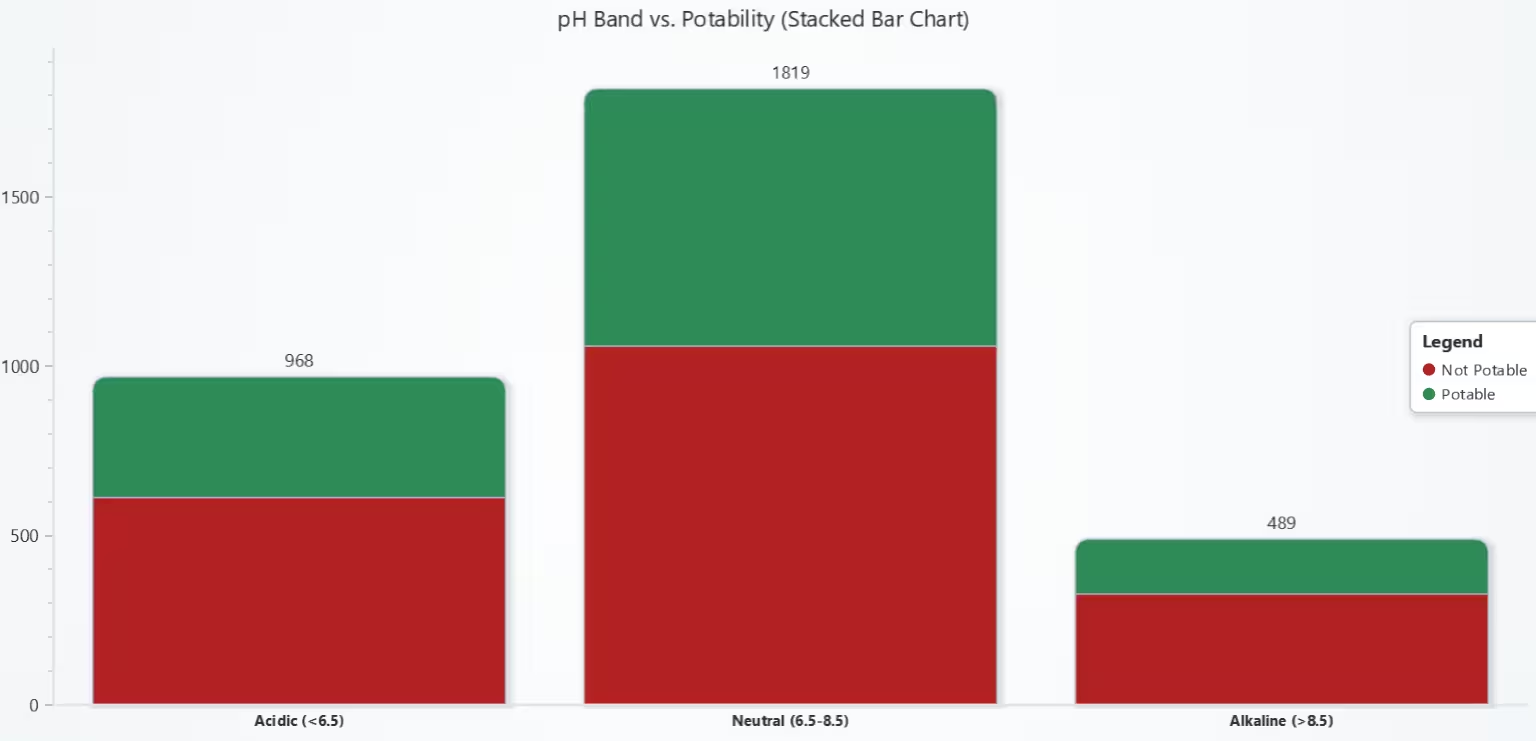
The stacked bar chart demonstrates that water within the neutral pH range is more likely to be potable, aligning with WHO guidelines for safe drinking water. Acidic and alkaline water samples show reduced potability rates, with acidic samples making up the second-largest category but skewing toward non-potability. This suggests that pH balance is a significant factor in water quality assessment.
# Chart 7 – pH Band vs. Potability (Stacked Bar Chart)
# Developed with AI Assistance to demonstrate LightningChart Python

import lightningchart as lc
import pandas as pd

# Load license
with open("D:/HAMK/Internship/MyProjects/lc_license.txt", "r") as f:
    lc.set_license(f.read().strip())

# Load dataset
wqpd = pd.read_csv("water_potability.csv")

# Fill missing pH with mean (already done earlier in data prep)
mean_ph = wqpd['ph'].mean()
wqpd['ph'].fillna(mean_ph, inplace=True)

# Create pH bands based on WHO guidelines
bins = [0, 6.5, 8.5, 14]
labels = ['Acidic (<6.5)', 'Neutral (6.5-8.5)', 'Alkaline (>8.5)']
wqpd['pH_Band'] = pd.cut(wqpd['ph'], bins=bins, labels=labels, include_lowest=True)

# Count potability within each pH band
counts = wqpd.groupby(['pH_Band', 'Potability']).size().unstack(fill_value=0)

# Prepare stacked bar data
categories = counts.index.tolist()
series_data = []

for pot_status in counts.columns:
    color = 'seagreen' if pot_status == 1 else 'firebrick'
    series_data.append({
        'subCategory': 'Potable' if pot_status == 1 else 'Not Potable',
        'values': counts[pot_status].tolist(),
        'color': color
    })

# Create chart
chart = lc.BarChart(
    vertical=True,
    theme=lc.Themes.Light,
    title='pH Band vs. Potability (Stacked Bar Chart)'
)

# Add stacked data
chart.set_data_stacked(categories, series_data)
chart.set_sorting('disabled')
chart.set_category_axis_labels(size=12, weight='bold')

# Add legend
chart.add_legend().add(chart)

# Show chart
chart.open()
Turbidity Levels by Potability – Box Plot
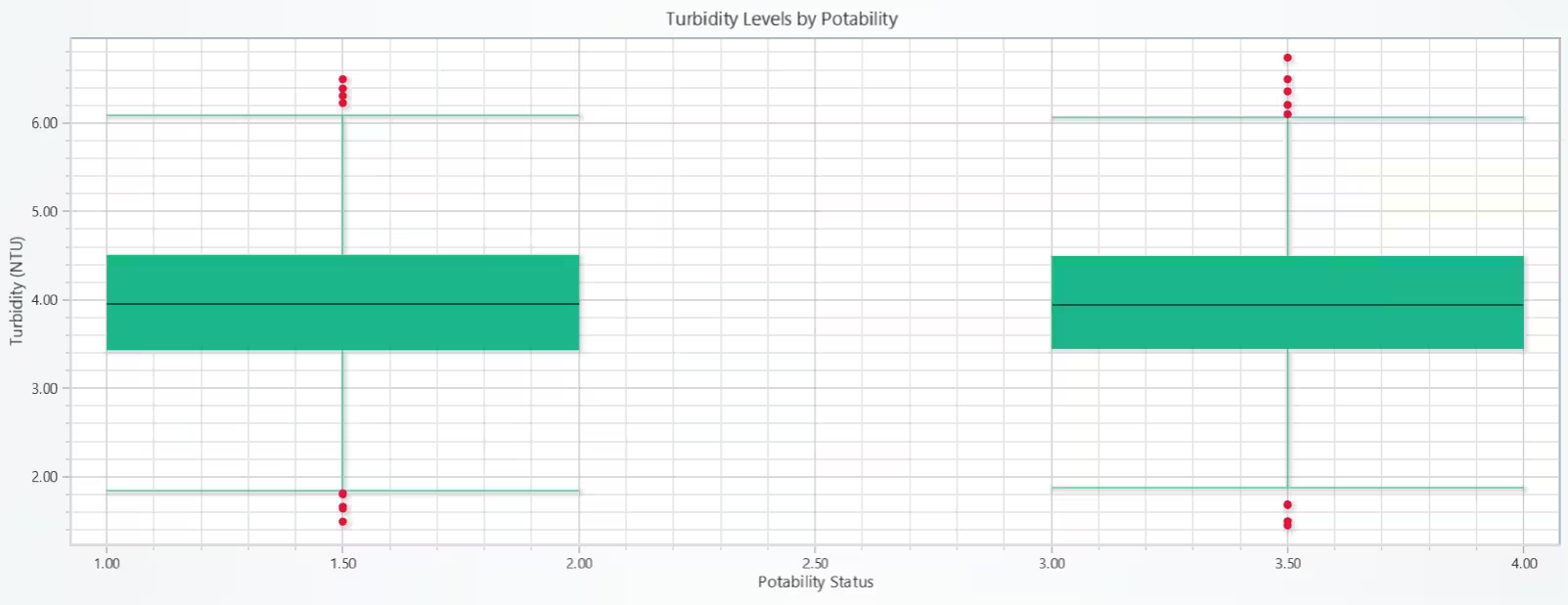
The box plot reveals that turbidity levels are closely aligned between potable and non-potable samples, with similar medians and spreads. While extreme outliers exist in both categories, the overlap suggests that turbidity, by itself, is not a decisive indicator of water potability. It may still be useful when combined with other water quality parameters but is insufficient as a sole predictor.
# Chart 8 – Turbidity Levels by Potability (Box Plot)
# Developed with AI Assistance to demonstrate LightningChart Python

import lightningchart as lc
import pandas as pd
import numpy as np

# Load your license
with open("D:/HAMK/Internship/MyProjects/lc_license.txt", "r") as f:
    lc.set_license(f.read().strip())

# Load dataset
wqpd = pd.read_csv("water_potability.csv")

# Prepare data groups
box_data = {
    'Potable': wqpd[wqpd['Potability'] == 1]['Turbidity'].tolist(),
    'Non-Potable': wqpd[wqpd['Potability'] == 0]['Turbidity'].tolist()
}

# Create chart
chart = lc.ChartXY(theme=lc.Themes.Light, title='Turbidity Levels by Potability')
chart.get_default_x_axis().set_title("Potability Status")
chart.get_default_y_axis().set_title("Turbidity (NTU)")

# Prepare box plot data
dataset = []
x_outliers = []
y_outliers = []

x_ticks = []
x_labels = []

for i, (label, values) in enumerate(box_data.items()):
    start = (i * 2) + 1
    end = start + 1
    center = start + 0.5

    q1 = float(np.percentile(values, 25))
    q3 = float(np.percentile(values, 75))
    median = float(np.median(values))
    iqr = q3 - q1
    lower_bound = q1 - 1.5 * iqr
    upper_bound = q3 + 1.5 * iqr

    non_outliers = [v for v in values if lower_bound <= v <= upper_bound]
    lower_extreme = float(min(non_outliers)) if non_outliers else q1
    upper_extreme = float(max(non_outliers)) if non_outliers else q3
    outliers = [v for v in values if v < lower_bound or v > upper_bound]

    dataset.append({
        'start': start,
        'end': end,
        'lowerQuartile': q1,
        'upperQuartile': q3,
        'median': median,
        'lowerExtreme': lower_extreme,
        'upperExtreme': upper_extreme,
    })

    for outlier in outliers:
        x_outliers.append(center)
        y_outliers.append(outlier)

    x_ticks.append(center)
    x_labels.append(label)

# Add box series
box_series = chart.add_box_series()
box_series.add_multiple(dataset)

# Add outlier series
if x_outliers:
    outlier_series = chart.add_point_series(sizes=True)
    outlier_series.set_point_color('crimson')
    outlier_series.append_samples(
        x_values=x_outliers,
        y_values=y_outliers,
        sizes=[8] * len(y_outliers),
    )

# Show chart
chart.open()
Chloramines vs Trihalomethanes by Potability – Line Chart
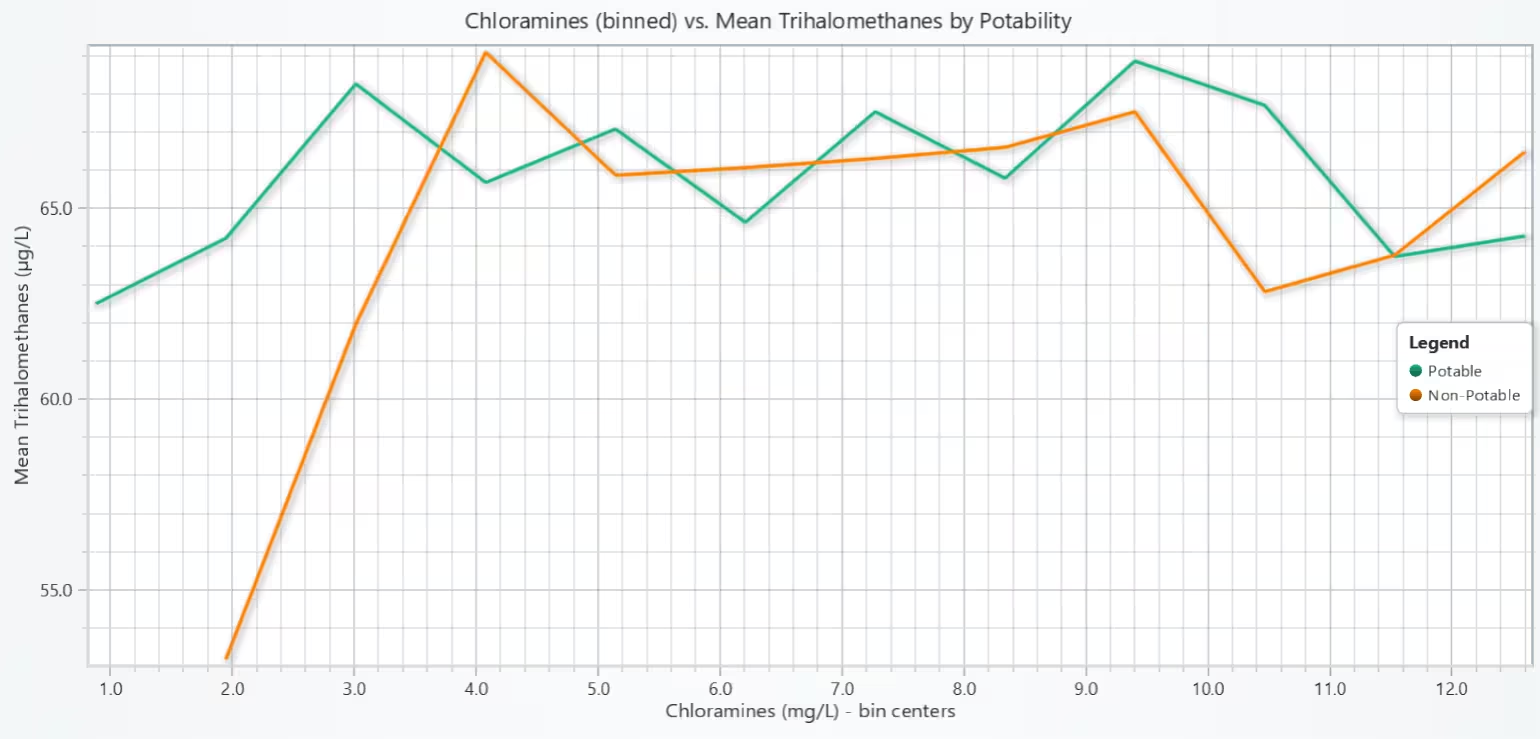
Binning Chloramines and plotting mean Trihalomethanes shows little difference between potable and non-potable water, suggesting these variables alone don’t indicate potability.
# Chart 9 – Chloramines (binned) vs mean Trihalomethanes by Potability (Line Chart)
# Developed with AI Assistance to demonstrate LightningChart Python

import lightningchart as lc
import numpy as np
import pandas as pd

# Load license
with open("D:/HAMK/Internship/MyProjects/lc_license.txt", "r") as f:
    lc.set_license(f.read().strip())

# Data prep
# Ensure required columns and drop NaNs
cols = ['Chloramines', 'Trihalomethanes', 'Potability']
data = wqpd[cols].dropna()

# Bin Chloramines
n_bins = 12  # tweak if you want smoother/coarser lines
ch_min, ch_max = data['Chloramines'].min(), data['Chloramines'].max()
bin_edges = np.linspace(ch_min, ch_max, n_bins + 1)
bin_centers = 0.5 * (bin_edges[:-1] + bin_edges[1:])

def bin_mean(df):
    # assign bins
    idx = np.digitize(df['Chloramines'].values, bin_edges, right=False) - 1
    # keep only indices within [0, n_bins-1]
    mask = (idx >= 0) & (idx < n_bins)
    idx = idx[mask]
    tri = df['Trihalomethanes'].values[mask]

    # compute mean per bin
    sums = np.zeros(n_bins, dtype=float)
    counts = np.zeros(n_bins, dtype=int)
    for i, v in zip(idx, tri):
        sums[i] += v
        counts[i] += 1

    with np.errstate(invalid='ignore'):
        means = np.where(counts > 0, sums / counts, np.nan)

    # drop NaN bins for plotting continuity
    x = bin_centers[~np.isnan(means)]
    y = means[~np.isnan(means)]
    return x.tolist(), y.tolist()

potable = data[data['Potability'] == 1]
non_potable = data[data['Potability'] == 0]

x_pot, y_pot = bin_mean(potable)
x_non, y_non = bin_mean(non_potable)

# Chart
chart = lc.ChartXY(
    theme=lc.Themes.Light,
    title="Chloramines (binned) vs. Mean Trihalomethanes by Potability"
)

# Potable line
series_pot = chart.add_line_series()
series_pot.add(x=x_pot, y=y_pot)
series_pot.set_name("Potable")
series_pot.set_line_thickness(3)

# Non-potable line
series_non = chart.add_line_series()
series_non.add(x=x_non, y=y_non)
series_non.set_name("Non-Potable")
series_non.set_line_thickness(3)

# Axis titles
chart.get_default_x_axis().set_title("Chloramines (mg/L) - bin centers")
chart.get_default_y_axis().set_title("Mean Trihalomethanes (µg/L)")

# Legend
chart.add_legend().add(chart)

chart.open()
Average Metrics by Potability – Radar (Spider) Chart
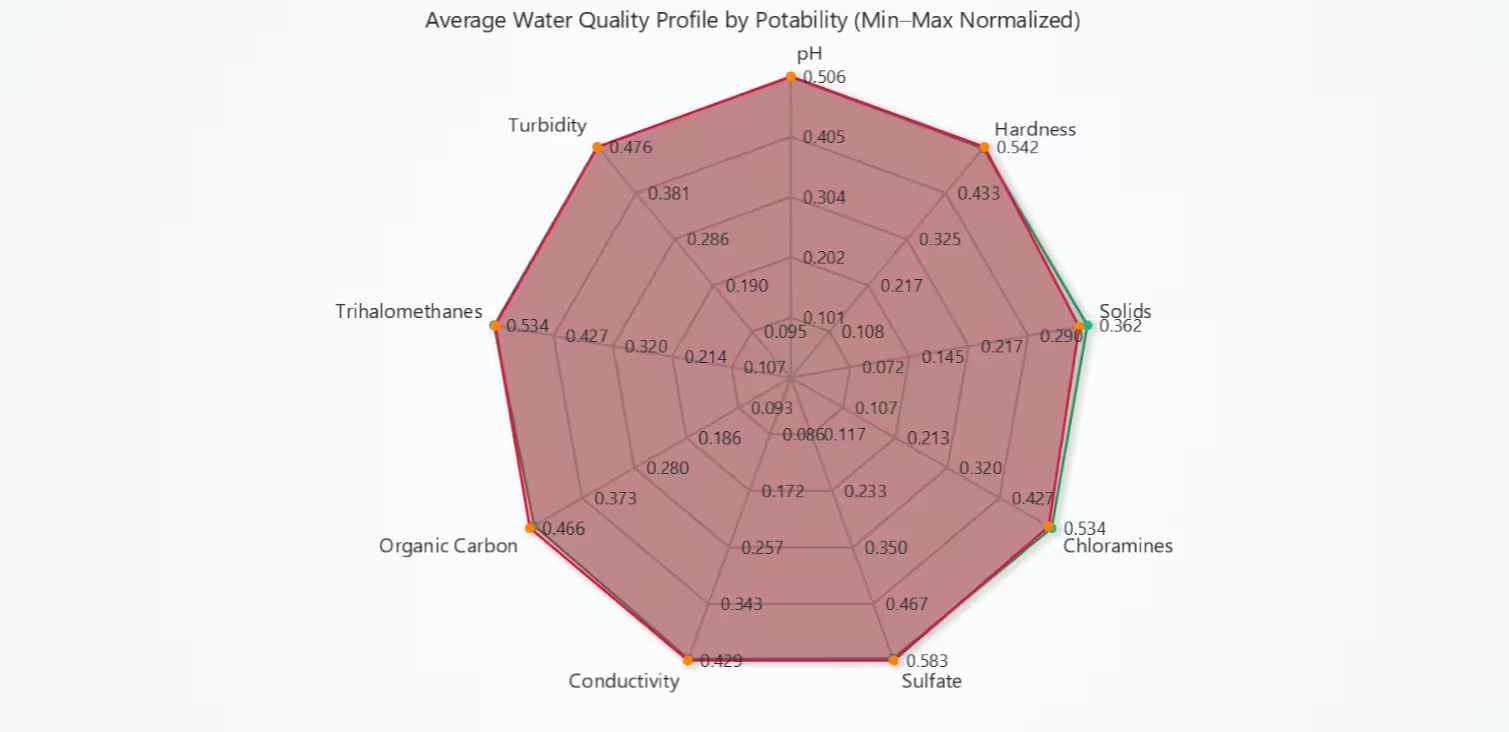
The radar chart reveals that potable and non-potable water share very similar normalized profiles, with only minor variations in certain chemicals. This suggests that potability classification likely depends on a combination of factors rather than any single parameter.
# Chart 10 – Average Metrics by Potability (Radar (Spider) Chart)
# Developed with AI Assistance to demonstrate LightningChart Python

import lightningchart as lc
import pandas as pd
import numpy as np

# License
with open("D:/HAMK/Internship/MyProjects/lc_license.txt", "r") as f:
    lc.set_license(f.read().strip())

# Data (use existing wqpd if present; else load)
try:
    wqpd
except NameError:
    wqpd = pd.read_csv("water_potability.csv", encoding='ISO-8859-1')

# Metrics to compare on the radar chart
metrics = ['ph', 'Hardness', 'Solids', 'Chloramines', 'Sulfate',
           'Conductivity', 'Organic_carbon', 'Trihalomethanes', 'Turbidity']
axes_labels = ['pH', 'Hardness', 'Solids', 'Chloramines', 'Sulfate',
               'Conductivity', 'Organic Carbon', 'Trihalomethanes', 'Turbidity']

# Ensure numeric + fill missing with column means for robust plotting
for col in metrics:
    wqpd[col] = pd.to_numeric(wqpd[col], errors='coerce')
    if wqpd[col].isna().any():
        wqpd[col].fillna(wqpd[col].mean(), inplace=True)

# Compute group means
group_means = wqpd.groupby('Potability')[metrics].mean()

# Optional: Min–Max normalize across ALL samples before averaging (keeps relative scale comparable)
# Comment this block out if you prefer raw means instead of normalized.
mins = wqpd[metrics].min()
maxs = wqpd[metrics].max()
range_ = (maxs - mins).replace(0, 1)
normalized = (group_means - mins) / range_
values_potable = normalized.loc[1].tolist()
values_non = normalized.loc[0].tolist()

# Create Radar (Spider) Chart
chart = lc.SpiderChart(
    title="Average Water Quality Profile by Potability (Min–Max Normalized)",
    theme=lc.Themes.Light
)
chart.set_web_mode("polygon")
chart.set_web_count(5)

# Add axes
for a in axes_labels:
    chart.add_axis(a)

# Colors (RGBA) and lines
color_potable_fill = (46, 139, 87, 100)    # seagreen w/ opacity
color_non_fill = (220, 20, 60, 100)        # crimson w/ opacity

# Potable series
s1 = chart.add_series()
s1.set_name("Potable")
s1.set_line_color('seagreen')
s1.set_fill_color(color_potable_fill)
s1.add_points([{ 'axis': axes_labels[i], 'value': float(values_potable[i]) } for i in range(len(axes_labels))])

# Non‑Potable series
s2 = chart.add_series()
s2.set_name("Non‑Potable")
s2.set_line_color('crimson')
s2.set_fill_color(color_non_fill)
s2.add_points([{ 'axis': axes_labels[i], 'value': float(values_non[i]) } for i in range(len(axes_labels))])

# Open chart
chart.open()
Conclusion
This project focused on visualizing and analysing water quality parameters for predicting water quality and understanding factors influencing potability using the Water Potability Dataset and the LightningChart Python library. A total of ten high-performance, interactive visualizations were developed to explore patterns across chemical, physical, and biological indicators such as pH, hardness, solids, chloramines, sulfate, conductivity, organic carbon, trihalomethanes, and turbidity, in relation to potable vs. non-potable classifications.
The dataset was pre-processed using pandas to manage missing values, normalize numerical ranges for radar plots, group continuous variables into bands (eg, pH categories), and calculate summary statistics for each potability class. The charts included histograms, box plots, scatter plots, bar charts, heatmaps, stacked bar charts, line charts, and radar charts, each selected to highlight distinct relationships between parameters and water potability.
The results provide practical insights for environmental monitoring agencies, water treatment operators, and public health authorities, such as identifying parameter ranges linked to potability, detecting weak correlations between certain chemical measures, and visually profiling the overall water quality landscape for more targeted intervention strategies.
Continue learning with LightningChart

Visualizing 10 Million Data Points in the Browser (2026): The Technical Deep-Dive
Ten Million Data Points in the Browser: How WebGL Makes Mass Datasets Interactive Ten million data points. That number used to mean a database problem, not a front-end problem. Now research teams want to explore it interactively in a browser. Trading desks want...
Elliott Wave Theory in Trading
Financial markets often appear chaotic, but many traders believe that price movements follow recurring patterns driven by human psychology. One of the most influential approaches based on this idea is the Elliott Wave Theory. Developed nearly a century ago, it remains one of the most widely studied methods of technical analysis.
The Head and Shoulders Pattern in Technical Analysis
The Head and Shoulders Pattern in Technical Analysis The Head and Shoulders Pattern in Technical Analysis The Head and Shoulders pattern is one of the most recognized and widely used chart patterns in technical analysis. It is considered a reliable reversal pattern...



If you have any questions, feel free to contact us!
©LightningChart Ltd 2025. All rights reserved.