





Create a Power Load Analysis with LightningChart Python
Tutorial
Assisted by AI
Learn how to create a detailed power load analysis using LightningChart Python for accurate and efficient data visualization.
Vindya Nukulasooriya
Data Science Developer


Introduction
This project aims to analyze and to give visual insights to the Electricity Transformer Temperature (ETT) Dataset using high-performance interactive visualizations from the LightningChart Python library. By utilizing the dataset, time-series analysis is performed and clearly visualized to understand power load behaviors. The dataset consists of four CSV files representing hourly and minute-level recordings of transformer features named HUFL, HULL, MUFL, MULL, LUFL, LULL & OT.
Project Overview
Introduction to the Project
This project utilizes the Electricity Transformer Temperature (ETT) dataset to perform time-series analysis and visualization for understanding power load behaviours. The dataset consists of four CSV files representing hourly and minute-level recordings of transformer features such as HUFL, LUFL, OT, etc.
LightningChart Python is used exclusively to visualize different aspects of this time-series data and is known for its speed, responsiveness, and ability to handle large datasets with ease, making it ideal for real-time and static environmental data visualization with high performance.
Objectives
- Visualize Long-Term Trends in Transformer Metrics
- Simulate Real-Time Monitoring and Diagnostics
- Analyze Statistical Distributions and Correlations
Deliverable
The project will present 5 distinct chart types, each highlighting different aspects of this time-series data to demonstrate the flexibility of LightningChart and reveal insights into Electricity Transformer Temperature (ETT) dataset.
Tools Used
Python 3.13.0, LightningChart Python, Jupyter Notebook, AI Assistance
About the Dataset
The Electricity Transformer Temperature (ETT) Dataset comprises four subsets designed from time-series forecasting of electrical transformer load and conditions. Each dataset varies in time resolution and operational context.
LightningChart Python
LightningChart Python is a high-performance data visualization library designed for fast, interactive, and visually rich charting. It supports both 2D and 3D visualization, making it an excellent choice for handling large, complex datasets like environmental monitoring data.
For this project, LightningChart is used to create dynamic and insightful visualizations and insights in to Electricity Transformer Temperature (ETT) Dataset. Its speed and interactivity make it ideal for exploring time-series trends, geographic distributions, and pollution patterns, helping users quickly identify environmental issues and draw meaningful conclusions from the data.

Setting Up Python Environment
Before running the project, install Python and the other required libraries using:
%pip install numpy pandas lightningchartOverview of Libraries Used:
- Pandas: for data handling and time-based grouping
- Numpy: for numerical operations
- LightningChart: for high-performance visualization
- DateTime: for parsing and formatting date strings
Setting Up Your Development Environment:
- Set up a virtual environment:
- Use Visual Studio Code (VSCode) for a streamlined development experience.
Loading and Preprocessing Data
To create this power load analysis, use the following function:
Downloaded the dataset from - https://github.com/zhouhaoyi/ETDatasetTo preprocess the dataset, we will import the pandas library:
# Import necessary libraries (load pandas library to preprocess dataset)
import pandas as pd
Visualizing Data with LightningChart Python
To effectively visualize and interpret the Electricity Transformer Temperature (ETT) dataset, we utilized five distinct chart types available in the LightningChart Python library.
Line Chart: OT vs Time (ETTh1)
Visualize long-term temporal (time-related) trends in transformer metrics
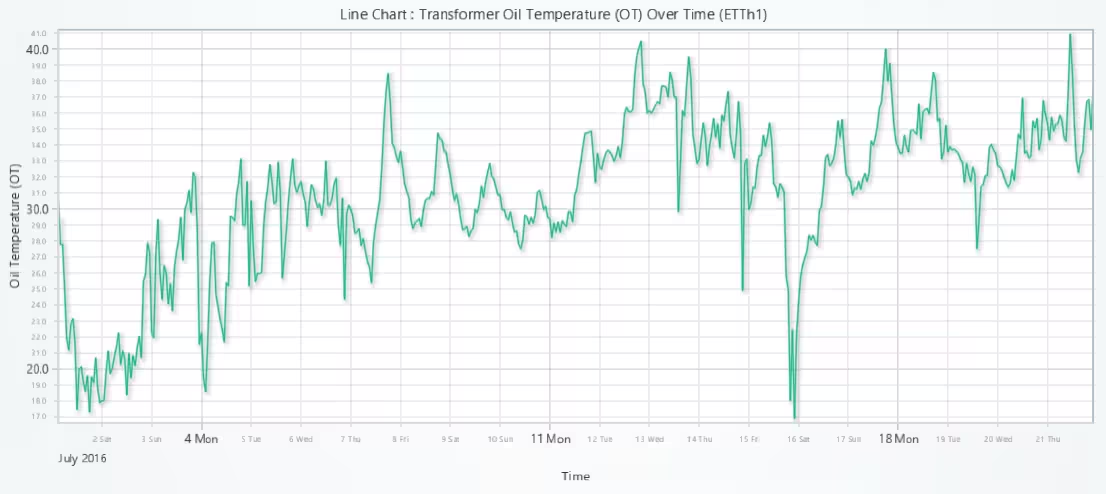
# Line Chart: OT (Oil Temperature) over Time from ETTh1 Dataset
# Developed with AI assistance to showcase the performance of LightningChart Python libraries.

import lightningchart as lc
import pandas as pd

# Load license key
with open("D:/Vindy/HAMK/Internship/MyProjects/lc_license.txt", "r") as f:
    license_key = f.read().strip()

lc.set_license(license_key)

# Load and process data
df = pd.read_csv("ETTh1.csv").head(500)
df['date'] = pd.to_datetime(df['date'])

# Prepare X (time in ms) and Y (OT) data
x = df['date'].astype('int64') // 10**6  # Faster than apply()
y = df['OT']

# Create chart
chart = lc.ChartXY(theme=lc.Themes.Light, title='Line Chart : Transformer Oil Temperature (OT) Over Time (ETTh1)')
line_series = chart.add_line_series()
line_series.add(x.tolist(), y.tolist())

# Configure X and Y axes
x_axis = chart.get_default_x_axis()
x_axis.set_title('Time')
x_axis.set_tick_strategy('DateTime')

y_axis = chart.get_default_y_axis()
y_axis.set_title('Oil Temperature (OT)')

# Optional: Add smoothing or styling
line_series.set_name('OT')
line_series.set_line_thickness(2)

chart.open()
Point Line Chart: OT, HUFL vs Time (ETTm1)
Visual comparison between two related signals.
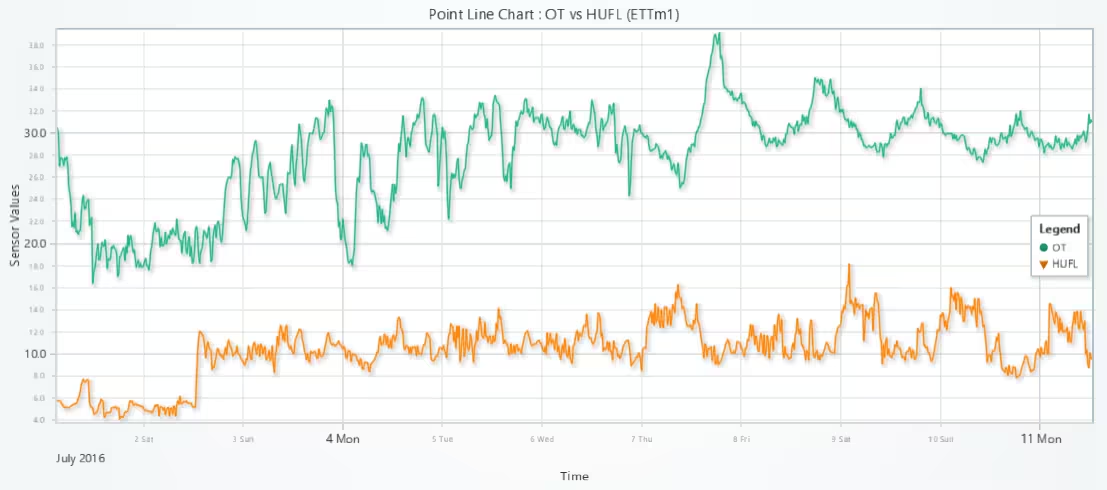
# Point Line Chart: OT vs HUFL over Time from ETTm1 Dataset
# Developed with AI assistance to showcase the performance of LightningChart Python libraries.

import lightningchart as lc
import pandas as pd

# Load license key
with open("D:/Vindy/HAMK/Internship/MyProjects/lc_license.txt", "r") as f:
    license_key = f.read().strip()
lc.set_license(license_key)

# Load and process data
df = pd.read_csv("ETTm1.csv").head(1000)
df['date'] = pd.to_datetime(df['date'])

# Convert datetime to milliseconds
x = df['date'].astype('int64') // 10**6
y_ot = df['OT']
y_hufl = df['HUFL']

# Create chart
chart = lc.ChartXY(theme=lc.Themes.Light, title='Point Line Chart : OT vs HUFL (ETTm1)')

# OT Series
series_ot = chart.add_point_line_series()
series_ot.set_name("OT").set_point_shape('circle').set_point_size(6).set_line_thickness(2)
series_ot.add(x.tolist(), y_ot.tolist())

# HUFL Series
series_hufl = chart.add_point_line_series()
series_hufl.set_name("HUFL").set_point_shape('triangle').set_point_size(6).set_line_thickness(2)
series_hufl.add(x.tolist(), y_hufl.tolist())

# Axis titles
chart.get_default_x_axis().set_title("Time").set_tick_strategy("DateTime")
chart.get_default_y_axis().set_title("Sensor Values")

chart.open()
Layered Area Chart
Visual comparison of log-scaled transformer loads to reveal subtle variations and feature dynamics over time.
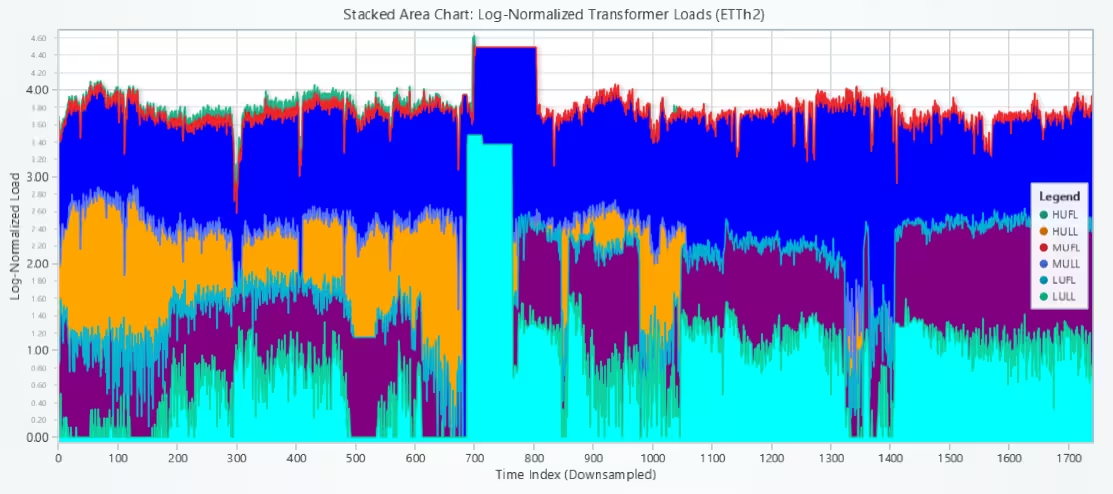
# Stacked Area Chart: Log-Normalized Transformer Load (ETTh2)
# Developed with AI assistance to showcase the performance of LightningChart Python libraries.

import lightningchart as lc
import pandas as pd
import numpy as np

# Load LightningChart license
with open("D:/Vindy/HAMK/Internship/MyProjects/lc_license.txt", "r") as f:
    lc.set_license(f.read().strip())

# Load ETTh2.csv properly
df = pd.read_csv("ETTh2.csv")
df['date'] = pd.to_datetime(df['date'])  # keep for reference, not used in plot

# Select only the relevant transformer load features
features = ['HUFL', 'HULL', 'MUFL', 'MULL', 'LUFL', 'LULL']
df = df[features]

# Drop missing values if any
df = df.dropna()

# Downsample: average over 10-row windows
window_size = 10
df_downsampled = df.groupby(df.index // window_size).mean()

# Apply logarithmic normalization (log1p to avoid log(0))
log_normalized = np.log1p(np.abs(df_downsampled))

# Create chart
chart = lc.ChartXY()
chart.set_title("Stacked Area Chart: Log-Normalized Transformer Loads (ETTh2)")
chart.get_default_y_axis().set_title("Log-Normalized Load")
chart.get_default_x_axis().set_title("Time Index (Downsampled)")

# Plot each feature using AreaSeries (not stacked visually, just layered)
colors = ['red', 'green', 'blue', 'orange', 'purple', 'cyan']
x_values = list(range(len(log_normalized)))

for i, feature in enumerate(features):
    area = chart.add_area_series()
    area.set_name(feature)
    area.add(x_values, log_normalized[feature].values)
    area.set_fill_color(lc.Color(colors[i]))

# Show chart
chart.open()
Box Plot: HUFL, HULL, MUFL, MULL, LUFL & LULL (ETTm2)
Identify distribution patterns and outliers.
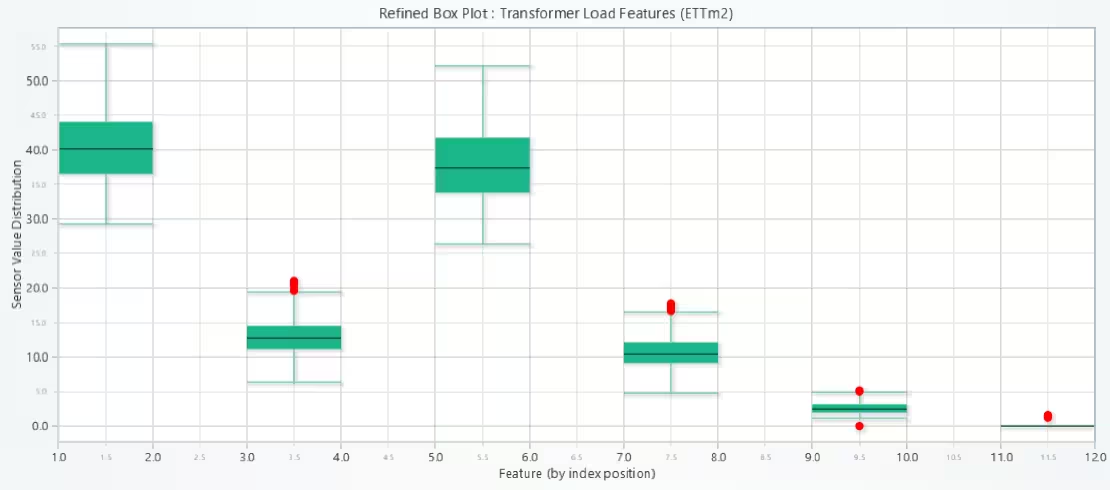
# Box Plot: Distribution of Transformer Load Features with Refined Whiskers (ETTm2) + Manual X-Axis Mapping
# Developed with AI assistance to showcase the performance of LightningChart Python libraries.

import lightningchart as lc
import pandas as pd
import numpy as np

# Load license
with open("D:/Vindy/HAMK/Internship/MyProjects/lc_license.txt", "r") as f:
    license_key = f.read().strip()
lc.set_license(license_key)

# Load and filter dataset
df = pd.read_csv("ETTm2.csv")
df = df[['HUFL', 'HULL', 'MUFL', 'MULL', 'LUFL', 'LULL']].dropna().iloc[:1000]

# Prepare refined box data
refined_box_data = []
x_outliers, y_outliers = [], []

for i, col in enumerate(df.columns):
    col_data = df[col].values
    q1 = np.percentile(col_data, 25)
    q3 = np.percentile(col_data, 75)
    iqr = q3 - q1
    lower_bound = q1 - 1.5 * iqr
    upper_bound = q3 + 1.5 * iqr
    non_outliers = col_data[(col_data >= lower_bound) & (col_data <= upper_bound)]

    refined_box_data.append({
        'start': i * 2 + 1,
        'end': i * 2 + 2,
        'lowerQuartile': float(q1),
        'upperQuartile': float(q3),
        'median': float(np.median(col_data)),
        'lowerExtreme': float(non_outliers.min()),
        'upperExtreme': float(non_outliers.max()),
        'label': col
    })

    # Collect outliers
    outliers = [v for v in col_data if v < lower_bound or v > upper_bound]
    x_outliers.extend([i * 2 + 1.5] * len(outliers))
    y_outliers.extend(outliers)

# Create chart
chart = lc.ChartXY(title="Refined Box Plot : Transformer Load Features (ETTm2)", theme=lc.Themes.Light)

# Add box series
box_series = chart.add_box_series()
box_series.add_multiple(refined_box_data)

# Add outliers
outlier_series = chart.add_point_series(sizes=True)
outlier_series.set_point_color(lc.Color('red'))
outlier_series.append_samples(x_values=x_outliers, y_values=y_outliers, sizes=[10] * len(y_outliers))

# Axis titles
chart.get_default_x_axis().set_title("Feature (by index position)")
chart.get_default_y_axis().set_title("Sensor Value Distribution")

# Print feature mapping
print("Feature X-Axis Mapping:")
for i, col in enumerate(df.columns):
    print(f"{(i * 2) + 1.5}: {col}")

chart.open()
Real-Time Line Chart: HUFL, MUFL & LUFL (ETTh1)
Simulate live transformer monitoring.
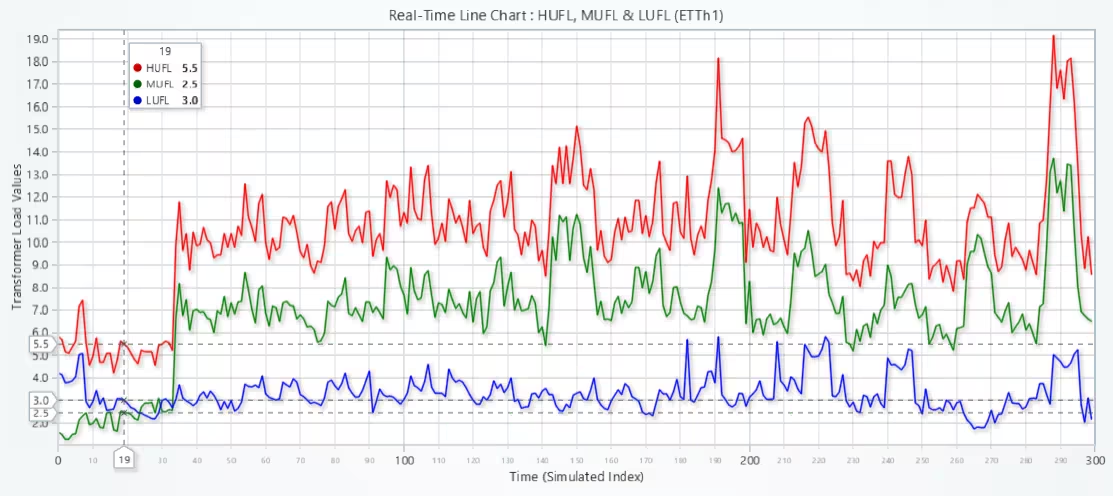
# Real-Time Line Chart: Streaming HUFL, MUFL, LUFL from ETTh1 Dataset
# Developed with AI assistance to showcase the performance of LightningChart Python libraries.

import lightningchart as lc
import pandas as pd
import time

# Load LightningChart license
with open("D:/Vindy/HAMK/Internship/MyProjects/lc_license.txt", "r") as f:
    license_key = f.read().strip()
lc.set_license(license_key)

# Load data
df = pd.read_csv("ETTh1.csv").iloc[:300]
df['date'] = pd.to_datetime(df['date'])
features = ['HUFL', 'MUFL', 'LUFL']

# Create chart
chart = lc.ChartXY(title="Real-Time Line Chart : HUFL, MUFL & LUFL (ETTh1)", theme=lc.Themes.Light)
chart.set_animations_enabled(False)

# Make sure axes and grid lines are visible
x_axis = chart.get_default_x_axis()
x_axis.set_title("Time (Simulated Index)")
x_axis.set_tick_strategy("Numeric")
x_axis.set_scroll_strategy('scrolling')
x_axis.set_interval(start=0, end=300, stop_axis_after=False)

y_axis = chart.get_default_y_axis()
y_axis.set_title("Transformer Load Values")
y_axis.set_tick_strategy("Numeric")

# Configure X-axis for streaming
x_axis = chart.get_default_x_axis()
x_axis.set_scroll_strategy('scrolling')
x_axis.set_interval(start=0, end=300, stop_axis_after=False)

# Initialize line series
colors = ['red', 'green', 'blue']
series_list = []
for i, feat in enumerate(features):
    line = chart.add_line_series()
    line.set_name(feat)
    line.set_line_thickness(2)
    line.set_line_color(lc.Color(colors[i]))
    series_list.append(line)

# Show chart in live mode
chart.open(live=True)

# Stream points into the chart
for i in range(len(df)):
    for j, feat in enumerate(features):
        x = i
        y = df.loc[i, feat]
        series_list[j].add(x, y)
    time.sleep(0.02)  # simulate 20 ms real-time interval

chart.close()
Conclusion
This project showcases the power of LightningChart Python in visualizing real-world transformer load data with various chart types suited for temporal trend analysis, distribution, real-time updates, and signal comparison. The visualizations support intelligent diagnostics and forecasting in power systems.
Continue learning with LightningChart

Visualizing 10 Million Data Points in the Browser (2026): The Technical Deep-Dive
Ten Million Data Points in the Browser: How WebGL Makes Mass Datasets Interactive Ten million data points. That number used to mean a database problem, not a front-end problem. Now research teams want to explore it interactively in a browser. Trading desks want...
Elliott Wave Theory in Trading
Financial markets often appear chaotic, but many traders believe that price movements follow recurring patterns driven by human psychology. One of the most influential approaches based on this idea is the Elliott Wave Theory. Developed nearly a century ago, it remains one of the most widely studied methods of technical analysis.
The Head and Shoulders Pattern in Technical Analysis
The Head and Shoulders Pattern in Technical Analysis The Head and Shoulders Pattern in Technical Analysis The Head and Shoulders pattern is one of the most recognized and widely used chart patterns in technical analysis. It is considered a reliable reversal pattern...



If you have any questions, feel free to contact us!
©LightningChart Ltd 2025. All rights reserved.