








Creating a Healthcare Patient Data monitoring App | LightningChart Python
Tutorial
Assisted by AI
Discover how to build a Python app for monitoring and managing healthcare patient data with LightningChart, ensuring better healthcare services.
Vindya Nukulasooriya
Data Science Developer

Introduction
This project focuses on visualizing real-time and multidimensional patient monitoring data using the Synthetic Patient HealthCare Monitoring Dataset (pdhmsd). The dataset includes key physiological parameters such as heart rate, SpO₂ level, systolic and diastolic blood pressure, body temperature, and several alert indicators reflecting abnormal conditions.
The goal of this project is to explore interrelationships among these vital signs, identify early signals of physiological instability, and demonstrate the power of LightningChart Python for high-performance medical data visualization.
Project Overview
To analyze and visually interpret patient health data to answer the following analytical questions:
- How does the physiological state (body temperature) relate to the overall abnormal alert load across vital signs?
- What correlation exists between systolic and diastolic blood pressure, and how stable are these readings over time?
- Are there observable patterns in heart rate when compared with other vitals such as SpO₂ level and blood pressure?
- Which combinations of vital signs indicate potential risk or instability?
LightningChart Python was selected for its GPU acceleration, real-time streaming, and interactive 3D visualization features, enabling detailed exploration of physiological data with exceptional rendering speed and clarity.
Deliverables
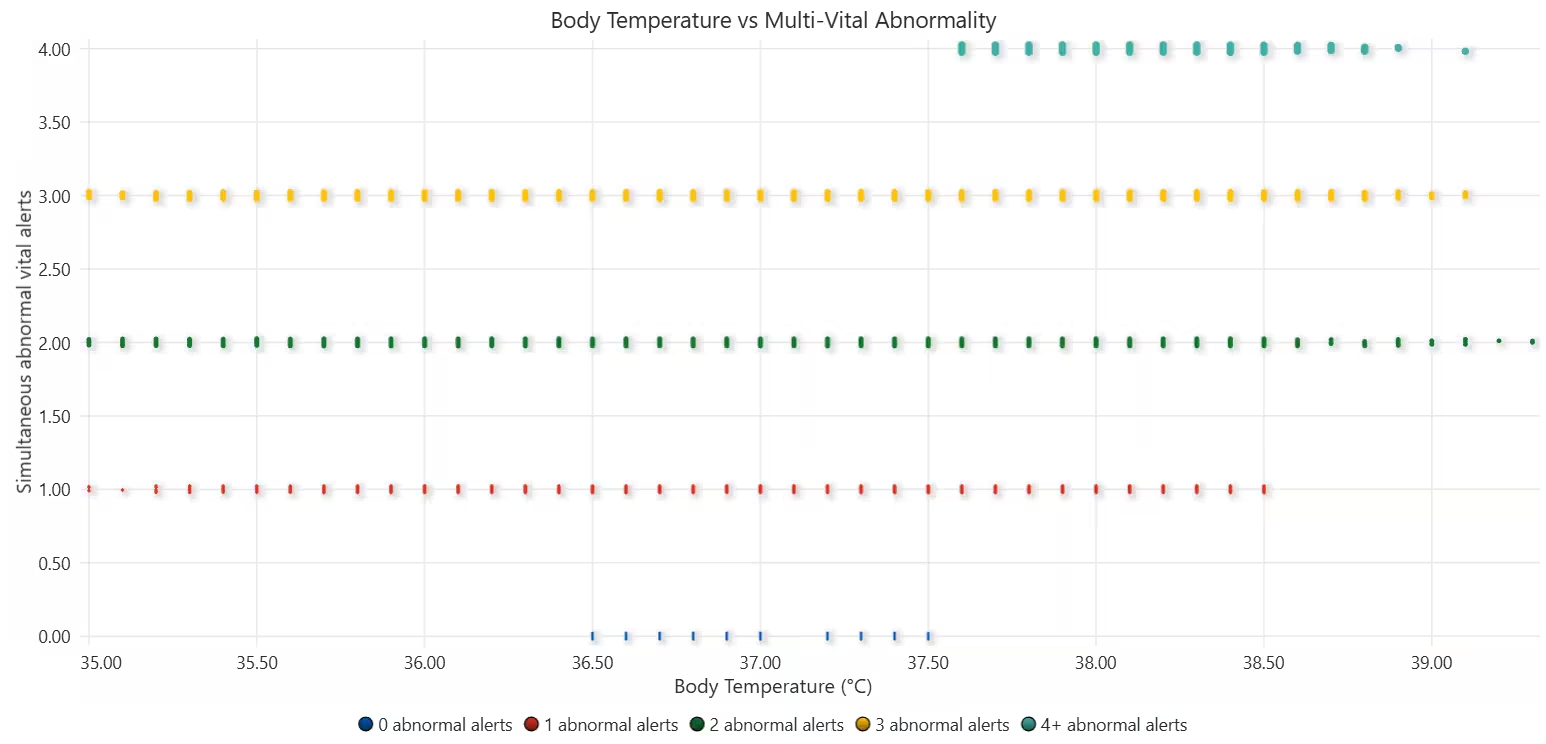
- Chart 1 – Body Temperature vs Abnormal Alert Load
- High-density 2D scatter plot with severity segmentation.
- Shows how simultaneous vital abnormalities increase with body temperature.
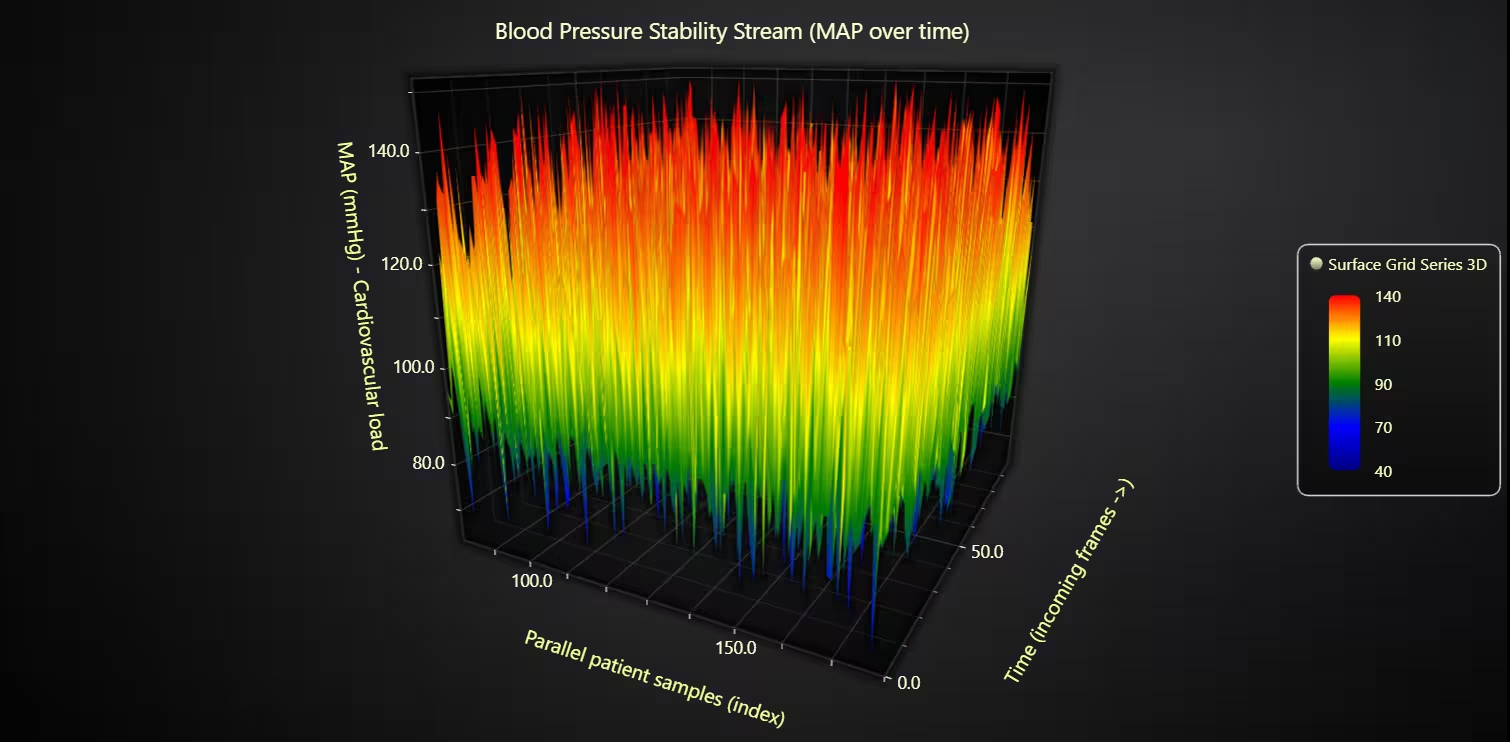
- Chart 2 – Blood Pressure Stability Stream (Scrolling 3D Surface)
- Real-time 3D surface grid visualizing Mean Arterial Pressure (MAP) over time.
- Demonstrates the continuous relationship between systolic and diastolic pressures and highlights pressure stability or overload zones.
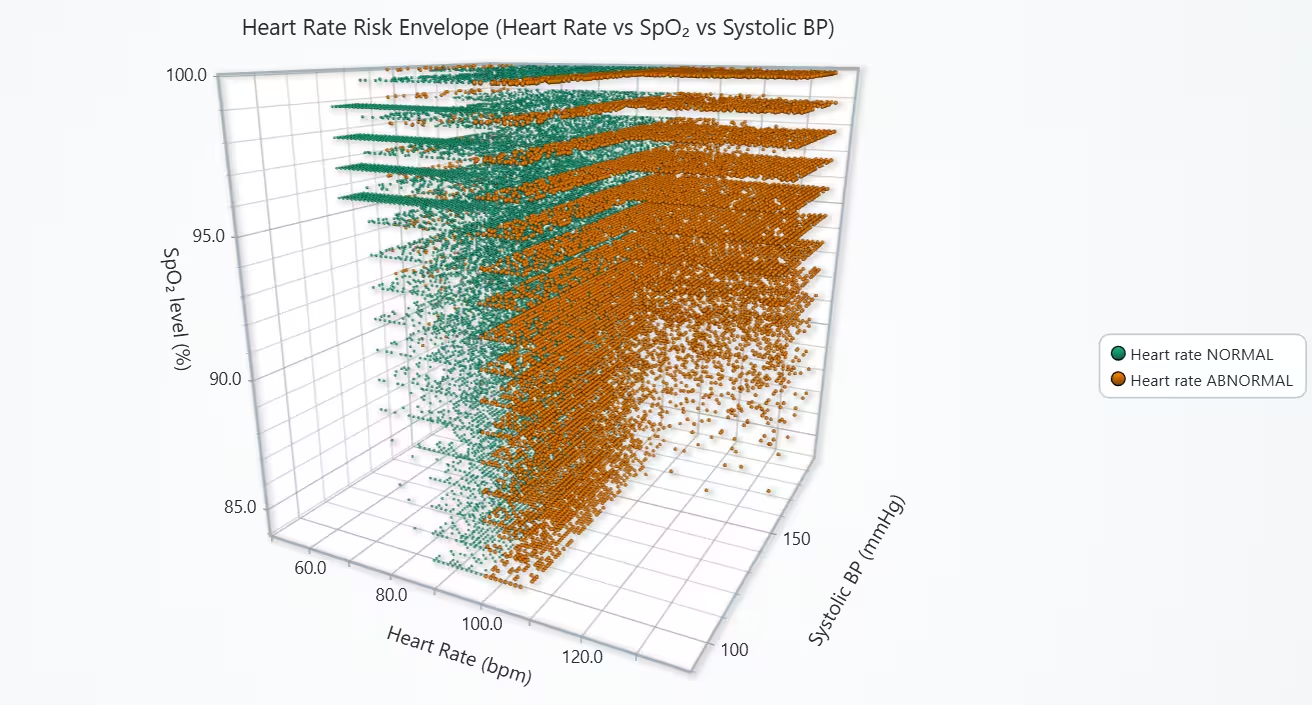
- Chart 3 – Heart Rate Risk Envelope (3D Vitals Point Cloud)
- Interactive 3D scatter plot comparing Heart Rate, SpO₂, and Systolic BP.
- Separates normal and abnormal heart rate clusters to reveal risk envelopes.
Tools Used
Python 3.13.5, LightningChart Python, Jupyter Notebook, AI Assistance
About the Dataset
The files used werethe Cryptocurrency dataset and the Stock market dataset available on Kaggle.
LightningChart Python
LightningChart Python is a GPU-accelerated scientific visualization library designed for real-time, interactive, and 3D analytical graphics. It provides the rendering performance and flexibility needed to visualize complex healthcare monitoring data, where multiple physiological signals evolve together.

Setting Up Python Environment
Before running the project, install Python and the other required libraries using:
%pip install numpy pandas lightningchartSetting Up Your Development Environment:
- Set up a virtual environment:
- Use Visual Studio Code (VSCode) for a streamlined development experience.
Loading and Preprocessing Data
Fetch and preprocess the data using the following function:
# Import necessary libraries (load pandas library to preprocess dataset)
import pandas as pd
Visualizing Data with LightningChart Python
A scatter plot is ideal for showing how body temperature relates to the number of abnormal vital signs at a given moment. Different point sizes help distinguish severity levels from 0 to 4+ abnormal alerts. As body temperature rises, patients are more likely to show multiple abnormal vitals at once. This pattern indicates systemic instability – meaning that fever is often part of a broader physiological stress response and not an isolated symptom.
# Chart 1 - Body Temperature vs Abnormal Alert Load
# Developed with AI assistance to demonstrate LightningChart Python

import lightningchart as lc
import numpy as np
import pandas as pd
# License
with open("D:/HAMK/Internship/MyProjects/lc_license.txt", "r") as f:
    lc.set_license(f.read().strip())
# Compute abnormal_count per row
alert_cols = [
    'heart_rate_alert',
    'spO2_level_alert',
    'blood_pressure_alert',
    'temperature_alert'
]

def abnormal_score(row):
    return sum(1 for c in alert_cols if row[c] == 'ABNORMAL')

if 'abnormal_count' not in pdhmsd.columns:
    pdhmsd['abnormal_count'] = pdhmsd.apply(abnormal_score, axis=1)

# We'll also clip abnormal_count into 0,1,2,3,4+ categories for nicer layering
def bucket_abn(n):
    return str(n) if n < 4 else '4+'

pdhmsd['abn_bucket'] = pdhmsd['abnormal_count'].apply(bucket_abn)

# Create chart
chart = lc.ChartXY(
    title='Body Temperature vs Multi-Vital Abnormality', html_text_rendering=True,
    theme=lc.Themes.White
)

x_axis = chart.get_default_x_axis()
y_axis = chart.get_default_y_axis()

x_axis.set_title('Body Temperature (°C)')
y_axis.set_title('Simultaneous abnormal vital alerts')

# Add one Point Series per severity bucket
severity_levels = ['0', '1', '2', '3', '4+']
for level in severity_levels:
    subset = pdhmsd[pdhmsd['abn_bucket'] == level]

    ps = chart.add_point_series()
    ps.set_name(f'{level} abnormal alerts')

    # Optional: make higher severity more visually bold (bigger points)
    # Different builds may use set_point_size or set_point_style.
    if hasattr(ps, 'set_point_size'):
        if level == '0':
            ps.set_point_size(2)
        elif level == '1':
            ps.set_point_size(3)
        elif level == '2':
            ps.set_point_size(4)
        elif level == '3':
            ps.set_point_size(5)
        else:  # '4+'
            ps.set_point_size(6)

    # Add the actual points.
    # For visibility (avoid perfect horizontal stripes), add tiny jitter vertically.
    jitter = (np.random.random(len(subset)) - 0.5) * 0.05
    y_vals = subset['abnormal_count'].to_numpy(dtype=float) + jitter
    x_vals = subset['body_temperature'].to_numpy(dtype=float)

    # LightningChart series usually accept list of dicts [{'x':..., 'y':...}, ...]
    ps.add([
        {'x': float(xv), 'y': float(yv)}
        for xv, yv in zip(x_vals, y_vals)
    ])

chart.open()
Blood Pressure Stability Stream (Scrolling 3D Surface)
A 3D scrolling surface is used to visualize Mean Arterial Pressure (MAP) over time. It helps reveal both short-term changes and persistent high-pressure patterns, giving a more complete picture of cardiovascular load. Systolic and diastolic pressures increase together, creating zones of high MAP that remain elevated over time. These sustained ridges show persistent cardiovascular strain, highlighting periods when the body is under higher circulatory stress.
# Chart 2 - Blood Pressure Stability Stream (Scrolling 3D Surface)
# Developed with AI assistance to demonstrate LightningChart Python
import lightningchart as lc
import numpy as np
import time
# License
with open("D:/HAMK/Internship/MyProjects/lc_license.txt", "r") as f:
    lc.set_license(f.read().strip())
# 1. Compute Mean Arterial Pressure (MAP)
sbp = pdhmsd['systolic_blood_pressure'].to_numpy(dtype=float)
dbp = pdhmsd['diastolic_blood_pressure'].to_numpy(dtype=float)
map_values = (sbp + 2.0 * dbp) / 3.0

# clip extreme outliers so the surface doesn't spike to nonsense
map_values = np.clip(map_values, 40, 160)

# 2. Chunk MAP into frames for streaming
columns_amount = 100
rows_amount = 100

def make_chunks(values, chunk_size):
    for i in range(0, len(values), chunk_size):
        chunk = values[i:i+chunk_size]
        if len(chunk) < chunk_size:
            chunk = np.pad(chunk, (0, chunk_size - len(chunk)), mode='edge')
        yield chunk

frames = list(make_chunks(map_values, columns_amount))
if len(frames) == 0:
    raise RuntimeError("Not enough BP data to generate surface frames.")

# 3. Build 3D scrolling surface chart
chart = lc.Chart3D(
    theme=lc.Themes.Dark,
    title='Blood Pressure Stability Stream (MAP over time)', html_text_rendering=True,
)

surface = chart.add_surface_scrolling_grid_series(
    columns=columns_amount,
    rows=rows_amount
)

# Color palette: lower MAP = blue/green, higher MAP = yellow/red
surface.set_palette_coloring(
    steps=[
        {'value': 40,  'color': ('navy')},
        {'value': 70,  'color': ('blue')},
        {'value': 90,  'color': ('green')},
        {'value': 110, 'color': ('yellow')},
        {'value': 140, 'color': ('red')}
    ],
    look_up_property='value',
    percentage_values=False
)

# Pre-fill the surface so it's not empty when it opens
init_buffer = []
for r in range(rows_amount):
    frame_idx = min(r, len(frames) - 1)
    init_buffer.append(frames[frame_idx].tolist())

surface.add_values(
    y_values=init_buffer,
    intensity_values=init_buffer
)

# ✨ NEW: label axes with medical meaning
x_axis_3d = chart.get_default_x_axis()
y_axis_3d = chart.get_default_y_axis()
z_axis_3d = chart.get_default_z_axis()

# X axis = parallel samples in the same frame (patients / channels)
x_axis_3d.set_title('Parallel patient samples (index)') # Parallel patient samples (index within frame)

# Y axis = physical height of surface = MAP
y_axis_3d.set_title('MAP (mmHg) - Cardiovascular load')

# Z axis = scroll direction = time
z_axis_3d.set_title('Time (incoming frames ->)')

# stream live
chart.open(live=True)

for frame in frames:
    row_list = frame.tolist()
    surface.add_values(
        y_values=[row_list],
        intensity_values=[row_list]
    )
    time.sleep(0.05)

chart.close()
Heart Rate Risk Envelope (3D Vitals Point Cloud)
A 3D point cloud effectively shows how multiple vital signs interact. By separating normal and abnormal heart rate readings, it reveals how heart rate instability relates to oxygen and blood pressure changes. Patients with abnormal heart rates show clear signs of cardiopulmonary stress – elevated heart rate, reduced oxygen, and increased blood pressure. This 3D view highlights how multiple vital parameters shift together during unstable conditions.
# Chart 3 - Heart Rate Risk Envelope (3D Vitals Point Cloud)
# Developed with AI assistance to demonstrate LightningChart Python

import lightningchart as lc
import numpy as np
import pandas as pd

# License
with open("D:/HAMK/Internship/MyProjects/lc_license.txt", "r") as f:
    lc.set_license(f.read().strip())

# Split dataframe by HR alert state
stable_df   = pdhmsd[pdhmsd['heart_rate_alert'] == 'NORMAL']
critical_df = pdhmsd[pdhmsd['heart_rate_alert'] == 'ABNORMAL']

# Create 3D chart
chart3d = lc.Chart3D(
    theme=lc.Themes.Light,
    title='Heart Rate Risk Envelope (Heart Rate vs SpO₂ vs Systolic BP)',
    html_text_rendering=True,
)

# Add one 3D point series for stable vitals
series_stable = chart3d.add_point_series()
series_stable.set_name('Heart rate NORMAL')

# Add one 3D point series for critical vitals
series_critical = chart3d.add_point_series()
series_critical.set_name('Heart rate ABNORMAL')

# OPTIONAL styling: emphasize critical points
# Some builds support set_point_size() on 3D series, some use set_point_style()
if hasattr(series_stable, 'set_point_size'):
    series_stable.set_point_size(3)
if hasattr(series_critical, 'set_point_size'):
    series_critical.set_point_size(5)

# Add stable points
series_stable.add([
    {
        'x': float(hr),
        'y': float(spo2),
        'z': float(sys_bp),
        'label': f'HR={hr}, SpO2={spo2}, SysBP={sys_bp}, HRalert=NORMAL'
    }
    for hr, spo2, sys_bp in zip(
        stable_df['heart_rate'],
        stable_df['spO2_level'],
        stable_df['systolic_blood_pressure']
    )
])

# Add critical points
series_critical.add([
    {
        'x': float(hr),
        'y': float(spo2),
        'z': float(sys_bp),
        'label': f'HR={hr}, SpO2={spo2}, SysBP={sys_bp}, HRalert=ABNORMAL'
    }
    for hr, spo2, sys_bp in zip(
        critical_df['heart_rate'],
        critical_df['spO2_level'],
        critical_df['systolic_blood_pressure']
    )
])

# Label axes with physiological meaning
x_axis = chart3d.get_default_x_axis()
y_axis = chart3d.get_default_y_axis()
z_axis = chart3d.get_default_z_axis()

x_axis.set_title('Heart Rate (bpm)')
y_axis.set_title('SpO₂ level (%)')
z_axis.set_title('Systolic BP (mmHg)')

# Optional: you can also play with camera/orbit interactively in runtime
chart3d.open()
Conclusion
This project used LightningChart Python to visualize key healthcare patient data indicators and reveal important physiological patterns. Three advanced charts were created – a high-density scatter, a 3D scrolling surface, and a 3D point cloud – each highlighting different aspects of patient stability and risk.
The results show that:
- Higher body temperature often occurs with multiple abnormal vital signs.
- Systolic and diastolic pressures rise together, forming sustained high-load periods of cardiovascular stress.
- Abnormal heart rate readings are linked with low oxygen levels and higher blood pressure, indicating cardiopulmonary strain.
Overall, LightningChart Python proved highly effective for analysing complex healthcare data. It allowed the detection of hidden trends, relationships, and early warning patterns that are essential for continuous patient monitoring and timely medical intervention.
Continue learning with LightningChart
Cartesian Chart
Written by a human | Updated on April 11th, 2025Cartesian Charts Once in a while, everybody is faced with the dilemma of how data should be presented. Maybe we want to present the data to other people or visualize it for ourselves. It is often more convenient to show...

DataGaps Trading Chart with React
Written by a human | Updated on April 11th, 2025React JS Gap Trading Chart Hi again, this is Omar with another React JS article. This time we'll execute an interesting React JS exercise using LightningChart JS and the Gap Trading Chart. A gap trading chart is...
Smith Chart
Written by a human | Updated on April 11th, 2025Smith Chart The Smith Chart is named after its inventor Phillip Smith, who developed it at Bell Telephone's Radio Research Lab during the 1930s. It is believed that Mizuhashi Tosaku developed this tool independently...



If you have any questions, feel free to contact us!
©LightningChart Ltd 2025. All rights reserved.