








Visualizing Global Temperature Trends with LightningChart Python
Tutorial
Assisted by AI
Discover the insights behind global temperature trends through effective visualizations using LightningChart Python for climate data analysis.
Vindya Nukulasooriya
Data Science Developer

Introduction
This project focuses on visualizing global temperature trends and climate change indicators using long-term historical datasets. (GlobalTemperatures.csv and GlobalLandTemperaturesByCountry.csv) These datasets contain monthly land and ocean temperature measurements as well as country-level temperature records, enabling detailed scientific exploration of global warming patterns.
The goal of this project is to understand how the Earth’s climate has changed over time by analysing:
- long-term global temperature progression,
- monthly deviation from historical climate baselines,
- warming rate differences between major countries.
This project demonstrates how LightningChart Python enables fast, interactive, and high-performance visualization even with large environmental and scientific datasets.
Project Overview
The objective of this global temperature trends visualization project is to analyze and visually interpret global climate patterns and answer:
– How has the global average temperature changed over time?
– What do monthly temperature anomalies reveal about climate variability?
– Which countries are warming the fastest?
– How do regional warming trends compare across decades?
LightningChart Python was chosen because of its
- real-time GPU rendering performance,
- support for advanced scientific charts (multiline, heatmaps, TreeMap, MapChart),
- ability to handle large datasets smoothly.
Deliverables
Core visualizations created with LightningChart Python (3 Charts):
- Chart 1 – Long-Term Global Temperature Trend (Multi-Line Chart)
- Shows annual temperature averages, 5-year moving averages, and uncertainty bands.
- Highlights the long-term warming trend since the mid-19th century.
- Chart 2 – Monthly Temperature Anomalies (XY Heatmap)
- Visualizes monthly deviations relative to the 1951–1980 baseline.
- Reveals how neutral months transitioned into predominantly positive anomalies.
- Chart 3 – Comparison of Warming Trends Across Countries (TreeMap +
MapChart)
- Ranks selected countries based on °C/decade warming rate.
- Shows geographic differences in the intensity of warming.
LightningChart Python
LightningChart Python is a GPU-accelerated scientific visualization library designed for real-time, interactive, and high-density analytical graphics. Its rendering performance and flexibility make it ideal for large-scale climate datasets, such as the global temperature time-series used in this project.

Setting Up Python Environment
Before running the project, install Python and the other required libraries using:
%pip install numpy pandas lightningchartSetting Up Your Development Environment:
- Set up a virtual environment:
- Use Visual Studio Code (VSCode) for a streamlined development experience.
Loading and Preprocessing Data
Fetch and preprocess the data using the following function:
# Import necessary libraries (load pandas library to preprocess dataset)
import pandas as pd
Visualizing Data with LightningChart Python
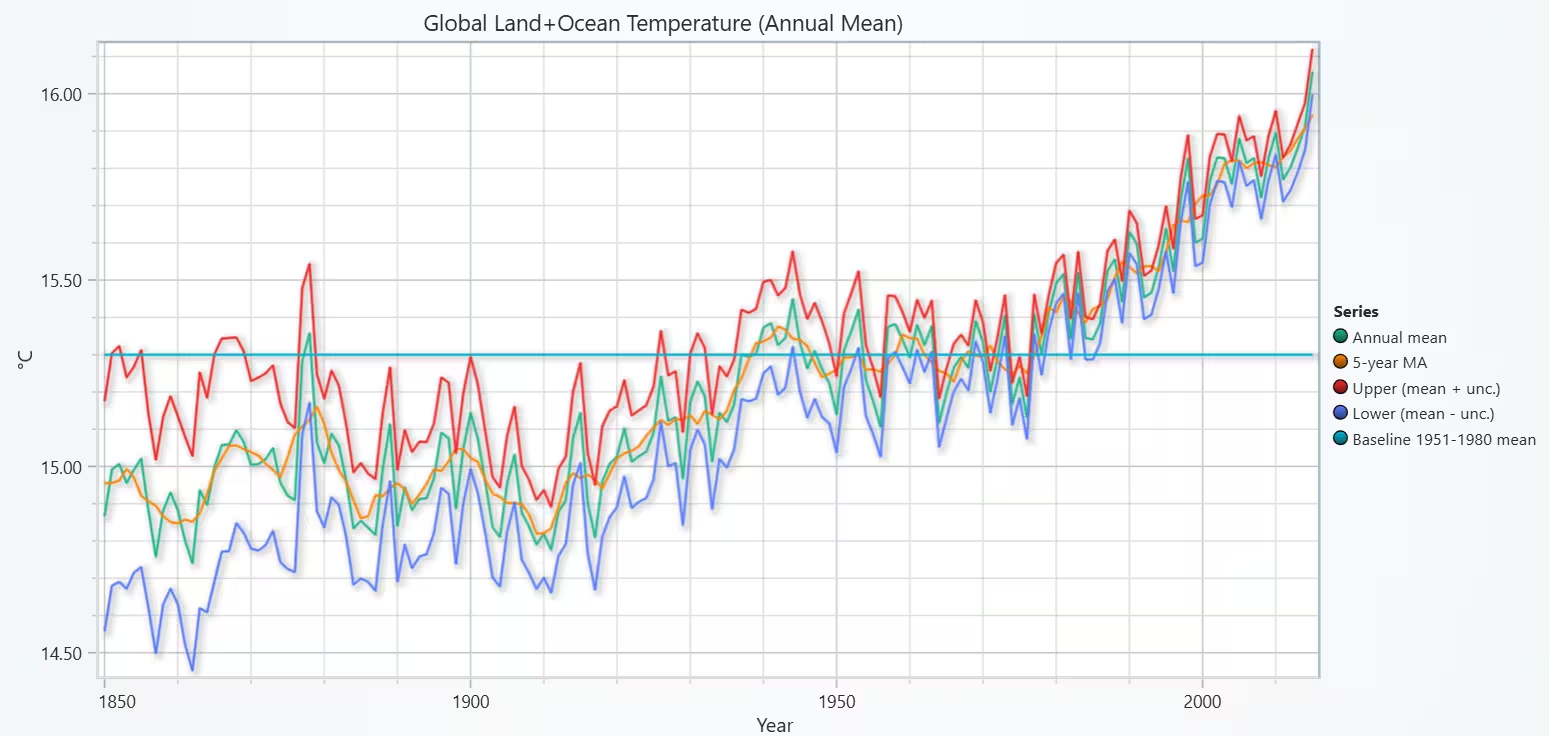
To visualize global temperature trends, we will use a multi-line chart is ideal for time series. This type of chart can show raw annual values, smoothed trend, and uncertainty band. The chart confirms a persistent, accelerating warming trend in global land-ocean temperatures. Warming since 1970 (printed °C/decade) quantifies how fast the climate is changing relative to earlier decades.
# Chart 1 - Multi Line Chart of Long-Term Global Average Temperature Trend
# Developed with AI assistance to demonstrate LightningChart Python

import lightningchart as lc
import pandas as pd
import numpy as np

# Config
GLOBAL_FILE = 'GlobalTemperatures.csv'      # <-- set to your file path
LICENSE_FILE = r"D:/HAMK/Internship/MyProjects/lc_license.txt"

# License
with open("D:/HAMK/Internship/MyProjects/lc_license.txt", "r") as f:
    lc.set_license(f.read().strip())

# Load & prep data
df = pd.read_csv(GLOBAL_FILE, usecols=[
    'dt',
    'LandAndOceanAverageTemperature',
    'LandAndOceanAverageTemperatureUncertainty'
])

# Parse date, sort, drop NA
df['dt'] = pd.to_datetime(df['dt'], errors='coerce')
df = df.dropna(subset=['dt', 'LandAndOceanAverageTemperature',
                       'LandAndOceanAverageTemperatureUncertainty'])
df = df.sort_values('dt').reset_index(drop=True)

# Annual aggregation
df['year'] = df['dt'].dt.year
annual = df.groupby('year', as_index=False).agg(
    temp=('LandAndOceanAverageTemperature', 'mean'),
    u=('LandAndOceanAverageTemperatureUncertainty', 'mean')
)

# 5-year centered moving average
annual['temp_ma5'] = annual['temp'].rolling(5, center=True, min_periods=1).mean()

# Optional baseline (e.g., 1951–1980 mean) for reference line
BASE_PERIOD = (1951, 1980)
mask = (annual['year'] >= BASE_PERIOD[0]) & (annual['year'] <= BASE_PERIOD[1])
baseline_mean = float(annual.loc[mask, 'temp'].mean()) if mask.any() else np.nan

# Build chart
chart = lc.ChartXY(
    title='Global Land+Ocean Temperature (Annual Mean)',
    theme=lc.Themes.Light,
    legend={'visible': True, 'position': 'RightCenter', 'title': 'Series'}
)

x = annual['year'].tolist()
y_mean = annual['temp'].tolist()
y_ma5  = annual['temp_ma5'].tolist()
y_up   = (annual['temp'] + annual['u']).tolist()
y_dn   = (annual['temp'] - annual['u']).tolist()

# Series
s_mean = chart.add_line_series().set_name('Annual mean')
s_mean.add(x, y_mean)

s_ma = chart.add_line_series().set_name('5-year MA')
s_ma.add(x, y_ma5)

s_up = chart.add_line_series().set_name('Upper (mean + unc.)')
s_up.add(x, y_up)

s_dn = chart.add_line_series().set_name('Lower (mean - unc.)')
s_dn.add(x, y_dn)

# Optional baseline line
if not np.isnan(baseline_mean):
    s_base = chart.add_line_series().set_name(f'Baseline {BASE_PERIOD[0]}-{BASE_PERIOD[1]} mean')
    s_base.add([x[0], x[-1]], [baseline_mean, baseline_mean])

# Axes
chart.get_default_x_axis().set_title('Year')
chart.get_default_y_axis().set_title('°C')

# Optional: quick warming rate since 1970 (°C/decade)
def slope_per_decade(y, x):
    if len(x) < 2:
        return np.nan
    a, b = np.polyfit(x, y, 1)  # y = a*x + b
    return a * 10.0

recent = annual[annual['year'] >= 1970]
rate = slope_per_decade(recent['temp'].values, recent['year'].values)
print(f"Warming rate since 1970: {rate:.3f} °C/decade")

chart.open()
Multi Line Chart of Country Comparison (annual anomalies + trend lines)
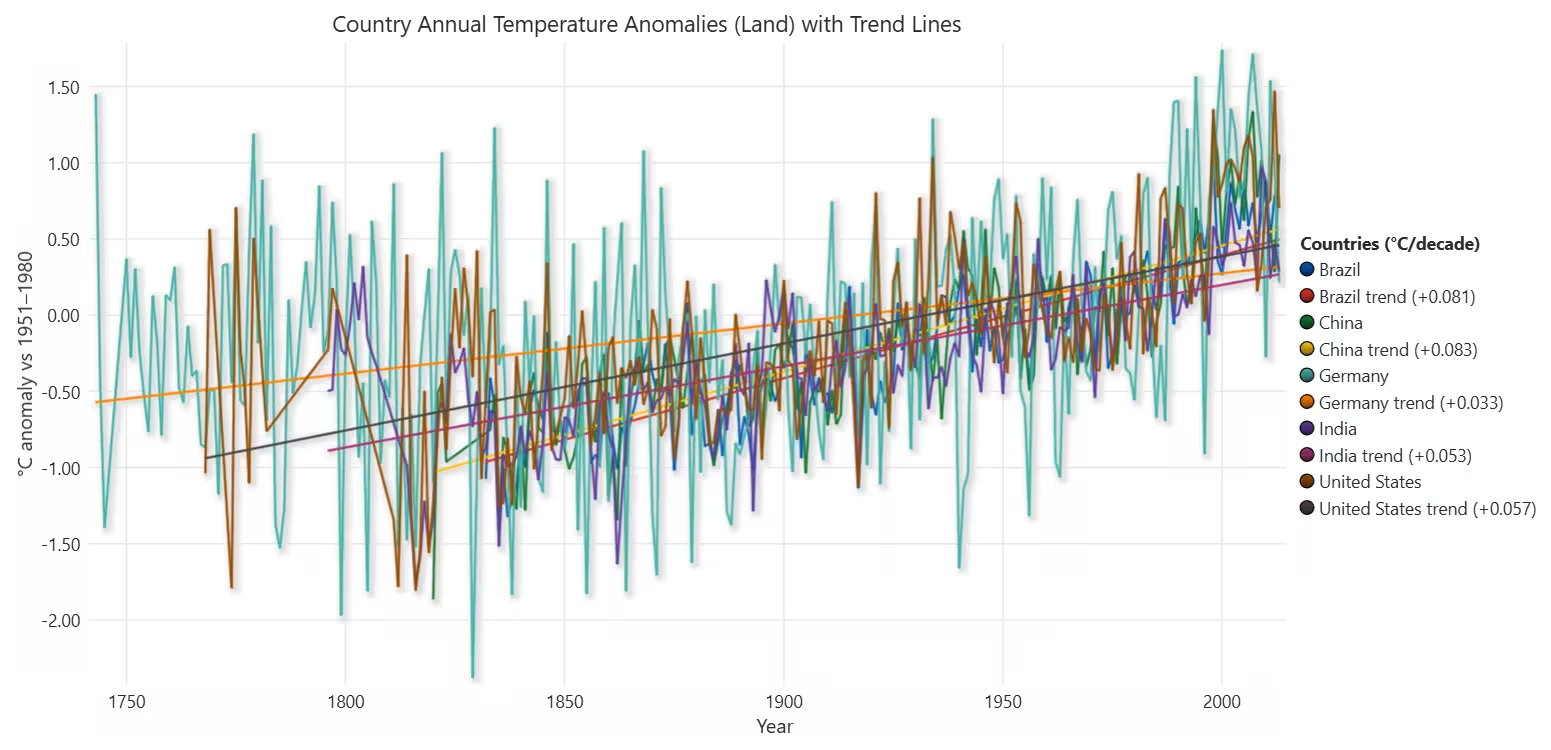
The following multi-line chart makes it easy to compare countries over time on the same anomaly scale. Trend lines with °C/decade in legend provide a direct numeric comparison of warming rates. The chart shows that warming is global but not uniform. Industrialized and mid–high latitude countries tend to show stronger warming rates, while others warm slightly more slowly. Using anomaly vs baseline allows fair cross-country comparison.
# Chart 2 - Multi Line Chart of Country Comparison (annual anomalies + trend lines)
# Developed with AI assistance to demonstrate LightningChart Python

import lightningchart as lc
import pandas as pd
import numpy as np

COUNTRY_FILE = r'GlobalLandTemperaturesByCountry.csv'
LICENSE_FILE = r'D:/HAMK/Internship/MyProjects/lc_license.txt'
BASE_PERIOD = (1951, 1980)
FOCUS = ['United States','China','India','Brazil','Germany']  # edit freely

with open(LICENSE_FILE) as f:
    lc.set_license(f.read().strip())

dc = pd.read_csv(COUNTRY_FILE, usecols=['dt','Country','AverageTemperature'])
dc['dt'] = pd.to_datetime(dc['dt'], errors='coerce')
dc = dc.dropna(subset=['dt','AverageTemperature'])
dc['Country'] = dc['Country'].str.strip()
dc['year'] = dc['dt'].dt.year
dc['month'] = dc['dt'].dt.month

dcc = dc[dc['Country'].isin(FOCUS)].copy()

# Per-country monthly baselines (1951–1980)
base_c = dcc[(dcc['year']>=BASE_PERIOD[0]) & (dcc['year']<=BASE_PERIOD[1])]
monthly_base_c = base_c.groupby(['Country','month'])['AverageTemperature'].mean()

def anomaly_row(r):
    idx = (r['Country'], r['month'])
    return r['AverageTemperature'] - monthly_base_c.loc[idx] if idx in monthly_base_c.index else np.nan

dcc['anomaly'] = dcc.apply(anomaly_row, axis=1)
dcc = dcc.dropna(subset=['anomaly'])

annual_c = dcc.groupby(['Country','year'], as_index=False)['anomaly'].mean()

def slope_line(x, y):
    # returns fitted y-hat for a simple linear model
    if len(x)<2: return x, y
    a,b = np.polyfit(x, y, 1)
    return x, a*np.array(x)+b, a*10.0  # and °C/decade

chart = lc.ChartXY(
    title='Country Annual Temperature Anomalies (Land) with Trend Lines',
    theme=lc.Themes.White,
    legend={'visible': True, 'position':'RightCenter', 'title':'Countries (°C/decade)'}
)
chart.get_default_x_axis().set_title('Year')
chart.get_default_y_axis().set_title(f'°C anomaly vs {BASE_PERIOD[0]}–{BASE_PERIOD[1]}')

for cname, sub in annual_c.groupby('Country'):
    years = sub['year'].astype(int).tolist()
    vals  = sub['anomaly'].tolist()
    # main series
    chart.add_line_series().set_name(cname).add(years, vals)
    # trend overlay
    x_hat, y_hat, rate = slope_line(np.array(years), np.array(vals))
    s_tr = chart.add_line_series().set_name(f'{cname} trend ({rate:+.3f})')
    s_tr.add(x_hat.tolist(), y_hat.astype(float).tolist())

chart.open()
TreeMap of Warming Trends Across Major Countries
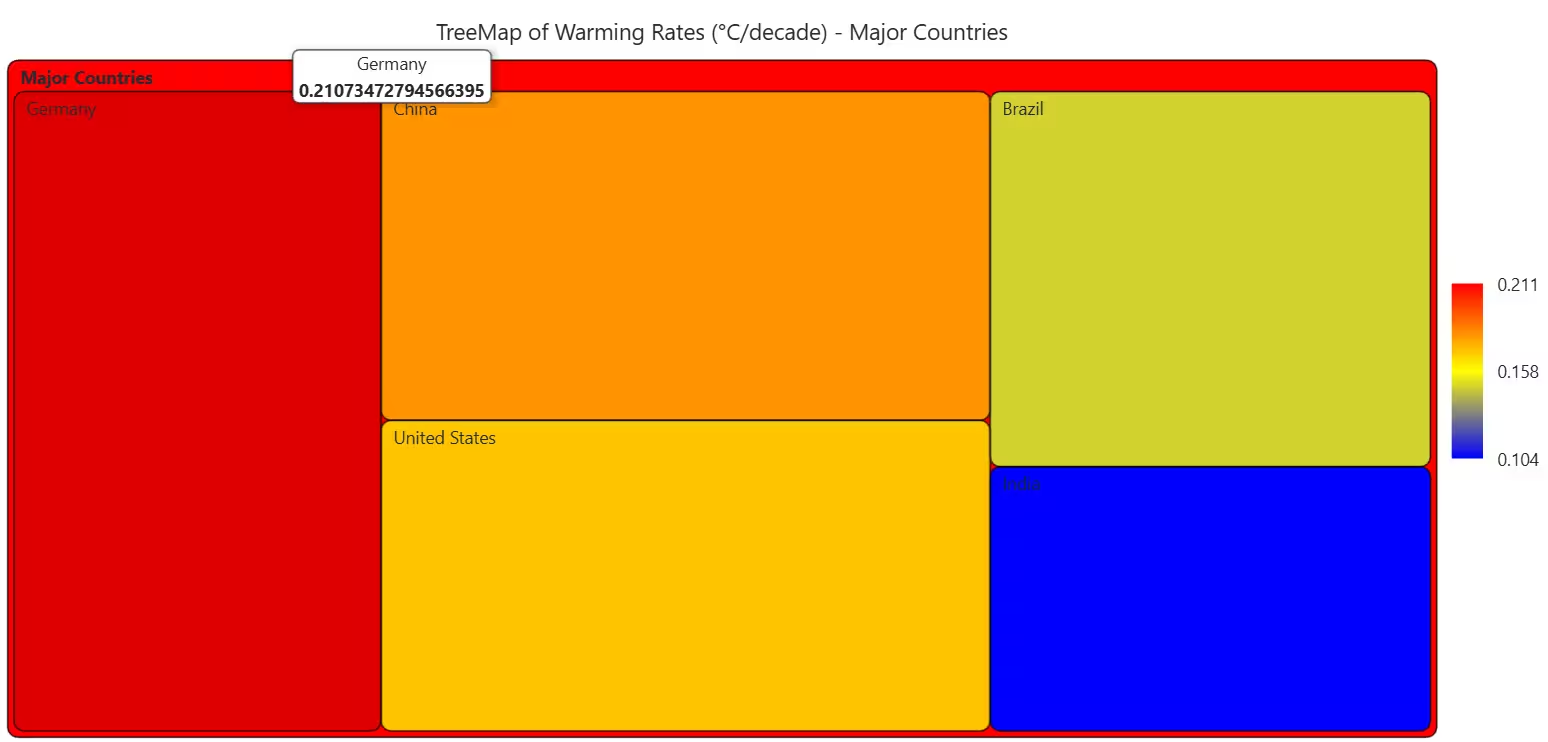
TreeMap is excellent for ranking and comparing magnitudes in a compact space for visualizing global temperature trends. Tile size and color both encode warming rate.
# Chart 3A - TreeMap of Warming Trends Across Major Countries
# Developed with AI assistance to demonstrate LightningChart Python

import lightningchart as lc
import pandas as pd
import numpy as np

# CONFIG
COUNTRY_FILE = r'GlobalLandTemperaturesByCountry.csv'
LICENSE_FILE = r'D:/HAMK/Internship/MyProjects/lc_license.txt'

BASE_PERIOD = (1951, 1980)
YEAR_START_FOR_TREND = 1950          # use modern era for slope
FOCUS = ['United States', 'China', 'India', 'Brazil', 'Germany']  # major countries

# LICENSE
with open(LICENSE_FILE, "r") as f:
    lc.set_license(f.read().strip())

# LOAD & PREP DATA
dc = pd.read_csv(COUNTRY_FILE, usecols=['dt', 'Country', 'AverageTemperature'])

dc['dt'] = pd.to_datetime(dc['dt'], errors='coerce')
dc = dc.dropna(subset=['dt', 'AverageTemperature'])

dc['Country'] = dc['Country'].str.strip()
dc['year'] = dc['dt'].dt.year
dc['month'] = dc['dt'].dt.month

# Keep only focus countries
dcc = dc[dc['Country'].isin(FOCUS)].copy()

# 1) Compute monthly baseline per country (1951–1980)
base = dcc[(dcc['year'] >= BASE_PERIOD[0]) & (dcc['year'] <= BASE_PERIOD[1])]
monthly_base = base.groupby(['Country', 'month'])['AverageTemperature'].mean()

def anomaly_row(r):
    idx = (r['Country'], r['month'])
    return r['AverageTemperature'] - monthly_base.loc[idx] if idx in monthly_base.index else np.nan

dcc['anomaly'] = dcc.apply(anomaly_row, axis=1)
dcc = dcc.dropna(subset=['anomaly'])

# 2) Annual anomalies per country
annual_c = (
    dcc.groupby(['Country', 'year'], as_index=False)['anomaly']
       .mean()
)

# Restrict to modern period for trend calculation
annual_c = annual_c[annual_c['year'] >= YEAR_START_FOR_TREND]

# 3) Compute °C/decade warming rate per country
def slope_per_decade(years, anomalies):
    if len(years) < 2:
        return np.nan
    a, b = np.polyfit(years, anomalies, 1)   # anomaly = a*year + b
    return a * 10.0                          # °C per decade

rates = {}
for cname, sub in annual_c.groupby('Country'):
    years = sub['year'].values.astype(float)
    vals  = sub['anomaly'].values.astype(float)
    rate = slope_per_decade(years, vals)
    if not np.isnan(rate):
        rates[cname] = rate

print("Warming rates (°C/decade) used for TreeMap:")
for k, v in rates.items():
    print(f"  {k:15s}: {v:+.3f}")

if not rates:
    raise ValueError("No valid warming rates could be computed.")

# 4) Build TreeMap data structure
children = [
    {'name': country, 'value': float(rate)}
    for country, rate in rates.items()
]

# Single root node grouping all focus countries
data = [
    {
        'name': 'Major Countries',
        'children': children,
    }
]

# Intensity range for coloring
values = np.array(list(rates.values()), dtype=float)
vmin = float(values.min())
vmax = float(values.max())
vmid = float((vmin + vmax) / 2.0)

# BUILD TREEMAP CHART
chart = lc.TreeMapChart(
    theme=lc.Themes.White,
    title="TreeMap of Warming Rates (°C/decade) - Major Countries"
)

# Color scale: cooler = slower warming, hotter = faster warming
chart.set_node_coloring(
    steps=[
        {'value': vmin, 'color': ('blue')},
        {'value': vmid, 'color': ('yellow')},
        {'value': vmax, 'color': ('red')},
    ],
)

# Set the hierarchical data
chart.set_data(data)

chart.open()
European Map of Warming Rates (Choropleth Map)
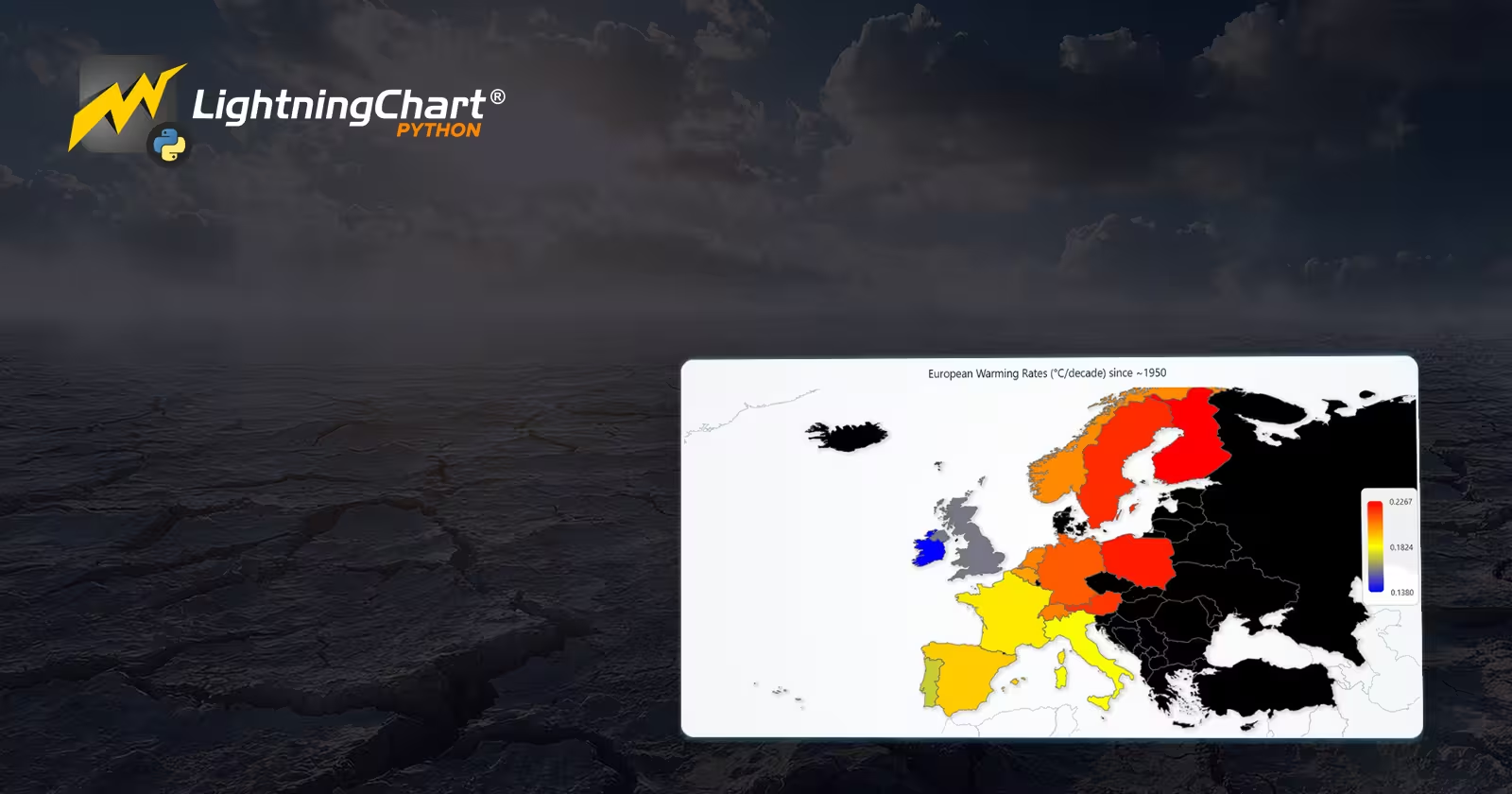
I selected this choropleth map because is ideal for geographical comparisons of global temperature trends as it shows how warming varies spatially across Europe, not just by numbers. The map reveals spatial patterns in European warming, with many northern and continental areas warming faster than others. It visually supports the conclusion that warming is unevenly distributed across Europe, which is important for regional impact studies.
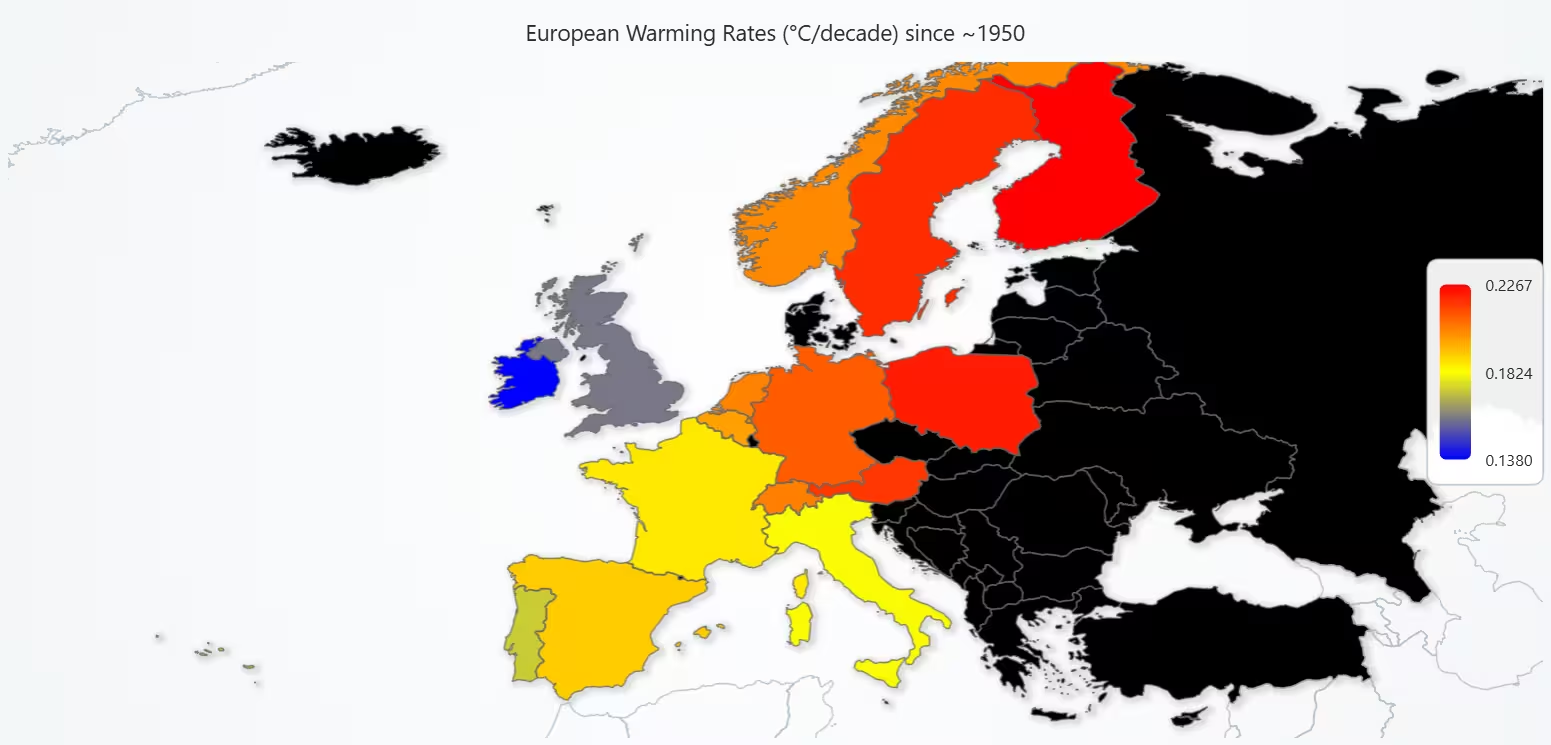
# Chart 3B - European Map of Warming Rates (°C/decade)
# Developed with AI assistance to demonstrate LightningChart Python

import lightningchart as lc
import pandas as pd
import numpy as np

# CONFIG
COUNTRY_FILE = r'GlobalLandTemperaturesByCountry.csv'
LICENSE_FILE = r'D:/HAMK/Internship/MyProjects/lc_license.txt'

BASE_PERIOD = (1951, 1980)
YEAR_START_FOR_TREND = 1950

# European countries you want to include (names as in the CSV)
EU_COUNTRIES = [
    "Germany", "France", "Spain", "Italy", "United Kingdom",
    "Sweden", "Norway", "Finland", "Poland", "Netherlands",
    "Belgium", "Austria", "Switzerland", "Portugal", "Ireland",
]

# Manual mapping from Berkeley Earth country names -> ISO_A3 codes
ISO_MAP = {
    "Albania": "ALB",
    "Austria": "AUT",
    "Belarus": "BLR",
    "Belgium": "BEL",
    "Bosnia and Herzegovina": "BIH",
    "Bulgaria": "BGR",
    "Croatia": "HRV",
    "Cyprus": "CYP",
    "Czech Republic": "CZE",
    "Denmark": "DNK",
    "Estonia": "EST",
    "Finland": "FIN",
    "France": "FRA",
    "Germany": "DEU",
    "Greece": "GRC",
    "Hungary": "HUN",
    "Iceland": "ISL",
    "Ireland": "IRL",
    "Italy": "ITA",
    "Latvia": "LVA",
    "Lithuania": "LTU",
    "Luxembourg": "LUX",
    "Malta": "MLT",
    "Moldova": "MDA",
    "Montenegro": "MNE",
    "Netherlands": "NLD",
    "North Macedonia": "MKD",
    "Norway": "NOR",
    "Poland": "POL",
    "Portugal": "PRT",
    "Romania": "ROU",
    "Russia": "RUS",
    "Serbia": "SRB",
    "Slovakia": "SVK",
    "Slovenia": "SVN",
    "Spain": "ESP",
    "Sweden": "SWE",
    "Switzerland": "CHE",
    "Ukraine": "UKR",
    "United Kingdom": "GBR",
}

# LICENSE
with open(LICENSE_FILE, "r") as f:
    lc.set_license(f.read().strip())

# LOAD & PREP DATA
dc = pd.read_csv(COUNTRY_FILE, usecols=["dt", "Country", "AverageTemperature"])

dc["dt"] = pd.to_datetime(dc["dt"], errors="coerce")
dc = dc.dropna(subset=["dt", "AverageTemperature"])

dc["Country"] = dc["Country"].str.strip()
dc["year"] = dc["dt"].dt.year
dc["month"] = dc["dt"].dt.month

# Keep only desired European countries that are present in the dataset
eu_present = sorted(set(EU_COUNTRIES) & set(dc["Country"].unique()))
dcc = dc[dc["Country"].isin(eu_present)].copy()

# 1) Monthly baseline per country (1951–1980)
base = dcc[(dcc["year"] >= BASE_PERIOD[0]) & (dcc["year"] <= BASE_PERIOD[1])]
monthly_base = base.groupby(["Country", "month"])["AverageTemperature"].mean()

def anomaly_row(r):
    idx = (r["Country"], r["month"])
    return r["AverageTemperature"] - monthly_base.loc[idx] if idx in monthly_base.index else np.nan

dcc["anomaly"] = dcc.apply(anomaly_row, axis=1)
dcc = dcc.dropna(subset=["anomaly"])

# 2) Annual anomalies per country
annual_c = (
    dcc.groupby(["Country", "year"], as_index=False)["anomaly"]
       .mean()
)

# Restrict to modern period for trend calculation
annual_c = annual_c[annual_c["year"] >= YEAR_START_FOR_TREND]

# 3) Compute °C/decade warming rate per country
def slope_per_decade(years, anomalies):
    if len(years) < 2:
        return np.nan
    a, b = np.polyfit(years, anomalies, 1)
    return a * 10.0   # °C per decade

rates = {}
for cname, sub in annual_c.groupby("Country"):
    years = sub["year"].to_numpy(dtype=float)
    vals  = sub["anomaly"].to_numpy(dtype=float)
    rate = slope_per_decade(years, vals)
    if not np.isnan(rate) and cname in ISO_MAP:
        rates[cname] = rate

print("European warming rates (°C/decade):")
for c, r in rates.items():
    print(f"  {c:20s}: {r:+.3f}")

if not rates:
    raise ValueError("No valid European warming rates could be computed.")

values = np.array(list(rates.values()), dtype=float)
vmin = float(values.min())
vmax = float(values.max())
vmid = float((vmin + vmax) / 2.0)

# 4) Build MapChart region_data
region_data = [
    {"ISO_A3": ISO_MAP[country], "value": float(rate)}
    for country, rate in rates.items()
]

# BUILD MAP CHART
chart = lc.MapChart(map_type="Europe", theme=lc.Themes.Light)
chart.set_title("European Warming Rates (°C/decade) since ~1950")

chart.invalidate_region_values(region_data)

# Color scale: blue = slower warming, red = faster warming
chart.set_palette_coloring(
    steps=[
        {"value": vmin, "color": ("blue")},
        {"value": vmid, "color": ("yellow")},
        {"value": vmax, "color": ("red")},
    ],
    look_up_property="value",
    percentage_values=False   # values are real °C/decade, not percentages
)

chart.open()
Conclusion
Global temperatures have risen steadily and rapidly, especially since the 1970s. Some countries warm faster than others, but the overall trend is clear and consistent. Uncertainty remains stable, confirming the reliability of the warming signal. Across all visualizations, the evidence shows a strong, accelerating shift toward a warmer global climate.
Continue learning with LightningChart

Ionic Capacitor
Learn how to use Ionic Capacitor for data visualization and build a mobile charting application with Angular & LightningChart JS

Create a JavaScript Pie Chart with NodeJS, TypeScript & LightningChart
Written by a human | Updated on April 10th, 2025JavaScript Pie Chart with NodeJS & TypeScript Today, we are going to do a short tutorial on how to generate a pie chart using Node JS, TypeScript, and LigningCharts JS. To see how to get LightningChart JS for...

Real-time data visualization with WebSockets
Written by a human | Updated on April 10th, 2025WebSockets Data Visualization in Real-Time These days it is ever increasingly common that people require web solutions for their applications and services. Data visualization is not an exception to this, as...



If you have any questions, feel free to contact us!
©LightningChart Ltd 2025. All rights reserved.