








Visualizing Global Renewable Energy Indicators | LightningChart Python
Tutorial
Assisted by AI
Explore how to visualize global renewable energy indicators effectively with LightningChart Python for insightful data representation.
Vindya Nukulasooriya
Data Science Developer


Introduction
This project focuses on visualizing global renewable energy indicators using the Global Renewable Energy and Indicators Dataset. The dataset covers multiple countries (2000–2023) and includes information on renewable production, energy mix, economic indicators, emissions, policy metrics, and technological capacity.
The aim of this project is to explore how renewable energy is evolving worldwide by examining:
- long-term renewable energy share trends,
- growth patterns of different renewable sources (Solar, Wind, Hydro, etc.),
- relationships between GDP, emissions, and renewable adoption,
- regional similarities and differences across continents.
This project demonstrates how LightningChart Python enables clear, high-performance visualization across many chart types, even when dealing with multi-dimensional global indicators.
Project Overview
- How has the global renewable energy share changed over time?
- Which renewable sources have grown the fastest?
- Is there a link between GDP and renewable energy usage?
- How do different world regions compare in renewable adoption?
- Are there countries that behave differently from typical economic patterns?
Reasons to choose LightningChart Python
- GPU-accelerated rendering for fast interactive charts,
- advanced chart support (3D surfaces, polar plots, maps, dashboards),
- ability to handle time-series and multivariable data smoothly.
Deliverables
Core visualizations created with LightningChart Python (11 Charts):
- Chart 1 – Line Chart: Global renewable energy share over 20+ years
- Chart 2 – Scrolling Heatmap: Country-year renewable share patterns
- Chart 3 – 3D Surface Grid: Production trends by renewable source
- Chart 4 – Treemap: Country-wise renewable production breakdown
- Chart 5 – Map Chart: Geographic distribution of renewable share
- Chart 6 – 3D Bubble Chart: GDP/ renewable share/ clean energy performance
- Chart 7 – Parallel Coordinates: Multi-indicator country comparison
- Chart 8 – Polar Scatter: Regional renewable mix by energy type
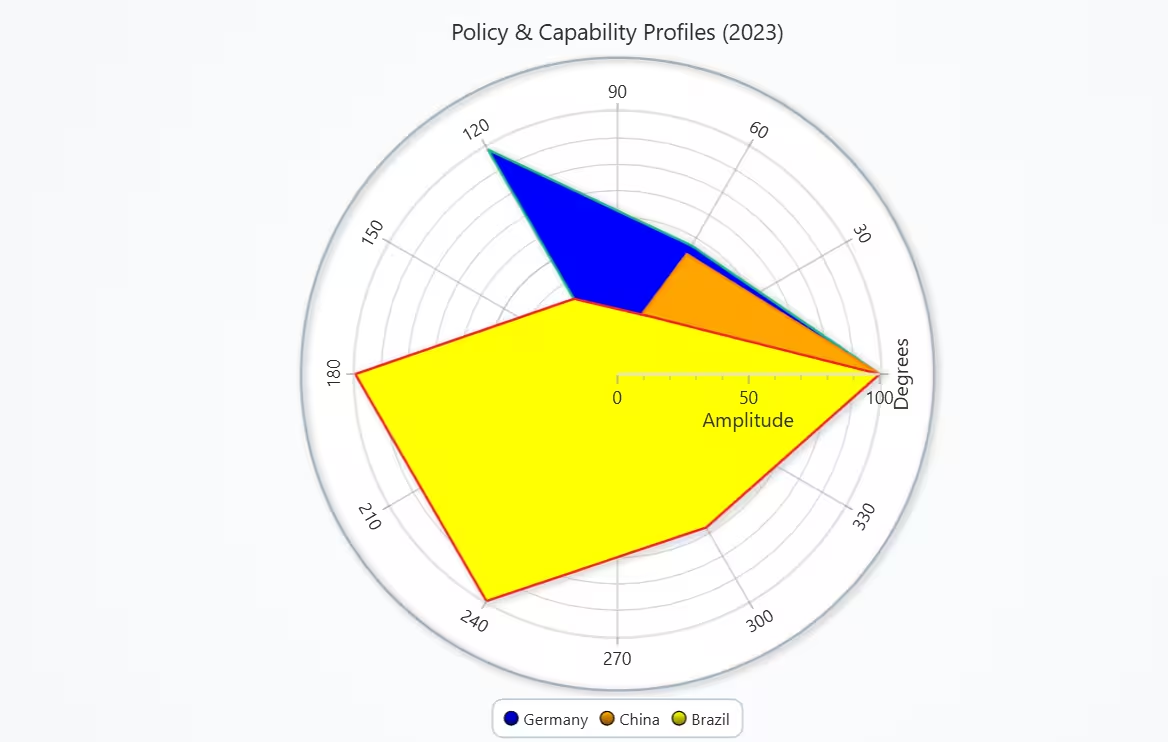
- Chart 9 – Polar Polygon: Policy & capability profiles of key countries
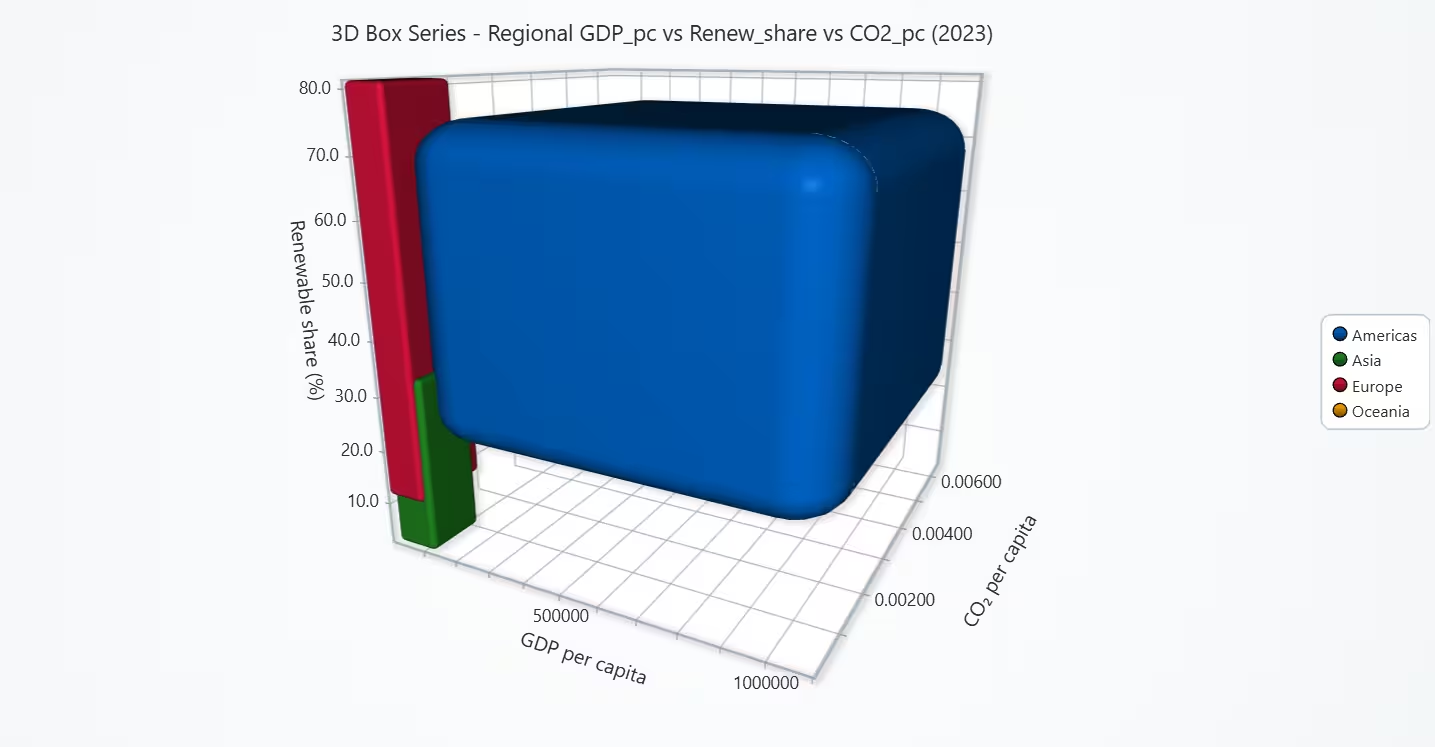
- Chart 10 – 3D Box Chart: Regional economic-renewable-emissions space
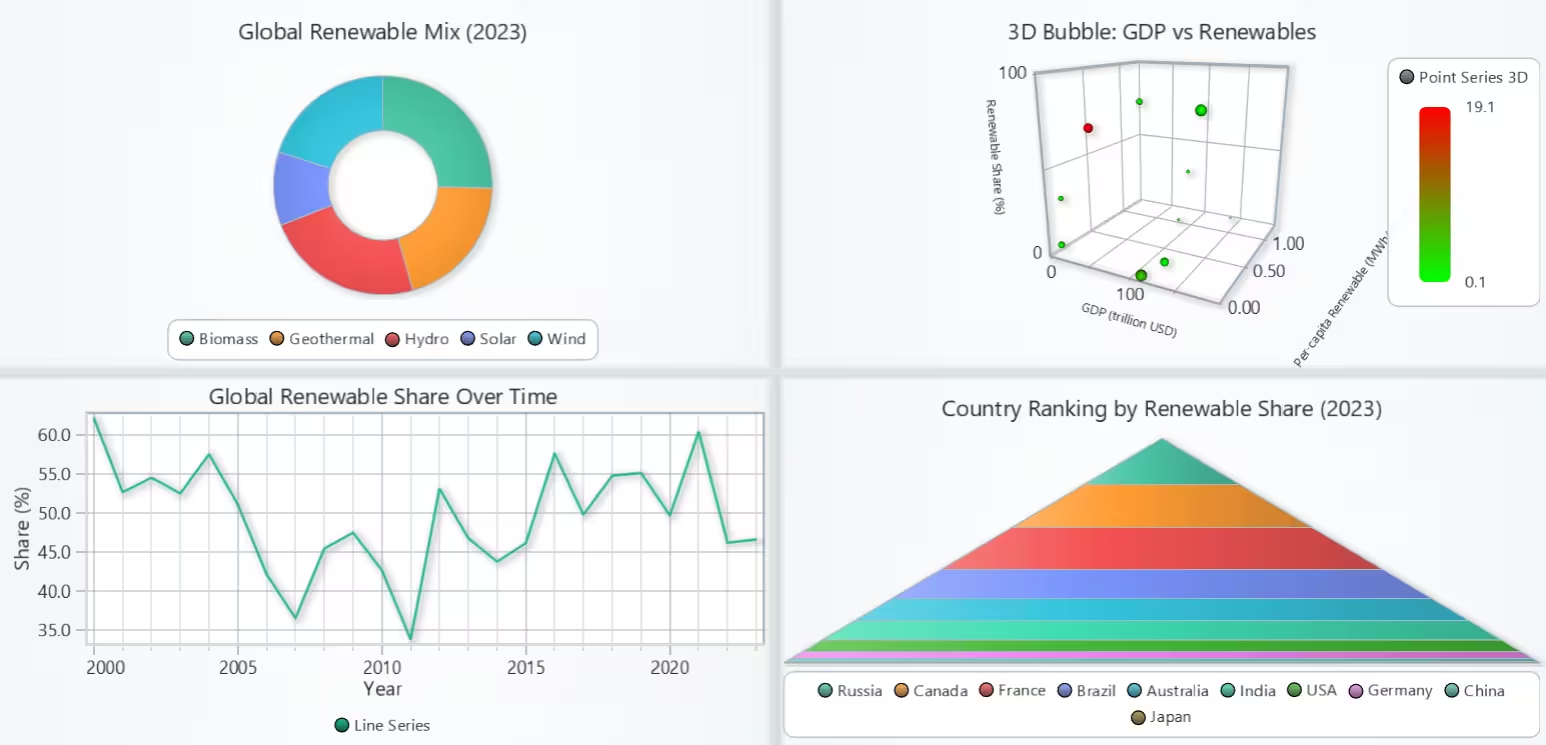
- Chart 11 – Dashboard: Combined overview of global renewable transition
Tools Used
Python 3.13.5, LightningChart Python, Jupyter Notebook, AI Assistance
About the Dataset
The files used werethe Cryptocurrency dataset and the Stock market dataset available on Kaggle.
LightningChart Python
LightningChart Python is a GPU-accelerated scientific visualization library built for real-time, interactive, and 3D analytical charts. It provides the performance and flexibility needed to visualize large, multi-indicator global energy datasets, such as this country–year renewable energy dataset with dozens of variables.

Setting Up Python Environment
Before running the project, install Python and the other required libraries using:
%pip install numpy pandas lightningchartSetting Up Your Development Environment:
- Set up a virtual environment:
- Use Visual Studio Code (VSCode) for a streamlined development experience.
Loading and Preprocessing Data
Fetch and preprocess the data using the following function:
# Import necessary libraries (load pandas library to preprocess dataset)
import pandas as pd
Visualizing Data with LightningChart Python
A line chart is the clearest way to show how one value changes over time. It lets us easily see: rising or falling trends, years with strong increases or drops, overall pattern across more than 20 years. Because we have one global value per year, a single continuous line is simple and not crowded. This chart shows that the global share of renewable energy did not increase steadily between 2000 and 2023.
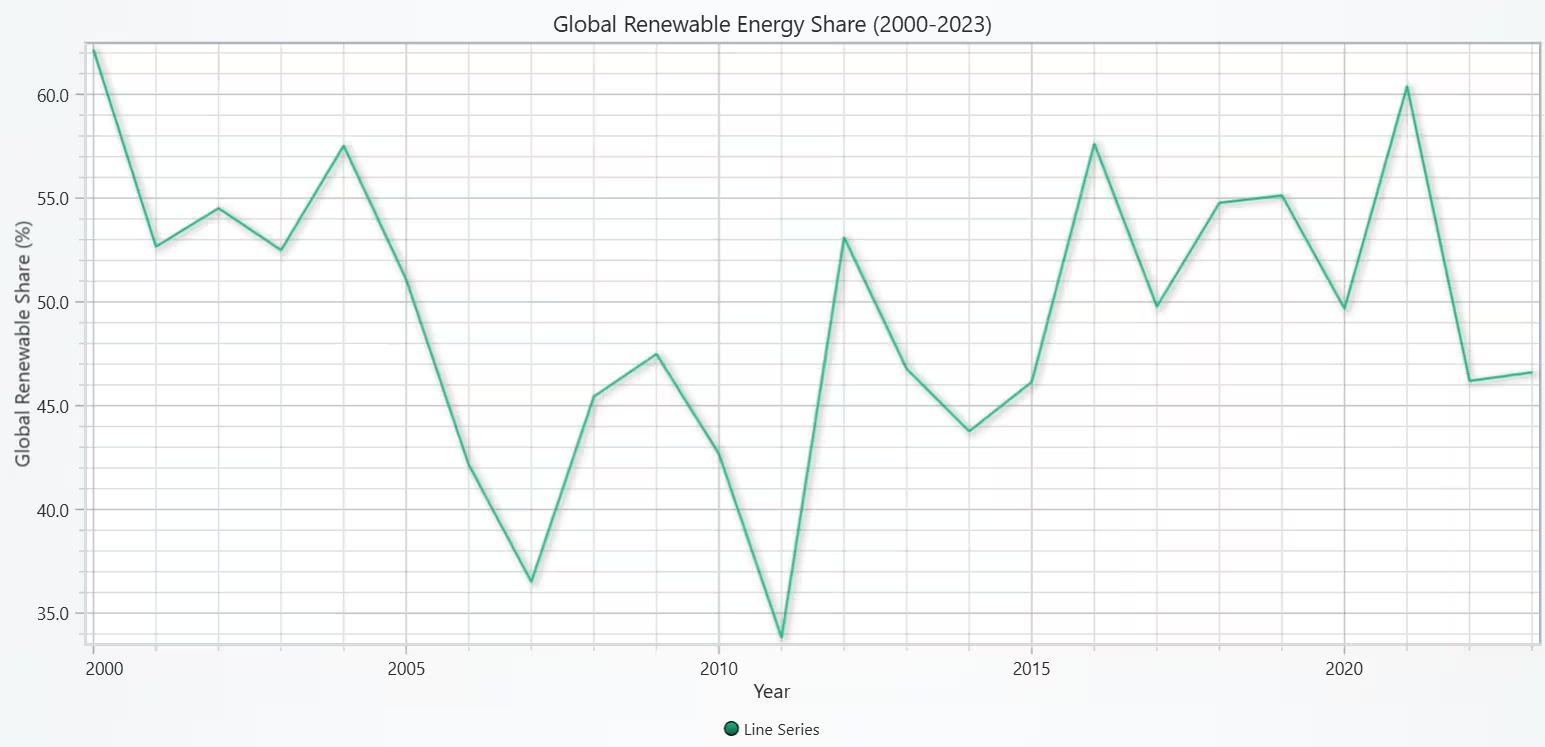
# Chart 1 - Line chart of Global Growth Trend of Total Renewable Energy Consumption
# Developed with AI assistance to demonstrate LightningChart Python

import pandas as pd
import lightningchart as lc

# License
with open("D:/HAMK/Internship/MyProjects/lc_license.txt", "r") as f:
    lc.set_license(f.read().strip())

# Load dataset
df = pd.read_csv('complete_renewable_energy_dataset.csv')

# Aggregate to Country-Year level
df_cy = df.groupby(['Country', 'Year'], as_index=False).agg({
    'Energy Consumption': 'first',
    'Proportion of Energy from Renewables': 'first'
})

# Compute renewable consumption
df_cy['Renewable Consumption'] = (
    df_cy['Energy Consumption'] * df_cy['Proportion of Energy from Renewables'] / 100.0
)

# Global totals per year
global_by_year = df_cy.groupby('Year', as_index=False).agg(
    total_energy=('Energy Consumption', 'sum'),
    total_renewable=('Renewable Consumption', 'sum')
)

global_by_year['Global Renewable Share %'] = (
    100.0 * global_by_year['total_renewable'] / global_by_year['total_energy']
)

# Extract lists
years = global_by_year['Year'].tolist()
share = global_by_year['Global Renewable Share %'].tolist()

# Create chart
chart = lc.ChartXY(
    title='Global Renewable Energy Share (2000-2023)',
    html_text_rendering=True,
    theme=lc.Themes.Light
)

# Axes setup
x_axis = chart.get_default_x_axis()
y_axis = chart.get_default_y_axis()

x_axis.set_title('Year')
y_axis.set_title('Global Renewable Share (%)')

x_axis.set_tick_strategy('Numeric')
x_axis.set_decimal_precision(0)

# Add line series
line = chart.add_line_series()
line.add(x=years, y=share)

# Display chart
chart.open()
Scrolling Heatmap of Country vs Year Renewable Share
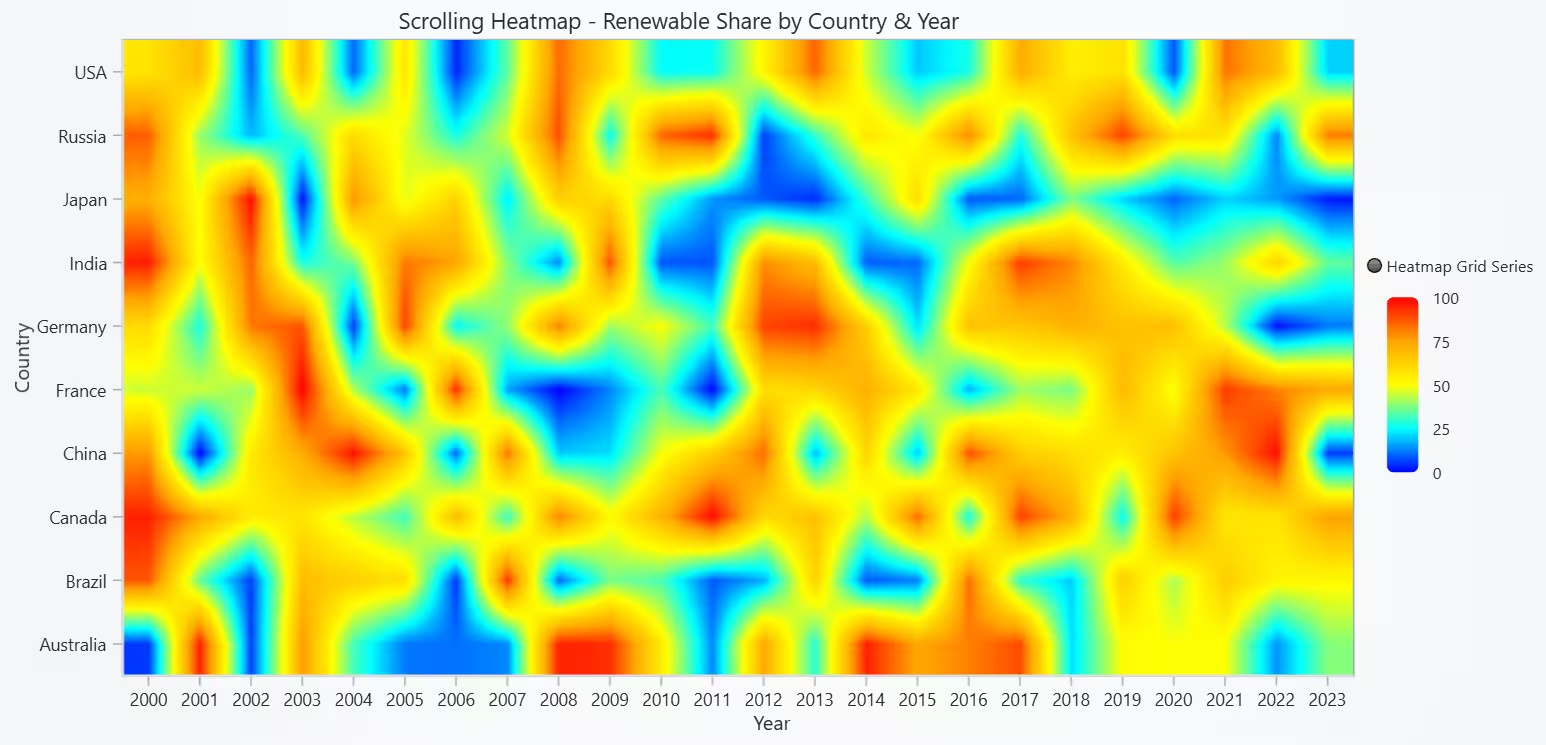
A heatmap is good when we want to see how one value changes over two dimensions (country and year). It lets us compare many countries across many years at once, using color instead of separate lines or bars. The scrolling x-axis keeps the chart readable even with a long period.
This scrolling heatmap shows how the share of renewables in total energy use changes by country over time. Warm color patches indicate periods where certain countries rely more on renewable energy, while cool patches show weaker adoption. Overall, the chart makes it easy to compare patterns between countries and to see whether renewable energy use becomes more common in later years or remains inconsistent.
# Chart 2 - Scrolling Heatmap of Country vs Year Renewable Share
# Developed with AI assistance to demonstrate LightningChart Python

import lightningchart as lc
import pandas as pd
import time

# License
with open("D:/HAMK/Internship/MyProjects/lc_license.txt", "r") as f:
    lc.set_license(f.read().strip())

df = pd.read_csv('complete_renewable_energy_dataset.csv')

# Country-year table with renewable share
df_cy = df.groupby(['Country', 'Year'], as_index=False).agg({
    'Proportion of Energy from Renewables': 'first'
})

countries = sorted(df_cy['Country'].unique())
years = sorted(df_cy['Year'].unique())

country_to_idx = {c: i for i, c in enumerate(countries)}
year_to_idx = {y: i for i, y in enumerate(years)}

resolution = len(countries)
time_steps = len(years)

chart = lc.ChartXY(
    title='Scrolling Heatmap - Renewable Share by Country & Year',
    html_text_rendering=True,
    theme=lc.Themes.Light
)

x_axis = chart.get_default_x_axis()
x_axis.set_title('Year')
x_axis.set_scroll_strategy(progressive=True)
x_axis.set_interval(0, time_steps)

x_axis.set_tick_strategy('Empty')
for j, year in enumerate(years):
    tick = x_axis.add_custom_tick()
    tick.set_value(float(j + 0.5))
    tick.set_text(str(year))

y_axis = chart.get_default_y_axis()
y_axis.set_title('Country')
y_axis.set_interval(0, resolution)

# Use custom ticks for country names
y_axis.set_tick_strategy('Empty')          # remove automatic numeric ticks
for i, country in enumerate(countries):
    tick = y_axis.add_custom_tick()
    tick.set_value(float(i + 0.5))        # center of each row
    tick.set_text(country)

matrix = [[0.0 for _ in range(time_steps)] for _ in range(resolution)]

for _, row in df_cy.iterrows():
    country = row['Country']
    year = row['Year']
    row_idx = country_to_idx[country]
    col_idx = year_to_idx[year]
    matrix[row_idx][col_idx] = row['Proportion of Energy from Renewables']

series = chart.add_heatmap_grid_series(columns=time_steps, rows=resolution, data_order='rows')
series.hide_wireframe()

series.set_palette_coloring(
    steps=[
        {'value': 0.0,  'color': 'blue'},
        {'value': 25.0, 'color': 'cyan'},
        {'value': 50.0, 'color': 'yellow'},
        {'value': 75.0, 'color': 'orange'},
        {'value': 100.0,'color': 'red'},
    ],
    percentage_values=False
)
series.invalidate_intensity_values(matrix)
chart.open()
Scrolling 3D Surface of Energy Type Growth Over Time
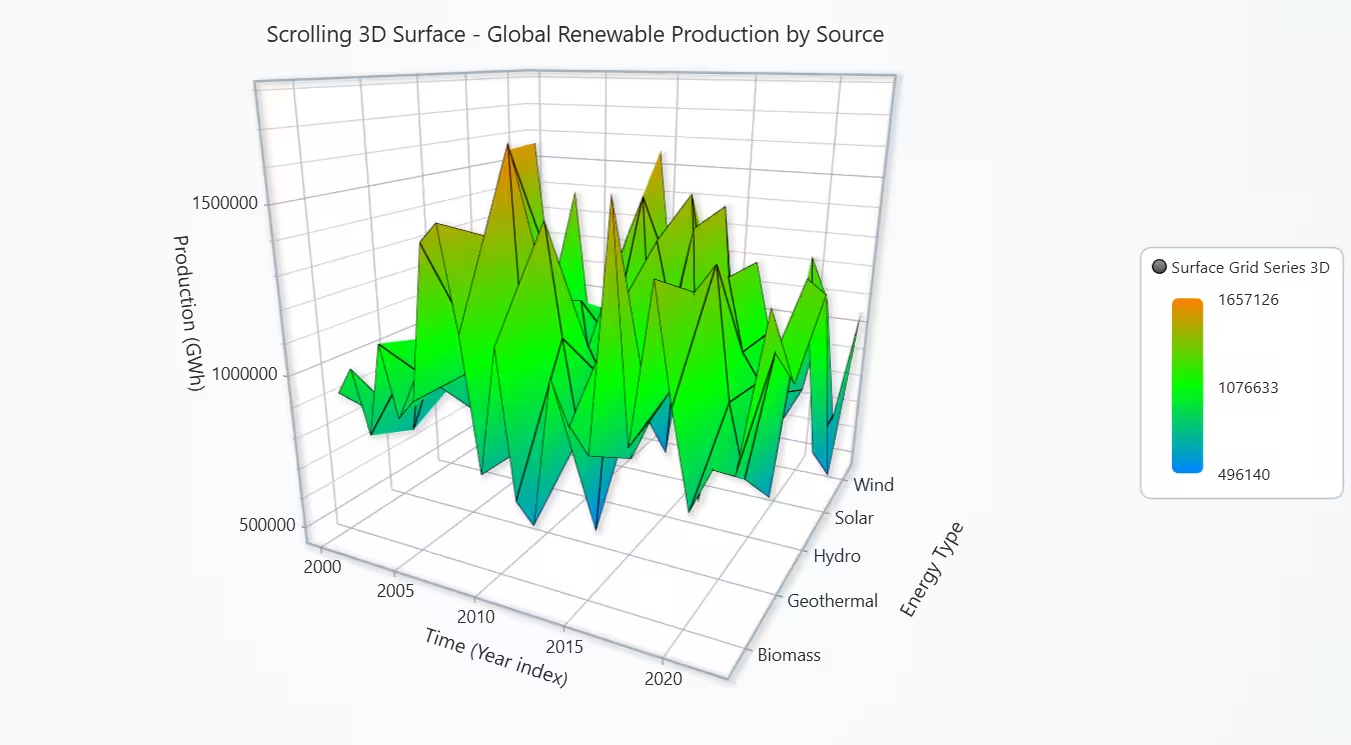
A 3D surface is useful when we want to see multiple energy sources over many years with production levels all shown together. It clearly shows patterns that would be hard to see in 2D charts. The chart shows that global renewable production is not steady. Each source (like Hydro or Wind) has years of higher production and years of lower production. Overall, renewable energy growth comes from many sources, each changing differently over time.
# Chart 3 - Scrolling 3D Surface of Energy Type Growth Over Time
# Developed with AI assistance to demonstrate LightningChart Python

import lightningchart as lc
import pandas as pd
import time

# License
with open("D:/HAMK/Internship/MyProjects/lc_license.txt", "r") as f:
    lc.set_license(f.read().strip())

df = pd.read_csv('complete_renewable_energy_dataset.csv')

# Aggregate global production by energy type and year
prod_ty = df.groupby(['Energy Type', 'Year'], as_index=False)['Production (GWh)'].sum()

energy_types = sorted(prod_ty['Energy Type'].unique())
years = sorted(prod_ty['Year'].unique())
etype_to_idx = {e: i for i, e in enumerate(energy_types)}

rows = len(energy_types)        # each column has one value per energy type
columns = len(years)            # how many time steps we want to store

min_prod = prod_ty['Production (GWh)'].min()
max_prod = prod_ty['Production (GWh)'].max()
mid_prod = (min_prod + max_prod) / 2

chart = lc.Chart3D(
    title='Scrolling 3D Surface - Global Renewable Production by Source',
    html_text_rendering=True,
    theme=lc.Themes.Light
)

# X axis: time index (scrolling)
axis_x = chart.get_default_x_axis()
axis_x.set_title('Time (Year index)')
axis_x.set_scroll_strategy(strategy='scrolling')
axis_x.set_interval(start=-columns, end=0, stop_axis_after=False)

# ❗ Remove automatic numeric ticks and add our own integer/year labels
axis_x.set_tick_strategy('Empty')
for i, year in enumerate(years):
    # show a label every 5 years (optional, for readability)
    if i % 5 != 0:
        continue
    tick = axis_x.add_custom_tick()
    tick.set_value(float(i))        # position = index
    tick.set_text(str(year))        # label = actual year (no decimals)

# Y axis: production
axis_y = chart.get_default_y_axis()
axis_y.set_title('Production (GWh)')
axis_y.set_interval(min_prod * 0.9, max_prod * 1.1)

# Z axis: energy type index with labels
axis_z = chart.get_default_z_axis()
axis_z.set_title('Energy Type')
axis_z.set_interval(-0.5, rows - 0.5)
axis_z.set_tick_strategy('Empty')
for i, et in enumerate(energy_types):
    tick = axis_z.add_custom_tick()
    tick.set_value(float(i))
    tick.set_text(et)

# Scrolling surface grid: rows = energy types, each add_values = one new time column
surface = chart.add_surface_scrolling_grid_series(columns=columns, rows=rows)
surface.set_wireframe_stroke(1, color=(0, 0, 0, 255))

surface.set_palette_coloring(
    steps=[
        {'value': float(min_prod), 'color': (0, 128, 255)},   # low = blue
        {'value': float(mid_prod), 'color': (0, 255, 0)},     # mid = green
        {'value': float(max_prod), 'color': (255, 128, 0)},   # high = orange
    ],
    look_up_property='y',
    percentage_values=False
)

chart.open(live=True)

for t, year in enumerate(years):
    # one value per energy type (length = rows)
    col_values = [0.0] * rows
    sub = prod_ty[prod_ty['Year'] == year]
    for _, r in sub.iterrows():
        idx = etype_to_idx[r['Energy Type']]
        col_values[idx] = r['Production (GWh)']

    # datagrid must be [[v0, v1, ..., v_(rows-1)]]
    datagrid = [col_values]
    surface.add_values(datagrid)
    time.sleep(0.03)

chart.close()
Treemap of Renewable Production by Country & Source
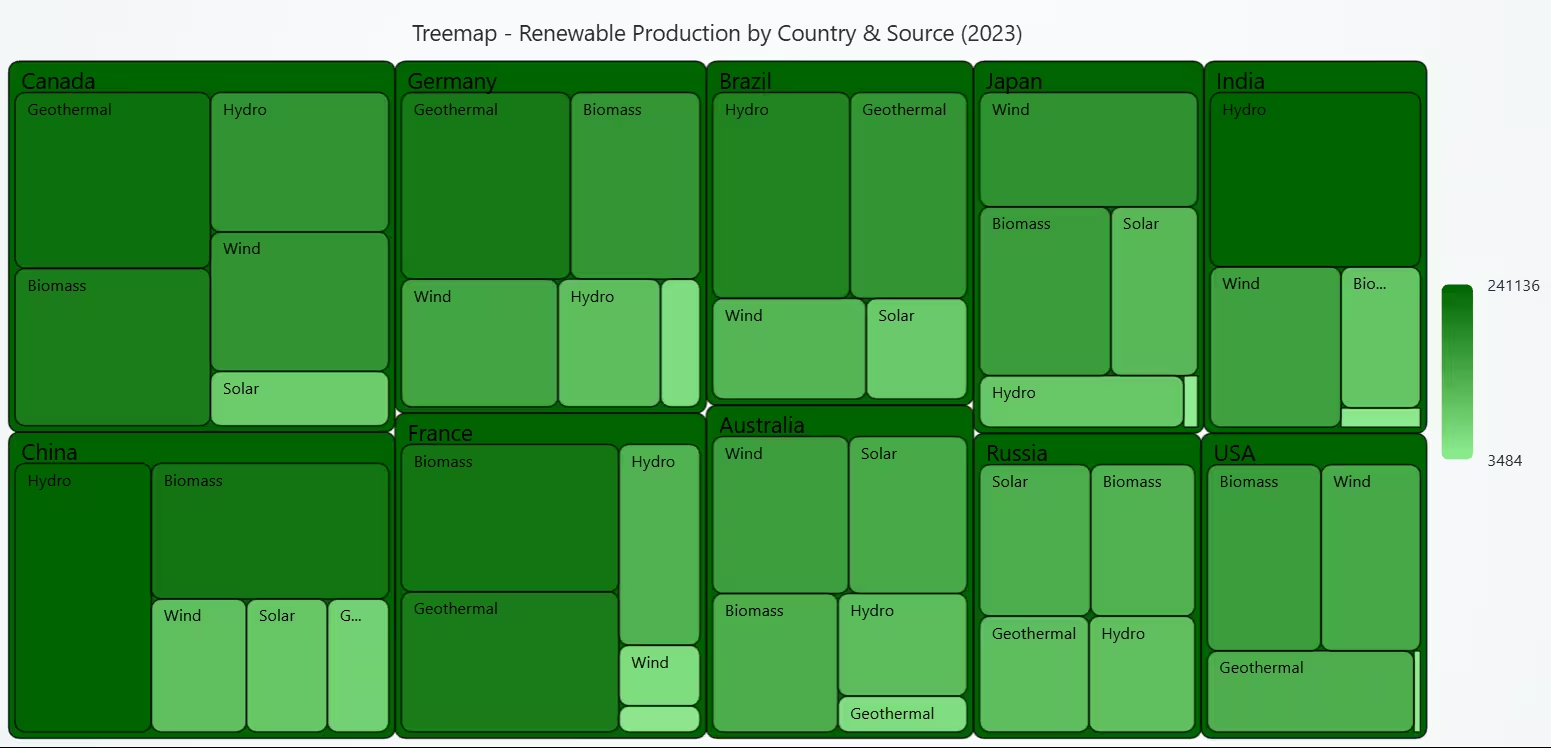
A treemap is good when we want to show how a total (country’s renewable production) is split into parts (different sources). Many categories at once without using a long bar chart. It allows us to compare countries with each other (by total area of each big box), and energy sources within each country (by area of inner boxes).
This treemap gives a quick picture of which renewable sources are most important in each country in 2023.
- Some countries rely heavily on Hydro (eg: China, India).
- Others rely more on Biomass or Wind (eg: USA, France, Japan, Australia).
- Geothermal plays a smaller role almost everywhere.
Overall, the chart shows that countries use different main renewable sources, even though all of them contribute to total renewable production.
# Chart 4 - Treemap of Renewable Production by Country & Source
# Developed with AI assistance to demonstrate LightningChart Python

import lightningchart as lc
import pandas as pd

# License
with open("D:/HAMK/Internship/MyProjects/lc_license.txt", "r") as f:
    lc.set_license(f.read().strip())

df = pd.read_csv('complete_renewable_energy_dataset.csv')
year_focus = 2023

df_y = df[df['Year'] == year_focus]

# Pre-aggregate once to get min / max for coloring
agg = (
    df_y.groupby(['Country', 'Energy Type'], as_index=False)['Production (GWh)']
    .sum()
)

min_prod = agg['Production (GWh)'].min()
max_prod = agg['Production (GWh)'].max()

# Build tree_data from the aggregated table
tree_data = []
for country, g in agg.groupby('Country'):
    children = [
        {'name': row['Energy Type'], 'value': float(row['Production (GWh)'])}
        for _, row in g.iterrows()
    ]
    tree_data.append({'name': country, 'children': children})

chart = lc.TreeMapChart(
    theme=lc.Themes.Light,
    title=f'Treemap - Renewable Production by Country & Source ({year_focus})', html_text_rendering=True,
)

# Use actual min / max production values for coloring
chart.set_node_coloring(
    steps=[
        {'value': float(min_prod), 'color': 'lightgreen'},
        {'value': float(max_prod), 'color': 'darkgreen'},
    ]
    # percentage_values=False by default → correct here
)

chart.set_data(tree_data)
chart.open()
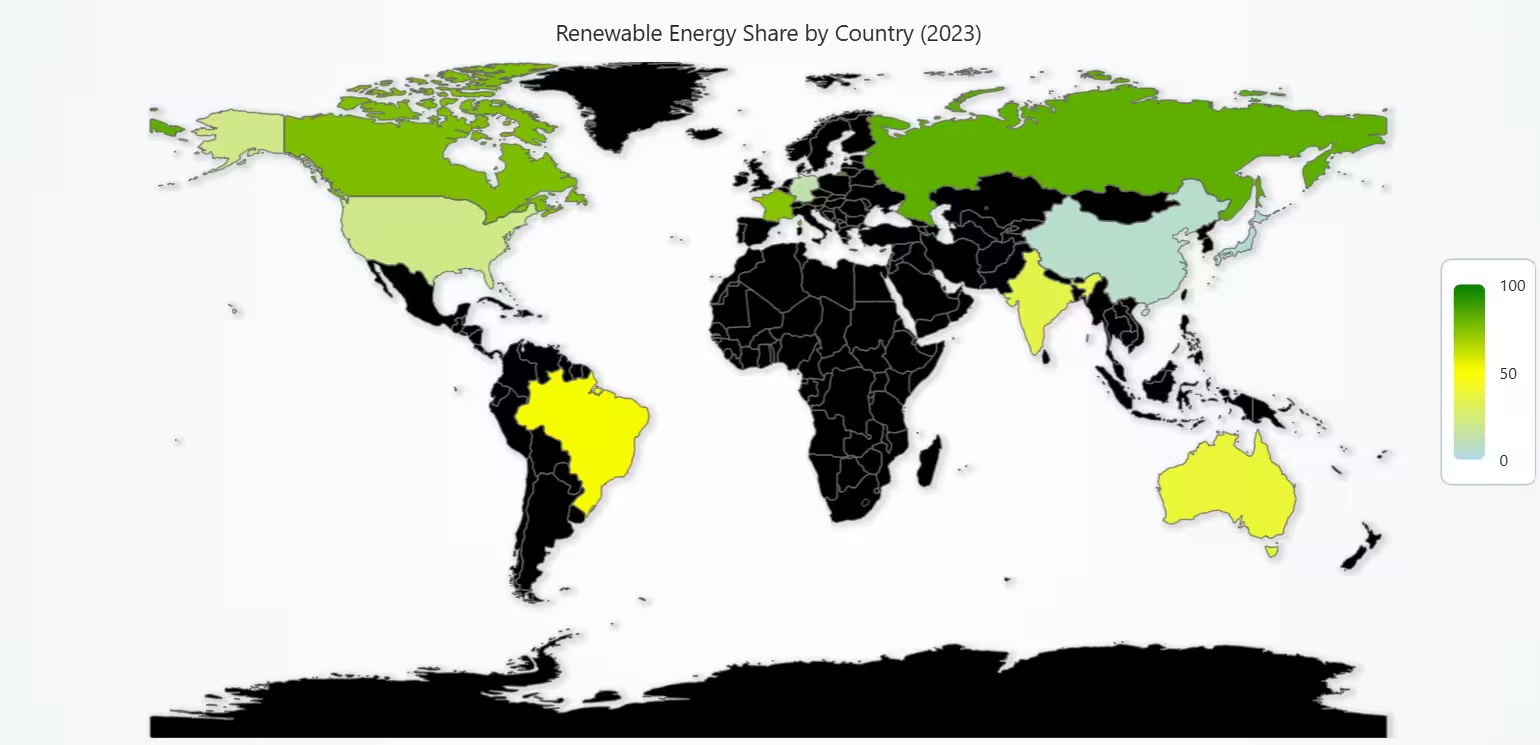
Map Chart of Renewable Share by Country (Latest Year)
A map chart is perfect when the goal is to compare data geographically. It allows us to:
- Immediately see where renewable energy is higher or lower,
- Spot regional patterns,
- Compare continents visually.
A map gives a very clear, location-based understanding that normal charts cannot provide. The map clearly shows that renewable energy share is not uniform across the world. Some countries in North America, Europe, and Asia show higher renewable percentages, while others are more moderate. This visualization makes it easy to compare countries briefly and understand which regions are leading or lagging in renewable energy adoption.
# Chart 5 - Map Chart of Renewable Share by Country (Latest Year)s
# Developed with AI assistance to demonstrate LightningChart Python

import lightningchart as lc
import pandas as pd

# License
with open("D:/HAMK/Internship/MyProjects/lc_license.txt", "r") as f:
    lc.set_license(f.read().strip())

df = pd.read_csv('complete_renewable_energy_dataset.csv')
year_focus = 2023

df_y = df.groupby(['Country', 'Year'], as_index=False).agg({
    'Proportion of Energy from Renewables': 'first'
})
df_y = df_y[df_y['Year'] == year_focus]

iso_map = {
    'Australia': 'AUS',
    'Brazil': 'BRA',
    'Canada': 'CAN',
    'China': 'CHN',
    'France': 'FRA',
    'Germany': 'DEU',
    'India': 'IND',
    'Japan': 'JPN',
    'Russia': 'RUS',
    'USA': 'USA'
}

region_data = []
for _, row in df_y.iterrows():
    iso = iso_map[row['Country']]
    region_data.append({
        'ISO_A3': iso,
        'value': float(row['Proportion of Energy from Renewables'])
    })

chart = lc.MapChart(map_type='World', theme=lc.Themes.Light)
chart.invalidate_region_values(region_data)
chart.set_palette_coloring(
    steps=[
        {'value': 0, 'color': 'lightblue'},
        {'value': 50, 'color': 'yellow'},
        {'value': 100, 'color': 'green'},
    ],
    look_up_property='value',
    percentage_values=False
)
chart.set_title(f'Renewable Energy Share by Country ({year_focus})')
chart.open()
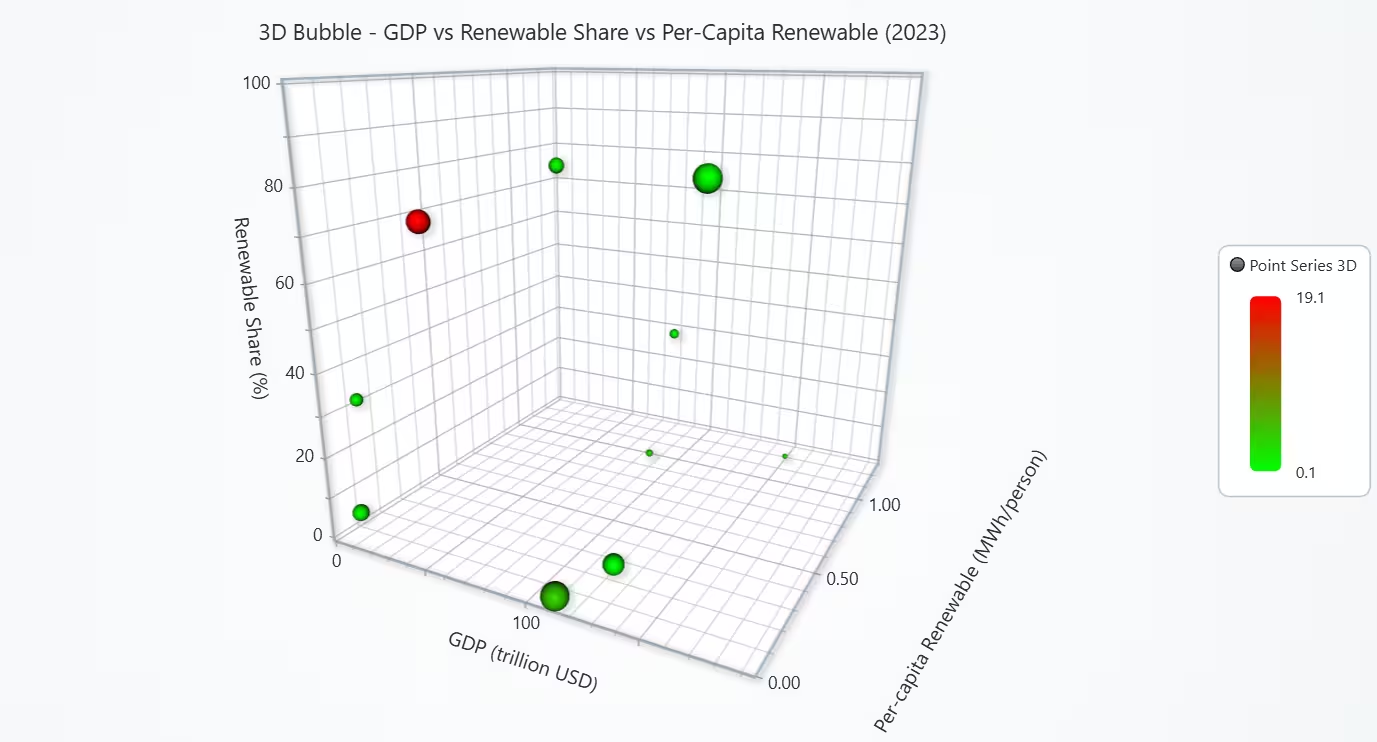
3D Bubble Chart of GDP vs Renewable Share vs Per-Capita Renewable
A 3D bubble chart is ideal because it allows many indicators to be shown at once. Each bubble represents a country with Position (x, y, z), Size, Color. This makes comparisons easier than using separate charts.
The chart shows that economic size doesn’t directly predict renewable performance. Some countries with high GDP invest more and have cleaner energy, while others still have higher emissions. Overall, renewable share, investment, and CO₂ intensity vary widely from country to country.
# Chart 6 - 3D Bubble Chart of GDP vs Renewable Share vs Per-Capita Renewable
# Developed with AI assistance to demonstrate LightningChart Python

import lightningchart as lc
import pandas as pd
import numpy as np

# License
with open("D:/HAMK/Internship/MyProjects/lc_license.txt", "r") as f:
    lc.set_license(f.read().strip())

df = pd.read_csv('complete_renewable_energy_dataset.csv')
year_focus = 2023

# Aggregate to country–year
df_cy = df.groupby(['Country', 'Year'], as_index=False).agg({
    'GDP': 'first',
    'Population': 'first',
    'Energy Consumption': 'first',
    'Proportion of Energy from Renewables': 'first',
    'Investments (USD)': 'sum',
    'CO2 Emissions': 'first'
})
df_y = df_cy[df_cy['Year'] == year_focus].copy()

# Core metrics
df_y['RenewableConsumption'] = (
    df_y['Energy Consumption'] * df_y['Proportion of Energy from Renewables'] / 100.0
)
df_y['PerCapitaRenew_GWh'] = df_y['RenewableConsumption'] / df_y['Population']
df_y['PerCapitaRenew_MWh'] = df_y['PerCapitaRenew_GWh'] * 1e3   # nicer scale on Z axis
df_y['GDP_trillion'] = df_y['GDP'] / 1e12
df_y['CO2_intensity'] = df_y['CO2 Emissions'] / df_y['Energy Consumption']  # CO2 per GWh

# Bubble size: normalize investments to 5–35 range
inv = df_y['Investments (USD)']
inv_min, inv_max = inv.min(), inv.max()
df_y['BubbleSize'] = 5 + 30 * (inv - inv_min) / (inv_max - inv_min + 1e-9)

chart = lc.Chart3D(
    theme=lc.Themes.Light, html_text_rendering=True,
    title=f'3D Bubble - GDP vs Renewable Share vs Per-Capita Renewable ({year_focus})'
)

series = chart.add_point_series(
    render_2d=False,
    individual_lookup_values_enabled=True,
    individual_point_color_enabled=True,
    individual_point_size_axis_enabled=True,
    individual_point_size_enabled=True,
)
series.set_point_shape('sphere')

# Color by CO2 intensity (green = cleaner, red = dirtier)
series.set_palette_point_colors(
    steps=[
        {'value': float(df_y['CO2_intensity'].min()), 'color': (0, 255, 0)},
        {'value': float(df_y['CO2_intensity'].max()), 'color': (255, 0, 0)},
    ],
    look_up_property='value',
    interpolate=True,
    percentage_values=False
)

data = []
for _, r in df_y.iterrows():
    data.append({
        'x': float(r['GDP_trillion']),                    # GDP
        'y': float(r['Proportion of Energy from Renewables']),  # Share %
        'z': float(r['PerCapitaRenew_MWh']),              # MWh per person
        'size': float(r['BubbleSize']),                   # bubble size
        'value': float(r['CO2_intensity']),               # color lookup
        'label': r['Country']
    })

series.add(data)

# Axes titles & ranges
chart.get_default_x_axis().set_title('GDP (trillion USD)')
chart.get_default_y_axis().set_title('Renewable Share (%)').set_interval(0, 100)
chart.get_default_z_axis().set_title('Per-capita Renewable (MWh/person)')

chart.open()
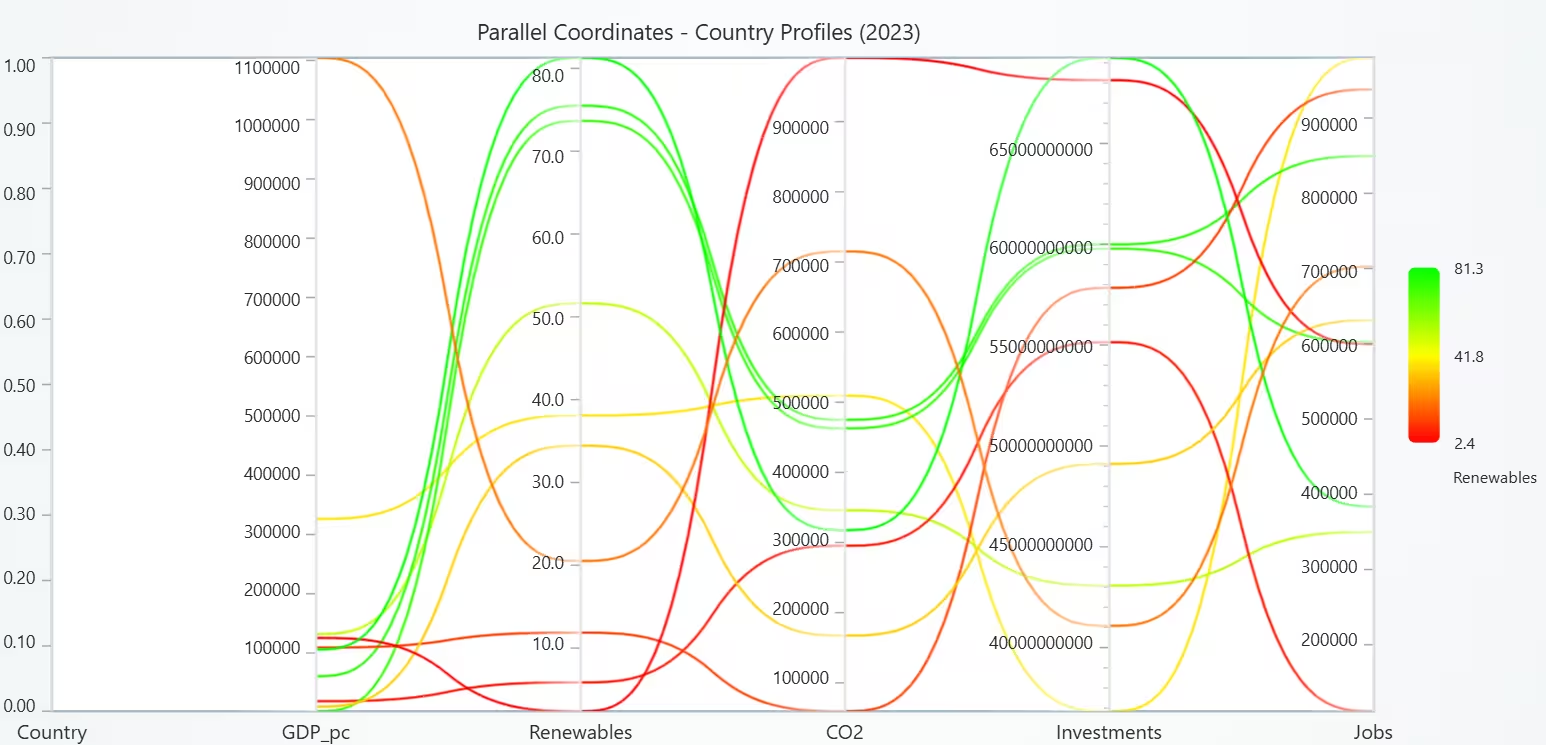
Parallel Coordinate Chart of Multi-Dimensional Country Profiles
A parallel coordinates chart is used to look at many indicators at the same time for each country. See each country’s whole profile across economy, renewables, CO₂, investments, and jobs in one view. The chart shows that countries do not follow a single pattern. High GDP per person does not always mean high renewable share or low CO₂. Parallel coordinates make it easy to compare these multi-dimensional differences between countries in one picture.
# Chart 7 (Option 2) - Parallel Coordinate Chart of Multi-Dimensional Country Profiles
# Developed with AI assistance to demonstrate LightningChart Python

import lightningchart as lc
import pandas as pd

# License
with open("D:/HAMK/Internship/MyProjects/lc_license.txt", "r") as f:
    lc.set_license(f.read().strip())

df = pd.read_csv('complete_renewable_energy_dataset.csv')
year_focus = 2023

# Aggregate one row per Country–Year
df_y = df.groupby(['Country', 'Year'], as_index=False).agg({
    'GDP': 'first',
    'Population': 'first',
    'Proportion of Energy from Renewables': 'first',
    'CO2 Emissions': 'first',
    'Investments (USD)': 'sum',
    'Renewable Energy Jobs': 'first'
})
df_y = df_y[df_y['Year'] == year_focus].copy()

df_y['GDP_per_capita'] = df_y['GDP'] / df_y['Population']

chart = lc.ParallelCoordinateChart(
    theme=lc.Themes.Light,
    title=f'Parallel Coordinates - Country Profiles ({year_focus})', html_text_rendering=True
)

axes = ['Country', 'GDP_pc', 'Renewables', 'CO2', 'Investments', 'Jobs']
chart.set_axes(axes)

# Add one series per country
for _, r in df_y.iterrows():
    s = chart.add_series()
    s.set_data({
        'Country': r['Country'],
        'GDP_pc': float(r['GDP_per_capita']),
        'Renewables': float(r['Proportion of Energy from Renewables']),
        'CO2': float(r['CO2 Emissions']),
        'Investments': float(r['Investments (USD)']),
        'Jobs': float(r['Renewable Energy Jobs']),
    })

# Value-based coloring: color by Renewable Share (%)
min_ren = df_y['Proportion of Energy from Renewables'].min()
max_ren = df_y['Proportion of Energy from Renewables'].max()
mid_ren = (min_ren + max_ren) / 2

chart.set_lut(
    axis_key='Renewables',    # use the Renewables axis as lookup
    interpolate=True,
    steps=[
        {'value': float(min_ren), 'color': (255, 0, 0)},     # low share = red
        {'value': float(mid_ren), 'color': (255, 255, 0)},   # mid share = yellow
        {'value': float(max_ren), 'color': (0, 255, 0)},     # high share = green
    ]
)

chart.open()
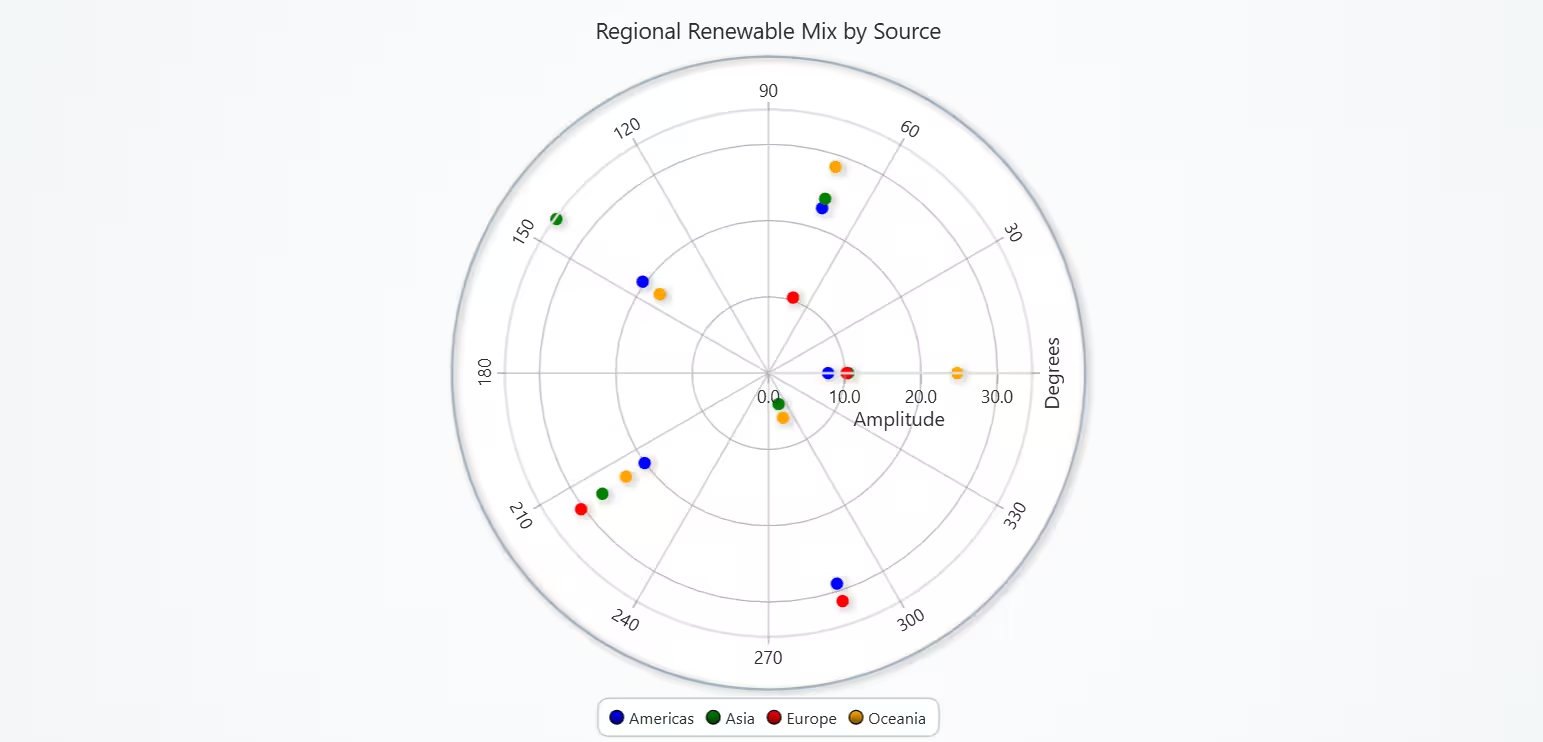
Polar Scatter of Regional Renewable Mix by Energy Type
A polar scatter chart is ideal because it shows how the mix of renewable sources differs across regions, using angles for energy types and radius for percentage contribution. It makes the comparison between regions visually easy and compact. This chart shows that the renewable energy mix varies a lot by region. Some regions depend heavily on one or two sources, while others have a more balanced spread. The polar layout helps reveal these differences quickly by the position and distance of the points.
# Chart 8 - Polar Scatter of Regional Renewable Mix by Energy Type
# Developed with AI assistance to demonstrate LightningChart Python

import lightningchart as lc
import pandas as pd
import numpy as np

# License
with open("D:/HAMK/Internship/MyProjects/lc_license.txt", "r") as f:
    lc.set_license(f.read().strip())

df = pd.read_csv('complete_renewable_energy_dataset.csv')
year_focus = 2023

# Map countries to regions
region_map = {
    'Australia': 'Oceania',
    'Brazil': 'Americas',
    'Canada': 'Americas',
    'China': 'Asia',
    'France': 'Europe',
    'Germany': 'Europe',
    'India': 'Asia',
    'Japan': 'Asia',
    'Russia': 'Europe',
    'USA': 'Americas',
}

df['Region'] = df['Country'].map(region_map)

# Use only the focus year for consistency with other charts
df_y = df[df['Year'] == year_focus].copy()

# Total production by region and energy type
prod = df_y.groupby(['Region', 'Energy Type'], as_index=False)['Production (GWh)'].sum()

energy_types = ['Solar', 'Wind', 'Hydro', 'Biomass', 'Geothermal']
angles = np.linspace(0, 360, len(energy_types), endpoint=False)
etype_to_angle = dict(zip(energy_types, angles))

chart = lc.PolarChart(
    theme=lc.Themes.Light,
    title="Regional Renewable Mix by Source", html_text_rendering=True
)

series_map = {}
colors = {
    'Europe': 'red',
    'Asia': 'green',
    'Americas': 'blue',
    'Oceania': 'orange'
}

# One point series per region
for region in sorted(prod['Region'].unique()):
    s = chart.add_point_series()
    s.set_point_size(10)
    s.set_point_color(color=colors.get(region, 'gray'))
    s.set_name(region)  # legend shows region names
    series_map[region] = s

# Fill each region series with 1 point per energy type
for region, g in prod.groupby('Region'):
    total = g['Production (GWh)'].sum()
    data = []
    for _, row in g.iterrows():
        etype = row['Energy Type']
        if etype not in etype_to_angle:
            continue  # skip unexpected types
        angle = etype_to_angle[etype]
        # Share of that source in the region's total production (%)
        amp_pct = float(row['Production (GWh)'] / total * 100.0) if total > 0 else 0.0
        data.append({'angle': angle, 'amplitude': amp_pct})
    series_map[region].set_data(data)

chart.open()
Polar Polygon of Country Policy & Capability Profiles
A polar polygon (radar-style) chart is used because we want to compare multiple policy and capability indicators for a few countries. It clearly shows strengths and weaknesses as the “arms” of the polygon. Overlapping shapes make it easy to see which country is stronger or weaker on each axis.
This chart shows that, within this dataset:
- Brazil appears to lead overall in policy and capability indicators.
- Germany also performs well but not as high on every dimension.
- China has more uneven performance, with some strong areas and some weaker ones.
The polar polygons make these differences easy to see briefly as different-sized and differently shaped profiles.
# Chart 9 - Polar Polygon of Country Policy & Capability Profiles
# Developed with AI assistance to demonstrate LightningChart Python

import lightningchart as lc
import pandas as pd
import numpy as np

# License
with open("D:/HAMK/Internship/MyProjects/lc_license.txt", "r") as f:
    lc.set_license(f.read().strip())

df = pd.read_csv('complete_renewable_energy_dataset.csv')
year_focus = 2023

countries_focus = ['Germany', 'China', 'Brazil']
indicators = [
    'Renewable Energy Targets',
    'R&D Expenditure',
    'Renewable Energy Jobs',
    'Regional Renewable Energy Cooperation',
    'Public-Private Partnerships in Energy',
    'Innovation Index'
]

# One angle per indicator
angles = np.linspace(0, 360, len(indicators), endpoint=False)

# Filter to year + countries of interest
df_y = df[df['Year'] == year_focus]
df_sel = df_y[df_y['Country'].isin(countries_focus)].copy()

# Normalize each indicator to 0–100 across the 3 countries
for ind in indicators:
    vals = df_sel[ind]
    vmin, vmax = vals.min(), vals.max()
    if vmax == vmin:
        # all equal -> flat 50%
        df_sel[ind + '_norm'] = 50.0
    else:
        df_sel[ind + '_norm'] = 100.0 * (vals - vmin) / (vmax - vmin)

chart = lc.PolarChart(
    theme=lc.Themes.Light,
    title=f'Policy & Capability Profiles ({year_focus})', html_text_rendering=True
)

colors = {
    'Germany': 'blue',
    'China': 'orange',
    'Brazil': 'yellow'
}

for country in countries_focus:
    # Each country should have exactly one row for these indicators
    row = df_sel[df_sel['Country'] == country].iloc[0]

    polygon_series = chart.add_polygon_series()
    polygon_series.set_name(country)                   # legend label
    polygon_series.set_color(color=colors[country])

    points = []
    for angle, ind in zip(angles, indicators):
        amp = float(row[ind + '_norm'])
        points.append({'angle': angle, 'amplitude': amp})

    polygon_series.add_polygon().set_geometry(points)

chart.open()
3D Box Chart of Global Country-Year Renewable Space
A 3D box chart is useful for summarising several countries into one 3D object per region. Showing both the typical level (center), and the spread/variation (box size) across three important indicators at the same time.
This chart gives a compact picture of how regions compare:
- It shows which regions are generally richer or poorer per person,
- Which ones have higher or lower renewable shares,
- And how clean or polluting they are on a per-person basis.
By looking at box location and size, we can quickly see both regional averages and internal differences within each region.
# Chart 10 - 3D Box Chart of Regional Economic–Renewable–Emissions Space (2023)
# Developed with AI assistance to demonstrate LightningChart Python

import lightningchart as lc
import pandas as pd

# License
with open("D:/HAMK/Internship/MyProjects/lc_license.txt", "r") as f:
    lc.set_license(f.read().strip())

# Load dataset
df = pd.read_csv('complete_renewable_energy_dataset.csv')
year_focus = 2023

# Map countries to regions (same mapping you used before)
region_map = {
    'Australia': 'Oceania',
    'Brazil': 'Americas',
    'Canada': 'Americas',
    'China': 'Asia',
    'France': 'Europe',
    'Germany': 'Europe',
    'India': 'Asia',
    'Japan': 'Asia',
    'Russia': 'Europe',
    'USA': 'Americas',
}
df['Region'] = df['Country'].map(region_map)

# Aggregate to Country–Year level
df_cy = df.groupby(['Country', 'Year'], as_index=False).agg({
    'GDP': 'first',
    'Population': 'first',
    'Energy Consumption': 'first',
    'Proportion of Energy from Renewables': 'first',
    'CO2 Emissions': 'first',
    'Region': 'first'
})

# Derived indicators
df_cy['GDP_pc']      = df_cy['GDP'] / df_cy['Population']
df_cy['CO2_pc']      = df_cy['CO2 Emissions'] / df_cy['Population']
df_cy['Renew_share'] = df_cy['Proportion of Energy from Renewables']

# Focus on 2023 only
df_2023 = df_cy[df_cy['Year'] == year_focus].copy()

# Prepare box geometry per region: center = mean, size = max - min
box_data = {}
for region, g in df_2023.groupby('Region'):
    if g.empty or pd.isna(region):
        continue

    x_vals = g['GDP_pc'].values
    y_vals = g['Renew_share'].values
    z_vals = g['CO2_pc'].values

    x_min, x_max = x_vals.min(), x_vals.max()
    y_min, y_max = y_vals.min(), y_vals.max()
    z_min, z_max = z_vals.min(), z_vals.max()

    box_data[region] = {
        "xCenter": float((x_min + x_max) / 2.0),
        "yCenter": float((y_min + y_max) / 2.0),
        "zCenter": float((z_min + z_max) / 2.0),
        "xSize":   float(max(x_max - x_min, 1e-6)),  # avoid zero-size boxes
        "ySize":   float(max(y_max - y_min, 1e-6)),
        "zSize":   float(max(z_max - z_min, 1e-6)),
    }

# Create chart
chart = lc.Chart3D(
    theme=lc.Themes.Light,
    title=f'3D Box Series - Regional GDP_pc vs Renew_share vs CO2_pc ({year_focus})', html_text_rendering=True
)

# Colors per region (hex strings)
region_colors = {
    'Americas': '#0066cc',
    'Europe':   '#dc143c',
    'Asia':     '#228b22',
    'Oceania':  '#ffa500',
}

# One BoxSeries per region so each appears with its own legend entry
for region, geom in box_data.items():
    series = chart.add_box_series()
    series.set_name(region)
    series.set_color(region_colors.get(region, '#808080'))  # default grey if not in dict
    series.add([geom])  # add expects a dict or list of dicts

# Axis titles
chart.get_default_x_axis().set_title('GDP per capita')
chart.get_default_y_axis().set_title('Renewable share (%)')
chart.get_default_z_axis().set_title('CO₂ per capita')

chart.open()
Dashboard of Renewable Energy Transition Overview
This dashboard has been created to put several key views in one place. The pie chart offers a quick view of which sources make up global renewables. The 3D bubble chart shows four dimensions at once – economic size, renewable share, per-capita use, and CO₂ intensity – to compare countries’ transition quality, not only quantity. The line chart shows how the global share changed over time. The pyramid chart ranks countries by renewable share.
# Chart 11 - Dashboard of Renewable Energy Transition Overview
# Developed with AI assistance to demonstrate LightningChart Python

import lightningchart as lc
import pandas as pd
import numpy as np

# License
with open("D:/HAMK/Internship/MyProjects/lc_license.txt", "r") as f:
    lc.set_license(f.read().strip())

df = pd.read_csv('complete_renewable_energy_dataset.csv')
year_focus = 2023

# PIE + PYRAMID DATA (same as before)
df_year = df[df['Year'] == year_focus]

# Pie data: global production share by energy type
pie_src = df_year.groupby('Energy Type', as_index=False)['Production (GWh)'].sum()
pie_data = [
    {'name': row['Energy Type'], 'value': float(row['Production (GWh)'])}
    for _, row in pie_src.iterrows()
]

# Pyramid: renewable share ranking by country (2023)
pyr_cy = df_year.groupby('Country', as_index=False).agg(
    RenewableShare=('Proportion of Energy from Renewables', 'first')
).sort_values('RenewableShare', ascending=False)
pyramid_data = [
    {'name': row['Country'], 'value': float(row['RenewableShare'])}
    for _, row in pyr_cy.iterrows()
]

# COUNTRY–YEAR AGG (for bubble + global trend)
df_cy = df.groupby(['Country', 'Year'], as_index=False).agg({
    'GDP': 'first',
    'Population': 'first',
    'Energy Consumption': 'first',
    'Proportion of Energy from Renewables': 'first',
    'Investments (USD)': 'sum',
    'CO2 Emissions': 'first'
})

# Global trend over all years (bottom-left line chart)
df_cy_full = df_cy.copy()
df_cy_full['RenewableConsumption'] = (
    df_cy_full['Energy Consumption']
    * df_cy_full['Proportion of Energy from Renewables'] / 100.0
)
gb = df_cy_full.groupby('Year', as_index=False).agg(
    total_energy=('Energy Consumption', 'sum'),
    total_renewable=('RenewableConsumption', 'sum')
)
gb['GlobalShare'] = 100 * gb['total_renewable'] / gb['total_energy']

# DATA FOR 3D BUBBLE (year_focus only)
df_y = df_cy[df_cy['Year'] == year_focus].copy()

df_y['RenewableConsumption'] = (
    df_y['Energy Consumption'] * df_y['Proportion of Energy from Renewables'] / 100.0
)
df_y['PerCapitaRenew_GWh'] = df_y['RenewableConsumption'] / df_y['Population']
df_y['PerCapitaRenew_MWh'] = df_y['PerCapitaRenew_GWh'] * 1e3   # nicer Z scale
df_y['GDP_trillion'] = df_y['GDP'] / 1e12
df_y['CO2_intensity'] = df_y['CO2 Emissions'] / df_y['Energy Consumption']

# Bubble size from investment
inv = df_y['Investments (USD)']
inv_min, inv_max = inv.min(), inv.max()
df_y['BubbleSize'] = 5 + 30 * (inv - inv_min) / (inv_max - inv_min + 1e-9)

# DASHBOARD LAYOUT
dashboard = lc.Dashboard(columns=2, rows=2, theme=lc.Themes.Light)

pie_chart     = dashboard.PieChart    (column_index=0, row_index=0)
pyramid_chart = dashboard.PyramidChart(column_index=1, row_index=1)
chart3d       = dashboard.Chart3D     (column_index=1, row_index=0)
chartxy       = dashboard.ChartXY     (column_index=0, row_index=1)

# Pie: global energy mix by source
pie_chart.set_title(f'Global Renewable Mix ({year_focus})')
pie_chart.add_slices(pie_data)
pie_chart.set_inner_radius(50)

# Pyramid: country ranking by renewable share
pyramid_chart.set_title(f'Country Ranking by Renewable Share ({year_focus})')
pyramid_chart.add_slices(pyramid_data)

# 3D BUBBLE CHART (TOP-RIGHT)
series = chart3d.add_point_series(
    render_2d=False,
    individual_lookup_values_enabled=True,
    individual_point_color_enabled=True,
    individual_point_size_axis_enabled=True,
    individual_point_size_enabled=True,
)
series.set_point_shape('sphere')

# Color by CO2 intensity (green = cleaner, red = dirtier)
series.set_palette_point_colors(
    steps=[
        {'value': float(df_y['CO2_intensity'].min()), 'color': (0, 255, 0)},
        {'value': float(df_y['CO2_intensity'].max()), 'color': (255, 0, 0)},
    ],
    look_up_property='value',
    interpolate=True,
    percentage_values=False,
)

data = []
for _, r in df_y.iterrows():
    data.append({
        'x': float(r['GDP_trillion']),                    # GDP
        'y': float(r['Proportion of Energy from Renewables']),  # Share %
        'z': float(r['PerCapitaRenew_MWh']),              # MWh/person
        'size': float(r['BubbleSize']),                   # bubble size
        'value': float(r['CO2_intensity']),               # color lookup
        'label': r['Country'],
    })
series.add(data)

# Axes titles + smaller fonts
x3 = chart3d.get_default_x_axis()
y3 = chart3d.get_default_y_axis()
z3 = chart3d.get_default_z_axis()

x3.set_title('GDP (trillion USD)')
y3.set_title('Renewable Share (%)').set_interval(0, 100)
z3.set_title('Per-capita Renewable (MWh/person)')

# Make axis titles smaller (as supervisor suggested)
x3.set_title_font(10)
y3.set_title_font(10)
z3.set_title_font(10)

chart3d.set_title('3D Bubble: GDP vs Renewables')

# MINI GLOBAL TREND LINE CHART (BOTTOM-LEFT)
sxy = chartxy.add_line_series()
sxy.add(x=gb['Year'].tolist(), y=gb['GlobalShare'].tolist())
chartxy.set_title('Global Renewable Share Over Time')

x_axis_xy = chartxy.get_default_x_axis()
y_axis_xy = chartxy.get_default_y_axis()

x_axis_xy.set_title('Year')
y_axis_xy.set_title('Share (%)')

# Make year labels integers (no decimals)
x_axis_xy.set_tick_strategy('Numeric')
x_axis_xy.set_decimal_precision(0)

dashboard.open()
Conclusion
Overall, the project shows that renewable energy continues to expand globally, but its growth is not smooth or consistent across years. Some renewable sources, especially Hydro, have grown faster than others, while Solar and Wind show moderate increases in this dataset.
Economic strength (GDP) does not strongly determine how much renewable energy a country uses per person, and regional differences remain clear: Europe and Oceania generally lead, while other regions show mixed progress. Countries tend to fall within a normal range without extreme outliers.
In summary, the global transition to renewable energy is moving forward, but at different speeds across regions, technologies, and economic contexts.
Continue learning with LightningChart

JavaScript Refreshing Spectrum Chart
Written by a human | Updated on April 10th, 2025JavaScript Refreshing Spectrum Chart Hello again, this time I bring a quick but helpful tutorial on how to create a JavaScript refreshing spectrum chart. A spectrum chart is commonly used in reading and plotting...
Horizontal Bar Chart of Russia-Ukraine War Weaponry Data
Written by a human | Updated on April 10th, 2025 JavaScript Horizontal Bar Chart In this article, we aim to respectfully create a JavaScript horizontal bar chart that simulates the weaponry usage on recent war conflicts. While the data have been taken from Kaggle and...

Create a vibration charts application with 2D & 3D spectrograms
Written by a human | Updated on April 10th, 2025JS Spectrogram ApplicationHello, in this article we will create a JS dashboard with 2D and 3D spectrogram charts. The purpose of creating this project is to explain how to create a vibration analysis application that...



If you have any questions, feel free to contact us!
©LightningChart Ltd 2025. All rights reserved.