





Conducting a Global Oil Analysis with LightningChart Python
Tutorial
Assisted by AI
Learn how to conduct a comprehensive analysis of global oil production using LightningChart Python to spot market trends and dynamics.
Vindya Nukulasooriya
Data Science Developer

Introduction
This project focuses on the analytical and visual exploration of global oil production data using the high-performance visualization capabilities of the LightningChart Python library. The dataset, sourced from Kaggle, encompasses detailed oil production statistics across multiple countries and years (2021–2023), including metrics such as production volume by country, product type, and flow category.
By utilizing diverse chart types ranging from line charts and grouped bar charts to 3D surface plots, radar charts, and funnel visualizations, this project offers an insightful perspective on global oil production trends. The visualizations aim to reveal key patterns in regional output, product composition, and geopolitical dynamics, supporting a deeper understanding of the global energy landscape. These interactive charts provide both analysts and policy-makers with intuitive, data-driven insights that contribute to informed decision-making in the energy sector.
Project Overview
This project utilizes a comprehensive oil production dataset to conduct a multi-dimensional analysis of global energy output across countries, years, and petroleum product types. The dataset contains structured records detailing oil production volumes from various nations, broken down by flow categories (eg: production, import, export) and product types (eg: crude oil, diesel, gasoline), spanning the years 2021 to 2023.
LightningChart Python is employed exclusively for all visualizations, leveraging its high-performance rendering, interactivity, and ability to manage large numerical datasets. The charting library is particularly well-suited for geoeconomic and energy-related analyses, enabling dynamic visualization of production distributions, time-based trends, and cross-sectional relationships between countries and oil products. The result is a set of insightful, professional-grade visualizations that support energy policy assessment, industrial monitoring, and strategic planning.
Objectives
- To analyze global oil production data from 2021 to 2023 across countries, flow types, and product categories.
- To create 10 high-performance visualizations using LightningChart Python that highlight key trends and comparisons.
- To support decision-making and policy discussion in the global energy sector through visual insights.
- To demonstrate the suitability of LightningChart Python for large-scale, domain-specific data analysis.
Deliverable is a complete visualization report consisting of
- 10 interactive charts developed with LightningChart Python
- Chart-specific Python code and explanations
- Analytical summary covering global trends, geopolitical impact, and sustainability insights
- Conclusion highlighting the role of visualization tools in energy data analytics
Tools Used
Python 3.13.0, LightningChart Python, Jupyter Notebook, AI Assistance
About the Dataset
The dataset records annual oil production statistics from countries around the world, categorized by product type (eg: crude oil, diesel), flow direction (eg: production, import, export), and measurement year (2021–2023). It includes production volumes in kilotons and represents a snapshot of global oil activity for analytical use.
Source:
- Dataset: Kaggle – Oil Production Statistics Dataset
- Publisher: Kaggle user @sazidthe1
- Format: CSV (tabular data)
- License: Open data (for academic and non-commercial use)
Why is this research important?
Oil production plays a crucial role in the global economy, energy security, and geopolitical strategy. Analysing this data helps:
- Identify top-producing nations and emerging shifts in global supply
- Assess the balance between refined and crude oil product flows
- Understand how policy, conflict, and sustainability goals shape production patterns
- Inform strategies for transitioning toward cleaner energy solutions while monitoring current fossil fuel dependencies
LightningChart Python
LightningChart Python is an advanced data visualization library designed for high-performance rendering, large dataset handling, and interactive exploration of multidimensional data. In the context of global oil production analysis, this tool offers several advantages that make it uniquely suited for conducting the global oil production analysis. LightningChart Python empowers this project with the flexibility, power, and visual richness needed to effectively analyze and communicate trends in global oil production.

Setting Up Python Environment
Before running the project, install Python and the other required libraries using:
%pip install numpy pandas lightningchartOverview of Libraries Used:
- Pandas: for data handling and time-based grouping
- Numpy: for numerical operations
- LightningChart: for high-performance visualization
- scipy.interpolate: for interpolating baseline FHR values across accelerations and uterine contractions
Setting Up Your Development Environment:
- Set up a virtual environment:
- Use Visual Studio Code (VSCode) for a streamlined development experience.
Loading and Preprocessing Data
To create this China Water Pollution Monitoring Application, we will fetch the China water pollution data using the following function:
Downloaded the dataset from Kaggle -- https://www.kaggle.com/datasets/sazidthe1/oil-productionTo preprocess the dataset, we will import the pandas library:
# Import necessary libraries (load pandas library to preprocess dataset)
import pandas as pd
Visualizing Data with LightningChart Python
To effectively conduct the global oil production analysis, I have selected five distinct chart types available in the LightningChart Python library.
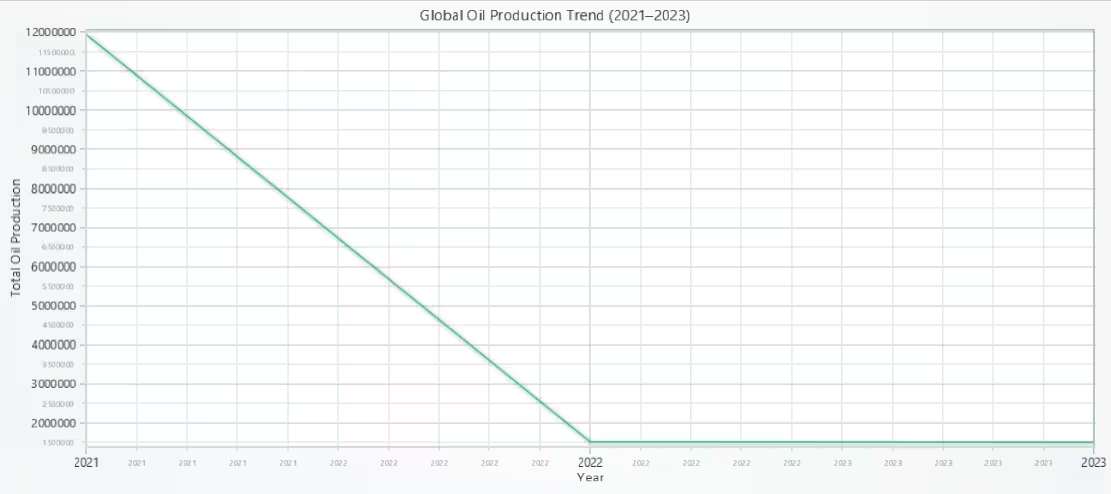
Global Oil Production Trend (2021–2023) – Line Chart
This visualization uses the ChartXY class from the LightningChart Python library to generate a simple line chart. It plots the total global oil production volume for the years 2021, 2022, and 2023.
# Line Chart - Global Oil Production Trend (2021–2023)
# Developed with AI assistance to showcase the performance of LightningChart Python libraries.

import lightningchart as lc

# Load license key securely from file
with open("D:/Vindy/HAMK/Internship/MyProjects/lc_license.txt", "r") as f:
    license_key = f.read().strip()

# Set your LightningChart license key
lc.set_license(license_key)

# Global oil production totals (aggregated)
x_values = [2021, 2022, 2023]
y_values = [11941390.59, 1517158.42, 1506134.98]

# Create the chart
chart = lc.ChartXY(
    theme=lc.Themes.Light,
    title='Global Oil Production Trend (2021–2023)'
)

# Add line series
series = chart.add_line_series().append_samples(
    x_values=x_values,
    y_values=y_values
)

# Set axis titles
chart.get_default_x_axis().set_title('Year')
chart.get_default_y_axis().set_title('Total Oil Production')

# Fix: Remove decimals from X-axis
chart.get_default_x_axis().set_decimal_precision(0)

# Display the chart
chart.open()
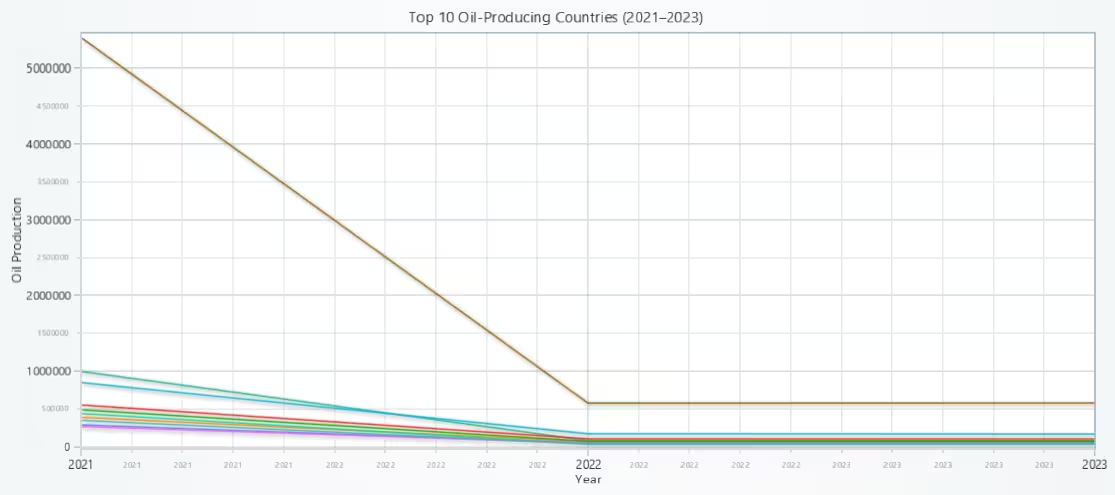
Top 10 Oil-Producing Countries (2021–2023) – Multi-Line Chart
This visualization provides a side-by-side temporal comparison of oil output across leading producer nations. Each country’s trajectory is rendered with a distinct line, making the chart useful for spotting national trends, production stability, or fluctuations due to external factors. The LightningChart engine manages dynamic rendering smoothly, even with multiple data series, ensuring the chart remains interactive and legible.
# Multi-Line Chart - Top 10 Oil-Producing Countries (2021–2023)
# Developed with AI assistance to showcase the performance of LightningChart Python libraries.

import lightningchart as lc
import pandas as pd

# Load license key securely from file
with open("D:/Vindy/HAMK/Internship/MyProjects/lc_license.txt", "r") as f:
    license_key = f.read().strip()

# Set your LightningChart license key
lc.set_license(license_key)

# Load data
ops = pd.read_csv("oil_production_statistics.csv", encoding="ISO-8859-1").drop_duplicates()

# Top 10 countries
top_countries = ops.groupby('country_name')['value'].sum().nlargest(10).index.tolist()
filtered_ops = ops[ops['country_name'].isin(top_countries)]

# Grouped totals per year per country
grouped_data = filtered_ops.groupby(['year', 'country_name'])['value'].sum().unstack().fillna(0)

# X values (years)
x_values = grouped_data.index.tolist()
country_names = grouped_data.columns.tolist()

# Create chart
chart = lc.ChartXY(
    theme=lc.Themes.Light,
    title='Top 10 Oil-Producing Countries (2021–2023)'
)

# Add one line series per country
for country in country_names:
    y_values = grouped_data[country].values.tolist()
    chart.add_line_series().set_name(country).append_samples(
        x_values=x_values,
        y_values=y_values
    )

# Label axes
chart.get_default_x_axis().set_title('Year')
chart.get_default_y_axis().set_title('Oil Production')

# Fix: Remove decimals from X-axis
chart.get_default_x_axis().set_decimal_precision(0)

# Show chart
chart.open()
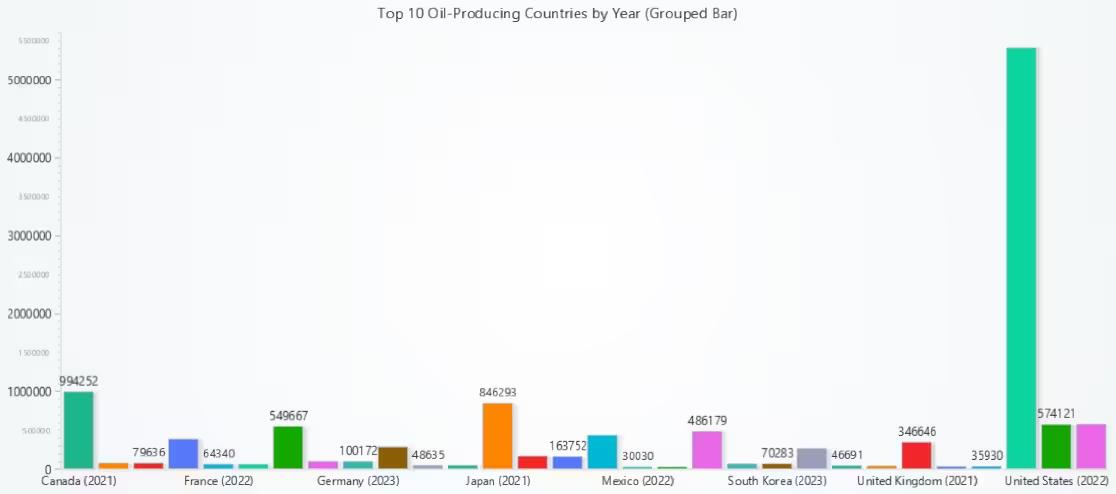
Top 10 Countries by Yearly Production – Grouped Vertical Bar Chart
This chart provides an accessible breakdown of oil production by the top 10 producing countries, year by year. Unlike line charts that emphasize continuity, the grouped bar format allows for isolated comparison between years for each country, facilitating analysis of sudden production increases or disruptions. It’s particularly useful in policy review or investment forecasting, where stakeholders are interested in annual behaviour rather than long-term trends.
# Grouped Vertical Bar Chart - Top 10 Oil-Producing Countries (2021–2023)
# Data preprocessing  — This code prepares and formats the data required for the Grouped Vertical Bar Chart
# Developed with AI assistance to showcase the performance of LightningChart Python libraries.

import pandas as pd

# Load dataset
ops = pd.read_csv("oil_production_statistics.csv", encoding="ISO-8859-1").drop_duplicates()

# Top 10 countries
top_countries = ops.groupby('country_name')['value'].sum().nlargest(10).index.tolist()
filtered_ops = ops[ops['country_name'].isin(top_countries)]

# Group by country and year
grouped = filtered_ops.groupby(['country_name', 'year'])['value'].sum().reset_index()

# Create "Country (Year)" labels
grouped['category'] = grouped.apply(lambda row: f"{row['country_name']} ({row['year']})", axis=1)

# Final bar data
bar_data = grouped[['category', 'value']].rename(columns={'value': 'value'}).to_dict('records')
Oil Product Composition by Year (Stacked View) – Stacked Line Chart
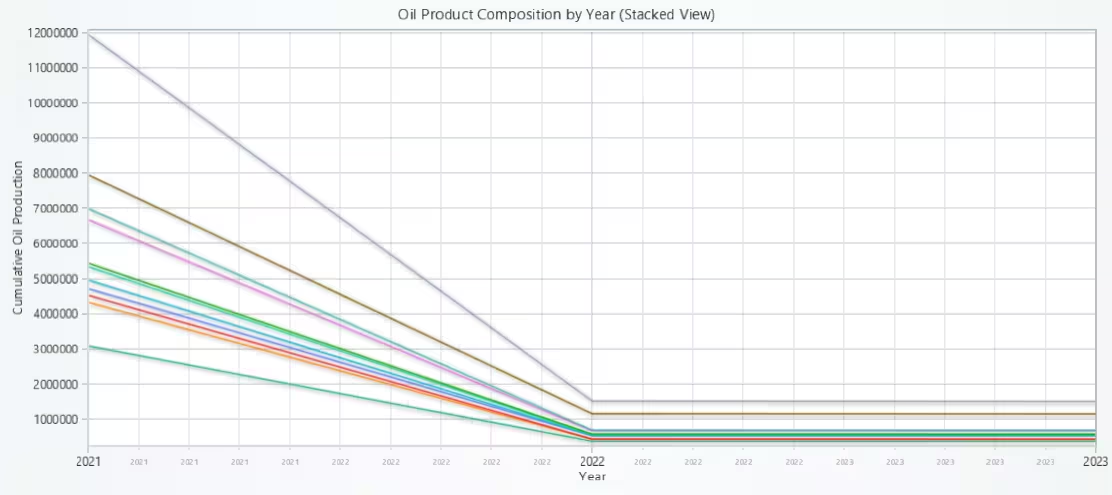
This stacked line chart provides a comprehensive view of oil product distribution across time. It not only tracks total production changes but also gives insight into product-level dynamics, helping analysts understand shifts in refining focus, industrial demand, or policy impact across the 2021–2023 period.
# Multi-Line Chart - Oil Product Composition by Year (Stacked View)
# Developed with AI assistance to showcase the performance of LightningChart Python libraries.

import pandas as pd
import lightningchart as lc

# Load license key securely from file
with open("D:/Vindy/HAMK/Internship/MyProjects/lc_license.txt", "r") as f:
    license_key = f.read().strip()

# Set your LightningChart license key
lc.set_license(license_key)

# Load and clean data
ops = pd.read_csv("oil_production_statistics.csv", encoding="ISO-8859-1").drop_duplicates()

# Group by year and product
product_year_data = ops.groupby(['year', 'product'])['value'].sum().unstack().fillna(0)

# Prepare stacking layers
years = product_year_data.index.tolist()
products = product_year_data.columns.tolist()

stacked_layers = []
cumulative = [0] * len(years)

for product in products:
    current = product_year_data[product].values.tolist()
    stacked = [c + v for c, v in zip(cumulative, current)]
    stacked_layers.append((product, current.copy(), stacked.copy()))
    cumulative = stacked

# Create chart
x_values = years
chart = lc.ChartXY(
    theme=lc.Themes.Light,
    title='Oil Product Composition by Year (Stacked View)'
)

# Plot each product layer
for product, y_values, stacked_tops in stacked_layers:
    chart.add_line_series()\
        .set_name(product)\
        .append_samples(x_values=x_values, y_values=stacked_tops)

# Label axes
chart.get_default_x_axis().set_title('Year')
chart.get_default_y_axis().set_title('Cumulative Oil Production')

# Fix: Remove decimals from year axis
chart.get_default_x_axis().set_decimal_precision(0)

# Show chart
chart.open()
Top 15 Countries by Crude Oil Production – Vertical Bar Chart
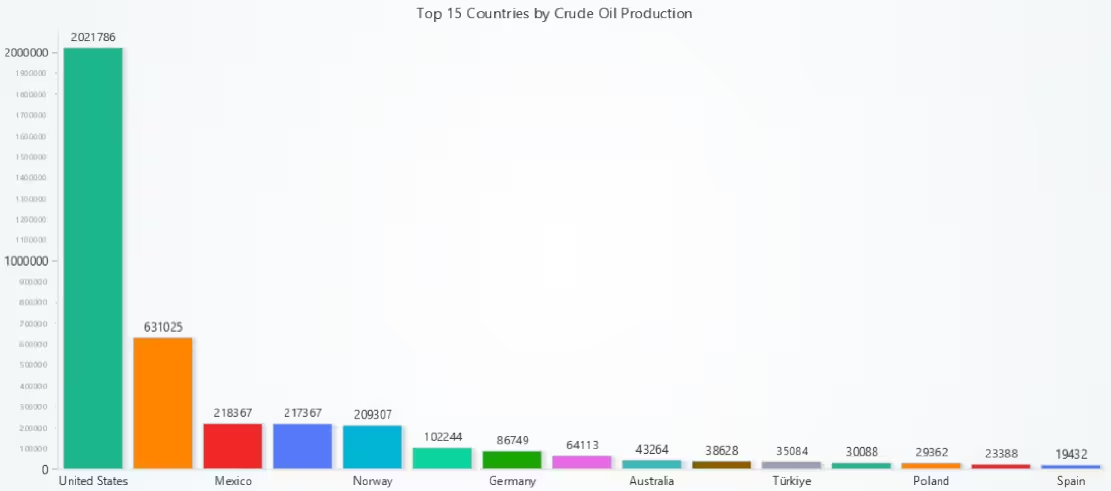
This vertical bar chart provides a focused snapshot of the global hierarchy in crude oil extraction. Isolating crude oil from other petroleum products, it emphasizes the raw production strength of leading nations. The visualization highlights how countries like the USA, Russia, and Saudi Arabia consistently dominate crude oil output, reinforcing their strategic importance in the global energy supply chain. It also helps contrast primary extractors from countries more focused on refining or consumption.
# Bar Chart - Top 15 Countries by Crude Oil Production
# Developed with AI assistance to showcase the performance of LightningChart Python libraries.

import pandas as pd
import lightningchart as lc

# Load license key securely from file
with open("D:/Vindy/HAMK/Internship/MyProjects/lc_license.txt", "r") as f:
    license_key = f.read().strip()

# Set your LightningChart license key
lc.set_license(license_key)

# Load and clean data
ops = pd.read_csv("oil_production_statistics.csv", encoding="ISO-8859-1").drop_duplicates()

# Filter for 'Crude oil' only
crude_oil_data = ops[ops['product'] == 'Crude oil']

# Group by country and sum values
crude_by_country = crude_oil_data.groupby('country_name')['value'].sum().nlargest(15).reset_index()

# Prepare data for BarChart
bar_data = [
    {'category': row['country_name'], 'value': row['value']}
    for _, row in crude_by_country.iterrows()
]

# Create bar chart
chart = lc.BarChart(
    vertical=True,
    theme=lc.Themes.Light,
    title='Top 15 Countries by Crude Oil Production'
)

chart.set_sorting('disabled')
chart.set_data(bar_data)
chart.open()
Top 10 Countries – Share of Global Oil Production (2023) – Pie Chart
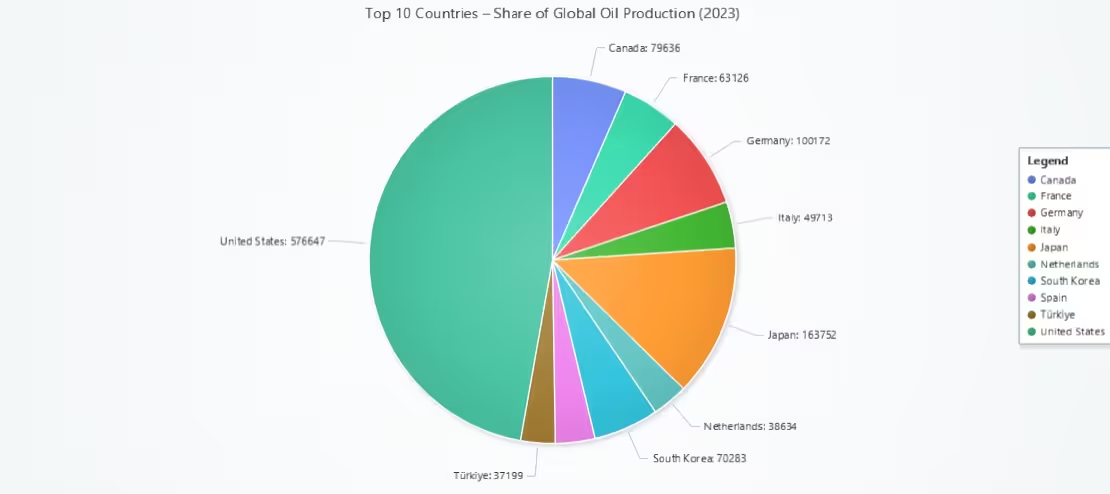
This chart offers a concise and intuitive view of global oil production dominance in 2023. It is particularly effective at highlighting the relative scale of production – clearly identifying the largest contributors and revealing how much of the global total is concentrated among a few nations.
# Pie Chart - Top 10 Countries : Share of Global Oil Production (2023)
# Developed with AI assistance to showcase the performance of LightningChart Python libraries.

import lightningchart as lc
import pandas as pd

# Load license key securely from file
with open("D:/Vindy/HAMK/Internship/MyProjects/lc_license.txt", "r") as f:
    license_key = f.read().strip()

# Set your LightningChart license key
lc.set_license(license_key)

# Load and filter data
ops = pd.read_csv("oil_production_statistics.csv", encoding="ISO-8859-1").drop_duplicates()
ops_2023 = ops[ops['year'] == 2023]

# Top 10 producing countries in 2023
top_10 = ops_2023.groupby('country_name')['value'].sum().nlargest(10).reset_index()

# Format for LightningChart PieChart
data = [
    {'name': row['country_name'], 'value': row['value']}
    for _, row in top_10.iterrows()
]

# Create the pie chart
chart = lc.PieChart(
    title='Top 10 Countries – Share of Global Oil Production (2023)',
    theme=lc.Themes.Light
)

# Optional: separate slices with white borders
chart.set_slice_stroke(color=lc.Color('white'), thickness=1)

# Add data
chart.add_slices(data)

# Add a legend
chart.add_legend(data=chart)

# Display
chart.open()
USA Oil Profile by Flow Type (2023) – Radar Chart
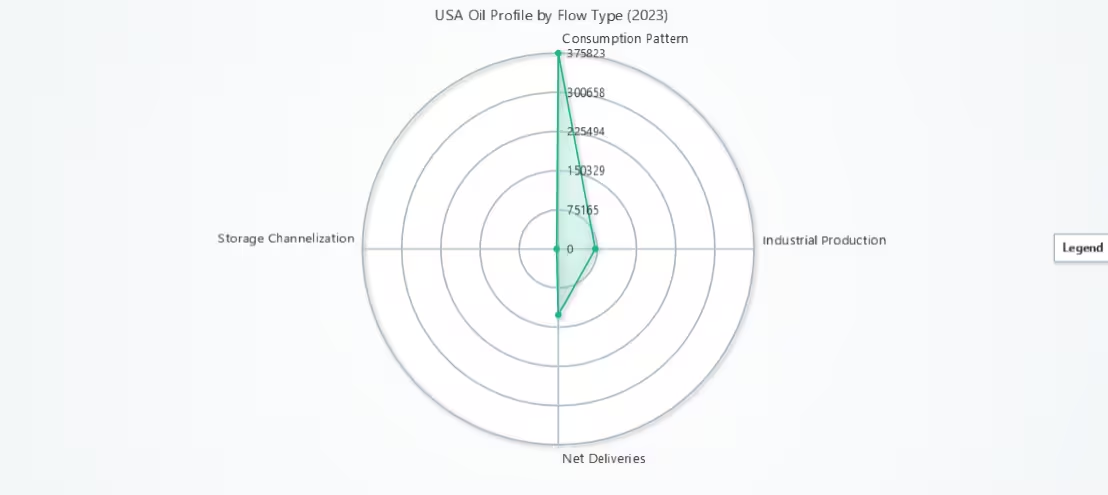
This radar chart delivers a compact but insightful profile of the USA’s oil flow structure for 2023. Instead of comparing countries, it focuses on breaking down what happens within one major producer, giving analysts a way to assess strategy, behaviour, and balance across oil flows. LightningChart’s radar implementation ensures clear rendering of multi-axis metrics, making it well-suited for profiling and energy diagnostics.
# Radar Chart - USA Oil Profile by Flow Type (2023)
# Developed with AI assistance to showcase the performance of LightningChart Python libraries.

import lightningchart as lc
import pandas as pd

# Load license key
with open("D:/Vindy/HAMK/Internship/MyProjects/lc_license.txt", "r") as f:
    license_key = f.read().strip()
lc.set_license(license_key)

# Load dataset and filter for USA in 2023
ops = pd.read_csv("oil_production_statistics.csv", encoding="ISO-8859-1").drop_duplicates()
ops_2023 = ops[ops['year'] == 2023]
filtered = ops_2023[ops_2023['country_name'] == 'United States']  # Adjust if dataset uses "USA"

# Pivot: rows = country, columns = flow type
radar_data = filtered.pivot_table(index='country_name', columns='flow', values='value', aggfunc='sum').fillna(0)

# Get flow types
flow_types = radar_data.columns.tolist()
country = 'United States'  # Consistent reference

# Create chart
chart = lc.SpiderChart(theme=lc.Themes.Light, title="USA Oil Profile by Flow Type (2023)")
chart.set_web_mode("circle")
chart.set_web_count(5)

# Add flow axes
for flow in flow_types:
    chart.add_axis(flow)

# Add USA data series
values = radar_data.loc[country].tolist()
series = chart.add_series().set_name(country)
points = [{'axis': flow_types[i], 'value': values[i]} for i in range(len(flow_types))]
series.add_points(points)

chart.add_legend()
chart.open()
Country Vs Year (Production Intensity) – Heatmap
This heatmap provides a clear, data-rich visualization of oil production intensity across top producers during 2021–2023. By encoding numerical volumes into a continuous color scale, the chart allows analysts to spot trends, anomalies, and consistencies at both national and global levels. The use of custom ticks for real country and year labels ensures that the chart remains intuitive and accessible, while interpolation and palette design enhance scientific readability and presentation quality.
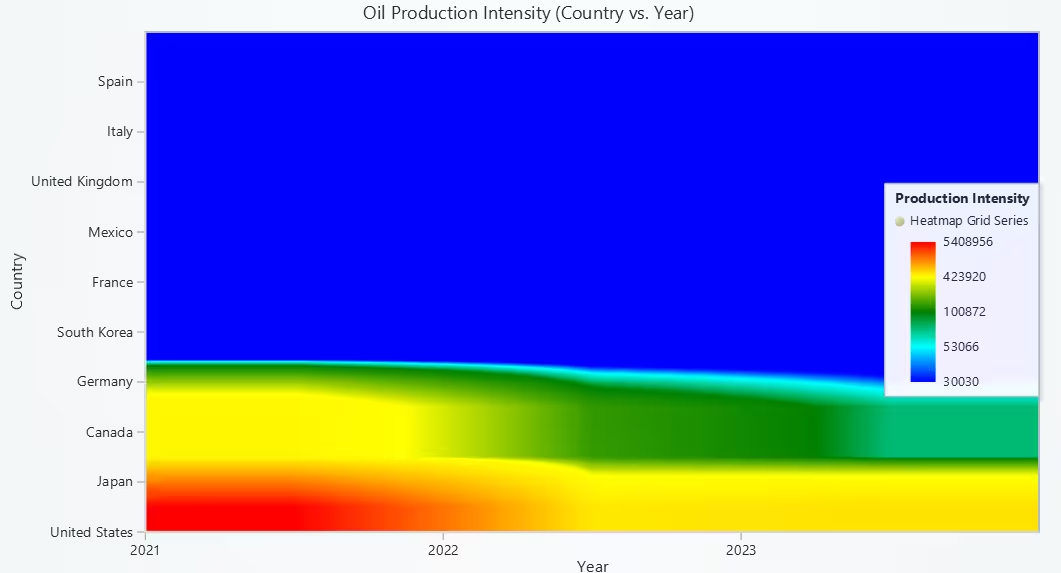
# Heatmap - Country vs Year (Production Intensity)
# Developed with AI assistance to showcase the performance of LightningChart Python libraries.

import lightningchart as lc
import numpy as np
import pandas as pd

# Load license key securely from file
with open("D:/Vindy/HAMK/Internship/MyProjects/lc_license.txt", "r") as f:
    license_key = f.read().strip()
lc.set_license(license_key)

# Load and process dataset
ops = pd.read_csv("oil_production_statistics.csv", encoding="ISO-8859-1").drop_duplicates()
country_year_data = ops.groupby(['country_name', 'year'])['value'].sum().unstack().fillna(0)

# Select top 10 countries by total production
top_countries = country_year_data.sum(axis=1).nlargest(10).index
top_country_year_data = country_year_data.loc[top_countries]

# Prepare heatmap data matrix
slice_data = top_country_year_data.values.astype(float)
slice_data[slice_data == 0] = np.nan  # Convert zeroes to NaN for cleaner interpolation

# Create chart
chart = lc.ChartXY(
    title='Oil Production Intensity (Country vs. Year)',
    theme=lc.Themes.Light
)

# Create heatmap series
rows, columns = slice_data.shape
heatmap_series = chart.add_heatmap_grid_series(columns=columns, rows=rows)
heatmap_series.set_start(x=0, y=0)
heatmap_series.set_end(x=columns, y=rows)
heatmap_series.set_step(x=1, y=1)
heatmap_series.set_intensity_interpolation(True)
heatmap_series.invalidate_intensity_values(slice_data.tolist())
heatmap_series.hide_wireframe()

# Set custom color palette
custom_palette = [
    {"value": np.nanmin(slice_data), "color": lc.Color('blue')},
    {"value": np.nanpercentile(slice_data, 25), "color": lc.Color('cyan')},
    {"value": np.nanmedian(slice_data), "color": lc.Color('green')},
    {"value": np.nanpercentile(slice_data, 75), "color": lc.Color('yellow')},
    {"value": np.nanmax(slice_data), "color": lc.Color('red')}
]
heatmap_series.set_palette_coloring(
    steps=custom_palette,
    look_up_property='value',
    interpolate=True
)

# Apply custom ticks for real labels on both axes
x_axis = chart.get_default_x_axis()
y_axis = chart.get_default_y_axis()

# Set axis titles
x_axis.set_title("Year")
y_axis.set_title("Country")

# Extract real label mappings
year_labels = top_country_year_data.columns.tolist()
country_labels = top_country_year_data.index.tolist()

# Disable default ticks and add custom ticks for X-axis (Years)
x_axis.set_tick_strategy('Empty')
for i, year in enumerate(year_labels):
    tick = x_axis.add_custom_tick()
    tick.set_value(i)
    tick.set_text(str(year))

# Disable default ticks and add custom ticks for Y-axis (Countries)
y_axis.set_tick_strategy('Empty')
for i, country in enumerate(country_labels):
    tick = y_axis.add_custom_tick()
    tick.set_value(i)
    tick.set_text(country)

# Add legend
chart.add_legend(data=heatmap_series).set_title('Production Intensity')

# Show chart
chart.open()
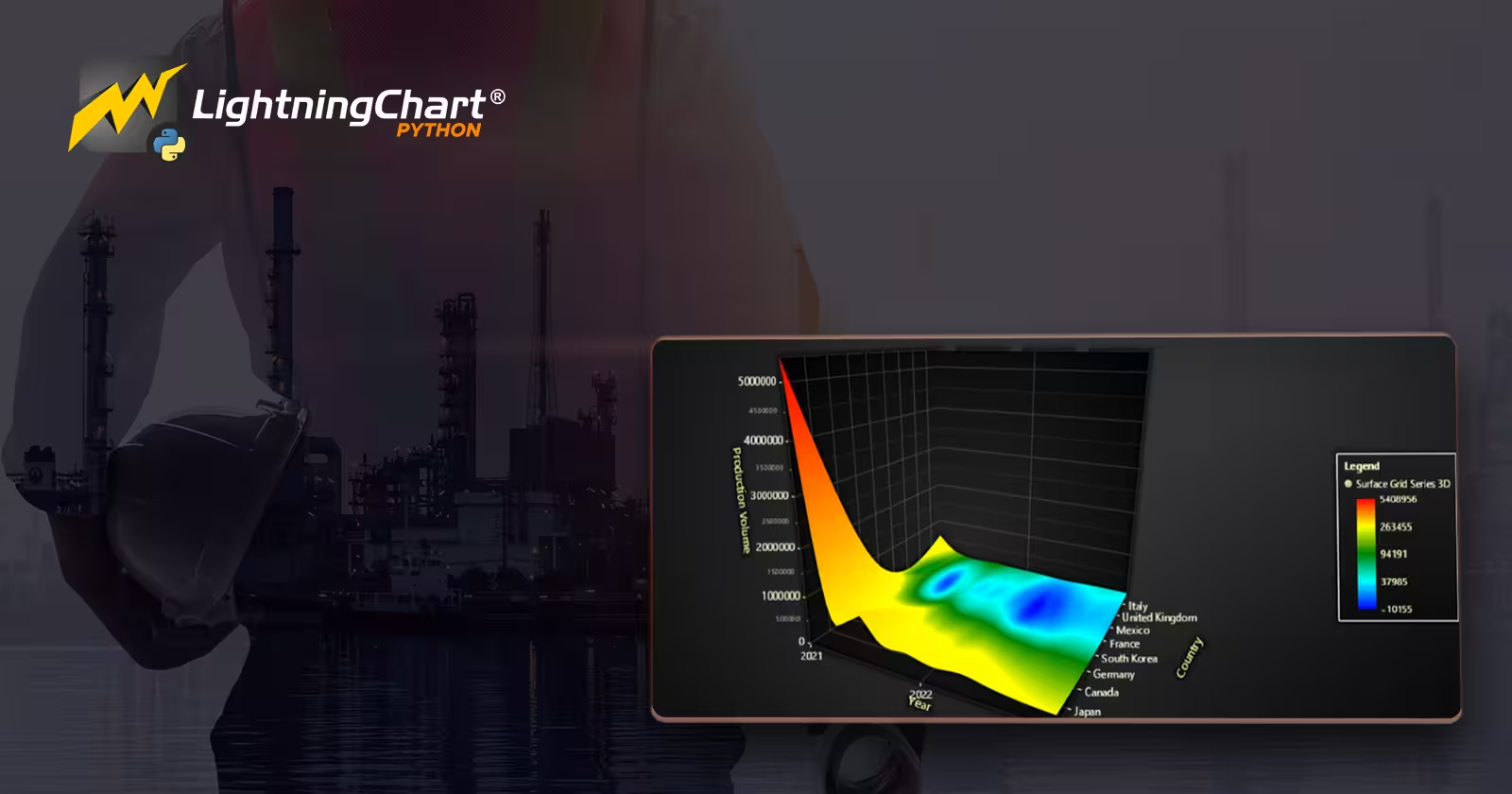
Interpolated Oil Production Volume by Country & Year – 3D Surface Grid
This 3D surface chart delivers a visually powerful and data-rich representation of interpolated oil production for the top 10 countries between 2021 and 2023. By utilizing surface topology and color gradients, it reveals both macro-level trends and micro-level variances, ideal for energy analysts seeking to detect production shifts, policy impacts, or regionally driven anomalies. LightningChart’s optimized 3D rendering ensures both performance and clarity, making it a valuable tool for analytical storytelling.
LightningChart’s optimized 3D rendering ensures both performance and clarity, with custom tick labeling for intuitive navigation. This makes it a valuable tool for analytical storytelling.
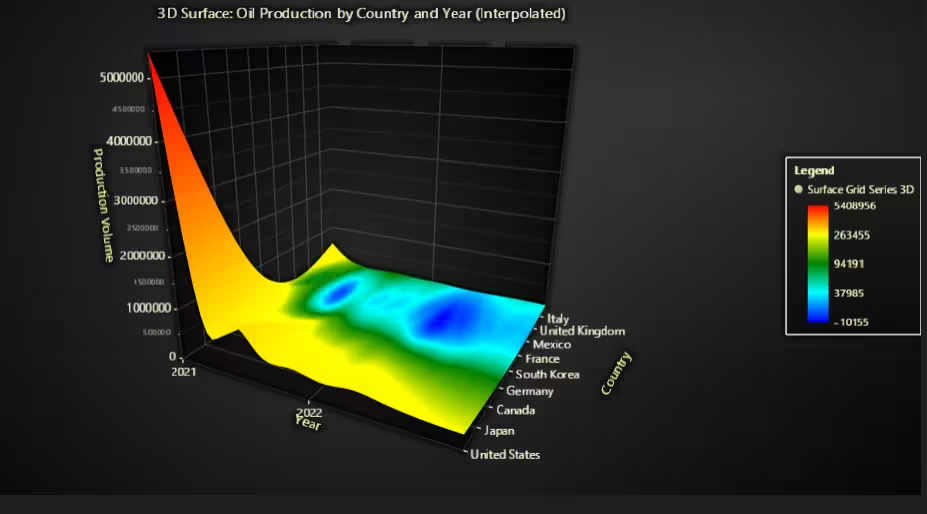
# 3D Surface Grid - Interpolated Oil Production Volume by Country & Year
# Developed with AI assistance to showcase the performance of LightningChart Python libraries.

import lightningchart as lc
import pandas as pd
import numpy as np
from scipy.interpolate import griddata

# Load license key securely from file
with open("D:/Vindy/HAMK/Internship/MyProjects/lc_license.txt", "r") as f:
    license_key = f.read().strip()

# Set your LightningChart license key
lc.set_license(license_key)

# Load and prepare dataset
ops = pd.read_csv("oil_production_statistics.csv", encoding="ISO-8859-1").drop_duplicates()

# Group production by country and year
country_year_data = ops.groupby(['country_name', 'year'])['value'].sum().unstack().fillna(0)

# Use Top 10 producing countries
top_countries = country_year_data.sum(axis=1).nlargest(10).index
top_data = country_year_data.loc[top_countries]

# Build X (year), Z (country index), Y (production volume)
years = top_data.columns.tolist()
countries = top_data.index.tolist()

year_indices = list(range(len(years)))
country_indices = list(range(len(countries)))

x_coords = []
z_coords = []
y_values = []

for z_idx, country in enumerate(countries):
    for x_idx, year in enumerate(years):
        x_coords.append(x_idx)  # X = year index
        z_coords.append(z_idx)  # Z = country index
        y_values.append(top_data.loc[country, year])  # Y = production

# Interpolate production data to a grid
grid_x, grid_z = np.meshgrid(
    np.linspace(min(x_coords), max(x_coords), 50),
    np.linspace(min(z_coords), max(z_coords), 50)
)

grid_y = griddata(
    (x_coords, z_coords),
    y_values,
    (grid_x, grid_z),
    method='cubic'
)

# Replace NaNs (from interpolation gaps) with the mean production value
grid_y[np.isnan(grid_y)] = np.nanmean(y_values)

# Chart setup
chart = lc.Chart3D(
    theme=lc.Themes.Dark,
    title='3D Surface: Oil Production by Country and Year (Interpolated)'
)

surface_series = chart.add_surface_grid_series(
    columns=grid_y.shape[1],
    rows=grid_y.shape[0]
)

# Grid start/end coordinates
surface_series.set_start(x=0, z=0)
surface_series.set_end(x=len(years)-1, z=len(countries)-1)

# Set step sizes
surface_series.set_step(
    x=(len(years) - 1) / grid_y.shape[1],
    z=(len(countries) - 1) / grid_y.shape[0]
)

# Set height map
surface_series.invalidate_height_map(grid_y.tolist())

# Hide wireframe for clean look
surface_series.hide_wireframe()

# Color mapping based on production volume
surface_series.set_palette_coloring(
    steps=[
        {"value": np.nanmin(grid_y), "color": lc.Color('blue')},
        {"value": np.nanpercentile(grid_y, 25), "color": lc.Color('cyan')},
        {"value": np.nanmedian(grid_y), "color": lc.Color('green')},
        {"value": np.nanpercentile(grid_y, 75), "color": lc.Color('yellow')},
        {"value": np.nanmax(grid_y), "color": lc.Color('red')}
    ],
    look_up_property='value',
    percentage_values=False
)

# Intensity for color shading
surface_series.invalidate_intensity_values(grid_y.tolist())

# Axis labels and custom ticks
x_axis = chart.get_default_x_axis()
y_axis = chart.get_default_y_axis()
z_axis = chart.get_default_z_axis()

x_axis.set_title("Year")
y_axis.set_title("Production Volume")
z_axis.set_title("Country")

# Disable default ticks and apply custom ticks for X-axis (Year)
x_axis.set_tick_strategy('Empty')
for i, year in enumerate(years):
    tick = x_axis.add_custom_tick()
    tick.set_value(i)
    tick.set_text(str(year))

# Disable default ticks and apply custom ticks for Z-axis (Country)
z_axis.set_tick_strategy('Empty')
for i, country in enumerate(countries):
    tick = z_axis.add_custom_tick()
    tick.set_value(i)
    tick.set_text(country)

# Add legend for surface coloring
chart.add_legend(data=surface_series)

# Show chart
chart.open()
Oil Product Refinement Chain – Funnel Chart
This funnel chart conceptually illustrates the refinement pathway from crude oil to final petroleum products and residues, using a simple yet impactful visual metaphor. It effectively communicates volume progression and transformation, making it useful for educational, strategic, or stakeholder presentations.
While based on aggregated estimations, the chart provides high-level insight into how global oil production is distributed across key refining stages, and LightningChart’s dynamic rendering ensures clarity and proportional accuracy.
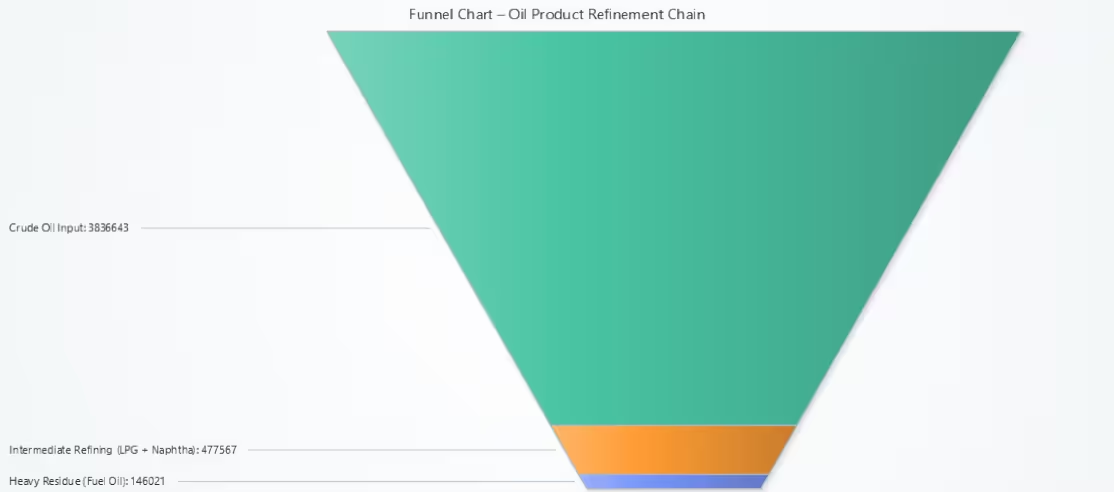
# Funnel Chart - Oil Product Refinement Chain
# Developed with AI assistance to showcase the performance of LightningChart Python libraries.

import lightningchart as lc
import pandas as pd

# Load license key securely from file
with open("D:/Vindy/HAMK/Internship/MyProjects/lc_license.txt", "r") as f:
    license_key = f.read().strip()

# Set your LightningChart license key
lc.set_license(license_key)

# Load and clean dataset
ops = pd.read_csv("oil_production_statistics.csv", encoding="ISO-8859-1").drop_duplicates()

# Normalize product names for consistent logic
ops['product'] = ops['product'].str.lower().str.strip()

# Create a conceptual chain:
# Step 1: Crude oil
# Step 2: Refined intermediate
# Step 3: Final petroleum fuels

# Group by product to compute totals
product_totals = ops.groupby('product')['value'].sum()

# Extract approximated flow values
crude = product_totals.get('crude oil', 0)
lpg = product_totals.get('liquified petroleum gas', 0)
naphtha = product_totals.get('naphtha', 0)
fuel_oil = product_totals.get('residual fuel oil', 0)
motor_gasoline = product_totals.get('motor gasoline excl. bio', 0)
diesel = product_totals.get('gas/diesel oil excl. bio', 0)

# Estimate stage-wise funnel conversion
funnel_data = [
    {'name': 'Crude Oil Input', 'value': int(crude)},
    {'name': 'Intermediate Refining (LPG + Naphtha)', 'value': int(lpg + naphtha)},
    {'name': 'Final Fuels (Diesel + Gasoline)', 'value': int(diesel + motor_gasoline)},
    {'name': 'Heavy Residue (Fuel Oil)', 'value': int(fuel_oil)},
]

# Create funnel chart
chart = lc.FunnelChart(
    slice_mode='height',
    theme=lc.Themes.Light,
    title='Funnel Chart – Oil Product Refinement Chain'
)

chart.add_slices(funnel_data)
chart.open()
Conclusion
This global oil production analysis delivered 10 LightningChart-based visualizations covering time series trends, comparative analytics, product flow chains, and statistical distributions in global oil production from 2021 to 2023. This project successfully used LightningChart Python to explore and visualize oil production across countries, years, and product types.
LightningChart Python provides high-performance rendering even for large data. It supports diverse chart types, including radar, funnel, 3D, and statistical visualizations. Integrated Python workflows allow fast iteration and full chart customization. It delivers publication-quality outputs ideal for dashboards and analytical reporting.
The interactive and high-performance rendering capabilities of LightningChart made it ideal for analysing large-scale production datasets. Insights gained here can inform global energy strategy, sustainability planning, and further AI-driven forecasts.
Continue learning with LightningChart
Horizontal Bar Chart of Russia-Ukraine War Weaponry Data
Written by a human | Updated on April 10th, 2025 JavaScript Horizontal Bar Chart In this article, we aim to respectfully create a JavaScript horizontal bar chart that simulates the weaponry usage on recent war conflicts. While the data have been taken from Kaggle and...
Create a vibration charts application with 2D & 3D spectrograms
Written by a human | Updated on April 10th, 2025JS Spectrogram ApplicationHello, in this article we will create a JS dashboard with 2D and 3D spectrogram charts. The purpose of creating this project is to explain how to create a vibration analysis application that...
Ionic app development
Written by a human | Updated on April 10th, 2025Beginning Ionic App Development with Capacitor, Angular & LightningChart JS [This is the second part of the article "Data Visualization with Ionic Capacitor, Angular & JS Charts (Part 1)"] In the previous...



If you have any questions, feel free to contact us!
©LightningChart Ltd 2025. All rights reserved.