





Forest Fire Analysis Data Visualization With LightningChart Python
Tutorial
Assisted by AI
Explore the steps to develop a robust forest fire analysis using LightningChart Python, and improve your data visualization techniques.
Vindya Nukulasooriya
Data Science Developer

Introduction
This project presents a comprehensive forest fire analysis using the Forest Fires in Brazil (1998–2017) dataset, powered by the high-performance LightningChart Python library. The dataset, originally sourced from Kaggle and compiled from Brazilian government records, documents monthly fire incident counts across all Brazilian states over a 20-year period.
The core objective of this project is to uncover temporal, spatial, and seasonal patterns in forest fire occurrences, identify regional hotspots, and detect anomalous trends over time. By converting raw fire incident data into interactive, multidimensional visualizations, we aim to support environmental monitoring efforts, policy development, and disaster prevention strategies.
To achieve these goals, LightningChart Python was selected for its exceptional rendering speed, advanced charting capabilities, and scientific-grade visual fidelity. Its ability to display complex datasets in both 2D and 3D formats makes it ideal for capturing the intricate dynamics of forest fire activity across Brazil.
Project Overview
To develop a curated set of up to 10 interactive chart examples using LightningChart Python, focusing on identifying and visualizing temporal, seasonal, and geographic patterns in forest fire activity across Brazil from 1998 to 2017.
Objectives
- To explore trends and anomalies in forest fire occurrences across months, years, and Brazilian states.
- To identify seasonal spikes, high-risk states, and outlier years using statistical and spatial visualizations.
- To detect regional fire intensity shifts and investigate whether certain areas consistently suffer higher fire counts.
- To demonstrate the scientific visualization capabilities of LightningChart Python in presenting environmental and geospatial data.
Deliverables
- Up to 10 high-performance interactive visualizations, exclusively built using LightningChart Python, focusing on the dynamics of forest fires across Brazil.
- Well-documented Python code and per-chart explanations.
- Interpretative summaries that highlight significant observations—such as top fire months, most affected regions, and spatio-temporal outliers.
- A conclusion reflecting on how LightningChart Python supports environmental trend analysis, fire monitoring, and data-driven risk awareness.
Tools Used
Python 3.13.5, LightningChart Python, Jupyter Notebook, AI Assistance
About the Dataset
The dataset, Forest Fires in Brazil, spans from 1998 to 2017 and records the number of monthly fire outbreaks per state. It was sourced from Kaggle, compiled from INPE (Brazilian National Institute for Space Research) monitoring systems. The dataset reflects government-tracked fire events across all 27 Brazilian states over two decades.
Each record includes
- Year
- Month
- State (UF)
- Number of Fires (quantitative value)
This allows for both time-series analysis and geospatial comparison, making it suitable for uncovering seasonal cycles, climatic anomalies, and regional vulnerabilities to wildfires.
LightningChart Python
LightningChart Python is a high-performance data visualization library engineered for ultra-fast rendering, smooth interactivity, and precise control over visual elements. Designed for both 2D and 3D environments, it is particularly powerful when analysing spatiotemporal, environmental, and statistical datasets. Its responsiveness and visual clarity make it an ideal tool for detecting patterns, anomalies, and seasonality in complex forest fire analysis.

Setting Up Python Environment
Before running the project, install Python and the other required libraries using:
%pip install numpy pandas lightningchartSetting Up Your Development Environment:
- Set up a virtual environment:
- Use Visual Studio Code (VSCode) for a streamlined development experience.
Loading and Preprocessing Data
To create this China Water Pollution Monitoring Application, we will fetch the China water pollution data using the following function:
Downloaded the dataset from https://www.kaggle.com/datasets/gustavomodelli/forest-fires-in-brazil%20To preprocess the dataset, we will import the pandas library:
# Import necessary libraries (load pandas library to preprocess dataset)
import pandas as pd
Visualizing Data with LightningChart Python
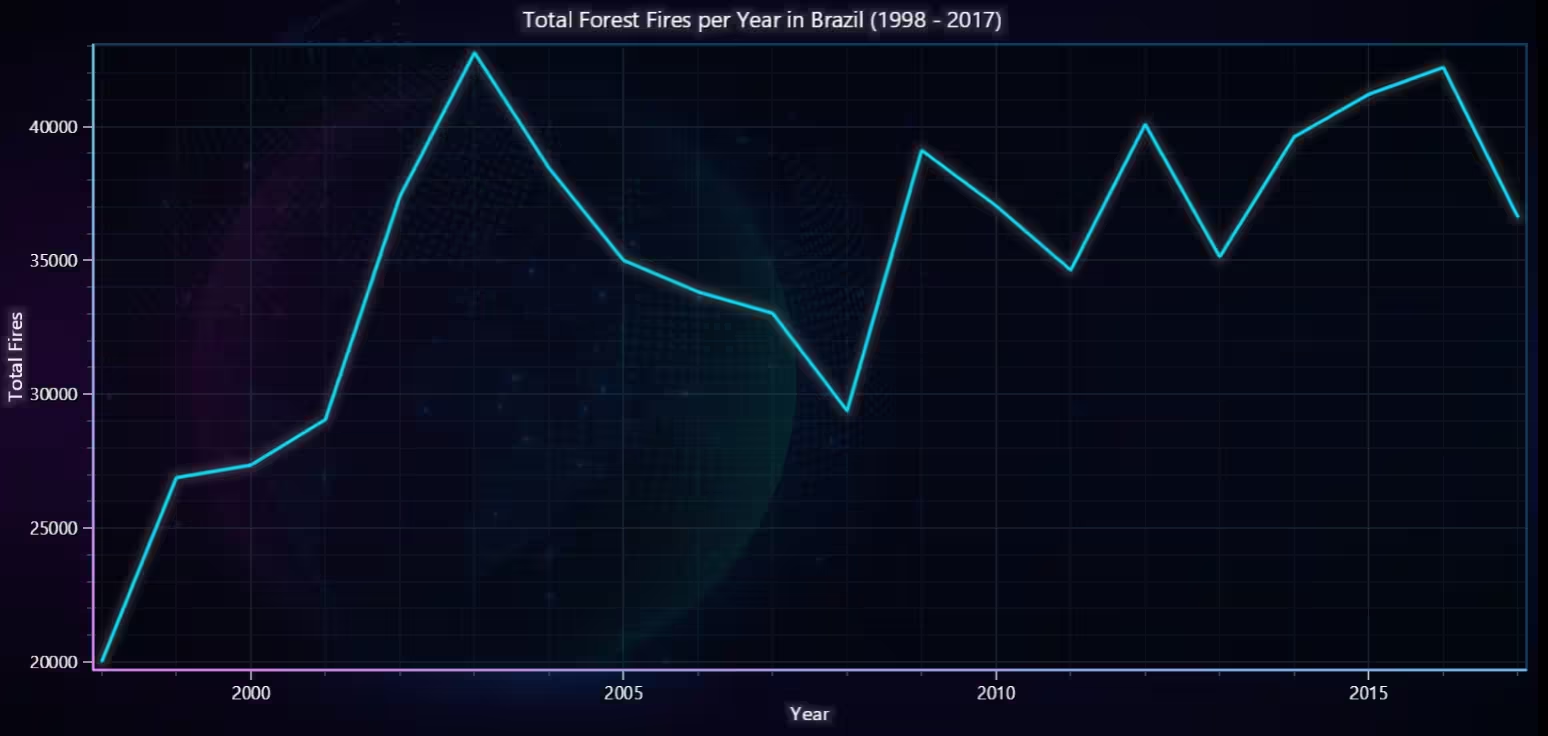
Total Forest Fires per Year in Brazil (1998–2017) – Line Chart
The chart shows how the total number of forest fires evolved annually. There are clear fluctuations, including noticeable spikes and dips in fire activity over the 20-year period. Enables identification of anomalies, peak years, or improvement periods in fire management.
# Chart 1 – Total Forest Fires per Year in Brazil (1998–2017) (Line Chart)
# Developed with AI assistance to demonstrate LightningChart Python

import lightningchart as lc
import pandas as pd

# Load LightningChart license
with open("D:/HAMK/Internship/MyProjects/lc_license.txt", "r") as f:
    lc.set_license(f.read().strip())

# Load and clean data
ffbd = pd.read_csv("Forest Fires Brazil Data.csv", encoding='ISO-8859-1')
ffbd.columns = ffbd.columns.str.strip()
ffbd.drop_duplicates(inplace=True)
ffbd['month'] = ffbd['month'].str.strip()

# Map Portuguese month names to English
month_translation = {
    'Janeiro': 'January', 'Fevereiro': 'February', 'Março': 'March',
    'Abril': 'April', 'Maio': 'May', 'Junho': 'June', 'Julho': 'July',
    'Agosto': 'August', 'Setembro': 'September', 'Outubro': 'October',
    'Novembro': 'November', 'Dezembro': 'December'
}
ffbd['month'] = ffbd['month'].replace(month_translation)

# Convert to datetime
ffbd['date'] = pd.to_datetime(ffbd['year'].astype(str) + '-' + ffbd['month'], errors='coerce')

# Group by Year
fires_per_year = ffbd.groupby(ffbd['date'].dt.year)['number'].sum().reset_index()
fires_per_year.columns = ['year', 'total_fires']

# Create Line Chart
chart = lc.ChartXY(
    theme=lc.Themes.CyberSpace,
    title='Total Forest Fires per Year in Brazil (1998 - 2017)'
)

series = chart.add_line_series()
series.set_name("Total Fires")
series.set_line_thickness(3)
series.append_samples(
    x_values=fires_per_year['year'].tolist(),
    y_values=fires_per_year['total_fires'].tolist()
)

# Fix decimal points on X-axis
x_axis = chart.get_default_x_axis()
x_axis.set_title("Year")
x_axis.set_decimal_precision(0)  # Remove unnecessary decimals

chart.get_default_y_axis().set_title("Total Fires")

# Open chart
chart.open()
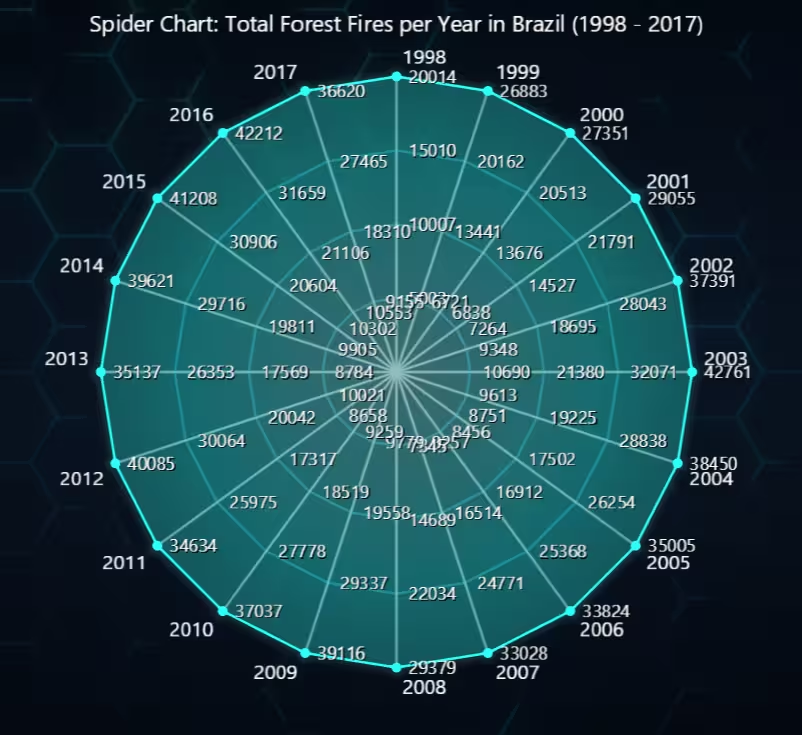
Total Forest Fires per Year in Brazil (1998–2017) – Spider Chart
The chart maps each year as a radial axis and plots the total fires along that axis. A single polygon is drawn by connecting the values, visually resembling fire intensity over time. Years with higher fire counts appear as extended spikes, while lower fire years are closer to the centre.
# Chart 2 – Total Forest Fires per Year in Brazil (1998–2017) (Spider Chart)
# Developed with AI assistance to demonstrate LightningChart Python

import lightningchart as lc
import pandas as pd

# Load license
with open("D:/HAMK/Internship/MyProjects/lc_license.txt", "r") as f:
    lc.set_license(f.read().strip())

# Load and clean data
ffbd = pd.read_csv("Forest Fires Brazil Data.csv", encoding='ISO-8859-1')
ffbd.columns = ffbd.columns.str.strip()
ffbd.drop_duplicates(inplace=True)
ffbd['month'] = ffbd['month'].str.strip()

# Translate month names
month_translation = {
    'Janeiro': 'January', 'Fevereiro': 'February', 'Março': 'March',
    'Abril': 'April', 'Maio': 'May', 'Junho': 'June', 'Julho': 'July',
    'Agosto': 'August', 'Setembro': 'September', 'Outubro': 'October',
    'Novembro': 'November', 'Dezembro': 'December'
}
ffbd['month'] = ffbd['month'].replace(month_translation)

# Convert to datetime
ffbd['date'] = pd.to_datetime(ffbd['year'].astype(str) + '-' + ffbd['month'], errors='coerce')

# Group by year
fires_by_year = ffbd.groupby(ffbd['date'].dt.year)['number'].sum().reset_index()
fires_by_year.columns = ['year', 'total_fires']

# Prepare Spider Chart
chart = lc.SpiderChart(
    theme=lc.Themes.TurquoiseHexagon,
    title='Spider Chart: Total Forest Fires per Year in Brazil (1998 - 2017)'
)

# Years as categories (axes)
categories = fires_by_year['year'].astype(str).tolist()
for year in categories:
    chart.add_axis(year)

# Total fires per year
values = fires_by_year['total_fires'].tolist()

# Add single data series
series = chart.add_series()
series.set_name("Total Fires")
series.add_points([
    {'axis': categories[i], 'value': values[i]} for i in range(len(categories))
])

# Show chart
chart.open()
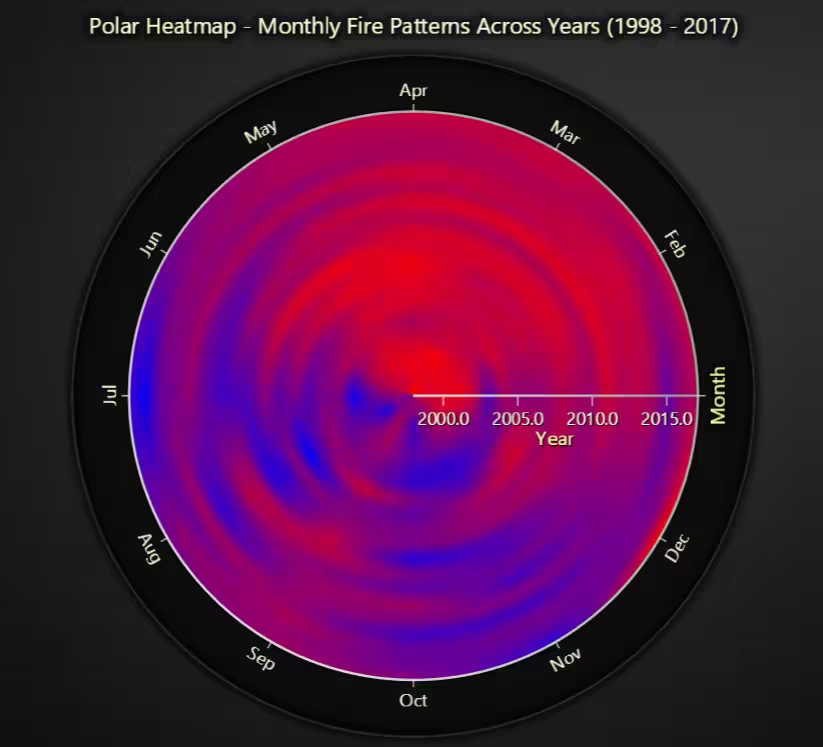
Monthly Fire Patterns Across Years (1998–2017) – Polar Heatmap
Each sector represents a month, and each ring represents a year (1998–2017). Color intensity reflects the number of fire incidents (logically interpolated from red = low to blue = high). The heatmap quickly shows which months consistently see higher fire activity, and whether these peaks are repetitive or shifting over time.
# Chart 3 – Monthly Fire Patterns Across Years (1998–2017) (Polar Heatmap)
# Developed with AI assistance to demonstrate LightningChart Python

import lightningchart as lc
import pandas as pd

# Load license
with open("D:/HAMK/Internship/MyProjects/lc_license.txt", "r") as f:
    lc.set_license(f.read().strip())

# Load and clean data
ffbd = pd.read_csv("Forest Fires Brazil Data.csv", encoding='ISO-8859-1')
ffbd.columns = ffbd.columns.str.strip()
ffbd.drop_duplicates(inplace=True)
ffbd['month'] = ffbd['month'].str.strip()

# Translate Portuguese to English months
month_translation = {
    'Janeiro': 'January', 'Fevereiro': 'February', 'Março': 'March',
    'Abril': 'April', 'Maio': 'May', 'Junho': 'June', 'Julho': 'July',
    'Agosto': 'August', 'Setembro': 'September', 'Outubro': 'October',
    'Novembro': 'November', 'Dezembro': 'December'
}
ffbd['month'] = ffbd['month'].replace(month_translation)

# Month order
month_order = ['January', 'February', 'March', 'April', 'May', 'June',
               'July', 'August', 'September', 'October', 'November', 'December']
ffbd['month'] = pd.Categorical(ffbd['month'], categories=month_order, ordered=True)

# Pivot: Rows = Year (Annuli), Columns = Month (Sectors)
pivot = ffbd.groupby(['year', 'month'])['number'].sum().unstack().fillna(0)
years = pivot.index.tolist()
heatmap_values = pivot.values.tolist()  # annuli × sectors

# ---- Create Polar Heatmap ----
chart = lc.PolarChart(
    theme=lc.Themes.Dark,
    title="Polar Heatmap - Monthly Fire Patterns Across Years (1998 - 2017)"
)

# Configure amplitude axis (annuli = years)
amplitude_axis = chart.get_amplitude_axis()
amplitude_axis.set_title("Year")
amplitude_axis.set_interval(min(years), max(years))  # Annulus range

# Configure radial axis (sectors = months)
radial_axis = chart.get_radial_axis()
radial_axis.set_title("Month")
radial_axis.set_tick_labels(['Jan', 'Feb', 'Mar', 'Apr', 'May', 'Jun',
                             'Jul', 'Aug', 'Sep', 'Oct', 'Nov', 'Dec'])

# Add Heatmap Series: 12 months, N years
heatmap_series = chart.add_heatmap_series(
    sectors=12,
    annuli=len(years),
    data_order='annuli',
    amplitude_start=min(years),
    amplitude_end=max(years),
    amplitude_step=1
)

# Load fire counts as intensity
heatmap_series.invalidate_intensity_values(values=heatmap_values, i_annulus=0, i_sector=0)

# Apply red-to-blue coloring based on fire counts
max_val = max(map(max, heatmap_values))
heatmap_series.set_palette_coloring(
    steps=[
        {'value': 0, 'color': lc.Color('red')},
        {'value': max_val, 'color': lc.Color('blue')}
    ],
    look_up_property='value',
    interpolate=True
)

# Smooth transitions
heatmap_series.set_intensity_interpolation('bilinear')

# Open chart
chart.open()
Monthly Fire Patterns Across Years (1998–2017) – 3D Surface Grid
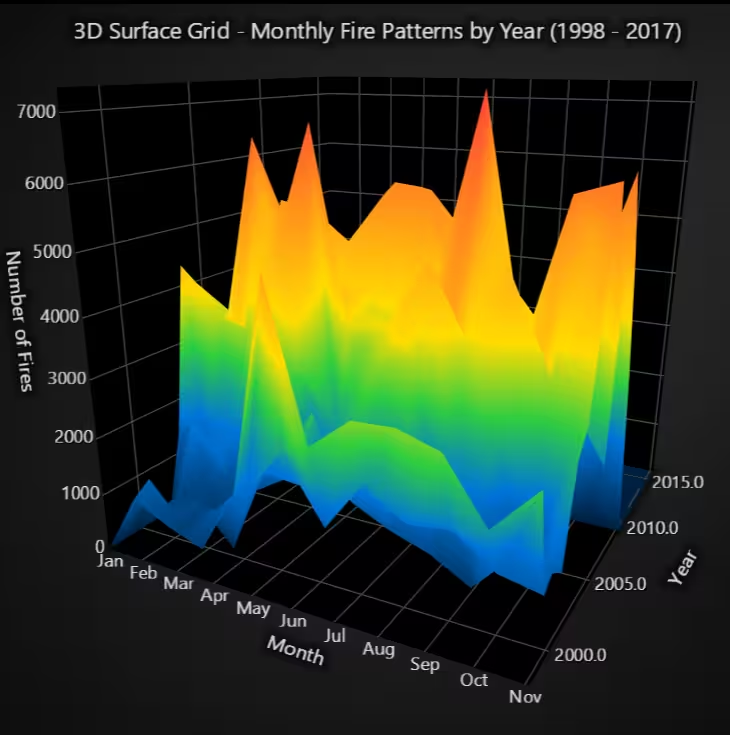
The chart displays fire activity over time, where X-axis represents months (Jan to Dec), Z-axis represents years (1998 to 2017) and Y-axis height and color reflect the number of fires. Months with high fire counts rise as coloured peaks, while low-activity periods appear as depressions or valleys.
# Chart 4 – Monthly Fire Patterns by Year (1998–2017) (3D Surface Grid)
# Developed with AI assistance to demonstrate LightningChart Python

import pandas as pd
import numpy as np
import lightningchart as lc

# Load license
with open("D:/HAMK/Internship/MyProjects/lc_license.txt", "r") as f:
    lc.set_license(f.read().strip())

# Load and clean data
ffbd = pd.read_csv("Forest Fires Brazil Data.csv", encoding='ISO-8859-1')
ffbd.columns = ffbd.columns.str.strip()
ffbd.drop_duplicates(inplace=True)
ffbd['month'] = ffbd['month'].str.strip()

# Translate Portuguese to English
month_translation = {
    'Janeiro': 'January', 'Fevereiro': 'February', 'Março': 'March',
    'Abril': 'April', 'Maio': 'May', 'Junho': 'June', 'Julho': 'July',
    'Agosto': 'August', 'Setembro': 'September', 'Outubro': 'October',
    'Novembro': 'November', 'Dezembro': 'December'
}
ffbd['month'] = ffbd['month'].replace(month_translation)

# Set month order
month_order = ['January', 'February', 'March', 'April', 'May', 'June',
               'July', 'August', 'September', 'October', 'November', 'December']
ffbd['month'] = pd.Categorical(ffbd['month'], categories=month_order, ordered=True)

# Pivot table: Year × Month → Fire Count
pivot = ffbd.groupby(['year', 'month'])['number'].sum().unstack().fillna(0)
years = pivot.index.tolist()
months = pivot.columns.tolist()

# Convert pivot to height map (rows = years, columns = months)
height_map = pivot.values.tolist()

# Create 3D Surface Grid Chart
chart = lc.Chart3D(theme=lc.Themes.Black, title="3D Surface Grid - Monthly Fire Patterns by Year (1998 - 2017)")

# Add Surface Grid Series
surface_series = chart.add_surface_grid_series(columns=len(months), rows=len(years))

# Set X = month index (0–11), Z = year index (numeric), Y = fire count (height)
surface_series.set_start(x=0, z=min(years))
surface_series.set_end(x=len(months)-1, z=max(years))
surface_series.set_step(x=1, z=1)
surface_series.invalidate_height_map(height_map)

# Hide wireframe
surface_series.hide_wireframe()

# Apply palette coloring optimized for Black theme
surface_series.set_palette_coloring(
    steps=[
        {"value": min_val, "color": ('#001f3f')},    # Deep Navy Blue
        {"value": np.percentile(height_map, 25), "color": ('#0074D9')},  # Strong Blue
        {"value": np.median(height_map), "color": ('#2ECC40')},          # Bright Green
        {"value": np.percentile(height_map, 75), "color": ('#FFDC00')},  # Sharp Yellow
        {"value": max_val, "color": ('#FF4136')}     # Vivid Red
    ],
    look_up_property='value',
    percentage_values=False
)

# Invalidate intensity values (optional)
surface_series.invalidate_intensity_values(height_map)

# Set Axis Titles
chart.get_default_x_axis().set_title("Month Index (0–11)")
chart.get_default_y_axis().set_title("Number of Fires")
chart.get_default_z_axis().set_title("Year")

# Fix X-axis: Replace month indices with actual month names
x_axis = chart.get_default_x_axis()
x_axis.set_title("Month")
x_axis.set_tick_strategy('Empty')  # Remove default ticks

for i, month in enumerate(months):
    tick = x_axis.add_custom_tick()
    tick.set_value(i)  # Month index (0 to 11)
    tick.set_text(month[:3])  # Short label e.g., 'Jan', 'Feb'

# Show Chart
chart.open()
State-Level Fire Comparison (1998–2017) – Radar Chart
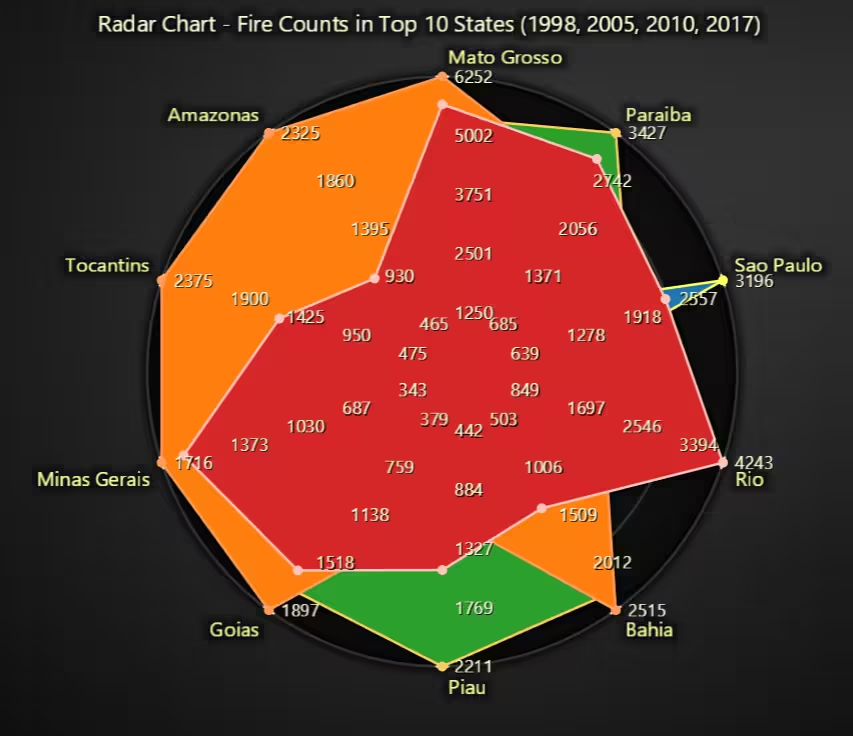
Some states (eg: Mato Grosso) consistently show large spikes, indicating higher fire prevalence. The shapes of the radar plots vary by year, suggesting that while the top states remain largely the same, their relative severity fluctuates. 2010 and 2005 show the largest overall surface area, implying higher fire activity across top states. Meanwhile, 1998 and 2017 show comparatively lower fire counts in many of the same states.
# Chart 5 – State-Level Fire Comparison (1998–2017) (Radar (Spider) Chart)
# Developed with AI assistance using LightningChart Python

import pandas as pd
import lightningchart as lc

# Load license
with open("D:/HAMK/Internship/MyProjects/lc_license.txt", "r") as f:
    lc.set_license(f.read().strip())

# Load and clean data
df = pd.read_csv("Forest Fires Brazil Data.csv", encoding='ISO-8859-1')
df.columns = df.columns.str.strip()
df.drop_duplicates(inplace=True)
df['month'] = df['month'].str.strip()

# Translate months (not used here but good practice)
month_translation = {
    'Janeiro': 'January', 'Fevereiro': 'February', 'Março': 'March',
    'Abril': 'April', 'Maio': 'May', 'Junho': 'June', 'Julho': 'July',
    'Agosto': 'August', 'Setembro': 'September', 'Outubro': 'October',
    'Novembro': 'November', 'Dezembro': 'December'
}
df['month'] = df['month'].replace(month_translation)

# Select top 10 states by total fire counts
top_states = df.groupby('state')['number'].sum().nlargest(10).index.tolist()

# Select years for comparison
years_to_compare = [1998, 2005, 2010, 2017]

# Initialize Spider Chart
chart = lc.SpiderChart(
    theme=lc.Themes.Dark,
    title="Radar Chart - Fire Counts in Top 10 States (1998, 2005, 2010, 2017)"
)
chart.set_web_mode("circle")
chart.set_web_count(5)

# Add top states as axes
for state in top_states:
    chart.add_axis(state)

# Add data series for each selected year
colors = ['#1f77b4', '#2ca02c', '#ff7f0e', '#d62728']  # Blue, Green, Orange, Red

for i, year in enumerate(years_to_compare):
    year_data = df[df['year'] == year]
    state_totals = year_data.groupby('state')['number'].sum()
    points = [
        {'axis': state, 'value': state_totals.get(state, 0)}
        for state in top_states
    ]
    series = chart.add_series()
    series.set_name(str(year))
    series.add_points(points)
    series.set_fill_color(colors[i])
    series.set_line_thickness(2)

# Open chart
chart.open()
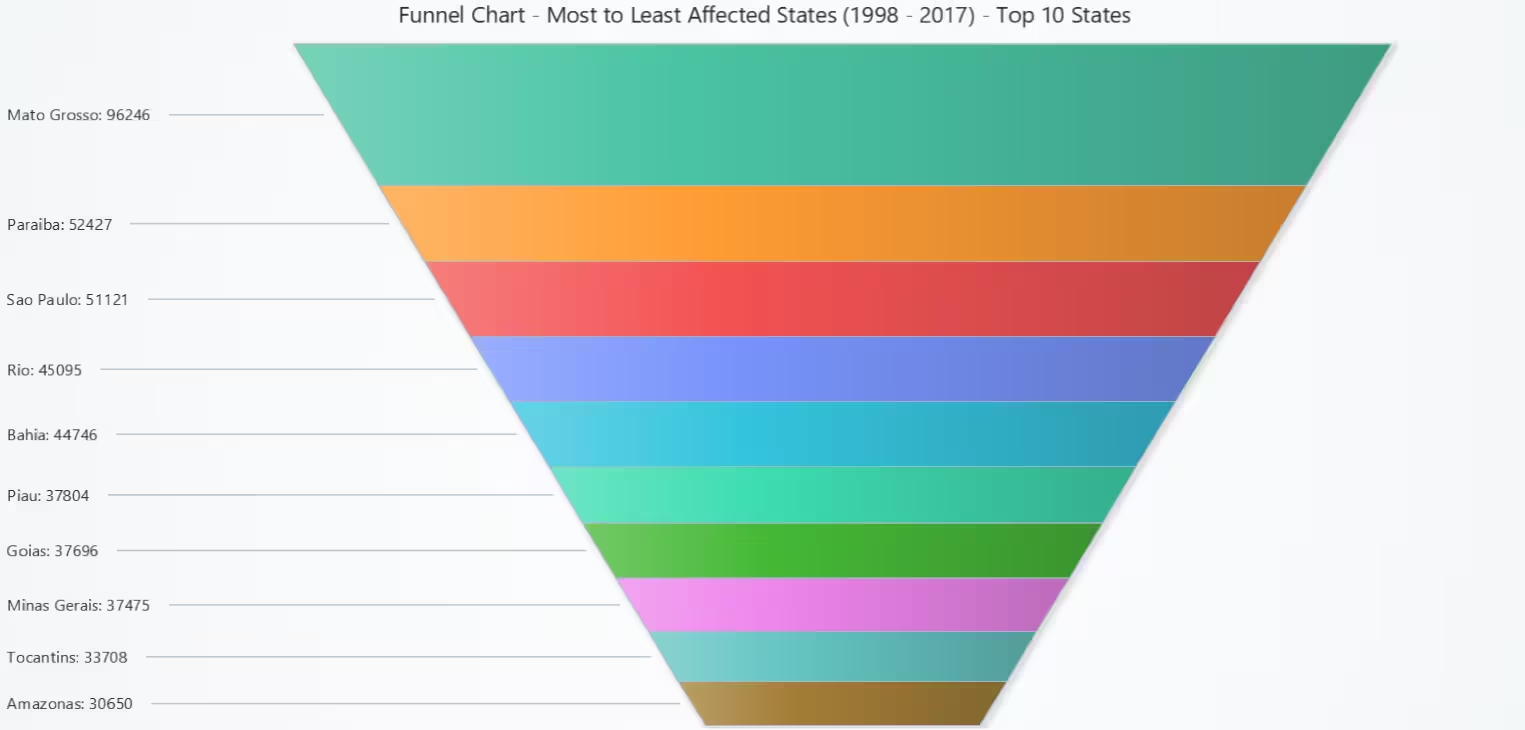
Top 10 Most Affected States by Fire Count (1998–2017) – Funnel Chart
The code bins the Non-industry income and expenditure/revenue into 7 equally spaced intervals using np.linspace. Computes the mean Operating Profit Rate for each bin separately for bankrupt and non-bankrupt companies. Visualizes these values in two bar charts to reveal profitability patterns within income ranges.
# Chart 6 – State-wise Fire Ranking: Top 10 States (Funnel Chart)
# Developed with AI assistance using LightningChart Python

import pandas as pd
import lightningchart as lc

# Load license key
with open("D:/HAMK/Internship/MyProjects/lc_license.txt", "r") as f:
    lc.set_license(f.read().strip())

# Load and clean dataset
df = pd.read_csv("Forest Fires Brazil Data.csv", encoding='ISO-8859-1')
df.columns = df.columns.str.strip()
df.drop_duplicates(inplace=True)
df['month'] = df['month'].str.strip()

# Translate Portuguese months to English (not used directly here but good practice)
month_translation = {
    'Janeiro': 'January', 'Fevereiro': 'February', 'Março': 'March',
    'Abril': 'April', 'Maio': 'May', 'Junho': 'June', 'Julho': 'July',
    'Agosto': 'August', 'Setembro': 'September', 'Outubro': 'October',
    'Novembro': 'November', 'Dezembro': 'December'
}
df['month'] = df['month'].replace(month_translation)

# Aggregate total fires by state for the full period (1998–2017)
state_totals = df.groupby('state')['number'].sum().sort_values(ascending=False)

# Prepare data for funnel chart
# Top 10 states
top_10_states = state_totals.head(10)
funnel_data = [
    {'name': state, 'value': value}
    for state, value in top_10_states.items()
]

# Create Funnel Chart
chart = lc.FunnelChart(
    slice_mode='height',  # Use height to differentiate slice sizes
    theme=lc.Themes.Light,
    title="Funnel Chart - Most to Least Affected States (1998 - 2017) - Top 10 States"
)

# Add slices based on fire count per state
chart.add_slices(funnel_data)

# Open chart
chart.open()
State vs Year vs Fire Count (1998–2017) – XY Heatmap
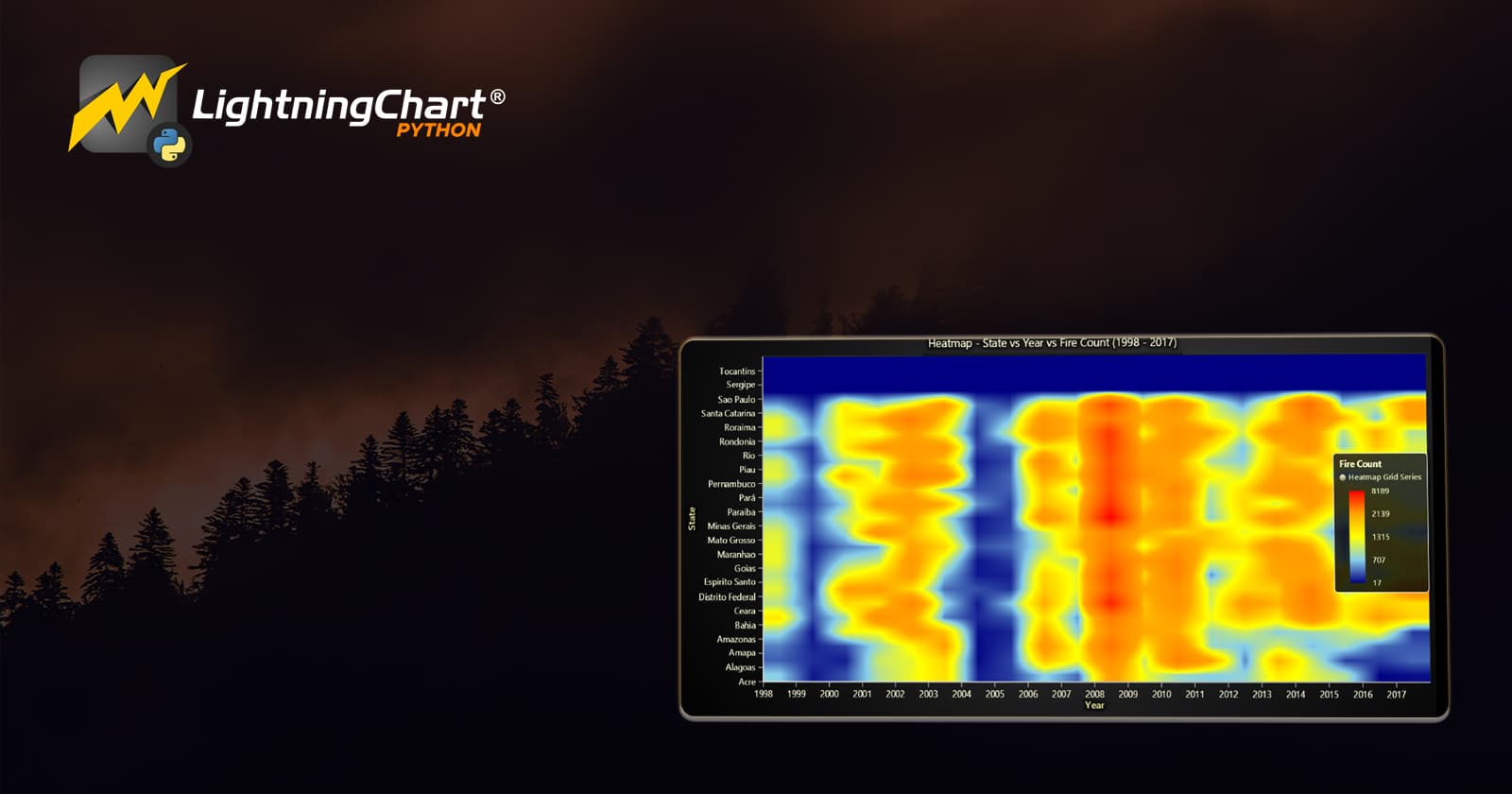
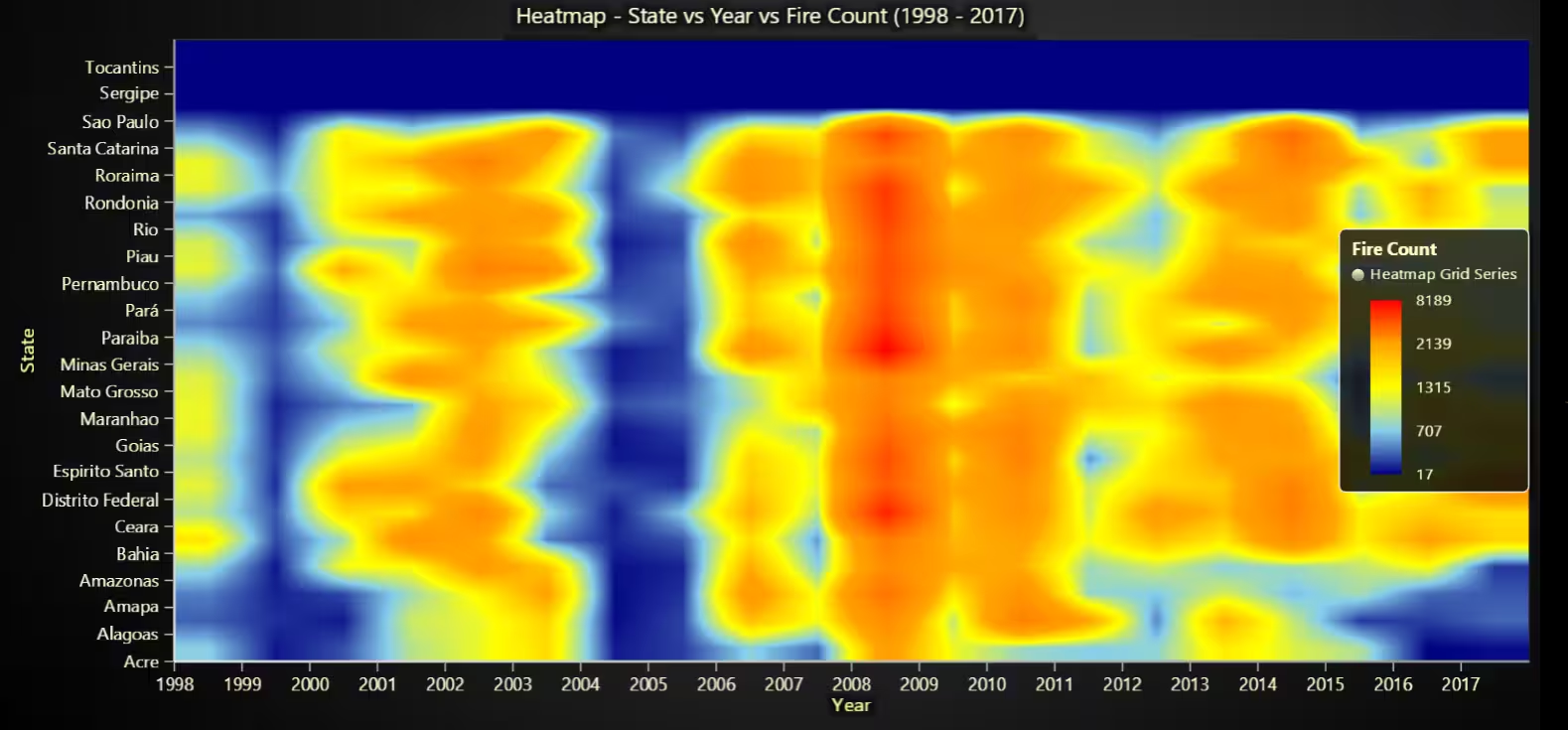
The heatmap reveals that some states like Mato Grosso, Pará, and Maranhão had consistently high fire counts. Certain years like 2004, 2007, and 2010 show unusually high fire intensity across multiple states, especially in the Amazon region.
# Chart 7 – State vs Year vs Fire Count (XY Heatmap)
# Developed with AI assistance using LightningChart Python

import pandas as pd
import numpy as np
import lightningchart as lc

# Load license
with open("D:/HAMK/Internship/MyProjects/lc_license.txt", "r") as f:
    lc.set_license(f.read().strip())

# Load and clean dataset
df = pd.read_csv("Forest Fires Brazil Data.csv", encoding='ISO-8859-1')
df.columns = df.columns.str.strip()
df.drop_duplicates(inplace=True)
df['month'] = df['month'].str.strip()

# Translate months (not used here)
month_translation = {
    'Janeiro': 'January', 'Fevereiro': 'February', 'Março': 'March',
    'Abril': 'April', 'Maio': 'May', 'Junho': 'June', 'Julho': 'July',
    'Agosto': 'August', 'Setembro': 'September', 'Outubro': 'October',
    'Novembro': 'November', 'Dezembro': 'December'
}
df['month'] = df['month'].replace(month_translation)

# Pivot: Rows = State, Columns = Year
pivot = df.groupby(['state', 'year'])['number'].sum().unstack().fillna(0)
states = pivot.index.tolist()
years = pivot.columns.tolist()
heatmap_values = pivot.values

# Create chart
chart = lc.ChartXY(title='Heatmap - State vs Year vs Fire Count (1998 - 2017)', theme=lc.Themes.Dark)
heatmap_series = chart.add_heatmap_grid_series(columns=len(years), rows=len(states))

# Configure dimensions
heatmap_series.set_start(x=0, y=0)
heatmap_series.set_end(x=len(years), y=len(states))
heatmap_series.set_step(x=1, y=1)
heatmap_series.set_intensity_interpolation(True)
heatmap_series.invalidate_intensity_values(heatmap_values.tolist())
heatmap_series.hide_wireframe()

# Color palette
min_val = np.min(heatmap_values)
max_val = np.max(heatmap_values)
heatmap_series.set_palette_coloring(
    steps=[
        {"value": min_val, "color": 'navy'},
        {"value": np.percentile(heatmap_values, 25), "color": 'skyblue'},
        {"value": np.median(heatmap_values), "color": 'yellow'},
        {"value": np.percentile(heatmap_values, 75), "color": 'orange'},
        {"value": max_val, "color": 'red'}
    ],
    look_up_property='value',
    interpolate=True
)

# Axis titles and labels
chart.get_default_x_axis().set_title("Year").set_tick_strategy('Empty')
for i, year in enumerate(years):
    tick = chart.get_default_x_axis().add_custom_tick()
    tick.set_value(i)
    tick.set_text(str(year))

chart.get_default_y_axis().set_title("State").set_tick_strategy('Empty')
for i, state in enumerate(states):
    tick = chart.get_default_y_axis().add_custom_tick()
    tick.set_value(i)
    tick.set_text(state)

# Add legend
chart.add_legend(data=heatmap_series).set_title("Fire Count")

chart.open()
Fire Intensity by State and Year (1998–2017) – 3D Scatter Plot
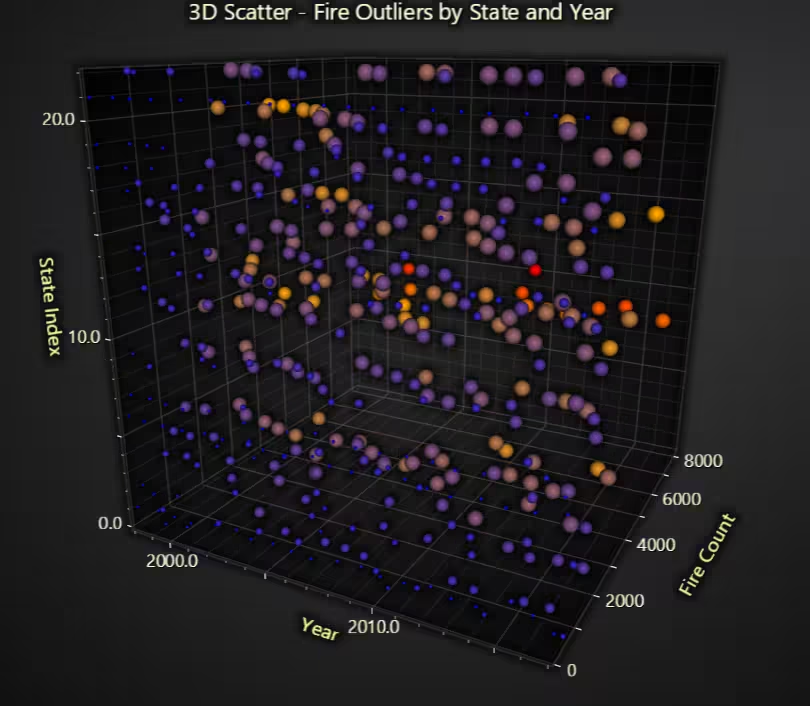
Large red and orange bubbles signify states and years with exceptional fire events, making it easy to identify outliers in fire frequency. Clusters around the middle decade (2004–2010) indicate widespread high activity.
# Chart 8 – Fire Intensity by State and Year (3D Scatter Plot)
# Developed with AI assistance using LightningChart Python

import pandas as pd
import lightningchart as lc

# Load license
with open("D:/HAMK/Internship/MyProjects/lc_license.txt", "r") as f:
    lc.set_license(f.read().strip())

# Load and clean data
df = pd.read_csv("Forest Fires Brazil Data.csv", encoding='ISO-8859-1')
df.columns = df.columns.str.strip()
df.drop_duplicates(inplace=True)
df['month'] = df['month'].str.strip()

# Translate months (optional)
month_translation = {
    'Janeiro': 'January', 'Fevereiro': 'February', 'Março': 'March',
    'Abril': 'April', 'Maio': 'May', 'Junho': 'June', 'Julho': 'July',
    'Agosto': 'August', 'Setembro': 'September', 'Outubro': 'October',
    'Novembro': 'November', 'Dezembro': 'December'
}
df['month'] = df['month'].replace(month_translation)

# Prepare aggregate fire counts per state per year
agg = df.groupby(['state', 'year'])['number'].sum().reset_index()

# Map state to index for Y-axis
state_list = sorted(agg['state'].unique())
state_to_idx = {state: idx for idx, state in enumerate(state_list)}

# Build 3D scatter data
data_points = []
for _, row in agg.iterrows():
    state_idx = state_to_idx[row['state']]
    year = row['year']
    fire_count = row['number']
    data_points.append({
        'x': year,
        'y': state_idx,
        'z': fire_count,
        'size': max(4, min(fire_count / 100, 20)),  # normalize size
        'value': fire_count
    })

# Create chart
chart = lc.Chart3D(theme=lc.Themes.Dark, title="3D Scatter - Fire Outliers by State and Year")
series = chart.add_point_series(
    render_2d=False,
    individual_point_color_enabled=True,
    individual_point_size_enabled=True,
    individual_lookup_values_enabled=True,
    individual_point_size_axis_enabled=True,
)
series.set_point_shape('sphere')
series.set_palette_point_colors(
    steps=[
        {'value': 0.0, 'color': 'blue'},
        {'value': 0.5, 'color': 'orange'},
        {'value': 1.0, 'color': 'red'}
    ],
    look_up_property='value',
    interpolate=True,
    percentage_values=True
)
series.add(data_points)

# Axes
chart.get_default_x_axis().set_title("Year")
chart.get_default_y_axis().set_title("State Index")
chart.get_default_z_axis().set_title("Fire Count")

# Print mapping of State Index to State Name
for i, state in enumerate(states):
    print(f"{i:02d} : {state}")

chart.open()
Share of Total Fires by Top 5 States – Pie Chart
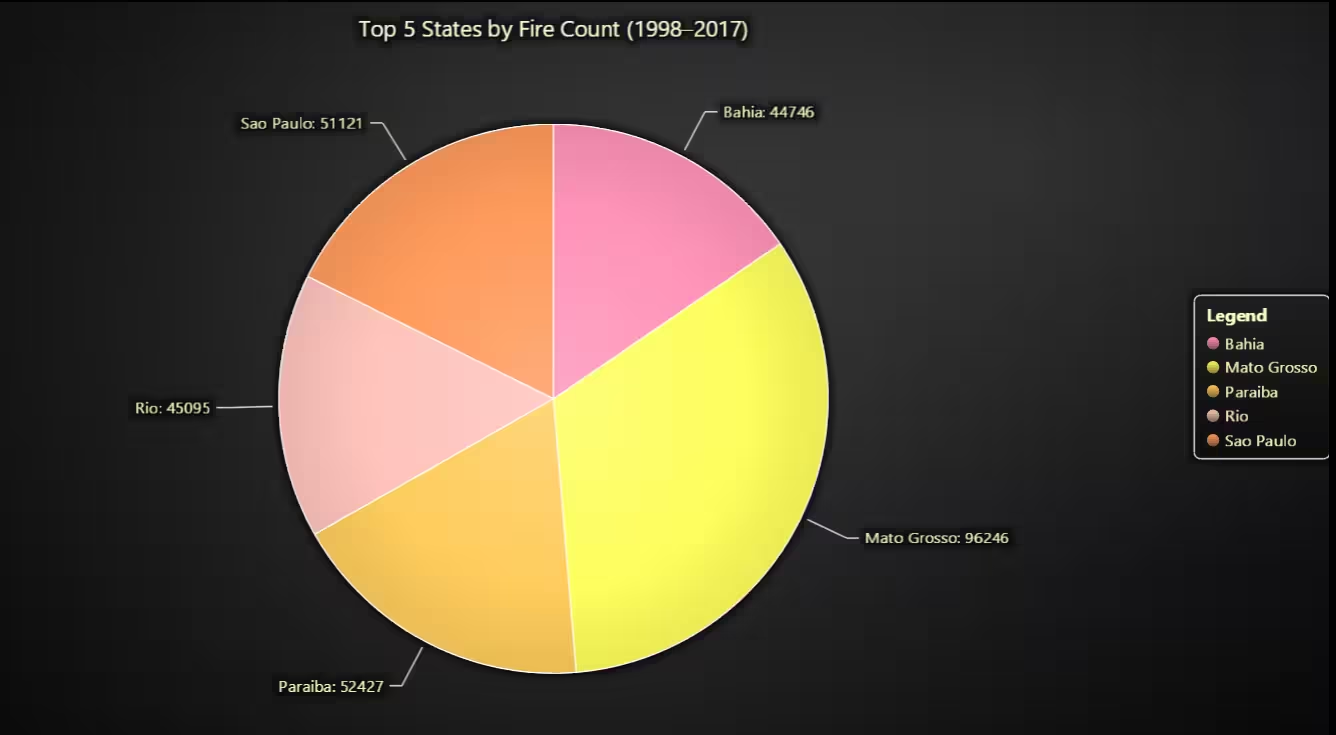
The chart displays the 5 states with the highest total fire activity from 1998 to 2017. It reveals that Mato Grosso occupies the largest slice, highlighting its disproportionate contribution to national forest fires. The rest of the slices (eg: Pará, Maranhão) represent smaller but still significant shares.
# Bonus Chart 1 – Top 5 States by Total Fire Count (Pie Chart)
# Developed with AI assistance using LightningChart Python

import pandas as pd
import lightningchart as lc

# Load LightningChart license
with open("D:/HAMK/Internship/MyProjects/lc_license.txt", "r") as f:
    lc.set_license(f.read().strip())

# Load and clean dataset
df = pd.read_csv("Forest Fires Brazil Data.csv", encoding='ISO-8859-1')
df.columns = df.columns.str.strip()
df.drop_duplicates(inplace=True)

# Total fires by state
fires_by_state = df.groupby('state')['number'].sum().sort_values(ascending=False)

# Top 5 states
top5 = fires_by_state.head(5)

# Format for PieChart
pie_data = [{'name': state, 'value': count} for state, count in top5.items()]

# Create Pie Chart
chart = lc.PieChart(
    title='Top 5 States by Fire Count (1998–2017)',
    theme=lc.Themes.Dark
)

# Configure slices
chart.set_slice_stroke(color='white', thickness=1)
chart.add_slices(pie_data)
chart.add_legend(data=chart)

chart.open()
Total Fires per Year – Bar Chart
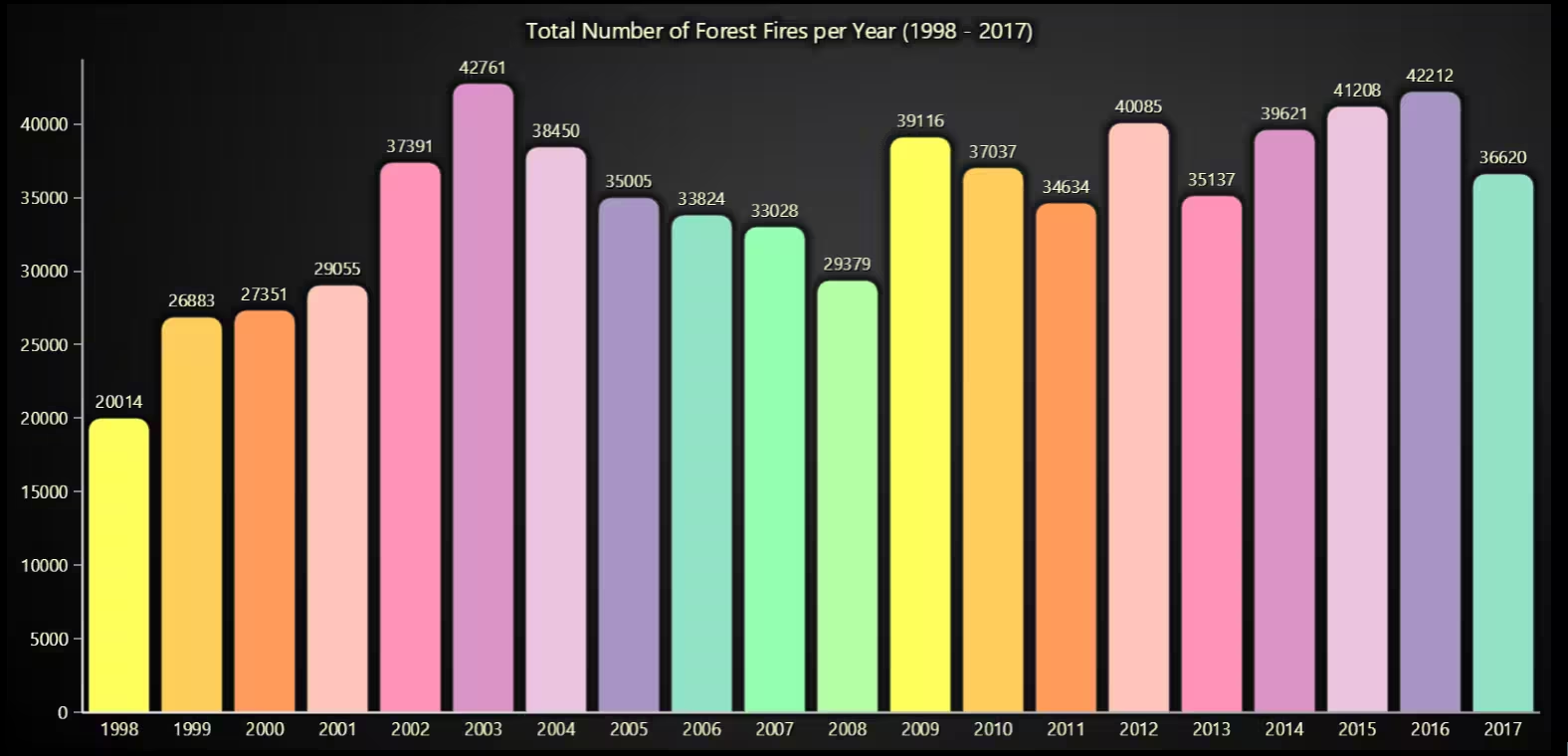
The chart presents the total number of forest fires per year from 1998 to 2017. It clearly highlights spikes in fire activity such as in 2004, 2007, and 2010, as well as notably calmer years like 2000 and 2012.
# Bonus Chart 2 – Total Fires per Year (Vertical Bar Chart)
# Developed with AI assistance using LightningChart Python

import pandas as pd
import lightningchart as lc

# Load LightningChart license
with open("D:/HAMK/Internship/MyProjects/lc_license.txt", "r") as f:
    lc.set_license(f.read().strip())

# Load and clean dataset
df = pd.read_csv("Forest Fires Brazil Data.csv", encoding='ISO-8859-1')
df.columns = df.columns.str.strip()
df.drop_duplicates(inplace=True)

# Group total fires per year
fires_per_year = df.groupby('year')['number'].sum()

# Convert to LightningChart format
bar_data = [{'category': str(year), 'value': count} for year, count in fires_per_year.items()]

# Create vertical bar chart
chart = lc.BarChart(
    vertical=True,
    theme=lc.Themes.Dark,
    title='Total Number of Forest Fires per Year (1998 - 2017)'
)
chart.set_sorting('disabled')
chart.set_data(bar_data)

chart.open()
Conclusion
This project focused on visualizing and analysing temporal, geographic, and seasonal forest fire patterns in Brazil using the Forest Fires Dataset (1998–2017) with the LightningChart Python library. A total of 8 high-performance, interactive visualizations were developed to uncover insights about fire seasonality, state-wise severity, long-term shifts, and outlier years.
The dataset was cleaned and transformed using pandas to prepare features such as monthly fire distributions, annual fire counts, and spatial fire intensity by state and year. The charts included line plots, spider charts, polar heatmaps, 3D surfaces, radar diagrams, funnel charts, XY heatmaps, and 3D scatter plots, each tailored to highlight unique patterns and behaviours in Brazil’s forest fire activity.
The results offer actionable insights for environmental analysts, policy makers, and emergency response planners. These visual tools enable more accurate risk assessments, identify state-level vulnerabilities, and support the development of targeted fire prevention strategies.
Continue learning with LightningChart

Visualizing 10 Million Data Points in the Browser (2026): The Technical Deep-Dive
Ten Million Data Points in the Browser: How WebGL Makes Mass Datasets Interactive Ten million data points. That number used to mean a database problem, not a front-end problem. Now research teams want to explore it interactively in a browser. Trading desks want...
Elliott Wave Theory in Trading
Financial markets often appear chaotic, but many traders believe that price movements follow recurring patterns driven by human psychology. One of the most influential approaches based on this idea is the Elliott Wave Theory. Developed nearly a century ago, it remains one of the most widely studied methods of technical analysis.
The Head and Shoulders Pattern in Technical Analysis
The Head and Shoulders Pattern in Technical Analysis The Head and Shoulders Pattern in Technical Analysis The Head and Shoulders pattern is one of the most recognized and widely used chart patterns in technical analysis. It is considered a reliable reversal pattern...



If you have any questions, feel free to contact us!
©LightningChart Ltd 2025. All rights reserved.