








Disease Symptom Data Visualization | LightningChart Python
Tutorial
Assisted by AI
Explore effective techniques for displaying complex health trends through disease symptom data visualization using LightningChart Python.
Vindya Nukulasooriya
Data Science Developer

Introduction
This project focuses on visualizing relationships between diseases and their symptoms using a large medical dataset (dsd). The dataset contains hundreds of symptoms (encoded as binary values) and multiple disease categories, allowing detailed exploration of frequency patterns and symptom behavior.
The goal of this project is to understand how symptoms contribute to disease identification by analysing:
- which symptoms are most common,
- which symptoms appear together,
- how symptom counts vary across different diseases.
This project demonstrates how LightningChart Python enables intuitive and high-performance visualization even with large, multidimensional medical datasets.
Project Overview
To analyze and visually interpret disease-symptom relationships and answer:
- Which symptoms occur most frequently across all diseases?
- Are there clusters of symptoms that tend to co-occur together?
- Do different diseases have different symptom complexity (few vs many symptoms)?
- Can symptom frequency and clustering help identify possible diagnostic markers?
LightningChart Python was selected for its GPU acceleration, real-time streaming, and interactive 3D visualization features, enabling detailed exploration of physiological data with exceptional rendering speed and clarity.
Deliverables
Core visualizations created with LightningChart Python (3 Charts):
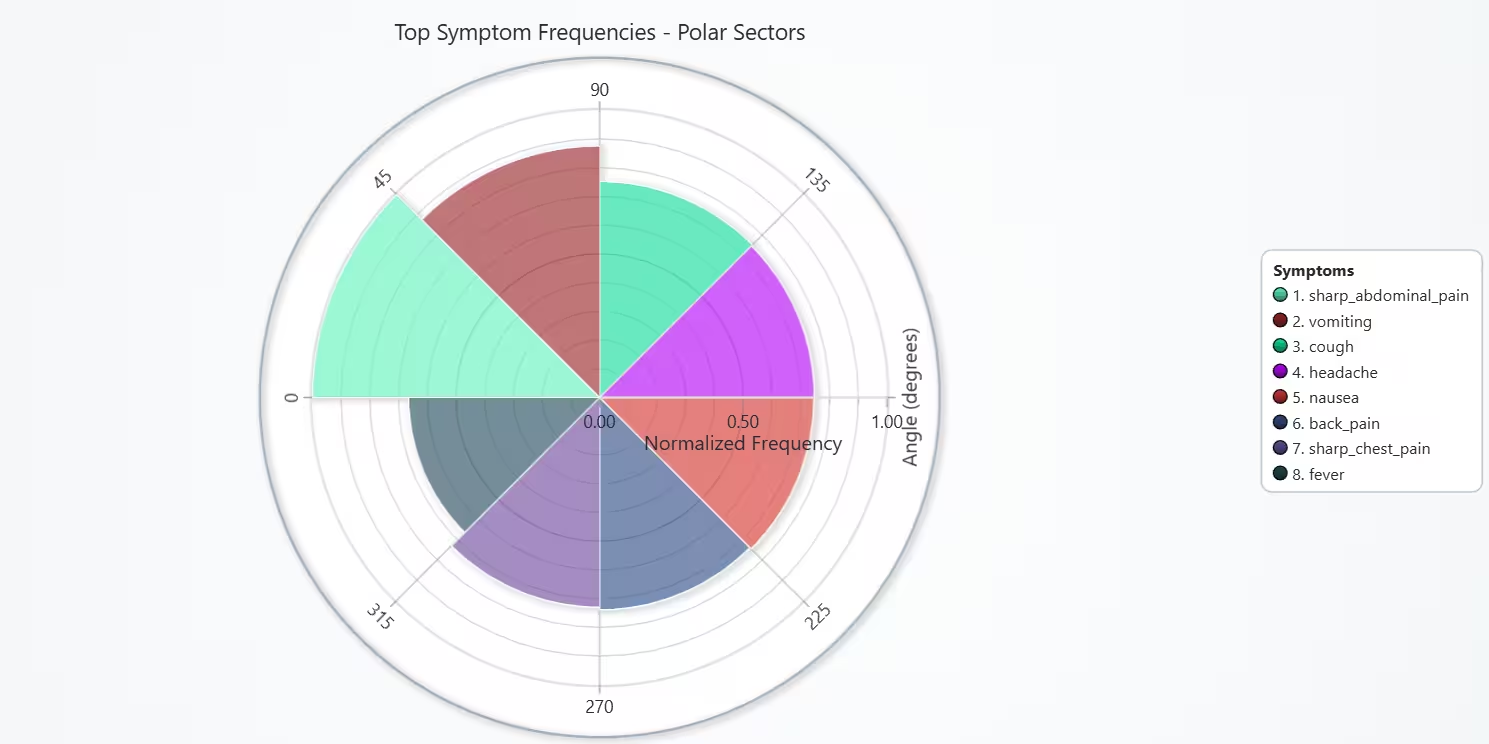
- Chart 1 – Top Symptom Frequencies (Polar Sector)
Shows which symptoms occur most often across all recorded diseases.
Helps identify high-frequency symptoms.
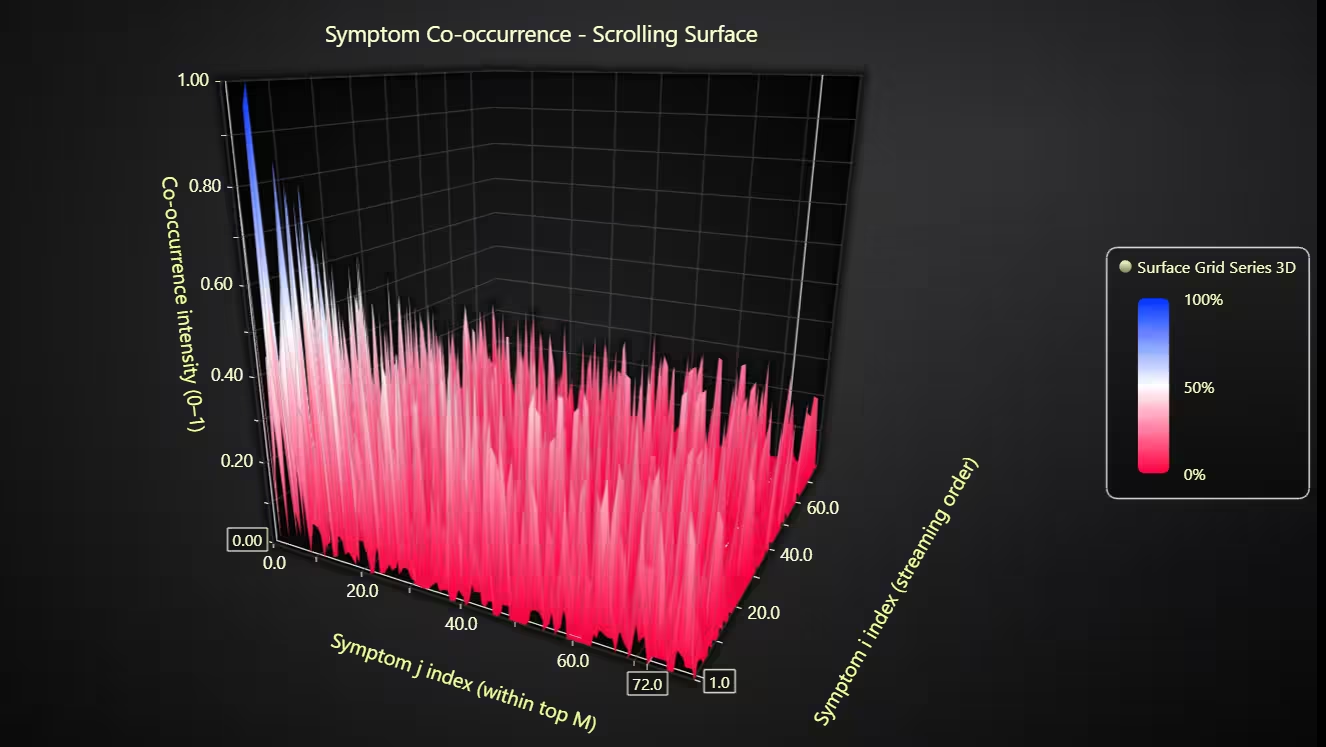
- Chart 2 – Symptom Co-occurrence (Scrolling 3D Surface Grid)
Visualizes co-occurrence patterns between symptoms.
Reveals symptom clusters that appear together.
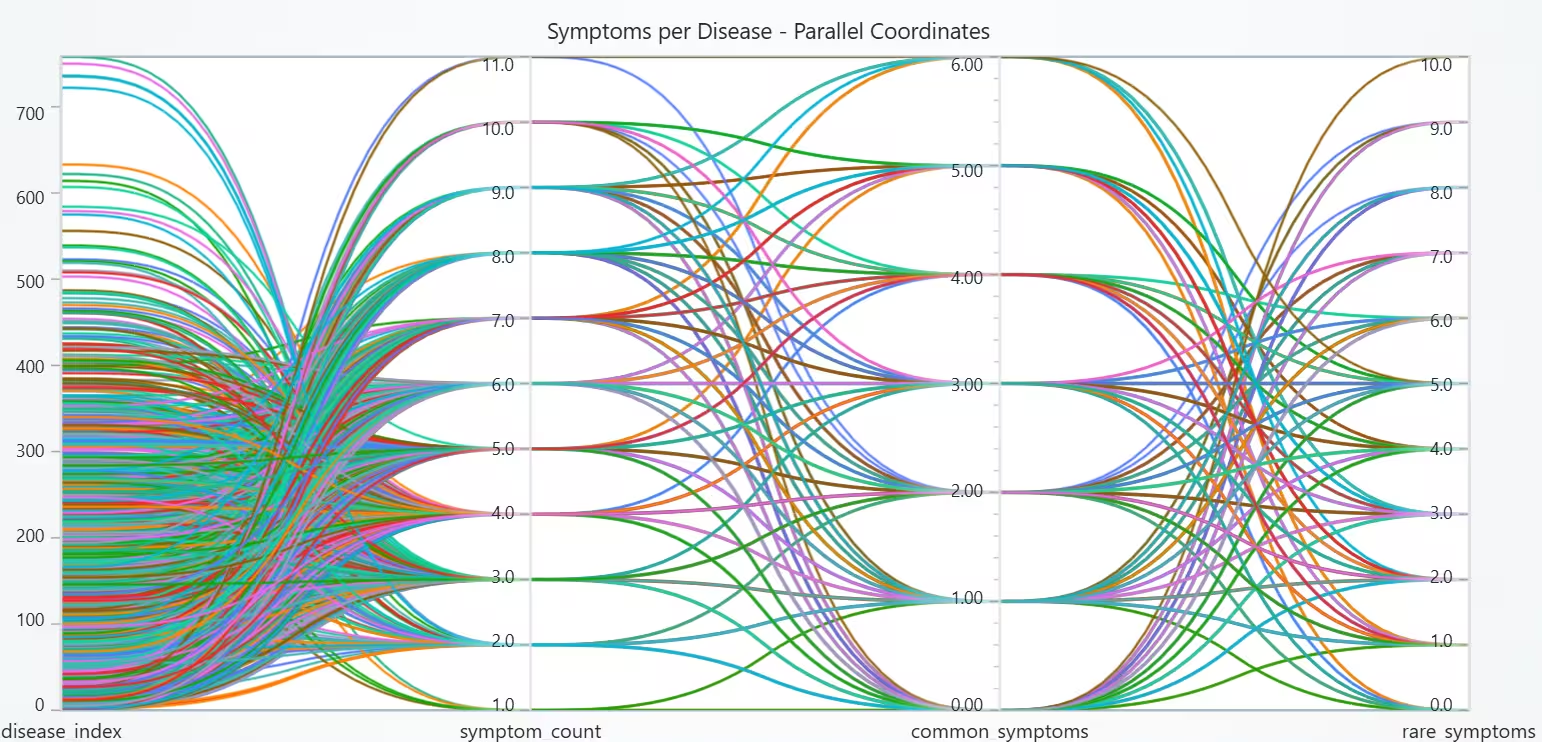
- Chart 3 – Symptom Count per Disease (Parallel Coordinate Chart)
Compares total, common, and rare symptom counts across diseases.
Shows variation in how complex each disease is symptomatically.
Tools Used
Python 3.13.5, LightningChart Python, Jupyter Notebook, AI Assistance
About the Dataset
The files used werethe Cryptocurrency dataset and the Stock market dataset available on Kaggle.
LightningChart Python
LightningChart Python is a GPU-accelerated scientific visualization library designed for real-time, interactive, and 3D analytical graphics. It provides the rendering performance and flexibility required to visualize large, high-dimensional medical datasets, such as this disease–symptom matrix with hundreds of symptoms.

Setting Up Python Environment
Before running the project, install Python and the other required libraries using:
%pip install numpy pandas lightningchartSetting Up Your Development Environment:
- Set up a virtual environment:
- Use Visual Studio Code (VSCode) for a streamlined development experience.
Loading and Preprocessing Data
Fetch and preprocess the data using the following function:
# Import necessary libraries (load pandas library to preprocess dataset)
import pandas as pd
Visualizing Data with LightningChart Python
Polar sectors were selected to create the first disease symptom data visualization, which makes small sets of categories easy to compare. Radial length equals relative frequency (clear ranking briefly). Similarly, polar sectors provide a compact view for “Top N” items (better than a long bar list here).
The symptom occurrence shows a Pareto-like pattern (few symptoms appear very often). These high-frequency symptoms likely contribute strongly to models and should be prioritized for feature importance checks.
# Chart 1 - Polar Sector of Frequency of Symptoms Across All Diseases
# Developed with AI assistance to demonstrate LightningChart Python

import lightningchart as lc
import pandas as pd
import numpy as np

# License
with open("D:/HAMK/Internship/MyProjects/lc_license.txt", "r") as f:
    lc.set_license(f.read().strip())

# Prep: symptom frequencies
symptom_cols = [c for c in dsd.columns if c != 'diseases']
freq = dsd[symptom_cols].sum().sort_values(ascending=False)
topN = 8
top_symptoms = freq.iloc[:topN]
amps = (top_symptoms / top_symptoms.max()).values  # 0..1

# Chart
chart = lc.PolarChart(
    theme=lc.Themes.Light,
    title="Top Symptom Frequencies - Polar Sectors",
    legend={'title': 'Symptoms', 'position': 'RightCenter'}
)

# Official API for axes
radial_axis = chart.get_radial_axis()
radial_axis.set_title('Angle (degrees)')
radial_axis.set_division(topN)      # show N sectors on angle axis
radial_axis.set_clockwise(True)     # optional: angle direction
radial_axis.set_north(90)           # optional: where 0° is placed

amplitude_axis = chart.get_amplitude_axis()
amplitude_axis.set_title('Normalized Frequency')

# Sectors
np.random.seed(42)  # optional: reproducible colors
angle_step = 360 / topN
for i, (symptom, amp) in enumerate(zip(top_symptoms.index, amps), start=1):
    sector = chart.add_sector()
    sector.set_name(f'{i}. {symptom}')
    sector.set_amplitude_start(0)
    sector.set_amplitude_end(float(amp))
    sector.set_angle_start((i - 1) * angle_step)
    sector.set_angle_end(i * angle_step)
    sector.set_color((
        int(255 * np.random.rand()),
        int(255 * np.random.rand()),
        int(255 * np.random.rand()),
        160
    ))
    sector.set_stroke(color='white', thickness=1)

chart.open()
Scrolling Surface Grid of Co-occurrence of Symptoms Among Diseases
The reason to select a scrolling surface grid chart for the disease syumptom data visualization project, was due to the co-occurrence is naturally a symptom × symptom matrix; a 3D surface shows the whole matrix at once. Also, the height = intensity of co-occurrence makes strong pairings pop out as peaks.
The scrolling grid lets one ingest large matrices row-by-row smoothly without freezing the UI and the color palette mapped to [0-1] provides quick visual classification of rare vs strong pairs.
The surface confirms that symptom co-occurrence is highly sparse, with only a few strong relationships. These strong pairs can help identify symptom clusters that may lead to more accurate disease prediction models later. This visualization supports feature engineering for ML (eg: grouping related symptoms, dimensionality reduction).
# Chart 2 - Scrolling Surface grid of Co-occurrence of Symptoms Among Diseases
# Developed with AI assistance to demonstrate LightningChart Python

import lightningchart as lc
import numpy as np
import time

# License
with open("D:/HAMK/Internship/MyProjects/lc_license.txt", "r") as f:
    lc.set_license(f.read().strip())

# Prep: co-occurrence on top M frequent symptoms
M = 80
symptom_cols = [c for c in dsd.columns if c != 'diseases']
top_symptoms = dsd[symptom_cols].sum().sort_values(ascending=False).index[:M]
S = dsd[top_symptoms].astype(int)

co = S.T.dot(S).astype(float).values
np.fill_diagonal(co, 0)
co_norm = (co - co.min()) / (co.max() - co.min() + 1e-12)

rows_amount, columns_amount = co_norm.shape

# Chart
chart = lc.Chart3D(theme=lc.Themes.Dark, title='Symptom Co-occurrence - Scrolling Surface')
series = chart.add_surface_scrolling_grid_series(columns=columns_amount, rows=rows_amount)

# Palette
series.set_palette_coloring(
    steps=[
        {'value': 1.0, 'color': '#0033ff'},
        {'value': 0.5, 'color': '#ffffff'},
        {'value': 0.0, 'color': '#ff0040'},
    ],
    look_up_property='value',
    percentage_values=True
)

# Official axis getters: label X/Y/Z
x_axis_3d = chart.get_default_x_axis()
y_axis_3d = chart.get_default_y_axis()
z_axis_3d = chart.get_default_z_axis()

x_axis_3d.set_title('Symptom j index (within top M)')
y_axis_3d.set_title('Co-occurrence intensity (0–1)')
z_axis_3d.set_title('Symptom i index (streaming order)')

# Optional: set ranges for clarity
try:
    x_axis_3d.set_interval(0, columns_amount - 1)
    y_axis_3d.set_interval(0.0, 1.0)
    z_axis_3d.set_interval(0, rows_amount - 1)
except Exception:
    pass  # set_interval availability varies

# Initialize and stream
K = 1
init_rows = co_norm[:K].tolist()
series.add_values(y_values=init_rows, intensity_values=init_rows)

chart.open(live=True)
for r in range(K, rows_amount):
    row_vals = co_norm[r].tolist()
    series.add_values(y_values=[row_vals], intensity_values=[row_vals])
    time.sleep(0.02)
chart.close()
Parallel Coordinate Chart for Number of Symptoms per Disease Category
Parallel coordinate chart can show multiple dimensions for many records at once. The lines prove that diseases vary significantly in symptom complexity. Diseases with mostly common symptoms may be easier to predict in models. Diseases with higher rare-symptom count suggest unique or distinctive symptom profiles, valuable for classification.
# Chart 3 - Parallel Coordinate Chart for Number of Symptoms per Disease Category
# Developed with AI assistance to demonstrate LightningChart Python

import lightningchart as lc
import numpy as np
import pandas as pd

# License
with open("D:/HAMK/Internship/MyProjects/lc_license.txt", "r") as f:
    lc.set_license(f.read().strip())

symptom_cols = [c for c in dsd.columns if c != 'diseases']
row_symptom_count = dsd[symptom_cols].sum(axis=1)

# Split into common vs rare by 5% prevalence
freq_pct = dsd[symptom_cols].mean()
common_cols = freq_pct.index[freq_pct >= 0.05].tolist()
rare_cols   = freq_pct.index[freq_pct <  0.05].tolist()

common_count = dsd[common_cols].sum(axis=1) if common_cols else pd.Series(0, index=dsd.index)
rare_count   = dsd[rare_cols].sum(axis=1)   if rare_cols   else pd.Series(0, index=dsd.index)

# Disease index (for axis)
disease_order = dsd['diseases'].value_counts().index.tolist()
disease_to_idx = {d: i for i, d in enumerate(disease_order)}
disease_idx = dsd['diseases'].map(disease_to_idx)

pc_df = pd.DataFrame({
    'disease_index': disease_idx.astype(float),
    'symptom_count': row_symptom_count.astype(float),
    'common_symptoms': common_count.astype(float),
    'rare_symptoms': rare_count.astype(float),
})

pc_sample = pc_df.sample(n=min(2000, len(pc_df)), random_state=42)

chart = lc.ParallelCoordinateChart(
    theme=lc.Themes.Light,
    title="Symptoms per Disease - Parallel Coordinates"
)
chart.set_axes(['disease_index', 'symptom_count', 'common_symptoms', 'rare_symptoms'])

for _, row in pc_sample.iterrows():
    s = chart.add_series()
    s.set_data({
        'disease_index': float(row['disease_index']),
        'symptom_count': float(row['symptom_count']),
        'common_symptoms': float(row['common_symptoms']),
        'rare_symptoms': float(row['rare_symptoms']),
    })

chart.open()
Conclusion
The analysis shows that while some symptoms (like fever, cough, nausea) occur across many diseases, others are rare and appear only in specific conditions. Symptom co-occurrence patterns reveal that certain symptoms frequently appear together, forming diagnostic clusters. The number of symptoms per disease also varies: some diseases involve only a few common symptoms, whereas others include several rare symptoms, making them more difficult to diagnose.
Overall, frequent symptoms help with early screening, but rare symptoms are far more valuable for narrowing down the potential disease. By analyzing symptom frequency, co-occurrence, and distribution, we can better understand diagnostic relevance and identify symptoms that function as strong markers for certain diseases.
Continue learning with LightningChart

Choosing the right XY line series
LightningChart .NET features 10 different line series. Read more about their characteristics and functionalities and choose the best for your app.

JavaScript Refreshing Spectrum Chart
Written by a human | Updated on April 10th, 2025JavaScript Refreshing Spectrum Chart Hello again, this time I bring a quick but helpful tutorial on how to create a JavaScript refreshing spectrum chart. A spectrum chart is commonly used in reading and plotting...
Horizontal Bar Chart of Russia-Ukraine War Weaponry Data
Written by a human | Updated on April 10th, 2025 JavaScript Horizontal Bar Chart In this article, we aim to respectfully create a JavaScript horizontal bar chart that simulates the weaponry usage on recent war conflicts. While the data have been taken from Kaggle and...



If you have any questions, feel free to contact us!
©LightningChart Ltd 2025. All rights reserved.