








Deforestation Trends Visualization | LightningChart Python
Tutorial
Assisted by AI
Explore Deforestation Trends Visualization with interactive charts showing forest-area change, regional comparisons, and country-level deforestation rates from 1990–2020.
Vindya Nukulasooriya
Data Science Developer

Introduction
This project presents a focused deforestation and forest-area visualization analysis using a global Kaggle forest area dataset and the LightningChart Python library. The dataset provides country-level snapshots for 1990, 2000, 2010, 2015, and 2020, allowing us to quantify change over time, compare regions, and surface countries driving the largest losses or gains.
The primary objectives of this project are to:
- Track how annualized deforestation rates evolve across the four periods (1990–2000, 2000–2010, 2010–2015, 2015–2020).
- Identify regions/countries with the most significant forest-area declines or increases.
- Compare Forest Area (2020) distributions by region (typical size, spread, outliers).
- Relate the % change to the absolute area to understand both rate and real-world impact.
- Produce clear, reproducible visuals to support monitoring and policy discussion.
To achieve these objectives, LightningChart Python was selected for its:
- High-performance rendering that stays smooth across hundreds of countries and multiple periods.
- Rich 2D components (shared-bin histograms, box plots, scatter) suited to distribution and comparative analyses.
- Interactive, publication-ready charts with custom ticks/labels and flexible theming for clear communication.
By converting raw country figures into intuitive, interactive visuals, the project reveals when global losses intensified, how regions differ, which countries stand out as outliers, and where to focus monitoring and conservation actions
Project Overview
Develop interactive charts with LightningChart Python to uncover patterns in deforestation and forest area, their relationships over time (1990–2020), and differences across regions and countries.
Objectives
- Measure annualized percent change in forest area for 1990–2000, 2000–2010, 2010–2015, 2015–2020.
- Identify top decliners/gainers and compare regions by typical size, spread, and outliers.
- Relate the % rate to the absolute area (a small % on a huge forest can mean a large real loss).
- Demonstrate LightningChart’s strengths for fast, interactive, publication-ready visuals.
Deliverables
- Documented Python code for each chart: preprocessing, parameters (bins, clipping, IQR), and rationale.
- Interpretive summaries highlighting shifts in distributions, regional contrasts, and notable countries.
- A conclusion on how LightningChart supports monitoring, reporting, and decision-making.
Tools Used
Python 3.13.5, LightningChart Python, Jupyter Notebook, AI Assistance
About the Dataset
Global forest area dataset (Kaggle) with country-level snapshots for 1990, 2000, 2010, 2015, 2020. Used file: Forest_Area.csv (CSV format). Aggregate rows like WORLD were excluded.
Each record includes
- Country and Area
- Forest Area, 1990/2000/2010/2015/2020 (numeric totals)
- Total Land Area, 2020; Forest Area as % of Land, 2020 (context)
- Deforestation, 2015–2020; Forest Area affected by fire, 2015 (where available)
- Derived (this project): Annualized % change per period; Region mapping
LightningChart Python
LightningChart Python is a professional-grade data visualization library renowned for its ultra-fast rendering and analytical precision. Its ability to handle large-scale, granular datasets and produce multidimensional, interactive visualizations makes it highly effective for data analysis.

Setting Up Python Environment
Before running the project, install Python and the other required libraries using:
%pip install numpy pandas lightningchartSetting Up Your Development Environment:
- Set up a virtual environment:
- Use Visual Studio Code (VSCode) for a streamlined development experience.
Loading and Preprocessing Data
To create this Deforestation Trends application, we will fetch the Global Forest Insights 1990-2020 data using the following function:
gfid = pd.read_csv("Forest_Area.csv", encoding='ISO-8859-1')To preprocess the dataset, we will import the pandas library:
# Import necessary libraries (load pandas library to preprocess dataset)
import pandas as pd
Visualizing Data with LightningChart Python
Histograms of Annual Deforestation Rates by Period (1990–2020)


# Chart 1 — Histograms of Annual Deforestation Rates by Period (1990–2020)
# Developed with AI assistance to demonstrate LightningChart Python

import lightningchart as lc
import numpy as np
import pandas as pd
from pathlib import Path

# License
with open("D:/your-license-key", "r") as f:
    license_key = f.read().strip()
lc.set_license(license_key)

# Load data
CSV_PATH = Path("Forest_Area.csv")
df = pd.read_csv(CSV_PATH)

# Expected columns
COLS = {
    "1990": "Forest Area, 1990",
    "2000": "Forest Area, 2000",
    "2010": "Forest Area, 2010",
    "2015": "Forest Area, 2015",
    "2020": "Forest Area, 2020",
}

# Safety check
for y, col in COLS.items():
    if col not in df.columns:
        raise KeyError(f"Missing expected column: {col}")

# Coerce forest-area columns to numeric
fa = pd.DataFrame(index=df.index)
for y, col in COLS.items():
    fa[y] = pd.to_numeric(df[col], errors="coerce")

# Periods and annualized rates
PERIODS = [
    ("1990", "2000", 10),
    ("2000", "2010", 10),
    ("2010", "2015", 5),
    ("2015", "2020", 5),
]

rates_pct_by_period = {}
summary_rows = []

for start, end, yrs in PERIODS:
    s = fa[start]
    e = fa[end]
    valid = (s > 0) & (e > 0)
    ratio = (e[valid] / s[valid]).astype(float)
    annual = ratio.pow(1.0 / yrs) - 1.0
    vals_pct = (annual * 100.0).dropna().values  # % per year
    rates_pct_by_period[f"{start}–{end}"] = vals_pct

    if vals_pct.size:
        summary_rows.append({
            "Period": f"{start}–{end}",
            "N countries": int(vals_pct.size),
            "Median %/yr": float(np.median(vals_pct)),
            "Mean %/yr": float(np.mean(vals_pct)),
            "P10 %/yr": float(np.percentile(vals_pct, 10)),
            "P90 %/yr": float(np.percentile(vals_pct, 90)),
        })

# Sanity table
if summary_rows:
    print(pd.DataFrame(summary_rows).round(3))
else:
    raise ValueError("No valid rates computed. Check data columns & values.")

# Shared histogram bins (clip extremes for readability)
all_vals = np.concatenate([v for v in rates_pct_by_period.values() if v.size])
CLIP_LOW, CLIP_HIGH = 1, 99
lo, hi = np.percentile(all_vals, [CLIP_LOW, CLIP_HIGH])
all_vals_clipped = np.clip(all_vals, lo, hi)

NUM_BINS = 24
bin_edges = np.linspace(all_vals_clipped.min(), all_vals_clipped.max(), NUM_BINS + 1)

def make_bar_data(values_pct: np.ndarray, edges: np.ndarray):
    """Convert raw values into BarChart categories + counts."""
    if values_pct.size == 0:
        return []
    clipped = np.clip(values_pct, edges[0], edges[-1])
    counts, _ = np.histogram(clipped, bins=edges)
    # compact, readable labels
    cats = [f"{edges[i]:.1f}–{edges[i+1]:.1f}%" for i in range(len(edges) - 1)]
    return [{"category": cat, "value": int(cnt)} for cat, cnt in zip(cats, counts)]

# Render BarChart per period
for period, values_pct in rates_pct_by_period.items():
    if values_pct.size == 0:
        continue

    bar_data = make_bar_data(values_pct, bin_edges)

    chart = lc.BarChart(
        vertical=True,
        theme=lc.Themes.Light,
        title=(
            f"Annual Deforestation Rate Histogram ({period})\n"
            f"X: % per year (bins, clipped 1–99 pct) • Y: Number of countries"
        )
    )
    chart.set_data(bar_data)
    chart.set_sorting("disabled")       # keep bin order
    chart.set_bars_color("forestgreen")

    # Optional styling for the value axis labels
    chart.set_value_axis_labels(major_size=12)

    # Make Y-axis ticks integers (no decimals)
    chart.value_axis.set_tick_strategy('Numeric')   # default, but explicit
    chart.value_axis.set_decimal_precision(0)       # <- no decimal point

    chart.open()
Forest Area (2020) – Box Plot by Region
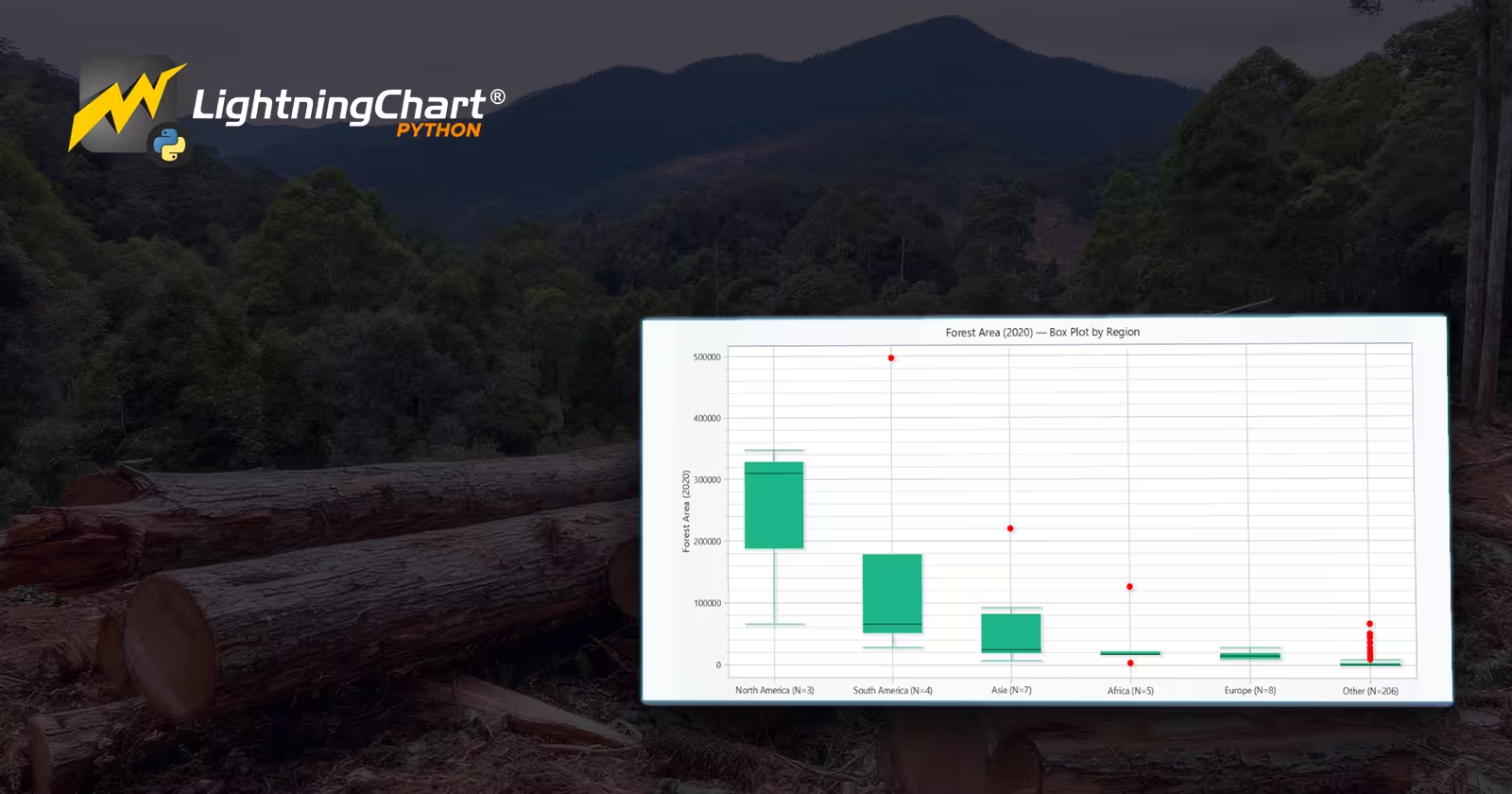
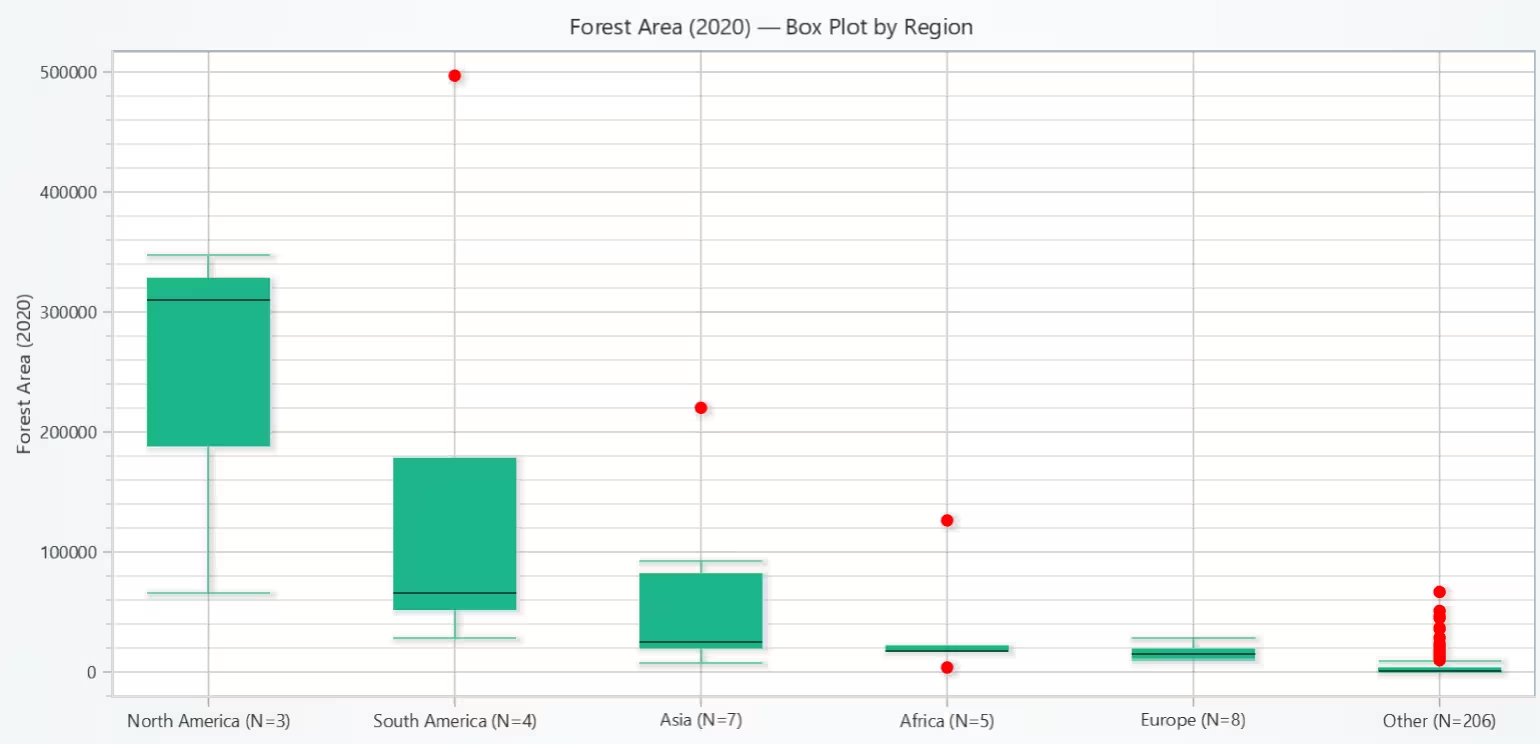
This box plot compares the distribution of forest area per country in 2020 across world regions, showing each region’s median, spread, and outliers to enable clear regional comparisons.
It reveals that the typical (median) forest area per country is highest in North America, followed by South America and Asia, with Africa and Europe having lower medians. South America and Asia also show the widest interquartile ranges, indicating large differences between countries within those regions.
Overall, regions with higher medians tend to include some of the world’s largest forest countries, while Europe and Africa have lower typical forest area per country.
# Chart 2 - Forest Area (2020) - Box Plot by Region
# Developed with AI assistance to demonstrate LightningChart Python

import lightningchart as lc
import numpy as np
import pandas as pd
from pathlib import Path

# License
with open("D:/your-file-location", "r") as f:
    license_key = f.read().strip()
lc.set_license(license_key)

# Load data
CSV_PATH = Path("Forest_Area.csv")
df = pd.read_csv(CSV_PATH)

# Keep needed columns, drop aggregate 'WORLD'
df = df[['Country and Area', 'Forest Area, 2020']].copy()
df = df[df['Country and Area'].str.upper() != 'WORLD']

# Coerce numeric
df['value'] = pd.to_numeric(df['Forest Area, 2020'], errors='coerce')
df = df.dropna(subset=['value'])

# Country -> Region mapping
continent_map = {
    # Americas
    "Brazil": "South America", "Argentina": "South America", "Colombia": "South America", "Peru": "South America",
    "United States": "North America", "United States of America": "North America",
    "Canada": "North America", "Mexico": "North America",

    # Europe / Asia
    "Russia": "Europe/Asia", "Russian Federation": "Europe/Asia",
    "Finland": "Europe", "Sweden": "Europe", "Germany": "Europe", "France": "Europe",
    "United Kingdom": "Europe", "Italy": "Europe", "Spain": "Europe", "Norway": "Europe", "Poland": "Europe",

    # Asia
    "China": "Asia", "India": "Asia", "Indonesia": "Asia", "Malaysia": "Asia", "Japan": "Asia",
    "Thailand": "Asia", "Vietnam": "Asia", "Philippines": "Asia",

    # Africa
    "South Africa": "Africa", "Democratic Republic of the Congo": "Africa", "Congo, Dem. Rep.": "Africa",
    "Nigeria": "Africa", "Kenya": "Africa", "Ethiopia": "Africa", "Tanzania": "Africa",

    # Oceania
    "Australia": "Oceania", "New Zealand": "Oceania",
}

def country_to_continent(name: str) -> str:
    return continent_map.get(name, "Other")

df['Continent'] = df['Country and Area'].apply(country_to_continent)

# Regions present
region_counts = df.groupby('Continent')['value'].size()
regions_present = region_counts.index.tolist()

# Require >=3 countries per region for stable box stats
regions_present = [r for r in regions_present if region_counts[r] >= 3]

# Sort regions by median forest area (descending) for visual clarity
medians = df.groupby('Continent')['value'].median()
regions_ordered = sorted(regions_present, key=lambda r: medians[r], reverse=True)

# Prepare Box Plot data
dataset = []
x_values_outlier, y_values_outlier = [], []
region_labels = []

for i, region in enumerate(regions_ordered):
    values = df.loc[df['Continent'] == region, 'value'].astype(float).to_numpy()
    if values.size < 3:
        continue

    # X span for this box
    start = (i * 2) + 1
    end = start + 1
    region_labels.append((start + 0.5, f"{region} (N={values.size})"))

    # Quartiles & median
    q1 = float(np.percentile(values, 25))
    q3 = float(np.percentile(values, 75))
    median = float(np.median(values))

    # IQR and whiskers using non-outliers
    iqr = q3 - q1
    lower_bound = q1 - 1.5 * iqr
    upper_bound = q3 + 1.5 * iqr
    non_outliers = values[(values >= lower_bound) & (values <= upper_bound)]
    if non_outliers.size == 0:
        lower_ext = float(values.min())
        upper_ext = float(values.max())
    else:
        lower_ext = float(non_outliers.min())
        upper_ext = float(non_outliers.max())

    dataset.append({
        'start': start,
        'end': end,
        'lowerQuartile': q1,
        'upperQuartile': q3,
        'median': median,
        'lowerExtreme': lower_ext,
        'upperExtreme': upper_ext,
    })

    # Outliers
    outs = values[(values < lower_bound) | (values > upper_bound)]
    if outs.size:
        x_values_outlier.extend([start + 0.5] * outs.size)
        y_values_outlier.extend(outs.astype(float).tolist())

# Plot with LightningChart
chart = lc.ChartXY(theme=lc.Themes.Light, title='Forest Area (2020) — Box Plot by Region')
box_series = chart.add_box_series()
box_series.add_multiple(dataset)

# Outliers (red points)
if y_values_outlier:
    outlier_series = chart.add_point_series(sizes=True)
    outlier_series.set_point_color('red')
    outlier_series.append_samples(
        x_values=x_values_outlier,
        y_values=y_values_outlier,
        sizes=[10] * len(y_values_outlier),
    )

# Region labels as custom X ticks (exactly per docs style)
x_axis = chart.get_default_x_axis()
x_axis.set_tick_strategy('Empty')
for pos, label in region_labels:
    x_axis.add_custom_tick().set_value(pos).set_text(label)

# Y-axis title (adjust units if known, e.g., "Forest Area (2020, 1000 ha)")
chart.get_default_y_axis().set_title('Forest Area (2020)')

chart.open()
Conclusion
This project used a global forest area dataset (Kaggle) with LightningChart Python to visualize deforestation trends and forest-size differences across countries from 1990 to 2020.
We built interactive charts, most notably a histogram (as BarChart) showing the distribution of annualized deforestation rates for the periods 1990–2000, 2000–2010, 2010–2015, and 2015–2020 (shared bins for fair comparison), and a box plot (ChartXY) summarizing Forest Area (2020) by region with IQR-based whiskers and outliers. These views let us see both how the global rate distribution shifts over time and how typical forest area and variability differ by region.
The histograms show that rates were close to neutral in the 1990s and 2000s, then shifted negative after 2010, with 2015–2020 having more countries in loss bins and fewer strong gainers. In 2020, North America and South America had larger median forest area per country, while South America and Asia showed wider spreads (bigger differences within the region).
Several very large forest countries stand out as outliers. These visuals support monitoring and prioritization, and the next useful steps are adding country timelines (1990->2020), a scatter/bubble linking percent change to absolute area change, maps for spatial patterns, and area-weighted region summaries in a small dashboard.
Continue learning with LightningChart

React Charting Performance
Here's a scenario that plays out across development teams every few months. Someone builds a React dashboard, picks Recharts or Victory because they're popular, the devs love them, and the first demo looks great. Then the dataset gets bigger. Or the data starts...

Javascript Charting Library comparison 2026
Every year someone publishes a listicle of JavaScript charting libraries. They screenshot a demo, note the GitHub stars, paste in the npm install command, and call it a day. Then you follow their recommendation, get six months into your project, and discover that your...

Visualizing 10 Million Data Points in the Browser (2026): The Technical Deep-Dive
Ten Million Data Points in the Browser: How WebGL Makes Mass Datasets Interactive Ten million data points. That number used to mean a database problem, not a front-end problem. Now research teams want to explore it interactively in a browser. Trading desks want...



If you have any questions, feel free to contact us!
©LightningChart Ltd 2025. All rights reserved.