








Crop Yield Data Visualization Analysis LightningChart Python
Tutorial
Assisted by AI
Discover techniques for crop yield data visualization in Python with LightningChart, enhancing your agricultural data analysis skills.
Vindya Nukulasooriya
Data Science Developer

Introduction
This project presents an analysis of crop yield factors using a curated agricultural dataset and the high-performance LightningChart Python library. The dataset contains measurements of key soil nutrients (Nitrogen, Phosphorus, Potassium), environmental parameters (Temperature, Humidity, Rainfall), and soil chemistry (pH), along with crop labels. Together, these factors influence which crops can thrive in given conditions and how strongly yield is affected.
The primary objectives of this project are to:
- Characterize how soil nutrients (N, P, K) are distributed across different crop types.
- Assess the impact of pH ranges on crop representation, highlighting favourable vs unfavourable conditions.
- Explore how climatic factors such as Temperature and Humidity shape crop presence when grouped into terciles (Low, Mid, High).
- Compare crop representation under varying rainfall levels and examine combined interactions with nutrients.
- Summarize correlations between soil and climatic factors, identifying which variables most strongly influence crop distribution.
To achieve these objectives, LightningChart Python was chosen for its:
- High performance when handling dense agricultural datasets with smooth interactivity.
- Versatile 2D and grouped bar chart types suitable for statistical and categorical comparisons.
- Interactive, presentation-ready visuals with zooming, tooltips, legends, axis labelling, and customizable themes.
By transforming raw soil and climate measurements into clear visualizations, the project reveals how nutrient balances, and environmental conditions jointly determine crop suitability. These insights support better crop planning, soil management, and agricultural decision-making.
Project Overview
Build 5 interactive LightningChart Python visuals to uncover how soil nutrients and climatic factors influence crop distribution and reveal patterns that explain crop suitability.
Objectives
- Measure how Nitrogen (N) and Phosphorus (P) values differ across crop types using distribution plots.
- Compare Potassium (K) and pH ranges for high-representation crops to identify favourable growth conditions.
- Examine multivariate relationships between nutrients and climate (e.g., rainfall vs. N/P/K, temperature × humidity) using scatter and violin plots.
- Summarize crop representation across climatic terciles (Low, Mid, High) with grouped bar charts.
- Analyze inter-parameter associations with a correlation heatmap to reveal strongest crop–factor links.
Deliverables
- Five LightningChart Python visuals: Box/violin plots, Scatter/Bubble chart, Grouped Bar Charts, Correlation Heatmap.
- Documented Python code for each visualization (preprocessing, parameters, axis/legend setup).
- Interpretive summaries highlighting factor differences, correlations, and crop-specific niches.
- A conclusion summarizing findings and demonstrating the value of LightningChart for agricultural analysis.
Tools Used
Python 3.13.5, LightningChart Python, Jupyter Notebook, AI Assistance
About the Dataset
The dataset used is the Crop Recommendation dataset, and the file used was Crop_recommendation.csv.
LightningChart Python
LightningChart Python is a professional-grade data visualization library renowned for its ultra-fast rendering and analytical precision. Its ability to handle large-scale, granular datasets and produce multidimensional, interactive visualizations makes it highly effective for data analysis.

Setting Up Python Environment
Before running the project, install Python and the other required libraries using:
%pip install numpy pandas lightningchartSetting Up Your Development Environment:
- Set up a virtual environment:
- Use Visual Studio Code (VSCode) for a streamlined development experience.
Loading and Preprocessing Data
Fetch and preprocess the data using the following function:
# Import necessary libraries (load pandas library to preprocess dataset)
import pandas as pd
Visualizing Data with LightningChart Python
Rice samples generally concentrate in a typical Nitrogen range, reflecting soil fertility norms and farming practices. The histograms confirm that extreme Nitrogen values are uncommon, which is useful for identifying normal versus unusual soil conditions.


# Histogram of Nitrogen Distribution by Crop Type (Rice)
# Developed with AI assistance to demonstrate LightningChart Python

import lightningchart as lc
import numpy as np

# License
with open("D:/HAMK/Internship/MyProjects/lc_license.txt", "r") as f:
    license_key = f.read().strip()
lc.set_license(license_key)

# Example: Nitrogen distribution for a selected crop (eg: rice)
selected_crop = 'rice'
crop_data = crd[crd['label'] == selected_crop]

# Extract Nitrogen values
nitrogen_values = crop_data['N'].values

# Create histogram data
counts, bin_edges = np.histogram(nitrogen_values, bins=20)

# Prepare histogram data for BarChart
bar_data = [
    {"category": f"{bin_edges[i]:.1f}–{bin_edges[i+1]:.1f}", "value": int(count)}
    for i, count in enumerate(counts)
]

# Create BarChart
chart = lc.BarChart(
    vertical=True,
    theme=lc.Themes.Light,
    html_text_rendering=True,
    title=(f'Histogram of Nitrogen Distribution - {selected_crop.capitalize()}\n'
           f'X-axis: Nitrogen (N) concentration range | Y-axis: Number of samples')
)

# Set histogram data
chart.set_data(bar_data)
chart.set_sorting('disabled')
chart.set_bars_color('cyan')

chart.open()
Box Plot of Phosphorus (P) by Crop Type
Phosphorus availability in soils is crop-dependent, with certain staple crops (rice, wheat) showing more uniform P levels, while legumes display greater variability. The combination of box & strip plots provides a comprehensive view: statistical summaries, actual data points, and smoothed distributions. These insights can support fertilizer management decisions and highlight where phosphorus monitoring should be prioritized.


# Chart 2A - Box Plot of Phosphorus (P) by Crop Type
# Developed with AI assistance to demonstrate LightningChart Python

import lightningchart as lc
import numpy as np

# License
with open("D:/HAMK/Internship/MyProjects/lc_license.txt", "r") as f:
    license_key = f.read().strip()
lc.set_license(license_key)

# build per-crop distributions from cleaned dataframe 'crd'
# Expect columns: 'label' (crop name), 'P' (phosphorus)
groups = []
for crop in sorted(crd['label'].unique()):
    vals = crd.loc[crd['label'] == crop, 'P'].dropna().astype(float).values
    if len(vals) == 0:
        continue
    groups.append((crop, vals))

if not groups:
    raise ValueError("No phosphorus values found in 'crd'.")

# prepare box plot data and outliers
dataset = []
x_values_outlier, y_values_outlier = [], []
x_tick_positions, x_tick_labels = [], []

for i, (crop, vals) in enumerate(groups):
    # x span for this box (leave a gap of 1 unit between boxes)
    start = (i * 2) + 1
    end = start + 1

    # quartiles & median
    q1 = float(np.percentile(vals, 25))
    q3 = float(np.percentile(vals, 75))
    med = float(np.median(vals))
    iqr = q3 - q1

    # whisker bounds (Tukey 1.5*IQR)
    lower_bound = q1 - 1.5 * iqr
    upper_bound = q3 + 1.5 * iqr

    non_outliers = [v for v in vals if lower_bound <= v <= upper_bound]
    lower_ext = float(np.min(non_outliers)) if len(non_outliers) else float(np.min(vals))
    upper_ext = float(np.max(non_outliers)) if len(non_outliers) else float(np.max(vals))

    dataset.append({
        'start': start,
        'end': end,
        'lowerQuartile': q1,
        'upperQuartile': q3,
        'median': med,
        'lowerExtreme': lower_ext,
        'upperExtreme': upper_ext,
    })

    # collect outliers to plot as points
    outliers = [v for v in vals if (v < lower_bound) or (v > upper_bound)]
    x_values_outlier += [start + 0.5] * len(outliers)
    y_values_outlier += list(map(float, outliers))

    # remember tick position/label (center of box)
    x_tick_positions.append(start + 0.5)
    x_tick_labels.append(crop)

# chart
chart = lc.ChartXY(theme=lc.Themes.Light, title='Box Plot of Phosphorus (P) by Crop Type', html_text_rendering=True)

# add box series
box_series = chart.add_box_series()
box_series.add_multiple(dataset)

# add outliers as points
if len(y_values_outlier):
    outlier_series = chart.add_point_series(sizes=True, rotations=True, lookup_values=True)
    outlier_series.set_point_color('red')
    outlier_series.append_samples(
        x_values=x_values_outlier,
        y_values=y_values_outlier,
        sizes=[9] * len(y_values_outlier),
    )

# axis titles
chart.get_default_y_axis().set_title('Phosphorus (P)')
chart.get_default_x_axis().set_title('Crop type')

# OPTIONAL: label X axis with crop names (works on recent LC Python)
# Comment out if your LC build doesn’t support custom ticks.
try:
    x_axis = chart.get_default_x_axis()
    # Clear existing ticks and add one custom tick per crop center
    x_axis.set_tick_strategy(lc.AxisTickStrategies.Numeric)
    for pos, lab in zip(x_tick_positions, x_tick_labels):
        tick = x_axis.add_custom_tick()
        tick.set_value(pos)
        tick.set_text(lab)
except Exception:
    # If custom ticks aren’t available in your build, you can show a legend mapping or keep numeric positions.
    pass

chart.open()
Scatter Plot of Potassium vs. Temperature, coloured by Crop
The scatter and bubble charts jointly illustrate how potassium levels vary with temperature across different crops. While the basic scatter highlights two-variable relationships, the bubble plot provides richer context by including humidity. These visualizations suggest that crop nutrient dynamics are not only species-dependent but also influenced by environmental conditions, which is valuable for precision agriculture and climate-adaptive fertilization strategies.


# Chart 3 - Scatter Plot of Potassium (K) Levels vs Temperature (°C) by Crop Type
# Developed with AI assistance to demonstrate LightningChart Python

import lightningchart as lc
import numpy as np
import pandas as pd

# License
with open("D:/HAMK/Internship/MyProjects/lc_license.txt", "r") as f:
    lc.set_license(f.read().strip())

SHOW_TOP_N_CROPS = None
POINT_SIZE = 6
JITTER_X = 0.00
JITTER_Y = 0.00

# Data
df = crd[['label', 'K', 'temperature']].dropna().copy()
if SHOW_TOP_N_CROPS:
    keep = (df.groupby('label')['K'].size().sort_values(ascending=False)
            .head(SHOW_TOP_N_CROPS)).index
    df = df[df['label'].isin(keep)]

crops = sorted(df['label'].unique())

chart = lc.ChartXY(
    title='Potassium (K) vs Temperature (°C) - colored by Crop',
    theme=lc.Themes.Light,
    html_text_rendering=True
)
x_axis = chart.get_default_x_axis(); x_axis.set_title("Temperature (°C)")
y_axis = chart.get_default_y_axis(); y_axis.set_title("Potassium (K)")

# Set intervals with padding
x_min, x_max = float(df['temperature'].min()), float(df['temperature'].max())
y_min, y_max = float(df['K'].min()), float(df['K'].max())
pad_x = 0.02 * (x_max - x_min if x_max > x_min else 1.0)
pad_y = 0.05 * (y_max - y_min if y_max > y_min else 1.0)
x_axis.set_interval(x_min - pad_x, x_max + pad_x)
y_axis.set_interval(y_min - pad_y, y_max + pad_y)

# Add series for each crop
for crop in crops:
    sub = df[df['label'] == crop]
    xs = sub['temperature'].astype(float).values
    ys = sub['K'].astype(float).values
    if JITTER_X or JITTER_Y:
        xs = xs + (np.random.rand(len(xs)) - 0.5) * 2 * JITTER_X
        ys = ys + (np.random.rand(len(ys)) - 0.5) * 2 * JITTER_Y

    s = chart.add_point_series(sizes=True)
    s.set_name(crop)  # name for legend
    s.append_samples(x_values=xs, y_values=ys, sizes=[POINT_SIZE] * len(xs))

# Add Legend Box
legend = chart.add_legend()
legend.set_title("Crops")
legend.add(chart)

chart.open()
Bar Chart of Crop Count Distribution by Temperature
Temperature profiles are not uniform across crops. Warm-season pulses (eg: mothbean, pigeonpea) occur more in High T, while cool/temperate-leaning crops (eg: chickpea, kidneybeans) appear mostly in Low T. This supports using temperature bands for crop suitability planning.


 Grouped Bar Chart: Crop Counts by Temperature Terciles
# Developed with AI assistance to demonstrate LightningChart Python

import lightningchart as lc
import pandas as pd
import numpy as np

# Config
TOP_N = 8                      # fewer categories => clearer x-axis labels
BIN_LABELS = ['Low T', 'Mid T', 'High T']  # temperature terciles

# License
with open("D:/HAMK/Internship/MyProjects/lc_license.txt", "r") as f:
    lc.set_license(f.read().strip())

# Prep data
df = crd[['label', 'temperature']].dropna().copy()
# Top N crops by total rows
top_crops = (df['label'].value_counts()
             .nlargest(TOP_N)
             .index.tolist())
df = df[df['label'].isin(top_crops)]

# Temperature terciles (q=3)
df['temp_bin'] = pd.qcut(df['temperature'], q=3, labels=BIN_LABELS, duplicates='drop')

# Pivot to counts per crop x temp_bin
pivot = (df.groupby(['label', 'temp_bin'])
           .size()
           .unstack(fill_value=0)
           .reindex(index=sorted(top_crops), columns=BIN_LABELS, fill_value=0))

categories = pivot.index.tolist()  # crops (x-axis)
# LightningChart grouped format: list of dicts with subCategory + values in same order as categories
series_list = [
    {'subCategory': bin_label, 'values': pivot[bin_label].astype(int).tolist()}
    for bin_label in BIN_LABELS if bin_label in pivot.columns
]

# Chart
chart = lc.BarChart(
    vertical=True,
    theme=lc.Themes.Light,
    title='Crop Count Distribution grouped by Temperature terciles',
    html_text_rendering=True
)
chart.set_data_grouped(categories, series_list)
chart.add_legend().add(chart)

# Axis titles (fallback-safe)
try:
    chart.set_title_axis_x("Crop Type")
    chart.set_title_axis_y("Number of Records")
except Exception:
    chart.set_title('Crop Count Distribution grouped by Temperature terciles\n(X = Crop Type, Y = #Records)')

chart.open()
Correlation Heatmap of all Numerical Soil Parameters
Both heatmaps complement each other: the correlation heatmap gives a broad overview of relationships among all variables, while the density heatmap zooms in on one specific nutrient–climate pair. Together, they reveal both global statistical associations and localized data distribution patterns, helping identify key factors that influence crop growth environments.
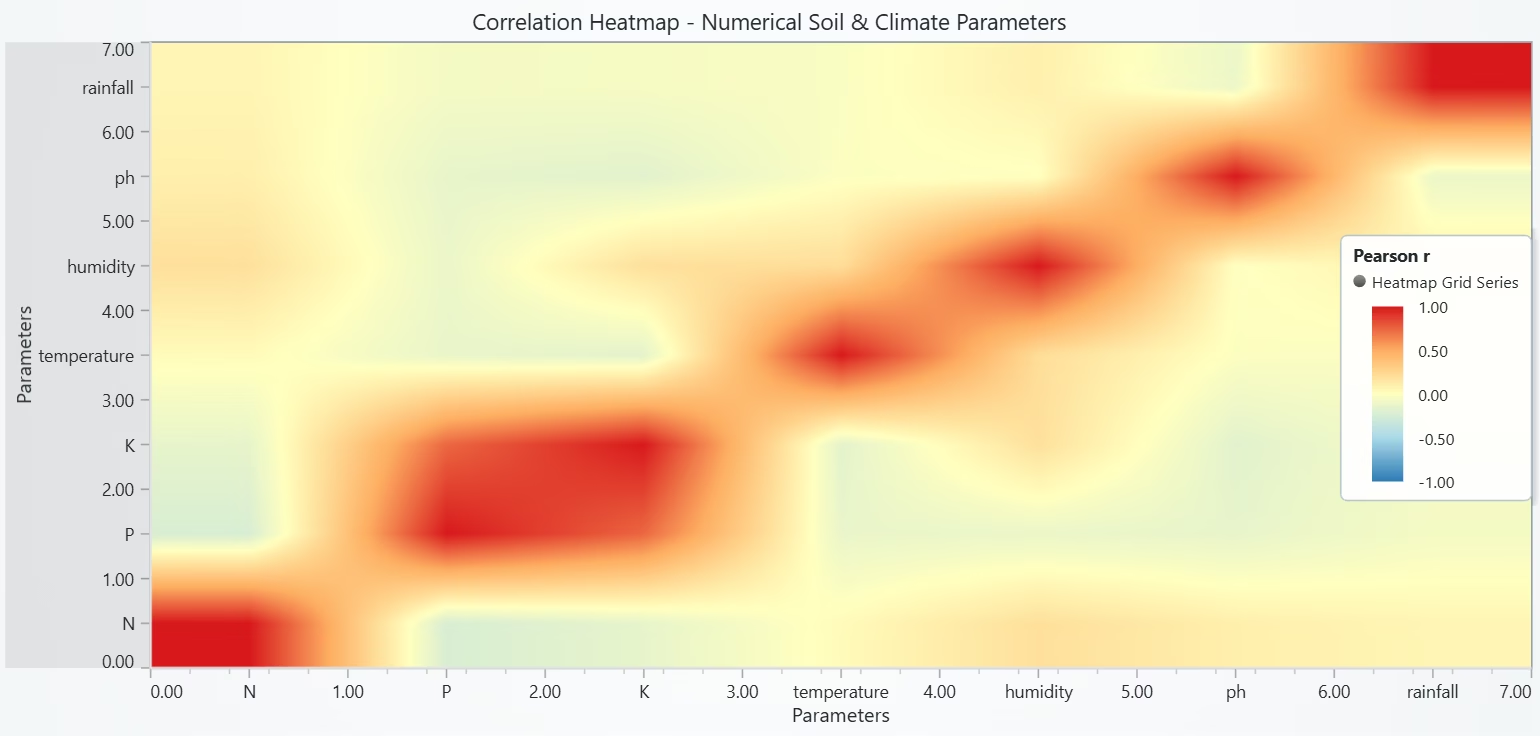
# Chart 5 - Correlation Heatmap of Numerical Soil & Climate Parameters
# Developed with AI assistance to demonstrate LightningChart Python

import lightningchart as lc
import numpy as np
import pandas as pd

# License
with open("D:/HAMK/Internship/MyProjects/lc_license.txt", "r") as f:
    lc.set_license(f.read().strip())

# Select numeric columns (exclude labels)
num_df = crd.select_dtypes(include="number").copy()
cols = list(num_df.columns)
if len(cols) < 2:
    raise ValueError("Not enough numeric columns for correlation heatmap.")

# Pearson correlation matrix in [-1, 1]
corr = num_df.corr().astype(float).values
n = corr.shape[0]

# Chart
chart = lc.ChartXY(
    title="Correlation Heatmap - Numerical Soil & Climate Parameters",
    theme=lc.Themes.Light,
    html_text_rendering=True
)

# Heatmap grid sized to correlation matrix
heatmap = chart.add_heatmap_grid_series(columns=n, rows=n)

# Each cell is 1 unit wide/high; map matrix indices [0..n] to axes
heatmap.set_start(x=0, y=0)
heatmap.set_end(x=float(n), y=float(n))
heatmap.set_step(x=1, y=1)
heatmap.set_intensity_interpolation(True)
heatmap.hide_wireframe()

# Feed correlation values
heatmap.invalidate_intensity_values(corr.tolist())

# Diverging palette centered at 0 (blue → white → red)
palette = [
    {"value": -1.0, "color": ("#2c7bb6")},   # strong negative
    {"value": -0.5, "color": ("#abd9e9")},
    {"value":  0.0, "color": ("#ffffbf")},   # neutral
    {"value":  0.5, "color": ("#fdae61")},
    {"value":  1.0, "color": ("#d7191c")},   # strong positive
]
heatmap.set_palette_coloring(steps=palette, look_up_property="value", interpolate=True)

# Axis titles
x_axis = chart.get_default_x_axis(); x_axis.set_title("Parameters")
y_axis = chart.get_default_y_axis(); y_axis.set_title("Parameters")

# Put parameter names as custom ticks at cell centers (i + 0.5)
# (Works without AxisTickStrategies in your setup.)
x_centers = [i + 0.5 for i in range(n)]
y_centers = [i + 0.5 for i in range(n)]
x_axis.set_interval(0.0, float(n))
y_axis.set_interval(0.0, float(n))

# Try to hide default numeric ticks if supported
for maybe in ('set_tick_strategy_empty', 'setTickStrategyEmpty'):
    if hasattr(x_axis, maybe): getattr(x_axis, maybe)()
    if hasattr(y_axis, maybe): getattr(y_axis, maybe)()

# Add custom ticks (wrap names if needed)
for pos, name in zip(x_centers, cols):
    t = x_axis.add_custom_tick(); t.set_value(float(pos)); t.set_text(str(name).replace(" ", "\n"))
for pos, name in zip(y_centers, cols):
    t = y_axis.add_custom_tick(); t.set_value(float(pos)); t.set_text(str(name).replace(" ", "\n"))

# Legend
chart.add_legend(data=heatmap).set_title("Pearson r")

chart.open()
Correlation Heatmap of all Numerical Soil Parameters
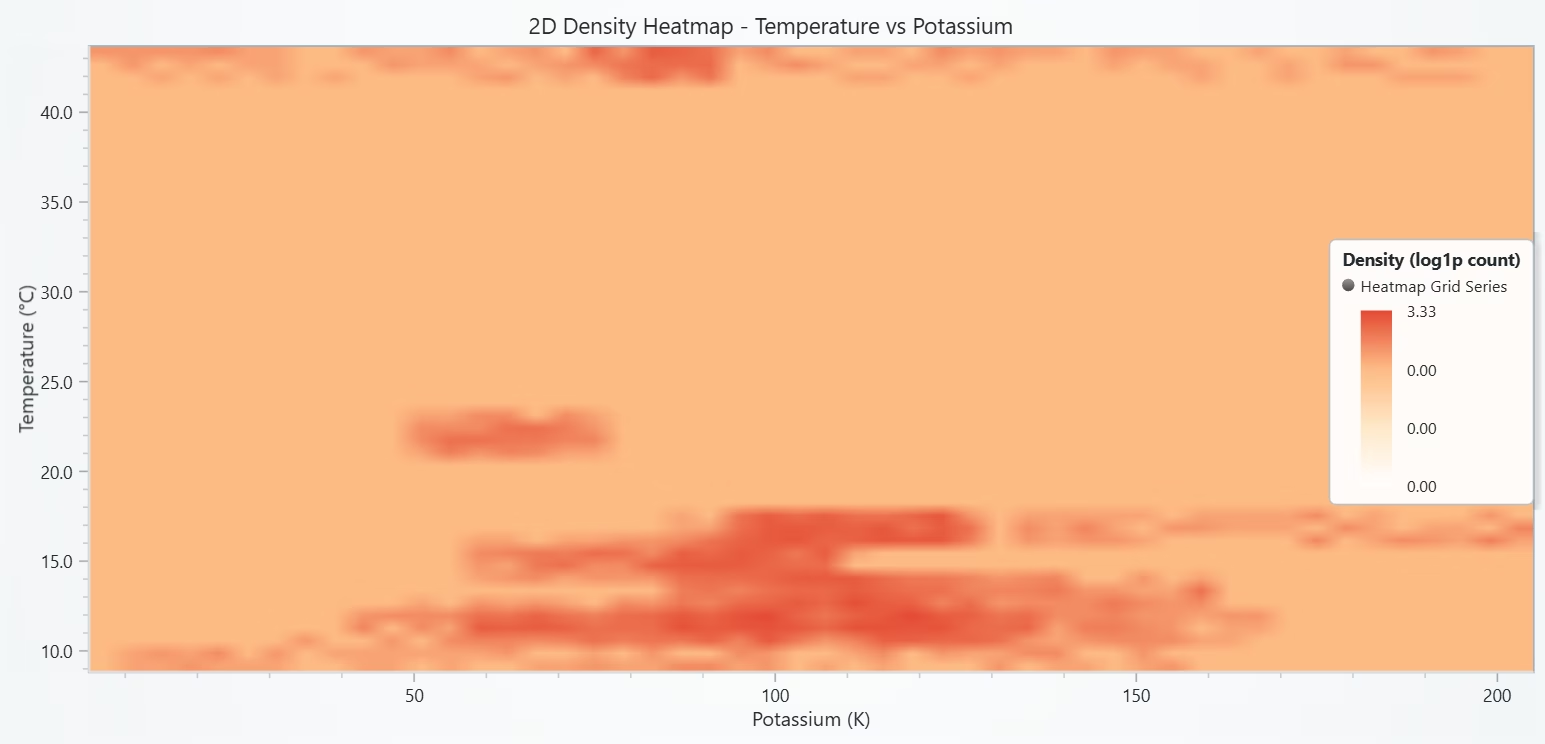
# Chart 5 - 2D Density Heatmap: Temperature vs Potassium
# Developed with AI assistance to demonstrate LightningChart Python

import lightningchart as lc
import numpy as np
import pandas as pd

# License
with open("D:/HAMK/Internship/MyProjects/lc_license.txt", "r") as f:
    lc.set_license(f.read().strip())

# Data (drop NaNs)
df = crd[['temperature', 'K']].dropna().astype(float)
x = df['temperature'].values
y = df['K'].values
if len(x) == 0:
    raise ValueError("No temperature/K data for density heatmap.")

# Bin to 2D histogram (adjust bins for resolution/perf)
BINS_X, BINS_Y = 50, 50
# histogram2d returns H with shape (x_bins, y_bins) when bins=[xedges, yedges] — we’ll transpose for (rows, cols) as needed
H, x_edges, y_edges = np.histogram2d(x, y, bins=[BINS_X, BINS_Y])

# Optional: log-scale to emphasize sparse structure
H = np.log1p(H)   # comment out to use raw counts

rows, cols = H.shape  # rows = BINS_X, cols = BINS_Y

# Chart
chart = lc.ChartXY(
    title="2D Density Heatmap - Temperature vs Potassium",
    theme=lc.Themes.Light,
    html_text_rendering=True
)

hm = chart.add_heatmap_grid_series(columns=cols, rows=rows)  # note: columns = along Y, rows = along X

# Map histogram bin edges to axis coordinates
x0, x1 = float(x_edges[0]), float(x_edges[-1])
y0, y1 = float(y_edges[0]), float(y_edges[-1])

hm.set_start(x=y0, y=x0)     # careful: series columns map to X-axis → we place Y on X-axis for correct orientation
hm.set_end(x=y1, y=x1)
hm.set_step(x=(y1 - y0) / cols, y=(x1 - x0) / rows)
hm.set_intensity_interpolation(True)
hm.hide_wireframe()

# Feed intensities; ensure shape matches (rows, cols)
hm.invalidate_intensity_values(H.tolist())

# Palette from low density (white) to high (red)
palette = [
    {"value": float(np.min(H)), "color": ("#ffffff")},
    {"value": float(np.percentile(H, 50)), "color": ("#fee8c8")},
    {"value": float(np.percentile(H, 75)), "color": ("#fdbb84")},
    {"value": float(np.max(H)), "color": ("#e34a33")},
]
hm.set_palette_coloring(steps=palette, look_up_property="value", interpolate=True)

# Axes titles
x_axis = chart.get_default_x_axis(); x_axis.set_title("Potassium (K)")     # X shows the second variable (y_edges)
y_axis = chart.get_default_y_axis(); y_axis.set_title("Temperature (°C)")  # Y shows the first variable (x_edges)

# Ranges for neat framing
x_axis.set_interval(y0, y1)
y_axis.set_interval(x0, x1)

# Legend
chart.add_legend(data=hm).set_title("Density (log1p count)")

chart.open()
Conclusion
The analysis shows that crop performance is strongly influenced by both soil nutrients (N, P, K, pH) and climate conditions (temperature, humidity, rainfall).
- Nitrogen and phosphorus vary across crops, reflecting specific nutrient requirements.
- Potassium and pH affect crop yield within optimal ranges.
- Balanced temperature and humidity support productivity better than extremes.
- Rainfall alone is not a clear indicator but becomes important when combined with soil nutrients.
Overall, crop growth depends on the interaction of multiple factors rather than any single parameter, highlighting the importance of integrated soil and climate management for sustainable agriculture.
Continue learning with LightningChart
React Charting Performance
Here's a scenario that plays out across development teams every few months. Someone builds a React dashboard, picks Recharts or Victory because they're popular, the devs love them, and the first demo looks great. Then the dataset gets bigger. Or the data starts...
Javascript Charting Library comparison 2026
Every year someone publishes a listicle of JavaScript charting libraries. They screenshot a demo, note the GitHub stars, paste in the npm install command, and call it a day. Then you follow their recommendation, get six months into your project, and discover that your...

Visualizing 10 Million Data Points in the Browser (2026): The Technical Deep-Dive
Ten Million Data Points in the Browser: How WebGL Makes Mass Datasets Interactive Ten million data points. That number used to mean a database problem, not a front-end problem. Now research teams want to explore it interactively in a browser. Trading desks want...



If you have any questions, feel free to contact us!
©LightningChart Ltd 2025. All rights reserved.