








Conducting a Cardiotocography Analysis in Python with LightningChart
Tutorial
Assisted by AI
Learn to perform a detailed cardiotocography analysis in Python with LightningChart, enhancing your data interpretation skills effectively.
Vindya Nukulasooriya
Data Science Developer

Introduction
This cardiotocography analysis aims to analyze and visually interpret the Cardiotocography (CTG) dataset using high-performance, interactive visualizations from the LightningChart Python library. The CTG dataset consists of physiological measurements collected from fetal monitoring sessions, including features such as baseline fetal heart rate (LB), uterine contractions (UC), and various variability metrics (eg, ASTV, ALTV).
By leveraging advanced chart types such as 3D surface plots, radar charts, bubble charts, and stacked bar charts, this project provides a clinically meaningful understanding of how different fetal health indicators relate to the final diagnostic class, known as NSP (Normal, Suspect, Pathologic). The visualizations support both exploratory cardiotocography analysisand potential clinical decision-making by offering clear insight into fetal condition patterns.
Project Overview
Introduction to the Project
This project utilizes the Cardiotocography (CTG) dataset to perform medical feature visualization and classification insight analysis for understanding fetal heart rate behaviour and fetal health outcomes. The dataset contains clinical recordings of fetal heart rate (FHR), uterine contractions (UC), and variability measures collected during non-stress tests from pregnant patients.
LightningChart Python is used exclusively to visualize different aspects of this clinical dataset. Known for its real-time rendering speed, interactivity, and ability to handle large-scale multidimensional data, LightningChart is ideal for exploring physiological data with both statistical and diagnostic relevance.
Objectives
- Visualize fetal heart rate and contraction trends across the dataset
- Analyze statistical distributions of key variability features (ASTV, ALTV, etc.)
- Explore multivariate relationships between features and NSP class
Deliverable
The project presents 10 distinct chart types, each highlighting specific feature patterns or class-based insights to demonstrate the flexibility of LightningChart Python and its usefulness for clinical data analysis.
Tools Used
Python 3.13.0, LightningChart Python, Jupyter Notebook, AI Assistance
About the Dataset
The Cardiotocography (CTG) dataset includes 2,126 samples of fetal health monitoring data, recorded during routine antenatal (during pregnancy) exams. Each sample represents a summary of FHR signal patterns and uterine activity features, along with a final diagnostic class label (NSP).
LightningChart Python
LightningChart Python is a high-performance data visualization library designed for fast, interactive, and visually rich charting. It supports both 2D and 3D visualization, making it an excellent choice for handling large, complex datasets like environmental monitoring data.
For this project, LightningChart is used to create visualizations for a cardiotocography analysis. Its speed and interactivity make it ideal for exploring trends and draw meaningful conclusions from the data.

Setting Up Python Environment
Before running the project, install Python and the other required libraries using:
%pip install numpy pandas lightningchartOverview of Libraries Used:
- Pandas: for data handling and time-based grouping
- Numpy: for numerical operations
- LightningChart: for high-performance visualization
- scipy.interpolate: for interpolating baseline FHR values across accelerations and uterine contractions
Setting Up Your Development Environment:
- Set up a virtual environment:
- Use Visual Studio Code (VSCode) for a streamlined development experience.
Loading and Preprocessing Data
To create this China Water Pollution Monitoring Application, we will fetch the China water pollution data using the following function:
Downloaded the dataset from - - https://archive.ics.uci.edu/dataset/193/cardiotocographyTo preprocess the dataset, we will import the pandas library:
# Import necessary libraries (load pandas library to preprocess dataset)
import pandas as pd
Visualizing Data with LightningChart Python
To effectively create the cardiotocography analysis, I have selected five distinct chart types available in the LightningChart Python library.
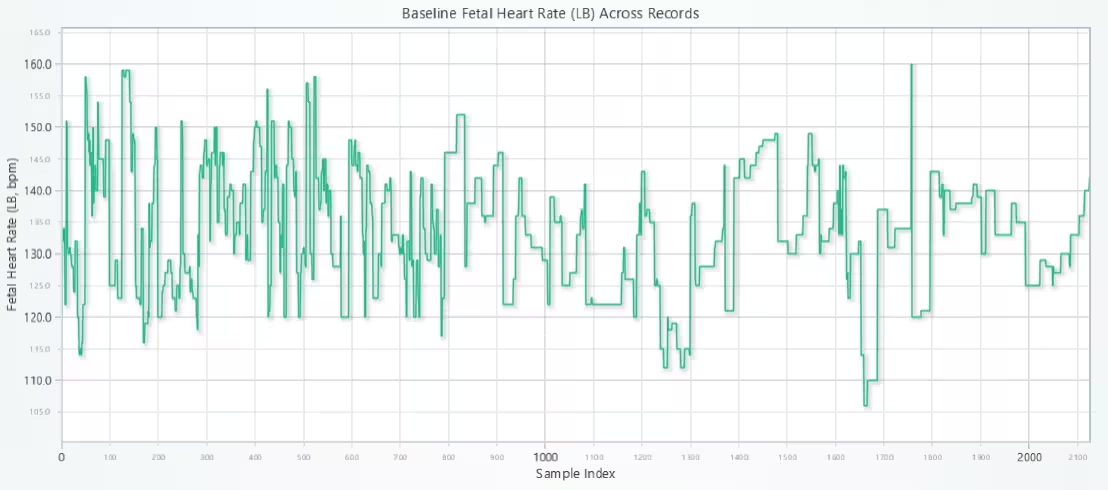
Line Chart: Baseline Fetal Heart Rate (LB) Across Records
This chart displays the Baseline Fetal Heart Rate (FHR) values (feature: LB) for each individual observation or patient record in the CTG dataset.
# Line Chart: Baseline Fetal Heart Rate (LB) Across Records
# Developed with AI assistance to showcase the performance of LightningChart Python libraries.

import lightningchart as lc

# Load license key
with open("D:/Vindy/HAMK/Internship/MyProjects/lc_license.txt", "r") as f:
    license_key = f.read().strip()

lc.set_license(license_key)

# Clean and prepare data
cd_lb_clean = cd_filtered[['LB']].dropna()
x_values = list(range(len(cd_lb_clean)))
y_values = cd_lb_clean['LB'].tolist()

# Create chart
chart = lc.ChartXY(
    theme=lc.Themes.Light,
    title='Baseline Fetal Heart Rate (LB) Across Records'
)

# Add line series
series = chart.add_line_series()
series.append_samples(x_values=x_values, y_values=y_values)

# Get axes
x_axis = chart.get_default_x_axis()
y_axis = chart.get_default_y_axis()

# Set axis intervals
x_axis.set_interval(0, len(x_values))
y_axis.set_interval(min(y_values) - 5, max(y_values) + 5)

# Set axis labels
x_axis.set_title("Sample Index")
y_axis.set_title("Fetal Heart Rate (LB, bpm)")

# Open chart
chart.open()
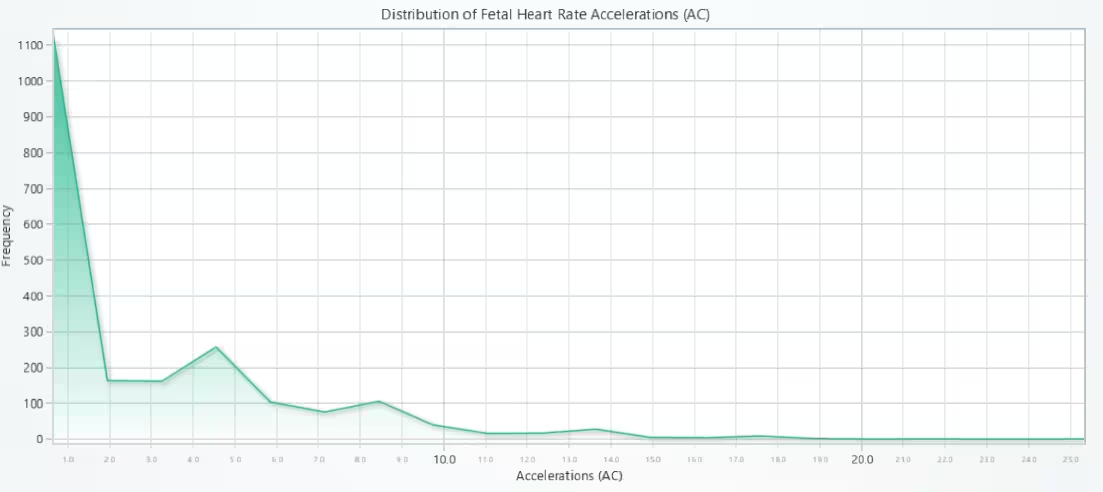
Histogram-style Area Chart: Distribution of Fetal Heart Rate Accelerations (AC)
This chart shows the distribution of the AC feature, which represents the number of fetal heart rate accelerations per second. It is visualized as a histogram-style Area Chart.
# Histogram-style Area Chart - Distribution of Fetal Heart Rate Accelerations (AC)
# Developed with AI assistance to showcase the performance of LightningChart Python libraries.

import lightningchart as lc
import numpy as np

# Load license key
with open("D:/Vindy/HAMK/Internship/MyProjects/lc_license.txt", "r") as f:
    license_key = f.read().strip()

lc.set_license(license_key)

# Get clean AC values
ac_values = cd_filtered['AC'].dropna().tolist()

# Bin the data using numpy
counts, bin_edges = np.histogram(ac_values, bins=20)
bin_centers = 0.5 * (bin_edges[:-1] + bin_edges[1:])

# Create chart
chart = lc.ChartXY(
    theme=lc.Themes.Light,
    title='Distribution of Fetal Heart Rate Accelerations (AC)'
)

# Add area series and use .add() to supply histogram data
area_series = chart.add_area_series()
area_series.add(bin_centers.tolist(), counts.tolist())

# Set axis titles
chart.get_default_x_axis().set_title("Accelerations (AC)")
chart.get_default_y_axis().set_title("Frequency")

# Open chart
chart.open()
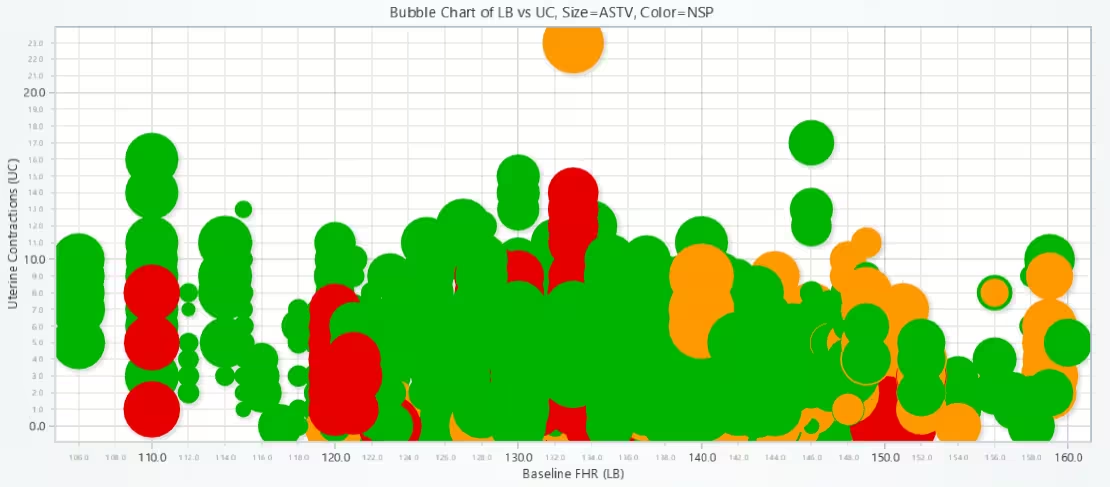
Bubble Chart: Baseline FHR vs Uterine Contractions (Size = ASTV, Color = NSP)
Visual comparison of log-scaled transformer loads to reveal subtle variations and feature dynamics over time.
# Bubble Chart - Baseline FHR vs Uterine Contractions (Size = ASTV, Color = NSP)
# Developed with AI assistance to showcase the performance of LightningChart Python libraries.

import lightningchart as lc

# Load license key
with open("D:/Vindy/HAMK/Internship/MyProjects/lc_license.txt", "r") as f:
    license_key = f.read().strip()

lc.set_license(license_key)

# Load necessary CTG features
data = cd[['LB', 'UC', 'ASTV', 'NSP']].dropna()

# Extract features
x_values = data['LB'].tolist()          # x-axis
y_values = data['UC'].tolist()          # y-axis
sizes = data['ASTV'].tolist()           # bubble size
lookup_values = data['NSP'].tolist()    # class (for color)
rotations = [0] * len(data)             # unused, but required

# Create chart
chart = lc.ChartXY(
    theme=lc.Themes.Light,
    title='Bubble Chart of LB vs UC, Size=ASTV, Color=NSP'
)

# Add point series with bubbles
series = chart.add_point_series(
    sizes=True,
    rotations=True,
    lookup_values=True,
)

# Append the data
series.append_samples(
    x_values=x_values,
    y_values=y_values,
    sizes=sizes,
    lookup_values=lookup_values
)

# Enable color per point based on NSP
series.set_individual_point_color_enabled(True)

# Map NSP values to color
series.set_palette_point_coloring(
    steps=[
        {'value': 1, 'color': lc.Color('#00b300')},   # Normal
        {'value': 2, 'color': lc.Color('#ff9900')},   # Suspect
        {'value': 3, 'color': lc.Color('#e60000')}    # Pathologic
    ],
    look_up_property='value',
    percentage_values=False
)

# Axis labels
chart.get_default_x_axis().set_title("Baseline FHR (LB)")
chart.get_default_y_axis().set_title("Uterine Contractions (UC)")

# Open chart
chart.open()
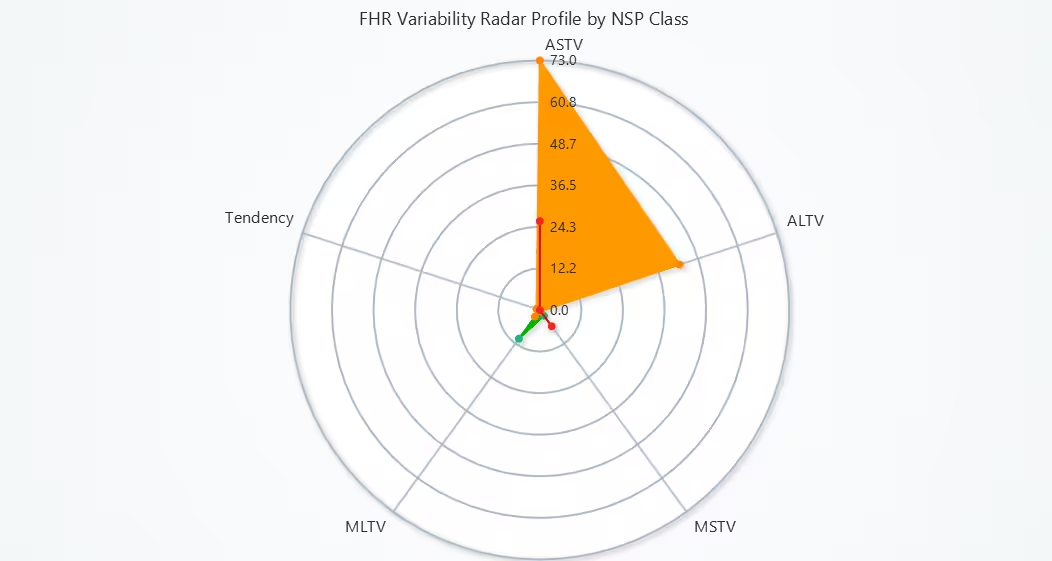
Radar (Spider) Chart: FHR Variability by NSP Class
This Radar (Spider) Chart compares the variability metrics of fetal heart rate (FHR) for three fetal health classes (NSP):
- Normal (1) – Green
- Suspect (2) – Orange
- Pathologic (3) – Red
It uses five key variability features:
- ASTV – % time with abnormal short-term variability
- ALTV – % time with abnormal long-term variability
- MSTV – Mean short-term variability
- MLTV – Mean long-term variability
- Tendency – Overall trend (up/down) in FHR
Each class is represented by one real patient sample.
# Radar(Spider) Chart - FHR Variability by NSP Class
# Developed with AI assistance to showcase the performance of LightningChart Python libraries.

import lightningchart as lc

# Load license key
with open("D:/Vindy/HAMK/Internship/MyProjects/lc_license.txt", "r") as f:
    license_key = f.read().strip()

lc.set_license(license_key)

# Define axes from full CTG data (not just filtered)
axes = ['ASTV', 'ALTV', 'MSTV', 'MLTV', 'Tendency']

# Pull from full dataset (cd) to include NSP and others
radar_data = cd[axes + ['NSP']].dropna()

# Take 1 sample from each NSP class
samples = []
for cls in [1, 2, 3]:  # Normal, Suspect, Pathologic
    sample = radar_data[radar_data['NSP'] == cls].iloc[0]
    samples.append(sample)

# Create the Spider Chart
chart = lc.SpiderChart(theme=lc.Themes.Light, title="FHR Variability Radar Profile by NSP Class")
chart.set_web_mode("circle")
chart.set_web_count(6)

# Add feature axes
for axis in axes:
    chart.add_axis(axis)

# Color and label maps
colors = {
    1: lc.Color('#00b300'),  # Green
    2: lc.Color('#ff9900'),  # Orange
    3: lc.Color('#e60000')   # Red
}
labels = {
    1: "Normal",
    2: "Suspect",
    3: "Pathologic"
}

# Add 3 series: one per NSP class
for sample in samples:
    nsp = int(sample['NSP'])
    values = sample[axes].tolist()
    points = [{'axis': axes[i], 'value': values[i]} for i in range(len(axes))]

    series = chart.add_series()
    series.set_name(labels[nsp])
    series.set_fill_color(colors[nsp])
    series.set_line_color(colors[nsp])
    series.add_points(points)

chart.open()
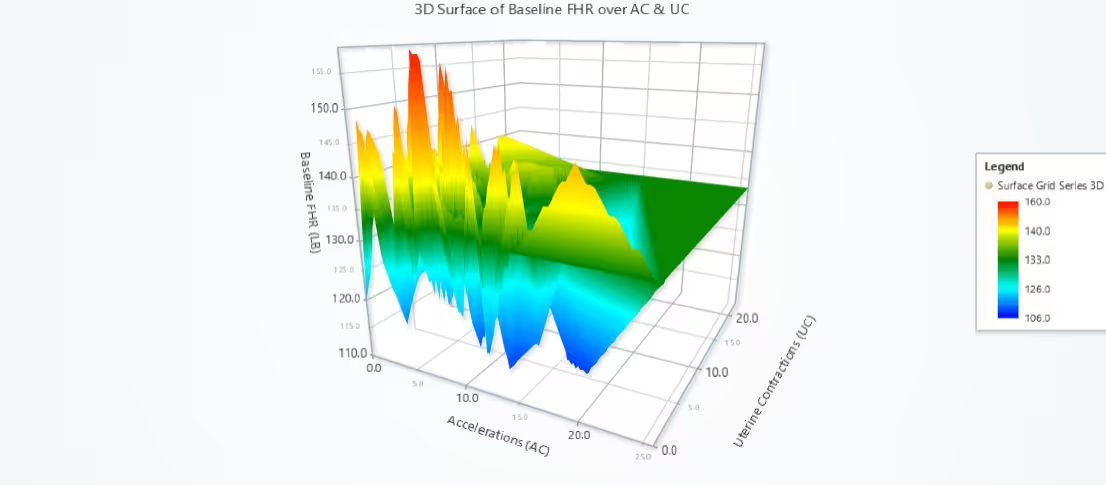
3D Surface Grid Chart: Baseline FHR over Accelerations and Uterine Contractions
This is a 3D Surface Grid Chart that models how Baseline Fetal Heart Rate (LB) varies in relation to:
- X-axis = AC (Accelerations per second)
- Y-axis (Height) = LB (Baseline FHR)
- Z-axis = UC (Uterine Contractions per second)
The surface visually interpolates the baseline heart rate over a 100×100 grid using linear interpolation based on real sample data.
# 3D Surface Grid Chart - Baseline FHR over Accelerations and Uterine Contractions
# Developed with AI assistance to showcase the performance of LightningChart Python libraries.

import lightningchart as lc
import numpy as np
from scipy.interpolate import griddata

# Load your license
with open("D:/Vindy/HAMK/Internship/MyProjects/lc_license.txt", "r") as f:
    license_key = f.read().strip()
lc.set_license(license_key)

# Use full dataset to include all columns
data = cd[['AC', 'UC', 'LB']].dropna()

# Prepare data arrays
x = data['AC'].values  # Accelerations
z = data['UC'].values  # Uterine Contractions
y = data['LB'].values  # Baseline FHR (mapped to height)

# Create a grid for interpolation
grid_x, grid_z = np.meshgrid(
    np.linspace(x.min(), x.max(), 100),
    np.linspace(z.min(), z.max(), 100)
)

# Interpolate y values (LB) over grid
grid_y = griddata(
    (x, z), y, (grid_x, grid_z), method='linear'
)

# Fill NaNs
grid_y[np.isnan(grid_y)] = np.nanmean(y)

# Create 3D Chart
chart = lc.Chart3D(
    theme=lc.Themes.Light,
    title='3D Surface of Baseline FHR over AC & UC'
)

# Add surface series
surface_series = chart.add_surface_grid_series(
    columns=grid_y.shape[1],
    rows=grid_y.shape[0]
)

# Set chart dimensions
surface_series.set_start(x=x.min(), z=z.min())
surface_series.set_end(x=x.max(), z=z.max())
surface_series.set_step(
    x=(x.max() - x.min()) / grid_y.shape[1],
    z=(z.max() - z.min()) / grid_y.shape[0]
)

# Set height map and intensity
surface_series.invalidate_height_map(grid_y.tolist())
surface_series.invalidate_intensity_values(grid_y.tolist())
surface_series.hide_wireframe()

# Palette for LB values
surface_series.set_palette_coloring(
    steps=[
        {"value": y.min(), "color": lc.Color('blue')},
        {"value": np.percentile(y, 25), "color": lc.Color('cyan')},
        {"value": np.median(y), "color": lc.Color('green')},
        {"value": np.percentile(y, 75), "color": lc.Color('yellow')},
        {"value": y.max(), "color": lc.Color('red')}
    ],
    look_up_property='value',
    percentage_values=False
)

# Axis labels
chart.get_default_x_axis().set_title("Accelerations (AC)")
chart.get_default_y_axis().set_title("Baseline FHR (LB)")
chart.get_default_z_axis().set_title("Uterine Contractions (UC)")

# Add legend
chart.add_legend(data=surface_series)

# Open chart
chart.open()
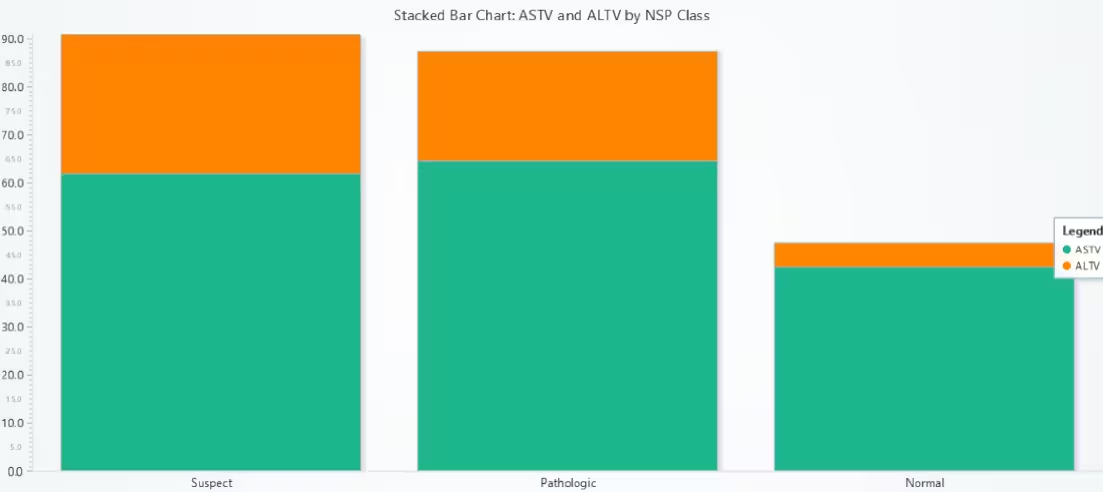
Stacked Bar Chart: ASTV and ALTV by NSP Class
This chart compares the mean values of two important FHR variability features across the three NSP classes:
- ASTV = Abnormal Short-Term Variability (in %)
- ALTV = Abnormal Long-Term Variability (in %)
Each bar represents a class of fetal condition:
- Normal (1)
- Suspect (2)
- Pathologic (3)
Each bar is stacked with:
- Bottom segment = Mean ASTV
- Top segment = Mean ALTV
# Stacked Bar Chart - ASTV and ALTV by NSP Class
# Developed with AI assistance to showcase the performance of LightningChart Python libraries.

import lightningchart as lc

# Load license key
with open("D:/Vindy/HAMK/Internship/MyProjects/lc_license.txt", "r") as f:
    license_key = f.read().strip()
lc.set_license(license_key)

# Prepare data from cd (original dataset)
grouped = cd[['NSP', 'ASTV', 'ALTV']].dropna().groupby('NSP').mean()

# Define categories
categories = ['Normal', 'Suspect', 'Pathologic']
astv_values = grouped['ASTV'].values.tolist()
altv_values = grouped['ALTV'].values.tolist()

# Create chart
chart = lc.BarChart(
    vertical=True,
    theme=lc.Themes.Light,
    title='Stacked Bar Chart: ASTV and ALTV by NSP Class'
)

# Add stacked data
chart.set_data_stacked(
    categories,
    [
        {'subCategory': 'ASTV', 'values': astv_values},
        {'subCategory': 'ALTV', 'values': altv_values},
    ]
)

# Hide value labels for cleaner look
chart.set_value_label_display_mode('hidden')

# Add legend
chart.add_legend().add(chart)

# Show chart
chart.open()
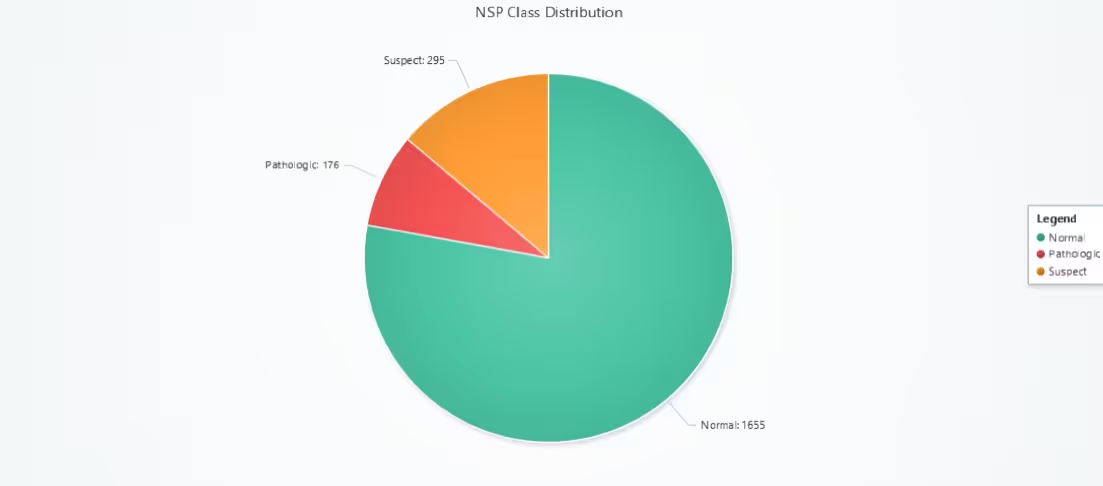
Pie Chart: NSP Class Distribution
This Pie Chart illustrates the distribution of fetal health conditions (NSP) in the CTG dataset, showing the proportion of:
- Normal (NSP = 1)
- Suspect (NSP = 2)
- Pathologic (NSP = 3)
Each pie slice represents one class, sized proportionally to its frequency in the dataset.
# Pie Chart - NSP Class Distribution
# Developed with AI assistance to showcase the performance of LightningChart Python libraries.

import lightningchart as lc

# Load license key
with open("D:/Vindy/HAMK/Internship/MyProjects/lc_license.txt", "r") as f:
    license_key = f.read().strip()
lc.set_license(license_key)

# Prepare NSP class counts from full dataset
nsp_counts = cd['NSP'].value_counts().sort_index()

# Map class names
label_map = {
    1: 'Normal',
    2: 'Suspect',
    3: 'Pathologic'
}

# Build data for pie chart
data = [
    {'name': label_map[nsp], 'value': int(count)}
    for nsp, count in nsp_counts.items()
]

# Create the pie chart
chart = lc.PieChart(
    title='NSP Class Distribution',
    theme=lc.Themes.Light
)

# Set white stroke between slices
chart.set_slice_stroke(color=lc.Color('white'), thickness=1)

# Add data slices
chart.add_slices(data)

# Add legend
chart.add_legend(data=chart)

# Open chart
chart.open()
Gauge Chart: Mean ASTV Level
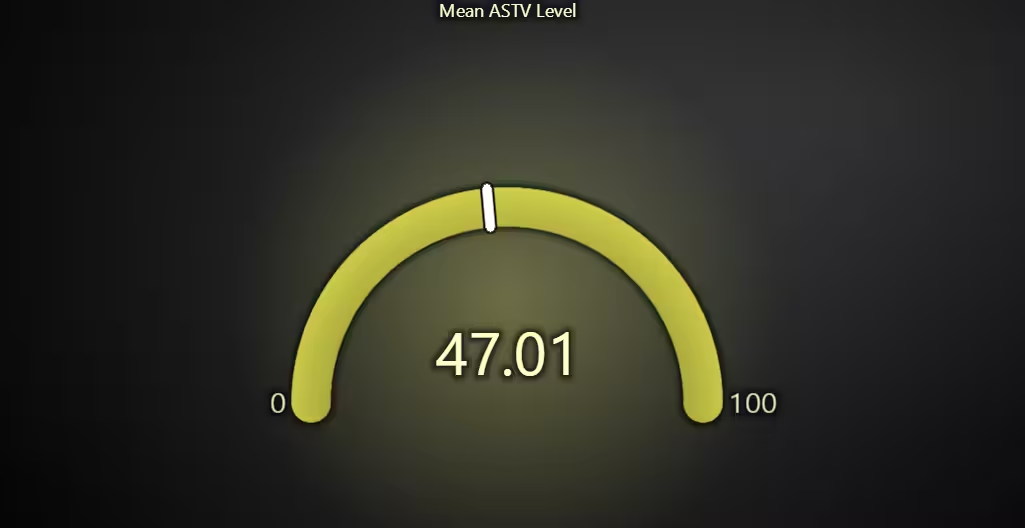
This chart visualizes the average value of ASTV across the entire CTG dataset using a semi-circular gauge.
- ASTV (Abnormal Short-Term Variability) is a key indicator of fetal heart rate behaviour and health.
- The gauge gives a quick-glance metric showing where the average ASTV falls within the clinically relevant 0–100% range.
# Gauge Chart - Mean ASTV Level
# Developed with AI assistance to showcase the performance of LightningChart Python libraries.

import lightningchart as lc

# Load license key
with open("D:/Vindy/HAMK/Internship/MyProjects/lc_license.txt", "r") as f:
    license_key = f.read().strip()
lc.set_license(license_key)

# Compute average ASTV (drop NaNs if any)
mean_astv = cd['ASTV'].dropna().mean()

# Create the gauge chart
chart = lc.GaugeChart(
    theme=lc.Themes.Dark,
    title='Mean ASTV Level'
)

# Set the angle of the gauge
chart.set_angle_interval(start=180, end=0)

# Set value interval based on observed ASTV range (0–100 by definition)
chart.set_interval(start=0, end=100)

# Set the computed ASTV value
chart.set_value(round(mean_astv, 2))

# Show the chart
chart.open()
Gauge Chart: Median ASTV Level
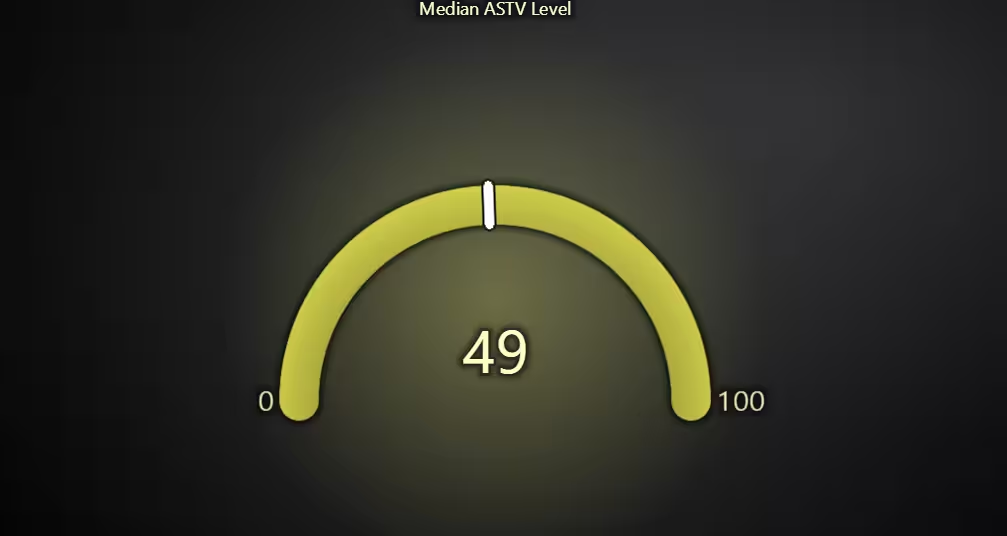
This chart displays the median value of ASTV (Abnormal Short-Term Variability) using a semi-circular gauge. This chart focuses on the central tendency that is less sensitive to outliers, especially important in clinical data that may be skewed.
# Gauge Chart - Median ASTV Level
# Developed with AI assistance to showcase the performance of LightningChart Python libraries.

import lightningchart as lc

# Load license key
with open("D:/Vindy/HAMK/Internship/MyProjects/lc_license.txt", "r") as f:
    license_key = f.read().strip()
lc.set_license(license_key)

# Compute median ASTV (drop NaNs if any)
median_astv = cd['ASTV'].dropna().median()

# Create the gauge chart
chart = lc.GaugeChart(
    theme=lc.Themes.Dark,
    title='Median ASTV Level'
)

# Set the angle of the gauge
chart.set_angle_interval(start=180, end=0)

# Set value interval based on observed ASTV range (0–100 by definition)
chart.set_interval(start=0, end=100)

# Set the computed ASTV value
chart.set_value(round(median_astv, 2))

# Show the chart
chart.open()
Funnel Chart: ASTV Decile (Interval) Distribution
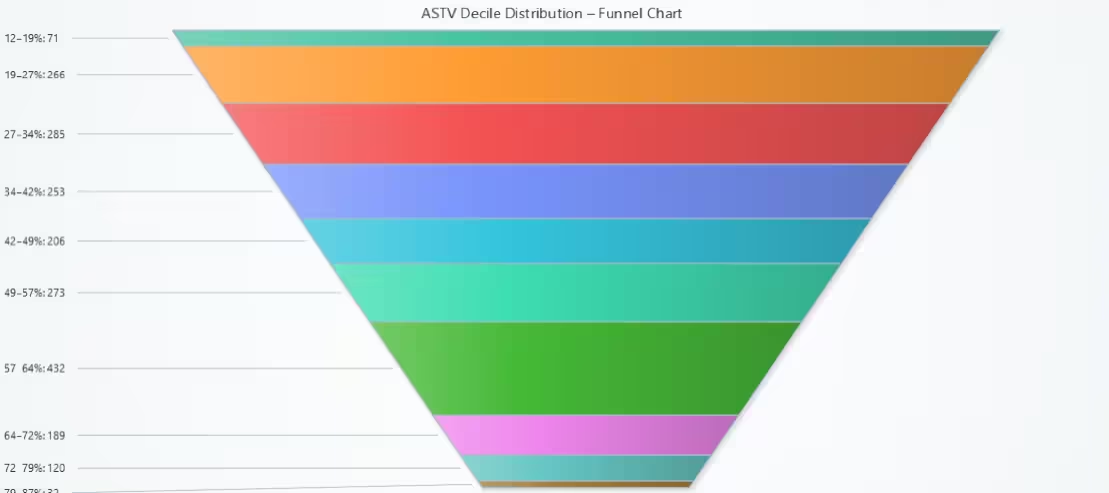
This chart displays the distribution of ASTV (Abnormal Short-Term Variability) values across 10 equal-width intervals (deciles) using a Funnel Chart. Each funnel slice represents a specific ASTV percentage range, and its height corresponds to the number of CTG samples that fall within that range.
# Funnel Chart - ASTV Decile(Interval) Distribution
# Developed with AI assistance to showcase the performance of LightningChart Python libraries.

import lightningchart as lc
import numpy as np

# Load license key
with open("D:/Vindy/HAMK/Internship/MyProjects/lc_license.txt", "r") as f:
    license_key = f.read().strip()
lc.set_license(license_key)

# Get ASTV values
astv_values = cd['ASTV'].dropna()

# Bin into deciles
counts, bins = np.histogram(astv_values, bins=10)

# Prepare funnel data
funnel_data = []
for i in range(len(counts)):
    label = f"{int(bins[i])}–{int(bins[i+1])}%"
    funnel_data.append({'name': label, 'value': int(counts[i])})

# Create funnel chart
chart = lc.FunnelChart(
    slice_mode='height',
    theme=lc.Themes.Light,
    title='ASTV Decile Distribution : Funnel Chart'
)
chart.add_slices(funnel_data)
chart.open()
Conclusion
This cardiotocography analysis successfully explored and visualized the Cardiotocography (CTG) dataset using the LightningChart Python library, focusing on fetal heart rate (FHR), uterine contractions (UC), and short-term and long-term variability indicators. A total of 10 clinically relevant and visually diverse charts were developed, offering both statistical insight and medical interpretability.
Continue learning with LightningChart
Ionic app development
Written by a human | Updated on April 10th, 2025Beginning Ionic App Development with Capacitor, Angular & LightningChart JS [This is the second part of the article "Data Visualization with Ionic Capacitor, Angular & JS Charts (Part 1)"] In the previous...
Ionic Capacitor
Learn how to use Ionic Capacitor for data visualization and build a mobile charting application with Angular & LightningChart JS
Create a JavaScript Pie Chart with NodeJS, TypeScript & LightningChart
Written by a human | Updated on April 10th, 2025JavaScript Pie Chart with NodeJS & TypeScript Today, we are going to do a short tutorial on how to generate a pie chart using Node JS, TypeScript, and LigningCharts JS. To see how to get LightningChart JS for...



If you have any questions, feel free to contact us!
©LightningChart Ltd 2025. All rights reserved.