





Bankruptcy Prediction Data Visualization Analysis With LightningChart Python
Tutorial
Assisted by AI
Explore how to leverage LightningChart in Python for effective bankruptcy prediction and improve your financial analysis skills.
Vindya Nukulasooriya
Data Science Developer

Introduction
This project delivers a comprehensive financial visualization analysis using the Taiwanese Bankruptcy Prediction Dataset and the high-performance LightningChart Python library. The dataset, sourced from the UCI Machine Learning Repository, contains anonymized financial ratios and performance indicators of companies over time. Each company is labelled as either bankrupt or non-bankrupt, enabling a wide range of comparative and predictive insights.
The primary objective of this project is to uncover financial red flags, trends, and patterns that signal a company’s trajectory toward bankruptcy. By transforming raw numerical indicators into intuitive visualizations, we aim to support early detection and risk profiling strategies relevant to financial analysts, auditors, and policy makers.
To achieve this, LightningChart Python was selected for its unmatched performance in rendering complex visuals, interactive features, and ability to handle multidimensional data efficiently.
Project Overview
To develop a curated set of up to 08 interactive chart examples using LightningChart Python, focusing on key financial indicators and behavioural metrics that distinguish bankrupt from non-bankrupt companies.
Objectives
- To explore and visualize bankruptcy-related trends using key financial ratios from the Taiwanese Bankruptcy Prediction dataset.
- To identify correlations among profitability metrics such as ROA variants, gross margin, and non-industry income ratios.
- To analyze differences in financial health across bankrupt and non-bankrupt companies.
- To demonstrate the analytical power and versatility of LightningChart Python in financial risk visualization and bankruptcy prediction contexts.
Deliverables
- Up to 8 professional-grade interactive visualizations developed exclusively with LightningChart Python, focused on indicators of corporate bankruptcy.
- Well-documented Python code and per-chart explanations for each visualization.
- Insightful analytical summaries highlighting patterns in financial ratios such as ROA, operating margins, and non-industry income relationships across bankruptcy classes.
- A conclusion reflecting on the advantages of LightningChart Python in financial analytics, showcasing how it supports bankruptcy risk assessment and corporate finance decision-making.
Tools Used
Python 3.13.5, LightningChart Python, Jupyter Notebook, AI Assistance
About the Dataset
The dataset originates from a corporate financial study focused on bankruptcy prediction among Taiwanese companies. It contains 6,819 firm-year financial records, each labelled with a binary outcome indicating whether the company eventually went bankrupt (1) or remained solvent (0).
Each record includes a diverse set of financial ratios and performance metrics, such as various Return on Assets (ROA) measures, operating profit rates, gross margins, net worth ratios, non-industry income proportions, and interest rate indicators. These features span multiple dimensions of corporate health and profitability, enabling detailed financial risk analysis.
This dataset supports a rich exploration of patterns that differentiate bankrupt companies from financially stable ones, particularly in terms of profitability, financial leverage, and operational efficiency which makes it ideal for visualization and analytical modeling of bankruptcy risk.
LightningChart Python
LightningChart Python is a high-performance data visualization library designed for ultra-fast rendering, real-time interactivity, and precision-driven output. Supporting both 2D and 3D graphics, it is especially effective for behavioural, categorical, and time-series datasets, where high responsiveness and visual clarity are essential for uncovering patterns, correlations, and actionable insights.

Setting Up Python Environment
Before running the project, install Python and the other required libraries using:
%pip install numpy pandas lightningchartOverview of Libraries Used:
- Pandas: for data handling and time-based grouping
- Numpy: for numerical operations
- LightningChart: for high-performance visualization
Setting Up Your Development Environment:
- Set up a virtual environment:
- Use Visual Studio Code (VSCode) for a streamlined development experience.
Loading and Preprocessing Data
To create this China Water Pollution Monitoring Application, we will fetch the China water pollution data using the following function:
Downloaded the dataset from https://archive.ics.uci.edu/dataset/572/taiwanese+bankruptcy+prediction To preprocess the dataset, we will import the pandas library:
# Import necessary libraries (load pandas library to preprocess dataset)
import pandas as pd
Visualizing Data with LightningChart Python
Bankruptcy prediction is critical for assessing financial risk and ensuring business stability. This analysis focuses on key profitability and financial indicators to uncover patterns linked to bankruptcy. We aim to answer:
- What is the distribution of Bankrupt? status in relation to profitability metrics like Operating Gross Margin and Operating Profit Rate?
- How do different ROA measures (ROA(C), ROA(A), ROA(B)) correlate, and do they show distinct patterns for bankrupt versus non-bankrupt firms?
- What is the relationship between Non-industry income/expenditure and profitability? Do companies with higher non-industry income exhibit different profiles?
- How do profitability and interest rate metrics evolve over time for companies that eventually go bankrupt
Insights from these questions will strengthen bankruptcy prediction models and improve financial risk management.
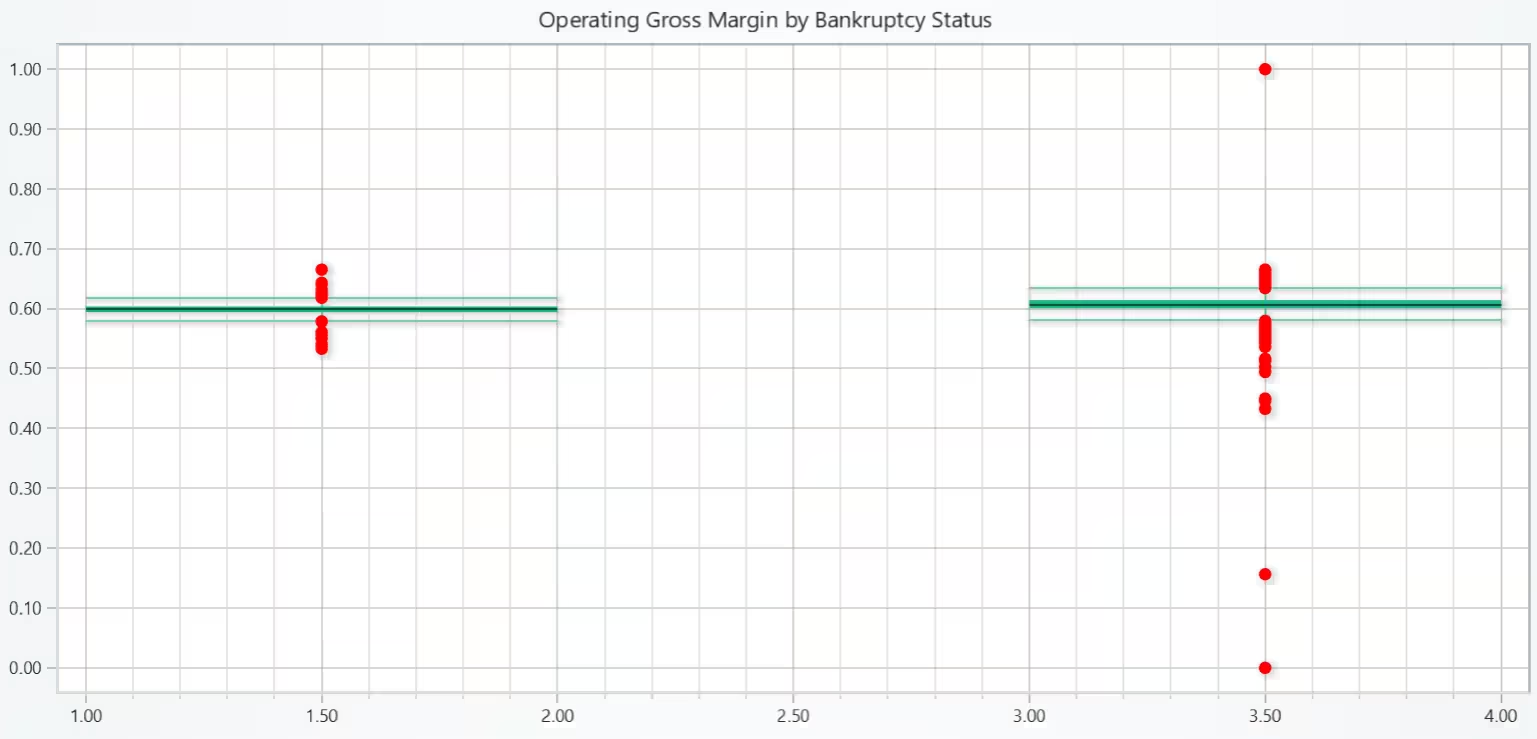
Operating Gross Margin by Bankruptcy Status – Box Plot
A box-and-whisker plot was used to display the distribution of Operating Gross Margin for both classes. Each box shows the interquartile range (IQR), with whiskers extending to min/max within 1.5×IQR. Outliers (extreme values) are shown as red dots, helping detect anomalies in either group.
# Chart 1 – Operating Gross Margin by Bankruptcy Status (Box Plot)
# Developed with AI assistance to demonstrate LightningChart Python

import lightningchart as lc
import numpy as np
import pandas as pd

# Load LightningChart license
with open("D:/HAMK/Internship/MyProjects/lc_license.txt", "r") as f:
    license_key = f.read().strip()

lc.set_license(license_key)

# Load and clean dataset
tbpd = pd.read_csv("TaiwaneseBankruptcyPredictionData.csv", encoding='ISO-8859-1')
tbpd.columns = tbpd.columns.str.strip()

# Prepare categories: 1 = Bankrupt, 0 = Non-Bankrupt
categories = ['Bankrupt', 'Non-Bankrupt']
category_data = {
    'Bankrupt': tbpd[tbpd['Bankrupt?'] == 1]['Operating Gross Margin'].tolist(),
    'Non-Bankrupt': tbpd[tbpd['Bankrupt?'] == 0]['Operating Gross Margin'].tolist()
}

# Create a chart
chart = lc.ChartXY(theme=lc.Themes.Light, title='Operating Gross Margin by Bankruptcy Status')

# Prepare box plot data
dataset = []
x_values_outlier = []
y_values_outlier = []

for i, category in enumerate(categories):
    column_data = category_data[category]

    start = (i * 2) + 1
    end = start + 1
    lowerQuartile = float(np.percentile(column_data, 25))
    upperQuartile = float(np.percentile(column_data, 75))
    median = float(np.median(column_data))

    # IQR for whiskers
    iqr = upperQuartile - lowerQuartile
    lower_bound = lowerQuartile - 1.5 * iqr
    upper_bound = upperQuartile + 1.5 * iqr

    non_outliers = [y for y in column_data if lower_bound <= y <= upper_bound]
    lowerExtreme = float(min(non_outliers))
    upperExtreme = float(max(non_outliers))

    dic = {
        'start': start,
        'end': end,
        'lowerQuartile': lowerQuartile,
        'upperQuartile': upperQuartile,
        'median': median,
        'lowerExtreme': lowerExtreme,
        'upperExtreme': upperExtreme,
    }
    dataset.append(dic)

    # Identify and store outliers
    outliers = [y for y in column_data if y < lower_bound or y > upper_bound]
    for outlier in outliers:
        x_values_outlier.append(start + 0.5)
        y_values_outlier.append(outlier)

# Add box series to the chart
series = chart.add_box_series()
series.add_multiple(dataset)

# Add outliers
outlier_series = chart.add_point_series(sizes=True)
outlier_series.set_point_color('red')
outlier_series.append_samples(
    x_values=x_values_outlier,
    y_values=y_values_outlier,
    sizes=[10] * len(y_values_outlier),
)

# Show chart
chart.open()
Operating Profit Rate by Bankruptcy Status – Histogram
The histograms shows that non-bankrupt companies tend to have a higher frequency of positive Operating Profit Rate, with a broader spread toward higher values. In contrast, bankrupt companies are more concentrated around lower or even negative profit rates. This divergence indicates that lower operating profitability may be associated with a higher likelihood of bankruptcy.


# Chart 2 – Operating Profit Rate by Bankruptcy Status (2 Histograms)
# Developed with AI assistance to demonstrate LightningChart Python

import lightningchart as lc
import numpy as np
import pandas as pd

# Load LightningChart license
with open("D:/HAMK/Internship/MyProjects/lc_license.txt", "r") as f:
    license_key = f.read().strip()

lc.set_license(license_key)

# Load and clean dataset
tbpd = pd.read_csv("TaiwaneseBankruptcyPredictionData.csv", encoding='ISO-8859-1')
tbpd.columns = tbpd.columns.str.strip()

# Extract 'Operating Profit Rate' values by bankruptcy class
bankrupt_data = tbpd[tbpd['Bankrupt?'] == 1]['Operating Profit Rate'].tolist()
non_bankrupt_data = tbpd[tbpd['Bankrupt?'] == 0]['Operating Profit Rate'].tolist()

# Create shared histogram bins based on combined data
all_data = bankrupt_data + non_bankrupt_data
counts_all, bin_edges = np.histogram(all_data, bins=50)

# Prepare histogram data for Non-Bankrupt
counts_nb, _ = np.histogram(non_bankrupt_data, bins=bin_edges)
bar_data_nb = [
    {"category": f"{bin_edges[i]:.2f}–{bin_edges[i+1]:.2f}", "value": int(count)}
    for i, count in enumerate(counts_nb)
]

# Prepare histogram data for Bankrupt
counts_b, _ = np.histogram(bankrupt_data, bins=bin_edges)
bar_data_b = [
    {"category": f"{bin_edges[i]:.2f}–{bin_edges[i+1]:.2f}", "value": int(count)}
    for i, count in enumerate(counts_b)
]

# Chart 1: Non-Bankrupt companies
chart_nb = lc.BarChart(
    vertical=True,
    theme=lc.Themes.Light,
    title='Operating Profit Rate Histogram - Non-Bankrupt Companies'
)
chart_nb.set_data(bar_data_nb)
chart_nb.set_sorting('disabled')
chart_nb.set_bars_color('cyan')

# Chart 2: Bankrupt companies
chart_b = lc.BarChart(
    vertical=True,
    theme=lc.Themes.Light,
    title='Operating Profit Rate Histogram - Bankrupt Companies'
)
chart_b.set_data(bar_data_b)
chart_b.set_sorting('disabled')
chart_b.set_bars_color('magenta')

# Display both charts
chart_nb.open()
chart_b.open()
ROA Metric Correlation by Bankruptcy Status – Heatmap
Six heatmaps were generated: three for Non-Bankrupt companies and three for Bankrupt companies, each showing pairwise correlation between ROA metrics. The values were taken from pre-verified calculations to ensure accuracy and visual clarity. Color palettes range from blue (weaker correlation) to red (stronger correlation), providing a visual cue for quick interpretation.


# Chart 3 – Compute and display both correlation matrices (corr_b and corr_nb) for the three ROA columns
# Developed with AI assistance to demonstrate LightningChart Python

import lightningchart as lc
import numpy as np
import pandas as pd

# Load LightningChart license
with open("D:/HAMK/Internship/MyProjects/lc_license.txt", "r") as f:
    license_key = f.read().strip()

lc.set_license(license_key)

# Load dataset (if not already loaded)
tbpd = pd.read_csv("TaiwaneseBankruptcyPredictionData.csv", encoding='ISO-8859-1')
tbpd.columns = tbpd.columns.str.strip()

# Select relevant columns
roa_cols = [
    'ROA(C) before interest and depreciation before interest',
    'ROA(A) before interest and % after tax',
    'ROA(B) before interest and depreciation after tax'
]

# Filter bankrupt and non-bankrupt data
df_b = tbpd[tbpd['Bankrupt?'] == 1][roa_cols]
df_nb = tbpd[tbpd['Bankrupt?'] == 0][roa_cols]

# Compute correlation matrices
corr_b = df_b.corr()
corr_nb = df_nb.corr()

# Display results
print("Correlation Matrix - Bankrupt Companies:")
display(corr_b)

print("\nCorrelation Matrix - Non-Bankrupt Companies:")
display(corr_nb)
ROA Metric by Bankruptcy Status – 3D Scatter Chart
The chart visualizes how companies cluster in a 3D ROA space depending on bankruptcy status. Non-Bankrupt firms show a wide distribution and potentially consistent spread across all three ROA dimensions. Bankrupt firms appear more compressed in a smaller region, suggesting limited ROA variation or underperformance across all three metrics.


# Chart 4 – Two Separate 3D ROA Scatter Plots: Bankrupt vs. Non-Bankrupt
# Developed with AI assistance to demonstrate LightningChart Python

import lightningchart as lc
import pandas as pd

# Load LightningChart license
with open("D:/HAMK/Internship/MyProjects/lc_license.txt", "r") as f:
    license_key = f.read().strip()

lc.set_license(license_key)

# Load and clean dataset
tbpd = pd.read_csv("TaiwaneseBankruptcyPredictionData.csv", encoding='ISO-8859-1')
tbpd.columns = tbpd.columns.str.strip()

# Extract ROA columns and class
columns = [
    'ROA(C) before interest and depreciation before interest',
    'ROA(A) before interest and % after tax',
    'ROA(B) before interest and depreciation after tax',
    'Bankrupt?'
]
df = tbpd[columns].dropna()

# Split datasets
df_nb = df[df['Bankrupt?'] == 0]
df_b = df[df['Bankrupt?'] == 1]

# Function to create chart
def create_roa_3d_chart(data, title, color_rgb):
    chart = lc.Chart3D(theme=lc.Themes.Light, title=title)

    series = chart.add_point_series(
        render_2d=False,
        individual_lookup_values_enabled=True,
        individual_point_color_enabled=True,
        individual_point_size_axis_enabled=False,
        individual_point_size_enabled=False,
    )
    series.set_point_shape('sphere')

    point_data = []
    for _, row in data.iterrows():
        point_data.append({
            'x': row['ROA(C) before interest and depreciation before interest'],
            'y': row['ROA(A) before interest and % after tax'],
            'z': row['ROA(B) before interest and depreciation after tax'],
            'color': color_rgb
        })
    series.add(point_data)

    chart.get_default_x_axis().set_title('ROA(C)')
    chart.get_default_y_axis().set_title('ROA(A)')
    chart.get_default_z_axis().set_title('ROA(B)')

    return chart

# Create and open charts
chart_non_bankrupt = create_roa_3d_chart(df_nb, '3D ROA Scatter - Non-Bankrupt', [0, 255, 255])  # Cyan
chart_bankrupt = create_roa_3d_chart(df_b, '3D ROA Scatter - Bankrupt', [0, 255, 255])  # Cyan

chart_non_bankrupt.open()
chart_bankrupt.open()
Operating Gross Margin by Non-Industry Revenue – Bar Chart
Both charts depict mean Operating Gross Margin values for each income bin. Despite tight clustering of the income values (most around 0.30), slight variations in profitability can still be observed across bins. Non-bankrupt companies generally show higher average margins across all bins while bankrupt companies show consistently lower and more unpredictably fluctuating margins.


# Chart 5 – Preparing the data for Two Separate Bar Charts: Operating Gross Margin by Non-Industry Revenue
# Developed with AI assistance to demonstrate LightningChart Python

import pandas as pd

# Load and clean dataset
df = pd.read_csv("TaiwaneseBankruptcyPredictionData.csv", encoding='ISO-8859-1')
df.columns = df.columns.str.strip()

# Select required columns and drop NaNs
df = df[['Non-industry income and expenditure/revenue', 'Operating Gross Margin', 'Bankrupt?']].dropna()

# Quantile-based binning into 6 bins (adjustable)
df['income_bin'] = pd.qcut(df['Non-industry income and expenditure/revenue'], q=6, duplicates='drop')

# Separate into bankrupt and non-bankrupt groups
df_nb = df[df['Bankrupt?'] == 0]
df_b = df[df['Bankrupt?'] == 1]

# Calculate mean Operating Gross Margin per bin
mean_nb = df_nb.groupby('income_bin')['Operating Gross Margin'].mean().reset_index()
mean_b = df_b.groupby('income_bin')['Operating Gross Margin'].mean().reset_index()

# Format data for LightningChart BarChart
data_nb = [{'category': str(row['income_bin']), 'value': round(row['Operating Gross Margin'], 4)} for _, row in mean_nb.iterrows()]
data_b = [{'category': str(row['income_bin']), 'value': round(row['Operating Gross Margin'], 4)} for _, row in mean_b.iterrows()]
Operating Profit Rate by Non-Industry Revenue – Bar Chart
The code bins the Non-industry income and expenditure/revenue into 7 equally spaced intervals using np.linspace. Computes the mean Operating Profit Rate for each bin separately for bankrupt and non-bankrupt companies. Visualizes these values in two bar charts to reveal profitability patterns within income ranges.


# Chart 6 – Two Separate Bar Charts:  Operating Profit Rate by Non-Industry Revenue
# Developed with AI assistance to demonstrate LightningChart Python

import lightningchart as lc
import pandas as pd
import numpy as np

# Load license
with open("D:/HAMK/Internship/MyProjects/lc_license.txt", "r") as f:
    license_key = f.read().strip()
lc.set_license(license_key)

# Load and clean dataset
df = pd.read_csv("TaiwaneseBankruptcyPredictionData.csv", encoding='ISO-8859-1')
df.columns = df.columns.str.strip()

# Select necessary columns
df = df[['Non-industry income and expenditure/revenue', 'Operating Profit Rate', 'Bankrupt?']].dropna()

# Round non-industry income to 3 decimals to improve binning
df['rounded_income'] = df['Non-industry income and expenditure/revenue'].round(3)

# Define bin edges (7 bins)
bin_edges = np.linspace(df['rounded_income'].min(), df['rounded_income'].max(), 8)
bin_labels = [f'B{i+1}' for i in range(len(bin_edges)-1)]

# Assign bins
df['IncomeBin'] = pd.cut(df['rounded_income'], bins=bin_edges, labels=bin_labels, include_lowest=True)

# Split data
df_nb = df[df['Bankrupt?'] == 0]
df_b = df[df['Bankrupt?'] == 1]

# Debug: Check if binning worked
print("Non-bankrupt bin counts:")
print(df_nb['IncomeBin'].value_counts())

print("\nBankrupt bin counts:")
print(df_b['IncomeBin'].value_counts())

# Group and mean Operating Profit Rate
group_nb = df_nb.groupby('IncomeBin', observed=True)['Operating Profit Rate'].mean().reset_index()
group_b = df_b.groupby('IncomeBin', observed=True)['Operating Profit Rate'].mean().reset_index()

# Filter out bins with no data
group_nb = group_nb.dropna()
group_b = group_b.dropna()

# Convert to chart-friendly format
data_nb = [{'category': row['IncomeBin'], 'value': row['Operating Profit Rate']} for _, row in group_nb.iterrows()]
data_b = [{'category': row['IncomeBin'], 'value': row['Operating Profit Rate']} for _, row in group_b.iterrows()]

# Chart 1 for Non-Bankrupt
chart_nb = lc.BarChart(
    vertical=True,
    theme=lc.Themes.Light,
    title='Operating Profit Rate by Non-Industry Revenue - Non-Bankrupt'
)
chart_nb.set_sorting('disabled')
chart_nb.set_data(data_nb)
chart_nb.set_bars_color('cyan')
chart_nb.open()

# Chart 2 for Bankrupt
chart_b = lc.BarChart(
    vertical=True,
    theme=lc.Themes.Light,
    title='Operating Profit Rate by Non-Industry Revenue - Bankrupt'
)
chart_b.set_sorting('disabled')
chart_b.set_data(data_b)
chart_b.set_bars_color('magenta')
chart_b.open()
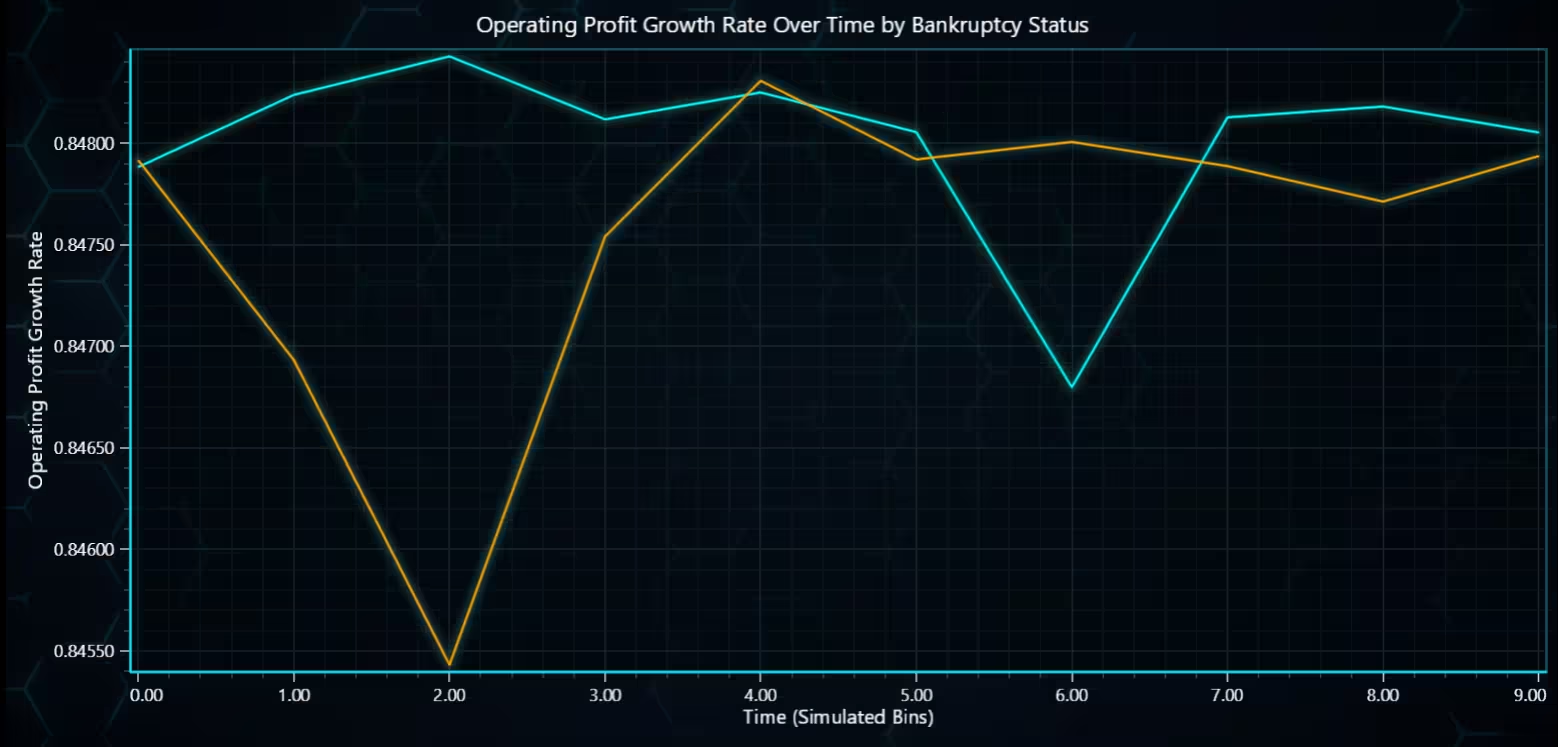
Operating Profit Growth Rate by Bankruptcy Status – Line Chart
The chart compares how the Operating Profit Growth Rate evolves for bankrupt vs. non-bankrupt companies. Non-bankrupt companies typically maintain a positive or steady growth pattern across most bins. Bankrupt companies often show fluctuating or declining trends, especially in later bins, suggesting financial deterioration.
# Chart 7 – Line Chart: Operating Profit Growth Rate by Bankruptcy Status
# Developed with AI assistance to demonstrate LightningChart Python

import lightningchart as lc
import pandas as pd
import numpy as np

# Load LightningChart license
with open("D:/HAMK/Internship/MyProjects/lc_license.txt", "r") as f:
    license_key = f.read().strip()
lc.set_license(license_key)

# Load and clean dataset
df = pd.read_csv("TaiwaneseBankruptcyPredictionData.csv", encoding='ISO-8859-1')
df.columns = df.columns.str.strip()

# Extract relevant columns and drop missing
df = df[['Operating Profit Growth Rate', 'Bankrupt?']].dropna()

# Assign simulated time bins (assuming sequential observation)
df['time_bin'] = pd.qcut(df.index, q=10, labels=False)

# Group by time and bankruptcy status
grouped = df.groupby(['time_bin', 'Bankrupt?'])['Operating Profit Growth Rate'].mean().unstack()

# Prepare x (time), y values
x_values = list(range(len(grouped)))
y_nb = grouped[0].tolist()  # Non-Bankrupt
y_b = grouped[1].tolist()   # Bankrupt

# Create chart
chart = lc.ChartXY(
    theme=lc.Themes.TurquoiseHexagon,
    title='Operating Profit Growth Rate Over Time by Bankruptcy Status'
)

# Add Non-Bankrupt series (Cyan)
series_nb = chart.add_line_series()
series_nb.set_name("Non-Bankrupt")
series_nb.set_line_color(lc.Color('aqua'))
series_nb.append_samples(x_values=x_values, y_values=y_nb)

# Add Bankrupt series (Magenta)
series_b = chart.add_line_series()
series_b.set_name("Bankrupt")
series_b.set_line_color(lc.Color('orange'))
series_b.append_samples(x_values=x_values, y_values=y_b)

# Axis titles
chart.get_default_x_axis().set_title("Time (Simulated Bins)")
chart.get_default_y_axis().set_title("Operating Profit Growth Rate")

# Open chart
chart.open()
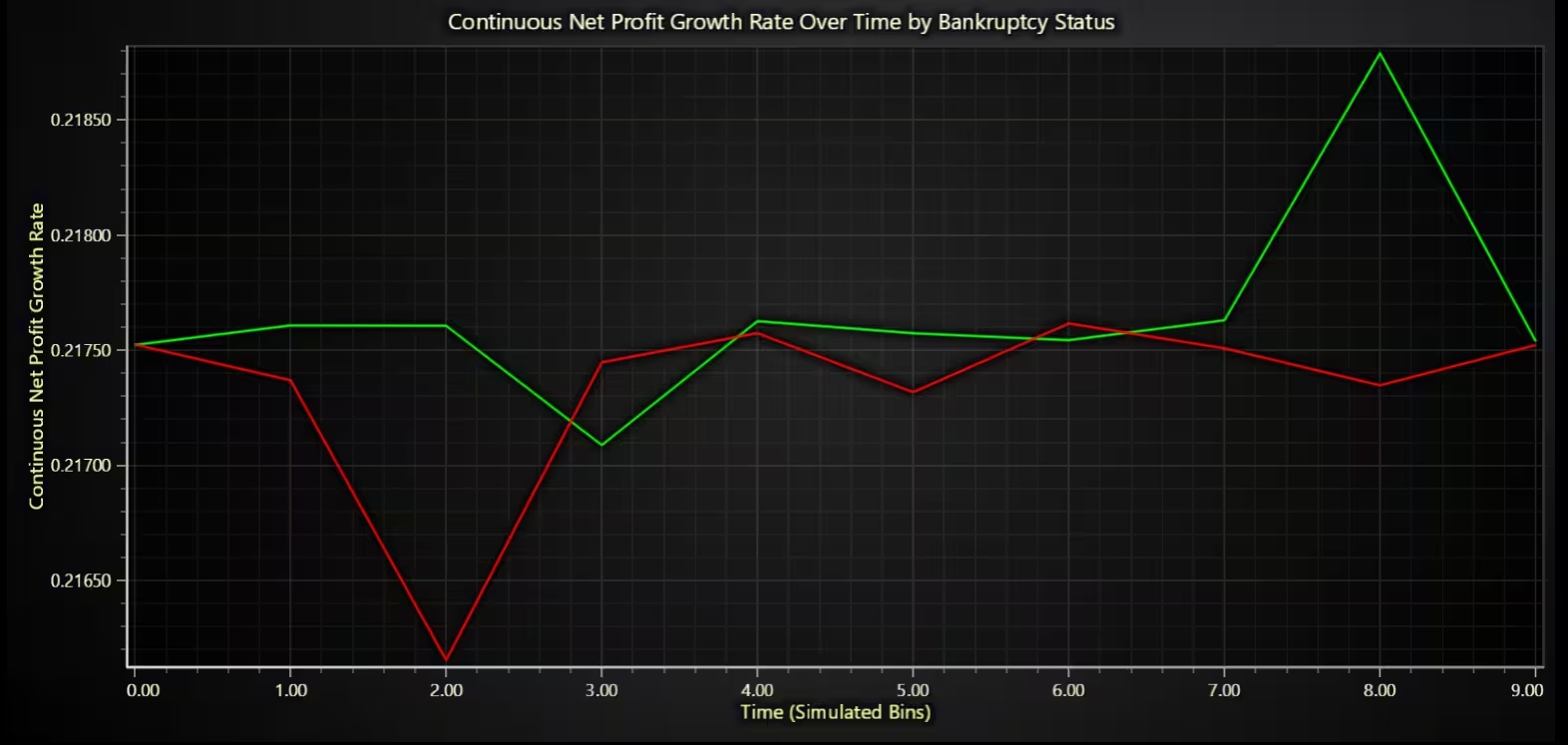
Continuous Net Profit Growth Rate by Bankruptcy Status – Line Chart
Non-bankrupt companies generally show a stable or upward trend in continuous net profit growth over time. Bankrupt companies demonstrate volatility and decline, especially in the middle-to-late bins, suggesting long-term profit erosion. This contrast grows stronger toward the right end of the timeline, implying that declining continuous profitability is a leading indicator of bankruptcy.
# Chart 8 – Line Chart: Continuous Net Profit Growth Rate by Bankruptcy Status
# Developed with AI assistance to demonstrate LightningChart Python

import lightningchart as lc
import pandas as pd

# Load LightningChart license
with open("D:/HAMK/Internship/MyProjects/lc_license.txt", "r") as f:
    license_key = f.read().strip()
lc.set_license(license_key)

# Load and clean dataset
df = pd.read_csv("TaiwaneseBankruptcyPredictionData.csv", encoding='ISO-8859-1')
df.columns = df.columns.str.strip()

# Extract relevant columns and drop missing
df = df[['Continuous Net Profit Growth Rate', 'Bankrupt?']].dropna()

# Simulated time binning (based on index order)
df['time_bin'] = pd.qcut(df.index, q=10, labels=False)

# Group by time_bin and bankrupt status, then calculate mean
grouped = df.groupby(['time_bin', 'Bankrupt?'])['Continuous Net Profit Growth Rate'].mean().unstack()

# Prepare time (x) and y-values for both groups
x_values = list(range(len(grouped)))
y_nb = grouped[0].tolist()  # Non-Bankrupt
y_b = grouped[1].tolist()   # Bankrupt

# Create chart
chart = lc.ChartXY(
    theme=lc.Themes.Dark,
    title='Continuous Net Profit Growth Rate Over Time by Bankruptcy Status'
)

# Add Non-Bankrupt line (cyan)
series_nb = chart.add_line_series()
series_nb.set_name("Non-Bankrupt")
series_nb.set_line_color(lc.Color('lime'))
series_nb.append_samples(x_values=x_values, y_values=y_nb)

# Add Bankrupt line (magenta)
series_b = chart.add_line_series()
series_b.set_name("Bankrupt")
series_b.set_line_color(lc.Color('red'))
series_b.append_samples(x_values=x_values, y_values=y_b)

# Axis titles
chart.get_default_x_axis().set_title("Time (Simulated Bins)")
chart.get_default_y_axis().set_title("Continuous Net Profit Growth Rate")

# Open chart
chart.open()
Conclusion
This project focused on visualizing and analysing financial distress patterns in companies using the Taiwanese Bankruptcy Prediction Dataset with the LightningChart Python library. A total of 8 interactive and high-performance chart examples were developed, addressing key financial questions about profitability, asset return correlation, non-industry income effects, and temporal trends in companies facing bankruptcy.
The dataset was pre-processed using pandas to extract relevant features such as Operating Gross Margin, Operating Profit Rate, ROA metrics, and Non-Industry Revenue. Visualizations included box plots, histograms, 3D scatter plots, line charts, and correlation heatmaps, each chosen to reveal financial insights critical to early bankruptcy detection.
The resulting visual analyses offer practical value for financial analysts and decision-makers by uncovering patterns associated with declining profitability and unstable asset returns. These findings can help build more reliable risk models and inform intervention strategies before companies enter financial collapse.
Continue learning with LightningChart
Horizontal Bar Chart of Russia-Ukraine War Weaponry Data
Written by a human | Updated on April 10th, 2025 JavaScript Horizontal Bar Chart In this article, we aim to respectfully create a JavaScript horizontal bar chart that simulates the weaponry usage on recent war conflicts. While the data have been taken from Kaggle and...

Create a vibration charts application with 2D & 3D spectrograms
Written by a human | Updated on April 10th, 2025JS Spectrogram ApplicationHello, in this article we will create a JS dashboard with 2D and 3D spectrogram charts. The purpose of creating this project is to explain how to create a vibration analysis application that...

Ionic app development
Written by a human | Updated on April 10th, 2025Beginning Ionic App Development with Capacitor, Angular & LightningChart JS [This is the second part of the article "Data Visualization with Ionic Capacitor, Angular & JS Charts (Part 1)"] In the previous...



If you have any questions, feel free to contact us!
©LightningChart Ltd 2025. All rights reserved.