SurfaceMeshSeries3D
SurfaceMeshSeries3D is almost similar to SurfaceGridSeries3D as they both mostly have the same properties. The biggest difference is that surface nodes can be positioned freely in 3D space. In other words, the surface does not have to be rectangular. SurfaceMeshSeries3D allows warping the surface virtually to any shape, for example to a sphere or a human head.

Surface mesh nodes. SizeX = 4, SizeZ =4.
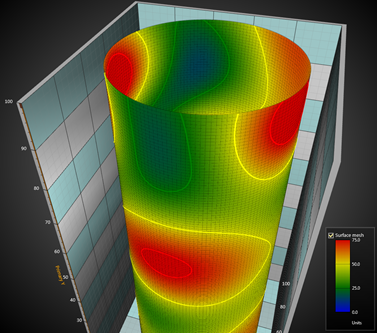
SurfaceMeshSeries3D, geometry made as a pipe.
Setting surface mesh data
- Set SizeX and SizeZ properties to give the grid a size as columns and rows.
- Set X, Y and Z values for all nodes:
for (int nodeIndexX = 0; nodeIndexX < columnCount; nodeIndexX ++)
{
	for (int nodeIndexZ = 0; nodeIndexZ < rowCount; nodeIndexZ ++)
     	{
	  meshSeries.Data[nodeIndexX, nodeIndexZ].Y = xValue;
	  meshSeries.Data[nodeIndexX, nodeIndexZ].Y = yValue;
	  meshSeries.Data[nodeIndexX, nodeIndexZ].Z = zValue;
	  meshSeries.Data[nodeIndexX, nodeIndexZ].Value = dataValue;
     	}
}
// Notify to refresh when the new values are ready
meshSeries.InvalidateData();
for (int nodeIndexX = 0; nodeIndexX < columnCount; nodeIndexX ++)
{
	for (int nodeIndexZ = 0; nodeIndexZ < rowCount; nodeIndexZ ++)
     	{
		  meshSeries.SetDataValue(nodeIndexX, nodeIndexZ,
		      	xValue,
                yValue,
                zValue,
                dataValue,
                Color.Green); // Source point colors are not used in this example, so use any color here
     	}
}

// Notify to refresh when the new values are ready
meshSeries.InvalidateData();
Examples
info
To see feature demonstration as example, check ExampleSurfaceMesh3D, ValueBased3DContouring, SteppingMesh3D, GlobeSurface3D and SurfaceMeshBars from our Demo.