Rectangle3D
Rectangle3D allows presenting a rectangle, turned to any angle, at any size, at any location. They can be added to View3D. Rectangles list. Rectangles can also act as planes by defining their size according to View3D. Dimensions.
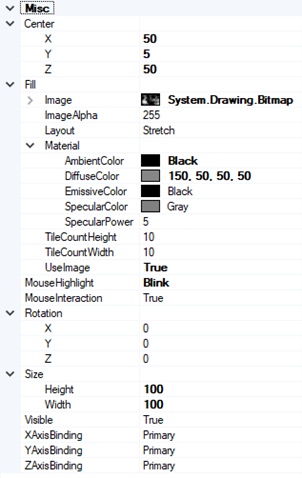
Properties of Rectangle3D objects.
Position and size
Set Size in 3D world dimensions (not X, Y or Z axis values) as Width and Height. Set the center point via Center property, defined in X, Y and Z axis values. Rotation property specifies the rotation in degrees.
Fill style
Fill settings can be modified via Fill property. Solid color and bitmap fills are available. To use bitmap fill, set the bitmap in Image, and enable UseImage. When setting Fill. Layout = Stretch, the bitmap stretches to fill the rectangle. By setting Fill. Layout = Tile, the same bitmap is tiled to fill the rectangle. The tile count can be altered via Fill. TileCountWidth and Fill. TileCountHeight properties.
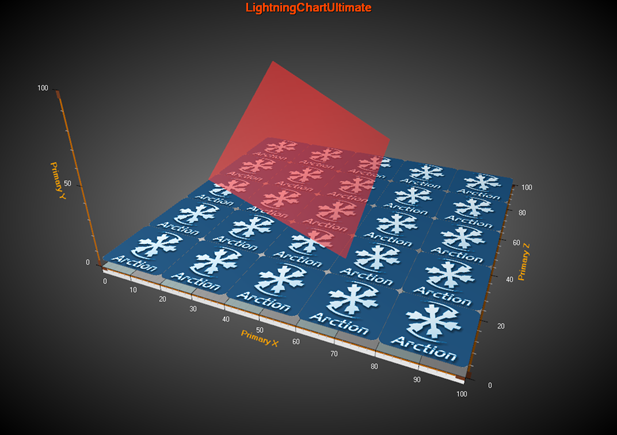
Two Rectangle3D objects in View3D. The bottom blue one shows a bitmap fill with Layout = Tile. The red rotated rectangle on the top is configured with translucent color.
Examples
To see feature demonstration as example, check ExampleRectangle3D, ParallelCoordinates3D and SurfaceMouseControl from our Demo.