LegendBox Polar
Modify the legend box properties via ViewPolar. LegendBox. Unlike ViewXY, ViewPolar can have only one legend box.
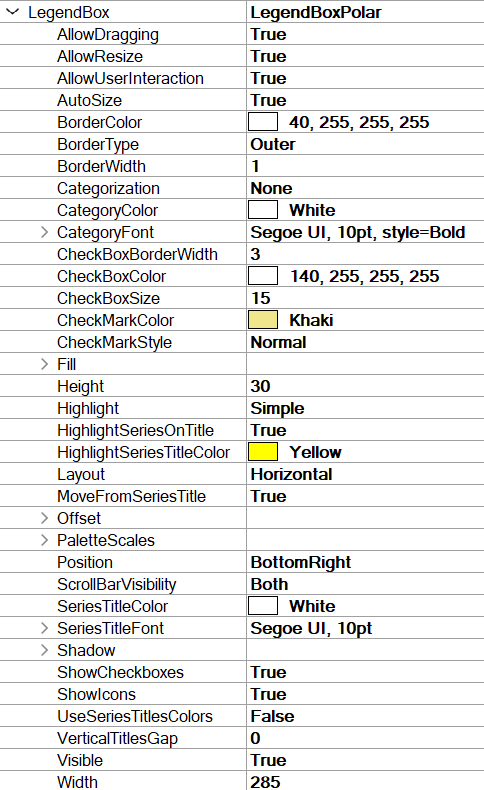
Legend box properties in ViewPolar.
Hiding palette scales
To hide the palette scale in a legend box, set PaletteScales.Visible = False. To resize it, set ScaleSizeDim1 and ScaleSizeDim2 properties.
Legend box positioning in ViewPolar
ViewPolar’s legend boxes can be placed automatically or manually. Automatic placement allows them to be aligned to the left/top/right/bottom side of the view, or the graph area. Control the position with Position property. Some positioning options take margin area into account while some do not.
Options ignoring margins (placing the legend box in the margin area):
TopCenter, TopLeft, TopRight, LeftCenter, RightCenter, BottomLeft, BottomCenter, BottomRight, Manual
Options placing the legend box inside the margin area:
GraphTopCenter, GraphTopLeft, GraphTopRight, GraphLeftCenter, GraphRightCenter, GraphBottomLeft, GraphBottomCenter, GraphBottomRight
Offset property shifts the position by given amount from the position determined by Position property.
// Setting legend box position, offset shifts from RightCenter position
chart.ViewPolar.LegendBox.Position = LegendBoxPosition.RightCenter;
chart.ViewPolar.LegendBox.Offset = new PointIntXY(-15, -70);
Manual positioning calculates the offset from the top-left corner of the legend box to the view’s top-left corner. Note that this differs from TopLeft option, which is calculated from the top of the graph area.