DataCursor Polar
Starting from version 10.5, ViewPolar has a built-in data cursor (similar to DataCursor in ViewXY), which automatically tracks the closest series value to the mouse cursor and shows it in a result table. The DataCursor consists of hair cross lines for amplitude and angular axes, tracking point at the location of the closest data value, axis labels showing the current amplitude and angle values, and the result table, which besides the axis values also shows the series name and its color.
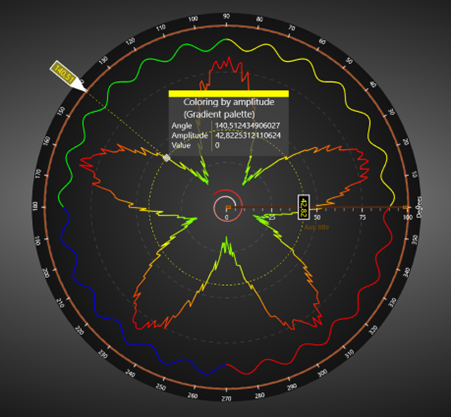
Data cursor in polar view. Result table has been set visible by enabling ShowResultTable.
Data cursor can be enabled or disabled via Visible property. It is also possible to hide some of the cursor components such as the lines or the axis labels individually by setting ShowHaircrossLines or ShowLabels, or other respective “Show” properties based on what should be hidden, false. The appearance of the cursor can also be modified via component specific properties. LabelFont modifies the axis label texts, and TrackingPointStyle allows altering the tracking point. Results property contains all the options to modify the result table. To modify the individual components such as one of the labels or lines, use options under Configuration property.
// Enables data cursor but hides its axis labels.
_chart.ViewPolar.DataCursor.Visible = true;
_chart.ViewPolar.DataCursor.ShowLabels = false;

// Enabling and modifying the result table.
_chart.ViewPolar.DataCursor.ShowResultTable = true;
_chart.ViewPolar.DataCursor.Results.Background.Color = Colors.DarkBlue;
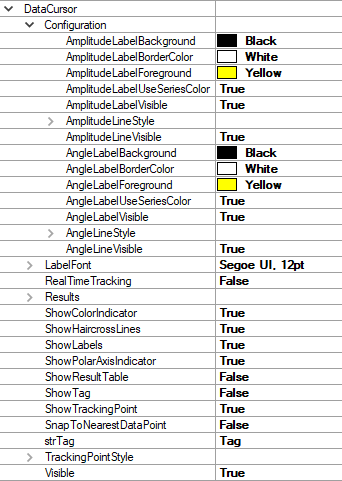
The property tree of the data cursor.
Data cursor changes its behavior depending on whether the tracked series has a visible line or just visible data points (scatter plot). If the line is visible, the cursor finds the nearest series and its value based on the cursor’s current polar-coordinates. If there are no lines visible, the cursor tracks the nearest data point in any direction and shows it if it is near the cursor’s position. Enabling SnapToNearestDataPoint overrides this making the cursor always finding the nearest actual data point value in any direction.
Data cursor works with PointLineSeriesPolar and AreaSeriesPolar.
Sectors and Markers cannot be tracked.