Data clipping in ViewPolar
ClipInsideGraph
PointLineSeriesPolar, AreaSeriesPolar, Sectors and PolarEventMarkers have ClipInsideGraph -property, which hides the data points if they are not within the radius of the graph area. The exact clipping point is the outermost angular axis. By default, ClipInsideGraph is enabled for all series.
// Disabling clipping outside the graph
pointLineSeriesPolar.ClipInsideGraph = false;
CenterClipping
CenterClipping was introduced in LightningChart version 8.5.1. It works similarly to ClipInsideGraph but controls how data is clipped at the center of the polar chart, when for example amplitude axis is dragged with mouse. CenterClipping has three options to choose from:
- None: The old behavior before version 8.5.1. Series are shifted to the opposite side of the center point, and not clipped in any way (except for sectors).
- Center: Data is clipped at the center point of the graph and will never be shifted to the opposite side. This is the default option.
- InnerCircle: Data is clipped at the innermost value of the amplitude axis, that is either the minimum or the maximum of the axis, depending on the axis being reversed or not. If the chart has several amplitude axes, series is clipped according to the axis it is assigned to.
// Setting PointLineSeriesPolar to be clipped below amplitude axis minimum, as reversed axis is not used.
_chart.ViewPolar.Axes[0].AmplitudeReversed = false;
pointLineSeriesPolar.CenterClipping = CenterClipping.InnerCircle;
Center and InnerCircle -options are not always at the same location, as there is AxisPolar. InnerCircleRadiusPercentage -property, which can be used to leave empty space near the center of the graph. In other words, it defines where an amplitude axis begins. InnerCircleRadiusPercentage is specific to the axis it is set to, meaning it does not affect the other amplitude axes.
// Setting InnerCircleRadiusPercentage to 10 percent for this axis
chart.ViewPolar.Axes[0].InnerCircleRadiusPercentage = 10;
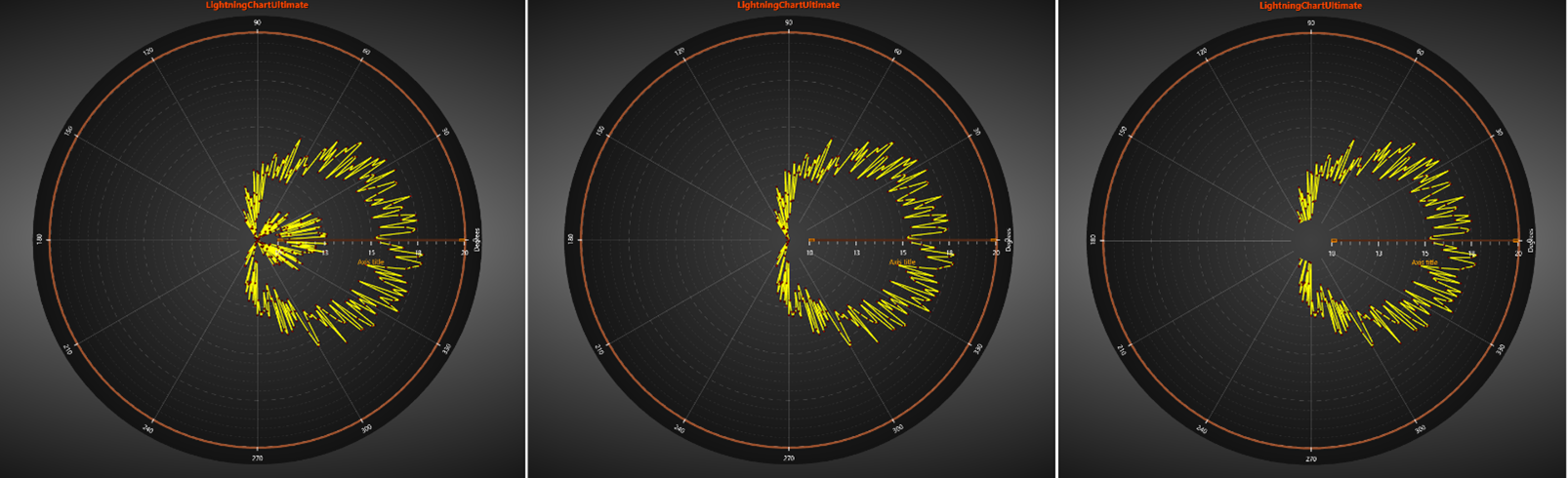
CenterClipping set to None on the left image, Center in the middle image and InnerCircle on the right image. InnerCircleRadiusPercentage is set to 10 in each one of the images.