Scatter
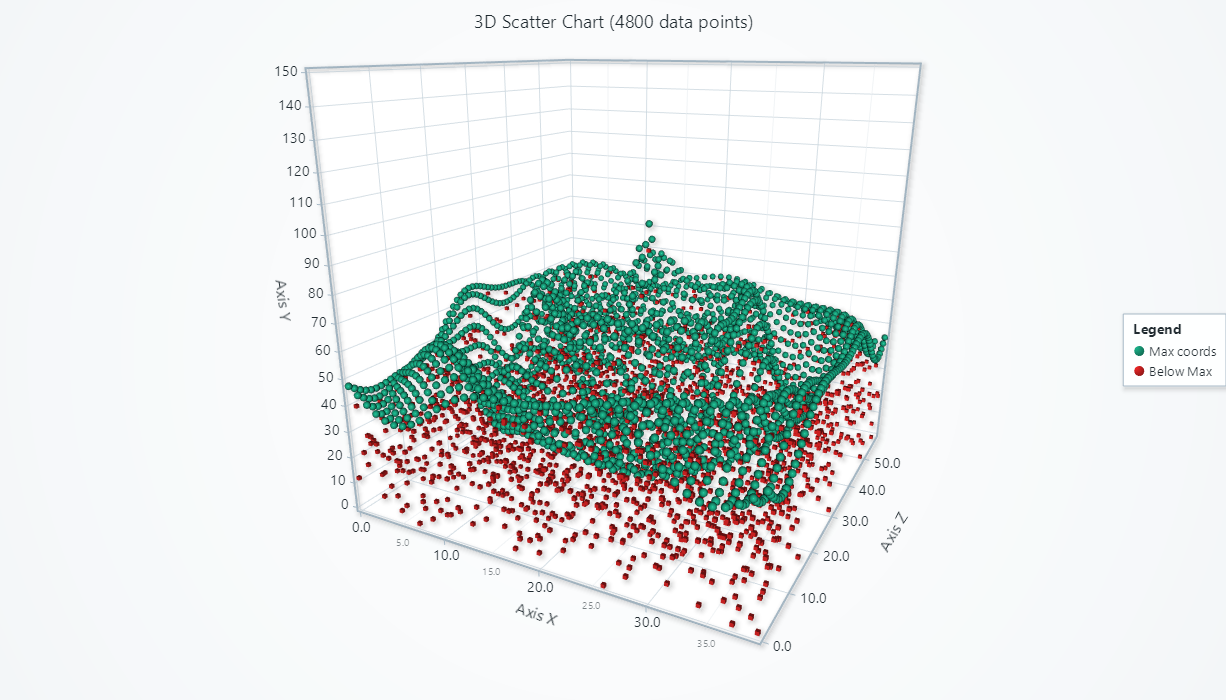
A commonly needed visualization feature is to display a set of X+Y+Z points scattered around.
// Creation of a 3D scatter series
const scatterSeries = chart.addPointSeries()

Adding data
This section works the same as for Line, to avoid duplication of guides, please refer to the section under Line](/6.1.2/features/d3/line)
Point color
scatterSeries.setPointStyle((points) => points.setFillStyle(new SolidFill({ color: ColorRGBA(255, 0, 0) })))
For more details about style API, please see Styles, colors and fonts](/6.1.2/more-guides/styles-colors-and-fonts).
Point shape
You can select between 'cube' and 'sphere' shapes.
scatterSeries.setPointStyle((points) => points.setShape('cube'))
Point size
scatterSeries.setPointStyle((points) => points.setSize(10))
Individual colors
const colorRed = new SolidFill({ color: ColorRGBA(255, 0, 0) })
const colorGreen = new SolidFill({ color: ColorRGBA(0, 255, 0) })
const scatterSeries = chart.addPointSeries({
    individualPointColorEnabled: true,
})
    .setPointStyle((points) => points.setFillStyle(new IndividualPointFill()))
    .add([
        { x: 0, y: 0, z: 0, color: colorRed },
        { x: 1, y: 3, z: 0, color: colorRed },
        { x: 2, y: 2, z: 0, color: colorGreen },
    ])
Color by lookup table
Alternative approach to individual colors, you can give each data point a number value, and specify rules for getting a color from any number:
const scatterSeries = chart.addPointSeries({
    individualLookupValuesEnabled: true,
})
    .setPointStyle((points) => points.setFillStyle(
        new PalettedFill({
            lookUpProperty: 'value',
            lut: new LUT({
                interpolate: true,
                steps: [
                    { value: 0, color: ColorCSS('red') },
                    { value: 100, color: ColorCSS('green') },
                ]
            })
        })
    ))
    .add([
        { x: 0, y: 0, z: 0, value: 0 },
        { x: 1, y: 3, z: 0, value: 100 },
        { x: 2, y: 2, z: 0, value: 50 },
    ])
const legend = chart.addLegendBox().add(chart)
LUT has also a percentageValues option, which you can use if you want to use % values of the present min-max lookup value range, rather than specific value steps:
new LUT({
    percentageValues: true,
    interpolate: true,
    steps: [
        // 0 = 0 %, 1 = 100%
        { value: 0, color: ColorCSS('red') },
        { value: 1, color: ColorCSS('green') },
    ]
})
Color by X, Y or Z
Instead of using lookup values in data set, you can also use X, Y or Z coordinates directly, by changing the lookUpProperty value in PalettedFill.
new PalettedFill({
    lookUpProperty: 'x', // 'x', 'y' or 'z'
    lut: new LUT({
        interpolate: true,
        steps: [
            { value: 0, color: ColorCSS('red') },
            { value: 100, color: ColorCSS('green') },
        ]
    })
})
Using timestamps
This section works the same as for Line, to avoid duplication of guides, please refer to the section under Line](/6.1.2/features/d3/line)
Data cleaning / maximum memory use
This section works the same as for Line, to avoid duplication of guides, please refer to the section under Line](/6.1.2/features/d3/line)
Editing or clearing data
This section works the same as for Line, to avoid duplication of guides, please refer to the section under Line](/6.1.2/features/d3/line)
3D color shading
This section works the same as for Line, to avoid duplication of guides, please refer to the section under Line](/6.1.2/features/d3/line)
Depth testing
This section works the same as for Line, to avoid duplication of guides, please refer to the section under Line](/6.1.2/features/d3/line)
Interactions with data points
This section works the same as for Line, to avoid duplication of guides, please refer to the section under Line](/6.1.2/features/d3/line)